


Sustained processor performance hinges on clean power delivery and well-engineered thermal dissipation across the socket platform. Dropping a multi-core processor into a board with undersized power stages quickly leads to frustrating VRM thermal throttling during demanding sessions. Tracking down the Best Gaming Motherboard Am5 requires looking past flashy aesthetics to assess heatsink mass, memory trace routing, and expansion flexibility. Whether you are assembling a fresh rig around a budget-friendly gaming CPU under 200 or outfitting a high-end battlestation, a dependable motherboard serves as the backbone that keeps every component running smoothly without stability bottlenecks.
Modern system builds bring specific challenges, from BIOS update roadblocks on fresh processor releases to awkward front-panel USB-C header placement in compact enclosures. Today’s AM5 motherboard options balance essential features like PCIe 5.0 graphics bandwidth, high-speed M.2 storage slots, and swift Wi-Fi connectivity to support future hardware upgrades. Based on manufacturer specifications, power delivery layouts, and user feedback, our editorial overview evaluates the top platform choices available right now. Pairing the right foundation with a spacious dedicated gaming desk ensures clean cable routing and reliable airflow throughout your entire setup.
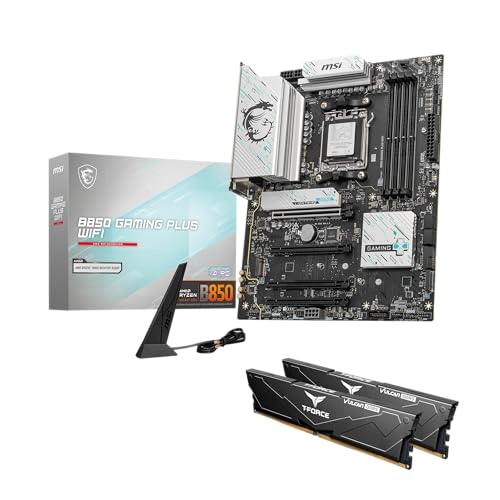


Pros
- Excellent power delivery for Ryzen 9000/8000/7000 CPUs, great for overclocking
- Three M.2 slots with heatsinks, including PCIe 5.0 support for future-proof storage
- Built-in WiFi 6E and 2.5G LAN for fast, reliable network connectivity
- Aura Sync RGB ecosystem for easy lighting customization with other ASUS gear
- Solid build quality with reinforced PCIe slots and durable capacitors
Cons
- BIOS update may be required for Ryzen 9000 and 8000 series CPUs out of the box
- Only two PCIe 4.0 M.2 slots; third is PCIe 5.0 but may share bandwidth with GPU
- White/silver color scheme may not match all black-themed gaming builds
The ASUS ROG Strix B650-A Gaming WiFi is an ATX motherboard built for PC gamers and enthusiasts who want to harness the power of AMD's latest Ryzen 9000, 8000, and 7000 series processors. It sits in the sweet spot of the AM5 lineup, offering a strong balance of features, performance, and value for competitive gamers, streamers, and content creators alike. Whether you're building a high-refresh-rate gaming rig or a workstation for streaming and editing, this board provides a solid foundation.
Performance-wise, the 12+2 power stage design with ProCool power connectors ensures clean, stable power delivery to the CPU, even under heavy loads or overclocking. This makes it a great choice for gamers who push their systems to the limit in demanding titles or multitasking scenarios. The DDR5 memory support allows for faster data transfer rates, which can improve load times and overall system responsiveness in games and creative applications. The three M.2 slots, including one PCIe 5.0, offer blazing-fast storage options for games and projects, reducing wait times significantly.
Build quality is typical of ASUS's ROG Strix line: robust, with reinforced PCIe slots, high-quality capacitors, and a clean layout that simplifies cable management. The VRM heatsinks are substantial and paired with high-conductivity thermal pads, keeping temperatures in check during long gaming sessions. The white and silver accents on the PCB and heatsinks give it a distinctive look that pairs well with white-themed builds or RGB setups. Aura Sync support means you can synchronize lighting with other compatible components and peripherals for a cohesive aesthetic.
Connectivity is a strong point here. WiFi 6E and 2.5G LAN provide low-latency network performance essential for online gaming and streaming. The rear I/O includes multiple USB 3.2 Gen 2 ports and a USB-C port, while the front-panel USB 3.2 Gen 2x2 Type-C header supports modern cases with fast charging and data transfer. Setting up the board is straightforward, though you may need to update the BIOS if you're using a Ryzen 9000 or 8000 series CPU out of the box. ASUS's BIOS interface is user-friendly, making overclocking and fan control easy to configure.
One realistic limitation is that the PCIe 5.0 M.2 slot may share bandwidth with the primary PCIe x16 slot, depending on your CPU and configuration, which could affect GPU performance in some scenarios. Additionally, the white color scheme might not appeal to everyone, especially those building all-black systems. However, for most gamers and builders, these are minor trade-offs given the overall feature set.
Overall, the ASUS ROG Strix B650-A Gaming WiFi is a well-rounded motherboard that suits a wide range of users: from competitive esports players needing low latency and fast storage, to streamers and content creators who require stable performance and connectivity, to casual gamers building a stylish RGB setup. It offers excellent value for its price point and is a reliable choice for any AM5-based gaming PC.
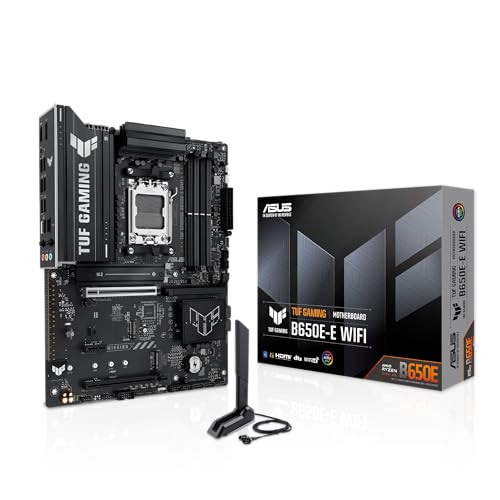


Pros
- Robust 80A power delivery and thermal design for stable overclocking and long gaming sessions.
- Excellent connectivity with Wi-Fi 7, 2.5Gb LAN, USB4, and plenty of M.2 slots for future-proof builds.
- AI-powered tools simplify overclocking and cooling tuning, ideal for beginners and pros.
- Broad CPU compatibility with Ryzen 9000, 8000, and 7000 series, offering flexible upgrade options.
- TUF build quality with reinforced PCIe slots, high-quality capacitors, and reliable components.
Cons
- Price may be high for budget-focused builders compared to B650 alternatives.
- Some users may find the BIOS UI slightly complex without prior experience.
- Limited RGB headers compared to some premium models, requiring optional splitters for extensive lighting setups.
The ASUS TUF Gaming X870-PLUS WiFi is an AMD AM5 ATX motherboard built for PC gamers, esports players, streamers, and anyone assembling a high-performance gaming desktop. It sits in the mid-to-high range of ASUS’s TUF lineup, focusing on durability, solid power delivery, and modern connectivity. This board is especially suited for competitive gamers who need stable frame rates, content creators who rely on fast storage and USB speeds, and gaming setup builders who want a reliable foundation for future upgrades.
Performance-wise, the 16+2+1 80A power stages and 8-layer PCB provide clean, stable power to AMD Ryzen 9000, 8000, and 7000 series processors. This translates to consistent clock speeds during intense gaming sessions, smoother multitasking when streaming or running background apps, and headroom for overclocking. ASUS’s AI Overclocking and AI Cooling II further simplify tuning, letting you push performance without deep manual tweaks. Dynamic OC Switcher and PBO Enhancement give enthusiasts extra flexibility to dial in voltages and core frequencies for tasks like rendering or heavy gaming.
Connectivity is a strong point. Wi-Fi 7 and 2.5Gb LAN ensure low-latency online play, while USB4 40Gbps and USB 20Gbps Type-C ports handle fast file transfers and high-speed peripherals like external SSDs or capture cards. Four M.2 slots all support PCIe 5.0, so you can build a storage array that loads games in seconds and handles large project files without chokepoints. The rear I/O also includes multiple USB-A and USB-C ports, making it easy to plug in a gaming mouse, mechanical keyboard, headset, and webcam without swapping cables.
Build quality is typical TUF: reinforced PCIe slots, robust capacitors, alloy chokes, and ProCool power connectors that prevent electrical arcing. The all-black PCB and heatsinks blend into most gaming setups, and the board’s layout leaves decent room for cable management in standard ATX cases. However, it only includes a handful of RGB headers, so if you’re planning an elaborate RGB lighting setup, you may need splitters or a separate controller. The BIOS interface is comprehensive but can feel cluttered to newcomers, though once configured, it rarely needs adjusting.
In everyday use, this motherboard feels solid and responsive. It boots quickly, the VRM cooling keeps temperatures under control even during long sessions, and the AI Cooling feature automatically adjusts fan curves based on CPU load. The included software suite, Armoury Crate, handles driver updates, RGB control for compatible devices, and system monitoring from one place. Setup is straightforward: install the CPU, RAM, and SSD, latch the GPU, connect power cables, and flash the latest BIOS if needed. There are no major quirks, though the second M.2 slot may share bandwidth with certain SATA ports, so check the manual before populating.
Overall, the ASUS TUF Gaming X870-PLUS WiFi is a practical choice for PC gamers who want a reliable, future-ready motherboard without paying top-tier ROG prices. Its power delivery, connectivity, and multi-generational CPU support make it a sound investment for a gaming PC build intended to last several years. While it lacks some premium features like built-in Wi-Fi 7 antenna or triple RGB headers, its core strengths in stability and speed more than compensate. If you’re building a Ryzen 7000, 8000, or 9000 series gaming rig and prioritize performance and expandability, this board deserves a spot on your shortlist.

Frequently Asked Questions
Can you update the BIOS on an AM5 motherboard without an installed CPU?
Yes, most modern AM5 boards feature a dedicated BIOS Flashback button on the rear I/O panel. This feature allows you to update the board firmware using only a formatted USB flash drive and a connected power supply unit. You do not need a processor, memory sticks, or a dedicated graphics card installed to complete this flashing procedure.
Do AM5 motherboards support older DDR4 RAM kits?
No, socket AM5 exclusively supports DDR5 memory modules. AMD transitioned completely away from DDR4 architecture for this platform to capitalize on higher memory bandwidth and modern EXPO overclocking profiles. Builders assembling a rig around the Best Gaming Motherboard Am5 must factor dedicated DDR5 memory into their overall system budget.
Does installing multiple M.2 NVMe SSDs disable SATA ports or GPU lanes?
It depends on the specific chipset and motherboard trace layout. While the primary PCIe x16 slot and primary Gen5 M.2 drive usually draw dedicated lanes directly from the CPU, secondary M.2 slots often route through the chipset. Certain board designs share bandwidth between lower M.2 slots and specific SATA ports, which can disable those SATA connections when populated.
Is PCIe 5.0 necessary for graphics cards on AM5 platforms in 2026?
No, current discrete graphics cards do not saturate PCIe 4.0 x16 interface bandwidth. However, securing a motherboard equipped with PCIe 5.0 expansion gives your system longevity when upgrading to future generation GPUs. Fast connectivity also pairs well with a high-performance PC TV monitor for responsive visual output.
How do onboard audio codecs on AM5 boards compare to external DAC solutions?
Onboard audio solutions provide reliable sound with isolated PCB layers, but they remain vulnerable to minor electrical static from high-load components. Dedicated audiophiles and competitive players often pair their desktop with a gaming headset with DAC to bypass motherboard interference entirely and achieve pristine sound clarity.
What VRM power delivery rating is ideal for multi-core gaming CPUs?
A power delivery design with at least 12 to 14 power phases rated around 70A to 80A per stage provides steady, cool operation for heavy gaming and background rendering. High-quality MOSFET heatsinks paired with substantial copper trace layers prevent thermal throttling when processors draw sustained power during intense gameplay.




Write Your Review
No reviews yet. Be the first to share your experience!