


Building High-Performance AM5 Rigs Without Thermal Throttling
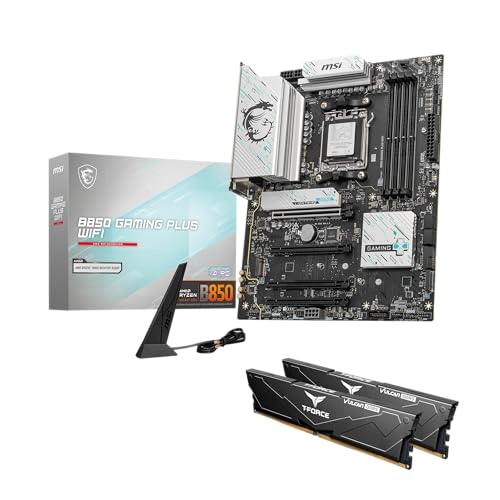
Pushing a multi-core processor through long gaming sessions requires stable voltage regulation and efficient cooling. Many system builders run into power bottlenecks or thermal throttling simply because a motherboard lacks sufficient power stages or beefy heatsinks. Balancing memory compatibility and Gen5 expansion needs careful attention before slotting in components. Selecting the best gaming motherboard b850 provides an ideal balance of features, offering AMD Socket AM5 builders robust power delivery, high-speed DDR5 memory support, and modern connectivity without unnecessary flagship premiums. If you need a refresher on matching sockets and chipsets, check out our guide on how to choose a motherboard for gaming to ensure your setup runs smoothly.
Board manufacturers now equip mid-tier platforms with premium hardware essentials, including PCIe 5.0 graphics slots, multi-gigabit networking, and dedicated thermal guards for blazing NVMe storage. Pairing these boards with the best gaming AMD CPU creates a responsive platform for competitive titles and heavy multitasking alike. Whether you assemble an expansive ATX showcase or a compact micro-ATX setup, the current generation of B850 boards delivers the bandwidth and stability required for future-proof desktop gaming.


Pros
- Excellent power delivery for overclocking and high-core-count CPUs.
- Future-proof connectivity with PCIe 5.0, Wi-Fi 7, and USB 20Gbps.
- User-friendly features like BIOS Flashback and comprehensive heat management.
- Good value for the feature set targeting mid-to-high-end AM5 builds.
Cons
- Only three M.2 slots may be limiting for users needing many NVMe drives.
- Integrated audio solution is decent but not specialized for audiophile-grade sound.
- Some RGB headers are located near the edge, requiring careful cable routing for clean setups.
The ASUS TUF Gaming B850-PLUS WiFi is an ATX motherboard built around AMD's AM5 socket, supporting Ryzen 7000, 8000, and 9000 series processors. It's tailored for PC gamers, esports players, streamers, and content creators who demand a stable foundation for their gaming PC builds. With a strong 14+2+1 80A power stage design and an 8-layer PCB, this board delivers clean, consistent power to the CPU, making it a solid choice for competitive gaming and multitasking scenarios.
Gaming performance on the B850-PLUS is marked by low-latency connectivity and high-bandwidth storage. The PCIe 5.0 slot supports the latest graphics cards, while the single PCIe 5.0 M.2 slot and two PCIe 4.0 slots deliver snappy load times. Wi-Fi 7 and 2.5Gb Ethernet ensure minimal network lag during online matches or when streaming on Twitch or YouTube. The rear USB 20Gbps Type-C port and front USB 10Gbps Type-C header handle high-speed peripherals and external SSDs without bottlenecks.
Build quality reflects ASUS's TUF Gaming philosophy: reinforced PCIe slots, durable capacitors, and a comprehensive cooling solution with all M.2 heatsinks. The layout is practical for cable management, with well-placed fan headers and RGB connectors. BIOS Flashback is a standout convenience, letting you update the BIOS without a CPU or RAM, which is helpful when building with newer Ryzen chips. The board also includes Thunderbolt (USB4) header support for future expansion.
In terms of daily use, the B850-PLUS is easy to set up and maintain. The UEFI BIOS is user-friendly, offering straightforward overclocking and fan curve adjustments. Armoury Crate software handles RGB lighting and driver updates, though some users may find it a bit bloated. Realistically, the motherboard lacks onboard Wi-Fi antenna in some bundles (check your package) and the audio codec is adequate but not premium. For most gamers and streamers, the audio quality will be fine for immersive gameplay and Discord chat.
Overall, the ASUS TUF Gaming B850-PLUS WiFi is a well-rounded motherboard for mid-to-high-end AM5 builds. It's especially suitable for gamers who want future-proof features like PCIe 5.0 and Wi-Fi 7 without stepping up to a more expensive X870E board. College gamers, work-from-home users, and RGB enthusiasts will appreciate the balance of performance, reliability, and connectivity. If you need more M.2 slots or advanced audio, you may want to look at higher-tier options, but for most gaming and streaming setups, this board offers excellent value.
The ASUS TUF Gaming B850-PLUS WiFi packs a modern connectivity suite that caters to demanding PC builds. On the rear I/O, you get a USB 20Gbps Type-C port, multiple USB 10Gbps and 5Gbps ports, DisplayPort and HDMI outputs for integrated graphics, Wi-Fi 7 antenna connections, and a 2.5Gb LAN port. The front panel header offers a USB 10Gbps Type-C connector, plus standard USB 3.2 and 2.0 headers for case ports.
Expansion slots include one PCIe 5.0 x16 slot, one PCIe 4.0 x16 slot (x4 electrical), and one PCIe 3.0 x1 slot. Storage is handled by three M.2 slots: one PCIe 5.0 x4 and two PCIe 4.0 x4, each with a dedicated heatsink. There are also four SATA 6Gb/s ports for older drives. The board also supports Thunderbolt 4 via a header, adding more connectivity options for creative professionals.
This combination makes the B850-PLUS a flexible choice for gamers who use multiple SSDs, capture cards, or high-speed peripherals. The inclusion of Wi-Fi 7 and 2.5Gb Ethernet ensures your network can keep up with high-resolution streaming and competitive gaming.

Frequently Asked Questions
Does an AM5 B850 motherboard support DDR4 memory?
No, B850 motherboards exclusively support DDR5 RAM. AMD transitioned fully to DDR5 architecture with Socket AM5, meaning older DDR4 memory kits will not physically fit or operate in these DIMM slots. Builders upgrading from older AM4 platforms must purchase new DDR5 modules with AMD EXPO profiles for optimal performance.
Can you update the BIOS on a B850 board without an installed processor?
Yes, most modern B850 boards include a dedicated BIOS Flashback button on the rear I/O panel. This feature allows you to update the motherboard firmware using only a USB flash drive and a power supply connection. It prevents boot failure headaches when installing newer Ryzen processors right out of the box.
Do B850 motherboards support PCIe 5.0 graphics cards and NVMe SSDs simultaneously?
Yes, B850 chipsets provide dedicated PCIe 5.0 lanes directly from the CPU for primary graphics cards and high-speed M.2 storage. Unlike older mid-range chipsets that forced lane sharing, quality B850 boards allow your top PCIe 5.0 x16 slot and primary Gen5 NVMe drive to run at full speed without bandwidth bifurcation.
Is a B850 motherboard sufficient for high-end Ryzen 9 processors?
Yes, top B850 boards equipped with 14+2+1 or 14+2+2 power stages easily handle heavy multi-core loads. When selecting the best gaming motherboard b850 for 2026, power delivery solutions with 80A Smart Power Stages and chunky heatsinks keep temperatures well within safe limits during sustained gaming or rendering. Pairing one with a balanced chip like the Ryzen 5 7600 gaming build or even a Ryzen 9 offers rock-solid voltage stability.
Does Wi-Fi 7 on B850 motherboards work out of the box on Windows 10?
No, Wi-Fi 7 features require Windows 11 version 24H2 or later for complete functionality. Systems running Windows 10 or earlier Windows 11 revisions typically step down to Wi-Fi 6 or 6E protocols due to operating system driver limitations. Upgrading your OS ensures you get the full speed and latency benefits of the integrated Wi-Fi 7 wireless module.
How many M.2 NVMe SSDs can you install on a B850 motherboard?
Most ATX B850 motherboards feature between three and four M.2 slots for high-speed storage. These setups usually include one or two Gen5 slots alongside multiple Gen4 slots covered by integrated thermal heatsinks. Always check the motherboard manual to verify whether populating the final M.2 slot disables any SATA ports.





Write Your Review
No reviews yet. Be the first to share your experience!