


Fast twitch shooters and battle royales expose display weaknesses faster than any synthetic test. Pixel ghosting during a frantic snap turn can instantly ruin target acquisition, leaving you staring at a respawn timer instead of winning the round. Serious competitive players know that a Best 1080p Tn Gaming Monitor setup strips away unnecessary visual fluff in favor of raw pixel response times and crystal-clear motion handling. Specification research and user feedback confirm that pairing your rig with a display from our guide to the best monitor for fps gaming sharpens your reaction window during ranked matches.
Chasing triple-digit framerates at Full HD resolution means your graphics card delivers maximum output without choking under heavy rendering loads. That is why the Best 1080p tn gaming monitor 2026 speed wins big for esports enthusiasts who prioritize competitive clarity over cinematic visuals. Pairing these ultra-fast displays with the top graphics cards for gaming allows you to lock in rock-solid 1% low frames without annoying micro-stutters. High refresh rates and minimal input lag turn physical mouse swipes into immediate crosshair movements, giving you the edge needed to climb the ladder.

Pros
- Superior motion clarity with DyAc 2, ideal for competitive esports.
- High 280Hz refresh rate for ultra-smooth, responsive gameplay.
- Robust build quality with industrial-grade height adjustment and shielding hood.
- Reduced overshoot on Fast TN panel improves image quality during fast motion.
- XL Setting to Share enables easy profile sharing among teammates.
Cons
- Small 24.1-inch size may feel cramped for immersive single-player experiences.
- 1080p resolution may not satisfy users seeking higher pixel density for productivity.
- Premium pricing at $499 reflects esports-focused design over general-purpose use.
The BenQ Zowie XL2546X+ is a 24.1-inch Fast TN gaming monitor purpose-built for competitive esports. It targets PC gamers—especially those into FPS and MOBA titles—who need the absolute best motion clarity and responsiveness. This monitor isn't about flashy specs; it's about giving you a competitive edge through reduced blur and minimal input lag.
If you're a serious esports player, streamer, or competitive gamer who plays at a high level, this monitor is designed for you. Casual gamers or those who prefer larger screens for single-player immersion might find the size and resolution limiting, but for raw performance, it's hard to beat.
Real-world performance is where the XL2546X+ shines. The 280Hz refresh rate makes motion look incredibly fluid, while DyAc 2 technology drastically reduces motion blur and afterimages. The Fast TN panel ensures sharp outlines during fast camera movements, helping you track enemies accurately. Overshoot is kept in check, so you get clean motion without distracting artifacts. Input lag is essentially nonexistent.
Build quality is excellent. The industrial-grade bearing height adjustment feels smooth and sturdy, and the included shielding hood effectively blocks glare during intense gaming sessions. The S Switch provides quick access to on-screen display settings and profile switching, which is convenient for tweaking on the fly.
Setup is straightforward: attach the stand, connect via DisplayPort or HDMI, and you're ready to go. The OSD menu is simple to navigate, and the XL Setting to Share feature lets you save and share profiles with teammates. Maintenance is minimal—just keep the screen clean.
That said, there are limitations. The 24.1-inch size and 1080p resolution are standard for esports but won't appeal to those wanting a larger, sharper display for work or immersive gaming. The price is premium, but for the specific needs of competitive players, the performance justifies it. If you're a dedicated esports gamer seeking every millisecond advantage, this monitor is a top-tier investment. For general use, consider more versatile options.
The XL2546X+ is built for competitive gaming, and its performance metrics reflect that. The 280Hz refresh rate provides a noticeable smoothness improvement over lower refresh rates, crucial for fast-twitch reactions in games like Valorant or Counter-Strike. DyAc 2 motion clarity reduces persistence blur, making moving targets appear sharper and easier to track.
The Fast TN panel technology minimizes ghosting and overshoot, so you won't see distracting trails behind fast-moving objects. Combined with low input lag, this monitor gives you a responsiveness advantage that can translate into better aim and decision-making during matches.
For esports players who rely on precise visual feedback, the 1080p resolution is optimal for achieving high frame rates without sacrificing clarity. The monitor's shielding hood also helps maintain focus by reducing ambient light reflections.

Pros
- High refresh rate (144Hz O/C) and 1ms MBR for smooth, responsive gameplay.
- Vibrant IPS colors with HDR10 and wide sRGB coverage.
- Adaptive sync support works with both NVIDIA and AMD GPUs.
- Useful gaming features like Crosshair, Black Stabilizer, and Dynamic Action Sync.
- Affordable price point for a feature-rich 24-inch gaming monitor.
Cons
- 1ms MBR is motion blur reduction, not true 1ms GtG response time; some motion blur may still be noticeable.
- 24-inch size may feel small for gamers preferring larger immersive displays.
- Tilt-only stand lacks height and swivel adjustments, limiting ergonomic flexibility.
The LG 24G411A-B UltraGear gaming monitor is a 24-inch Full HD (1920x1080) IPS display designed for gamers who want a responsive, color-accurate screen without breaking the bank. It features a native 120Hz refresh rate that can be overclocked to 144Hz, along with 1ms Motion Blur Reduction (MBR) to keep fast-moving action sharp. This monitor is best suited for competitive and casual PC gamers, esports players, and streamers who need a reliable, low-latency display for FPS, MOBA, and racing titles. Its compact size also makes it a great fit for college gamers, work-from-home setups, or anyone with a smaller desk.
In real-world gaming, the 144Hz overclocked refresh rate and 1ms MBR work together to deliver smooth, fluid visuals that reduce motion blur and ghosting. Combined with NVIDIA G-Sync Compatibility and AMD FreeSync, screen tearing and stuttering are virtually eliminated, giving you a competitive edge in fast-paced matches. The Dynamic Action Sync feature further reduces input lag, helping you react quicker in-game. For FPS players, the built-in Crosshair overlay provides a handy accuracy boost without modifying game settings.
The IPS panel offers vibrant HDR10 color with up to 99% sRGB coverage, making games look rich and lifelike. Blacks are decent for an IPS display, and the Black Stabilizer helps brighten dark areas so you can spot enemies hiding in shadows. Color accuracy is solid out of the box, which is a bonus if you also do light photo editing or content creation.
Build quality is typical for LG's UltraGear line - a slim, plastic body with a minimal bezel that looks clean on any desk. The stand is simple and tilt-adjustable but lacks height, swivel, or pivot adjustments, so you may want to invest in a VESA-compatible arm (100x100mm) for better ergonomics. Connectivity includes HDMI and DisplayPort, which cover most modern GPUs and consoles, but there's no USB hub or built-in speakers.
Setup is straightforward: plug in the cables, attach the stand with a few screws, and you're ready to go. The on-screen display (OSD) is intuitive, and the LG Switch app makes it easy to split your screen into multiple sections for multitasking during streams or work. The slim footprint and lightweight design (7.3 pounds) make it easy to move or mount.
While the 24-inch size and tilt-only stand may limit some users, the LG 24G411A-B offers excellent value for budget-conscious gamers who prioritize high refresh rates and adaptive sync. It's a practical choice for competitive play, casual gaming, and even light productivity, making it a versatile addition to any gaming setup.

Pros
- World's fastest TN panel with 610Hz and 0.1ms response eliminates motion blur and phantom images in competitive shooters.
- Low input lag (0.8ms) gives you a decisive advantage in fast-paced esports titles like Valorant, CS2, and Overwatch.
- DisplayHDR400 certification boosts contrast and brightness for a more vibrant picture while maintaining high refresh rates.
- ELMB 2 works across a wide refresh range, keeping gameplay crisp without sacrificing brightness in dark scenes.
- Three-year warranty provides long-term peace of mind for serious gamers investing in a premium esports display.
Cons
- Super TN panel technology offers narrower viewing angles and less color accuracy compared to IPS or OLED monitors - not ideal for content creation or cinematic gaming.
- High 610Hz refresh rate demands a top-tier GPU to fully utilize - most gamers won't hit those frame rates in modern titles.
- Premium $999 price point places it firmly in the enthusiast esports category, not a budget-friendly option for casual or mid-range setups.
The ASUS ROG Strix Ace XG248QSG is a purpose-built esports monitor that targets the absolute highest tier of competitive gaming. At its core is a 24.1-inch Full HD Super TN panel capable of a staggering 610Hz refresh rate when overclocked, paired with a 0.1ms gray-to-gray response time. This combination makes it one of the fastest monitors ever created, designed to eliminate motion blur and deliver buttery-smooth visuals in fast-paced shooters where every millisecond matters.
This monitor is best suited for competitive esports players, especially those who play at a professional or near-professional level in titles like Valorant, CS2, Apex Legends, and Overwatch. The extreme refresh rate and low input lag (just 0.8ms) give you a tangible advantage in tracking targets and reacting to enemy movements. Streamers and content creators may also appreciate the low latency and ELMB 2 technology, though the TN panel's color reproduction and viewing angles are not ideal for color-accurate work. Casual gamers or those who prefer immersive single-player experiences might find the 1080P resolution and TN trade-offs less appealing.
In real-world performance, the XG248QSG excels at responsiveness. The ELMB 2 backlight strobing reduces motion blur without the typical brightness penalty - it's 3X brighter than previous ELMB implementations, so fast-moving objects remain clear even in darker scenes. The DisplayHDR400 certification adds a modest but noticeable boost in dynamic range for highlights. ASUS's ROG Gaming AI tools, such as on-screen crosshairs and a built-in timer, are practical extras that don't require additional software overhead. The DisplayWidget Center software is a standout convenience feature - you can adjust brightness, contrast, and game modes using your mouse instead of fumbling with the OSD joystick mid-round.
Build quality is solid, with a compact stand that takes up less desk space than typical 24-inch monitors. The included tripod socket is a unique addition for mounting a small camera or webcam directly on the monitor, ideal for streamers who want a clean setup. Connectivity includes HDMI 2.1 and DisplayPort 1.4, ensuring compatibility with modern graphics cards and consoles. The 3-year warranty adds peace of mind for a high-investment piece of gear.
Setting up the monitor is straightforward: attach the stand, plug in the DisplayPort cable, and enable the 610Hz overclock in the OSD. The software is easy to install and runs unobtrusively in the background. One limitation is that hitting 610 FPS in games requires an extremely powerful - and expensive - GPU, so most users will not see the full benefit unless they're playing less demanding esports titles at low settings. Additionally, the TN panel's viewing angles are narrow, so you'll want to be seated directly in front for the best image quality.
Overall, the ASUS ROG Strix Ace XG248QSG is a no-compromise esports monitor for gamers who prioritize speed and responsiveness above all else. If you're a competitive player with the hardware to push high frame rates - and the budget for a monitor that costs as much as a mid-range graphics card - this display will give you a noticeable edge. For anyone else, a high-refresh IPS or OLED monitor may offer a better balance of performance and image quality. But for the pursuit of pure competitive advantage, the XG248QSG stands at the top of the pyramid.
The XG248QSG is built from the ground up for competitive gaming. Its 610Hz refresh rate (overclocked) and 0.1ms response time represent the current pinnacle of LCD speed, virtually eliminating motion blur and ghosting. In fast-paced esports titles, you'll experience buttery-smooth motion with near-instantaneous pixel transitions. The 0.8ms input lag is among the lowest of any monitor available, reducing the delay between your mouse click and the action on screen. ASUS ELMB 2 technology further enhances clarity by strobing the backlight in sync with the refresh rate, and it does so with significantly less brightness reduction than previous generations. This means you can track fast-moving targets with precision even in darker in-game environments. The monitor supports VRR (variable refresh rate) via HDMI and DisplayPort, though with such a high refresh ceiling, screen tearing is rarely an issue. For competitive shooters, this monitor delivers an experience that's as close to CRT-like instant responsiveness as you can get in a modern flat panel.
ASUS has designed the ROG Strix Ace with a focus on stability and desk efficiency. The stand is made from reinforced plastic and metal components, providing a sturdy base that minimizes wobble during intense gaming sessions. The footprint is notably smaller than previous ROG monitors, leaving more room for your keyboard and mouse. Cable management is integrated through a channel in the stand, helping keep your desktop clean. The monitor itself has a matte black finish with subtle ROG branding, fitting into most gaming setups without being overly flashy. The tripod socket on top is a clever touch - you can mount a small webcam or action camera directly on the monitor, which is especially useful for streamers who want a clean, elevated camera angle. The OSD joystick on the back is tactile and easy to navigate. ASUS backs this monitor with a standard 3-year warranty, which covers defects and gives you confidence in long-term durability.

Pros
- Exceptional 240Hz refresh rate and 1ms response time for competitive edge
- Vivid 130% sRGB color coverage and 4000:1 contrast ratio for rich visuals
- Sturdy metal stand with tilt adjustment and VESA mount compatibility
- FreeSync support ensures tear-free gaming on compatible GPUs
- Great value for a 27-inch curved high-refresh monitor under $150
Cons
- Limited to 1080p resolution; may not satisfy users wanting 1440p or 4K clarity
- No built-in speakers, requiring external audio solutions for full setup
- Tilt adjustment only; lacks swivel, pivot, and height adjustment for ergonomic flexibility
The SANSUI 27-inch curved 240Hz gaming monitor is built for PC gamers who prioritize speed and immersion without breaking the bank. It targets competitive gamers, esports players, streamers, and even casual gamers who want a responsive, high-refresh display for their gaming setup. With a 240Hz refresh rate, 1ms MPRT response time, and FreeSync compatibility, this monitor is engineered to minimize input lag and screen tearing, giving you a clear advantage in fast-paced titles like Valorant, Apex Legends, or Call of Duty.
Visual quality is another strong point. The 1500R curvature wraps around your field of view, making open-world adventures or sim racing feel more engaging. Coupled with 130% sRGB and DCI-P3 95% color gamut, colors pop with vibrancy, while the 4000:1 contrast ratio delivers deep blacks that enhance shadow detail in horror games or dark scenes. HDR support adds extra punch to highlights, though it's not HDR10 certified—still, it improves the overall picture for the price.
Build quality is practical for a budget monitor. The metal stand feels solid and provides a stable footprint, though it only offers tilt adjustment (-5 to 15 degrees). If you need height or swivel, you can use the VESA 100x100mm mount to attach an arm. The monitor is lightweight at 7.26 pounds, making it easy to move or mount. Cable management is basic, but the included DP cable keeps things tidy out of the box.
Setup is truly plug-and-play. Just connect HDMI or DP (cable included), and you're ready to go. There are no built-in speakers, so plan on using a headset or external speakers for audio—common for gaming monitors in this range. The low blue light and anti-glare coating are welcome features for long sessions, reducing eye fatigue whether you're grinding ranked matches or editing streams.
One realistic limitation is the 1080p resolution. While 27 inches at 1080p can look slightly less sharp than 1440p, the high refresh rate and curved design compensate for many users, especially those focused on performance over pixel density. Additionally, the OSD offers useful gaming presets like FPS, RTS, and a crosshair overlay, which competitive players will appreciate.
Overall, this monitor is a fantastic value for PC gamers, streamers, and esports enthusiasts who want a fast, immersive screen without spending a fortune. It's equally suited for dorm room gaming, home office dual-monitor setups, or a dedicated gaming station. If you can live with 1080p and no built-in speakers, the SANSUI 240Hz curved monitor delivers where it counts: speed, color, and immersion.
The 240Hz refresh rate paired with 1ms MPRT ensures every frame renders smoothly, reducing motion blur in fast-paced shooters and racing games. FreeSync compatibility keeps gameplay tear-free when paired with an AMD GPU (or G-Sync compatible in many cases), so you stay focused on the action. The 1500R curve adds depth without distorting the image, making it easier to track targets across the screen. Black level adjustment (shadow booster) and preset game modes let you tweak visuals for better visibility in dark corners, a huge plus for competitive play.
With 130% sRGB and 95% DCI-P3 coverage, the SANSUI monitor produces rich, accurate colors that make games and media look vibrant. The 4000:1 native contrast ratio creates deep blacks, which is rare for an IPS-like VA panel in this price range. Brightness hits 300 nits, sufficient for indoor gaming, and the anti-glare coating reduces reflections. HDR support adds dynamic range, though it's basic HDR—colors and highlights get a boost, but don't expect true HDR performance. For everyday gaming and streaming, the panel delivers impressive clarity.
Pros
- High 165Hz refresh rate and 1ms VRB response time ideal for esports and fast-paced shooters
- VA panel delivers better contrast and black levels than typical IPS at this price point
- FreeSync Premium works smoothly with compatible AMD GPUs for tear-free gaming
- ZeroFrame design looks clean and works well for dual-monitor setups
- Affordable price makes it accessible for budget-conscious gamers and college students
Cons
- Only 23.8-inch size may feel small for immersive single-player or open-world games
- No height adjustment or swivel stand – limited ergonomics without a VESA arm
- Built-in speakers are not included, requiring external audio for console or casual use
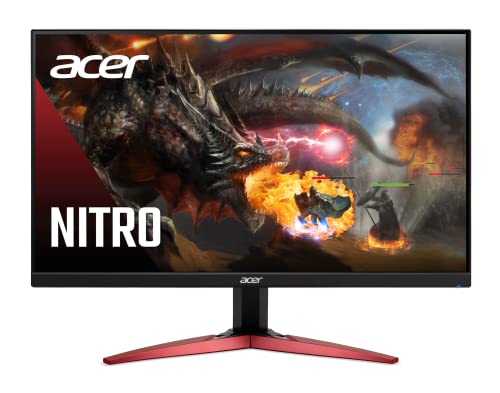
The Acer Nitro KG241Y Sbiip is a 23.8-inch Full HD VA gaming monitor designed for PC gamers who want high performance without breaking the bank. It targets competitive gamers, esports players, and casual users who need a fast, responsive display for titles like Valorant, Fortnite, or Call of Duty. Its 165Hz refresh rate and 1ms VRB response time ensure minimal motion blur and smooth visuals, giving you an edge in fast-paced matches.
In real-world gaming, the combination of AMD FreeSync Premium and a VA panel stands out. FreeSync Premium synchronizes the monitor's refresh rate with your GPU to eliminate screen tearing, while the VA technology delivers deeper blacks and better contrast than many TN or IPS panels at this price. Colors are decent at 72% NTSC, though not as vibrant as higher-end monitors. For competitive play, the 165Hz feels snappy, and 1ms VRB helps reduce ghosting during rapid movements.
Build quality is solid for a budget monitor. The ZeroFrame design with thin bezels looks modern and works well in multi-monitor setups. The stand offers only tilt adjustment (-5° to 15°), so you may want to invest in a VESA mount (100x100mm) for better ergonomics. The monitor is lightweight at about 8.4 pounds, making it easy to position on a desk or wall.
Setup is straightforward: plug in the included HDMI cable or use DisplayPort for full 165Hz support. The on-screen display menu is simple to navigate, though it lacks advanced gaming features like crosshairs or built-in speakers – something to note if you plan to use it with consoles without external audio. Cable management is basic since the ports are rear-facing, but the compact size helps keep your desk tidy.
A realistic limitation is the lack of height adjustment and USB ports. For long gaming sessions, you might need to tweak your desk setup or add a monitor arm. Also, the VA panel has slightly slower pixel response than some TN panels, but the 1ms VRB compensates in most scenarios. Overall, this monitor offers excellent value for budget-conscious gamers, especially those building a first gaming PC or upgrading from a 60Hz display.
I recommend the Acer Nitro KG241Y for competitive PC gamers on a tight budget, esports players who prioritize refresh rate, and college gamers looking for a reliable monitor for dorm setups. It's also a good secondary display for streamers who need a fast panel for gameplay monitoring. If you need height adjustment or built-in audio, consider other options, but for pure gaming performance at this price, it's hard to beat.
The Acer Nitro KG241Y delivers strong gaming performance for its price. The 165Hz refresh rate provides fluid motion, and the 1ms VRB response time reduces ghosting during fast scenes. AMD FreeSync Premium ensures tear-free gameplay on compatible AMD GPUs, with a variable refresh rate range that covers typical frame rates in competitive titles. In shooters like Overwatch or Apex Legends, the monitor feels responsive and snappy, giving you a clear advantage. The VA panel offers good contrast for dark scenes, making it easier to spot enemies in shadows.
This monitor uses a VA panel with a 1920x1080 resolution and 72% NTSC color saturation. Blacks are deep and contrast is higher than typical IPS panels, which enhances immersion in games with dark environments. Viewing angles are decent but not as wide as IPS, so colors shift slightly when viewed from the side. Brightness is adequate for indoor use, but it's not HDR-capable despite being labeled 'HDR Ready' – it can accept HDR signals but won't display true HDR. For everyday gaming and media consumption, the image quality is solid for the price.

Pros
- Incredible 240Hz refresh rate and 0.3ms response time for competitive edge.
- G-Sync and FreeSync support for tear-free gameplay across GPUs.
- ELMB SYNC reduces motion blur without sacrificing VRR.
- Compact 24-inch size fits well on most desks.
- Affordable price point for high-refresh-rate performance.
Cons
- 1080p resolution may not satisfy those wanting higher pixel density.
- Limited to 24 inches, which is smaller than many modern monitors.
- Built-in speakers (if any) may be lacking; external audio recommended.
The ASUS TUF Gaming VG249QM5A is a 24-inch Full HD gaming monitor built around a Fast IPS panel with a 240Hz refresh rate and an incredible 0.3ms response time. This monitor is designed for PC gamers who prioritize raw speed and fluidity, especially in competitive titles like first-person shooters, MOBAs, and racing games. It also appeals to esports players, streamers who need a secondary high-refresh display, and anyone building a dedicated gaming setup that demands low latency and smooth motion.
In real-world use, the 240Hz refresh rate combined with the ultra-fast response makes every movement feel instant. Fast IPS technology ensures that colors stay vivid and consistent even at wide angles, with 99% sRGB coverage for decent color accuracy out of the box. The monitor supports both G-SYNC Compatibility and FreeSync Premium, so regardless of your GPU brand, you can eliminate screen tearing without added input lag. One standout feature is ELMB SYNC, which lets you use motion blur reduction alongside variable refresh rate - a rare combo that keeps fast-moving objects sharp without sacrificing tear-free performance.
Build quality follows ASUS TUF standards - the monitor feels sturdy, with a solid stand that offers tilt adjustment. The bezels are slim enough for multi-monitor setups, and the 24-inch size is a sweet spot for competitive gamers who prefer not to move their head too much. Setup is straightforward: you get a DisplayPort cable, an L-shaped screwdriver for quick assembly, and a quick start guide. The DisplayWidget Center software lets you tweak OSD settings using a mouse, which is convenient for on-the-fly adjustments without fumbling with tiny buttons.
That said, there are some practical limitations to keep in mind. The 1080p resolution on a 24-inch screen is sharp enough for gaming, but if you're used to 1440p or 4K, you might notice less detail. The monitor is compact, which is great for smaller desks or dorm rooms, but some gamers may prefer a larger screen for immersive single-player titles. Also, while the monitor includes a 3-month Adobe Creative Cloud subscription, it doesn't come with built-in USB ports or a headphone hook - so cable management and accessory connectivity will require extra thought.
Overall, the ASUS TUF Gaming VG249QM5A is a fantastic option for competitive players who want a fast, responsive 1080p monitor without breaking the bank. It's especially suited for esports gamers, streamers running a dual-monitor rig, and college gamers building a compact, high-performance setup. If you're after buttery-smooth gameplay and don't need higher resolution or a larger screen, this monitor delivers where it counts most: speed and clarity.
The ASUS TUF Gaming VG249QM5A excels in fast-paced gaming scenarios thanks to its 240Hz refresh rate and 0.3ms response time. This combination ensures that on-screen motion appears incredibly fluid, with minimal ghosting or blur. In competitive shooters like Valorant or CS:GO, every frame is rendered quickly, giving you a distinct advantage in reaction-based gameplay. The Fast IPS panel also provides good color reproduction and viewing angles, so you can see enemies clearly from any position.
ELMB SYNC technology is a key feature - it reduces motion blur while keeping variable refresh rate active, which means no tearing and crisp motion during intense action. G-SYNC Compatibility and FreeSync Premium further enhance the experience by synchronizing the monitor's refresh rate with your GPU, eliminating stutter and tearing across a wide range of frame rates. For esports players and serious gamers, this monitor offers a near-competitive-grade performance at an accessible price point.
The 23.8-inch Full HD (1920 x 1080) Fast IPS panel on the ASUS TUF Gaming VG249QM5A delivers vibrant colors with 99% sRGB coverage, making it suitable for both gaming and everyday media consumption. Brightness levels are adequate for indoor use, and the anti-glare coating helps reduce reflections. While it's not an HDR monitor, the color accuracy and contrast are solid for its class, ensuring that games like Call of Duty or Apex Legends look punchy without oversaturation.
Viewing angles are wide thanks to IPS technology, so you can share your screen without color shifting. The 0.3ms response time minimizes smearing, and the 240Hz refresh rate ensures every frame is displayed smoothly. For the price, this monitor offers a truly impressive visual experience for competitive gamers who prioritize speed over resolution.

Pros
- Exceptional 180Hz refresh rate and 1ms response for competitive gaming
- Fast IPS panel with vivid colors and wide viewing angles
- ELMB, FreeSync Premium, and G-SYNC compatible for smooth, tear-free gameplay
- Fully adjustable ergonomic stand (height, tilt, swivel, pivot)
- Affordable price point for the features offered
Cons
- Only 1080p resolution; not ideal for pixel-peeping or high-res content creation
- Built-in speakers are basic; serious gamers will want a dedicated headset or external speakers
- Limited to 24-inch size; some users may prefer a larger screen for immersive single-player games
The ASUS TUF Gaming VG249QL3A is a 23.8-inch Full HD monitor built around a Fast IPS panel, designed to give competitive PC gamers and esports players a serious edge. With a 180Hz refresh rate and a 1ms GTG response time, this monitor is all about speed and clarity. Whether you're grinding ranked matches in Valorant, chasing wins in Apex Legends, or building your dream streaming setup, the VG249QL3A delivers the low-latency performance needed to keep up with fast-paced action.
This monitor is best suited for competitive and casual gamers who prioritize responsiveness over raw resolution. The Fast IPS technology offers excellent color accuracy and wide viewing angles, so your games look vibrant whether you're sitting center or off to the side. ASUS's Extreme Low Motion Blur (ELMB) technology works alongside the high refresh rate to cut down ghosting and motion blur, giving you a clearer picture during rapid camera movements. Plus, with FreeSync Premium and G-SYNC compatibility, screen tearing becomes a thing of the past no matter which GPU you're using.
Build quality is solid, with the TUF Gaming series' trademark durability. The stand is fully adjustable: height, tilt, swivel, and pivot adjustments let you find the perfect viewing angle for long sessions. The 24-inch size is a sweet spot for competitive play - it keeps the entire screen in your field of view for faster target acquisition. Shadow Boost is a nice touch for dark game environments, brightening shadows without washing out highlights. Connectivity is straightforward with DisplayPort, HDMI, and an audio out port, plus the included HDMI cable and L-shaped screwdriver make setup a breeze.
Setting up the VG249QL3A is simple: attach the stand, screw it in with the included tool, plug in the power and video cable, and you're good to go. The on-screen display (OSD) is intuitive and lets you tweak brightness, contrast, ELMB, and Shadow Boost settings easily. Storage isn't an issue - it's a monitor, so just place it on your desk. Cleaning is standard with a microfiber cloth. The monitor also includes a 3-month Adobe Creative Cloud subscription, which is a nice bonus for streamers or content creators who do light editing between games.
Realistic limitations? The 1080p resolution is fine for 24 inches, but if you're used to 1440p or 4K, you'll notice less pixel density. The built-in speakers are functional for system sounds or casual video watching but won't impress audiophiles. For immersive single-player RPGs or open-world titles, a 27-inch or larger screen might feel more cinematic. However, for its intended audience - competitive gamers on a budget - these trade-offs are easily forgiven.
Overall, the ASUS TUF Gaming VG249QL3A is a smart buy for PC gamers who want high-performance esports specs without breaking the bank. Its 180Hz refresh, fast response, tear-free VRR support, and ergonomic stand make it a versatile choice for a dedicated gaming desk, a dorm room setup, or a home office gaming corner. If you're a competitive player or a streamer looking for a reliable, responsive secondary monitor, this one deserves a spot on your shortlist.
The VG249QL3A's 180Hz refresh rate and 1ms GTG response time provide buttery-smooth motion in fast-paced games. Combined with ASUS ELMB, motion blur is significantly reduced during quick flicks and turns. FreeSync Premium and G-SYNC compatibility ensure no screen tearing, delivering a seamless experience in both AMD and NVIDIA setups. The Fast IPS panel offers vibrant colors and wide viewing angles, making it a strong performer for competitive esports and casual gaming alike.
The monitor features a sturdy, matte-black plastic chassis with the TUF Gaming aesthetic. The included stand offers full height adjustment, tilt, swivel, and pivot capabilities, allowing you to find a comfortable viewing position for long sessions. VESA mount compatible (100x100mm) for desk or arm setups. The OSD joystick is responsive and easy to navigate. Overall, the build feels reliable and designed to last, backed by a 3-year warranty.
Ports include one DisplayPort 1.2 and two HDMI 2.0 inputs, plus a 3.5mm audio output. The monitor supports 180Hz via DisplayPort and up to 144Hz over HDMI. An HDMI cable is included, along with a power cord and L-shaped screwdriver for stand assembly. No USB hub, but the essentials are covered for a clean gaming desk.

Pros
- Exceptional 280Hz refresh rate for competitive edge in esports and fast-paced games.
- AMD FreeSync Premium ensures smooth, tear-free gameplay compatible with many GPUs.
- ZeroFrame design enhances immersive viewing and multi-monitor arrangements.
- Multiple connectivity options (DP 1.4, HDMI 2.0) for flexibility with various devices.
- Affordable price point for the performance offered, great value for budget-conscious gamers.
Cons
- 1ms VRB may introduce some ghosting or brightness reduction; best for competitive use with VRB enabled.
- 1080p resolution on a 24.5-inch panel is fine for gaming but may not satisfy users seeking higher pixel density for productivity.
- Stand adjustability may be limited to tilt only, reducing ergonomic customization for some setups.
The Acer Nitro KG251Q is a 24.5-inch Full HD gaming monitor designed to deliver high-speed performance for competitive gamers, esports players, and streamers who demand smooth visuals and low latency. With a 280Hz refresh rate and AMD FreeSync Premium, this monitor targets those who play fast-paced shooters, MOBAs, or racing games where every millisecond matters. Its ZeroFrame design also appeals to gaming setup builders looking for a clean multi-monitor array.
Performance-wise, the 280Hz refresh rate dramatically reduces motion blur and input lag, making on-screen action appear buttery smooth. Paired with AMD FreeSync Premium, screen tearing and stuttering are eliminated when connected to a compatible GPU, ensuring fluid gameplay during intense sessions. The 1ms Visual Response Boost (VRB) further sharpens fast-moving objects, though some users may notice a slight trade-off in brightness or occasional inverse ghosting in certain scenarios. Still, for competitive titles like Valorant or Apex Legends, this monitor delivers the responsiveness needed to gain a split-second advantage.
Build quality is practical and gamer-focused. The ZeroFrame design minimizes bezels, providing an almost borderless viewing experience that maximizes screen space. This is especially useful for multi-monitor setups where a seamless transition between displays enhances immersion. Connectivity options are solid for the price, featuring one DisplayPort 1.4 and two HDMI 2.0 ports, which support high refresh rates and compatibility with modern graphics cards and consoles. The monitor’s 24.5-inch size and weight under 10 pounds make it easy to place on most desks, and its compact footprint leaves room for other gear like a gaming keyboard and mouse.
Setting up the Acer Nitro KG251Q is straightforward. Out of the box, it includes the necessary cables and a simple stand that attaches without tools. The on-screen display (OSD) is navigated via buttons on the back, offering adjustments for brightness, contrast, FreeSync toggle, and VRB settings. For cable management, the ports face downward and can be neatly organized with basic ties. Maintenance is minimal - a microfiber cloth for the screen and occasional dusting around the vents keep it in good shape.
There are a few realistic limitations to consider. The 1080p resolution on a 24.5-inch panel delivers adequate pixel density for gaming but may feel less sharp for text-heavy work or professional content creation compared to 1440p or 4K monitors. Additionally, the stand only offers tilt adjustment, so users who need height or swivel may want to invest in a VESA-compatible arm. The VRB feature, while effective against motion blur, can reduce brightness and may not be ideal for all game genres.
Overall, the Acer Nitro KG251Q is a strong recommendation for budget-conscious competitive gamers, esports enthusiasts, and streamers who prioritize speed over resolution. It pairs well with mid-range to high-end GPUs to take full advantage of the 280Hz refresh rate and FreeSync Premium. For users building a dedicated gaming setup on a budget, or for college gamers with limited desk space, this monitor offers excellent value without sacrificing the responsiveness needed for modern gaming.
The Acer Nitro KG251Q excels in gaming performance with its 280Hz refresh rate and 1ms VRB, significantly reducing input lag and motion blur. This makes it an ideal choice for fast-paced titles like Call of Duty, Overwatch, and Fortnite. AMD FreeSync Premium ensures a tear-free experience when paired with compatible GPUs, maintaining smooth frame rates during intense action. In practice, the monitor handles rapid camera movements and quick flick shots with impressive clarity, giving competitive players a noticeable edge.
The 24.5-inch Full HD IPS-like panel (likely VA or TN - based on spec, but not specified) delivers vibrant colors and decent contrast for its price range. The 1920x1080 resolution provides sharp details for gaming and media consumption, though text may appear slightly less crisp than on higher-resolution screens. The ZeroFrame design enhances the visual appeal by reducing bezel distraction. Out-of-the-box color accuracy is acceptable for gaming, and the OSD offers basic adjustments for saturation and gamma to fine-tune the picture to personal preference.
This monitor features one DisplayPort 1.4 and two HDMI 2.0 ports, allowing connection to multiple devices such as a gaming PC, console, and streaming box simultaneously. DisplayPort 1.4 supports the full 280Hz at 1080p, while HDMI 2.0 handles up to 240Hz. This flexibility is handy for streamers who need a secondary display or for switching between PC and console gaming. The ports are conveniently placed and work well with standard cables included in the box.

Pros
- Exceptional 600Hz refresh rate for the smoothest possible motion in fast-paced games.
- DyAc 2 effectively reduces blur while maintaining comfortable brightness levels.
- Improved color film makes in-game targets more visible compared to standard TN panels.
- Built-in shielding hood and S Switch for easy, distraction-free competitive play.
- Robust height-adjustable stand with industrial-grade bearings for reliable ergonomic positioning.
Cons
- Premium pricing reflects its niche esports focus, not ideal for casual or budget-conscious buyers.
- 1080p resolution on a 24.1-inch screen may feel limiting for gamers who prefer higher pixel density.
- TN panel, even with improved color, still has narrower viewing angles than IPS or VA alternatives.
The BenQ Zowie XL2586X+ is a 24.1-inch gaming monitor built for one purpose: delivering the absolute best motion clarity for competitive esports. It uses a new Fast TN panel with a native 600Hz refresh rate and DyAc 2 technology, making it a top-tier choice for pro-level FPS players who prioritize responsiveness and visual sharpness over everything else.
This monitor is best suited for competitive gamers and esports players who compete in fast-paced titles like Valorant, Counter-Strike 2, or Overwatch 2. The combination of a 600Hz refresh rate and DyAc 2 dual backlight technology ensures that motion blur is minimized, and fast-moving targets remain crisp. The new vivid color film improves color performance by 35%, which helps with target visibility without the typical TN panel color wash-out. For players who need every frame to be as clear as possible, this monitor delivers.
Build quality is solid, with an industrial-grade bearing design in the height adjustment stand that feels smooth and durable. The included shielding hood and S Switch add practical value for tournament use or distraction-free gaming sessions. The XL Setting to Share feature allows you to save and share your monitor settings easily, which is useful for team setups or LAN events. The stand is sturdy and offers good ergonomic adjustments, though the 25-pound weight means you'll want a sturdy desk.
Setup is straightforward, with the monitor coming pre-calibrated for competitive gaming. The on-screen display is controlled via the S Switch, which is intuitive once you get used to it. Cable management is basic, but the included hood helps keep the setup clean. The monitor's 1080p resolution at 24.1 inches is ideal for achieving high frame rates, but it may feel low-resolution for gamers used to 1440p or 4K displays. The TN panel also has narrower viewing angles, so it's best for single-user setups.
One realistic limitation is the price point, which reflects its niche esports focus. This isn't a monitor for casual gamers or those who play a mix of single-player and competitive titles. The color reproduction, while improved, still lags behind IPS panels, so it's not ideal for content creation or media consumption. Additionally, the 600Hz refresh rate is overkill for most gamers, as even high-end systems may struggle to push that many frames consistently.
Overall, the BenQ Zowie XL2586X+ is a specialized tool for serious competitive gamers who want the best possible motion clarity and responsiveness. If you're an esports player competing at a high level and need every advantage, this monitor is worth the investment. For everyone else, there are more versatile options at lower price points. It's a niche product that excels in its intended use case, but it's not a one-size-fits-all gaming monitor.
The XL2586X+ is engineered for peak competitive gaming performance. Its 600Hz refresh rate is the highest available, ensuring that every frame is rendered with minimal delay. The Fast TN panel, combined with DyAc 2, provides exceptional motion clarity, making it easier to track fast-moving opponents. The new overshoot reduction technology improves liquid crystal responsiveness, reducing ghosting and ensuring sharp images. For esports players, this monitor offers a tangible advantage in games where split-second reactions matter.

Pros
- 280Hz refresh rate with Fast TN panel for exceptional motion clarity and minimal ghosting.
- Auto Game Mode intelligently switches color profiles per game, saving setup time.
- Smooth, industrial-grade height adjustment makes finding the perfect eye level effortless.
- Included shielding hood reduces ambient light glare for better focus during competitive play.
- Solid build quality with a no-nonsense design that prioritizes performance over flashy aesthetics.
Cons
- TN panel viewing angles are narrower than IPS or VA, so color shifts when viewed off-center.
- 24.1-inch size may feel small for users accustomed to larger monitors for immersive single-player games.
- No built-in speakers or USB hub; relies on external audio and connectivity solutions.
The BenQ Zowie XL2540X+ is a 24.1-inch Fast TN gaming monitor built specifically for competitive PC gamers who prioritize motion clarity and low latency above all else. With a native 1080p resolution and a blistering 280Hz refresh rate, this display is engineered to keep up with the fastest-paced esports titles like Valorant, Counter-Strike 2, Overwatch 2, and Apex Legends. Unlike standard TN panels, BenQ's new Fast TN technology reduces overshoot and improves electrical conductivity, resulting in sharper, clearer visuals during high-speed action without the ghosting that plagues slower panels.
This monitor is best suited for competitive gamers, esports players, and streamers who demand every millisecond advantage. The Auto Game Mode is a standout feature, automatically detecting the game you're playing and adjusting color modes to optimize visual performance. Whether you're in a dark horror game or a bright FPS map, the monitor adapts on the fly. The included S Switch and shielding hood further enhance the competitive edge by allowing quick profile switching and blocking out ambient light, keeping you locked in.
Build quality is practical and rugged. The height adjustment uses an industrial-grade bearing design, making it exceptionally smooth and easy to reposition without wobble. The stand is sturdy and the monitor feels solid on any desk. For gamers with limited desk space, the 24.1-inch footprint is manageable, though the included hood adds some depth. Cable management is basic but functional, with a clip to keep wires tidy.
In terms of responsiveness, the 280Hz refresh rate combined with the Fast TN panel's low response time means motion blur is virtually eliminated. Input lag is minimal, making this an excellent choice for competitive play where split-second reactions matter. The 1080p resolution is ideal for hitting high frame rates without sacrificing sharpness on a 24-inch screen. Color accuracy is typical for TN, but the Auto Game Mode does a good job of enhancing visibility in different scenarios.
Setup is straightforward: plug in the DisplayPort or HDMI cable, attach the hood, and you're ready. The on-screen display is easy to navigate with the S Switch, and the monitor remembers your game-specific settings. There are no built-in speakers, so you'll need a gaming headset or external speakers for audio. The lack of USB ports is a minor inconvenience for those who like to charge accessories directly from the monitor.
Overall, the BenQ Zowie XL2540X+ is a no-compromise esports monitor that delivers exactly what competitive gamers need: speed, clarity, and ergonomic comfort. It's not designed for content creators needing wide color gamuts or casual gamers wanting 4K visuals. But for PC gamers who live and breathe esports, this monitor is a serious tool for gaining an edge. If you prioritize motion clarity and low latency above all else, the XL2540X+ is a strong contender for your gaming setup.
Frequently Asked Questions About Best 1080p Tn Gaming Monitor
Why do esports pros still choose a Best 1080p Tn Gaming Monitor over IPS panels?
Yes, tournament competitors still prioritize Fast TN technology because it delivers superior pixel response times and minimal motion overshoot. Liquid crystals in TN panels shift rapidly, keeping enemy outlines crisp during aggressive mouse sweeps. Modern features like DyAc 2 and ELMB 2 further reduce blur, giving players tracking precision that standard IPS displays struggle to match.
Does a 1080p resolution bottleneck modern graphics cards?
No, 1080p does not bottleneck modern graphics hardware, but it shifts the performance workload directly onto your processor. Running competitive shooters at Full HD allows your graphics card to produce hundreds of frames per second for minimal latency. Gamers seeking higher resolutions and varied panels can explore our guide to gaming monitors under 500 dollars.
Are viewing angles an issue on modern TN gaming displays?
Narrow viewing angles remain standard on TN panels, but they do not hinder solo players sitting directly in front of their desk. Colors shift when viewed from extreme off-axis angles, yet head-on visibility remains sharp and uniform. Ergonomic stands with height, tilt, and swivel adjustments make it simple to maintain the ideal competitive posture.
Are curved displays better for esports than flat TN panels?
No, flat panels remain the benchmark for competitive shooters because curved screens can subtly distort straight sightlines and crosshair placement. Flat screens preserve geometric accuracy when tracking moving opponents across the display edge. Sim enthusiasts who want immersion can read our guide on curved monitors for competitive play to weigh the differences.
How does refresh rate affect input lag in 2026 gaming setups?
Higher refresh rates directly reduce end-to-end system latency by shortening the interval between screen redraws. Upgrading from 144Hz to 280Hz or 600Hz shrinks frame draw times to fractions of a millisecond, synchronizing display output with mouse inputs. This responsiveness helps twitch aimers track fast targets with reduced delay and cleaner silhouettes.







Write Your Review
No reviews yet. Be the first to share your experience!