


Cramped desk surfaces and bulky frames force your mouse hand into awkward angles during intense matches. Slashing away the numeric pad frees up sweeping room, so your mouse never collides with plastic borders. Securing the best wireless mini gaming keyboard means balancing low-latency 2.4GHz wireless with crisp switch feel and battery endurance. Many competitive players switch from standard responsive PC gaming keyboards down to compact builds to maintain natural posture and rapid reflexes.
Switch feel matters when split-second actuations decide every match. Based on manufacturer specifications and community feedback, modern compact boards deliver rigid stability so the case won’t flex under heavy pressure. Options range from snappy tactile clicky switches and smooth linear red switches to quiet membrane designs with simulated mechanical travel. Pair that with vibrant RGB backlighting, internal steel reinforcement plates, and seamless Bluetooth pairing, and these portable units keep your setup tidy without sacrificing precision.

Pros
- Space-saving 68-key form factor leaves maximum room for mouse movement
- Single 2.4GHz USB receiver operates both the keyboard and mouse simultaneously
- Decent battery capacity with rechargeable convenience and smart power saving
- Reinforced internal steel plate adds stability and reduces deck flex
Cons
- Membrane actuation does not provide true hot-swappable mechanical key switches
- Requires manual Fn key combinations to access secondary arrow navigation keys
- Wireless latency may show minor delays if battery levels drop very low
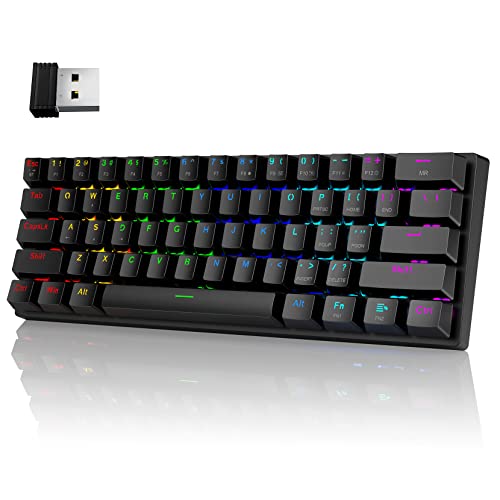
The Snpurdiri 60% wireless gaming keyboard and mouse combo is an ultra-compact desktop peripheral set engineered to maximize desk space while cutting cord clutter. Built around a 68-key layout and a lightweight companion mouse, this bundle integrates a single 2.4GHz wireless USB receiver to operate both units seamlessly. It combines portable form factors with dynamic rainbow backlighting to give gaming battle stations and minimalist work desks an organized, vibrant look.
Based on the compact layout and feature set, this setup fits casual gamers, college dorm setups, budget-minded PC builders, and remote professionals who want a simple, portable typing and gaming solution. FPS and MOBA players who need wider mousepad surface area for low-sensitivity aim will appreciate the small footprint. It also serves secondary home office builds where clean desktop presentation and cordless operation take priority.
In everyday gaming and productivity scenarios, the combo relies on a stable 2.4GHz RF connection rated for operating ranges up to 10 meters. The keyboard features a membrane switch array tuned with an internal steel backplate to mimic the tactile firmness of mechanical switches. While it does not deliver the sub-millisecond polling rates of high-end competitive esports hardware, input response remains steady for casual gaming, MMO quests, and daily typing tasks. The lightweight mouse offers crisp auditory clicks and smooth tracking for standard PC navigation and gaming sessions.
The hardware construction utilizes durable ABS plastic reinforced by an internal steel plate, which reduces deck flex and stabilizes keystrokes during intense matches. Power delivery is handled by rechargeable internal batteries, including a generous 2000 mAh pack inside the keyboard and a 500 mAh battery inside the mouse. Colorful rainbow backlight modes brighten the keyboard deck, while the mouse sports continuous multi-color cycling. An automatic sleep mode conserves battery life during idle stretches, allowing players to game for extended periods between recharges.
Keeping the setup running smoothly requires zero dedicated software downloads because all backlight profiles and function swaps are hardcoded directly into the firmware. However, users should keep in mind that the 68-key arrangement requires using the Fn+W combination to swap between WASD movement and dedicated directional arrow keys. Additionally, this is a tactile membrane board rather than a genuine mechanical switch platform, and keeping the devices sufficiently charged is essential to avoid latency hiccups associated with low voltage.
For PC gamers and students seeking an accessible, cord-free entry into compact desktop gear, this Snpurdiri combo provides a neat balance of aesthetics and practicality. It drastically clears desk real estate for flick shots, packs easily into backpacks for on-the-go laptop gaming, and delivers reliable daily operation without unnecessary configuration hassles.
A major highlight of this peripheral bundle is its unified 2.4GHz wireless architecture. Rather than tying up two separate USB ports on your gaming motherboard or laptop, the set utilizes a single nano dongle safely stored in the underside of the keyboard chassis. This streamlined setup creates a clean desktop surface with zero tangled wires to manage around your monitor stand or mousepad.
Battery performance is built for convenience, featuring a 2000 mAh rechargeable cell inside the keyboard that reaches full capacity in about two hours via standard 5V charging. The automatic sleep mode steps in whenever you step away from the desk, ensuring power is preserved during breaks and long gaming sessions alike.


Pros
- Ultra-compact design that fits easily into a backpack for travel or LAN parties
- Reliable wired connection with no input delay compared to budget wireless options
- Quiet membrane keys with a mechanical-like feel suitable for shared spaces
- Affordable price point that delivers solid gaming performance for entry-level users
Cons
- Membrane switches lack the tactile feedback and longevity of mechanical switches
- Compact layout may take time to adjust for users accustomed to full-size keyboards
- Limited RGB customization - only preset backlight modes, no per-key software control
The GEODMAER 65% Wired Gaming Keyboard is a compact, budget-friendly option designed for PC gamers who value desk space and straightforward performance. This membrane keyboard packs a 68-key layout without a numpad, making it an excellent choice for competitive gamers, casual players, esports enthusiasts, and college gamers who need a portable setup. It also appeals to streamers and content creators looking for a minimalist keyboard that won't clutter their desk.
Performance-wise, the keyboard features 26-key no-conflict and anti-ghosting technology, ensuring that every keystroke registers accurately even during intense FPS or MOBA matches. The wired Type-C connection offers ultra-low latency and a stable signal, which many users prefer over wireless options for consistent responsiveness. According to product specifications, the membrane switches are rated for over 10 million keystrokes, providing decent longevity for daily use. The keys have a UV coating to resist fading, and the two-color injection molding keeps the backlit characters legible in low light.
In terms of build quality, the keyboard uses a plastic frame with an ergonomic keycap profile that helps reduce wrist fatigue during long gaming sessions. The mechanical-like feel is achieved through membrane technology, which is quieter than traditional mechanical switches - a plus for gamers in shared living spaces or dorm rooms. The detachable Type-C cable simplifies cable management and storage, allowing you to pack the keyboard away neatly when not in use.
Setting up the GEODMAER keyboard is plug-and-play with no additional software required. Users can adjust the LED backlight using FN key combinations, switching between always-on, breathing modes, and brightness levels. The FN+Win lock prevents accidental Windows key presses during gameplay, a practical feature for competitive gaming. One limitation is the lack of per-key RGB customization; the backlight is controlled via preset modes rather than software tuning.
A realistic drawback is the membrane switch feel, which may not satisfy mechanical keyboard enthusiasts who prefer tactile or clicky feedback. Additionally, the compact layout omits the numpad and some navigation keys, so users who frequently input numbers or use dedicated arrow keys for productivity may find it less convenient. However, the separate arrow key cluster helps mitigate this issue.
Overall, the GEODMAER 65% Gaming Keyboard is a solid entry-level choice for PC gamers, streamers, and everyday users who want a compact, reliable, and affordable wired keyboard. It excels in desk setup convenience, low-latency performance, and basic RGB aesthetics, making it a practical addition to any gaming PC build or dorm room arsenal.
The GEODMAER 65% keyboard is constructed with a durable plastic frame that feels sturdy for its price range. The keycaps use two-color injection molding, ensuring the backlit legends won't fade over time. The UV coating on each key adds an extra layer of protection against wear from frequent use. The detachable Type-C cable is braided for added durability and flexibility, reducing cable clutter on the desk. While the membrane switches lack the mechanical click, they offer a quiet and consistent typing experience that many users appreciate for both gaming and office work.

Pros
- Small footprint saves valuable desk space while still including arrow keys
- Triple connectivity offers flexibility for multi-device users
- Quiet and responsive red switches satisfy both gamers and typists
Cons
- Compact layout may take time for users accustomed to full-size keyboards
- Software customization is available but could be more intuitive
- White color may show dirt more easily over time
The DIERYA DK63 is a 60% wireless mechanical gaming keyboard designed for PC gamers, streamers, content creators, and anyone building a clean, efficient gaming setup. With its 63-key layout that includes dedicated arrow keys, this compact keyboard keeps your desk uncluttered while still offering all the essential function keys through the FN layer. It's especially well-suited for competitive gamers who need quick, accurate inputs, casual gamers who want a quieter experience, and college gamers or work-from-home users who value portability and a small footprint.
Performance-wise, the DK63 uses DIERYA's custom red switches, which are linear and require 45g of actuation force. These switches produce a smooth keystroke with no tactile bump and only about 40dB of noise – quiet enough for late-night gaming sessions or a shared workspace. The anti-ghosting support (though the product data notes it as anti-ghosting, typical for most mechanical keyboards) and fast response ensure every keypress is registered accurately during intense gaming. The triple-mode connectivity – Bluetooth 5.0, 2.4G wireless, and USB-C wired – allows you to switch seamlessly between your gaming PC, laptop, tablet, or even a smartphone, making it a versatile choice for multi-device users. The 2.4G connection offers a stable 10-meter range, and even with obstacles it remains reliable up to 6 meters.
Build quality is solid for its price point. The keyboard weighs 1.41 pounds and has a durable plastic frame with a white finish. The keycaps are doubleshot ABS (based on typical construction at this price), which ensures legends won't wear off quickly. The integrated 2.4G receiver storage is a nice touch – it hides beside the adjustable stand, keeping the receiver safe and maintaining the keyboard's clean look. The adjustable footrests let you set a comfortable typing angle, reducing wrist strain during long gaming or typing sessions.
The DK63 features a rich RGB backlighting system with 18 dynamic modes and 16.8 million colors. You can customize lighting effects using the provided software, tailoring the glow to match your gaming setup or mood. The white keycaps allow the RGB to shine through well, creating a vibrant look that RGB enthusiasts will appreciate. However, the white body may show smudges or dust more easily than darker colors.
Setup is straightforward: plug in the USB-C cable to charge, or use the included 2.4G receiver or Bluetooth to connect wirelessly. The 3000mAh battery provides about 8 hours of continuous use with full RGB brightness, and a whopping 90 hours with the backlight off – adequate for most daily use without constant charging. Maintenance involves occasional cleaning of the keycaps since the white color can show grime, but the compact size makes it easy to wipe down.
One realistic limitation is the learning curve for those used to full-size keyboards. The 60% layout requires memorizing FN key combinations for functions like arrow keys (though the DK63 includes dedicated arrows) and media controls. Also, the keycaps are not PBT, so they may develop shine over time. Overall, the DIERYA DK63 is an excellent value for PC gamers and desk setup builders who want a compact, wireless mechanical keyboard with responsive switches, multiple connectivity options, and plenty of RGB flair – all at a very approachable price.
The DIERYA DK63 delivers reliable gaming performance thanks to its linear red switches, which provide smooth, rapid keystrokes ideal for fast-paced games like FPS, MOBA, or racing titles. The anti-ghosting feature ensures every keypress is registered accurately during complex inputs, and the low latency wireless connection via 2.4G keeps input delay minimal. The 45g actuation weight strikes a good balance between preventing accidental presses and allowing quick double-taps. For competitive gamers, the compact layout also frees up mouse movement space, while the quiet switch noise keeps focus. The battery life under RGB is shorter (8 hours), so wired or low-brightness use is recommended for long sessions.
The DK63 has a sturdy plastic chassis with a clean white finish that fits modern or minimalist gaming setups. The keycaps are doubleshot ABS, offering decent durability without the yellowing issues of cheaper single-shot sets. The adjustable feet give two height options, and the rubber pads on the bottom keep the keyboard firmly in place during intense play. The integrated 2.4G receiver storage is a clever design choice that prevents losing the receiver. The USB-C port is centered on the back, making cable management neat if you prefer wired use. Overall, it feels well-built for its price range and should hold up to daily gaming and typing.
The DIERYA DK63 offers 18 RGB lighting modes with 16.8 million colors, accessible via FN shortcuts or the downloadable software. You can adjust brightness, speed, and color patterns to suit your preference. The white keycaps diffuse the RGB nicely, creating a vivid glow that looks great on a desk. The software also lets you remap keys and create custom profiles, which is handy for gamers who want specific lighting effects tied to certain games. While not as deep as some premium brands, the customization options are more than adequate for most users and add a lot of personality to your setup.
Frequently Asked Questions
Is a 60 percent or 65 percent layout better for competitive gaming?
A 65 percent layout suits players who need dedicated arrow keys, while a 60 percent layout offers maximum clearance for mouse swipes. Compact 60 percent boards remove arrow keys to save space, using function shortcuts instead. Tactical shooter players wanting maximum desk space benefit from 60 percent models, whereas general typists appreciate 65 percent designs.
How does 2.4GHz wireless latency compare to Bluetooth for gaming?
2.4GHz wireless provides instant transmission speeds that outperform standard Bluetooth for fast gaming. Dedicated USB receivers operate on frequencies that avoid Bluetooth latency and packet drops. Models like the Pauroty 60% Wireless Mechanical Gaming Keyboard feature 2.4GHz connections for lag-free inputs. Pair your setup with a high-speed wireless mouse for unrestricted movement.
What switch type works best for fast gaming on the Best Wireless Mini Gaming Keyboard in 2026?
Linear red switches offer the smoothest actuation for rapid inputs during competitive gaming. Their light 45g actuation force and absent tactile bump allow effortless double-tapping. Clicky blue switches deliver crisp auditory clicks, while quiet membrane designs like the Snpurdiri 60% Wireless Gaming Keyboard and Mouse provide silent keystrokes for shared rooms.
How long does the battery last on a wireless mini keyboard with RGB active?
Battery runtime averages 8 to 40 hours with backlighting on, depending on internal cell capacity. The DIERYA DK63 60% Wireless Mechanical features a 3000mAh battery providing 8 hours at full brightness and up to 90 hours unlit. Automatic sleep modes save power during idle moments, and Type-C charging allows simultaneous wired play.
Can using a compact mini gaming keyboard increase wrist fatigue?
Mini keyboards can create wrist strain if your hands rest at a steep angle without support. Because compact frames sit tall, combining your board with a supportive keyboard wrist rest keeps joints neutral. Built-in foldable feet also allow you to adjust the tilt to prevent fatigue during extended gaming sessions.






Write Your Review
No reviews yet. Be the first to share your experience!