


Dark desktop peripherals often clutter a workspace and create an uninspiring setup. Gamers and daily typists frequently deal with mushy key feel, scratchy switch travel, and plain black plastic cases that highlight every speck of dust. Upgrading your desk with bright, cohesive styling requires gear that balances tactile response with smooth lighting, which makes the best white rgb gaming keyboard an attractive centerpiece for modern battlestations. The right board sharpens your typing rhythm and elevates desk aesthetics whether you prefer a compact 75 percent frame or a full-size deck.
A reliable board demands crisp keystrokes, robust anti-ghosting matrices, and durable keycaps that resist finger oils during long gaming sessions. Modern options incorporate sound dampening layers, hot-swappable switch sockets, and dedicated volume knobs to streamline everyday productivity alongside fast paced gaming. Pairing these vibrant decks with a solid competitive gaming keyboard setup helps maintain peak accuracy and rapid input consistency across demanding titles. Based on our analysis of switch specifications, build materials, and verified user impressions, these picks deliver striking aesthetics without sacrificing keystroke precision.



Pros
- Affordable price point for a full keyboard and mouse combo
- Vibrant RGB lighting with multiple customization options
- Comfortable ergonomic design suitable for extended use
- Easy plug-and-play setup with no software required
Cons
- Some users report inconsistent key quality, such as non-functioning keys out of the box
- Not spill-resistant, so liquids can damage the keyboard
- Mouse clicks are very quiet, which may feel less tactile for some gamers
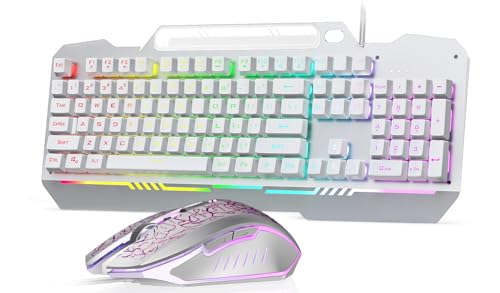
The MageGee K1 Gaming Keyboard and Mouse Combo is a budget-friendly wired set designed for PC gamers who want a full-size keyboard and a functional mouse without breaking the bank. This white-themed combo targets casual gamers, college students, and setup builders looking for an affordable way to add RGB flair to their desk. It's also a practical choice for work-from-home users who need a reliable typing experience for both productivity and light gaming.
In terms of performance, the keyboard features a standard 104-key layout with floating keycaps that provide a responsive typing feel. The RGB backlight offers 8 colors and 5 modes, allowing you to match your setup's vibe. The mouse includes 6 DPI levels (600 to 3200), which is adequate for casual gaming and everyday tasks. According to user feedback, the keys are relatively quiet, though the space bar can be a bit clunky. The mouse clicks are very soft, which some may find less satisfying but others appreciate for quiet environments.
Build quality is decent for the price, with ABS plastic construction and double-shot injection keycaps that resist fading. The keyboard has an ergonomic tilt and non-slip pads to keep it stable during use. However, it's important to note that the combo is not spill-resistant, so you'll want to keep drinks away. Some users have reported receiving units with non-functioning keys, which suggests occasional quality control issues. The mouse has a 7-color breathing LED that can be locked to a single color, adding to the aesthetic appeal.
Setup is straightforward: just plug the USB cable into your PC or laptop, and it works immediately with Windows, Mac, and Linux. No drivers or software are needed, which is convenient for those who prefer a simple plug-and-play experience. The cable is a standard USB 2.0 with a gold-plated interface and anti-interference magnet ring for stable data transmission. Cleaning is easy thanks to the removable keycaps, though the transparent base may show dust over time.
A realistic limitation is that this combo is best suited for casual gaming and general use, not for competitive esports where higher polling rates and mechanical switches are preferred. The keyboard uses membrane switches, which lack the tactile feedback of mechanical options. Additionally, the mouse's quiet clicks may not appeal to everyone. If you're a serious gamer, you might want to invest in a dedicated mechanical keyboard and a higher-end mouse.
Overall, the MageGee K1 combo is a solid entry-level choice for gamers on a budget, especially those building a white-themed setup. It offers good value with its RGB lighting, ergonomic design, and plug-and-play convenience. For casual gaming, schoolwork, or office tasks, it gets the job done without fuss. Just be aware of the potential quality variability and lack of spill resistance. If you need a reliable, affordable combo for light use, this is worth considering.

Frequently Asked Questions
How do you keep a white RGB gaming keyboard clean from dirt and stains?
Regular wiping with a soft microfiber cloth and a mild soapy solution keeps dust and surface grime away. White plastic cases and keycaps show oils faster than black keyboards. Double-shot keycaps and brushed aluminum top plates resist surface staining, helping your best white rgb gaming keyboard stay pristine over time.
Are mechanical switches faster than membrane keys for gaming?
Yes, mechanical switches actuate much earlier in the keystroke travel than standard membrane keys, offering distinct tactile response and faster resets. Dedicated mechanical boards register inputs via individual physical switches rather than a shared silicone sheet. Typists seeking faster actuation can read our breakdown of the top keyboards for typing accuracy to compare switch profiles.
What makes a 75 percent keyboard layout beneficial for desk space?
A 75 percent form factor removes the numeric keypad to free up significant room for swift mouse swipes while keeping essential arrow and function keys. This compact footprint allows your hands to sit at a natural shoulder width, reducing arm fatigue during intense gaming or long work shifts.
Do double-shot keycaps prevent RGB backlighting legends from fading?
Yes, double-shot molding forms the keycap legends from a separate layer of plastic, making them physically impossible to wear off. Many top boards in 2026 utilize double-shot keycaps so vibrant RGB lighting shines cleanly through clear letters without flaking or rubbing away after extended daily use.
How does an ergonomic wrist rest reduce typing fatigue?
An ergonomic wrist rest elevates the palms to maintain a neutral forearm angle, minimizing strain across your carpal tunnel. Raised key profiles can force wrists into an awkward upward bend. Pairing your setup with a dedicated pad from our guide to the best wrist rests for gaming prevents wrist soreness during long typing sessions.







Write Your Review
No reviews yet. Be the first to share your experience!