


Thermal Stability and Platform Longevity for Canadian Builds
VRM thermal throttling under sustained multi-core workloads can quietly choke your system, dropping frame rates during intense multiplayer matches. Budget power stages and tiny heatsinks struggle to feed steady current to modern processors, turning what should be smooth gameplay into a stuttering mess. Based on manufacturer specifications and builder feedback, finding the best gaming motherboard canada players trust comes down to picking reliable voltage regulation, ample PCIe lanes, and modern connectivity. Getting this central platform right saves you hours of troubleshooting down the road.
Nobody wants to struggle with memory compatibility errors or unbootable firmware. Features like BIOS Flashback and dedicated PCIe 5.0 lanes keep your setup versatile as newer hardware arrives. If you are starting a fresh build, our practical guide to motherboard selection details how to match your board to your exact performance targets. Taking time to inspect VRM power delivery and port selection ensures your desktop runs cool, stable, and quiet under heavy daily gaming.

Pros
- Solid power delivery and cooling for Ryzen 5000 CPUs, making it great for gaming and streaming
- Built-in WiFi saves a PCIe slot and reduces desk clutter in compact setups
- Aura Sync RGB ecosystem provides extensive lighting customization through ASUS software
- BIOS FlashBack simplifies troubleshooting and upgrades without needing a compatible CPU
Cons
- Limited PCIe 3.0 lanes may slightly hinder future high-end GPU bandwidth in heavy workloads
- Only two memory slots, which may restrict future RAM upgrades for some users
- No onboard USB-C header, requiring an adapter for front-panel Type-C connectors on modern cases
The ASUS TUF Gaming A520M-PLUS WiFi is a microATX motherboard that strikes a solid balance between performance, features, and affordability for PC gamers and builders. Built around the AMD AM4 socket, it supports Ryzen 5000, 4000 G-Series, and 3000 series processors, making it a flexible choice for everything from a budget gaming rig to a compact streaming setup. Its TUF lineup heritage promises durability through military-grade components and rigorous testing, giving you confidence for long gaming sessions.
For competitive and casual gamers alike, the onboard 802.11ac WiFi and TUF LANGuard ensure stable, low-latency connections during online matches. The comprehensive cooling solution, featuring a large VRM heatsink and PCH heatsink, keeps the board running cool even under intense loads. With Fan Xpert 2+, you can fine-tune system fan curves for a quiet yet efficient gaming environment. The 32Gb/s M.2 slot supports the latest NVMe SSDs, drastically cutting down game load times and level transitions in open-world titles.
RGB enthusiasts will appreciate the Aura Sync ecosystem, which includes both standard RGB headers and a Gen 2 addressable header for granular per-LED control. The software makes it easy to sync lighting with other compatible components, like fans and RAM, for a cohesive gaming setup aesthetic. Connectivity is well-rounded with USB 3.2 Gen 1 Type-A ports, DisplayPort, HDMI, and D-Sub outputs, making it suitable for APU builds or multi-monitor productivity.
Build quality is a hallmark of the TUF series. The board uses reinforced PCIe slots and sturdy components, and the inclusion of BIOS FlashBack lets you update the BIOS without a CPU or RAM installed, a lifesaver for Ryzen 5000 compatibility out of the box. Setup is straightforward for anyone familiar with PC building, and the microATX form factor fits neatly into smaller cases without sacrificing expandability. Cable management is simplified by the thoughtfully placed headers, though there is no onboard USB-C header for front-panel Type-C ports.
Realistic limitations include the lack of PCIe 4.0 support (it supports PCIe 3.0), which could slightly impact future high-end GPU bandwidth in data-intensive tasks, and only two DIMM slots, which restricts maximum RAM capacity to 64GB. However, for the vast majority of gaming and streaming scenarios, these are non-issues. The board also lacks built-in Bluetooth, so you will need an adapter for wireless peripherals beyond WiFi.
Overall, the ASUS TUF Gaming A520M-PLUS WiFi is an excellent choice for PC gamers, esports players, streaming newcomers, and gaming setup builders who want a reliable, feature-rich microATX motherboard without breaking the bank. It handles Ryzen 5000 CPUs with ease, offers useful connectivity, and provides enough RGB customization to satisfy most enthusiasts. If you are building a mid-range gaming PC or a compact streaming rig, this board delivers great value and long-term dependability.

Pros
- Excellent networking suite with WiFi 6E and 2.5Gb LAN for competitive gaming and streaming
- Robust 12+2 power stage design handles high-end Ryzen 5000 processors with ease
- PCIe 4.0 support on both M.2 slots and primary GPU slot for fast storage and graphics
- Comprehensive RGB ecosystem with Aura Sync and addressable Gen 2 header
- BIOS Flashback and user-friendly UEFI make updates and overclocking straightforward
Cons
- No PCIe 5.0 support, limiting future-proofing for next-gen GPUs and SSDs
- DDR4 memory only, which may disappoint users looking to move to DDR5 platforms
- Premium pricing for a B550 board; some budget alternatives offer similar core features
The ASUS ROG Strix B550-F Gaming WiFi II is an ATX motherboard built around the AMD B550 chipset, designed for PC gamers and gaming setup builders who want a solid foundation for a Ryzen-based rig. It supports AMD Ryzen 3000 and 5000 series processors (including G-series), making it a versatile choice for both current-gen and last-gen CPUs. The board comes packed with features that appeal to competitive gamers, streamers, and RGB enthusiasts alike.
Performance-wise, the motherboard delivers where it matters most. With PCIe 4.0 support on the primary PCIe x16 slot and both M.2 slots, you can run the latest graphics cards and NVMe SSDs at full speed, reducing load times and improving gaming responsiveness. The 12+2 teamed power stages, paired with a ProCool power connector and high-quality alloy chokes, ensure stable power delivery even under heavy CPU loads. That means smoother gameplay in CPU-intensive titles and stable overclocking potential for those who like to push their Ryzen 5000 chips.
Connectivity is a standout feature. The integrated WiFi 6E (802.11ax) module provides ultra-low latency wireless networking, ideal for online gaming and streaming without the clutter of Ethernet cables. For wired setups, the Intel 2.5Gb Ethernet port with ASUS LANGuard offers reliable, high-speed connections. The rear I/O also includes HDMI 2.1 and DisplayPort 1.2 outputs, which can drive high-resolution monitors directly from an APU or as secondary displays. Bluetooth v5.2 is included for wireless peripherals.
Build quality and ease of setup are well thought out. The board features a clean layout with clearly labeled headers, including an addressable Gen 2 RGB header for custom lighting control via Aura Sync. The BIOS Flashback button lets you update the BIOS without a CPU or RAM installed, which is a lifesaver when upgrading to a newer Ryzen processor. The UEFI BIOS dashboard is intuitive, offering both basic and advanced tuning options. Cable management is straightforward thanks to well-placed connectors and a sleek black PCB with subtle ROG styling.
That said, there are a few realistic limitations. The B550 chipset lacks PCIe 5.0 support, so if you're planning to use future GPUs or SSDs that leverage Gen5 speeds, you'll need to step up to an X570 or newer platform. Also, this board uses DDR4 memory, which is still excellent for gaming but may feel less future-proof as DDR5 becomes more mainstream. Finally, the price point is on the higher side for a B550 board, though the feature set justifies the cost for many builders.
Overall, the ASUS ROG Strix B550-F Gaming WiFi II is a strong recommendation for PC gamers, streamers, and gaming setup builders who want a reliable, feature-rich AM4 motherboard. It excels in networking, power delivery, and RGB customization, making it a great match for a Ryzen 5000-based gaming PC. If you're building a new rig or upgrading from an older platform and don't need PCIe 5.0 or DDR5, this board offers excellent value and performance for years of gaming enjoyment.

Frequently Asked Questions
Can you run an AMD Ryzen 5000 CPU on an A520 or B550 board without a BIOS update?
Yes, most newer AM4 boards boot Ryzen 5000 processors right out of the box. Older warehouse stock might occasionally need a quick firmware refresh before posting. Models like the ASUS TUF Gaming A520M-PLUS (WiFi) feature a physical BIOS Flashback button, letting you update firmware using a thumb drive without an installed CPU.
What is the biggest advantage of choosing an AM5 motherboard in 2026?
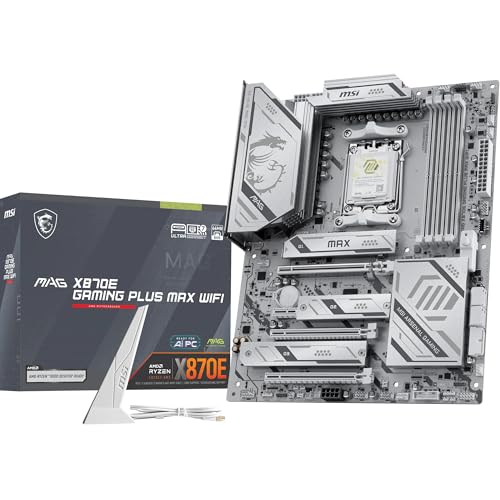
Native support for high-speed DDR5 memory, PCIe 5.0 graphics, and future processor upgrades is the standout benefit. Modern platforms like the MSI MAG X870E Gaming MAX WiFi also provide Wi-Fi 7 and robust VRM power stages. Pairing an AM5 board with the best gaming CPU Ryzen 5 7600 gives you an easy upgrade path for upcoming game releases.
Does installing multiple M.2 NVMe SSDs slow down your primary graphics card?
No, your graphics card retains full bandwidth on motherboards with dedicated CPU lanes. While entry-level chipsets occasionally share lanes across secondary slots, well-designed boards preserve sixteen lanes for the primary PCIe slot. That keeps your GPU running at peak efficiency alongside multiple fast NVMe solid-state storage drives.
Is a Micro-ATX motherboard good enough for a dedicated gaming rig?
Yes, Micro-ATX motherboards offer plenty of capability for single-GPU setups. You get full-speed PCIe slots, four memory channels on many boards, and integrated networking in a smaller footprint. Builders who want a compact desk footprint can easily combine a smaller board with a smooth gaming RX 7600 GPU without thermal bottlenecks.
Is onboard Wi-Fi 6E or Wi-Fi 7 necessary for desktop online gaming?
No, a wired 2.5Gb Ethernet cable is still the gold standard for minimal latency. However, onboard Wi-Fi 6E and Wi-Fi 7 provide reliable wireless connections when your desk sits far from the modem. Built-in wireless also frees up USB ports and PCIe expansion slots for other accessories.




Write Your Review
No reviews yet. Be the first to share your experience!