


Low frame rates and tiny screens can kill the fun fast when you’re trying to enjoy Zelda or Mario Kart on a bigger display. A cramped handheld view just doesn’t cut it for intense races or exploring vast open worlds. That’s why finding the best gaming monitor for nintendo switch matters more than you think. Whether you want a portable monitor for travel or a high-refresh desktop screen for docked play, the right gear transforms your experience. We’ve dug into specs, user feedback, and compatibility notes to bring you 10 top options that cover everything from budget-friendly docks to premium 4K portable monitors. For a deeper look at size considerations, check out our guide on is a 24 inch monitor good for gaming.
Nintendo Switch owners often face a tough choice: stick with the built-in screen or buy an external monitor that actually works with the console’s quirks. Some docks struggle with power delivery, while portable monitors might not support the Switch OLED’s 4K output. We’ve filtered through the noise to highlight products that solve these headaches. From the ARMORR Orion with its integrated dock to the G-STORY 14-inch case for Switch 2, each pick addresses a specific pain point. If you’re also looking to upgrade your desk setup, our best corner desk gaming setup guide can help you organize everything.

Pros
- Large 11.6-inch IPS screen significantly improves the Switch's built-in display for a more immersive experience
- Versatile compatibility with HDMI consoles, laptops, and mobile devices, expanding its use beyond the Switch
- Built-in stereo speakers offer decent audio quality for a portable monitor, enhancing gameplay immersion
- Detachable Ergo Handles add comfort and stability, especially during long gaming sessions
- Easy setup - just dock the Switch and connect power; no complicated installation required
Cons
- Requires external power from the Switch AC adapter or a power bank (not included); without power, the screen shows 'No Signal'
- Limited to 720p HD resolution, which may not satisfy users seeking higher resolutions for other devices
- Not an official Nintendo product, so compatibility and build quality may not match first-party accessories
The ARMORR Orion is a versatile 11.6-inch HD IPS portable monitor designed primarily as a docking station for the Nintendo Switch, but it also works with other HDMI devices like PS5, Xbox, laptops, and even smartphones with iOS 16 or higher. This makes it a flexible addition to any gaming setup, especially for those who want a larger screen for their Switch without investing in a full-sized TV or monitor. The monitor's compact size and lightweight build (just 1.28 pounds) make it easy to transport, while the built-in kickstand and detachable Ergo Handles add convenience and comfort for on-the-go gaming.
For competitive and casual gamers alike, the Orion's 11.6-inch IPS panel offers a noticeable upgrade over the Switch's native 6.2-inch LCD or 7-inch OLED screen. The dynamic contrast and overdrive response time help reduce motion blur, making fast-paced games like racing or action titles feel smoother. However, keep in mind that the resolution is HD (720p), which is fine for the Switch but may not satisfy PC gamers used to higher resolutions on dedicated gaming monitors. The dual 2.5-watt stereo speakers provide decent audio for a portable device, though they lack the bass and clarity of dedicated gaming headsets or external speakers.
Build quality is solid for a portable monitor, with a sturdy plastic frame and a well-designed docking bay that includes airflow vents to prevent overheating during long sessions. The detachable Ergo Handles add a nice touch, providing extra grip and comfort for handheld play, but they may feel a bit bulky for some users. The Orion's HDMI-in port expands its usability beyond the Switch, allowing you to connect it to a laptop for productivity or to a console for a secondary display. This versatility makes it a practical tool for streamers or content creators who need an extra screen for monitoring chat or managing streams.
Setup is straightforward: simply dock your Switch into the Orion and connect power from the Switch AC adapter or a power bank. However, it's important to note that the monitor requires external power to function - without it, the screen will display 'No Signal.' This is a key limitation to consider if you're planning to use it in places without easy access to a power source. The included 3.5mm audio-out jack is a nice addition for private listening, and the kickstand is stable enough for desk use but may not be as secure on uneven surfaces.
One of the Orion's standout features is its ability to serve as a screen replacement for a broken or unresponsive Switch. Instead of repairing or replacing the console, you can simply dock it and use the Orion as your new display - no tools or disassembly required. This is a practical solution for gamers who have a damaged Switch but don't want to buy a new one. However, the Orion is not an official Nintendo product, so compatibility and build quality may not match first-party accessories, and some users may experience minor issues with fit or performance.
Overall, the ARMORR Orion is a solid choice for Switch owners who want a larger, more immersive gaming experience without breaking the bank. It's also useful for streamers, content creators, or work-from-home gamers who need a portable secondary display for their laptop or console. While the power requirement and 720p resolution are drawbacks, the Orion's versatility, ease of use, and reasonable price make it a worthwhile investment for casual gamers and setup builders looking to enhance their gaming station. For those seeking higher resolutions or more advanced features, a dedicated gaming monitor may be a better fit, but for Switch-focused gaming on a budget, the Orion delivers practical value.
Pros
- Compact and lightweight design makes it easy to carry for travel or commutes.
- Plug-and-play connection to Switch without extra cables or adapters.
- Built-in speakers provide acceptable audio for casual gaming sessions.
- Versatile as a secondary monitor for laptops via USB-C, boosting productivity.
- Affordable price point for a dedicated Switch portable monitor.
Cons
- 18650 battery not included, requiring an additional purchase for portable power.
- 10.1-inch screen may feel small for desktop use or extended gaming at a desk.
- Resolution is capped at 1080P, lacking 4K support for other devices.
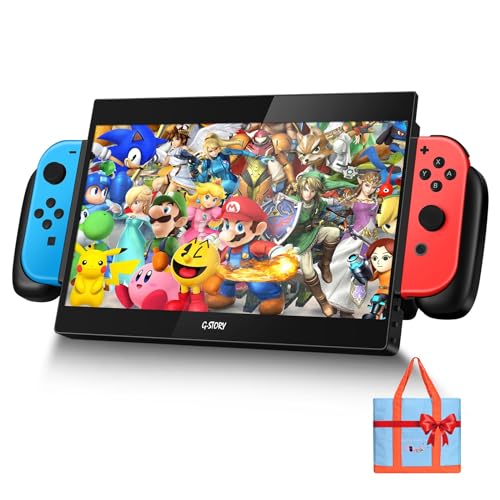
The G-STORY 10.1-inch portable monitor is a specialized gaming accessory designed to enhance the Nintendo Switch experience. It fits into the niche of travel-friendly displays, allowing gamers to enjoy a larger screen without being tethered to a TV. While its primary target is Switch owners, it also functions as a secondary monitor for laptops and USB-C devices, making it a versatile tool for both gaming and productivity.
For PC gamers and streamers, this monitor is best suited as a secondary display for monitoring chats or streaming software, though its small size limits heavy multitasking. Switch gamers will appreciate the direct connection that requires no extra cables - just dock the console into the monitor's built-in slot and play. The 1080P IPS panel provides decent color and clarity for a screen this size, and the built-in 2W speakers add convenience for casual play without headphones.
Performance-wise, the monitor promises lag-free sync with the Switch, which is critical for fast-paced games like Splatoon or Super Smash Bros. While not designed for competitive esports, it's more than adequate for casual gaming on the go. The optional 18650 battery slot (battery sold separately) allows for true portability, letting you play in parks, cafes, or during travel without needing a wall outlet.
Build quality appears solid for a portable device, with a compact frame that fits easily into a backpack. The included random carry bag adds basic protection, though users may want a sturdier case for regular travel. Setup is straightforward: slide the Switch into the monitor's dock, and you're ready to go. Cleaning and maintenance are minimal, but the screen may require occasional wiping due to fingerprints.
A realistic limitation is the screen size - at 10.1 inches, it's not ideal for desktop gaming or for those who prefer larger displays. Also, the reliance on an external battery (not included) means you'll need to budget for that extra purchase if you want unplugged use. For home office gamers or college students, it can serve as a compact secondary monitor for work or study, but don't expect it to replace a full 24-inch or larger display.
Overall, the G-STORY 10.1-inch portable monitor is a practical choice for Switch owners who frequently travel or want a bigger screen for handheld mode. It's also a decent budget secondary monitor for laptops. If you value portability and direct Switch integration over screen size, this monitor delivers on its promises without breaking the bank.

Pros
- High 180Hz refresh rate and 1ms response for ultra-smooth gaming
- Vibrant IPS panel with wide color gamut and HDR support
- G-Sync and FreeSync compatibility for tear-free play on both NVIDIA and AMD GPUs
- Low blue light technology helps reduce eye fatigue without washing out colors
- Brand reliability and solid build quality typical of Alienware monitors
Cons
- Limited ergonomic adjustments (height, pivot, swivel) may require a separate monitor arm
- No built-in speakers, so external audio is needed for full immersion
- Some users may prefer a higher 240Hz+ refresh rate for top-tier esports
The Alienware AW2725DM is a 27-inch QHD gaming monitor that aims to deliver high-performance visuals without breaking the bank. With a 180Hz refresh rate, 1ms gray-to-gray response time, and support for both NVIDIA G-Sync and AMD FreeSync, this monitor is designed for PC gamers who demand fluid, tear-free gameplay in competitive titles like Call of Duty, Valorant, or Apex Legends. The IPS panel offers rich colors and wide viewing angles, making it equally suitable for casual open-world adventures and streaming sessions.
This monitor is best suited for competitive gamers, esports players, and streamers who need fast response times and consistent frame pacing. The QHD resolution (2560x1440) provides a sweet spot between sharpness and performance, allowing modern GPUs to push high frame rates without overloading. Casual gamers and content creators will also appreciate the 95% DCI-P3 color coverage and VESA DisplayHDR 400 certification, which bring out details in games, movies, and photo editing work.
In terms of real-world performance, the 180Hz refresh rate ensures that fast-moving objects remain clear and smooth, while the 1ms response time minimizes ghosting. The inclusion of G-Sync and FreeSync adaptive sync technologies means you can pair this monitor with a wide range of graphics cards and enjoy tear-free gameplay across a variety of game genres. The hardware-based low blue light mode is a practical addition for late-night gaming sessions, preserving color accuracy while reducing eye strain.
Build quality is typical of Alienware's monitor lineup: a sturdy plastic chassis with a metallic finish and slim bezels. The stand offers tilt adjustment, but lacks height swivel or pivot adjustments, which may be a limitation for users who want precise ergonomic positioning. However, the VESA 100x100mm mount allows you to attach a third-party arm or stand for better desk customization. The monitor weighs about 14.5 pounds, so it feels solid on a desk without being too heavy.
Setting up the AW2725DM is straightforward: plug in the power, connect via DisplayPort or HDMI, and the monitor auto-detects the signal. The on-screen display (OSD) menu is intuitive, with controls for brightness, contrast, input switching, and gaming presets. There is no built-in speaker, so you will need external speakers or a headset for audio. Cable management is decent, with a small cutout in the stand for routing cables, though a full cable cover is not included.
Overall, the Alienware AW2725DM is a compelling choice for PC gamers who prioritize high refresh rates and vivid image quality at a reasonable price point. While it may lack advanced ergonomics and built-in audio, its core performance features make it a strong contender for competitive play and everyday gaming. If you are building a mid-range to high-end gaming setup or need a reliable secondary monitor for streaming, this monitor delivers excellent value without compromise.
The AW2725DM excels in fast-paced gaming thanks to its 180Hz refresh rate and 1ms response time. Combined with G-Sync and FreeSync support, screen tearing and stuttering are virtually eliminated, providing a buttery-smooth experience in competitive shooters, battle royales, and racing games. The QHD resolution helps maintain high frame rates on modern GPUs while offering a noticeable sharpness upgrade over 1080p. For esports titles where every millisecond counts, this monitor delivers the responsiveness needed to stay ahead.
The IPS panel on the Alienware AW2725DM covers 95% of the DCI-P3 color space and achieves VESA DisplayHDR 400 certification. This means vibrant colors, deep blacks, and good contrast for HDR content. The 27-inch size is a sweet spot for both immersive gaming and productivity, with wide viewing angles that keep colors accurate from any position. Whether you are editing video, playing open-world RPGs, or watching streams, the display quality holds up well against more expensive monitors.
The monitor features a classic Alienware design with a dark gray finish and slender bezels. The stand provides tilt adjustment but lacks height, swivel, and pivot functions. That said, the VESA mount compatibility (100x100mm) lets you easily attach a monitor arm for full ergonomic control. The overall construction feels sturdy, and the unit weighs a manageable 14.5 pounds. Cable management is basic but functional, with a small opening in the stand to route cables neatly.

Pros
- Versatile resolution/refresh options: 4K@60Hz for clarity, 1080P@120Hz for smoothness.
- Integrated carry case simplifies storage and transport – no extra bag needed.
- IPS panel delivers accurate colors and wide viewing angles for gaming and content creation.
- Broad device compatibility: Switch 2, PS5, Xbox Series, PC, laptops – one screen for all.
- Shock-resistant build gives peace of mind during travel.
Cons
- 14-inch screen may feel small for extended desktop gaming compared to larger monitors.
- Weight of nearly 7.8 pounds makes it less ideal for minimal carry setups.
- Limited to one USB-C/HDMI input – no built-in battery so requires external power or host device.
The G-STORY 14-inch Portable Monitor Case is built for gamers who refuse to leave their high-performance setup behind. While it’s specifically optimized for the Nintendo Switch 2, this all-in-one solution works with Switch 1, PS5, Xbox Series, PC, and laptops via HDMI, making it a versatile travel companion for any gaming platform. The integrated carrying case holds your console, controller, and cables alongside the monitor, so you can grab one bag and go.
For gamers who prioritize fluidity, the ability to switch between 4K@60Hz and 1080P@120Hz is a standout feature. You get crisp 4K visuals for single-player RPGs or cinematic open-world games, and 120Hz smoothness for fast-paced shooters and esports titles. The IPS screen provides decent color accuracy and viewing angles, which helps whether you’re editing a stream overlay or playing a colorful platformer. Input latency is low enough for competitive play at 1080P 120Hz, based on product specifications.
Build quality centers around practicality. The carrying case is reinforced and shock-resistant, protecting the monitor and your Switch 2 from the bumps of daily travel. It’s not intended for extreme abuse, but it offers solid protection for dorm rooms, commutes, or LAN parties. The 14-inch size is a compromise: it’s small enough to slide into a backpack but large enough for gaming sessions on a desk or in a coffee shop. At about 7.8 pounds, it’s heavier than a bare monitor, but that’s because the case is built-in.
Setup is genuinely plug-and-play. There are no drivers to install; just connect your device via HDMI, and the monitor powers on. This simplicity extends to streaming setups – you can add it as a secondary display for Twitch chat, Discord, or OBS previews without hassle. For work-from-home use, it doubles as a portable second screen for productivity tasks.
One limitation to keep in mind is the single HDMI input and lack of a built-in battery. The monitor draws power from your host device or a USB-C power source, so you’ll need to plan for a power bank or plug near your gaming spot. Also, while 14 inches is great for portability, it won’t replace a full-size primary monitor for extended gaming sessions at a desk.
Overall, this portable monitor case is best suited for gamers who frequently travel, college students in dorms, or streamers who want a compact second screen. It’s also a practical gift for Switch 2 early adopters. If you value convenience, dual-resolution flexibility, and shock-resistant protection over screen size and weight savings, the G-STORY is a solid investment.

Pros
- Compact and portable design fits easily in a bag for travel or storage
- One-handed adjustment lets you change viewing angles quickly during intense gameplay
- Sturdy construction holds both Switch and Pro Controller securely without wobble
- Works in handheld and tabletop modes for flexible use at home or on the go
- Streamlines your desk setup by keeping your Switch and controller organized and accessible
Cons
- Only compatible with Nintendo Switch and Pro Controller, not for other consoles or PC accessories
- No built-in cable management or charging pass-through, so wires may still clutter the desk
- Limited color options may not appeal to all gamers, and the gray finish shows smudges easily
The Fixture S1 is a dedicated mount and stand designed primarily for the Nintendo Switch and its Pro Controller. While it's not a traditional PC gaming accessory, it's an excellent addition for PC gamers who also enjoy console gaming or stream Switch titles alongside their PC setup. This mount fills a niche for those who want a stable, adjustable platform for their Switch during tabletop play, whether at home, in a dorm, or on the road.
Targeted at casual and competitive Switch gamers, streamers, gaming setup builders, and even college gamers, the S1 focuses on ergonomics and portability. Its patented two-axis adjustment allows you to tilt and rotate the display with one hand, helping you find the perfect angle for comfortable viewing. This is especially useful during long handheld sessions or when using the Switch as a secondary screen for Discord or game guides on a desk.
In terms of performance, the mount provides a rock-solid grip on both the Switch and Pro Controller. The clamp mechanism is secure yet easy to engage, so your device stays put even during intense multiplayer action. For streamers, this stability means no wobble when tapping the screen or reaching for a drink. The transition between handheld and tabletop mode is seamless, so you can quickly share the screen with friends or prop it up for a better view.
Build quality feels durable, with a plastic and metal construction that avoids creaking or flexing. The folding design is practical for travel, collapsing flat to fit in most laptop bags. Setup is straightforward: just clip the device in and adjust the angle. No tools or software required. However, there's no built-in cable routing, so charging cables may dangle loosely unless you manage them separately. The gray color is low-profile but prone to fingerprints.
While the Fixture S1 excels as a Switch accessory, its limitation is obvious: it doesn't work with other consoles, tablets, or phones. If you're looking for a multi-device stand, you'll need a different product. Also, the price point of around $40 is reasonable for the build quality and convenience, but budget-conscious gamers might find alternative solutions. That said, for dedicated Switch players—especially those who stream or game on the go—the S1 offers a tangible upgrade in comfort and desk organization.
Overall, the Fixture S1 is a practical purchase for any gamer who wants to elevate their Switch experience. It's particularly well-suited for streamers using a capture card to broadcast Switch gameplay, as it keeps the console stable and at a good camera angle. Casual players will appreciate the portability and ease of use, while competitive players will like the quick adjustability for tournaments or LAN parties. If you're a PC gamer who also loves Splatoon or Mario Kart on the Switch, this mount is a smart desk companion.

Pros
- High 160Hz refresh rate at an affordable price point.
- Excellent contrast ratio (3000:1) for deep blacks and vivid colors.
- 1500R curve adds immersion without being too aggressive.
- VESA mountable for flexible desk arrangements.
- Includes HDMI cable out of the box.
Cons
- Only 1080p resolution - not ideal for those wanting higher pixel density.
- No built-in speakers, so external speakers or headset required.
- Limited ergonomic adjustment - tilt only, no height or swivel.
The SANSUI ES-G24C1L is a 24-inch curved gaming monitor designed to deliver a high-refresh-rate experience without the premium price tag. With a 160Hz refresh rate and 1ms MPRT response time, this monitor targets competitive gamers who need smooth motion clarity in fast-paced titles like Valorant, Apex Legends, or Call of Duty. Its 1500R curvature helps wrap the screen around your peripheral vision, making it a solid pick for immersive single-player adventures as well.
Under the hood, the VA panel offers a 3000:1 contrast ratio, which is significantly higher than typical IPS monitors in this price range. This means deeper blacks and better shadow detail, especially useful for horror games or dark scenes in RPGs. The 110% sRGB color gamut ensures colors are vibrant, though it's not as wide as some higher-end displays. HDR support is present but limited by the 300-nit brightness - it's more of a bonus than a true HDR experience.
For connectivity, you get one HDMI 2.0 and one DisplayPort 1.4, both capable of running 1080p at 160Hz. There's also a 3.5mm audio jack for connecting headphones or external speakers. The monitor supports FreeSync, which reduces screen tearing when paired with compatible AMD or NVIDIA GPUs. VESA 75x75mm mounting is supported, allowing you to attach it to an arm for a cleaner desk setup.
Build quality is typical for budget monitors: a plastic frame with a simple stand that offers tilt adjustment (-5 to 15 degrees) but no height, swivel, or pivot. The screen has a matte anti-glare coating that helps reduce reflections in bright rooms. Setup is straightforward - just attach the stand, plug in the included HDMI cable, and you're ready to go. The on-screen display (OSD) is controlled via buttons and includes gaming features like crosshair overlay, game timer, and black level adjustment.
One limitation is the lack of built-in speakers, so you'll need external audio. Also, the 1080p resolution on a 24-inch screen is standard but may not satisfy users accustomed to higher pixel density. The stand's limited ergonomics could be a drawback for those who need height adjustment for proper posture during long sessions.
Overall, the SANSUI 24-inch curved monitor is a great value for budget-conscious PC gamers, esports players, and streamers who prioritize high refresh rate and good contrast over resolution. It's also suitable for college gamers setting up a dorm room or anyone building a secondary gaming rig. If you're looking for an affordable way to step up from a standard 60Hz monitor, this is a solid choice.
The 160Hz refresh rate combined with 1ms MPRT makes this monitor well-suited for competitive gaming. In fast-paced shooters, motion blur is minimized, and tracking targets feels responsive. FreeSync helps maintain a tear-free experience, especially when frame rates fluctuate. The VA panel's high contrast also helps spot enemies in dark corners. However, VA panels can exhibit some black smearing in very dark transitions, though at this price point it's acceptable. For casual gaming and single-player titles, the curvature adds to the immersion.

Pros
- Extremely portable and lightweight, perfect for gaming on the go or travel.
- Supports 4K/60Hz output for Steam Deck, enhancing visual clarity in games.
- Easy setup with no software needed; just plug in and play.
- Affordable alternative to the bulky original Switch dock.
- Built-in safety features protect your console during charging and gameplay.
Cons
- Does not support Nintendo Switch Lite, limiting compatibility for some users.
- Requires a 15V/2.6A PD wall charger and HDMI cable (not included) for operation.
- USB 3.0 port may not be sufficient for high-power accessories like external drives without additional power.
The pdobq Switch Dock is a practical accessory for Nintendo Switch and Steam Deck owners who want a more portable and space-saving alternative to the original dock. This compact docking station transforms your handheld console into a TV gaming powerhouse with support for 4K/60Hz output on Steam Deck and 1080p/60Hz on Nintendo Switch. It’s designed for gamers who value flexibility and convenience whether they are at home, in a dorm room, or traveling.
For PC gamers and streamers who also enjoy console gaming, this dock offers a seamless way to switch between setups. The plug-and-play functionality means you can connect it to any HDTV, monitor, or projector with an HDMI port and start gaming in seconds. The included USB 3.0 port allows you to connect a wired controller or USB drive, making it easier to manage game captures or use accessories during long sessions. The PD charging port ensures your console stays powered while you play, so you never have to worry about battery life during intense gaming marathons.
Build quality is solid for its price point, with a compact plastic housing that feels durable enough for regular travel. The dock’s small footprint helps reduce desk clutter, which is a big plus for gamers with limited space. While it lacks the premium feel of metal docks, the pdobq dock gets the job done without adding extra weight to your bag. The latest voltage and current control technology provides peace of mind by protecting your console from power surges.
Setup is straightforward: just connect a 15V/2.6A PD charger and an HDMI cable to the dock, plug the USB-C output into your Switch or Steam Deck, and select the correct HDMI input on your TV. The screen typically lights up within 3 to 8 seconds, so you are not left waiting. This simplicity makes it a great option for casual gamers, college students, or anyone who wants a hassle-free way to play on a big screen.
One realistic limitation is that the dock does not support Nintendo Switch Lite, so it is only compatible with the standard Switch, Switch OLED, and Steam Deck. Additionally, you need to supply your own power adapter and HDMI cable, which might be an inconvenience if you are packing light. The USB 3.0 port also lacks high-power delivery for demanding accessories, but it works fine for basic peripherals like a controller or flash drive.
Overall, the pdobq Switch Dock is a reliable and affordable solution for gamers who want a portable TV adapter for their Switch or Steam Deck. It is especially useful for esports players who practice on console and PC, streamers who need quick setup changes, or casual gamers who want to enjoy multiplayer games on a larger screen without the bulk of the original dock. For the price, it delivers solid performance and convenience that fits well into any gaming desk or travel kit.

Pros
- Compact and lightweight for easy portability during travel or LAN parties.
- Affordable price point compared to Nintendo's official dock, great for budget setups.
- Supports 4K output with compatible devices for sharper visuals on modern TVs.
- Simple plug-and-play operation with no extra software or drivers needed.
- Versatile compatibility with multiple USB-C devices beyond just the Switch.
Cons
- Requires the original Nintendo Switch charger to function properly; third-party chargers may cause issues.
- Does not support Switch 2 (2025 version) or Switch Lite, limiting future-proofing.
- Only outputs 1080P on the original Switch, which may disappoint users expecting 4K on all models.
The Herfair Switch Docking Station is a handy USB-C to HDMI adapter designed to turn your Nintendo Switch or Steam Deck into a console-like experience on your TV or monitor. If you're a casual gamer, college student, or traveler who wants to play on a big screen without lugging around the bulky official dock, this compact cable is a practical solution. It's not a full dock with extra USB ports, but for pure video output, it gets the job done.
For U.S. PC gamers and gaming setup builders, this adapter is best suited for those who already have a Switch or Steam Deck and want a simple way to connect to a monitor or TV for multiplayer sessions or solo gaming. Competitive and esports players might not find it essential, but casual gamers and streamers who use a Switch for party games or retro titles will appreciate the convenience. It's also a solid pick for college gamers who need a portable setup for their dorm room.
In terms of real-world performance, the adapter delivers reliable 4K@30Hz output when paired with a Switch OLED, or 1080P with the original Switch. That's fine for most games, but if you're used to high-refresh-rate monitors on your gaming PC, the 30Hz cap might feel sluggish for fast-paced titles. On the plus side, audio passes through cleanly, so you won't miss any dialogue or sound effects during gaming sessions. Setup is straightforward: just plug the original charger into the adapter, connect it to your Switch, and plug the HDMI into your display. No software or drivers needed.
Build quality is decent for the price. The 6.5ft cable is long enough to reach from your desk to a TV, and the blue color adds a subtle pop to your gaming setup. The connector feels sturdy, but it's not reinforced like premium cables, so you'll want to handle it with care during travel. The lightweight design is great for tossing into a carrying case, but it also means the adapter might not sit as securely as a full dock. There's no cable management feature built in, but the simple design keeps things tidy.
One realistic limitation is that this adapter only works with the original Nintendo charger or a high-quality USB-C power source. Using a random third-party charger might cause connection issues or no display at all. Also, it's not compatible with the upcoming Switch 2 (2025 version) or Switch Lite, so if you plan to upgrade, this won't carry over. For Steam Deck users, it works well as a display adapter, but you'll still need a separate solution for charging while playing.
Overall, the Herfair Switch Docking Station is a budget-friendly option for gamers who want a second dock for travel or a different room without spending $60+ on the official one. It's not for hardcore competitive players or those needing extra ports, but for casual gaming sessions, streaming party games, or setting up a quick gaming corner in your dorm, it's a reliable choice. Just remember to keep your original charger handy.

Pros
- Very lightweight and slim, ideal for travel or carrying in a laptop bag
- Spring-loaded guide notch adds peace of mind for repeated docking
- Affordable alternative to the official Nintendo Switch 2 dock
- Works well for tabletop and TV modes with easy mode switching
- Multiple USB ports expand connectivity options
Cons
- Requires use of the official Nintendo Switch 2 power adapter (not included)
- Not compatible with any protective case on the Switch 2 due to tight fit
- Only supports the Nintendo Switch 2 (2025) model, not older Switch versions
The SIWIQU dock station is a third-party replacement designed exclusively for the Nintendo Switch 2 (2025 model). It provides a portable, lightweight alternative to the official dock, making it a practical choice for gamers who want a secondary dock for travel, a dorm room, or a different TV in the house. The dock supports 4K@60Hz output (via its 4K@120Hz capable HDMI adapter) and includes two USB 2.0 ports plus a USB-C port, allowing you to connect wired controllers, a LAN adapter, or other accessories while charging.
For U.S. PC gamers and gaming setup builders who also own a Switch 2, this dock can be a convenient addition to a desk setup. Its small footprint (7.5 x 2.3 x 1.3 inches) and low weight (0.24 lb) mean it won't clutter your gaming space. The spring-loaded guide notch is a thoughtful design element that helps prevent wear on the console's USB-C port over time, which is a common concern for frequent dock users. However, note that the dock fits snugly without any protective case on the Switch 2, so you'll need to remove cases before docking.
Performance-wise, the dock delivers stable video output up to 4K@60Hz (the Switch 2's max supported resolution) and also supports 1080p. The one-touch button to switch between TV and tabletop modes is straightforward and responsive. The built-in smart chip provides multiple protection layers, including short-circuit and over-heating protection, which adds peace of mind for long gaming sessions. Since the dock uses the official power adapter, charging performance is identical to the original dock.
Build quality is solid for the price point, with a sturdy plastic construction and anti-skid pads on the bottom to keep it in place. The red and blue color scheme matches the Switch 2's aesthetic. One realistic limitation is that the dock does not include a power cable or charger, so you must have the official Nintendo Switch 2 adapter. Additionally, the USB ports are USB 2.0, which may be slower for data transfers but sufficient for controllers or a LAN adapter.
Setting up the SIWIQU dock is simple: connect the official power adapter, plug in an HDMI cable, and insert the Switch 2. No drivers or software are needed. Maintenance is minimal just keep the vent areas clear and avoid dust buildup. The compact design makes it easy to store in a backpack or drawer when not in use.
Overall, this dock is a practical and budget-friendly choice for Nintendo Switch 2 owners who want a portable or secondary dock. It's best suited for gamers who travel, stream from different rooms, or want to keep a dedicated dock at a desk setup without paying for an expensive official second dock. While it won't replace the official dock for everyone due to the lack of a built-in cable and case incompatibility, it offers solid value and reliable performance for the price.
Pros
- High 165Hz refresh rate and 1ms VRB response time ideal for esports and fast-paced shooters
- VA panel delivers better contrast and black levels than typical IPS at this price point
- FreeSync Premium works smoothly with compatible AMD GPUs for tear-free gaming
- ZeroFrame design looks clean and works well for dual-monitor setups
- Affordable price makes it accessible for budget-conscious gamers and college students
Cons
- Only 23.8-inch size may feel small for immersive single-player or open-world games
- No height adjustment or swivel stand – limited ergonomics without a VESA arm
- Built-in speakers are not included, requiring external audio for console or casual use
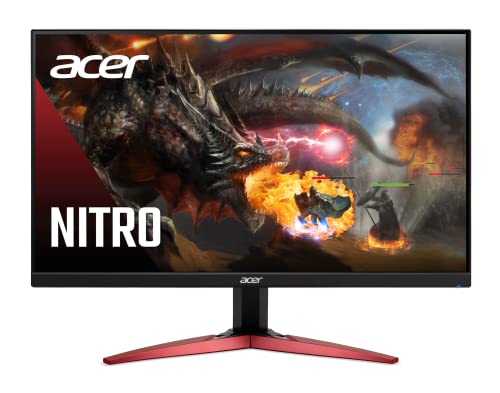
The Acer Nitro KG241Y Sbiip is a 23.8-inch Full HD VA gaming monitor designed for PC gamers who want high performance without breaking the bank. It targets competitive gamers, esports players, and casual users who need a fast, responsive display for titles like Valorant, Fortnite, or Call of Duty. Its 165Hz refresh rate and 1ms VRB response time ensure minimal motion blur and smooth visuals, giving you an edge in fast-paced matches.
In real-world gaming, the combination of AMD FreeSync Premium and a VA panel stands out. FreeSync Premium synchronizes the monitor's refresh rate with your GPU to eliminate screen tearing, while the VA technology delivers deeper blacks and better contrast than many TN or IPS panels at this price. Colors are decent at 72% NTSC, though not as vibrant as higher-end monitors. For competitive play, the 165Hz feels snappy, and 1ms VRB helps reduce ghosting during rapid movements.
Build quality is solid for a budget monitor. The ZeroFrame design with thin bezels looks modern and works well in multi-monitor setups. The stand offers only tilt adjustment (-5° to 15°), so you may want to invest in a VESA mount (100x100mm) for better ergonomics. The monitor is lightweight at about 8.4 pounds, making it easy to position on a desk or wall.
Setup is straightforward: plug in the included HDMI cable or use DisplayPort for full 165Hz support. The on-screen display menu is simple to navigate, though it lacks advanced gaming features like crosshairs or built-in speakers – something to note if you plan to use it with consoles without external audio. Cable management is basic since the ports are rear-facing, but the compact size helps keep your desk tidy.
A realistic limitation is the lack of height adjustment and USB ports. For long gaming sessions, you might need to tweak your desk setup or add a monitor arm. Also, the VA panel has slightly slower pixel response than some TN panels, but the 1ms VRB compensates in most scenarios. Overall, this monitor offers excellent value for budget-conscious gamers, especially those building a first gaming PC or upgrading from a 60Hz display.
I recommend the Acer Nitro KG241Y for competitive PC gamers on a tight budget, esports players who prioritize refresh rate, and college gamers looking for a reliable monitor for dorm setups. It's also a good secondary display for streamers who need a fast panel for gameplay monitoring. If you need height adjustment or built-in audio, consider other options, but for pure gaming performance at this price, it's hard to beat.
The Acer Nitro KG241Y delivers strong gaming performance for its price. The 165Hz refresh rate provides fluid motion, and the 1ms VRB response time reduces ghosting during fast scenes. AMD FreeSync Premium ensures tear-free gameplay on compatible AMD GPUs, with a variable refresh rate range that covers typical frame rates in competitive titles. In shooters like Overwatch or Apex Legends, the monitor feels responsive and snappy, giving you a clear advantage. The VA panel offers good contrast for dark scenes, making it easier to spot enemies in shadows.
This monitor uses a VA panel with a 1920x1080 resolution and 72% NTSC color saturation. Blacks are deep and contrast is higher than typical IPS panels, which enhances immersion in games with dark environments. Viewing angles are decent but not as wide as IPS, so colors shift slightly when viewed from the side. Brightness is adequate for indoor use, but it's not HDR-capable despite being labeled 'HDR Ready' – it can accept HDR signals but won't display true HDR. For everyday gaming and media consumption, the image quality is solid for the price.
Frequently Asked Questions
Can any gaming monitor work with Nintendo Switch?
Yes, most monitors with an HDMI port work, but you need a dock or USB-C to HDMI adapter for the Switch. The console outputs 1080p when docked, so a full HD monitor is sufficient. For Switch OLED, some docks support 4K upscaling. Always check compatibility with your specific Switch model.
Do portable monitors for Switch need external power?
Most portable monitors require power from the Switch charger or a power bank. Models like the ARMORR Orion explicitly state you must plug in the AC adapter, otherwise you’ll see “No Signal”. Some, like the G-STORY 10.1-inch, use a removable 18650 battery (not included) to keep the Switch charged while playing.
What is the best refresh rate for Switch gaming?
The Switch itself outputs at 60Hz max, so a 60Hz monitor is perfectly fine. However, a higher refresh rate monitor (like 120Hz or 165Hz) can reduce input lag and be future-proof for other consoles or PC gaming. The Acer Nitro KG241Y with 165Hz is a great choice if you also play on other devices.
Can I use a gaming monitor with Nintendo Switch 2?
Yes, but only docks explicitly labeled for Switch 2 will work. The SIWIQU Switch 2 Dock supports 4K@120Hz output, but it’s not compatible with original Switch or OLED. For a portable solution, the G-STORY 14-inch monitor case is optimized for Switch 2 and also works with older models via HDMI.
Do I need a special cable to connect Switch to a monitor?
You need a USB-C to HDMI adapter or a dock. The Herfair Switch Docking Station is a compact cable that does the job for $7.99, but it requires the original charger. For better stability, a full dock like the pdobq Switch Dock includes extra USB ports and supports 4K upscaling.
Are curved monitors good for Nintendo Switch?
Curved monitors can be immersive, but the Switch’s 1080p output may look softer on larger curved screens. A 24-inch 1500R curved monitor like the SANSUI ES-G24C1L works well for desk setups, offering 160Hz for other gaming. Just remember the Switch won’t benefit from the high refresh rate.
What is the most affordable way to play Switch on a big screen?
The cheapest option is a USB-C to HDMI adapter like the Herfair at $7.99, but you’ll need the official charger. For a more reliable experience with extra ports, the pdobq Switch Dock at $16.99 is a solid budget pick. Both support 1080p output and are travel-friendly.




Write Your Review
No reviews yet. Be the first to share your experience!