


Desk space limitations often push competitive PC players to reconsider oversized screen setups. Packing ultra-high definition into a compact chassis elevates pixel density, rendering clean textures and distinct crosshairs without distracting aliasing. Scanning your peripheral vision takes minimal neck motion on a smaller screen, keeping focus locked during fast firefights. Exploring the Best 24 Inch 4k Gaming Monitor category shows how tight pixel pitch elevates motion tracking and visual clarity. Driving that dense pixel count requires capable graphics cards for gaming with sufficient VRAM to sustain steady frame rates.
Panel responsiveness remains just as critical as raw visual sharpness for high-stakes competition. Modern Fast IPS panels, rapid response times, and adaptive sync eliminate ghosting and screen tearing during split-second engagements. Many esports enthusiasts favor compact screens over bulky setups because all HUD data remains in direct line of sight. Combining high pixel density with fluid refresh rates bridges the gap between cinematic fidelity and competitive speed. Gamers seeking dedicated monitors for FPS gaming often find this compact format delivers excellent visual control.

Pros
- High 180Hz refresh rate and 1440p resolution for competitive gaming.
- Fast IPS panel with excellent color accuracy and HDR400.
- Fully adjustable stand with height, tilt, and pivot.
- Affordable price point for a QHD high-refresh monitor.
Cons
- HDMI limited to 144Hz; DisplayPort required for full 180Hz.
- No built-in speakers, so external audio needed.
- Limited to 24-inch size which may be small for some users preferring larger screens.
The KTC H24T7 is a 24-inch QHD gaming monitor designed for PC gamers who want high refresh rates without breaking the bank. With a 2560x1440 resolution and a Fast IPS panel, it offers sharp visuals and smooth motion. The 180Hz refresh rate (overclockable to 185Hz) combined with Adaptive Sync support makes it a solid choice for competitive gamers playing fast-paced titles like Valorant or Call of Duty.
This monitor is best suited for competitive gamers, esports players, and gaming setup builders who prioritize responsiveness and clarity. The QHD resolution provides more screen real estate than 1080p, while the 24-inch size keeps pixel density high for crisp text and details. Casual gamers and content creators will also appreciate the 99% sRGB coverage and HDR400 support for vibrant colors.
In real-world gaming, the high refresh rate ensures fluid motion, and the Fast IPS panel delivers low input lag. Adaptive Sync (compatible with FreeSync and G-Sync) eliminates screen tearing without introducing stutter. The DisplayPort 1.4 connection is required to hit the full 180Hz, while HDMI 2.0 caps at 144Hz. For console gamers, the monitor works well with PlayStation or Xbox at 1440p 120Hz.
Build quality is solid with a fully adjustable stand that includes height adjustment, tilt, pivot, and VESA mount compatibility. This makes it easy to find a comfortable viewing angle or integrate into a multi-monitor setup. The monitor also features low blue light, anti-glare, and flicker-free technology to reduce eye strain during long sessions. The thin bezels give it a modern look that fits well on any desk.
Setup is straightforward: attach the stand, connect via DisplayPort or HDMI, and adjust settings via the on-screen display. The monitor lacks built-in speakers, so you'll need external speakers or a headset. The 24-inch size is compact enough for smaller desks, and the VESA mount allows for space-saving arm setups.
One limitation is that the HDMI ports are limited to 144Hz, so PC gamers who want the full 180Hz must use DisplayPort. Additionally, some users may prefer a larger screen for immersive gaming. Overall, the KTC H24T7 offers excellent value for budget-conscious gamers who want a high-refresh QHD monitor with good ergonomics and color performance. It's a practical choice for competitive play and everyday use.
The KTC H24T7 delivers a 180Hz refresh rate with overclock to 185Hz, ensuring ultra-smooth motion in fast-paced games. Adaptive Sync support reduces tearing and stutter. The Fast IPS panel provides fast response times, making it ideal for competitive shooters and MOBAs. QHD resolution offers a good balance between performance and visual detail, allowing mid-range GPUs to push high frame rates.
The monitor features a sturdy stand with height adjustment, tilt, and pivot for flexible positioning. The VESA 100x100mm mount allows for aftermarket arms. The build feels solid with minimal bezels. The on-screen display menu is easy to navigate. The included cables are basic but functional. The overall design is sleek and professional.

Pros
- High refresh rate (144Hz O/C) and 1ms MBR for smooth, responsive gameplay.
- Vibrant IPS colors with HDR10 and wide sRGB coverage.
- Adaptive sync support works with both NVIDIA and AMD GPUs.
- Useful gaming features like Crosshair, Black Stabilizer, and Dynamic Action Sync.
- Affordable price point for a feature-rich 24-inch gaming monitor.
Cons
- 1ms MBR is motion blur reduction, not true 1ms GtG response time; some motion blur may still be noticeable.
- 24-inch size may feel small for gamers preferring larger immersive displays.
- Tilt-only stand lacks height and swivel adjustments, limiting ergonomic flexibility.
The LG 24G411A-B UltraGear gaming monitor is a 24-inch Full HD (1920x1080) IPS display designed for gamers who want a responsive, color-accurate screen without breaking the bank. It features a native 120Hz refresh rate that can be overclocked to 144Hz, along with 1ms Motion Blur Reduction (MBR) to keep fast-moving action sharp. This monitor is best suited for competitive and casual PC gamers, esports players, and streamers who need a reliable, low-latency display for FPS, MOBA, and racing titles. Its compact size also makes it a great fit for college gamers, work-from-home setups, or anyone with a smaller desk.
In real-world gaming, the 144Hz overclocked refresh rate and 1ms MBR work together to deliver smooth, fluid visuals that reduce motion blur and ghosting. Combined with NVIDIA G-Sync Compatibility and AMD FreeSync, screen tearing and stuttering are virtually eliminated, giving you a competitive edge in fast-paced matches. The Dynamic Action Sync feature further reduces input lag, helping you react quicker in-game. For FPS players, the built-in Crosshair overlay provides a handy accuracy boost without modifying game settings.
The IPS panel offers vibrant HDR10 color with up to 99% sRGB coverage, making games look rich and lifelike. Blacks are decent for an IPS display, and the Black Stabilizer helps brighten dark areas so you can spot enemies hiding in shadows. Color accuracy is solid out of the box, which is a bonus if you also do light photo editing or content creation.
Build quality is typical for LG's UltraGear line - a slim, plastic body with a minimal bezel that looks clean on any desk. The stand is simple and tilt-adjustable but lacks height, swivel, or pivot adjustments, so you may want to invest in a VESA-compatible arm (100x100mm) for better ergonomics. Connectivity includes HDMI and DisplayPort, which cover most modern GPUs and consoles, but there's no USB hub or built-in speakers.
Setup is straightforward: plug in the cables, attach the stand with a few screws, and you're ready to go. The on-screen display (OSD) is intuitive, and the LG Switch app makes it easy to split your screen into multiple sections for multitasking during streams or work. The slim footprint and lightweight design (7.3 pounds) make it easy to move or mount.
While the 24-inch size and tilt-only stand may limit some users, the LG 24G411A-B offers excellent value for budget-conscious gamers who prioritize high refresh rates and adaptive sync. It's a practical choice for competitive play, casual gaming, and even light productivity, making it a versatile addition to any gaming setup.
Pros
- 4K IPS panel delivers excellent color accuracy and detail for content creation and casual gaming.
- Multiple input options including Type-C make it compatible with modern laptops, consoles, and PCs.
- VESA mountable and compact size suit tight desk arrangements and multi-monitor gaming setups.
- Eye-care features help reduce fatigue during long hours of use.
- Cost-effective price point for a 4K IPS monitor with built-in speakers.
Cons
- 60Hz refresh rate and 5ms response time are not ideal for competitive esports or fast-paced FPS gaming.
- Built-in speakers are basic and may lack the bass and volume needed for immersive gameplay.
- Wall mount hardware is not included, adding a small extra cost for those aiming to mount.
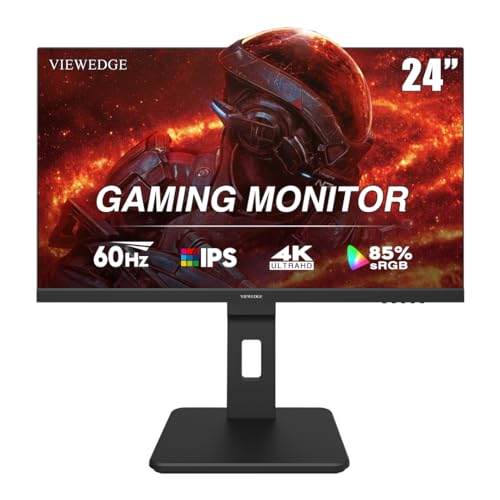
The Viewedge 24-inch 4K UHD IPS monitor is designed to bridge the gap between professional-grade visuals and everyday computing, making it a versatile option for PC gamers, streamers, content creators, and work-from-home users. While it doesn't target the high-refresh-rate crowd, its 4K resolution and IPS panel shine in scenarios where detail and color accuracy matter most.
Best suited for casual gamers, college gamers, and streamers who prioritize resolution over refresh rate, this monitor excels in open-world RPGs, strategy games, and creative applications like photo editing or video production. The 60Hz refresh rate and 5ms response time handle most titles smoothly, but competitive players focused on fast-paced shooters or MOBAs might find it lacking. For Twitch streamers displaying detailed dashboards or editing 4K content, the clarity is a clear advantage.
Real-world performance centers on visual clarity and connectivity. The 3840x2160 resolution delivers crisp text and fine details, while the IPS panel ensures consistent colors up to 178 degrees. The built-in speakers provide convenient audio for quick sessions or background video, though they're not a replacement for dedicated gaming headsets or external speakers. Connectivity options include two HDMI ports, one DisplayPort, and a USB Type-C port (with cables included), making it easy to switch between a gaming PC, console, and laptop.
Build quality is solid for the price point, with a sturdy stand and slim bezels that look clean on a desk. The VESA 100x100mm mount support lets you save space by wall-mounting or using a monitor arm, which is especially useful for compact gaming setups or dorm rooms. The flicker-free backlight and blue light filter are practical additions for long gaming sessions or late-night work, reducing strain without washing out colors too much.
Setup is straightforward: plug in the included cables, adjust the tilt, and you're ready. The on-screen display menu is simple to navigate, though it lacks advanced gaming features like crosshairs or frame rate counters. The monitor's 24-inch size is a sweet spot for those with limited desk space, fitting comfortably alongside a second monitor for a multi-display streaming or productivity layout. Cleaning and maintenance are minimal thanks to the matte finish that resists fingerprints and glare.
Realistic limitations include the 60Hz cap, which won't satisfy competitive gamers chasing 144Hz or higher, and the basic speaker quality. Additionally, the stand offers tilt but no height or swivel adjustment, so you may need a VESA mount for ergonomic positioning. Overall, the Viewedge 4K monitor is a strong buy for casual gamers, streamers, and creators who want sharp visuals on a budget, but esports players should look elsewhere for higher refresh rates.

Pros
- High 240Hz refresh rate combined with 1440p resolution offers excellent balance of speed and clarity for competitive gaming
- Fast IPS panel delivers wide viewing angles and consistent color accuracy for both gaming and productivity
- HDMI 2.1 and DisplayPort 1.4 provide modern connectivity for high-frame-rate gaming on PC and consoles
- Compact 24.5-inch size is ideal for smaller desks or dual-monitor setups without sacrificing image quality
Cons
- Built-in speakers are basic and won't replace dedicated gaming headsets or external speakers for immersive audio
- Stand offers tilt adjustment only, with no height or swivel adjustments, which may limit ergonomic positioning for some users
- Limited to 240Hz via DisplayPort 1.4; HDMI may cap at lower refresh rates depending on device and resolution settings
The INNOCN 25G2S is a 24.5-inch Fast IPS gaming monitor that brings together a high-resolution QHD 1440p display with a blistering 240Hz refresh rate. Designed for PC gamers, competitive esports players, and streaming enthusiasts, this monitor aims to deliver both speed and visual clarity without breaking the bank. With its compact size and modern connectivity options including HDMI 2.1 and DisplayPort 1.4, it fits well into a variety of gaming setups from dorm rooms to dedicated desktop battlestations.
At the heart of this monitor is its Fast IPS panel, which provides a 1ms response time and G-Sync compatibility for a tear-free experience during fast-paced games like first-person shooters and real-time strategy titles. The 1440p resolution offers a noticeable step up from 1080p, delivering sharper details and more screen real estate for both gaming and productivity tasks. The 99% sRGB color coverage ensures that colors look rich and accurate, which is a bonus for content creators who also use their setup for photo or video work.
Build quality is solid for its price range, with a sleek black chassis and ultra-thin bezels on three sides that make it easy to set up in a multi-monitor configuration. The included metal stand provides tilt adjustment, though you won't get height or swivel options here. It's VESA 100x100 mm compatible, so mounting it on an arm or wall is straightforward. The monitor is relatively lightweight at just over 7 pounds without the stand, making it easy to reposition or mount.
Connectivity is a strong point, with HDMI 2.1 and DisplayPort 1.4 supporting high refresh rates and resolutions from a wide range of devices. PC gamers will likely want to use DisplayPort for the full 240Hz, while console gamers can take advantage of HDMI 2.1 for smooth 120Hz gameplay on PS5 or Xbox Series X. The monitor also includes built-in speakers, but they are basic and best used for system sounds or casual video watching rather than immersive gaming audio.
One realistic limitation is the lack of height adjustment on the stand, which may require you to add a monitor arm or riser for optimal ergonomics, especially during long gaming sessions. The speakers are also underwhelming, so a good gaming headset or external speakers are recommended for any serious gaming or streaming use. Eye-care features like blue light reduction and flicker-free technology help reduce fatigue during extended use, making this a practical choice for gamers who also work or study from home.
Overall, the INNOCN 25G2S is a strong contender for gamers who want high-refresh-rate 1440p performance without spending a fortune. It's especially well-suited for competitive PC gamers, esports players, and setup builders who prioritize speed and clarity. If you can work around the limited ergonomics and plan to use your own audio solution, this monitor offers impressive gaming performance and modern connectivity that will serve you well in both gaming and everyday tasks.
The INNOCN 25G2S is built for speed, featuring a 240Hz refresh rate and 1ms response time that makes motion appear incredibly smooth and responsive. This high refresh rate is a significant advantage in competitive games like Valorant, CS2, Overwatch 2, and Apex Legends, where every millisecond counts. The Fast IPS panel ensures minimal ghosting and blurring, so fast-moving objects remain clear and easy to track. G-Sync compatibility further enhances the experience by eliminating screen tearing and stuttering when frame rates fluctuate, giving you a buttery-smooth visual experience across a wide range of PC games. The QHD 1440p resolution also provides a noticeable sharpness improvement over 1080p, allowing you to see finer details without sacrificing the high frame rates needed for competitive play.
This monitor offers a 2560x1440 QHD resolution with a 99% sRGB color gamut, delivering vibrant and accurate colors that make games and multimedia content look more lifelike. The Fast IPS technology provides wide viewing angles of up to 178 degrees, ensuring consistent colors and brightness from almost any position. Whether you're playing a colorful open-world game, editing photos, or watching movies, the image quality holds up well. The matte screen surface helps reduce glare from ambient light, making it easier to use in brightly lit rooms. While it doesn't support HDR10 or have a high contrast ratio like VA or OLED panels, the combination of resolution and color performance is still very good for its price point and ideal for both gaming and productivity tasks.
The INNOCN 25G2S comes equipped with modern connectivity options, including HDMI 2.1 and DisplayPort 1.4 ports. The DisplayPort 1.4 connection supports the full 240Hz refresh rate at 1440p, making it the go-to choice for PC gamers who want maximum performance. The HDMI 2.1 port is a welcome addition for console gamers, allowing the PS5 and Xbox Series X to output at 120Hz in supported titles without compromising on resolution. Both inputs are backward compatible with older hardware, so it will work with a wide range of PCs, laptops, and gaming consoles. The inclusion of a 3.5mm audio jack lets you connect external speakers or headsets directly to the monitor for simple audio routing.
The monitor features a sturdy construction with a black metal stand and a matte black plastic bezel that feels durable for its price range. The three-sided ultra-thin bezels give it a modern, frameless look that looks great on any desk and works well in multi-monitor setups. The stand offers tilt adjustment only, so you may need to add a monitor arm or riser if you require height or swivel adjustments. The VESA 100x100 mm mounting pattern makes it easy to attach to a monitor arm or wall mount, freeing up desk space and allowing for more ergonomic positioning. Weighing just over 8 pounds with the stand, it's reasonably portable for a 24.5-inch monitor, and the simple assembly process means you can have it up and running in minutes.
For gamers who spend long hours in front of their screen, the INNOCN 25G2S includes blue light reduction and flicker-free technology to help minimize eye strain and fatigue. These features work together to create a more comfortable viewing experience during extended gaming sessions, late-night streaming, or productivity work. The matte screen finish also helps reduce reflections, which can be a major source of eye strain in brightly lit environments. While the stand's limited tilt adjustment may not suit every desk setup, using a VESA mount or monitor arm can solve that issue. Overall, these eye-care features make this monitor a practical choice for gamers who also use their PC for school, work, or content creation.

Pros
- 4K at 160Hz with 1ms response time is rare and well-executed
- ELMB Sync works with variable refresh rates to reduce motion blur
- Wide 95% DCI-P3 color coverage out of the box for HDR and editing
- Solid build quality and 3-year warranty from ASUS TUF series
- Works with both G-Sync and FreeSync for flexible GPU pairing
Cons
- Stand has limited ergonomic adjustment (no height or swivel out of the box)
- Connectivity may lack HDMI 2.1, which could limit console performance at 4K 120Hz
- No USB-C or built-in speakers, requiring separate audio and video cables
The ASUS TUF Gaming VG27UQ1A is a 27-inch 4K gaming monitor that targets PC gamers, esports players, and content creators who want high resolution without sacrificing speed. With a 160Hz refresh rate and 1ms response time, this monitor bridges the gap between sharp visuals and competitive responsiveness. It's also well-suited for streamers who need accurate colors for video editing or live overlays.
In real-world use, the combination of 4K and 160Hz provides a smooth experience in fast-paced shooters and immersive single-player titles. The Extreme Low Motion Blur Sync (ELMB Sync) technology allows motion blur reduction to work alongside variable refresh rates, reducing ghosting without introducing tearing. G-Sync Compatible and FreeSync Premium support ensure compatibility with most modern GPUs, making it a flexible choice for gaming PCs.
Color performance is a strong point, with 95% DCI-P3 coverage delivering rich, accurate hues for HDR gaming and creative tasks. The monitor handles HDR content well for its price point, though peak brightness may not match premium HDR displays. Gamers who play colorful games like Cyberpunk 2077 or work with photo and video content will appreciate the enhanced vibrancy.
Build quality reflects the TUF lineup's reputation for durability. The stand offers tilt but no height or swivel adjustment, so you may need a separate monitor arm for optimal desk setup. The included L-shaped screwdriver and DisplayPort cable add convenience for immediate use. Cable management is straightforward with ports located at the rear, though you'll need to supply your own HDMI cable if required.
One limitation is the lack of HDMI 2.1, which means console gamers aiming for 4K at 120Hz may need to rely on DisplayPort or accept lower refresh rates. The monitor also omits built-in speakers and USB-C, which could be drawbacks for all-in-one setups. However, for a dedicated PC gaming monitor, these omissions are common at this price point.
Overall, the ASUS TUF Gaming VG27UQ1A is a strong recommendation for PC gamers and creators who want a 4K high-refresh experience without breaking the bank. It performs well in competitive and casual scenarios alike, and the inclusion of ELMB Sync and wide color gamut makes it versatile for both gaming and productivity.
The ASUS TUF Gaming VG27UQ1A delivers excellent gaming performance thanks to its 160Hz refresh rate and 1ms response time. In fast-paced esports titles like Valorant and Apex Legends, motion stays clear and responsive. The ELMB Sync feature reduces motion blur without dimming the screen, and it works alongside variable refresh rates to keep gameplay smooth. G-Sync Compatible and FreeSync Premium ensure tear-free visuals across a wide range of graphics cards, making it a solid choice for any gaming PC.
With 4K (3840 x 2160) resolution and 95% DCI-P3 color coverage, the VG27UQ1A provides sharp, vivid imagery suitable for HDR gaming and content creation. The panel delivers good brightness and contrast for its class, though HDR peak brightness is not as high as premium models. Colors appear saturated and accurate out of the box, reducing the need for calibration. For gamers and creators who prioritize color fidelity, this monitor offers strong value.
The monitor includes DisplayPort and HDMI inputs, plus a headphone jack. The box contains a DisplayPort cable and an L-shaped screwdriver for VESA mount installation. Setting up the monitor is straightforward: attach the stand, plug in power and video, and adjust basic settings via the on-screen display or optional DisplayWidget software. The stand only offers tilt adjustment, so a VESA arm may improve ergonomics and desk space.

Pros
- Exceptional 4K QLED display with wide color gamut and high brightness for vivid visuals.
- Ultra-low 1ms response time and FreeSync support for smooth, lag-free gaming.
- Portable yet large 23.8-inch screen with versatile mounting options (stand and VESA).
- Simple USB-C and HDMI connectivity works with a wide range of devices.
- Built-in adjustable stand allows easy angle changes for ergonomic comfort.
Cons
- Peak brightness of 400 nits only achieved with external power supply; USB-C power limits to 300 nits.
- Larger than typical portable monitors, requiring more desk space – may not fit ultra-compact bags.
- No built-in battery, so it relies on external power sources for operation.
The UPERFECT 23.8-inch 4K QLED portable monitor is a compelling option for PC gamers, streamers, content creators, and anyone building a versatile dual-screen setup. This monitor bridges the gap between a standard desktop display and a compact travel screen, offering a generous 23.8-inch diagonal with a crisp 3840x2160 UHD resolution. Its QLED panel promises 100% DCI-P3 color coverage and 400 nits peak brightness, making it suitable for both immersive gaming and accurate creative work.
For competitive gamers and esports players, the 1ms response time and FreeSync support help reduce screen tearing and input lag during fast-paced FPS or MOBA matches. While the refresh rate isn't specified as high-refresh (likely 60Hz), the combination of 4K clarity and low latency can still enhance visual detail in open-world or story-driven titles. Streamers can use this as a secondary monitor for chat, overlays, or OBS controls without straining their main gaming screen.
Build quality seems practical for a portable monitor. It weighs 7.2 pounds and includes a built-in 180-degree adjustable stand for easy angle changes. The inclusion of a VESA 75x75 mount gives users the option to attach it to monitor arms, wall mounts, or desk clamps – a nice touch for gamers who want a clean, cable-managed setup. Connectivity is handled via two USB-C ports (one for power, one for data/video) and a mini HDMI port, ensuring compatibility with modern laptops, mini PCs, and game consoles like the Nintendo Switch or PS5 (with an adapter).
One realistic limitation is brightness: the monitor reaches 400 nits only when powered by an external adapter. When using USB-C power from a laptop or portable battery, brightness drops to 300 nits, which is still decent but less impressive in brightly lit rooms. Also, because it's a 23.8-inch panel, it's larger than many 15-17 inch portable monitors – it may not slip into a standard backpack sleeve easily. However, for a dedicated desk or home office setup, this size offers a real productivity boost over smaller portable screens.
Setup is straightforward: plug in the USB-C power and video cable, and the monitor is recognized almost instantly. The on-screen display (OSD) allows basic adjustments for brightness, contrast, and color modes. There's no complex software required, making it a hassle-free addition to any gaming or work station. Maintenance involves occasional screen cleaning, and the sturdy metallic stand feels durable enough for daily use.
Overall, the UPERFECT 23.8" 4K QLED portable monitor is a strong choice for PC gamers and content creators who need a high-resolution secondary display that can travel between rooms or setups. It's particularly useful for streamers needing extra screen real estate, college gamers with limited desk space, or creative professionals who demand color accuracy on the go. If you can live with the brightness caveat and the larger form factor, this monitor delivers impressive visual performance and versatile connectivity at a reasonable price point.

Pros
- Excellent color accuracy (100% DCI-P3, Delta E < 2) suitable for creative work
- Compact 24-inch size fits smaller desks and multi-monitor setups
- Height-adjustable stand reduces neck strain during extended use
- 4K resolution at this size offers very high pixel density for sharp text and details
- VESA mountable for custom mounting solutions
Cons
- 60Hz refresh rate may not satisfy competitive PC gamers seeking higher frame rates
- Built-in speakers are only 2W each, adequate for basic audio but not immersive gaming
- No adaptive sync (FreeSync/G-Sync) support for screen tearing reduction
The CUNPU 24-inch 4K monitor is a compact yet powerful display aimed at users who need high resolution and accurate colors in a space-saving package. While it is not marketed specifically as a gaming monitor, its 4K UHD resolution (3840x2160), IPS panel, and 100% DCI-P3 color coverage make it an excellent choice for PC gamers who also dabble in photo or video editing, streaming, or content creation.
For casual gamers, the 60Hz refresh rate is perfectly fine for slower-paced titles, strategy games, or console gaming via HDMI. The high pixel density (185 PPI) means images look incredibly sharp, and text appears crisp—great for reading guides or chatting in Discord. However, competitive gamers who prioritize high frame rates in fast-paced shooters may find 60Hz limiting; this monitor is better suited for work and play where visual fidelity matters more than raw speed.
Build quality is solid for the price. The IPS panel delivers wide 178-degree viewing angles and consistent colors, which is a boon for streamers who need to share their screen or for anyone working with color-sensitive projects. The ergonomic stand allows height adjustment, tilt, and even vertical rotation, so you can set up a portrait mode for coding or reading documents. The monitor also supports VESA mounts (100x100mm), giving desk setup builders flexibility to use a monitor arm or wall mount.
Setup is straightforward: plug in via HDMI or DisplayPort, and you're good to go. The built-in dual 2W speakers are acceptable for basic audio—think YouTube videos or system sounds—but you'll want dedicated speakers or a headset for immersive gaming or streaming. Connectivity is adequate with one HDMI and one DisplayPort, and the monitor is compatible with PCs, laptops, and modern consoles via HDMI.
A realistic limitation is the lack of adaptive sync technology, so you might notice screen tearing if your frame rate fluctuates significantly. Also, the 60Hz ceiling means it's not ideal for esports or high-refresh-rate gaming. But considering the price point and the color accuracy, this monitor is a strong value for gamers who also use their setup for photo editing, video production, or productivity tasks.
Overall, the CUNPU 24-inch 4K monitor is a practical buy for college gamers, work-from-home users, and content creators who want a compact, color-accurate display that doubles as a gaming monitor for less demanding titles. If you're building a balanced desk setup and need something that handles both creative work and casual gaming well, this monitor deserves a look.

Pros
- 100Hz refresh rate and 1ms MPRT provide a noticeable upgrade over standard 60Hz monitors for smoother gameplay.
- AMD FreeSync compatibility helps prevent screen tearing in supported titles without extra cost.
- Built-in speakers save desk space and reduce cable clutter, handy for casual gaming or video playback.
- Blue Light Shift enhances comfort during long sessions and late-night use.
- Very affordable price makes high-refresh gaming accessible for budget builds and dorm setups.
Cons
- Refresh rate limited to 100Hz, not ideal for competitive esports players who prefer 144Hz or higher.
- Built-in speakers are basic and may lack bass and volume for immersive gameplay; headphones recommended.
- No DisplayPort or USB hub, limiting connectivity for dual-monitor setups or modern peripherals.
The Sceptre 24-inch Gaming Monitor (E248W-FW100TR) is a budget-friendly display aimed at PC gamers who want a smoother experience without breaking the bank. With a 100Hz refresh rate and 1ms blur reduction, this monitor is well-suited for casual gaming, entry-level esports, and everyday PC use. It also includes built-in speakers and AMD FreeSync, making it a versatile choice for gamers who value both performance and convenience.
This monitor is ideal for budget-conscious PC gamers, college students, or anyone building a cost-effective gaming setup. The 100Hz panel offers a noticeable improvement over standard 60Hz monitors, providing smoother motion in fast-paced games like Fortnite, Valorant, or racing sims. The 1ms MPRT helps reduce motion blur, though keep in mind that it's a VA or TN panel technology (depending on spec) which may have some trade-offs in viewing angles compared to IPS.
Connectivity is straightforward with two HDMI ports and one VGA port. The HDMI inputs support the full 100Hz refresh rate, while the VGA is limited to lower refresh rates - fine for older hardware or secondary monitors. Built-in speakers provide passable audio for desk clutter reduction, but they won't replace a dedicated headset or speakers for immersive gaming. Blue Light Shift is a nice addition for reducing eye strain during long sessions, giving a warmer tint that's easier on the eyes.
Build quality is typical for budget monitors: a sturdy plastic frame with a simple stand that offers tilt adjustment but no height or swivel. The 24-inch size is compact enough for smaller desks and leaves room for peripherals or a second monitor in a dual-screen configuration. Setup is quick with the included HDMI cable and power adapter, and on-screen display controls are intuitive once you get used to the button layout.
In terms of limitations, the 100Hz refresh rate may leave competitive players wanting more, and the lack of DisplayPort could be a dealbreaker for some modern GPU setups. The speakers are serviceable but not great for music or high-detail audio. Still, these are reasonable compromises given the price point.
Overall, the Sceptre 24-inch Gaming Monitor is a solid pick for gamers on a tight budget, casual players, or anyone needing a secondary monitor for streaming or productivity. It's not built for pro-tier esports, but for the price, it delivers a smooth, eye-friendly experience that punches above its weight. If you're looking for an affordable upgrade from a basic 1080p 60Hz monitor, this is a practical choice that won't disappoint.

Pros
- Exceptional 4K resolution with high refresh rate (160Hz) for a premium gaming experience.
- Fast IPS panel with 1ms response time provides clear, responsive gameplay.
- ELMB Sync works alongside G-Sync Compatible VRR to reduce motion blur and screen tearing.
- Great color accuracy out of the box, suitable for photo/video editing alongside gaming.
- Convenient tripod socket for streamers using a webcam or DSLR on the monitor.
Cons
- HDR400 is modest; HDR performance is limited compared to higher-tier HDR monitors.
- No built-in speakers, so you'll need external audio for full setup.
- Stand is sturdy but lacks height adjustment (tilt only) out of the box; an optional arm may be needed for ergonomic setups.
The ASUS ROG Strix XG27UCS is a 27-inch 4K gaming monitor that strikes a compelling balance between high resolution and fast refresh rates. Designed for PC gamers who want both crisp visuals and smooth motion, this monitor uses a Fast IPS panel to deliver a 1ms response time and a 160Hz refresh rate. Whether you are playing competitive shooters like Valorant or exploring vast open worlds, the combination of UHD clarity and high frame rates makes every session feel fluid and detailed.
This monitor is especially suited for competitive gamers and esports players who demand low latency and minimal motion blur. The included ELMB SYNC technology allows you to use ultra-low motion blur alongside variable refresh rates (VRR), effectively eliminating ghosting and tearing without sacrificing brightness. G-Sync Compatible support further ensures a tear-free experience when paired with NVIDIA graphics cards. For streamers and content creators, the 4K resolution and 95% DCI-P3 color gamut provide vibrant, accurate colors that make games look great on stream and help with light photo or video editing.
Build quality is typical of the ROG Strix line: a sturdy plastic chassis with a matte finish that resists fingerprints. The stand offers tilt adjustment, but lacks height, swivel, or pivot out of the box. Many users will pair this monitor with a VESA mount or aftermarket arm for full ergonomic control. The OSD is controlled via a joystick and the DisplayWidget Center software, which lets you adjust settings like brightness, contrast, and color profiles with a mouse – a convenient touch for desktop workflow.
Connectivity includes DisplayPort 1.4, HDMI 2.1, and a USB-C port with DP Alt Mode and power delivery, making it easy to connect a laptop for work or gaming. There are also two USB-A ports for peripherals. A nice addition for streamers is the built-in tripod socket on the stand, allowing you to mount a camera directly above the monitor without a separate arm. Cable management is handled by a channel in the stand, helping keep your desk tidy.
One realistic limitation is the HDR400 certification. While it supports HDR content, the lack of local dimming and moderate peak brightness means HDR effects are subtle. For true HDR, you would need to spend more. Also, there are no built-in speakers, so plan for external speakers or a headset. The 27-inch size and 4K resolution may require some scaling on certain apps.
Overall, the ASUS ROG Strix XG27UCS is a strong recommendation for PC gamers who want a high-refresh 4K monitor without breaking the bank. It is versatile enough for esports, immersive single-player games, and content creation. If you value color accuracy, low input lag, and a clean desk setup with the tripod socket, this monitor delivers solid performance at a competitive price point.

Pros
- Exceptional color accuracy out of the box – ideal for photo/video editing and color-grade streaming
- Thunderbolt 4 with 100W charging powers a single-cable laptop setup, perfect for mobile gamers and creators
- Solid build quality with full ergonomic adjustments for comfortable desk use
- Compact 24-inch size saves desk space while delivering sharp 4K detail
Cons
- 60Hz refresh rate limits smoothness in fast-paced competitive games – not ideal for high-FPS esports
- Price premium over standard 4K monitors due to color certification and Thunderbolt 4
- Small screen size may not suit users who prefer larger immersive displays for gaming or multitasking
The ViewSonic VP2488-4K sits in a unique spot: it's a 24-inch 4K monitor that prioritizes color accuracy and connectivity over high refresh rates. For PC gamers and streamers who also edit video, design graphics, or work with color-sensitive content, this monitor offers a professional-grade canvas. Its Pantone validation and 98% DCI-P3 coverage mean you can trust the colors on screen – a huge plus if you're creating overlays, thumbnails, or grading gameplay footage.
Who is this monitor for? It's best suited for content creators, work-from-home gamers, and streaming enthusiasts who need accurate color reproduction. If you play competitive esports titles like Valorant or Call of Duty, the 60Hz refresh rate might feel sluggish compared to 144Hz+ gaming monitors. However, for slower-paced single-player games, strategy games, or open-world adventures, the 4K clarity and IPS vibrancy can be stunning. College gamers with a dual-monitor setup will appreciate the Thunderbolt 4 daisy chain capability, which keeps cable management tidy on a cramped desk.
In terms of real-world performance, the IPS panel delivers consistent colors across wide viewing angles, making it easy to share your screen with a friend or collaborator. The 60Hz refresh rate is fine for productivity and casual gaming, but you won't get the buttery-smooth motion that high-refresh-rate monitors offer. The Thunderbolt 4 port is a standout feature – it handles 40Gbps data, video, and audio, and can charge a connected laptop at 100W. This is ideal for someone who uses a single cable to dock their laptop and connect peripherals, streamlining the setup.
Build quality is solid, with a sturdy frame that doesn't wobble. The ergonomic stand offers height, tilt, swivel, and pivot adjustments, which is rare at this price point. You can easily switch between landscape and portrait mode for coding, reading, or editing. The bezels are slim, facilitating a multi-monitor array. A built-in USB hub with four downstream ports (including one USB-C) makes it simple to plug in a gaming mouse, keyboard, and webcam without reaching for the back of your PC.
Setting up the VP2488-4K is straightforward: it comes with HDMI, DisplayPort, and a Thunderbolt 4 cable. The on-screen display menu is intuitive, with controls for brightness, contrast, color temperature, and input selection. One realistic limitation is that it lacks built-in speakers, so you'll need external ones or a gaming headset. Also, the 24-inch size may feel small if you're used to a 27-inch or larger monitor, especially for immersive gaming.
Overall, the ViewSonic VP2488-4K is a practical choice for the creative gamer or streamer who needs accurate colors and versatile connectivity. If your priority is raw competitive frame rates, look elsewhere. But if you want a monitor that balances productivity, content creation, and casual gaming with a clean, cable-friendly setup, this is a solid investment.
The 24-inch 4K IPS panel delivers sharp details with 3840x2160 resolution. Colors are vibrant and accurate right out of the box, thanks to 100% sRGB and 98% DCI-P3 coverage. Pantone validation means the monitor can reproduce over 1,000 Pantone colors reliably – a boon for designers and video editors. The 60Hz refresh rate limits motion fluidity, but for non-competitive gaming, the visual clarity is excellent. Viewing angles are wide, with minimal color shift from the sides.
Thunderbolt 4 is the star here: it supports up to 40Gbps data transfer, 4K video, and 100W power delivery over a single cable. You can daisy chain a second 4K monitor without extra clutter. Also included are HDMI 2.0, DisplayPort, and a USB-C upstream port. The four USB-A 3.2 downstream ports let you plug in a gaming mouse, keyboard, or flash drive without reaching your tower. The monitor acts as a hub, simplifying your desk setup.
Frequently Asked Questions About High-Density Gaming Displays
Can a Best 24 Inch 4k Gaming Monitor achieve high refresh rates over HDMI in 2026?
Yes, provided the display includes HDMI 2.1 connectivity. Older HDMI 2.0 ports cap 4K visual output at 60Hz, whereas HDMI 2.1 or DisplayPort 1.4 unlocks higher refresh rates up to 160Hz. Always check your graphics card outputs and cable ratings to ensure full bandwidth support.
Does extreme pixel density cause interface scaling issues in modern games?
No, current operating systems and game engines provide dependable display scaling. Windows applies automatic scaling so menus, chat text, and minimaps stay readable without blur. Most modern esports titles render user interface elements independently from native 4K 3D scenes.
How does a compact flat display compare to curved options for tactical shooters?
Flat compact panels offer consistent geometry without edge distortion. While many players enjoy curved monitors for gaming on wide ultrawide screens, smaller displays do not require curvature for comfort. Straight viewing angles keep crosshairs centered and HUD indicators accurately positioned.
Will gaming at 4K resolution on a 24-inch screen require an expensive GPU?
Yes, native 4K rendering requires strong GPU computing power and ample video memory. Modern upscaling technologies like DLSS or FSR help maintain smooth frame pacing during demanding gaming sessions. Shoppers with budget limits can also consider gaming monitors under 500 dollars that balance performance with price.
Do compact 4K IPS panels exhibit noticeable backlight bleed?
Backlight bleed varies across individual display units, though mild glow remains standard on IPS panels. Subtle glow in dark scenes usually becomes unnoticeable with mild ambient room lighting. Consistent panel manufacturing and quality control help keep illumination uniform across normal viewing angles.
Is text clarity noticeably sharper on a compact 4K screen than on 1080p?
Yes, packing 3840×2160 resolution into a 24-inch frame creates exceptional pixel density above 180 PPI. Text rendering appears razor-sharp with virtually invisible pixel grids, cutting down visual fatigue during marathon sessions. This makes the form factor fantastic for both productivity and gaming.





Write Your Review
No reviews yet. Be the first to share your experience!