


Managing desktop clutter while demanding high-resolution screen real estate often forces professionals and power users to juggle multiple display cables and bulky charging bricks. A single high-bandwidth connection simplifies this setup by transmitting uncompressed video signals, peripheral data, and high-wattage power through one port. Selecting the best thunderbolt ultrawide monitor ensures your workstation doesn’t get cluttered while expanding your visual canvas for intensive multitasking. Wide aspect ratios like 21:9 or 32:9 replace clumsy dual-screen arrangements with unbroken panoramic views, making it easier to arrange complex project timelines or compare spreadsheets side by side. Exploring specialized programming monitors can clarify how wide formats benefit code readability and productivity.
Achieving an optimal desktop setup requires weighing pixel density, refresh rates, and ergonomic adjustability against your daily workflow. High-performance models often incorporate curved panels, docking hubs, and integrated KVM switches that let you control multiple computers using a single keyboard and mouse. Our guide reviews published manufacturer specifications, port capabilities, and documented user experiences to help you identify reliable ultrawide options. Users who spend long hours at their desks might also consider displays that help reduce eye strain alongside high refresh rates to maintain comfortable viewing throughout demanding workdays.

Pros
- Immersive ultrawide aspect ratio enhances single-player and racing games
- Anti-glare screen works well in brightly lit rooms without reflections
- Robust build quality with a sturdy, adjustable stand
- USB-C daisy chain keeps desk clutter to a minimum
Cons
- Limited to 60Hz refresh rate, not suitable for competitive esports or high-frame-rate gaming
- Premium price point compared to similar-sized gaming monitors with higher refresh rates
- No built-in speakers or G-Sync/FreeSync support for variable refresh rate gaming
The Dell UltraSharp 34 U3425WE is a professional-grade ultrawide monitor that also serves as a compelling option for PC gamers and content creators who prioritize screen real estate and color accuracy over raw refresh rates. This 34-inch curved QHD display offers a 21:9 aspect ratio, giving you a wider field of view in immersive games like racing sims, open-world adventures, and strategy titles. It's equally at home on a streamer's desk, where the extra horizontal space makes managing chat, OBS, and gameplay much easier.
For gaming performance, the monitor delivers sharp, vibrant visuals thanks to its high resolution and factory-calibrated colors. However, it's important to note that the refresh rate maxes out at 60Hz, so competitive gamers accustomed to 144Hz or higher may find it lacking for fast-paced shooters. The anti-glare coating and ambient light sensor are thoughtful touches that reduce eye fatigue during extended sessions, whether you're grinding through a campaign or editing a video.
Build quality is excellent, with a solid metal stand that offers tilt, swivel, and height adjustment. The locking stand feature adds security in shared spaces like dorm rooms or offices. Connectivity includes HDMI, DisplayPort, and USB-C with 90W power delivery, plus a USB hub for peripherals. The digital daisy chain capability via USB-C is a standout for multi-monitor setups, allowing you to run a clean cable arrangement without extra clutter.
Setup is straightforward: the monitor comes mostly pre-assembled, and the on-screen menu is intuitive. The Picture-by-Picture mode is handy for showing two inputs side by side, useful for streamers monitoring a second PC or for productivity work. While there are no built-in speakers, the headphone jack works fine for private listening.
Realistic limitations include the 60Hz cap and lack of adaptive sync technologies like G-Sync or FreeSync, which means you might notice screen tearing if your frame rates fluctuate. The price is also on the higher side, especially considering you can find 34-inch ultrawides with higher refresh rates for less. But if color accuracy, anti-glare, and a premium build are your priorities, this monitor delivers.
Overall, the Dell UltraSharp 34 U3425WE is best suited for PC gamers who value visual fidelity and immersion over competitive responsiveness, and for streamers or content creators who need a reliable, color-accurate ultrawide for both work and play. It's a solid choice for a gaming desk that doubles as a professional workstation.
The Dell UltraSharp 34 U3425WE features a 34-inch curved IPS panel with QHD (3440x1440) resolution, delivering sharp details and wide viewing angles. Color accuracy is factory-calibrated to Delta E < 2, making it suitable for photo and video editing. The anti-glare coating effectively minimizes reflections, while the ambient light sensor automatically adjusts brightness for comfortable viewing in various lighting conditions. The 60Hz refresh rate is adequate for casual gaming and desktop use but won't satisfy high-refresh-rate enthusiasts.
This monitor offers a versatile selection of ports: 1x HDMI 2.0, 1x DisplayPort 1.4, 1x USB-C upstream (with 90W power delivery), 4x USB-A 3.2 downstream, and a headphone jack. The USB-C port supports video, data, and charging, simplifying connection to modern laptops. Digital daisy chaining via USB-C allows you to connect multiple monitors with a single cable run, reducing desk clutter. The built-in USB hub is convenient for plugging in a mouse, keyboard, or webcam.
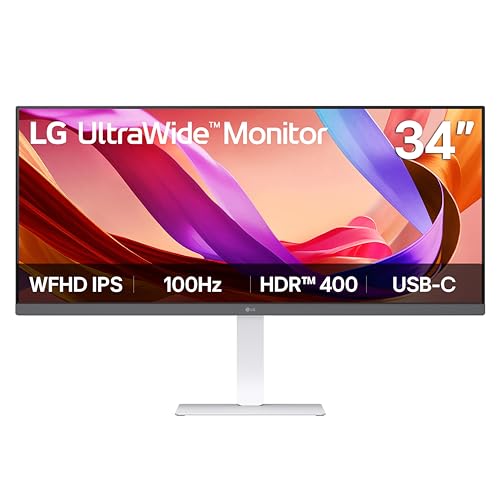
Pros
- UltraWide 21:9 aspect ratio boosts productivity and gaming immersion
- 100Hz refresh rate ensures smooth gameplay and fluid motion
- VESA DisplayHDR 400 and wide color gamut deliver impressive HDR visuals
- USB-C port simplifies connectivity with laptops and reduces cable mess
- Ergonomic stand with full adjustability for comfortable long sessions
Cons
- WFHD resolution (2560x1080) may not be as sharp as higher-resolution UltraWide monitors
- Built-in speakers are adequate but lack depth for critical gaming audio
- Limited to 100Hz, which may not satisfy competitive gamers seeking higher refresh rates
The LG 34U530A-W is a 34-inch UltraWide WFHD IPS monitor designed for PC gamers, streamers, content creators, and anyone who wants to level up their desktop setup. With a 21:9 aspect ratio, this monitor gives you extra horizontal screen real estate, making it easier to keep multiple windows open side by side. Whether you're gaming, streaming on Twitch, or working on a project, the wider view helps you see more at once.
For gamers, the 100Hz refresh rate is a solid step up from standard 60Hz monitors. It provides smoother motion in fast-paced games like FPS and MOBA titles, reducing screen tearing and making quick movements feel more fluid. The IPS panel ensures consistent colors and wide viewing angles, so the image stays clear even if you're not sitting dead center. VESA DisplayHDR 400 support boosts brightness and contrast, giving HDR content more pop, though it's not the highest HDR tier available.
Connectivity is a strong point here. The USB-C port supports both display output and data transfer, letting you hook up a laptop with a single cable. This is a huge convenience for streamers or college gamers who switch between devices. The monitor also includes HDMI and DisplayPort inputs, so you can connect your gaming PC, console, or streaming gear without hassle.
Build quality is practical and thoughtful. The slim L-shaped stand and compact square base free up desk space, which is great for tidy cable management and RGB setups. The stand offers tilt, height, and swivel adjustments, so you can dial in a comfortable viewing angle for long gaming sessions or all-night streaming marathons. The white color option adds a clean, modern look to any gaming desk or dorm room.
One realistic limitation is the WFHD resolution (2560x1080). While it's a good match for the 100Hz refresh rate and keeps GPU demands lower, it's not as sharp as 1440p or 4K UltraWide panels. If you're a competitive gamer who craves the highest pixel density, you might want to look elsewhere. The built-in speakers are decent for casual use, but serious gamers and streamers will likely prefer dedicated headphones or external speakers for better audio clarity.
Overall, the LG 34U530A-W is a strong choice for PC gamers, streamers, and multitaskers who value screen real estate, smooth visuals, and easy connectivity. It works well for casual and competitive gaming, content creation, and home office tasks. The adjustable stand and USB-C convenience make it a practical addition to any gaming setup or work-from-home desk.


Frequently Asked Questions
What is the benefit of Thunderbolt 4 connectivity on an ultrawide monitor?
Thunderbolt 4 delivers high-speed data transmission and video output over a single cable while simultaneously powering connected laptops. For instance, the Samsung 34” ViewFinity (S65TC) supplies up to 90W charging, a built-in Ethernet LAN port, and peripheral connections through its unified connection.
Does an ultrawide monitor work well for gaming as well as office productivity?
Yes, many ultrawide screens balance productivity features with smooth motion handling. Models such as the SAMSUNG 49-inch Odyssey G9 (G91F) DQHD, 144Hz feature a 144Hz refresh rate, AMD FreeSync Premium Pro, and a 1ms response time for gaming alongside extensive Picture-in-Picture multitasking.
How does a 21:9 ultrawide aspect ratio compare to a 32:9 super ultrawide display?
A 21:9 display provides roughly one-third more horizontal space than a standard widescreen, which works well for general multitasking on typical desks. In contrast, a 32:9 dual QHD screen, like the Samsung 49” Business Curved Ultrawide Dual QHD, matches the horizontal area of two side-by-side 16:9 displays.
What makes 5K2K resolution advantageous on larger ultrawide screens?
A 5K2K resolution, featured on the Dell UltraSharp U4025QW 40″ Class 5K2K WUHD, provides higher pixel density across a 39.7-inch panel than standard QHD ultrawides. This delivers crisper text rendering and finer image clarity for detailed creative tasks and complex desktop layouts.
Can ultrawide displays deliver cinematic media experiences?
Yes, because most feature films are produced in wide cinematic aspect ratios that fill a 21:9 screen without black bars. If you frequently stream entertainment, comparing screens optimized for watching movies helps explain how panel contrast and HDR formatting affect visual immersion.
Do these ultrawide monitors allow managing two computers at the same desk?
Yes, several models offer integrated hardware solutions for multi-device workflows. Displays like the Samsung 34” ViewFinity (S65TC) include an integrated KVM switch and Picture-by-Picture options, allowing you to operate two connected PCs using a single keyboard and mouse.







Write Your Review
No reviews yet. Be the first to share your experience!