


Choosing between a samsung monitor vs tv usually comes down to your primary activity and room setup. If you spend most of your time on a desk for work or competitive gaming, a monitor typically offers better input lag and text clarity.
If you are in a living room and prioritize movie watching or casual console play, a larger television panel is often the better fit. The distinction is no longer just about screen size, as modern smart monitors now include streaming apps and gaming hubs that blur the line between the two categories.
For many users, the decision hinges on whether you need the specific features of a display designed for close-up viewing or the immersive scale of a home theater device. Samsung offers both categories with overlapping technologies, such as HDR and high refresh rates, but the intended use cases remain distinct. Understanding these differences helps you avoid paying for features you won’t use, such as a massive screen in a small room or a low-refresh-rate TV for fast-paced esports. This article breaks down the key technical and practical differences to help you make an informed choice based on your specific needs.
If you are still weighing options for your desk setup, our monitor for office work guide provides additional context on ergonomic considerations and panel types suitable for long text reading sessions.

Pros
- All-in-one entertainment hub reduces the need for extra devices.
- Good value at this price point for a 32-inch smart monitor with speakers.
- Adaptive Sound provides clear, scene-optimized audio.
- Gaming Hub enables cloud gaming without a powerful PC.
- Easy to set up and switch between streaming and desktop use.
Cons
- Only 60Hz refresh rate, not ideal for fast-paced competitive gaming.
- Limited HDR performance due to the basic FHD panel.
- Built-in speakers are adequate but lack deep bass for immersive gaming.
The Samsung 32-inch M5 (M50F) Series Smart Monitor is a unique offering that combines a standard desktop display with a built-in smart TV platform. It’s not designed for esports or high-refresh-rate competitive gaming, but it serves as a versatile hub for casual gaming, streaming movies, and productivity tasks. For PC gamers who want a secondary screen for watching guides or streaming content while they play, this monitor can be a solid addition.
Best suited for casual gamers, streamers, content creators, work-from-home users, and college gamers who value convenience over peak gaming performance. The Samsung Gaming Hub provides access to cloud gaming services like Xbox Game Pass and NVIDIA GeForce NOW, meaning you can play a wide library of games without a dedicated gaming PC. This makes it a great choice for budget-conscious gamers or those who want a monitor that doubles as a living room TV in a dorm or small apartment.
In terms of real-world performance, the 32-inch FHD (1920x1080) panel offers decent clarity for everyday use and streaming video, though the 60Hz refresh rate and standard response time won’t satisfy competitive gamers looking for ultra-smooth motion. The HDR10 support adds a bit of vibrancy to supported content, but it’s not as impactful as higher-end HDR monitors. Audio from the built-in speakers is surprisingly clear thanks to Adaptive Sound, which adjusts the mix based on what you’re watching or playing. Voice clarity in dialogue-heavy scenes is good, but the speakers lack bass for explosive action sequences.
Build quality is typical for Samsung’s M series: a slim plastic frame with a sturdy stand that offers tilt adjustment. The monitor is lightweight at just over 10 pounds, making it easy to move or mount on a VESA-compatible arm. Connectivity includes one HDMI port, a USB-C port, and a USB-A port, so you can hook up a laptop, console, or streaming device without hassle. Cable management is basic, but the clean design helps keep your desk looking organized.
Setting up the smart features is straightforward: connect to Wi-Fi, sign into your streaming accounts, and you’re ready to go. The remote control makes navigation simple, and the monitor also supports mobile mirroring for sharing content from your phone. One realistic limitation is that the 32-inch size may be too large for a typical desk setup if you sit close, so consider your viewing distance. Also, the lack of a high refresh rate means it’s not the best choice for fast-paced shooters like Call of Duty or Valorant.
Overall, the Samsung M5 M50F is a practical choice for anyone who wants a monitor that does more than just display PC output. It’s ideal for casual PC gaming, streaming shows, and handling daily productivity tasks. If you’re a competitive gamer, you’ll want a dedicated 144Hz+ gaming monitor, but for a versatile second screen or a budget-friendly all-in-one solution, this monitor delivers solid value.
For cloud gaming via Samsung Gaming Hub, the experience depends on your internet connection. The 60Hz panel is sufficient for slower-paced titles like strategy games, indie games, and RPGs. Fast-paced competitive shooters will feel sluggish due to the refresh rate and input lag typical of smart monitors. If you primarily play casual or single-player games, the performance is acceptable for the price.
The 32-inch FHD VA panel offers good contrast and decent viewing angles for a monitor in this price range. Colors are punchy out of the box, and HDR10 adds a bit of extra dynamic range in supported content. However, peak brightness is modest, so bright rooms may cause glare. For everyday computing and video streaming, the display is more than adequate.


Pros
- All-in-one smart functionality eliminates need for separate streaming device or console for casual gaming
- Good FHD resolution and HDR10 support for clear visuals and vibrant colors in games and movies
- Adaptive Sound provides real-time audio optimization for different content types
- Easy mobile screen mirroring and file sharing for quick content access
- Sleek design and reasonable price point for a multi-purpose monitor
Cons
- Only 60Hz refresh rate, not ideal for competitive esports or fast-paced FPS gaming
- Limited to 1080p resolution, may not satisfy gamers wanting higher pixel density
- Built-in speakers are adequate for casual use but lack bass and volume for immersive gaming
The Samsung 27-Inch M5 (M50F) Series FHD Smart Monitor is a versatile display that goes beyond traditional monitors by integrating smart TV features directly into the screen. Designed for casual gamers, streamers, and those who want a multifunctional desktop companion, it offers a 27-inch 1080p panel with HDR10 support and built-in speakers. This monitor is particularly appealing for college gamers, work-from-home users, and anyone building a compact gaming setup who values convenience and all-in-one functionality over raw gaming performance.
For casual gamers, the Samsung Gaming Hub is a standout feature, allowing you to stream games from partners like Xbox Game Pass and NVIDIA GeForce NOW without needing a separate PC or console. This makes it a great option for quick gaming sessions or exploring new titles without the hassle of additional hardware. The 60Hz refresh rate is adequate for slower-paced games like strategy titles, indie games, or casual multiplayer experiences, but competitive gamers playing fast shooters or MOBAs will likely find the lack of higher refresh rates limiting. The FHD resolution delivers clear visuals for everyday use, though enthusiasts may prefer higher resolutions for more detail.
Beyond gaming, the smart functionality shines. You can access streaming apps like Netflix, Hulu, and Samsung TV Plus directly from the monitor, turning your desk into an entertainment hub. Adaptive Sound automatically adjusts audio based on content, enhancing dialogue in movies or emphasizing game effects. The built-in speakers are serviceable for casual listening but lack the depth and volume for immersive gaming or movie nights, so external speakers or a gaming headset are recommended for a better experience.
Build quality is solid for its price range, with a sleek black bezel and a compact stand that fits well on most desks. The monitor weighs only 7.71 pounds, making it easy to reposition or mount. Connectivity includes multiple ports for hooking up peripherals, and mobile screen mirroring via the SmartThings app is straightforward. Setup is simple: plug in, connect to Wi-Fi, and you're ready to stream or game. The inclusion of vision accessibility tools and a workout tracker adds unique value for health-conscious users or those with visual needs.
One realistic limitation is the 60Hz refresh rate and 1080p resolution, which won't satisfy competitive esports players or those seeking high-refresh-rate gaming. Additionally, the smart interface can feel slightly sluggish compared to dedicated streaming devices, and the lack of a dedicated remote (though you can use the SmartThings app) may be a minor inconvenience. For users who prioritize gaming performance, a dedicated gaming monitor with higher refresh rates would be a better fit.
Overall, the Samsung M5 Smart Monitor is a practical choice for casual gamers, streamers, and desk users who want an all-in-one solution for work, entertainment, and light gaming. It excels in convenience and versatility, making it ideal for dorm rooms, home offices, or secondary setups. If you're a competitive gamer or need high refresh rates, look elsewhere, but for everyday use and casual gaming, this monitor offers great value and functionality.


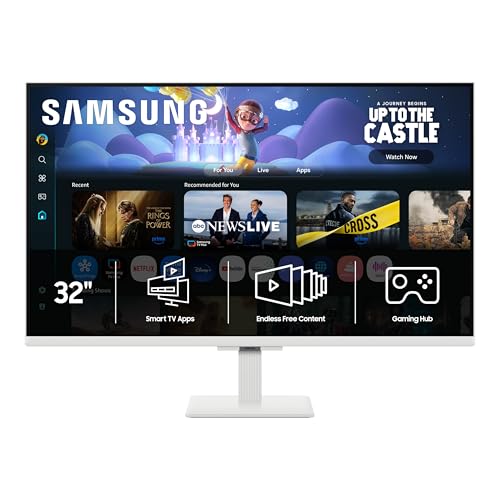
The core difference between a Samsung monitor and a Samsung TV lies in their design priorities. Monitors are engineered for close-range viewing, prioritizing pixel density, response time, and input lag to ensure sharp text and fast motion. TVs are designed for distance, focusing on brightness, color volume, and audio performance to create an immersive experience in larger rooms. While there is overlap in resolution and connectivity, the underlying panel technologies and software features serve different purposes. Understanding these fundamental distinctions is the first step in selecting the right display for your specific environment.
| Feature | Monitor | TV |
|---|---|---|
| Primary Use | Work, Gaming, Close Viewing | Movies, Casual Gaming, Living Room |
| Pixel Density | Higher (PPI) | Lower (PPI) |
| Input Lag | Lower | Higher (unless Game Mode) |
| Audio | Basic Speakers | Integrated Soundbars/Systems |
| Smart Features | Apps, Gaming Hub | Full OS, Smart Home Hub |
| Typical Size | 24″ to 32″ | 43″ to 85″+ |
When evaluating which display suits your needs, consider the following factors that often influence the decision. These points highlight the practical implications of choosing one form factor over the other.
- Input lag is critical for competitive gaming, favoring monitors.
- Pixel density affects text clarity, making monitors better for work.
- Integrated audio is superior on TVs, reducing external speaker needs.
- Smart home integration is more robust on modern TV operating systems.
- Viewing distance dictates the ideal screen size for comfort.
Panel Technology and Image Quality
Both monitors and TVs use various panel types, including IPS, VA, and OLED, but their implementation differs. Monitors often prioritize color accuracy and wide viewing angles for professional work, while TVs may emphasize high contrast ratios and brightness for cinematic content. For example, a VA panel in a TV might be tuned for deep blacks in dark scenes, whereas the same panel type in a monitor might be calibrated for consistent colors across angles. This tuning affects how you perceive the image in different lighting conditions and usage scenarios.
The resolution also plays a significant role in perceived quality. A 32-inch 4K monitor offers a much higher pixel density than a 55-inch 4K TV, resulting in sharper text and finer details at a typical desk distance. If you are working with documents or spreadsheets, this higher density can reduce eye strain and improve readability. Conversely, if you are watching content from a couch, the extra pixels on a smaller screen may not be as noticeable, making the larger size of a TV more beneficial for immersion.
Gaming Performance and Response Times
Gaming requirements vary widely depending on the type of games you play. Competitive titles like first-person shooters or fighting games demand low input lag and high refresh rates, which are standard features in most gaming monitors. These displays are optimized to minimize the delay between your input and the action on screen, providing a more responsive experience. TVs, on the other hand, often have higher input lag due to image processing features that enhance visual quality but add delay. Many modern TVs include a “Game Mode” that disables some processing to reduce lag, but it may still not match the responsiveness of a dedicated gaming monitor.
Refresh rate is another key factor for gamers. Monitors commonly offer 144Hz, 165Hz, or even higher refresh rates, which result in smoother motion and reduced motion blur. While some high-end TVs now support 120Hz, they are less common and often require specific HDMI 2.1 connections. For casual gamers who play slower-paced titles, the difference may not be as critical, but for competitive players, the higher refresh rate of a monitor can provide a tangible advantage in tracking fast-moving objects and reacting quickly.
Smart Features and Connectivity
Modern Samsung smart monitors come with built-in streaming apps, such as Netflix, YouTube, and Samsung TV Plus, allowing you to access content without a separate device. This feature blurs the line between monitors and TVs, as you can watch movies and shows directly on the monitor. However, the interface and app selection on monitors are generally more limited compared to the full operating systems found on TVs. TVs offer a more comprehensive smart experience, with access to a wider range of apps, voice assistants, and smart home integration features.
Connectivity is another area where differences emerge. Monitors typically include HDMI, DisplayPort, and USB ports, which are essential for connecting to PCs and other devices. Some models also feature USB-C with power delivery, making them convenient for laptop users. TVs, while also equipped with HDMI ports, often include additional inputs for external devices like soundbars, gaming consoles, and streaming sticks. The number and type of ports can influence your setup, especially if you plan to connect multiple devices or use a single cable for both video and power.
Audio Capabilities and Room Setup
Audio is a significant differentiator between monitors and TVs. Most monitors come with basic built-in speakers that are sufficient for casual listening, such as watching YouTube videos or joining video calls. However, they are not designed for high-quality audio output, and you may need external speakers or a soundbar for a better experience. TVs, on the other hand, often feature more powerful integrated speakers, with some models including soundbar technology or Dolby Atmos support. This makes TVs a more complete solution for media consumption, especially in living rooms where audio quality is important.
Room setup also plays a role in your decision. If you are setting up a workspace in a bedroom or home office, a monitor is usually the better choice due to its smaller size and focus on productivity. If you are looking to create a home theater or entertainment center in a living room, a TV is more appropriate because of its larger screen size and superior audio. Consider the viewing distance and the primary activities you will be doing on the display to determine which form factor fits your space best.
Price and Value Considerations
Price is a major factor for many buyers, and the cost of monitors and TVs can vary significantly based on size, features, and technology. Generally, monitors are more affordable for their size compared to TVs, especially when considering higher refresh rates and resolutions. For example, a 32-inch 4K gaming monitor may cost less than a 43-inch 4K TV with similar specifications. However, if you require a larger screen for immersive gaming or movie watching, a TV might offer better value per inch, particularly in the mid-range price segment.
It is also important to consider the total cost of ownership, including additional accessories like soundbars, stands, or mounting hardware. Monitors often require external speakers for better audio, which can add to the overall cost. TVs, with their integrated audio, may not need extra components, making them a more straightforward option for many users. Evaluate your budget and the features you truly need to determine which display offers the best value for your specific use case.
When to Choose a Monitor
A Samsung monitor is the right choice if your primary use is work, productivity, or competitive gaming. If you spend long hours reading text, editing documents, or working with graphics, the higher pixel density and better color accuracy of a monitor can improve your experience. For gamers who play fast-paced titles, the low input lag and high refresh rates of a gaming monitor provide a competitive edge. Additionally, if you have limited desk space, a smaller monitor may be more practical than a large TV, which can dominate the room and require a larger viewing distance.
Monitors are also a good option if you want to streamline your setup with fewer cables and devices. Many modern monitors include USB-C connectivity, which allows you to connect your laptop with a single cable for both video and power. This can reduce clutter and simplify your workspace. If you value a clean, organized desk and need a display that supports your workflow efficiently, a monitor is likely the better fit.
When to Choose a TV
A Samsung TV is the better choice if your primary use is watching movies, TV shows, or casual gaming in a living room or larger space. The larger screen size and superior audio capabilities of a TV create a more immersive experience for media consumption. If you enjoy watching content from a distance, the lower pixel density of a TV is less noticeable, and the larger screen size enhances the viewing experience. TVs are also more suitable for households with multiple users who want to access a wide range of streaming apps and smart features.
For gamers who prefer a more relaxed, couch-based setup, a TV can be a great option, especially if you use a game mode to reduce input lag. The larger screen can make games feel more immersive, and the integrated audio can enhance the overall experience. If you are looking for a single display that can handle both entertainment and casual gaming without the need for additional speakers or complex setups, a TV may be the more convenient choice.
If you are considering a high-performance setup for your PC, our 1080p gaming monitor guide offers insights into how resolution impacts performance and which specs matter most for fast-paced titles.
Ultimately, the choice between a Samsung monitor and a TV depends on your specific needs and environment.
- Consider your primary activities, room setup, and budget to make an informed decision about your display.
- Both options offer unique advantages that distinguish them for different usage scenarios and personal preferences.
- Understanding these differences will help you select the display that best fits your lifestyle and usage patterns.







Write Your Review
No reviews yet. Be the first to share your experience!