


A high refresh rate can make fast motion look smoother, but it only helps when the game, source device, connection, and monitor can support the mode you want. The best answer to what kind of monitor is best for gaming depends on whether you care most about responsive play, detailed scenery, contrast, or a screen that also works well for everyday tasks.
Start with the resolution and frame rate your PC or console can reasonably deliver, then check the monitor’s inputs and supported modes. Screen size, viewing distance, panel characteristics, and desk space matter too, while an HDR label alone doesn’t tell you how convincing HDR will look. Our guide to gaming monitor screen size can help you weigh screen dimensions against your viewing position.
The display options below span compact 1080p screens, fast refresh-rate models, and curved ultrawide designs. Their listed features are useful for comparing specifications, but they don’t replace checking the manufacturer’s documentation for your exact setup. For a broader look at display choices, see our gaming monitor selection guide.
Product Shortcode

Pros
- Affordable curved monitor with immersive 1800R curvature for the price
- 75Hz refresh rate offers a noticeable upgrade from 60Hz for smoother gameplay
- Multiple connectivity options including HDMI and VGA for older devices
- VESA mountable for flexible desk or wall setups
- Lightweight at 7 pounds, easy to move or mount
Cons
- Only 75Hz, not suitable for competitive esports players who prefer 144Hz or higher
- Built-in speakers are basic and lack bass; external speakers or headphones recommended for immersive audio
- Stand offers limited ergonomic adjustments (tilt only); height and swivel require VESA arm
The Sceptre Curved 24-inch Gaming Monitor (C248W-1920RN) is a budget-friendly entry into the world of curved displays, designed for PC gamers who want a more immersive visual experience without spending a fortune. With its 1800R curvature, the screen gently wraps around your peripheral vision, making it a great fit for casual gaming sessions, open-world exploration, or even just browsing and streaming content. The 1080p resolution keeps things crisp on a 24-inch panel, and the 75Hz refresh rate is a step above standard 60Hz monitors, offering slightly smoother motion in games like Fortnite, Rocket League, or Apex Legends.
This monitor is best suited for casual gamers, college students, work-from-home users, or anyone building a multi-monitor setup on a tight budget. It's not aimed at competitive esports players who demand 144Hz or higher refresh rates for split-second reactions, but for everyday gaming and productivity, it holds its own. The 98% sRGB color coverage ensures decent color accuracy out of the box, which is handy for light photo editing or watching videos.
Build quality is what you'd expect at this price point: a slim metal black frame that feels sturdy enough, though the stand is basic with tilt-only adjustment. The monitor is VESA mount compatible (100x100mm), so you can easily attach it to a monitor arm or wall mount to free up desk space. Connectivity includes two HDMI ports and a VGA input, plus a PC audio out for connecting external speakers or headphones. The built-in speakers are functional for system sounds or casual YouTube, but they lack bass and clarity for immersive gaming or music.
Setup is straightforward: plug in the power, connect via HDMI or VGA, and you're good to go. The on-screen display (OSD) is controlled via buttons on the back and offers basic adjustments for brightness, contrast, and color. There's no USB hub or advanced gaming features like FreeSync, but for the price, that's expected. The 250 cd/m² brightness is adequate for indoor use, though it may struggle in very bright rooms.
One realistic limitation is the lack of height adjustment and swivel on the included stand. You'll need a VESA arm or mount to get the perfect viewing angle. Additionally, the 75Hz refresh rate, while better than 60Hz, won't satisfy players chasing ultra-smooth competitive gameplay. The speakers are also best considered a backup rather than your primary audio solution.
Overall, the Sceptre C248W-1920RN is a practical choice for budget-conscious PC gamers, streamers on a tight setup, or anyone wanting a curved monitor for a dual-screen workstation. It delivers on its promise of an immersive curve at an accessible price, making it a solid value pick for casual gaming and everyday use.


Pros
- High 200Hz refresh rate provides buttery-smooth motion in competitive games.
- Curved ultrawide 21:9 aspect ratio enhances immersion and peripheral vision.
- AMD FreeSync support reduces stuttering and tearing when paired with compatible GPUs.
- Affordable price point for a gaming monitor with these features.
- Thin bezels and VESA mount compatibility simplify multi-monitor or wall-mounted setups.
Cons
- 2560x1080 resolution is less sharp than 1440p or 4K, noticeable in text or detailed scenes.
- 5ms response time is adequate but not ideal for hyper-competitive esports players who prefer 1ms.
- Built-in speakers are basic; most gamers will prefer dedicated headphones or external speakers.
The Sceptre 30-inch Curved Gaming Monitor (C305B-200UN1) is an ultrawide display designed to elevate your gaming experience without breaking the bank. With a 21:9 aspect ratio and 2560x1080 resolution, this monitor wraps around your peripheral vision, making games like racing sims, first-person shooters, and open-world titles feel more immersive. The 200Hz refresh rate over DisplayPort delivers exceptionally smooth motion, which competitive gamers will appreciate for tracking fast-moving targets. AMD FreeSync compatibility further ensures tear-free gameplay when paired with an AMD graphics card.
This monitor is best suited for PC gamers who want a significant upgrade from standard 60Hz displays, especially those who play fast-paced genres like FPS and MOBA. It also works well for casual gamers and multitaskers who enjoy the extra screen real estate for productivity. Streamers and content creators may find the ultrawide format useful for managing windows and previews, though the resolution is not ideal for color-critical work.
Performance-wise, the 200Hz refresh rate and FreeSync work together to minimize input lag and visual artifacts. The 5ms response time is decent for most gaming, though purists may notice slight ghosting compared to 1ms panels. The monitor includes custom FPS and RTS picture modes that adjust brightness and contrast for better visibility in dark scenes or strategy maps. Blue Light Shift and Anti-Flicker reduce eye fatigue during long sessions, a welcome feature for all-night gaming or work-from-home use.
Build quality is solid for a monitor in this price range. The metal black finish and thin bezel give it a clean, modern look that fits well in any gaming setup. The included stand is functional but basic; you might want to consider a VESA mount (100x100mm pattern) for better ergonomics and desk space savings. The monitor also has built-in speakers, which are acceptable for conference calls and background audio but won't deliver immersive gaming audio. Plan to use a gaming headset or external speakers for the best experience.
Setup is straightforward: unbox, attach the stand, connect via DisplayPort (for 200Hz) or HDMI (up to 120Hz), and you're ready. The on-screen display (OSD) offers intuitive controls for brightness, game modes, and volume. Cable management is minimal, but the monitor's thin profile helps keep the desk tidy. Maintenance involves occasional dusting; the matte coating resists fingerprints well.
A realistic limitation is the resolution: 2560x1080 on a 30-inch screen gives a lower pixel density than 1440p, so text and fine details won't look as crisp. If you prioritize sharpness for productivity or cinematic titles, a higher-resolution monitor might be better. However, for pure gaming performance and immersion at a very competitive price, the Sceptre C305B-200UN1 is a strong choice. It's especially recommended for budget-conscious gamers, esports players wanting high refresh rates, and anyone building an ultrawide setup without spending a fortune.
The Sceptre C305B-200UN1 excels in gaming responsiveness thanks to its 200Hz refresh rate over DisplayPort. This high refresh rate dramatically reduces motion blur and makes fast-paced action feel fluid. Combined with AMD FreeSync, screen tearing and stuttering are virtually eliminated, providing a smooth experience in games like 'Call of Duty,' 'Overwatch,' and 'Fortnite.' The 5ms response time is acceptable for most players, though those competing at the highest levels may prefer a 1ms TN panel. The custom FPS and RTS modes tweak gamma and brightness to improve visibility in dark areas or cluttered battlefields. Overall, this monitor delivers a noticeable competitive advantage over standard 60Hz screens at an affordable price.
With a 30-inch curved VA panel and 2560x1080 resolution, the Sceptre monitor offers decent contrast and good color reproduction for its class. The curve (1800R) enhances immersion by wrapping the edges of the screen into your peripheral vision. The 250 cd/m² brightness is adequate for most indoor environments, and the 170° viewing angles are fine for solo use. However, the 2560x1080 resolution results in a pixel density of about 94 PPI, which is noticeably softer than 1440p or 4K monitors. Text and icons may appear slightly blurry, so this display is best suited for gaming and video rather than detailed productivity work. The Anti-Flicker technology helps reduce eye strain, and the Blue Light Shift mode is a nice addition for late-night sessions.

Pros
- Blazing 240Hz refresh rate ensures silky-smooth gameplay, especially in competitive esports titles.
- 1ms response time virtually eliminates ghosting, providing sharp motion clarity.
- 1500R curvature creates an immersive wraparound effect for a more engaging gaming experience.
- Affordable price point delivers high-performance features without breaking the bank.
- Multiple video inputs (2x DisplayPort, 2x HDMI) allow easy switching between PC and console.
Cons
- 1080p resolution may feel limited for users accustomed to higher pixel densities on larger screens.
- Built-in speakers lack bass and volume, so external speakers or a headset may be needed for richer audio.
- Limited adjustability (tilt only) compared to higher-end monitors with height and swivel options.
The Sceptre C255B-FWT240 is a 24.5-inch curved gaming monitor that brings high-refresh-rate performance to a budget-friendly price point. With a 240Hz refresh rate and 1ms response time, it's specifically built for competitive gamers and esports players who demand smooth, responsive visuals. The 1500R curvature wraps the screen around your peripheral vision, making it a solid choice for immersive gaming sessions, whether you're into fast-paced shooters or open-world adventures.
When it comes to real-world performance, the 240Hz refresh rate delivers exceptionally fluid motion, reducing blur and tearing in high-speed games. Combined with a 1ms response time, quick movements remain sharp and clear, giving you a distinct advantage in titles like Valorant, Apex Legends, or Call of Duty. The AMD FreeSync Premium support further enhances the experience by synchronizing the monitor's refresh rate with your GPU's output, minimizing stutter and screen tearing without noticeable input lag. The 1080p resolution on a 24.5-inch screen keeps pixel density decent for clear text and details, though it's optimized for performance over pixel count.
Build quality is practical for its class. The monitor comes with dual DisplayPort and dual HDMI inputs, offering versatile connectivity for gaming PCs, consoles, and streaming setups. The built-in speakers are adequate for system sounds or casual video watching, but serious gamers will likely use a dedicated headset or external speakers for richer audio. The Blue Light Shift feature reduces eye strain during extended sessions, a thoughtful addition for streamers and work-from-home gamers. The stand provides tilt adjustment but lacks height or swivel, so you may need a VESA mount for optimal ergonomic positioning.
Setting up the monitor is straightforward: attach the base, plug in power and video cables, and you're ready. The on-screen menu is intuitive for adjusting brightness, contrast, and game modes. The curve helps reduce glare and keeps the screen uniform from different angles, though it's not a must for everyone. One limitation is the lack of USB ports or cable management features on the stand, which might require some desk organization for a tidy setup. Also, the 1080p resolution means it's best suited to the 24.5-inch screen size; larger monitors would benefit from higher resolution.
Overall, the Sceptre C255B-FWT240 is an excellent value for competitive gamers and casual players who want high refresh rates without paying a premium. It pairs well with mid-range to high-end GPUs that can push frame rates above 120fps, making it a practical choice for esports, streaming, and everyday PC use. If you need extensive ergonomic adjustments or higher resolution for content creation, you may look elsewhere, but for pure gaming performance at this price, it's a strong contender.
The 240Hz refresh rate is the standout feature of this Sceptre monitor, reducing motion blur and providing a competitive edge in fast-paced games. Combined with a 1ms response time, quick movements remain sharp and clear, making it a strong choice for esports titles like Valorant, CS:GO, and Apex Legends.
AMD FreeSync Premium further enhances the experience by synchronizing the monitor's refresh rate with your GPU's frame rate, minimizing screen tearing and stuttering without introducing noticeable input lag. The 1080p resolution on a 24.5-inch screen keeps pixel density high enough for crisp details while allowing mid-range GPUs to hit high frame rates easily. For competitive gamers seeking an affordable high-refresh-rate setup, this monitor delivers reliable performance.
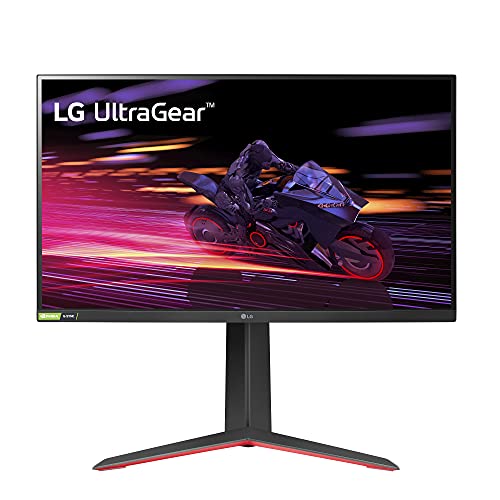
Pros
- 240Hz refresh rate and 1ms response time for exceptional motion clarity and responsiveness
- IPS panel with 99% sRGB color gamut provides accurate, vibrant colors out of the box
- Ergonomic stand with full adjustability for height, tilt, pivot, and swivel
- G-Sync and FreeSync Premium support deliver tear-free gaming on both NVIDIA and AMD systems
Cons
- Limited to 1920x1080 resolution; not ideal for users seeking 4K or high-resolution content creation
- No built-in speakers, so external audio is necessary for sound output
- Stand base may feel slightly wobbly on uneven surfaces based on user feedback; a VESA mount is a good alternative
The LG 27GP750-B is a 27-inch FHD IPS gaming monitor engineered specifically for competitive gamers who prioritize speed and responsiveness over raw resolution. With a 240Hz refresh rate and a 1ms response time, this display is built for esports players, FPS enthusiasts, and anyone who needs every millisecond advantage in games like Valorant, CS:GO, Overwatch, or Apex Legends. It also fits well for streamers who want a high-refresh secondary monitor for smooth previews or chat windows.
Performance is where this monitor truly shines. The combination of 240Hz and 1ms IPS response keeps motion blur and ghosting to a minimum, making fast-moving targets appear crisp and easy to track. NVIDIA G-Sync compatibility and AMD FreeSync Premium work together to eliminate screen tearing without introducing noticeable input lag. Meanwhile, HDR10 support adds a bit of extra contrast and pop to supported games, though it's not a full HDR experience. The Black Stabilizer brightens dark areas to reveal hidden enemies, and the on-screen Crosshair gives you a reliable aiming reticle for any game.
Build quality is solid with a fully adjustable stand that lets you change height, tilt, pivot, and swivel. This makes it easy to dial in the perfect viewing angle for long gaming marathons or when switching between sitting and standing. The thin bezels are great for multi-monitor setups, and the overall footprint on your desk is fairly compact. Some users note the stand base can feel a bit light or wobble on carpet, but a VESA mount offers a stable alternative if needed.
Setting up the LG 27GP750-B is straightforward - just plug in via DisplayPort or HDMI, enable the high refresh rate in your display settings, and you're ready to go. The on-screen menu is simple to navigate, with preset gaming modes and the useful gaming features. The main limitation is the FHD resolution: while it's perfect for hitting high frame rates in competitive titles, it won't give you the pixel density needed for detailed productivity work or 4K content creation. Also, there are no built-in speakers, so you'll need a headset or external speakers for audio.
Overall, the LG 27GP750-B offers a compelling package for PC gamers focused on competitive play. If you're a college gamer or someone building a high-refresh gaming setup on a budget, this monitor delivers the speed you need without sacrificing image quality or ergonomics. Casual gamers who prefer immersive single-player experiences might want to look at 1440p options, but for pure esports and fast-paced multiplayer performance, this is one of the best values in its class.

Pros
- High 180Hz refresh rate and 1ms response time ensure smooth, responsive gameplay.
- Vivid color reproduction with 110% sRGB and HDR support enhances visual immersion.
- Flexible connectivity with HDMI 2.1 and DP 1.4, both capable of 180Hz.
- Eye care features and VESA mount compatibility add comfort and desk organization.
Cons
- No built-in speakers, requiring external audio solution.
- Limited to 1080p resolution; may not satisfy users seeking higher pixel density.
- Adjustable stand only offers tilt; lacks height or swivel adjustment.
The SANSUI 24-inch gaming monitor is a budget-friendly FHD display built for PC gamers who prioritize high refresh rates and smooth motion. With a 180Hz refresh rate and 1ms MPRT response time, it's especially suited for competitive gamers playing fast-paced shooters like Valorant or Call of Duty, as well as casual players who want a fluid experience without breaking the bank. Streamers and content creators will appreciate the 110% sRGB color gamut for accurate color reproduction during editing or live broadcasts.
In real-world gaming, the 180Hz refresh rate dramatically reduces motion blur and provides a noticeable advantage in tracking targets. The 1ms response time keeps ghosting to a minimum, and FreeSync support helps eliminate screen tearing when paired with compatible GPUs. The monitor also includes game-specific presets like CrossHair, Timer, FPS, RTS, and Racing modes, allowing quick optimization for different genres.
The monitor's build is practical with a slim bezel design that works well in multi-monitor setups. Connectivity includes one HDMI 2.1 and one DP 1.4 port, both supporting the full 180Hz refresh rate, plus a 3.5mm audio jack for headphones or external speakers. VESA 75x75mm compatibility means you can mount it on an arm or wall, freeing up valuable desk space. The included HDMI cable gets you started right away.
Color performance is solid for the price, with 110% sRGB and 80% DCI-P3 coverage, plus HDR support for improved contrast in supported content. The 4000:1 contrast ratio and 300 cd/m² brightness deliver decent depth. Eye care features like anti-flicker and low blue light reduce fatigue during long sessions, making this monitor a good choice for college gamers or work-from-home users who spend hours at the screen.
The main trade-offs are the lack of built-in speakers and the stand's limited adjustability (tilt only). You'll need external speakers or a headset for audio, and you may want a monitor arm for better ergonomics. Also, 1080p at 24 inches offers standard pixel density, so users accustomed to 1440p might notice less sharpness. However, for the price, these compromises are reasonable.
Overall, the SANSUI 24-inch 180Hz monitor is a strong value pick for budget-conscious PC gamers, esports players, and streamers who need a fast, responsive display without spending a fortune. It's also a great secondary monitor for gaming setups or dorm rooms. If you prioritize high refresh rates and color accuracy over 4K resolution, this monitor delivers where it counts.
The 180Hz refresh rate and 1ms MPRT response time make this monitor exceptionally responsive for competitive gaming. In fast-paced FPS titles like Apex Legends or Overwatch, motion stays clear and fluid, giving you a split-second advantage in tracking enemies. FreeSync technology synchronizes the monitor's refresh rate with your GPU to eliminate tearing and stuttering, provided you have an AMD graphics card or a compatible NVIDIA GPU.
The included game assistant features (crosshair overlay, timer, and genre-specific presets) are handy for quick adjustments without diving into menus. The FPS mode boosts visibility in dark scenes, while RTS mode enhances color for strategy games. Racing mode reduces input lag for steering response. These presets add real convenience for gamers who switch between genres.
Input lag is minimal thanks to the high refresh rate and fast response time, ensuring your actions translate to on-screen movement almost instantly. For competitive players, this monitor offers a noticeable upgrade over standard 60Hz or 75Hz displays, without the premium cost of 240Hz or 360Hz panels.
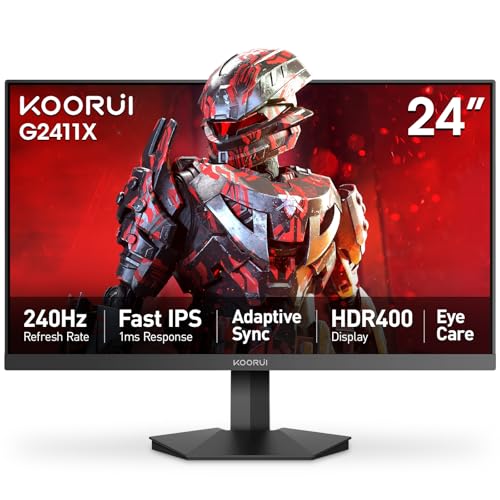
Pros
- Exceptional 240Hz refresh rate and 1ms response time for competitive gaming at an affordable price.
- Fast IPS panel with wide color gamut (90% DCI-P3) provides excellent color accuracy and viewing angles.
- Adaptive Sync support eliminates screen tearing without needing a G-Sync or FreeSync premium monitor.
- Compact 24-inch size with ultra-slim bezels fits well in small desks or multi-monitor setups.
- Easy assembly and VESA compatibility for flexible mounting options.
Cons
- No built-in speakers, so external audio is required for gaming or streaming.
- Stand offers only tilt adjustment; lacks height, swivel, and pivot for advanced ergonomics.
- Limited to 1080p resolution; not ideal for users who prefer higher pixel density for productivity or detailed graphics work.
The KOORUI 24" gaming monitor is a budget-friendly powerhouse aimed squarely at competitive PC gamers, esports players, and streaming enthusiasts who demand high refresh rates without overspending. With a 240Hz refresh rate and a 1ms Fast IPS panel, this monitor is designed to deliver buttery-smooth motion clarity in fast-paced titles like Valorant, Call of Duty, and Apex Legends. The FHD (1920x1080) resolution keeps GPU demands manageable, allowing even mid-range graphics cards to push high frame rates consistently.
For competitive gamers, the combination of Adaptive Sync and the fast IPS technology means no screen tearing or ghosting during intense firefights. The 90% DCI-P3 color gamut and HDR400 support also make this monitor surprisingly capable for casual content creation or enjoying visually rich open-world games. The ultra-slim bezels and sleek black design look clean on any desk, and the VESA mount compatibility lets you build a multi-monitor setup or free up desk space with an arm.
Build quality is solid for the price point. The stand is easy to assemble and provides tilt adjustment (-5° to 20°), though it lacks height, swivel, and pivot options. The monitor itself is lightweight at under 10 pounds, making it easy to reposition. The on-screen joystick control is intuitive, and features like a built-in crosshair overlay and timer are nice bonuses for competitive play. Connectivity is straightforward with HDMI 2.0 and DisplayPort 1.4, so you can hook up a PC, console, or laptop without hassle.
Setup is simple: attach the stand or mount, plug in power and video cables, and you're ready to game. The blue light filter and flicker-free technology help reduce eye strain during long sessions, which is a welcome addition for both gamers and remote workers. One limitation is the lack of built-in speakers, so you'll need a headset or external speakers for audio. Additionally, the stand's limited ergonomics may require an aftermarket monitor arm for optimal positioning.
Overall, the KOORUI 24" gaming monitor is a fantastic value for competitive PC gamers, esports players, and budget-conscious streamers who prioritize speed and responsiveness. It's also a great option for college gamers or anyone building a compact, high-performance gaming setup. If you can live without height adjustment and built-in audio, this monitor delivers top-tier gaming performance at a price that's hard to beat.
The 240Hz refresh rate and 1ms Fast IPS response time make this monitor a standout for competitive gaming. In fast-paced shooters like Overwatch 2 or Fortnite, motion blur is virtually eliminated, and the Adaptive Sync ensures no screen tearing even when frame rates fluctuate. The 1080p resolution keeps GPU load low, allowing for sustained high frame rates on mid-range hardware. The built-in crosshair overlay and timer are practical tools for improving accuracy and strategy without third-party software. Overall, this monitor delivers a smooth, responsive experience that rivals more expensive models.
The Fast IPS panel offers wide 178° viewing angles and maintains color consistency from any position. With 90% DCI-P3 coverage, colors are vibrant and accurate, making games like Cyberpunk 2077 or Horizon Forbidden West look rich and immersive. HDR400 support provides a noticeable boost in contrast and brightness for supported content, though it's not true HDR. The 1920x1080 resolution is sharp enough for a 24-inch screen, and the anti-glare coating minimizes reflections during daytime use. For the price, the display quality is impressive.

Pros
- High 200+Hz refresh rate for excellent motion clarity in competitive gaming
- Affordable ultrawide curved monitor with FreeSync for smooth tear-free gameplay
- Built-in speakers and Picture-by-Picture mode add convenience for streaming and multitasking
- Blue Light Shift and FPS/RTS presets enhance long-session comfort and in-game visibility
Cons
- 5ms GTG response time may be slightly slower compared to 1ms monitors for hardcore esports players
- Built-in speakers are basic and lack bass, not ideal for immersive audio without external speakers
- 2560x1080 resolution has lower vertical pixels than standard 1440p or 4K monitors, less sharp for productivity tasks
The Sceptre C305B-200UN is a 30-inch curved ultrawide gaming monitor designed for PC gamers who want an immersive battlefield without breaking the bank. With a 2560x1080 resolution and 200+Hz refresh rate, this monitor targets competitive and casual gamers alike, offering wide-screen immersion and fluid gameplay for FPS, MOBA, and racing genres. The curved 21:9 panel wraps around your peripheral vision, making it great for open-world exploration and sim racing.
This monitor shines in performance-focused scenarios. The 200+Hz refresh rate (via DisplayPort) reduces motion blur, giving you an edge in fast-twitch shooters like Valorant or Call of Duty. AMD FreeSync syncs the display to compatible graphics cards, nearly eliminating screen tearing and stuttering. While the 5ms GTG response time isn't the fastest on the market, many users may find it sufficient for most gaming situations. The built-in FPS and RTS presets tailor gamma and contrast to highlight enemies or improve strategic visibility.
Build quality is solid for the price point. The machine black finish and 30-inch curved panel make a bold statement on any desk. Connectivity includes HDMI and DisplayPort, with the latter required to hit the full 200Hz. The built-in speakers are basic but functional for casual use, though we recommend external speakers or a headset for immersive audio. The Picture-by-Picture feature is a hidden gem, allowing two inputs to be displayed side-by-side - perfect for streaming your game on Twitch while keeping chat or stats visible on the same screen.
Setup is straightforward: plug in, adjust the stand, and enable FreeSync or the desired preset via the on-screen display. The Blue Light Shift mode is a welcome addition for late-night sessions, reducing eye fatigue without washing out colors. Cable management is simple due to the monitor's rear connectivity, though the stand only offers tilt adjustment - height and swivel are absent, which might limit ergonomic options for some users.
Limitations are worth considering. The 2560x1080 resolution has less vertical space than 1440p or 4K monitors, making productivity tasks like coding or document editing feel cramped. The 5ms GTG response may not satisfy the most demanding esports players who prefer 1ms panels. Also, the built-in speakers lack bass and volume for a truly engaging audio experience.
Overall, the Sceptre C305B-200UN is a strong recommendation for budget-conscious PC gamers, streamers, and college gamers looking to upgrade to an ultrawide monitor with high refresh rate. It's ideal for competitive gaming sessions where smooth motion and wide field of view matter. If you need a versatile monitor for gaming and streaming multitasking without spending over $300, this is a solid choice for your gaming setup.
What Makes a Gaming Monitor a Good Fit?
There isn’t one monitor type that suits every player. A useful match balances the display’s resolution, refresh rate, panel characteristics, and size with the games you play and the device driving the screen. Competitive games may make smooth motion and responsive controls a priority, while slower-paced or visually rich games can put greater emphasis on detail, contrast, and color.
For a practical starting point, decide which trade-off you’d rather make: more pixels, more refresh headroom, a larger or wider view, or stronger image characteristics. Then check that the monitor and source device support the intended resolution and refresh-rate mode over the connection you plan to use. A model’s headline specification describes the display’s capability, not a promise that every game or computer can use it.
Match resolution to screen size and hardware
Resolution describes the number of pixels used to form the picture. More pixels can show finer detail, but they also ask more of the graphics hardware when a game is rendered at that resolution. The actual frame rate depends on the game, settings, and PC or console, so choosing a higher-resolution monitor doesn’t make the system render more frames by itself.
Several listed models are 1080p displays, including the Sceptre and LG options. That resolution can be a sensible match for a compact gaming setup when a buyer values refresh-rate headroom or wants to avoid pushing as many pixels as a higher-resolution mode would require. Whether the picture looks sufficiently detailed also depends on screen size and viewing distance, so consider how close you sit rather than judging resolution alone.
The Sceptre 30-inch curved 21:9 models are listed at 2560 by 1080, a wider format than a conventional 16:9 screen. That extra horizontal space may suit supported games or side-by-side desktop tasks, but it doesn’t mean every game will use the full width as intended. Check each game’s display options and the monitor’s documentation, and make sure the physical screen fits the desk and your usual viewing position.
Consider how much detail you want at your normal viewing distance, then compare that with the resolution your hardware can sustain in the games you care about. A sharper target can be worthwhile for scenic single-player games, but it may require lowering graphics settings or accepting fewer frames. A more modest resolution can be a better fit for players prioritizing high frame rates in competitive titles.
Refresh rate matters only when the system can use it
Refresh rate is the number of times a display can update its image per second. A higher maximum can make motion look smoother when the source is delivering suitable frames, which may be useful in fast-paced games. It does not raise the game’s frame rate, and not every game, graphics card, console, connection, or setting can take advantage of a monitor’s highest listed mode.
The supplied models include specifications ranging from 75Hz to 240Hz, with several options listing 165Hz, 180Hz, or 200Hz-plus modes. Treat those figures as model claims, not as a guarantee of the output you’ll see in your setup. Check the manual for the exact model, the input you will use, and the resolution at which each refresh-rate mode is supported.
Competitive players who can sustain higher frame rates may have more reason to prioritize a fast display than someone who mostly plays turn-based, cinematic, or slower games. For a closer explanation of what a high refresh rate can and cannot do, our guide to 240Hz gaming displays discusses the trade-offs. Choose based on your actual games and hardware rather than buying a large refresh-rate number for its own sake.
Variable refresh rate can help coordinate a display’s updates with changing frame delivery, but compatibility depends on the monitor, source device, connection, and settings. The product information lists AMD FreeSync or Adaptive Sync for some models, including the Sceptre ultrawide and KOORUI options. Confirm the supported range and platform behavior in manufacturer documentation instead of assuming that a feature name guarantees support for every device.
Response time, input lag, and motion are different
Response time describes how quickly pixels change between shades under a specified measurement method. Input lag describes delay between an action from the source and its appearance on the display, while refresh rate describes how often the panel can update. These terms are related to the experience of responsiveness, but they are not interchangeable measures.
Some product listings advertise 1ms response times, while the 30-inch Sceptre ultrawide specifications list 5ms GTG. Those are manufacturer-listed figures, and the available information doesn’t provide independent test results or consistent test conditions for comparing them. A stated response time shouldn’t be treated as a guaranteed result in every picture mode or as proof that one monitor has lower input lag.
Overdrive and other monitor settings can affect how pixel transitions appear, so a specification by itself can’t describe every motion characteristic. Check model documentation and independent reviews with clearly stated test methods if motion performance is central to your decision. Without comparable evidence, focus on the supported modes and features you can verify instead of ranking monitors by response-time numbers alone.
A high refresh rate can still be useful even if you don’t expect a game to reach the display’s maximum every moment. But the benefit depends on the frames the game and hardware actually deliver, and on whether the monitor can accept the signal over the selected input. Confirm the mode in both the source device’s display settings and the monitor documentation before assuming the intended refresh rate is active.
Panel characteristics shape the picture
IPS and VA are types of LCD panel, with different image characteristics that may suit different priorities. The supplied product data identifies the LG 27GP750-B as IPS and the KOORUI 24-inch model as Fast IPS, but it doesn’t provide comparable independent measurements of their contrast, viewing angles, brightness, or color accuracy. Use the panel label as a starting point, not a complete picture-quality verdict.
Many buyers compare IPS and VA partly because they want to balance viewing angles and color presentation with darker-scene contrast. The result depends on the exact monitor, and reliable model-specific testing is useful when those traits matter a great deal. Our overview of VA gaming displays adds context on that panel option without implying that it suits every game or room.
LCD describes a display technology, while LED commonly refers to the backlighting used by an LCD monitor. Those terms aren’t straightforward competing panel categories. QLED generally describes an LCD approach using quantum dots, whereas OLED uses self-emissive pixels; they are different display approaches, and neither should be assumed to be the right choice for every buyer.
The listed options here are primarily presented as gaming monitors with LCD-style product descriptions, and the supplied specifications don’t establish that any of them is OLED or QLED. If you are comparing other display technologies, look for documentation and independent reviews of the exact model. Consider the traits you care about, such as dark-scene appearance, viewing angle, brightness, and the kind of content you watch, rather than relying on a technology label alone.
Screen shape and size have to suit your setup
A 24-inch screen can be easier to accommodate on a compact desk, while a larger or ultrawide display takes up more horizontal space and can change how far you sit from the screen. The listed choices include 24-inch and 24.5-inch models as well as 27-inch and 30-inch options. Measure your available space and consider your viewing distance before deciding that a bigger screen is automatically an upgrade.
Curvature is a preference and setup consideration, not a performance guarantee. The supplied Sceptre models include 1500R or 1800R curved designs, but a curved display’s fit depends on its size, viewing position, desk layout, and personal preference. A curve may feel more cohesive to some users on a wider screen, while others may prefer a flat panel for shared viewing or particular office tasks.
Stand flexibility can also affect comfort. The LG 27GP750-B listing describes height, tilt, and pivot adjustments, while the KOORUI listing describes tilt adjustment and VESA mounting support. Check the exact model’s manual and the mounting equipment requirements before planning a stand replacement or wall installation, and follow the manufacturer’s instructions.
An ultrawide can provide room for compatible games and desktop windows, but its 21:9 format may not match every game’s interface or content. The Sceptre ultrawide listings also mention Picture by Picture on one model, a feature described as showing two sources side by side. Confirm the exact model’s functions and your intended connections, and decide whether the wider layout is useful enough to justify the space it occupies.
HDR needs more evidence than a label
HDR support can indicate that a display accepts HDR content, but a label alone doesn’t establish how bright, contrast-rich, or visually striking the image will be. The LG product description lists HDR10, and the KOORUI description lists HDR400. Those manufacturer-listed details are not independent measurements of HDR performance, and the supplied data does not provide comparable test results for these models.
For a meaningful HDR comparison, look for model-specific documentation and independent measurements of brightness, contrast, and the display’s behavior with HDR content. Also check whether the PC or console, connection, game, and selected settings support the desired HDR mode. If reliable measurements aren’t available, treat HDR as a feature to verify rather than the deciding reason to buy.
HDR may matter more to someone who plays supported visually rich games or watches HDR video than to a player focused on competitive frame rates. Even then, the complete setup must support the content and intended mode. Don’t assume every game offers HDR or that an HDR setting will improve every scene.
Check ports and console or PC modes before buying
Ports determine what signals you can connect, but port names alone don’t confirm every resolution and refresh-rate combination. The listings mention HDMI and DisplayPort on several models, and the Sceptre 24-inch Prime listing describes two of each. Check the exact model documentation for the supported mode on the particular input you plan to use, including any differences between inputs.
For a PC, compare the graphics hardware’s output capability with the monitor’s resolution and refresh-rate modes, then check the game’s likely performance at your chosen settings. For a console, verify the console, game, monitor input, and connection against the intended resolution, refresh rate, and HDR mode. The supplied product information does not confirm every console mode for every listed monitor, so avoid assuming a model’s PC-oriented headline specification will be available on a particular console.
After connecting a display, check the source device’s settings to see which modes it offers, and consult the monitor’s manual for any input-specific limits. If a desired mode isn’t available, possible explanations include source-device limits, game support, connection choice, or settings; the exact cause depends on the setup. Use documentation for the specific devices instead of forcing an unsupported mode or assuming a cable can overcome a hardware limitation.
Built-in speakers appear in several supplied product descriptions, while the SANSUI listing specifically says it has no built-in speakers and provides an audio jack. That distinction matters if you want a simple desk setup, but the supplied data doesn’t compare sound quality. Check whether you plan to use separate speakers or a headset and confirm the audio connection that suits your devices.
One screen for games, work, or a living room?
A gaming monitor can also serve office tasks, but check how the resolution and size suit your text, applications, and desk. An ultrawide may give compatible software extra horizontal workspace, while a smaller display may be easier to position in a limited area. Stand adjustment, mounting options, available inputs, and the way you connect work devices can matter as much as gaming features for a mixed-use setup.
A TV versus monitor decision depends on the exact models and how you use the screen. A monitor may fit a close-up desk setup, while a TV may better suit a room where people sit farther away, but category labels don’t establish which specific model has the better picture, response, or supported modes. Compare documentation and independent measurements for the exact devices, and check the viewing distance, available connections, and games or other content you plan to use.
Portable monitors aren’t represented by the supplied product choices, so these listings don’t establish a portable option or its power requirements. For that kind of setup, verify the portable display’s supported input, power arrangement, resolution, and refresh rate against the laptop, console, or other source device. A compatible connector shape alone doesn’t confirm that the device can send the intended signal or power the display.
For the models covered here, the practical distinctions are clearer than any universal winner: compact 1080p screens, high-refresh options, adjustable IPS choices, and curved ultrawides serve different needs. Start with your games and hardware, confirm the exact input mode and screen fit, then decide which features you’ll actually use. That approach helps separate a useful upgrade from specifications that look impressive but don’t match your setup.







Write Your Review
No reviews yet. Be the first to share your experience!