


Frame drops during intense team fights and painful thermal throttling quickly ruin the fun when gaming on a slim notebook. Modern mobile chips hit strict power limits before delivering smooth visual fidelity, leaving players searching for serious graphical muscle without ditching their mobile rig. The Best External GPU For Laptop 2026: Boost Performance Instantly offers a smart bridge between portable convenience and raw desktop horsepower. Many gamers route their machines through high-bandwidth connections like OCuLink 64Gbps or Thunderbolt 5 enclosures to drive higher frame rates and sustain 1% low stability. Equipping your setup with external hardware lets you tap into full-size modern graphics cards for gaming while keeping internal temperatures calm.
Setting up an external dock also sidesteps the hassle of buying a separate desktop tower. Docks supporting universal ATX and SFX power supplies give you modular flexibility as hardware demands change. Based on manufacturer specifications, prioritizing dedicated interface lanes reduces data bottlenecks, allowing smoother render times and crisp motion clarity. Pairing your notebook with one of these docks represents one of the smartest performance upgrades for gaming setups without compromising on daily mobility.
Pros
- High bandwidth PCIe 4.0 x4 interface for demanding games and creative workloads.
- Flexible, slim OCuLink cable reduces desk clutter and cable stress.
- Works with standard ATX PSUs, so you can reuse existing power supplies.
- Compact enclosure design supports easy transport and storage.
Cons
- OCuLink does not support hot-plugging; computer must be off to connect or disconnect.
- Requires a compatible OCuLink port on your laptop or mini PC (not Thunderbolt).
- Power supply and GPU are not included, adding to overall cost.
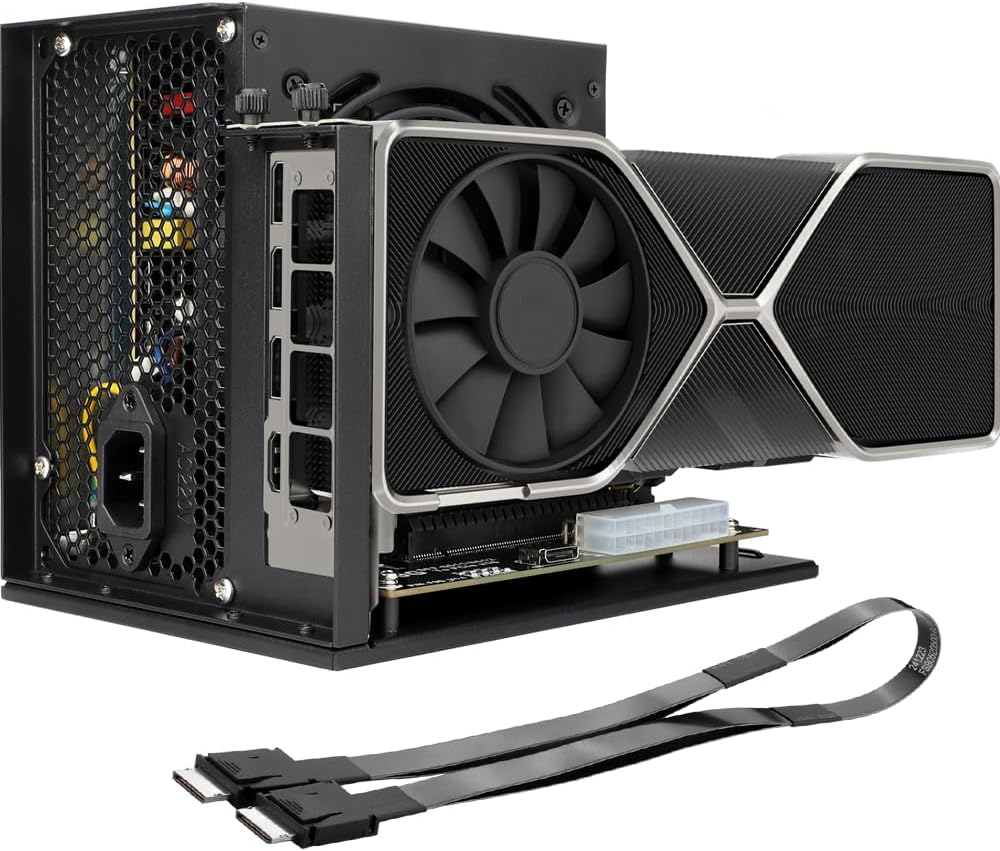
The OwlTree PCIe 4.0 x4 eGPU Dock is an external GPU enclosure designed for PC gamers and content creators who want to supercharge their laptop or mini PC with a full-size desktop graphics card. It uses an OCuLink SFF-8612 to SFF-8611 connection, delivering up to 64Gbps of bandwidth. This makes it a strong alternative to Thunderbolt-based eGPU solutions, especially for users who already have an OCuLink-equipped device or are building a compact gaming setup.
For competitive gamers and esports players, the low-latency PCIe 4.0 x4 connection helps maintain high frame rates in fast-paced titles like Valorant, Overwatch 2, and Apex Legends. Streamers and content creators will appreciate the ability to pair a powerful GPU with a portable laptop, enabling smooth 1080p or 1440p streaming and faster video rendering without being tied to a bulky desktop tower. The dock’s detachable design makes it easy to pack up for LAN events or dorm room moves.
Build quality is practical with gold-plated contacts that reduce signal degradation and a sturdy enclosure that houses a standard ATX power supply. The included OCuLink cable is notably thin and flexible, which helps with cable management in tight desk setups. However, the dock does not include a PSU or GPU, so you’ll need to supply those separately. It supports large cards like the RTX 4090 and AMD RX 7900 XTX, giving you plenty of room for high-end hardware.
Setup is straightforward: open the enclosure, mount your GPU and PSU, connect the OCuLink cable to your laptop or mini PC, and install the appropriate drivers. The LED status indicator helps confirm connection and power status. One key limitation is that OCuLink does not support hot-plugging, so you must power down before connecting or disconnecting the cable. This is a minor inconvenience but standard for this interface.
For college gamers, work-from-home professionals, or anyone with a laptop that lacks a dedicated GPU, this eGPU dock offers a cost-effective way to get desktop-level graphics performance. It’s also a great fit for mini PC enthusiasts who want to game or render without sacrificing desk space. The enclosure’s compact footprint and flat cable help keep your setup clean and organized.
Overall, the OwlTree eGPU Dock is a versatile, high-bandwidth solution for upgrading your portable system’s graphics capabilities. It shines for those who already own an ATX power supply and a GPU, and who value a slim, travel-friendly design over hot-plug convenience. Just remember to power down before swapping cables.

Pros
- Ultra-fast dual connectivity (Thunderbolt 5 and OCuLink) for maximum flexibility and bandwidth.
- Integrated M.2 NVMe slot for AI model storage and fast file access directly on the dock.
- Universal ATX/SFX power supply support allows easy upgrades and use of existing PSUs.
- Single-cable Thunderbolt 5 workflow simplifies desk setup and reduces cable clutter.
- Future-proof design with compatibility for upcoming GPUs and high-speed interfaces.
Cons
- Requires a separate power supply and GPU, increasing overall cost and setup complexity.
- Cable management can be messy due to user-supplied PSU cables and GPU connections.
- OCuLink may require an adapter for non-MINISFORUM devices, adding extra steps.
The MINISFORUM DEG2 is an external GPU enclosure that combines Thunderbolt 5 and OCuLink connectivity, designed to turn a mini PC or laptop into a gaming powerhouse. It also includes a built-in M.2 NVMe slot for storing AI models or project files, making it a versatile tool for PC gamers, streamers, content creators, and esports players who need desktop-level graphics on a compact system.
Performance-wise, the DEG2 delivers impressive bandwidth options: up to 80Gbps via Thunderbolt 5 and 64Gbps via OCuLink. Based on user feedback from the previous DEG1 model, this translates to smooth 4K gaming, high frame rates in demanding titles like Alan Wake 2, and low-latency responsiveness for competitive FPS and MOBA games. The built-in signal booster further reduces lag during intense gaming sessions or 8K rendering tasks, ensuring a reliable connection for both gaming and productivity workflows.
Build quality is solid with a modular design that accepts standard ATX or SFX power supplies, letting you reuse your existing PSU or upgrade easily. The dock itself is compact and lightweight, fitting neatly on a desk or inside a gaming setup. Setup is straightforward for Thunderbolt 5 users—just connect one cable for data, display, and charging. OCuLink setups may require driver installation and a compatible adapter, but once configured, the dock works seamlessly with most mini PCs and laptops.
One realistic limitation is that you need to supply your own power supply and GPU, which adds cost and can lead to cable management challenges. The dock's open design means the GPU is exposed, so it's best placed in a safe spot away from pets or spills. Additionally, the power button can be hard to reach with large GPUs installed. However, these trade-offs are common with eGPU enclosures, and the DEG2 offers excellent value for its feature set.
Overall, the MINISFORUM DEG2 is a practical choice for PC gamers, streamers, and content creators who want to boost their mini PC or laptop with a desktop GPU. It's especially useful for college gamers with limited space, work-from-home setups needing extra rendering power, or anyone building a compact gaming rig. With future-proof interfaces and modular upgrades, it's a smart investment for long-term gaming and creative use.
With Thunderbolt 5's 80Gbps bandwidth and OCuLink's direct PCIe connection, the DEG2 delivers near-desktop gaming performance when paired with a powerful GPU. User reviews of the previous DEG1 model show smooth 4K gaming and high frame rates in titles like Alan Wake 2 and Borderlands 3. The low-latency signal booster ensures minimal input lag, making it suitable for competitive esports and fast-paced FPS games. For streamers, the single-cable workflow simplifies setup, allowing you to game and stream from a compact mini PC without sacrificing graphics quality.

Pros
- Excellent performance uplift for ultrabooks, mini PCs, and handhelds like the ROG Ally X at 1080p-1440p.
- Quieter and cooler operation compared to competing eGPUs, according to user feedback.
- Versatile connectivity: works with Thunderbolt 3/4, USB4, and OCuLink for broad compatibility.
- Integrated SSD slot and USB/Ethernet ports reduce cable clutter and enhance desk organization.
Cons
- Not compatible with original ROG Ally Z1 (only Z1 Extreme and Ally X) - verify your device's OCuLink or Thunderbolt support before buying.
- Build materials feel slightly less premium than all-metal alternatives, though still durable for travel use.
- Power adapter is large (230W), adding bulk to the portable setup; may require a larger bag.
The BOSGAME GVP 7600 eGPU is an external graphics dock that packs a full AMD Radeon RX 7600M XT GPU with 8GB of GDDR6 memory into a sleek, portable aluminum enclosure. Designed for PC gamers, streamers, and content creators who need desktop-class graphics on the go, this eGPU connects to laptops, mini PCs, and even handheld gaming consoles via Thunderbolt 3/4, USB4, or OCuLink. It's particularly well-suited for gamers who want to breathe new life into a thin-and-light work laptop or a mini PC for gaming sessions at home or on the road.
In real-world gaming use, the RX 7600M XT delivers smooth 1080p-1440p performance in popular titles like Call of Duty, Fortnite, and Elden Ring. According to user reviews, it can handle 1440p at high settings comfortably, and even push 4K on less demanding esports titles. The dual-mode power switching lets you choose between a quieter 100W Eco mode for casual use or a more aggressive 120W Turbo mode for maximum frame rates in competitive gaming. The fan noise stays manageable, and the enclosure doesn't get uncomfortably hot during long sessions.
Build quality is solid with a mostly metal body that feels durable enough for travel. The inclusion of an M.2 2280 SSD slot is a smart touch, letting users add up to 4TB of game storage directly inside the dock. Port selection is generous: two HDMI 2.1 (4K60), two DisplayPort 2.0 (4K120), two USB-A 3.2, and an RJ45 Ethernet port. This makes it a genuine docking station, simplifying cable management and reducing desk clutter. Setup is straightforward: install the AMD drivers, plug in via the included Thunderbolt 4 cable, and the device is recognized quickly on both Windows and Linux.
Comfort and ergonomics extend beyond the device itself. Because this eGPU handles all the graphics processing, your laptop stays cooler and quieter, allowing for longer gaming sessions without thermal throttling. The compact size (just 1.92 lb) means it can slip into a backpack alongside your laptop or handheld, making it a practical solution for college gamers or remote workers who want to game after hours. It also cleans easily with a dry cloth thanks to the aluminum finish.
That said, there are a couple of limitations. The 230W power adapter is bulky, which somewhat diminishes portability. Compatibility is excellent with Thunderbolt 3/4 and OCuLink, but users of the original ROG Ally Z1 (non-Extreme) have reported issues, so it's best suited for the Ally X or other OCuLink-capable devices. Additionally, while the performance is impressive for an external GPU, it won't match a full desktop RTX 4070 in raw power, but that's expected given its size and power envelope.
Overall, the BOSGAME GVP 7600 eGPU is a strong choice for PC gamers, esports enthusiasts, and streamers who want a flexible, portable graphics upgrade. It's particularly valuable for those with Thunderbolt 4 laptops who want to game at higher settings without building a separate desktop. With its integrated storage, docking features, and quiet operation, it delivers a practical, cost-effective boost for your gaming setup.
The Radeon RX 7600M XT inside this eGPU delivers solid 1080p and 1440p gaming performance across a wide range of titles. Users report hitting 60+ fps in AAA games like Cyberpunk 2077 at medium-high settings, and exceeding 100 fps in competitive shooters like Overwatch 2 and Valorant at 1440p. The Turbo mode (120W) provides a noticeable bump in frame rates for demanding scenes. While not a replacement for a high-end desktop GPU, it performs similarly to a laptop RTX 4050 and is ideal for turning a modest laptop into a capable gaming machine.
This eGPU doubles as a dock. It offers two USB-A 3.2 ports for peripherals, an RJ45 Gigabit Ethernet port for stable wired networking, and an M.2 2280 PCIe 3.0 slot for adding up to 4TB of SSD storage. Video output supports up to four displays via two HDMI 2.1 (4K60) and two DisplayPort 2.0 (4K120). This makes it suitable for multi-monitor productivity setups or immersive gaming spans multiple screens. The Thunderbolt 4 cable included provides 40Gbps bandwidth for low-latency GPU communication.
Weighing only 1.92 lb and housed in a compact aluminum alloy enclosure, the BOSGAME eGPU is designed for travel. The chassis stays cool under load, and the internal fan is relatively quiet, even in Turbo mode. The included 230W power adapter adds some bulk, but the overall package is still far more portable than a desktop PC. The build feels sturdy enough for regular packing and unpacking, though some users note the materials are slightly less premium than all-metal competitors. A carrying case is recommended for frequent travelers.

Pros
- Dual OCuLink/Thunderbolt 5 modes offer wide compatibility with modern mini PCs and laptops.
- Internal M.2 slot is a unique benefit for creative workflows, reducing file transfer bottlenecks.
- Signal-optimized design ensures reliable connections with various GPU and cable combinations.
- Auto power-on and single-cable docking make setup seamless after initial configuration.
- Supports full-size GPUs and standard ATX/SFX PSUs, allowing easy upgrades.
Cons
- GPU and power supply are sold separately, adding to total system cost.
- Compatibility may be limited with non-Minisforum mini PCs; some users report issues with certain brands like GMKTec.
- The dock plus GPU and PSU can approach the cost of a dedicated gaming desktop, making it a niche solution for portability rather than pure value.
The MINISFORUM DEG2 is an external GPU (eGPU) docking station designed to bring desktop-class graphics performance to mini PCs, ultrabooks, and other compact host devices. It supports two high-bandwidth interfaces: OCuLink at 64Gbps and Thunderbolt 5 at 80Gbps, allowing you to connect a full-size graphics card and power supply for serious gaming, content creation, or AI workloads. This eGPU enclosure is particularly well-suited for PC gamers who want a portable powerhouse, streamers needing extra rendering muscle, and content creators dealing with large project files.
In terms of real-world performance, the DEG2 lets you pair a modern GPU like an RTX 4090 or RX 7900 XTX with a lightweight host device. According to user feedback, this setup can deliver smooth 1440p ultra settings in demanding games, with minimal latency thanks to the signal-optimized PCB design. The internal M.2 2280 slot is a standout feature: you can store games, models, or project assets locally on the dock for faster GPU access, reducing file transfers and streamlining creative workflows. The auto power-on feature syncs the dock with your host’s power state, making it feel like a plug-and-play extension of your desk.
Build quality is solid, with a compact metal enclosure that fits easily into a backpack for LAN parties or co-working spaces. The dock supports both ATX and SFX power supplies, giving you flexibility to choose a quiet or high-wattage PSU. All necessary mounting screws and brackets are included, and the OCuLink cable is provided. However, you’ll need to supply your own GPU, PSU, and PCIe power cables. The physical toggle between OCuLink and Thunderbolt 5 is a smart touch, eliminating driver or software hassles when switching devices.
Setup is straightforward for a mini PC with an OCuLink port or a laptop with Thunderbolt 5. For OCuLink, you install the included interface card into an M.2 slot on the host (if not already built-in). Most users reported a 3-5 minute installation process. The dock boots automatically when the host powers on, provided the PSU is switched on. Cable management is decent, though you’ll have a few cables running between the dock, PSU, GPU, and host. The dock’s small footprint helps keep your desk organized.
Realistic limitations include the total system cost: the $299 dock plus a quality GPU and PSU can add up quickly. Some users have reported compatibility hiccups with non-Minisforum mini PCs (e.g., GMKTec), so double-check your host’s OCuLink implementation. Also, while Thunderbolt 5 is blazing fast, OCuLink may introduce slight stuttering in some setups, though most user reviews indicate smooth performance at high settings. The dock itself runs cool and quiet, with no active cooling required.
Overall, the MINISFORUM DEG2 is a practical buy for PC gamers, streamers, and content creators who already own a capable mini PC or laptop and want to boost graphics performance without building a full desktop. It’s especially appealing if you prioritize portability and upgradeability. If your goal is to squeeze every dollar, a dedicated gaming tower might offer better price-to-performance, but for those who value a compact, versatile setup that can evolve with future GPUs, the DEG2 is a reliable choice.
Based on user reports and product specs, the DEG2 delivers strong gaming performance when paired with a modern GPU. For example, a setup with an RTX 3090 and Ryzen 9 9950X mini PC achieved 71 FPS at 1440p ultra in Fallout 76, close to a desktop tower with the same card. The dual interface allows you to choose OCuLink for lower latency or Thunderbolt 5 for higher bandwidth, depending on your host. Competitive gamers will appreciate the minimal input lag, especially with OCuLink’s direct PCIe connection. The internal M.2 slot can also store game files for faster load times.
The DEG2 works with both OCuLink and Thunderbolt 5 host devices. It is specifically tested with MINISFORUM mini PCs (e.g., UM890 Pro) and modern laptops like the HP ZBook Ultra G1a and MacBook Pro M3. It supports full-size dual-slot GPUs up to roughly 300mm long and standard ATX or SFX power supplies up to 1000W. Note that the dock is not compatible with MINISFORUM MS-02 Workstation. Some users have reported issues with non-Minisforum brand mini PCs, so verify your host’s OCuLink implementation before purchase.
The DEG2 offers a robust port selection: two Thunderbolt 5 ports (one 140W PD, one 30W PD), one OCuLink port (64Gbps), one 2.5G LAN port, one USB 3.2 Gen2 Type-A, one USB 3.2 Gen1 Type-A, one M.2 2280 slot, one PCIe x16 slot, and power input for ATX/SFX PSU. This allows you to connect a monitor via the GPU’s display outputs and use the dock’s LAN and USB ports for peripherals. The Thunderbolt 5 ports also support daisy-chaining, expanding your desk setup.

Pros
- Plug-and-play setup with Oculink-equipped mini PCs; no driver headaches.
- Supports the latest high-end GPUs for 4K gaming and AI workloads.
- Open-air design provides excellent airflow and keeps GPU temperatures in check.
- Compact footprint and solid metal construction feel durable and premium.
- Great value compared to Thunderbolt eGPU enclosures with similar performance.
Cons
- Requires a separate power supply and GPU, adding to total cost.
- No GPU support bracket included; heavier cards may need additional support to prevent sag.
- Only works with Oculink ports; not compatible with USB-C, Thunderbolt, or standard laptops.
The MINISFORUM DEG1 eGPU Dock is a specialized accessory designed for PC gamers, streamers, and content creators who want to supercharge their mini PC with a full-size desktop graphics card. Unlike traditional Thunderbolt enclosures, this dock uses Oculink 4i (PCIe 4.0 x4) for a direct, low-latency connection to compatible mini PCs like the MINISFORUM UM890 Pro or MS-A1. If you're a gaming setup builder looking to maximize performance in a compact form factor, this is a compelling option.
Performance-wise, the DEG1 delivers the full bandwidth of PCIe 4.0 x4, which is more than enough for gaming at 1440p and 4K with cards like the RTX 4090 or RX 7900 XTX. User reviews note that games run smoothly with high frame rates, and the open-air design keeps the GPU cool even during extended sessions. For streamers and content creators, this dock can handle demanding tasks like 4K video editing and live streaming without bottlenecking modern GPUs.
Build quality is solid with a metal frame that feels sturdy. The dock is essentially a bare-bones platform: you mount your GPU and power supply directly onto the board. While this keeps costs down, it means there's no support bracket for heavier cards. Some users have reported that the PCIe connection feels wobbly, so a third-party GPU support bracket might be necessary for long-term reliability. The included Oculink cable is adequate, but shorter aftermarket cables can help with cable management.
Setup is straightforward for anyone familiar with PC building. Simply install your GPU and PSU, connect the Oculink cable to your mini PC, and power on. The follow-start feature works seamlessly with MINISFORUM mini PCs, allowing the dock to turn on and off with the host. However, note that the Oculink interface does not support hot-plugging, so you must shut down the system before connecting or disconnecting.
A realistic limitation is compatibility: this dock only works with devices that have an Oculink port, which is primarily found on certain mini PCs and a few laptops like the ThinkBook 14 Gen 6. It won't work with Thunderbolt or USB-C. Additionally, you'll need to supply your own GPU and power supply, which adds to the overall investment. For college gamers or those with compact desks, the small footprint is a major plus, but the open design means you'll have a GPU sitting out in the open, which may not suit everyone's aesthetic.
Overall, the MINISFORUM DEG1 is an excellent value for its niche. If you own a compatible Oculink mini PC and want to game at high settings or accelerate creative workloads without building a full tower, this dock is a smart buy. Just factor in the cost of a PSU and a GPU support bracket for heavier cards. It's a practical, performance-focused solution for gamers who value flexibility and desk space.
With PCIe 4.0 x4 bandwidth, the DEG1 eGPU Dock can handle modern GPUs like the RTX 4090 and RX 7900 XTX without noticeable bottlenecks in most games. User reports show high frame rates in titles like Cyberpunk 2077 and Call of Duty at 1440p and 4K. The open-air design keeps thermals low, so GPU performance remains consistent during long gaming sessions. Competitive gamers will appreciate the low latency of the Oculink connection, which is comparable to a direct motherboard slot.
The dock features a metal chassis that feels robust and stable. The PCB is well-mounted, and the Oculink connector is secure. However, there is no GPU support bracket, so heavier cards may sag over time. Users recommend adding a third-party support to avoid strain on the PCIe slot. The overall construction is minimalist but functional, prioritizing airflow and easy access.
This eGPU dock is designed exclusively for devices with an Oculink port. It is confirmed compatible with MINISFORUM mini PCs like the UM780 XTX, UM890 Pro, and MS-A1, as well as select ThinkBook models. It does not support Thunderbolt, USB-C, or standard laptops. Always verify your device's Oculink availability before purchasing. The dock works with any standard ATX or SFX power supply and any PCIe GPU.

Pros
- Ultra-fast Thunderbolt 5 bandwidth ensures low latency and high performance for gaming and content creation
- Wide GPU compatibility – supports most NVIDIA and AMD cards up to 4 slots wide
- Tool-free modular design allows easy upgrades or reuse of existing GPU and PSU
- True plug-and-play with no driver hassle on compatible Windows laptops and devices
Cons
- Requires a separate GPU and ATX power supply (not included), adding to the total cost
- Compatibility depends on your laptop – must have a Thunderbolt 4/5 or USB4 port with eGPU support
- Not supported on Mac devices with M1 or newer chips, limiting platform options
The Razer Core X V2 is an external graphics enclosure that gives compatible laptops – whether Thunderbolt 4, Thunderbolt 5, or USB4 – a huge boost in graphical power. It's essentially a desktop GPU dock that lets you plug in a full-size graphics card and use it via a single cable. This is perfect for PC gamers who want desktop-level performance on their laptop, streamers who need extra GPU muscle for encoding, content creators working with 3D rendering or video editing, and even college gamers who want a single laptop that doubles as a powerful desktop when docked.
Performance-wise, the Core X V2 benefits from Thunderbolt 5's massive 80 Gbps bandwidth – double that of Thunderbolt 4. This means lower latency and smoother gaming, especially in demanding AAA titles. You can install the latest NVIDIA GeForce or AMD Radeon cards (up to 4 slots wide) and get near-desktop frame rates. The enclosure also delivers up to 140W power delivery to your laptop, so you can game and charge simultaneously. Setup is a breeze: just plug the included Thunderbolt 5 cable into your device, and the eGPU is recognized without a reboot – perfect for quick transitions between on-the-go and docked use.
Build quality is solid. The steel chassis is vented for maximum airflow, and the built-in 120mm fan automatically adjusts speed based on temperature to keep things quiet during light use and ramps up under load. You can even customize fan curves through Razer Synapse software. The interior is modular – you can swap the GPU and ATX power supply tool-free using thumbscrews. This gives you flexibility to upgrade later or reuse parts from an older desktop build. The enclosure's dimensions (16.59 x 8.51 x 7.76 inches) are compact enough for most desks but leave room for a large GPU.
One practical consideration: the Core X V2 does not come with a GPU or power supply, so you'll need to budget for those separately. Also, not every Thunderbolt 4 or USB4 device supports external graphics – always check your laptop manufacturer's documentation. Mac users with M1 or newer chips are out of luck, as those don't support eGPUs. But for Windows gaming laptops and handhelds (like certain USB4 gaming handhelds), it's a game-enhancing accessory.
In a setup, the Core X V2 is a clean addition. Its black steel finish matches most gaming gear, and the single cable reduces clutter. The 140W power delivery means you might not need a separate charger for your laptop. For streamers, pairing this with a high-end GPU can handle 1440p or 4K gaming while streaming at the same time. For content creators, GPU-accelerated tasks like video rendering and 3D modeling get a massive boost. The fan and PSU can be customized to match your performance needs and noise tolerance.
Overall, the Razer Core X V2 is a great investment for anyone who wants desktop-class graphics in a laptop-centric lifestyle. It's best suited for PC gamers who travel but still want high-end gaming at home, streamers or creators who need extra GPU power on demand, and laptop users who want to future-proof their setup with GPU upgrades. Just make sure your device is compatible and be ready to invest in a GPU and PSU. The convenience and performance make it a smart upgrade for many gamers and power users.
With Thunderbolt 5 bandwidth up to 80 Gbps, the Razer Core X V2 can handle demanding titles without bottlenecking most modern GPUs. You can expect smooth frame rates in games like Cyberpunk 2077, Call of Duty, and Forza Horizon at high settings. The enclosure supports both NVIDIA and AMD graphics cards up to 4 slots wide, so you can drop in a flagship card like the RTX 4090 or RX 7900 XTX. Active cooling with a 120mm fan keeps temperatures in check during long sessions. Since the GPU is fully inside the enclosure, you'll get desktop-grade performance with minimal compromise, especially when connecting an external monitor directly to the GPU.
The Core X V2 works with Windows laptops and devices that have a Thunderbolt 4, Thunderbolt 5, or USB4 port with eGPU support. It's also compatible with select USB4 gaming handhelds. Check your device manufacturer's documentation to ensure eGPU support. The enclosure supports most NVIDIA and AMD PCIe graphics cards up to 4 slots wide and any standard ATX power supply (sold separately). Note that Mac devices with M1 or later chips do not support eGPUs. The included Thunderbolt 5 cable is USB-C to USB-C, and the enclosure requires Windows 10 or 11 for full functionality.
Pros
- Affordable entry into external GPU gaming for laptop users without a dedicated gaming rig
- Supports both NVIDIA and AMD GPUs (confirmed by multiple user reviews)
- Four power input options give flexibility to use almost any ATX power supply
- Includes a high-quality Thunderbolt 4 cable for reliable connectivity
- Easy driver installation - most users report it works within 30 minutes
Cons
- Limited to PCIe 3.0 x16 bandwidth (22Gbps), which may bottleneck high-end cards like RTX 5090 in some scenarios
- Requires an external power supply (not included) and a separate GPU, adding to overall cost and desk clutter
- Some users report stability issues when daisy-chaining with other Thunderbolt devices or using older GPUs
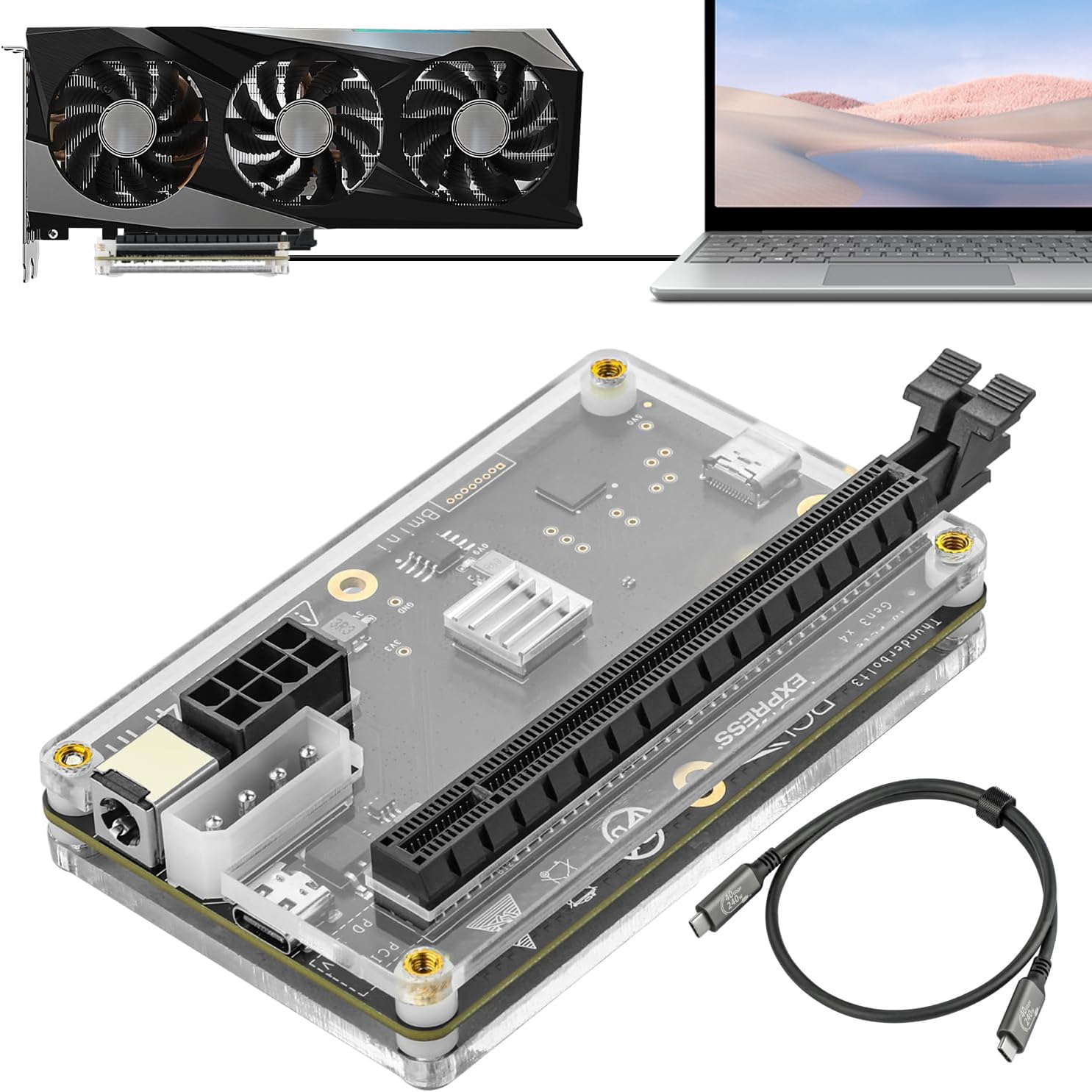
The OwlTree PCIE 3.0 x16 eGPU Dock is a practical and affordable way to bring desktop graphics card power to your Thunderbolt-equipped laptop. Designed for PC gamers, streamers, content creators, and anyone who needs extra GPU muscle without buying a full desktop, this dock connects to your laptop via Thunderbolt 3 or 4 (or USB4 with a BIOS update) and lets you install any compatible NVIDIA or AMD graphics card. It's a great fit for competitive gamers who want higher frame rates on the go, casual gamers upgrading from integrated graphics, and esports players running demanding titles like Valorant or Apex Legends on a lightweight laptop.
Performance-wise, the dock uses the JHL6340 controller to deliver around 22Gbps of bandwidth over PCIe 3.0 x16. While that's not as fast as a direct desktop PCIe slot, it's more than enough for most gaming scenarios, video editing, and AI workloads. User reviews confirm it works well with cards from GTX 980 Ti to RTX 5090, though you may see some bandwidth limitations with the highest-end GPUs in very demanding games. For 1080p and 1440p gaming, the experience is smooth and responsive. The dock also supports AMD GPUs, despite some early confusion - multiple users successfully used RX 5500 XT and 9060 XT cards.
Build quality is solid for its price point. The dock is compact and lightweight (7 ounces), making it easy to slip into a backpack for LAN parties or travel. However, because it's so small, a heavy GPU can tip it over - you'll want to brace it or mount it on a stand. The included Thunderbolt 4 cable is high-quality and 23.6 inches long, giving you decent placement flexibility. Power input is flexible: you can use a CPU 4+4-pin, Molex, PD 3.0 (60W), or DC5521 (120W) connector, so almost any ATX power supply works. Just note that a PSU is not included, and you'll need one with enough PCIe power connectors for your GPU.
Setup is straightforward for anyone comfortable with PC hardware. Most users report it takes about 30 minutes from unboxing to driver installation. The dock comes with a 24-pin power jumper to trick the PSU into turning on. Simply plug in your GPU, connect the Thunderbolt cable, install drivers from NVIDIA or AMD, and you're good to go. Some users on Windows 11 noted occasional driver conflicts when using a GPU that shares the same family as the laptop's integrated graphics, but a quick driver reinstall usually fixes it. For laptops with USB4, a BIOS update may be needed to enable full functionality.
Realistically, this dock has a few limitations. The PCIe 3.0 x16 interface caps bandwidth at 22Gbps, which can bottleneck very high-end cards in bandwidth-intensive tasks. Also, the lack of included GPU/PSU brackets means your setup may look a bit messy - many users 3D-print their own enclosures or use zip ties to keep things tidy. Additionally, hot-plugging and unplugging the dock while the laptop is on can cause driver crashes, so it's best to power down before disconnecting. These are common eGPU quirks, not unique to this product.
Overall, the OwlTree eGPU Dock is a smart buy for laptop gamers and creators who want to level up their graphics performance without building a whole new desktop. It's especially useful for college gamers with a Thunderbolt laptop who want to game at higher settings in their dorm, or for streamers who need extra rendering power for OBS. If you're comfortable sourcing a PSU and GPU separately, this dock offers excellent value at its price point. Just be prepared to do a little DIY cable management and consider a support bracket for heavy cards.

Pros
- Compact, portable eGPU that delivers desktop-tier gaming performance for laptops
- Excellent connectivity options including Thunderbolt 4/3, HDMI 2.1a, and USB4
- Built-in speakers and microphone array add convenience for streaming and calls
- Secure locking mechanism prevents accidental disconnection during use
- Premium CNC aluminum build with fingerprint login and volume controls
Cons
- Premium pricing at $1199 may be high for budget-conscious gamers
- Requires Thunderbolt 4/3 or USB4 for full performance, limiting compatibility with older laptops
- Intended primarily for use with Khadas Mind mini PC or compatible laptops, not a standalone GPU
The Khadas Mind Graphics is an external GPU (eGPU) dock designed to bring desktop-class graphics performance to laptops and compatible mini PCs. It houses a full NVIDIA GeForce RTX 4060 Ti with 16GB of GDDR6 VRAM, making it a powerful upgrade for PC gamers, streamers, content creators, and gaming setup builders who need more graphical horsepower without building a full desktop tower.
This eGPU is best suited for competitive and casual gamers who want to play modern titles at high settings on their laptop, as well as streamers and content creators who need faster rendering, video editing, and AI workloads. Its compact 2.5-liter size and 2.7 kg weight make it easy to place on a desk or move between setups, ideal for college gamers or work-from-home users with limited space.
In terms of performance, the RTX 4060 Ti delivers smooth 1440p gaming and capable 4K experiences, with support for up to 8K at 60Hz output. The eGPU connects via Thunderbolt 4/3 or USB4, providing up to PCIe 4.0 x8 bandwidth (128 GT/s) for low-latency gameplay and responsive input. The built-in dual speakers and far-field microphone array add convenience for casual gaming sessions or Discord calls, though dedicated gaming headsets will still offer better audio quality for competitive play.
Build quality is a highlight, with a CNC unibody aluminum enclosure that feels premium and durable. The Mind Lock Mechanism physically secures the GPU connection, reducing the risk of accidental disconnection during intense gaming. The integrated 300W GaN power supply keeps the setup tidy, and the fingerprint reader with physical volume rocker adds practical everyday ease. The eGPU supports up to four displays via HDMI 2.1a and Thunderbolt, making it versatile for multi-monitor setups.
Setup is straightforward for compatible devices, but it's important to note that the Mind Graphics is designed primarily for use with Khadas Mind mini PCs or laptops with Thunderbolt 4/3. It's not a standalone GPU and requires a host device to function. Some users may find the $1199 price steep, but for those needing a portable, powerful eGPU solution, it offers a clean, all-in-one package that avoids the bulk of traditional external GPU enclosures.
Overall, the Khadas Mind Graphics is a strong recommendation for laptop gamers and creators who want desktop graphics performance without building a full PC. Its compact design, robust connectivity, and secure locking mechanism make it a practical choice for gaming setups, streaming rigs, or mobile workstations where space and portability matter.
Frequently Asked Questions About Best External Gpu For Laptop
Does an external GPU increase laptop gaming FPS?
Yes, connecting an external dock delivers a substantial jump in gaming frame rates and visual fidelity. Laptops with integrated chips or older laptops with mobile graphics face thermal ceilings that cause stuttering. Offloading graphics to a desktop card eliminates throttling and stabilizes 1% low frame rates in demanding titles.
What is the performance difference between OCuLink and Thunderbolt?
OCuLink provides direct PCIe lane access that yields lower latency and less bandwidth loss than traditional Thunderbolt connections. While Thunderbolt offers convenient plug-and-play operation, OCuLink transfers at PCIe 4.0 x4 speeds up to 64Gbps with minimal protocol overhead. Gamers wanting maximum rendering efficiency often choose OCuLink to extract peak performance from desktop cards.
Can any laptop work with the Best External GPU For Laptop 2026: Boost Performance Instantly?
No, your laptop must feature a high-speed port like Thunderbolt 3, Thunderbolt 4, Thunderbolt 5, USB4, or a native OCuLink port. Standard USB-A and regular USB-C ports lack the PCIe data routing required to transmit graphical data in real time. Verifying host port compatibility beforehand prevents frustrating connection drops and device recognition problems.
Does an eGPU support hot-plugging while the system is running?
It depends on the interface used on your enclosure. Thunderbolt and USB4 docks support hot-plugging within the operating system, though closing running games first prevents software crashes. In contrast, OCuLink interfaces do not support hot-plugging, meaning you must power down the computer before connecting or disconnecting the cable.
Do external GPU docks come with a graphics card and power supply included?
Most standalone docks do not include a graphics card or power supply. Modular enclosures like the MINISFORUM DEG2 or OwlTree docks require you to supply an external card and an ATX or SFX power unit. All-in-one models like the BOSGAME RX 7600M XT or Khadas Mind provide integrated GPUs and built-in power supplies.


Write Your Review
No reviews yet. Be the first to share your experience!