


Choppy frame rates and aggressive thermal throttling quickly ruin an evening gaming session right after a long day of spreadsheets. Modern hybrid workflows demand balanced portable hardware that delivers reliable clock speeds without turning your desk into a noisy jet engine. Evaluating cooling layouts, display refresh rates, and processor power helps determine the Best Dell Laptop for Work and Gaming 2026 Top Picks for users who need dependable weekday office tools and smooth weekend gaming power. Selecting a laptop with dedicated silicon, such as RTX GPUs or robust integrated graphics, ensures you will avoid sluggish frame drops when rendering media or jumping into casual lobbies. Checking out portable mobile gaming rigs gives helpful context on how thermal design impacts steady clock rates over long sessions.
Responsive panels with fast refresh rates and 16:10 aspect ratios make daily multitasking significantly easier by expanding vertical screen real estate for documents and timelines. High DDR5 memory bandwidth and speedy NVMe SSD storage cut application launch times and eliminate frustrating hitching during open-world gameplay. Careful analysis of system thermals and manufacturer hardware specifications shows that pairing efficient multi-core processors with capable graphics silicon provides the best path toward sustained productivity and competitive gaming stability. Comparing portable systems against desktop alternatives highlights the value of balancing power delivery against battery endurance. Understanding how mobile chips compare to dedicated graphics hardware clarifies what visual fidelity and frame rates you can realistically maintain.

Pros
- Exceptional multitasking performance with 32GB DDR5 and Core 7 processor.
- Sharp 16-inch touchscreen with 16:10 ratio ideal for productivity and content creation.
- Generous 1TB SSD provides ample storage for games, media, and project files.
- Portable and lightweight at under 4.4 lbs with a slim profile.
- Windows 11 Pro with Copilot AI enhances workflow and security.
Cons
- Integrated Intel Graphics limit gaming performance to light or older titles; not for modern AAA gaming.
- Single USB-C port may require a hub for multiple peripherals.
- Display brightness at 300 nits may be dim in very bright environments.
The Dell DC16251 is not a gaming laptop in the traditional sense, but it is a performance-oriented productivity machine that fits well into the setup of any PC gamer, streamer, or content creator who needs a powerful secondary device for work, school, or streaming management. With its Intel Core 7 150U processor and 32GB of DDR5 RAM, this laptop handles heavy multitasking with ease—perfect for running OBS, Discord, and multiple browser tabs while gaming on your main rig.
For the competitive or casual gamer who also needs a reliable workhorse, the 1TB NVMe SSD ensures fast load times and plenty of storage for project files and a modest game library. The 16-inch FHD+ touchscreen display with a 16:10 aspect ratio gives you extra vertical screen real estate—great for coding, video editing timelines, or managing chat overlays while streaming. The integrated Intel Graphics are sufficient for light gaming, indie titles, or older esports games like CS:GO or League of Legends at lower settings, but don't expect to run Cyberpunk 2077 here.
Build quality is solid with a Platinum Silver chassis that feels premium and durable. The backlit keyboard includes a numeric keypad, making data entry and spreadsheet work smoother, and the fingerprint reader adds quick, secure login. The laptop is lightweight at 4.37 pounds, making it easy to move between your gaming desk and a coffee shop or classroom.
Connectivity is decent with Wi-Fi 6E, Bluetooth, two USB-A ports, one USB-C with Power Delivery, HDMI 1.4, and an SD card reader. The single USB-C port might require a hub for multiple monitors or external drives, but it supports DisplayPort and charging. The 1080p webcam with noise reduction works well for video calls and streaming check-ins.
Windows 11 Pro with Copilot AI integration is a nice productivity boost—useful for quickly drafting emails, summarizing notes, or searching files. Setup is straightforward, and the laptop comes with minimal bloatware. The main limitation for gamers is the integrated graphics, but for its intended use as a business/student laptop, it excels. If you are a PC gamer or streamer looking for a powerful, portable companion for work, study, or content creation, the Dell DC16251 is a solid choice that won't break the bank.

Pros
- Strong price-to-performance ratio with RTX 4050 and 165Hz display
- AI-powered graphics and DLSS 3.5 support for modern games
- Easy RAM upgrade path to overcome the 8GB bottleneck
- Solid connectivity including Thunderbolt 4 and Wi-Fi 6
- Effective cooling system with customizable fan profiles
Cons
- 8GB RAM is insufficient for many modern AAA titles out of the box
- Some user reports of screen ghosting at high refresh rates
- Fan noise can be noticeable under heavy load in performance mode
The Acer Nitro V 15 (model ANV15-52-586Z) is a budget-friendly gaming laptop that aims to deliver solid performance without breaking the bank. It's powered by an Intel Core i5-13420H processor and an NVIDIA GeForce RTX 4050 laptop GPU, which together provide enough muscle for esports titles, popular battle royale games, and even some AAA experiences at medium settings. The 15.6-inch Full HD IPS display with a 165Hz refresh rate is a standout feature at this price point, offering smooth motion and decent color reproduction for both gaming and content consumption.
This laptop is best suited for PC gamers on a tight budget, college gamers looking for a portable rig, and casual gamers who want to play modern titles without spending a fortune. It also works well for light content creation or streaming, thanks to the RTX 4050's AI capabilities and DLSS 3.5 support. However, it's not a turn-key solution for demanding users right out of the box, as the 8GB of DDR5 RAM is a clear bottleneck. Many user reviews highlight that upgrading to 16GB or 32GB significantly improves performance and eliminates stuttering in games like Hogwarts Legacy.
In terms of real-world gaming performance, the RTX 4050 handles most games at 1080p with high settings, and the 165Hz screen makes fast-paced shooters feel responsive. The dual-fan cooling system does a good job keeping temperatures in check, though the fans get loud in performance mode. The keyboard is comfortable for gaming with a backlit layout and numeric keypad, but the spacebar lacks backlighting, which some users may find odd. Build quality is typical for this price range: mostly plastic with a sturdy feel, and the laptop weighs 4.66 pounds, making it portable enough for a backpack.
Connectivity is a strong point, with Thunderbolt 4, HDMI 2.1, three USB 3.2 Gen 1 ports, and Wi-Fi 6. This makes it easy to connect to external monitors, high-speed storage, or a gaming dock. The Acer PurifiedVoice noise reduction technology helps with in-game chat and Discord calls, though the built-in microphone is average. Setting up the laptop is straightforward, but you'll want to update drivers and consider a fresh Windows install if you encounter any pre-installed software issues, as some users reported.
The biggest limitation is the 8GB RAM, which causes stuttering and high memory usage even on the desktop. Upgrading the RAM is simple (two DDR5 slots), and many users recommend doing it right away. Another potential issue is screen ghosting at 165Hz, which may be noticeable in fast-paced games. Fan noise under load is also worth noting if you play in a quiet room. Despite these drawbacks, the Acer Nitro V 15 offers excellent value for its price, especially after a RAM upgrade.
If you're a budget-conscious gamer, a college student, or someone building their first gaming setup, this laptop is a practical choice. It's not perfect out of the box, but with a small investment in more RAM, it becomes a very capable machine for gaming, streaming, and everyday use. For esports players or those who prioritize competitive performance, the 165Hz display and RTX 4050 provide a smooth experience in games like Valorant, Fortnite, and Overwatch 2. Just be prepared to spend a little extra time and money to unlock its full potential.
The Acer Nitro V 15's RTX 4050 GPU and Intel i5 processor deliver solid 1080p gaming performance. In esports titles like CS:GO and Valorant, you can expect well over 100 FPS on high settings, taking full advantage of the 165Hz display. For more demanding games like Cyberpunk 2077, DLSS 3.5 and frame generation help maintain playable frame rates at medium settings. The 8GB RAM is a bottleneck here, causing occasional stutters in open-world games; upgrading to 16GB resolves this. The dual-fan cooling system keeps the CPU and GPU from throttling during long sessions, though the fans become audible in performance mode. Overall, this laptop offers great gaming value once you address the memory limitation.
The Acer Nitro V 15 features a dark, understated design with a glossy Acer logo on the lid and subtle gradient accents. The chassis is primarily plastic but feels sturdy enough for daily use. At 4.66 pounds and 0.93 inches thick, it's reasonably portable for a 15.6-inch gaming laptop. The keyboard includes a backlit layout with a numeric keypad, though the spacebar lacks illumination. The touchpad is responsive, but most gamers will use an external mouse. The display has thin bezels on the sides, giving an 82.64% screen-to-body ratio, and the hinge feels solid. Port placement is practical, with USB ports on both sides and the HDMI and Thunderbolt 4 on the rear. Overall, the build quality meets expectations for the price range, with no major creaking or flex during normal use.

Pros
- Exceptional memory and storage combo for the price – 32GB RAM + 1TB SSD outpaces most laptops in this range
- Touchscreen display adds convenience for intuitive navigation and creative applications
- Windows 11 Pro offers business-grade features and better security than Home edition
- Multiple USB ports (2 USB 3.2, 1 USB 2.0) and HDMI allow easy connection to peripherals and external monitors
- Quiet and efficient performance for typical student and workday tasks
Cons
- Integrated Intel UHD Graphics limit gaming to esports and older titles – not suitable for AAA or competitive FPS gaming
- Battery life is realistic at 3-4 hours under typical use, not the 7 hours advertised
- Some reports of third-party resellers swapping SSDs – ensure you buy from a reputable seller
The Dell Inspiron Touchscreen Laptop is a well-rounded machine that blends productivity with casual gaming capabilities, all at a price that won't break the bank. Powered by an Intel Core i5-1155G7 processor, 32GB of DDR4 RAM, and a 1TB SSD, this laptop is built for users who need speed and storage for multitasking, light content creation, and everyday computing. While it won't compete with dedicated gaming rigs, it's an excellent choice for college gamers, streamers on a budget, and work-from-home pros who also enjoy casual gaming sessions.
Who is this laptop best for? Think of it as a daily driver for students who want to run multiple apps, browse the web, write papers, and occasionally jump into games like League of Legends, Minecraft, or indie titles. Streamers who need a secondary machine for light streaming or Discord calls will appreciate the 32GB RAM for smooth OBS multitasking. Content creators working with photos or 1080p video editing can rely on the fast SSD and ample memory, though heavy rendering will be limited by the integrated graphics.
In real-world use, the Inspiron feels snappy and responsive. The 15.6-inch Full HD IPS touchscreen offers decent color and sharpness, and the 220-nit brightness is adequate for indoor use. The touchscreen is a nice bonus for scrolling through documents or zooming into images. The keyboard includes a numeric keypad, which is handy for data entry or gaming key binds. However, the 720p webcam is basic, so consider an external webcam if you stream or take video calls seriously.
Build quality is typical for Dell's Inspiron line – a sturdy plastic chassis with a slim profile at 0.69 inches thick and a weight of 3.65 pounds. It's portable enough for backpack commuting. Port selection includes two USB 3.2 Type-A, one USB 2.0, HDMI 1.4 (supports external 1080p displays), an SD card reader, and a headphone jack. Connectivity relies on Wi-Fi 5 (802.11ac) and Bluetooth – not the latest standards, but sufficient for most home networks and peripherals.
One realistic limitation is the integrated Intel UHD Graphics. You won't be playing Cyberpunk 2077 or Call of Duty: Warzone at playable frame rates. Stick to older or less demanding games, and you'll have a good experience. Another drawback is battery life – user reviews indicate around 3-4 hours with Wi-Fi and normal use, far from the 7 hours claimed. If you need all-day battery, this isn't it. Also, be aware that some third-party sellers have been known to swap the SSD, so verify your purchase source.
For anyone looking for a budget-friendly laptop that doubles as a productivity tool and casual gaming machine, the Dell Inspiron Touchscreen is a great value. Pair it with an external monitor for a more immersive desktop setup, and use the touchscreen for creative tasks. It's a practical choice for college gamers, streamers starting out, or anyone who needs a reliable workhorse with plenty of RAM and storage without breaking the bank.
Pros
- Powerful Intel Core 7 and RTX 5060 deliver excellent 1080p/1440p gaming performance
- Bright, high-resolution 16:10 display with 120Hz refresh rate for smooth visuals
- User-upgradeable RAM and storage for future-proofing
- Effective cooling keeps thermal throttling at bay during extended play
- Premium build quality with anodized aluminum and comfortable keyboard/palm rest
Cons
- Heavier than some competitors at 5.49 pounds, less ideal for frequent travel
- Reports of occasional firmware/driver issues that may require manual updates
- Can get warm on the lap during intensive gaming, so desk use is recommended
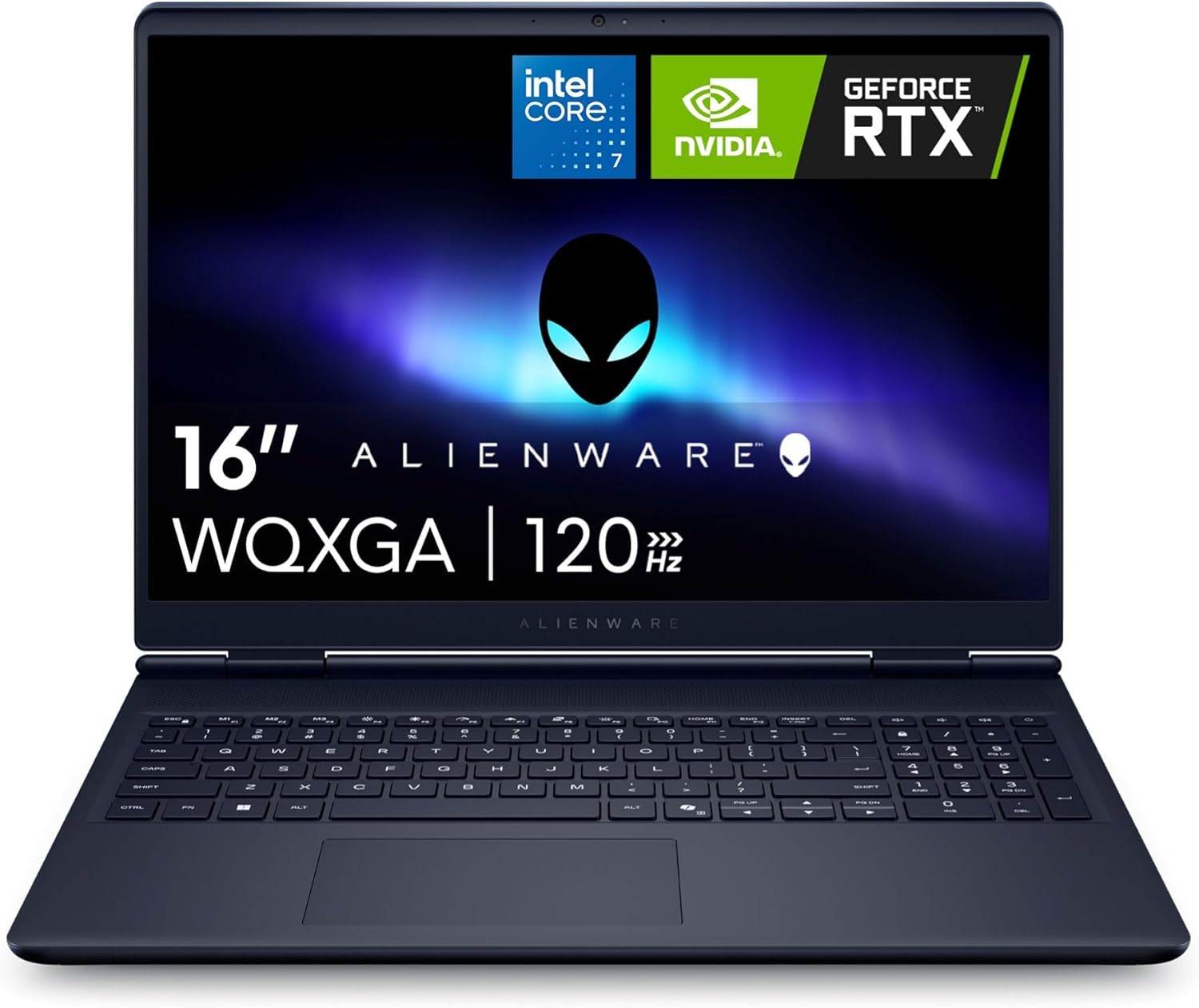
The Alienware 16 Aurora is a gaming laptop that aims to balance raw performance with everyday portability. Powered by an Intel Core 7 processor and NVIDIA GeForce RTX 5060 graphics with 8GB of GDDR7 VRAM, this machine is built to handle modern titles at high settings. The 16-inch WQXGA display runs at 120Hz and uses an anti-glare IPS panel with ComfortView Plus, making it suitable for both competitive gaming and content creation. Based on user feedback, the laptop delivers solid frame rates in games like Crusader Kings 3 and iRacing, though some have noted that it performs best when kept on a desk rather than a lap due to heat output under load.
This laptop targets a wide audience: PC gamers, streamers, esports enthusiasts, college gamers, and work-from-home users who need a single device for gaming and productivity. The RTX 5060 GPU supports DLSS 4 and Nvidia Reflex 2, which can reduce latency and boost framerates in supported titles. The 16GB of DDR5 RAM and 1TB NVMe SSD provide a responsive experience out of the box, and both are user-upgradeable thanks to two SODIMM slots and two M.2 slots. This flexibility means buyers can extend the laptop's lifespan as their needs grow.
Build quality is a highlight. The anodized aluminum lid with an iridescent Alienware logo and magnesium alloy interior give the laptop a premium feel. The chassis measures just 0.89 inches thick and weighs 5.49 pounds, which is reasonable for a 16-inch gaming laptop. The keyboard features a comfortable, pillowed palm rest and a full numeric keypad, making it practical for both gaming and typing. Alienware's Cryo-Tech cooling uses dual fans and three copper heat pipes to keep temperatures in check, and user reviews often praise the system's ability to stay quiet and cool during moderate gaming.
Connectivity is generous, with two USB-A ports, two USB-C ports (one with DisplayPort), HDMI 2.1, an RJ-45 Ethernet jack, and a global headset jack. The inclusion of Wi-Fi 7 (802.11be) ensures fast wireless speeds for online play and streaming. Setting up the laptop is straightforward, with Windows 11 Home pre-installed. Some users reported needing to update drivers manually for sound and drawing tablets, but once updated, the system ran reliably. The 1-year onsite service from Dell adds convenience if hardware issues arise.
However, the laptop has realistic limitations. At 5.49 pounds, it is heavier than many 16-inch ultrathins, making it less ideal for daily commuting. A few reviewers experienced a complete failure after a firmware update, though others found the machine stable after driver updates. The battery life is decent for light tasks but will be shorter during gaming. The RTX 5060 is a capable mid-range GPU, but it won't max out every AAA title at native resolution with full ray tracing. Buyers should temper expectations for ultra settings on the most demanding games.
Overall, the Alienware 16 Aurora is a well-rounded gaming laptop that offers strong performance, upgradeability, and a comfortable design. It is best suited for gamers who want a portable rig for moderate to high settings at 1440p or 1080p, as well as streamers and students who need a reliable workhorse. If you can catch it on sale, the value improves significantly. Just be prepared for a heavier carry and the occasional need to tinker with drivers. For anyone seeking a stylish, capable gaming machine that can grow with them, this Alienware is a worthy contender.
The Alienware 16 Aurora's gaming performance hinges on the Intel Core 7 Processor 240H (10 cores, 16 threads) and the NVIDIA GeForce RTX 5060 with 8GB GDDR7. According to user reports, this combination handles most modern games at 1080p and 1440p with high settings. The 120Hz display pairs well with the GPU, providing smooth motion in fast-paced titles like first-person shooters and racing games. DLSS 4 support helps boost frame rates in ray-traced games, and Nvidia Reflex 2 reduces input latency for a more responsive feel. The 110W total performance power (65W TGP + 45W TDP) ensures the system can maintain solid frame rates without excessive throttling, aided by the effective Cryo-Tech cooling.
The Alienware 16 Aurora uses a refined Cryo-Tech cooling system with dual ultra-thin fans, three copper heat pipes, and four exhaust vents. Air is drawn in through the keyboard and bottom vents, then exhausted out the sides and rear. This design helps keep the CPU and GPU cool during extended gaming sessions. Users report that fan noise is manageable, especially in Quiet Mode activated via F7. However, the bottom can become quite warm when gaming on a lap, so using the laptop on a desk or cooling pad is recommended. The thermal solution appears well-balanced for sustained performance, and the lack of a rear thermal shelf makes the laptop easier to slip into a backpack.
Pros
- Excellent CPU and RAM combo for heavy multitasking, content creation, and AI-driven apps
- Fast 2TB SSD offers ample space for games and projects without needing an external drive
- High-resolution 16:10 display with good color and anti-glare coating for long work or gaming sessions
- Sleek, portable design with solid build quality and a comfortable backlit keyboard
- Good selection of ports including Thunderbolt 4 for fast data transfer and external GPU support
Cons
- Integrated Intel Arc graphics limit high-end gaming at max settings; not ideal for AAA titles at full resolution
- Only one USB-A port may require a hub for peripherals like a gaming mouse and external drive
- Battery life varies under heavy load; real-world use may fall short of advertised 10 hours
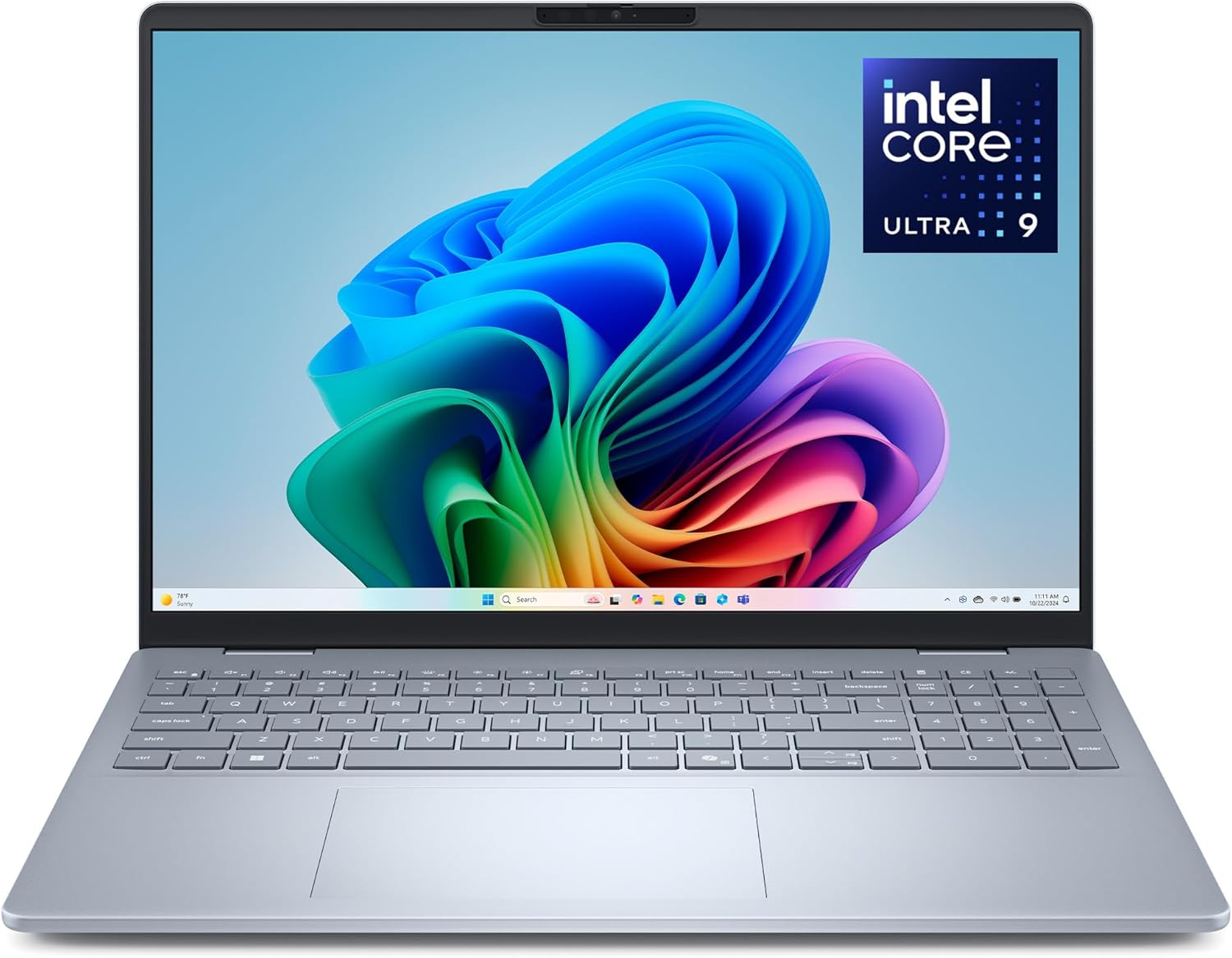
The Dell 16 Plus laptop (model DB16250) is built around Intel's new Core Ultra 9 288V processor, which combines powerful CPU cores, Intel Arc integrated graphics, and a dedicated neural processing unit (NPU) for AI tasks. This makes it a versatile machine for users who need raw compute power, solid integrated graphics for light to moderate gaming, and modern AI features like real-time video effects, noise cancellation, and intelligent search.
This laptop is especially well suited for college gamers who split their time between classwork, content creation, and playing less demanding titles like Fortnite, League of Legends, or indie games. Streamers and content creators will appreciate the 32GB of fast LPDDR5X RAM and the 2TB NVMe SSD, which allow for smooth multitasking in OBS, Adobe Premiere, or DaVinci Resolve without choking on storage space. The 16-inch 2.5K display with a 16:10 aspect ratio provides extra vertical screen space, great for editing timelines, reading documents, or keeping chat windows open while gaming.
In terms of real-world gaming performance, the Intel Arc Graphics can handle many popular esports titles at 1080p with medium to high settings, but you will need to lower resolution or details for the latest AAA single-player games. The system stays cool and quiet during extended sessions, thanks to efficient thermal design and the power-sipping nature of the Core Ultra architecture. For competitive gaming where every frame matters, this laptop works well for MOBAs and shooters that aren't GPU-bound.
Build quality is reassuring. The aluminum chassis feels premium, and the laptop passes military-grade durability testing. At just 0.67 inches thick and 4.12 pounds, it's easy to carry to class, a coffee shop, or a friend's dorm for a LAN party. The backlit keyboard with Copilot key is comfortable for long typing sessions, and the precision touchpad works reliably. The FHD+ webcam with AI noise cancellation ensures you look and sound clear on Discord calls or Twitch streams.
Connectivity is a highlight. You get one USB 3.2 Gen 1 Type-A, two USB-C ports (one Thunderbolt 4 with DisplayPort 2.1 and Power Delivery, and one USB 3.2 Gen 2), HDMI 2.1, and a universal audio jack. This allows you to connect a gaming monitor, capture card, or external GPU enclosure easily. However, be prepared to use a USB hub if you need more than one USB-A peripheral.
Overall, the Dell 16 Plus is a smart pick for PC gamers who also need a productivity powerhouse. It's not a dedicated gaming beast, but it delivers excellent all-around performance for competitive gaming, streaming on the side, and handling intensive creative projects. If you're a college gamer, content creator, or work-from-home user who values portability and AI features, this laptop offers great value at its price point.
Intel Arc Graphics in this laptop can run popular esports titles like Valorant, CS2, Rocket League, and Overwatch 2 at 1080p with high settings, delivering smooth 60-90 FPS. More demanding games like Cyberpunk 2077 or Starfield will require lower settings and resolution (720p or 900p) for playable frame rates. The 32GB of RAM helps reduce stutter when background apps are open, and the fast SSD keeps load times short. For serious AAA gaming, an external GPU enclosure via Thunderbolt 4 is an option, but it adds cost. Overall, this laptop is a capable performer for competitive and casual gaming but not for 4K ultra settings.
The chassis is made from aluminum with a sleek Ice Blue finish. It measures 14.05 x 9.87 x 0.67 inches and weighs 4.12 pounds, making it highly portable for a 16-inch laptop. The hinge feels sturdy, and the display has minimal flex. Dell claims it meets military-grade standards for shock, vibration, and temperature. The keyboard includes a numeric keypad and backlighting, with good key travel for comfortable typing. The ports are well placed, though having only one USB-A is a minor inconvenience.
Frequently Asked Questions
Can a hybrid work and gaming laptop handle extended play without thermal throttling?
Yes, modern laptops engineered with multi-fan cooling exhausts and dedicated heat pipe arrays maintain stable clock speeds during long gaming marathons. Chassis airflow design ensures key components stay within safe thermal limits. Keeping vents clear and elevating the rear feet helps sustain peak frame rates.
How much system memory is recommended for multitasking and gaming in 2026?
16GB of DDR5 RAM is the baseline standard, but 32GB provides optimal headroom for background work applications and demanding game assets. Dual-channel memory configurations boost data transfer bandwidth, preventing memory bottlenecks when running heavy background tasks. Exploring strategic upgrades for gaming PC components shows how memory capacity directly stabilizes 1% low frame rates.
Do productivity laptops offer high refresh rate displays suitable for esports?
Certain modern models feature 120Hz to 165Hz panels that provide fluid motion clarity for competitive multiplayer titles. High refresh displays significantly reduce motion blur and perceived input latency during fast tracking. Standard 60Hz panels remain better suited for office work and slower-paced casual games.
Are integrated Intel Arc graphics powerful enough for modern gaming?
Yes, Intel Arc integrated graphics comfortably support popular esports titles and lighter indie games at 1080p resolution. Demanding AAA games with ray tracing still benefit greatly from dedicated GPUs with standalone VRAM. Integrated graphics excel at conserving battery life while handling routine office applications.
How does laptop acoustic output compare to full-sized desktop PCs during gaming?
Laptop cooling fans spin at higher RPMs to exhaust thermal energy from compact chassis bodies, creating louder acoustic profiles under full GPU load. Users seeking nearly silent operation often prefer larger desktop builds like an air-cooled gaming PC. Using performance management software helps tailor fan curves to keep noise balanced during work meetings.
Does running Windows 11 Pro reduce in-game frame rates compared to Home?
No, Windows 11 Pro delivers identical frame rate performance to Windows 11 Home across all major gaming titles. The Pro edition simply adds enterprise tools like BitLocker encryption and remote desktop protocols. Both editions share the exact same DirectX 12 Ultimate gaming stack and driver architecture.


Write Your Review
No reviews yet. Be the first to share your experience!