


Background applications and bloated browser tabs love to devour memory before your favorite game or project even loads. That sudden frame drop during an intense gaming session or heavy render usually strikes when your system runs out of physical memory. Choosing the Best Laptop With 16GB RAM 2026 For Speed And Multitasking eliminates frustrating memory bottlenecks and keeps frame rates steady. Ample dual-channel memory gives your processor enough breathing room to manage discord calls, web streams, and gaming overlays at once. Anyone needing portable power for editing video alongside light gaming can also check out a versatile laptop for creators and gaming for balanced daily performance.
Thermal management and fast storage controllers work together to maintain consistent boost clocks during marathon sessions. Modern PCIe NVMe SSD storage pairs with capable multi-core processors to keep system boot times instantaneous and app switching frictionless. You do not have to endure micro-stutters or slow loading screens while working on the go. Many budget shoppers also compare an entry-level gaming laptop with dedicated graphics to boost visual fidelity without overspending. Investing in 16GB of system memory protects your setup from annoying slowdowns and delivers long-term productivity value.

Pros
- Slim and lightweight design for on-the-go gaming and productivity
- Strong processor and memory for multitasking during streaming or creative work
- Good display quality with WUXGA resolution for sharp text and visuals
- Decent port selection for connecting gaming peripherals
Cons
- Integrated Intel Iris Xe graphics limit gaming to older or less demanding titles
- Display refresh rate is likely 60Hz, not ideal for competitive esports
- No dedicated GPU or high-refresh screen, so AAA gaming is not feasible
The ASUS Vivobook 16 is a versatile laptop designed for users who need a balance of portability, performance, and everyday usability. While it's not a dedicated gaming laptop, it fits well into the ecosystem of PC gamers and streamers who also prioritize work, school, or content creation on the go. Its Intel Core i7-1355U processor and 16GB of RAM provide enough horsepower for heavy multitasking, whether you're editing videos, running a Twitch stream via OBS, or juggling multiple browser tabs while managing your gaming setup.
For gaming, the Intel Iris Xe integrated graphics can handle popular esports titles like League of Legends, Valorant, and CS:GO at lower settings, making it a decent option for casual gamers or college gamers who want to squeeze in matches between classes. It also works well for older or less demanding games such as Minecraft, Stardew Valley, or indie titles. However, it's not suited for modern AAA games or high-fidelity VR experiences, so competitive gamers and graphics enthusiasts should look elsewhere.
The 16-inch WUXGA display delivers crisp, color-accurate visuals for productivity and media consumption, though its standard 60Hz refresh rate doesn't offer the fluid motion that esports players often prefer. The laptop's build quality is solid for its price point, with a lightweight chassis that makes it easy to toss into a backpack. The keyboard is comfortable for long typing sessions, and the trackpad is responsive, though most gamers will plug in a dedicated gaming mouse for better accuracy.
Setup is straightforward: Windows 11 comes pre-installed, and the laptop boots quickly thanks to the 512GB SSD. Port selection includes USB-C, USB-A, HDMI, and a microSD card reader, so you can connect a gaming mouse, headset, or an external monitor without needing a dongle. Cable management is limited to the laptop itself, but the minimal footprint helps keep a desk tidy. The Indie Black finish resists fingerprints reasonably well, and the overall build feels sturdy for everyday use.
One realistic limitation is the integrated graphics: you won't be able to play the latest AAA releases or run high-refresh-rate games smoothly. Also, the 16-inch 60Hz display means fast-paced competitive gaming won't feel as responsive as on a dedicated gaming laptop with a 120Hz+ panel. If you're a streamer or content creator who needs GPU power for rendering, this laptop might bottleneck your workflow for intensive tasks like 3D modeling or high-bitrate video encoding.
Overall, the ASUS Vivobook 16 is a practical buy for work-from-home gamers, college students, or casual gamers who need a portable machine that can handle productivity tasks and light gaming. It's also a good secondary laptop for streamers or RGB setup enthusiasts who want a travel-friendly device for managing their gaming ecosystem on the go. If you're a competitive gamer or need a high-performance gaming laptop, you'll want to invest in a model with a dedicated GPU and high-refresh display. But for its price, this Vivobook delivers solid all-around performance for a broad range of users.

Pros
- Smooth 120Hz FHD display ideal for casual gaming, streaming, and daily use
- Generous 16GB RAM and 512GB SSD for snappy multitasking and fast file access
- Comfortable backlit keyboard with numeric keypad and ergonomic hinge design
- ExpressCharge support quickly replenishes battery, plus 1-year onsite service
Cons
- Integrated Intel UHD Graphics limit gaming to low settings on esports titles and older games
- Only one USB 2.0 port and HDMI 1.4 (not 2.0) may restrict high-resolution external displays
- Plastic build with post-consumer recycled materials; feels less premium than metal chassis models
The Dell 15 DC15250 is a 15.6-inch traditional laptop designed to handle everyday computing tasks with a focus on efficiency and user comfort. While it’s not a dedicated gaming machine, its standout feature—a 120Hz FHD display—makes it more appealing than typical budget laptops for users who enjoy light gaming or fast-paced media consumption. This laptop is best suited for college gamers, work-from-home users, and casual players who prioritize a smooth screen experience over raw GPU power.
Under the hood, the 13th Gen Intel Core i5-1334U processor with 10 cores and 16GB of DDR4 RAM provides solid responsiveness for multitasking, web browsing, streaming, and productivity software like Office or photo editing tools. The 512GB PCIe NVMe SSD ensures quick boot times and snappy application loading. For gaming, the integrated Intel UHD Graphics can handle popular esports titles like League of Legends, Valorant, or CS2 at low to medium settings and 60+ fps, thanks in part to the 120Hz panel that makes motion look smoother. Don’t expect to run AAA single-player games at high details—this laptop isn’t meant for that.
Build quality is decent for the price point. The laptop uses post-consumer recycled plastics in the palmrest and bottom cover, which is environmentally conscious but gives it a somewhat lightweight feel. The lifted hinge design creates a natural typing angle that reduces wrist strain, and the backlit keyboard with a numeric keypad is a welcome addition for late-night work or gaming sessions. The 120Hz anti-glare display, while only 250 nits, cuts down on reflections and provides clear visuals indoors. ComfortView software further reduces blue light, making longer sessions easier on the eyes.
In terms of connectivity, you get one USB 2.0 port, one USB 3.2 Gen 1 Type-A, one USB-C (Full Function), HDMI 1.4, an SD card reader, and a universal audio jack. The USB-C port supports data, video, and power delivery, which adds some flexibility. However, the HDMI 1.4 port limits external monitor output to 4K at 30Hz—fine for presentations but not ideal for high-refresh gaming on a secondary display. The absence of Thunderbolt is expected at this price.
Battery life is reasonable thanks to integrated graphics and an energy-efficient design. ExpressCharge can refill to 80% in about an hour, which is handy for users on the go. The laptop also includes a mechanical camera shutter for privacy, dual microphones (on the metal chassis version; this model likely has single mic), and AI noise reduction for clearer voice calls. Windows 11 Home comes preinstalled.
Overall, the Dell 15 DC15250 is a capable productivity laptop that doubles as a light gaming machine for esports and indie titles. It’s a smart choice for college students who need a reliable daily driver with a smooth screen, or for remote workers who want a budget-friendly system. If you’re a competitive gamer demanding high fps in modern AAA games, you’ll want a dedicated gaming laptop. But for casual gamers and multitaskers, this Dell offers excellent value with its 120Hz display and generous memory and storage configuration.
Pros
- Excellent price-to-performance ratio for basic computing
- 16GB RAM is rarely seen at this price point - great for keeping many apps open
- Lightweight and portable design with decent battery life
- Included docking station adds extra storage and connectivity options
Cons
- Intel Celeron N150 is underpowered for gaming, video editing, or heavy multitasking
- 1366x768 HD display is dim and low-resolution, not ideal for detailed work or entertainment
- Windows S mode restrictions require switching out for full app installs, which can be confusing for some users
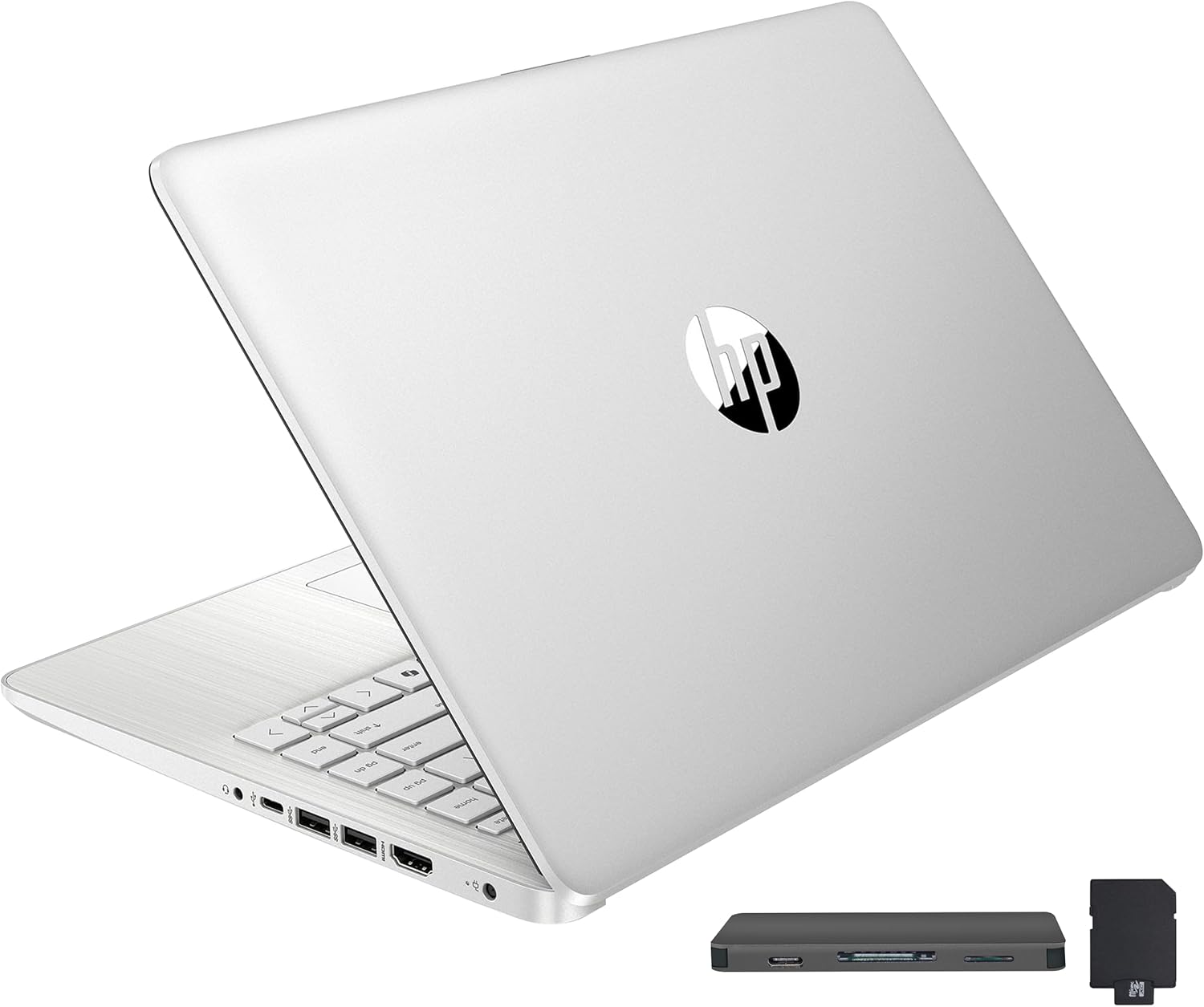
The HP Stream 14 is a traditional laptop, not a gaming machine, but it fills a specific niche for users who need a no-frills, ultra-affordable device for everyday tasks. It's best suited for college students, remote workers on a budget, or casual users who primarily browse the web, check email, stream video, and work with office documents. With 16GB of DDR4 RAM and a 288GB storage bundle (128GB eMMC plus a 160GB docking station set), this HP Stream packs more memory than typical budget laptops, which helps with basic multitasking - you can keep several browser tabs and a Word document open without immediate slowdown.
Performance is where reality sets in. The Intel Celeron N150 is a low-power, 4-core processor designed for minimal energy draw, not speed. According to user feedback, it handles light tasks reasonably well, but any attempt at gaming, heavy photo editing, or running multiple demanding applications will push the CPU to 100% and cause noticeable lag. For its intended audience - students taking notes, streaming Netflix, or doing homework - it's adequate, but competitive gamers, streamers, or content creators should look elsewhere. The integrated Intel UHD graphics are fine for video playback but won't run modern games at playable frame rates.
Build quality is typical for a sub-$350 laptop: a plastic chassis that feels sturdy enough but not premium. The 14-inch HD BrightView display offers 1366x768 resolution, which is sharp enough for reading text but lacks vibrancy and detail compared to higher-resolution panels. Some users reported the screen is dim, and colors appear washed out - not great for photo work or gaming. On the positive side, the laptop is light at 3.24 pounds and thin at 0.71 inches, making it very portable for tossing in a backpack. The keyboard is comfortable for typing, and the trackpad is responsive.
Setup can be a bit of a hurdle. The laptop comes with Windows 11 in S mode, which restricts app installations to the Microsoft Store and defaults to Microsoft Edge and Bing. Switching out of S mode is permanent but required to install programs like Chrome or Spotify. Several user reviews mention that the switch process can fail due to pre-installed bloatware like McAfee, requiring a full PC reset. Once out of S mode and with McAfee declined, the laptop runs more smoothly. The included docking station is a nice addition, adding USB-C, card reader, and extra storage - helpful for connecting peripherals and expanding capacity.
Limitations are clear: the Celeron processor, low-res display, and restrictive initial software make this laptop unsuitable for gaming, streaming, or any performance-intensive work. Battery life is advertised at 11 hours, and users report it lasts a full school day with moderate use. However, some units have exhibited defects - a handful of buyers experienced crashes or failure to boot soon after purchase. HP's warranty and the seller's return policy appear responsive based on reviews, but it's worth noting the quality control can be hit or miss.
If you need a cheap, lightweight laptop strictly for web browsing, word processing, and video streaming - and you're comfortable navigating Windows S mode - the HP Stream 14 offers solid value for its price. College gamers might use it for taking notes and then game on a separate desktop, but it won't serve as a primary gaming rig. For anyone seeking even light gaming or creative work, a Chromebook or an entry-level gaming laptop with better graphics would be a wiser investment.
The HP Stream 14 bundle includes: the laptop itself, a 7-in-1 docking station with 128GB of additional storage, a 32GB MicroSD card with adapter, a Type-C data cable, a 3-in-1 charging cable, and a suede cleaning cloth. This package is tailored for users who need extra ports and storage right out of the box, making desk setup or on-the-go file transfer more convenient.

Pros
- Excellent value with 16GB RAM and 512GB SSD at this price point.
- USB-C fast charging included, making it travel-friendly and versatile.
- Backlit keyboard with adjustable brightness and no auto-off timeout.
- Fingerprint reader provides quick and secure login.
- Solid build quality with no flex and a quiet fan.
Cons
- Integrated AMD graphics limit gaming to older or less demanding titles.
- No dedicated PgUp/PgDn/Home/End keys, which may frustrate power users.
- Wi-Fi 5 instead of Wi-Fi 6 can be slower in congested network environments.
The NIMO 15.6" laptop is a budget-friendly choice aimed at students and casual gamers who need a reliable daily driver for school, work, and light gaming. It packs a Ryzen 5 processor, 16GB of RAM, and a 512GB PCIe SSD into a slim, blue chassis with a metal A-shell. While not built for hardcore AAA gaming, it handles everyday multitasking, streaming, and older or esports titles with ease.
Performance is where this laptop shines for its price bracket. The AMD Ryzen 5 3500U with four cores up to 3.7GHz, paired with 16GB of DDR4 RAM, ensures smooth operation across multiple browser tabs, office applications, and even some light photo editing. The 512GB SSD boot up quickly, and file transfers feel snappy. For gaming, it can run titles like Starcraft 2, Warhammer: Rogue Trader, and indie games without major issues, though you'll need to keep settings low for modern 3D games. The integrated Radeon graphics are not designed for high-end gaming, so stick to less demanding experiences.
Build quality is impressively solid for the price. The metal lid gives it a premium feel, and the chassis shows no flex. The backlit keyboard is a standout feature - it offers adjustable brightness and, as noted by users, does not time out after 30 seconds of inactivity. This is a real plus for late-night study sessions or gaming in dimly lit rooms. The fingerprint reader on the touchpad is responsive and makes logging in quick and secure. The 65W USB-C charger is compact and can also charge tablets and phones, reducing cable clutter.
Port selection covers the basics: three USB 3.0 ports, a USB 2.0 port, an audio jack, and an HDMI output for connecting an external monitor. The 15.6" Full HD IPS display is bright and sharp, with good color accuracy for media consumption. Battery life is rated at 9 hours, which should get you through a day of classes or casual use. Additionally, both the RAM and SSD are upgradeable via accessible slots, allowing you to extend the laptop's lifespan as your needs grow.
Realistic limitations include the integrated graphics, which mean you won't be playing Cyberpunk 2077 or the latest AAA releases. The keyboard layout omits dedicated PgUp, PgDn, Home, and End keys - you'll find them embedded in the numeric keypad, which might take some getting used to. Also, Wi-Fi 5 is sufficient for most, but if your network is crowded, Wi-Fi 6 would offer better speeds. The fan can get audible under load, but it's not overly loud.
Overall, the NIMO 15.6" laptop is an excellent choice for college gamers, students, and home office users who need an affordable, capable machine for daily tasks and light gaming. It offers great value with its generous RAM and SSD, USB-C charging, and thoughtful extras like a backlit keyboard and fingerprint reader. If you're looking for a budget-friendly laptop that can handle schoolwork and some casual gaming, this is a solid pick.

Pros
- Strong performance for office productivity, web browsing, and streaming video
- 16GB RAM is generous for a budget renewed laptop, allowing smooth multitasking
- SSD storage ensures quick startup and responsive app loading
- Compact and lightweight build is highly portable
Cons
- Integrated Intel graphics cannot handle modern PC gaming or demanding creative workloads
- Renewed units may show cosmetic wear, and some users report battery or hardware issues
- Display is only 60Hz and not ideal for competitive gaming or color-critical work
The Dell Latitude 5420 is a business-class laptop that has been renewed by Amazon, offering a solid foundation for everyday computing at a fraction of its original price. It comes with an Intel Core i5-1145G7 processor, 16GB of DDR4 RAM, and a 256GB SSD, plus Windows 11 Pro pre-installed. This makes it a strong choice for work-from-home professionals, college students, or anyone who needs a reliable secondary laptop for productivity tasks.
While this laptop is not designed for PC gaming, esports, or content creation with heavy rendering, it handles typical office workloads with ease. You can comfortably run Microsoft Office, Slack, Zoom, web browsers with multiple tabs, and even light photo editing software. The 16GB of RAM ensures you won't hit memory bottlenecks during typical multitasking sessions, and the SSD makes booting and loading applications very snappy.
The 14-inch Full HD display provides clear text and decent viewing angles, though it's limited to a standard 60Hz refresh rate. It's perfectly adequate for spreadsheets, coding, or watching YouTube tutorials. Build quality feels sturdy with a metal-reinforced chassis, though cosmetic imperfections are possible since it's a renewed product. Many users report that the condition is better than expected, but some have noted scratches or a vinyl cover over the bottom.
Connectivity is solid with USB-A, HDMI, a headphone jack, and USB-C for charging. The inclusion of Windows 11 Pro is a nice bonus for business users who need advanced security features like BitLocker. The laptop also integrates a webcam and microphone, which work well for video calls.
One realistic limitation is the integrated Intel graphics, which cannot handle modern games or GPU-accelerated tasks. If you're a PC gamer looking for a laptop to also play titles, this isn't it. However, for a dedicated work machine or a budget laptop for a college gamer who already has a desktop, it's a great value. Some renewed units may have battery drain issues or minor hardware glitches, so checking the return policy is wise.
Overall, the Dell Latitude 5420 is a practical, cost-effective option for non-gaming productivity. It's ideal for streamers who need a portable laptop for admin tasks, work-from-home gamers seeking a secondary device, or college students on a tight budget. Just don't expect any gaming performance from the integrated GPU.

Pros
- Affordable price point for budget-conscious students and professionals
- 16GB RAM is generous for a laptop in this price range, allowing comfortable multitasking
- Includes Microsoft 365 subscription for one year, adding value for document-heavy users
- Lightweight and compact, easy to slip into a backpack for on-the-go use
Cons
- Not suitable for gaming or graphics-intensive tasks due to integrated Intel UHD Graphics and low-power Intel N100 processor
- Storage is limited to 128GB SSD (plus 128GB external drive and 1TB OneDrive), which may fill up quickly with large files
- Some users report overheating under sustained load and misleading storage descriptions in the listing
The HP Ultrabook Laptop with 16GB RAM and 128GB SSD is positioned as a budget-friendly option for users who need a reliable machine for basic computing tasks. It is not a gaming laptop or a high-performance workstation, but it can serve well as a secondary device for students, remote workers, or gamers who already have a dedicated gaming desktop and need something portable for everyday productivity.
This laptop is best suited for college gamers who need a lightweight device for taking notes, writing papers, and browsing the web between gaming sessions. Work-from-home gamers may also find it useful for handling emails, spreadsheets, and video calls without breaking the bank. However, it is important to set realistic expectations: the Intel N100 processor and integrated UHD Graphics are not capable of running modern games or demanding creative software. Users should not expect smooth FPS in titles like Fortnite or Call of Duty, or even decent performance in photo or video editing beyond very basic tasks.
In terms of real-world performance, the 16GB of DDR4 RAM allows for comfortable multitasking with several browser tabs, Office apps, and a music streaming service open simultaneously. The 128GB SSD ensures quick boot times and snappy app launches, though storage is limited. The listing mentions 1.2TB total storage, but that includes a 128GB external drive and 1TB of OneDrive cloud storage, which may not be ideal for users who prefer local storage. According to user feedback, the laptop can get warm under sustained use, and some have experienced software issues or blue screens, so reliability may vary.
Build quality is typical for an entry-level HP laptop: a plastic chassis with a rose gold finish, a 14-inch HD (1366x768) display with an anti-glare coating, and a numeric keypad for easier data entry. The camera privacy shutter is a nice touch for security-conscious users. The laptop includes a USB-C port, two USB-A ports, HDMI, and a headphone/microphone combo jack, which provides decent connectivity for external monitors and peripherals. The webcam features temporal noise reduction for clearer video calls.
Setup is straightforward with Windows 11 pre-installed, though some users reported difficulties downloading apps like Chrome due to Microsoft Store restrictions. The included Microsoft 365 subscription (one year) adds value for document editing, but it is the web-based version, not the full desktop suite. Maintenance involves keeping the system updated and managing cloud storage if you rely on OneDrive. The laptop is lightweight and easy to clean with a microfiber cloth.
Overall, this HP Ultrabook is a reasonable choice for budget-conscious students or professionals who need a basic laptop for school or office work. It is not a gaming device, and buyers should not expect gaming performance or high-end build quality. If you are a PC gamer looking for a secondary laptop for productivity tasks, this could be a cost-effective option, but for any gaming or creative work, you are better off investing in a dedicated gaming laptop or desktop. Consider your needs carefully before purchasing.

Pros
- 16GB RAM allows smooth multitasking for basic tasks like web browsing, email, and document editing
- Lightweight and portable design makes it easy to carry to class or coffee shops
- Includes HDMI and USB-C ports for connecting external displays and peripherals
Cons
- Intel Celeron N4120 processor is underpowered for gaming, video editing, or heavy multitasking
- 64GB eMMC storage is limited and slower than a traditional SSD; may require cloud or external storage
- 1366x768 HD display has low resolution and 45% NTSC color gamut, making it less ideal for media consumption
The HP Essential Laptop is a budget-friendly traditional laptop designed for students, casual users, and those who need a basic machine for everyday tasks. It is not a gaming PC or a high-performance device, but rather a practical choice for web browsing, email, streaming video, and light office work. With its 14-inch HD display and rose gold finish, it aims to offer a portable and stylish solution for users who prioritize affordability over raw power.
This laptop is best suited for college students, work-from-home professionals handling light workloads, and casual users who don't need heavy computing. It is not recommended for PC gamers, streamers, content creators, or esports players due to its Intel Celeron N4120 processor and Intel UHD Graphics 600, which lack the performance for modern games, video editing, or live streaming. However, for basic productivity tasks like writing papers, checking email, or attending Zoom classes, it gets the job done.
In terms of real-world performance, the 16GB of DDR4 RAM helps with multitasking across a few applications, but the Celeron processor can feel sluggish when opening multiple tabs or running heavier software. The 64GB eMMC storage provides fast boot times compared to traditional hard drives, but it fills up quickly and is not upgradeable. The display is adequate for indoor use but lacks brightness and color accuracy, making it less enjoyable for watching movies or editing photos.
Build quality is typical for an entry-level HP laptop: a plastic chassis that feels solid enough for daily use, but not premium. The keyboard is comfortable for typing short documents, and the trackpad is responsive. Port selection is decent for its class, including USB-C, USB-A, HDMI, and a headphone jack. The webcam is standard 720p, fine for video calls but not for streaming.
Setup is straightforward: Windows 11 Home comes pre-installed, and the included 1-year Office 365 subscription adds value for students. Maintenance is minimal, though users should be aware that the eMMC storage cannot be upgraded, and the RAM is soldered. For storage, cloud services or an external drive are recommended.
Overall, the HP Essential Laptop is a reasonable choice for those on a tight budget who need a basic laptop for school or home office use. It is not suitable for gaming, streaming, or content creation. If you need a portable machine for light tasks and value the extra RAM, this could work. But for gaming or creative work, look elsewhere.

Pros
- Generous 16GB RAM and 1TB SSD for smooth multitasking and ample storage
- Touchscreen adds convenience for navigation and creative tasks
- Long battery life supports all-day use
- Anti-glare display reduces eye strain during extended sessions
Cons
- Integrated Intel UHD Graphics limits gaming to less demanding titles
- 1366x768 display resolution is lower than many modern laptops
- Core i3 processor may struggle with heavy multitasking or intensive applications
The HP Pavilion 15.6" Touchscreen Laptop is a versatile traditional laptop that caters to a wide range of users, including casual gamers, streamers, content creators, and college students. While it's not built for hardcore gaming, it offers enough power for light to moderate gaming, streaming, and everyday productivity tasks.
Under the hood, the Intel Core i3-1115G4 processor (up to 4.1GHz) paired with 16GB of DDR4 RAM ensures smooth performance for web browsing, document editing, and running multiple applications simultaneously. The 1TB PCIe NVMe SSD provides fast boot times and ample space for games, media, and files. However, the integrated Intel UHD Graphics means you'll be limited to less demanding games like Minecraft, League of Legends, or older titles at lower settings.
The 15.6" HD touchscreen display features an anti-glare coating, which helps reduce reflections and makes it comfortable to use in bright environments. The 1366x768 resolution is adequate for everyday tasks but may not satisfy those used to higher-resolution screens for gaming or content creation. The touchscreen functionality adds a layer of convenience for navigating Windows 11 Home, especially for creative work or casual browsing.
Build quality is typical for HP's Pavilion line - a sturdy plastic chassis with a sleek silver finish. The laptop weighs just 3.74 pounds and measures 0.71 inches thick, making it easy to slip into a backpack for on-the-go use. The battery life is a standout feature, with up to 11 hours of runtime, allowing you to work, stream, or game without constantly searching for an outlet.
Connectivity is solid with one USB-C port, two USB-A ports, HDMI 1.4b, and a headphone/microphone combo jack. This setup lets you connect external monitors, mice, and headsets for a more desktop-like experience. The inclusion of Wi-Fi and Bluetooth ensures you can easily connect to networks and peripherals.
For casual gamers and college students who need a reliable laptop for schoolwork, streaming, and light gaming, the HP Pavilion 15.6" Touchscreen Laptop is a practical choice. It offers a good balance of performance, storage, and battery life at an accessible price point. However, if you're a competitive gamer or need to run demanding AAA titles, you'll want to look at laptops with dedicated graphics and higher-resolution displays.

Pros
- Strong multitasking performance with 16GB RAM and fast SSD storage
- High-quality Full HD IPS touch display with wide viewing angles and anti-glare coating
- Windows 11 Pro provides robust security and business-friendly features
- Good build quality and premium feel for the price point
- Portable and lightweight enough for on-the-go use
Cons
- Integrated Intel UHD graphics limit gaming to low settings and less demanding titles
- Battery life averages 3-4 hours under real-world use, well below advertised claims
- Some users report potential issues with third-party SSD replacements from resellers
The Dell Inspiron Touchscreen Laptop is a solid all-rounder designed for users who need a reliable machine for everyday tasks, light gaming, and content consumption. While it doesn't pack a dedicated graphics card, its Intel i5-1155G7 processor and 16GB of RAM make it a capable performer for casual gaming, streaming, and multitasking. This laptop is best suited for college gamers, work-from-home professionals, and content creators who prioritize portability and productivity over high-end gaming performance.
In terms of real-world performance, the Inspiron handles everyday applications and web browsing with ease. The 1TB SSD ensures fast boot times and quick access to files, while the 16GB RAM allows for smooth multitasking between multiple tabs, streaming video, and light photo editing. For casual gaming, the integrated Intel UHD Graphics can run older or less demanding titles like League of Legends, Minecraft, or indie games at low to medium settings. However, it's not suitable for modern AAA games at high settings, which is a realistic limitation for budget-conscious gamers.
Build quality is commendable for the price range. The laptop features a sleek carbon black chassis with a narrow-bezel display and a comfortable keyboard with a numeric keypad. The Full HD IPS touchscreen provides clear visuals and accurate color reproduction, though the 220 nits brightness is average for indoor use. The included 720p webcam is adequate for video calls and streaming, but serious streamers may want an external webcam for better quality. The port selection includes USB 3.2, USB 2.0, HDMI 1.4, and an SD card reader, offering decent connectivity for peripherals.
Setup is straightforward: the laptop comes with Windows 11 Pro pre-installed, and you only need to complete the out-of-box experience. The touchscreen adds a layer of convenience for quick navigation, though most users will still prefer a mouse for precision. Maintenance involves occasional cleaning of the screen and keyboard, and the SSD is user-accessible for potential upgrades, though some users report that certain resellers may swap the original SSD, so it's wise to check specifications upon delivery.
One realistic limitation is the battery life. Despite claims of up to 7 hours, real-world usage with Wi-Fi and moderate brightness yields around 3 to 4 hours. This may be a concern for all-day classes or long work sessions away from an outlet. Additionally, the integrated graphics mean this isn't a gaming laptop, so expectations should be set accordingly. For light gaming, streaming, and productivity, the Dell Inspiron is a practical choice.
Overall, the Dell Inspiron Touchscreen Laptop offers strong value for its price, especially for college gamers, casual users, and remote workers who need a versatile machine. It's a great addition to a budget-friendly gaming setup for less demanding titles, and it pairs well with an external monitor for multitasking. If you need a durable, responsive, and portable device for everyday use and light gaming, this is a worthwhile investment.

Pros
- Affordable price point ideal for students and budget-conscious buyers.
- 16GB RAM supports smooth multitasking for everyday use and light gaming.
- Comes with a generous accessory bundle including wireless earbuds, external drive, and mouse.
- Long battery life with fast charging for all-day productivity.
- Lightweight and portable design at just 3.24 lbs.
Cons
- Integrated Intel Graphics limits gaming to older or less demanding titles.
- HD display (1366x768) lacks sharpness and detail compared to Full HD screens.
- Some users report issues with accessory quality, such as earbuds not connecting.
The HP 14 Laptop Student Business 2025 Flagship is a budget-friendly ultraportable designed primarily for students, remote workers, and casual users who need a reliable machine for everyday computing, light productivity, and media consumption. While it’s not built for hardcore PC gaming, it can handle older or less demanding titles, making it a versatile option for work-from-home gamers and college gamers on a tight budget.
Under the hood, the 13th Gen Intel N150 quad-core processor paired with 16GB of DDR4 RAM provides snappy performance for web browsing, document editing, video streaming, and light multitasking. The 628GB total storage (128GB UFS plus a 500GB external drive) offers decent space for files, projects, and a few casual games. However, the integrated Intel Graphics means you won't be playing modern AAA titles at high settings. Casual gamers may enjoy older games or indie titles without issues.
The 14-inch HD display with anti-glare coating is adequate for indoor use but lacks the sharpness and color accuracy of higher-resolution screens. The 720p webcam with temporal noise reduction is fine for video calls and online classes, though streamers will want a dedicated external webcam for better quality. Audio from the stereo speakers is basic, so a good gaming headset is recommended for immersive sound and clear communication during Discord calls or casual gaming sessions.
Build quality is typical for a budget laptop: a plastic chassis that feels sturdy enough for daily carry. The keyboard is comfortable for typing, and the touchpad is responsive. Port selection includes USB-C, USB-A, HDMI 1.4b, and a headphone jack, which covers most basic connectivity needs. Wi-Fi 6 and Bluetooth 5.4 ensure fast wireless connections for streaming and peripheral use.
Setup is straightforward, with Windows 11 Home in S Mode pre-installed. You can easily switch out of S Mode if needed. The included 6-in-1 accessory bundle adds value, though some users have reported issues with the wireless earbuds. The 1-year Microsoft Office 365 subscription is a nice bonus for students and professionals.
Overall, the HP 14 Laptop is a solid choice for those who need an affordable, portable device for school, work, and light entertainment. It’s not a gaming rig, but for casual gamers, college students, and remote workers seeking a practical daily driver with a few extra perks, it delivers good value for the price.
Frequently Asked Hardware Questions About High-Memory Laptops
Is 16GB RAM enough for gaming and multitasking in 2026?
Yes, 16GB of RAM is the sweet spot for modern gaming and active multitasking. It provides ample headroom to run contemporary games while keeping discord, browser tabs, and music apps open without stuttering. Everyday productivity tasks and esports titles run smoothly without forcing Windows to page memory to drive storage.
Does dual-channel memory improve integrated graphics frame rates?
Yes, dual-channel memory noticeably improves integrated GPU frame rates by doubling bandwidth across memory channels. Because integrated chips share system memory rather than dedicated VRAM, fast dual-channel RAM directly boosts frame stability. Gamers balancing portability and budget frequently evaluate a thin gaming laptop under 1000 for higher rendering power.
How does 16GB RAM prevent thermal throttling during multitasking?
16GB RAM reduces thermal strain by preventing excessive virtual memory paging to storage drives. When physical memory fills up, the processor must constantly manage cache swap files, creating continuous background heat. Keeping active tasks inside system RAM allows cooling fans to run quieter and preserves sustained boost clocks.
Can you upgrade the memory on budget productivity laptops?
Yes, many budget laptops feature accessible SO-DIMM slots for quick memory upgrades. Devices like the NIMO 15.6-inch laptop offer expandable RAM slots so users can add capacity as software demands increase. Those considering durable chassis options can also evaluate whether an ASUS TUF laptop fits their budget before buying fixed-memory models.
Does Windows 11 require 16GB RAM for optimal responsiveness?
Windows 11 functions on 8GB, but 16GB is strongly recommended for seamless multitasking without interface lag. Background security services, system widgets, and browser processes quickly consume memory upon boot. Equipping your machine with 16GB ensures the operating system stays responsive when switching between office suites, video calls, and casual games.


Write Your Review
No reviews yet. Be the first to share your experience!