


Maintaining fluid motion during intense teamfights often depends directly on your display speed and panel responsiveness. When you track chaotic spell animations and rapid camera pans across the map, screen tearing or motion blur can disrupt reaction timing. Selecting the best gaming monitor for dota 2 requires balancing fluid refresh rates, responsive pixel response times, and solid contrast so heroes remain distinct from the lane terrain. Many competitive players look to high-refresh gaming monitors to achieve smoother cursor tracking during crucial lane engagements.
This comparative review analyzes options from Sceptre, acer, SANSUI and more, assessing manufacturer specifications, panel structures, and reported buyer feedback without relying on unverified claims. You will find displays ranging from compact 24-inch curved panels to dual-screen productivity setups. If you are outfitting a battlestation on a budget, checking entry-level gaming displays can keep costs manageable. Key features like VA contrast ratios, adaptive sync, and proper ports ensure you get reliable hardware that fits your desk.
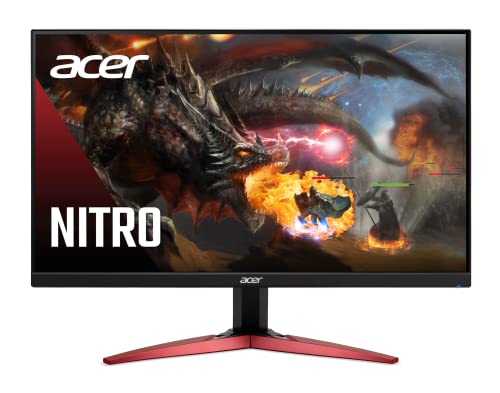
Pros
- High 165Hz refresh rate and 1ms VRB response time ideal for esports and fast-paced shooters
- VA panel delivers better contrast and black levels than typical IPS at this price point
- FreeSync Premium works smoothly with compatible AMD GPUs for tear-free gaming
- ZeroFrame design looks clean and works well for dual-monitor setups
- Affordable price makes it accessible for budget-conscious gamers and college students
Cons
- Only 23.8-inch size may feel small for immersive single-player or open-world games
- No height adjustment or swivel stand – limited ergonomics without a VESA arm
- Built-in speakers are not included, requiring external audio for console or casual use
The Acer Nitro KG241Y Sbiip is a 23.8-inch Full HD VA gaming monitor designed for PC gamers who want high performance without breaking the bank. It targets competitive gamers, esports players, and casual users who need a fast, responsive display for titles like Valorant, Fortnite, or Call of Duty. Its 165Hz refresh rate and 1ms VRB response time ensure minimal motion blur and smooth visuals, giving you an edge in fast-paced matches.
In real-world gaming, the combination of AMD FreeSync Premium and a VA panel stands out. FreeSync Premium synchronizes the monitor's refresh rate with your GPU to eliminate screen tearing, while the VA technology delivers deeper blacks and better contrast than many TN or IPS panels at this price. Colors are decent at 72% NTSC, though not as vibrant as higher-end monitors. For competitive play, the 165Hz feels snappy, and 1ms VRB helps reduce ghosting during rapid movements.
Build quality is solid for a budget monitor. The ZeroFrame design with thin bezels looks modern and works well in multi-monitor setups. The stand offers only tilt adjustment (-5° to 15°), so you may want to invest in a VESA mount (100x100mm) for better ergonomics. The monitor is lightweight at about 8.4 pounds, making it easy to position on a desk or wall.
Setup is straightforward: plug in the included HDMI cable or use DisplayPort for full 165Hz support. The on-screen display menu is simple to navigate, though it lacks advanced gaming features like crosshairs or built-in speakers – something to note if you plan to use it with consoles without external audio. Cable management is basic since the ports are rear-facing, but the compact size helps keep your desk tidy.
A realistic limitation is the lack of height adjustment and USB ports. For long gaming sessions, you might need to tweak your desk setup or add a monitor arm. Also, the VA panel has slightly slower pixel response than some TN panels, but the 1ms VRB compensates in most scenarios. Overall, this monitor offers excellent value for budget-conscious gamers, especially those building a first gaming PC or upgrading from a 60Hz display.
I recommend the Acer Nitro KG241Y for competitive PC gamers on a tight budget, esports players who prioritize refresh rate, and college gamers looking for a reliable monitor for dorm setups. It's also a good secondary display for streamers who need a fast panel for gameplay monitoring. If you need height adjustment or built-in audio, consider other options, but for pure gaming performance at this price, it's hard to beat.
The Acer Nitro KG241Y delivers strong gaming performance for its price. The 165Hz refresh rate provides fluid motion, and the 1ms VRB response time reduces ghosting during fast scenes. AMD FreeSync Premium ensures tear-free gameplay on compatible AMD GPUs, with a variable refresh rate range that covers typical frame rates in competitive titles. In shooters like Overwatch or Apex Legends, the monitor feels responsive and snappy, giving you a clear advantage. The VA panel offers good contrast for dark scenes, making it easier to spot enemies in shadows.
This monitor uses a VA panel with a 1920x1080 resolution and 72% NTSC color saturation. Blacks are deep and contrast is higher than typical IPS panels, which enhances immersion in games with dark environments. Viewing angles are decent but not as wide as IPS, so colors shift slightly when viewed from the side. Brightness is adequate for indoor use, but it's not HDR-capable despite being labeled 'HDR Ready' – it can accept HDR signals but won't display true HDR. For everyday gaming and media consumption, the image quality is solid for the price.

Pros
- Affordable curved monitor with immersive 1800R curvature for the price
- 75Hz refresh rate offers a noticeable upgrade from 60Hz for smoother gameplay
- Multiple connectivity options including HDMI and VGA for older devices
- VESA mountable for flexible desk or wall setups
- Lightweight at 7 pounds, easy to move or mount
Cons
- Only 75Hz, not suitable for competitive esports players who prefer 144Hz or higher
- Built-in speakers are basic and lack bass; external speakers or headphones recommended for immersive audio
- Stand offers limited ergonomic adjustments (tilt only); height and swivel require VESA arm
The Sceptre Curved 24-inch Gaming Monitor (C248W-1920RN) is a budget-friendly entry into the world of curved displays, designed for PC gamers who want a more immersive visual experience without spending a fortune. With its 1800R curvature, the screen gently wraps around your peripheral vision, making it a great fit for casual gaming sessions, open-world exploration, or even just browsing and streaming content. The 1080p resolution keeps things crisp on a 24-inch panel, and the 75Hz refresh rate is a step above standard 60Hz monitors, offering slightly smoother motion in games like Fortnite, Rocket League, or Apex Legends.
This monitor is best suited for casual gamers, college students, work-from-home users, or anyone building a multi-monitor setup on a tight budget. It's not aimed at competitive esports players who demand 144Hz or higher refresh rates for split-second reactions, but for everyday gaming and productivity, it holds its own. The 98% sRGB color coverage ensures decent color accuracy out of the box, which is handy for light photo editing or watching videos.
Build quality is what you'd expect at this price point: a slim metal black frame that feels sturdy enough, though the stand is basic with tilt-only adjustment. The monitor is VESA mount compatible (100x100mm), so you can easily attach it to a monitor arm or wall mount to free up desk space. Connectivity includes two HDMI ports and a VGA input, plus a PC audio out for connecting external speakers or headphones. The built-in speakers are functional for system sounds or casual YouTube, but they lack bass and clarity for immersive gaming or music.
Setup is straightforward: plug in the power, connect via HDMI or VGA, and you're good to go. The on-screen display (OSD) is controlled via buttons on the back and offers basic adjustments for brightness, contrast, and color. There's no USB hub or advanced gaming features like FreeSync, but for the price, that's expected. The 250 cd/m² brightness is adequate for indoor use, though it may struggle in very bright rooms.
One realistic limitation is the lack of height adjustment and swivel on the included stand. You'll need a VESA arm or mount to get the perfect viewing angle. Additionally, the 75Hz refresh rate, while better than 60Hz, won't satisfy players chasing ultra-smooth competitive gameplay. The speakers are also best considered a backup rather than your primary audio solution.
Overall, the Sceptre C248W-1920RN is a practical choice for budget-conscious PC gamers, streamers on a tight setup, or anyone wanting a curved monitor for a dual-screen workstation. It delivers on its promise of an immersive curve at an accessible price, making it a solid value pick for casual gaming and everyday use.

Pros
- Smooth 180Hz refresh rate and 1ms response for responsive gaming at an affordable price
- Good color performance with 130% sRGB and 97% DCI-P3 for a vivid visual experience
- Includes built-in speakers and an HDMI cable, so you can get started right out of the box
- VESA mountable and metal stand offers sturdy support with tilt adjustment
Cons
- Only tilt adjustment (-5 to 15 degrees); lacks height, swivel, or pivot options for ergonomic fine-tuning
- Built-in speakers (2x2w) are adequate for basic audio but lack bass and volume for immersive gaming
- HDMI 1.4 and DP 1.2 inputs may limit future upgrades, but are fine for 1080p at 180Hz
The SANSUI ES-G24C1 is a 24-inch curved gaming monitor designed to deliver a high-refresh experience without emptying your wallet. With a 180Hz refresh rate and 1ms MPRT response time, it targets competitive PC gamers and esports players who want smooth motion in fast-paced shooters and racers. The 1500R curvature helps immerse you in the action, while FreeSync compatibility keeps tearing at bay when paired with an AMD graphics card.
For the price, this monitor punches above its weight in color performance. It covers 130% sRGB and 97% DCI-P3, which means colors look punchy and lifelike. While not a professional-grade panel, it's more than enough for gaming, watching movies, or light photo editing. The full HD 1080p resolution keeps text sharp at 24 inches, and the 3000:1 contrast ratio from the VA panel gives deep blacks for better immersion in dark scenes.
Build quality is solid for a budget monitor. The metal stand feels sturdy and offers tilt adjustment (-5 to 15 degrees), though you won't get height, swivel, or pivot options. VESA 75x75mm mount compatibility makes it easy to attach to an arm or wall mount if you prefer a cleaner desk setup. The slim bezels on three sides also look modern and help with multi-monitor arrangements.
Connectivity includes one HDMI 1.4 and one DisplayPort 1.2, which are sufficient for 1080p at 180Hz. The monitor also includes a pair of 2-watt built-in speakers. These are fine for casual YouTube or Discord calls, but for gaming you'll want dedicated speakers or a headset. An HDMI cable and power adapter are included, so setup is quick and straightforward.
One realistic limitation is the lack of ergonomic adjustments beyond tilt. If you're particular about neck and shoulder comfort, you may need a monitor arm. The speakers also won't satisfy audiophiles. For its price, however, these compromises are expected. The monitor is best suited for budget-minded PC gamers, college students, or anyone building a secondary gaming setup who values high refresh over extra features.
Overall, the SANSUI ES-G24C1 is a solid entry-level curved gaming monitor that delivers on core gaming performance. It's easy to recommend to casual and competitive gamers looking for 180Hz smoothness, decent color, and a curved screen without spending over $150. Just plan for a headset or external speakers if you want better audio.

Pros
- Ultra-high 240Hz refresh rate for its price range
- Curved 1500R panel provides immersion without breaking the bank
- 1ms response time and FreeSync for tear-free, responsive gameplay
- Good color accuracy with 124% sRGB and high contrast ratio
- Includes DP cable and supports tilt adjustment
Cons
- No built-in speakers, requiring external audio solution
- Only tilt adjustment (no height or swivel, but VESA compatible)
- Limited connectivity with one HDMI port and one DP port, no USB ports
The SANSUI ES-G24C1 Pro is a 24-inch curved gaming monitor that brings a 240Hz refresh rate and 1080P resolution to an affordable price point. It's designed for PC gamers who want smooth, competitive performance without spending a fortune, making it a strong option for esports players, casual gamers, and anyone building a budget-friendly gaming setup.
At the heart of this monitor is a 240Hz refresh rate paired with a 1ms MPRT response time. That combination keeps fast-moving action exceptionally smooth, which is crucial for FPS games like Valorant or Call of Duty. FreeSync support helps eliminate screen tearing when paired with compatible AMD GPUs, though it works with G-Sync compatible NVIDIA cards as well. The 1500R curve adds a subtle wrap-around effect that pulls you deeper into the game without being too aggressive.
Despite its low price, the monitor offers decent color performance with 124% sRGB and 93% DCI-P3 coverage. The 3000:1 contrast ratio produces deeper blacks than typical IPS panels, which helps in dark game scenes. The 300-nit brightness and HDR support add some extra pop to highlights, though don't expect true HDR performance at this price point. The anti-glare coating keeps reflections manageable in brightly lit rooms.
Physically, the monitor has a simple black bezel with a sturdy stand that offers tilt adjustment (-5 to 15 degrees). It lacks height adjustment or swivel, so you may want to consider a VESA mount (75x75mm compatible) for better ergonomics. Port selection includes one HDMI 2.0, one DP 1.4, and an audio jack. The included DP cable is a nice bonus, saving you an extra purchase. There are no built-in speakers, so plan for external speakers or a headset.
Setting up the ES-G24C1 Pro is straightforward. The stand snaps on without tools, and the cables are easy to manage thanks to the simple design. The on-screen display (OSD) is controlled via buttons and offers game presets, a crosshair overlay, and a shadow booster to brighten dark areas. Low Blue Light mode helps reduce eye strain during long sessions, which is a welcome feature for users who game for hours.
That said, the monitor does have some trade-offs. The 1080P resolution at 24 inches is fine for most, but those wanting sharper text or more screen real estate might prefer 1440P. The limited connectivity means you'll have to switch cables if using multiple sources. No USB ports are available. Overall, for the price, this is a fantastic option for competitive gamers on a budget. It delivers the high refresh rate and low latency that matter most in fast-paced games, all in an immersive curved package. College gamers, esports enthusiasts, and casual players will find great value here.
For competitive gaming, refresh rate and response time are king. The SANSUI ES-G24C1 Pro delivers a true 240Hz refresh rate via its DisplayPort connection, meaning you get up to 240 frames per second on screen with minimal input lag. This is a massive advantage in fast-twitch shooters and racing games where every millisecond counts. The 1ms MPRT response time also helps reduce motion blur, keeping images sharp during rapid camera movements. FreeSync support ensures the monitor's refresh rate matches your GPU's output, eliminating screen tearing without adding noticeable latency. While the monitor is best paired with an AMD graphics card for FreeSync, it also works with NVIDIA G-Sync compatible cards in many cases. The 1500R curvature further enhances the gaming experience by creating a more natural field of view, which can improve peripheral awareness in open-world titles.
The SANSUI ES-G24C1 Pro uses a VA panel that offers a high 3000:1 contrast ratio, resulting in deep blacks and good shadow detail - a notable advantage over typical IPS monitors. The 124% sRGB and 93% DCI-P3 color gamut coverage provides vibrant, saturated colors that make games and movies pop. With 300 nits of brightness, it's bright enough for most indoor environments, though HDR content will lack the peak luminance of higher-end models. The anti-glare coating effectively reduces reflections, making it usable in rooms with ambient light. At 1080P resolution on a 24-inch screen, pixel density is decent, offering sharp text and clear visuals without needing a powerful graphics card to push high frame rates. The 1500R curvature adds a subtle depth that enhances immersion without distorting the image, making it comfortable for both gaming and general use.
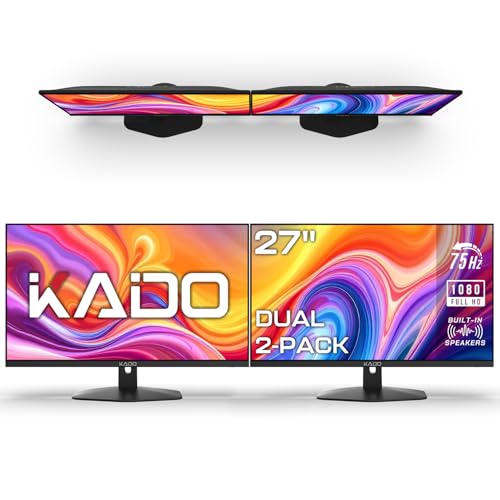
Pros
- Affordable dual monitor bundle for budget-conscious gamers and streamers
- 75Hz refresh rate and fast response time improve gaming fluidity over standard 60Hz monitors
- Built-in speakers eliminate the need for external speakers in compact desk setups
- VESA mount ready for easy ergonomic adjustments and multi-monitor configurations
- Custom gaming modes enhance specific game genres like FPS and RTS
Cons
- 1080p resolution may not satisfy users seeking higher pixel density for detailed creative work
- 75Hz refresh rate is lower than high-end gaming monitors (144Hz+), limiting competitive esports use
- Basic stand lacks height and swivel adjustments, requiring a VESA mount for optimal ergonomics
The Kado Dual Monitor Setup is a 2-pack of 27-inch 1920x1080 monitors designed for gamers, streamers, content creators, and anyone looking to boost productivity with a dual-screen workstation. With a 75Hz refresh rate, fast response times, and built-in speakers, these monitors offer a practical entry into multi-monitor gaming and office setups without breaking the bank.
In terms of gaming performance, the 75Hz refresh rate provides noticeably smoother motion than standard 60Hz displays, which helps during fast-paced FPS and racing games. The fast response time minimizes ghosting and blurring, keeping enemy movements clear during chaotic moments. Custom gaming modes for FPS and RTS let you tweak visual settings on the fly, though competitive esports players may still prefer higher refresh rates like 144Hz. The 100% sRGB color gamut ensures vibrant colors for both gaming and creative tasks, making these monitors suitable for light photo editing or video work.
Build quality is solid for the price point, with slim bezels that help create a nearly seamless dual-screen experience. The monitors include built-in speakers, which are convenient for casual use and save desk space, though audiophiles will likely want dedicated speakers or a headset. VESA mount compatibility is a major plus, allowing you to attach the monitors to arms or wall mounts for a cleaner, ergonomic setup. The included stands are basic and lack height or swivel adjustments, so investing in VESA mounts is recommended for comfort during long sessions.
Setting up the dual monitors is straightforward: plug in the HDMI cables, power on, and the system recognizes both displays automatically. Cable management is simple if you use VESA arms, as you can route cables behind the arms. The monitors are lightweight at 8.8 pounds each, making them easy to position. No software is required, but you can adjust settings via the on-screen display menu.
Limitations include the 1080p resolution, which may feel less sharp for detailed design work or if you're used to higher pixel densities. The 75Hz refresh rate is fine for casual and moderate gaming but won't satisfy competitive players seeking every frame advantage. The built-in speakers are adequate for system sounds and voice calls but lack bass and volume for immersive gaming.
Overall, the Kado Dual Monitor Setup is an excellent value for budget-conscious gamers, streamers, and work-from-home users who want a dual-screen setup for under $200. It's ideal for college gamers, casual players, and anyone building a home office with gaming capabilities. If you need higher refresh rates or resolution, look elsewhere, but for a balanced hybrid of gaming and productivity, this 2-pack delivers solid performance at a great price.

Pros
- High 180Hz refresh rate at an affordable price point
- Fast 1ms response time suitable for competitive gaming
- Good color accuracy with 110% sRGB coverage out of the box
- Includes HDMI cable and supports both DP 1.4 and HDMI 2.0
- VESA mountable and has a small footprint for compact setups
Cons
- Built-in speakers are not included; external speakers or headphones are needed
- Tilt-only adjustment (no height, swivel, or pivot) limits ergonomic flexibility
- Limited to 1080p resolution may not satisfy users seeking higher pixel density for productivity
The SANSUI ES-G24F4 is a 24-inch Full HD (1920x1080) gaming monitor built for gamers who prioritize speed and responsiveness over resolution. With a 180Hz refresh rate and a 1ms MPRT response time, this display is especially well-suited for competitive gamers, esports players, and anyone playing fast-paced shooters like Valorant, Apex Legends, or Call of Duty. It's also a solid choice for casual gamers who want a smooth upgrade from a standard 60Hz monitor without breaking the bank.
When it comes to real-world performance, the high refresh rate and low response time work together to reduce motion blur and ghosting, giving you a clearer picture during quick flicks and fast movements. The monitor supports Adaptive Sync, which helps minimize screen tearing when paired with a compatible GPU. Colors are punchy thanks to 110% sRGB coverage, and the 300-nit brightness is adequate for most indoor lighting conditions. For streamers or content creators on a budget, this monitor provides enough color accuracy for basic photo editing or video previews.
Build quality is respectable for the price point. The monitor features a sturdy stand with a small footprint, making it easy to fit into tight desk setups. The bezels are relatively slim, which works well for multi-monitor configurations. Connectivity includes one DisplayPort 1.4 and one HDMI 2.0 port, along with a 1.5-meter HDMI cable in the box. The VESA 75x75mm mounting pattern gives you the option to use a monitor arm or wall mount for better cable management and desk organization.
Ease of setup is straightforward: simply attach the stand or mount, connect your video cable, and power it on. The on-screen display (OSD) is simple to navigate via the joystick control, giving you quick access to picture presets including Racing, FPS, and RTS modes. Eye-care technology reduces blue light emission, which is a nice bonus for long gaming sessions or late-night work. Keep in mind that there are no built-in speakers, so you will need external speakers or a gaming headset for audio.
One realistic limitation is the ergonomic adjustment. The stand only offers tilt (-5° to 15°), with no height, swivel, or pivot options. If you need a more customized viewing angle, a VESA mount is recommended. Also, at 1080p, the pixel density is standard for 24 inches, but it may not satisfy users looking for sharper text or more screen real estate for productivity tasks like programming or graphic design.
Overall, the SANSUI ES-G24F4 is a practical choice for budget-conscious PC gamers, college gamers, and esports enthusiasts who want a high-refresh-rate monitor without spending a lot. It's also a good option for gaming setup builders looking to add a secondary or entry-level gaming display. If you prioritize speed and smoothness over resolution and premium ergonomics, this monitor delivers strong value for its price.
The 180Hz refresh rate and 1ms MPRT response time make the SANSUI ES-G24F4 a strong performer in fast-paced games. In FPS titles like Overwatch 2 and Rainbow Six Siege, you'll notice smoother motion and less input lag compared to standard 60Hz or 75Hz monitors. The Adaptive Sync support helps keep gameplay free from tearing when your frame rate fluctuates. While not a G-Sync or FreeSync certified monitor, it still works well with most modern graphics cards that support VRR over DisplayPort.
The Racing, FPS, and RTS preset modes allow you to quickly optimize the picture for different game genres. The FPS mode boosts shadows and brightness to help spot enemies in dark corners, while Racing mode emphasizes contrast for a more immersive driving experience. For competitive players, the 1080p resolution means higher frame rates are easier to achieve, especially on mid-range GPUs.
Frequently Asked Questions
Does a higher refresh rate provide an advantage in Dota 2?
Yes, refresh rates of 165Hz or higher produce noticeably smoother camera panning and sharper cursor movement. While extra frames do not replace player skill, they make rapid spell interactions much easier to follow during chaotic team clashes.
Is a 1080p resolution suitable for Dota 2 gameplay?
Yes, 1080p resolution on a 24-inch monitor delivers clear detail without overburdening your graphics card. This setup helps you maintain high frame rates, though players wanting more screen space often explore 27-inch fast displays.
Are curved monitors practical for MOBA games?
Curved displays with a 1500R or 1800R profile can bring peripheral interface elements into your natural view, making minimap monitoring more comfortable. Flat panels remain just as capable and avoid altering straight on-screen lines.
What panel type works best when choosing the best gaming monitor for dota 2 in 2026?
VA panels offer high 3000:1 contrast ratios that help hero models stand out against darker map areas. Panels paired with 1ms response specifications help reduce blur, making them strong contenders for the best gaming monitor for dota 2 in 2026.
Does adaptive sync matter when playing Dota 2?
Yes, adaptive sync eliminates screen tearing by synchronizing your monitor refresh rate with GPU frame output. This feature maintains smooth motion even during heavy teamfights that cause sudden frame fluctuations.
Do you need built-in speakers on a gaming monitor?
No, built-in monitor speakers offer basic sound for office tasks but usually lack clarity for gaming. Most players prefer dedicated gaming headsets to communicate clearly and pinpoint auditory cues.







Write Your Review
No reviews yet. Be the first to share your experience!