


Long hours spent playing games or handling desk assignments can place substantial physical strain on the lower spine, shoulders, and hips. Many desk users wonder whether are gaming chairs good for your back when transitioning away from basic task seating. The answer depends heavily on specific adjustability options, cushion materials, and how well the chair matches individual body proportions. Incorporating supportive seating alongside other practical workspace accessories can help establish a more comfortable and sustainable daily work routine.
Standard gaming seats feature distinctive racing-inspired aesthetics, but visual styling alone does not guarantee proper spinal alignment or lasting comfort. Models with dedicated lumbar mechanisms, breathable upholstery, and customizable armrests offer meaningful physical support for extended desk sessions. However, poorly fitted chairs or rigid racing bolsters may restrict natural movement and lead to muscle stiffness over time. Evaluating published seat dimensions and mechanical adjustments provides clear insight into whether a specific chair suits your physical needs.


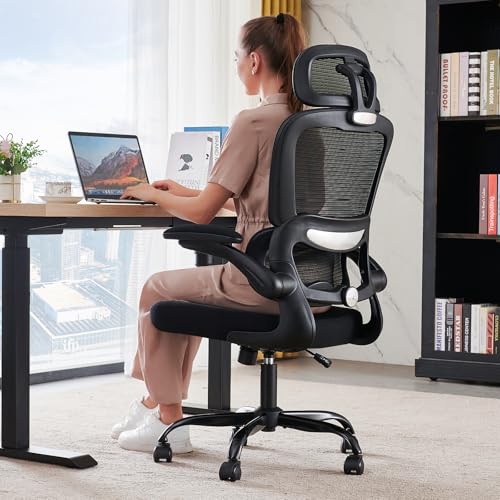




Evaluating Back Support, Spinal Alignment, and Long-Term Seating Ergonomics
Determining whether are gaming chairs good for your back requires looking past bold colors and focusing on core ergonomic fundamentals. A chair supports the back effectively only when it preserves the natural curvature of the spine while allowing periodic posture changes throughout the day. While some designs provide substantial lumbar relief and robust structural stability, others rely on cosmetic styling that can restrict movement. Understanding how specific design choices interact with the human body helps buyers make informed decisions for both gaming and desk work.
Spinal health during seated tasks relies on balanced weight distribution across the thighs, hips, and spinal column. When a chair lacks adequate lumbar support or forces the pelvis into an unnatural tilt, back muscles must work continuously to maintain upright stability. Over several hours, this continuous muscle engagement can lead to tension, soreness, and fatigue. Selecting a chair with the right combination of seat depth, backrest angle, and cushioning creates a more sustainable sitting experience.
How Gaming Chair Anatomy Affects Spinal Alignment
The human spine naturally forms an S-shaped curve, featuring an inward curve at the lower lumbar region and an outward curve at the thoracic spine. When you sit without proper lower back contact, the lumbar curve tends to flatten out, transferring pressure directly onto intervertebral discs. Many gaming chairs address this issue by including external lumbar cushions that fill the space between the lower back and the backrest. While adjustable cushions offer flexible placement for various user heights, their effectiveness depends entirely on whether they match the natural curve of the user.
Fixed or oversized lumbar pillows can inadvertently push the lower back too far forward, creating an exaggerated arch that strains surrounding muscles. Higher-end ergonomic designs often replace loose cushions with built-in mechanisms that adjust in depth to gently support the spine. Upper back and neck support also play a critical role in overall spinal posture during intensive gaming or computer tasks. A well-positioned headrest keeps the cervical spine aligned with the shoulders, preventing the forward head posture that frequently causes upper back stiffness.
Maintaining spinal alignment also involves supporting the thoracic region without forcing the shoulder blades together. Chairs with contoured backrests should follow the broad expanse of the shoulders rather than curling forward aggressively. When a backrest curves too inward, it forces the user into a slouched, rounded shoulder position that tightens chest muscles and strains the upper back. A flatter or gently curved backrest profile allows the shoulders to open naturally, which makes breathing easier and prevents tension from accumulating across the neck.
The Impact of Bucket Seats Versus Wingless Seat Cushions
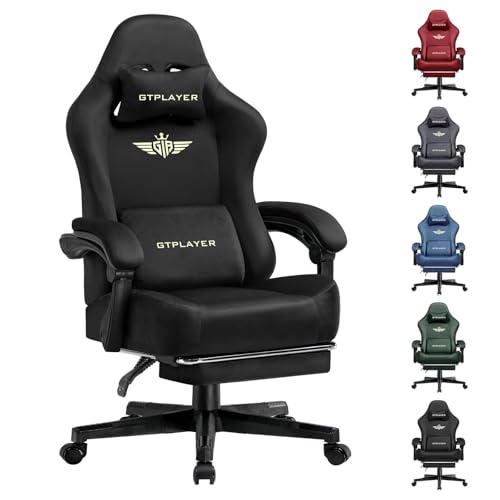
Traditional gaming seats borrow their aesthetic directly from motorsports, featuring prominent side bolsters along the seat base and backrest. In a race car, these bolsters hold the driver firmly in place against strong lateral forces around sharp corners. At an office or gaming desk, however, rigid side wings can restrict natural leg movement and compress the outer thighs. If the seat base is too narrow for the user, the bolsters can press inward against the hips, forcing the legs together and tilting the pelvis.
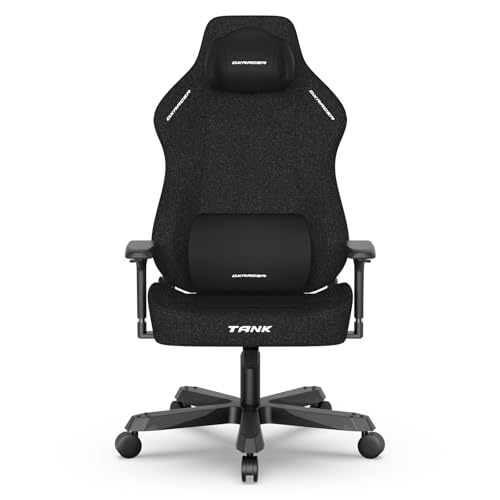
Modern seating designs increasingly favor flat, wingless cushions that provide greater usable sitting width. A wider flat cushion, such as the 51-centimeter seating surface seen on contemporary models, allows users to shift positions or sit cross-legged without pinching their legs. Allowing the hips to spread naturally distributes body weight evenly across the entire surface of the seat. This open layout prevents localized pressure points along the thighs and supports a neutral pelvic orientation, which directly stabilizes the lower back.
Restricted pelvic movement is a common contributor to lower back discomfort during extended desk sessions. When thigh wings limit how you place your legs, you lose the ability to make small postural micro-adjustments throughout the day. These subtle posture shifts are essential for relieving pressure on specific muscle groups and encouraging steady circulation. Choosing a wingless seat cushion gives users the flexibility to sit comfortably in multiple postures without sacrificing core structural support.
Cushion Density, Pocket Springs, and Lower Back Pressure
Seat cushion construction directly influences how well a chair relieves spinal pressure over hours of continuous use. Low-density foam cushions tend to collapse quickly under body weight, causing the user to bottom out against the underlying metal or wood frame. When the cushion bottoms out, the tailbone and ischial tuberosities bear concentrated vertical loads that radiate upward into the lumbar spine. High-resilience molded foam resists permanent sagging, maintaining consistent elasticity and cushioning support across prolonged daily sessions.
Some manufacturers combine high-rebound foam with interior pocket spring coils borrowed from mattress and sofa engineering. These independent coils compress dynamically based on localized weight distribution, providing balanced contouring beneath the pelvis and thighs. By reducing vertical shock and dispersing downward pressure, pocket springs help keep the pelvic girdle level and supported. Maintaining a level pelvic foundation prevents the sacrum from slumping backward, which is essential for protecting the lower lumbar discs.
The durability of the seat base material also affects long-term ergonomic benefits. A cushion that flattens within a few months of purchase loses its ability to distribute weight evenly, leading to uneven spinal loading. Molded foam seats and spring-assisted cushions retain their structural integrity far longer than cut budget foam slabs. Evaluating cushion composition prior to purchasing helps ensure that the chair will continue supporting your lower back throughout years of daily use.
Gaming Chairs Compared to Ergonomic Mesh Office Chairs
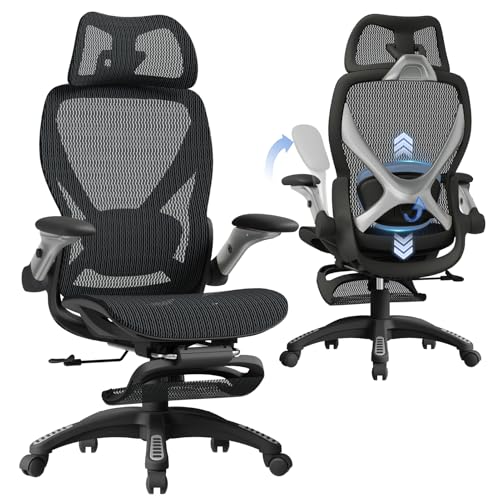
Shoppers frequently debate whether to choose a racing-style gaming seat or a dedicated ergonomic office chair. Traditional gaming chairs typically utilize synthetic polyurethane leather over padded steel frames, offering a high backrest and plush visual presentation. Ergonomic office models, such as high-back mesh designs, prioritize breathable airflow and flexible backrest tension that adapts continuously to subtle body movements. Mesh upholstery prevents heat buildup during warm weather, eliminating the discomfort of perspiration and sticking during long work or play sessions.
Ergonomic office models also tend to focus on targeted mechanical adjustments, such as depth-adjustable lumbar dials and calibrated seat pans. While gaming chairs often excel at deep reclining angles and integrated footrests for relaxed media viewing, mesh office chairs emphasize neutral posture for active keyboard and mouse work. When optimizing a setup for productivity and comfort, pairing your seating choice with appropriate desk illumination bars can also reduce visual fatigue and posture slouching. Both chair styles can support back comfort when their specific dimensions align properly with your body shape.
Material maintenance also differs substantially between these two common seating categories. Polyurethane leather requires routine wiping to remove surface oils and dust, but poor-quality synthetic covers may peel or crack after extended exposure to body heat and friction. High-tension mesh backrests avoid peeling altogether while maintaining their taut, supportive shape over many years of active use. Weighing upholstery breathability and durability against the plush padding of traditional gaming chairs allows buyers to select the surface that best matches their workspace climate.
Essential Adjustability Features That Protect Your Back
Adjustability is the single most important factor determining whether a chair will provide comfortable spinal support. A reclining backrest that moves between 90 degrees and 135 degrees allows users to vary their sitting angle throughout the day. Tilting the backrest slightly backward to around 100 to 110 degrees transfers a portion of upper body weight onto the chair, reducing compressive pressure on the lower spinal discs. Locking mechanisms ensure the backrest stays securely positioned at the chosen angle, providing dependable support whether reading, working, or relaxing.
Armrest design also significantly affects tension in the upper back, shoulders, and neck. Fixed armrests that sit too high force the shoulders to shrug upward, leading to muscle fatigue along the trapezius and cervical spine. Multi-directional armrests, including synchronized tilting arms or 3D adjustable pads, allow users to match the armrest height and angle to their desk surface. Supporting the forearms at a comfortable 90-degree angle eliminates downward gravitational pull on the shoulder girdle, relieving strain across the thoracic spine.
Tilt tension control is another valuable adjustment mechanism that improves seated ergonomics. A chair mechanism that allows gentle rocking encourages active sitting, which stimulates blood flow and engages stabilizing core muscles without requiring conscious effort. Stiff tilt mechanisms that require excessive force to recline can cause back strain as users push backward against resistance. Conversely, loose mechanisms may cause the chair to tip unexpectedly, making tension calibration a key component of overall seating stability.
Sizing Considerations: Matching Chair Dimensions to Your Body
Even a well-built chair with premium materials will fail to support your back if its physical dimensions do not match your body frame. Seat height is the first critical measurement to evaluate, as your feet should rest flat on the floor with knees bent at approximately 90 degrees. If the chair sits too high, your legs dangle, causing the front edge of the seat to compress blood vessels and pulling the lower spine out of alignment. If the seat is too low, the knees rise above the hips, flattening the lumbar curve and increasing disc stress.
Seat depth and width require equal scrutiny before selecting a chair for daily gaming or study. An ideal seat depth leaves approximately two to four fingers of clearance between the front edge of the seat cushion and the back of your knees. Without this gap, the seat edge presses against sensitive nerves and tendons, encouraging the user to slide forward into an unsupported slump. Chairs offering generous seat widths and extended weight capacities, such as reinforced frames supporting higher loads, ensure stable seating without restricting comfortable posture.
Backrest height should correspond closely with your torso length so the integrated headrest and lumbar contours align with your spine. If a backrest is too short, the headrest cushion will push into your upper back or shoulder blades rather than cradling your neck. For taller individuals, high-back designs with adjustable headrest pillows provide essential cervical support during reclining intervals. Comparing published chair dimensions against your own seated measurements is the most reliable way to verify a compatible physical fit.
Common Posture Pitfalls and Setup Mistakes During Long Sessions
Purchasing an ergonomic chair does not automatically solve back discomfort if poor sitting habits remain unaddressed. Many individuals position their lumbar pillow too low or too high, which can push the spine into unnatural curvature rather than providing gentle support. Another frequent error involves leaning forward toward the computer monitor during intense gaming moments, abandoning backrest contact entirely. To maintain back support, users must consciously rest their torso against the backrest and adjust their monitor distance accordingly.
Remaining completely static for hours at a time also contributes to spinal fatigue, regardless of how supportive the chair feels. The human spine is designed for dynamic movement, and staying in one fixed position reduces blood circulation to postural muscles. Taking brief standing breaks every hour and utilizing the chair’s tilt mechanism to shift posture keeps spinal tissues oxygenated and flexible. Adjusting your desk height so your elbows align naturally with the desktop further reinforces an upright, strain-free seated posture.
Crossing legs or sitting perched on the front edge of the cushion are additional habits that distort pelvic orientation. When you sit on the front edge of the seat, the backrest cannot provide lumbar or thoracic support, forcing spinal erector muscles to work continuously. Crossing one leg over the other rotates the pelvis and twists the lumbar vertebrae, creating uneven muscle tension over time. Keeping both feet grounded and resting your back firmly against the support cushions prevents these common postural distortions.
Practical Verification: Assembly, Stability, and Purchase Protections
Safe assembly and structural stability are fundamental prerequisites for dependable back support. During setup, every bolt connecting the seat mechanism, armrests, and backrest must be tightened evenly to prevent mechanical play or leaning. A chair that wobbles or tilts subtly to one side forces the spine to compensate continuously, creating asymmetrical muscle tension across the lower back. Checking for safety certifications, such as SGS or BIFMA ratings on the pneumatic gas cylinder, confirms that the height adjustment mechanism will hold securely under load.
Because individual comfort preferences and spinal shapes vary widely, reviewing purchase terms before buying is an essential step. Reliable manufacturer warranties covering replacement parts, gas cylinders, and structural frames provide valuable peace of mind over years of ownership. Clear return policies allow buyers to assemble and test the chair within their own workspace to confirm a proper physical fit. If a chair feels overly rigid or fails to support your lower back after careful adjustment, utilizing return options ensures you can find a more compatible model.
Ongoing maintenance also plays an important role in preserving long-term seating stability. Hardware can loosen gradually over months of routine shifting, reclining, and swiveling, leading to squeaks and subtle wobbling. Periodically inspecting and re-tightening frame bolts keeps the backrest aligned and ensures the chair continues to support your posture correctly. Keeping the casters free of hair and debris ensures smooth rolling, preventing awkward twisting motions when adjusting your position relative to your desk.
Finding the Right Seating Balance for Your Setup
Ultimately, whether are gaming chairs good for your back depends on choosing a model designed around bodily support rather than superficial styling. High-density foam cushions, adjustable lumbar solutions, and flexible recline angles provide the physical foundation needed to maintain healthy posture during demanding sessions. Comparing detailed specifications, seat dimensions, and adjustment ranges against your personal measurements ensures the best opportunity for lasting comfort. Combining a well-fitted chair with regular movement breaks creates a practical, supportive environment for gaming, studying, and desk work alike.
A thoughtful seating setup treats the chair as one component of a broader ergonomic workstation. Integrating proper monitor height, relaxed arm positioning, and consistent lumbar contact allows you to work or play for hours without unnecessary physical strain. By prioritizing adjustability, durable materials, and proper proportions over flashiness, you can select a chair that actively encourages spinal well-being. Evaluating your individual sitting habits and physical dimensions will always remain the most reliable path to achieving lasting seated comfort.


Write Your Review
No reviews yet. Be the first to share your experience!