


Fitting a capable screen onto a compact workstation or dorm desk often comes down to balancing desktop footprint with readable text and fluid motion. When desk space is tight, picking the best 22 inch pc monitor lets you maintain crisp 1080p visual clarity without overcrowding your work area. These smaller desktop displays provide tight pixel density for spreadsheets, everyday tasks, and streaming video. Many entry-level screens now offer refresh rates from 100Hz to 144Hz for smoother cursor tracking than standard 60Hz panels. Our review evaluates manufacturer specifications, technical sheets, and user feedback to help you identify the right model for your daily needs.
Selecting between panel types and ergonomic stands will also influence your daily viewing comfort. Models with VA panels typically deliver deep contrast for dim rooms, while IPS panels prioritize wider viewing angles and uniform color. If you are comparing desktop setups, reviewing value displays shows how smaller screens balance performance against price. Features like Adaptive Sync, tilt adjustments, and eye comfort modes add noticeable utility to long work sessions. By examining published specifications and connection ports, you can pick a dependable screen that fits your space.

Pros
- 144Hz refresh rate for smooth gaming performance at a very competitive price.
- Built-in speakers eliminate need for external audio for basic use.
- Minimal bezels make for an immersive multi-monitor experience.
- Blue-Light Shift helps reduce eye fatigue during long sessions.
Cons
- Only 22-inch screen may feel small for immersive single-monitor gaming.
- Built-in speakers typically lack depth and volume for serious gaming audio needs.
- No VESA mount support mentioned, limiting desk mounting options.
The Sceptre E225W-FW144 Series is a 22-inch Full HD gaming monitor built for gamers who prioritize smooth performance on a tight budget. With a 144Hz refresh rate and 1080p resolution, this display offers a noticeable upgrade over standard 60Hz office monitors, especially in fast-paced games like Call of Duty, Valorant, or Apex Legends. The combination of HDMI and DisplayPort inputs makes it easy to connect to most modern gaming PCs or laptops, and the integrated speakers provide basic audio without needing extra gear on your desk.
This monitor is best suited for casual gamers, competitive players looking for a low-cost secondary screen, and college gamers setting up a dorm room battle station. The 22-inch size keeps the desk footprint small, and the nearly bezel-free design means it pairs well in a dual-monitor arrangement for streaming or productivity. Gamers who play mostly esports titles will appreciate the 144Hz responsiveness, which helps reduce motion blur and gives a slight edge in competitive play.
Build quality is typical for this price range a lightweight plastic frame that feels sturdy enough for desk use but not rugged for frequent moves. The Blue-Light Shift feature is a practical addition for those who game or work late, as it filters some harmful blue light and may reduce eye fatigue over time. The stand offers basic tilt adjustment, but you won't find height, swivel, or pivot options, which is expected at this price point.
Setup is straightforward: attach the stand, plug in power and video cable, and the monitor is ready to go. The on-screen display (OSD) menus are simple to navigate for adjusting brightness, contrast, and gaming presets. Cable management is minimal since there are no integrated routing channels, but the compact size keeps wires from getting too messy.
One realistic limitation is the lack of VESA mounting support, so you cannot easily attach this monitor to an arm or wall mount. Also, the built-in speakers are functional but won't satisfy gamers who want rich sound for immersion or crisp audio for competitive footstep detection. Most users will want to pair this monitor with a dedicated gaming headset or external speakers.
Overall, the Sceptre 22-Inch 144Hz Monitor is a solid choice for budget-minded PC gamers, streamers needing a secondary display, or anyone building a cost-effective gaming setup. It delivers the essential performance needed for smooth 1080p gaming without the premium price. If you're focused on high-refresh-rate gameplay and keeping your budget in check, this monitor is worth considering for your desk.

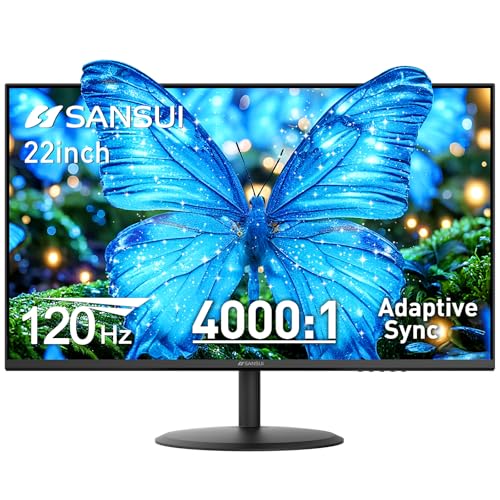
Pros
- 120Hz refresh rate with Adaptive Sync provides smooth, tear-free gaming at an affordable price.
- High 4000:1 contrast ratio delivers deep blacks and better image depth than typical IPS monitors.
- Eye care features (anti-flicker, low blue light, anti-glare) support comfortable long gaming sessions.
- Dual HDMI inputs and VESA mount offer flexible connectivity and desk organization options.
Cons
- 22-inch size may feel small for users accustomed to larger gaming monitors, especially for immersive single-player titles.
- No built-in speakers require external audio solutions for console or PC use out of the box.
- Limited to HDMI 1.4, which may cap refresh rate at 120Hz for some devices; no DisplayPort or USB-C connectivity.
The SANSUI ES-22X3AH is a 22-inch 120Hz gaming monitor designed to deliver smooth visuals and solid image quality without breaking the bank. With a Full HD 1080p resolution, Adaptive Sync support, and a 4000:1 contrast ratio, this monitor targets PC gamers, esports players, and casual users who prioritize responsive gameplay and eye comfort during extended sessions.
For competitive gamers and esports enthusiasts, the 120Hz refresh rate is a key advantage. It provides noticeably smoother motion compared to standard 60Hz monitors, which helps in fast-paced games like Valorant, Apex Legends, or Call of Duty. Adaptive Sync further reduces screen tearing and stuttering, creating a more fluid experience during intense firefights. While the 22-inch screen is compact, it keeps all gameplay in your direct field of view, which some competitive players actually prefer for faster reaction times.
Streamers and content creators will appreciate the 100% sRGB color coverage and HDR mode, which deliver accurate and vibrant colors for video editing, graphic design, or watching streams. The 4000:1 contrast ratio also enhances depth in darker scenes, making open-world or horror games more immersive. The anti-glare coating and low blue light mode reduce reflections and eye fatigue, which is a huge plus for anyone spending long hours in front of a screen whether gaming, streaming, or working from home.
Build quality is practical for a budget monitor. The plastic chassis feels sturdy enough for daily use, and the tilt adjustable stand allows for some ergonomic tweaking. The monitor also supports VESA 75x75mm mounting, so you can easily attach it to an arm or wall for a cleaner desk setup. Cable management is straightforward with dual HDMI 1.4 ports, letting you hook up both a gaming PC and a console without constantly swapping cables.
A couple of realistic limitations to consider: the 22-inch size may feel small if you are used to 24-inch or larger displays for immersive single-player games or productivity multitasking. Also, there are no built-in speakers, so you will need external speakers, a headset, or a soundbar for audio. Additionally, the HDMI 1.4 ports could limit some devices from accessing higher refresh rates, though at 1080p, 120Hz is well within reach. Overall, the SANSUI 22-inch monitor is a solid entry-level choice for PC gamers, esports players, and gamers on a budget who want smoother gameplay and comfort without spending a lot.
The 120Hz refresh rate on the SANSUI ES-22X3AH provides a noticeable upgrade over standard 60Hz monitors, delivering smoother motion in fast-paced games. Combined with Adaptive Sync, it reduces screen tearing and stuttering, which helps maintain immersion during competitive matches. The 4000:1 contrast ratio adds depth to dark scenes, making it easier to spot enemies in shadows. While the 22-inch size is compact, it keeps all visual information within your direct line of sight, potentially aiding reaction times in esports titles.
The monitor features a sturdy black plastic construction that feels durable for its price range. The stand offers -5 to 22 degrees tilt adjustment, allowing some ergonomic flexibility. It also supports VESA 75x75mm mounting, so you can easily switch to an arm or wall mount for a cleaner desk setup. At 6.6 pounds, it is lightweight enough to move between rooms or adjust without hassle.
Connectivity is handled by two HDMI 1.4 ports, which can support up to 120Hz at 1080p. This setup lets you connect both a gaming PC and a console simultaneously, making it easy to switch between devices. There is no DisplayPort or USB-C, so users with older GPUs or laptops may need an adapter. The monitor also lacks built-in speakers, so plan for external audio solutions.

Pros
- Exceptional value for money - delivers 100Hz refresh rate and VA panel quality at a budget price.
- Great contrast and color performance for an entry-level monitor, making games and media look more immersive.
- Eye-care features like LowBlue mode help reduce fatigue during extended use.
- Compact 22-inch size is ideal for smaller desks or dual-monitor setups.
- VESA mountable for flexible placement options.
Cons
- Limited to 100Hz refresh rate - not ideal for competitive esports players who prefer 144Hz or higher.
- No DisplayPort input, only HDMI and VGA, which may limit compatibility with some modern GPUs.
- 22-inch screen size may feel small for users accustomed to larger displays for immersive gaming or productivity.
The ArcticPro 22-inch 100Hz monitor is a budget-friendly display that aims to deliver a smooth and visually pleasing experience for PC gamers and everyday users. With a Full HD 1920x1080 resolution and a VA panel boasting a 3000:1 contrast ratio, this monitor punches above its price point in terms of image quality. The 100Hz refresh rate, while not the highest on the market, provides a noticeable improvement over standard 60Hz monitors, making motion appear smoother in games like fast-paced shooters or racing titles.
This monitor is best suited for casual gamers, college students, and work-from-home users who want a reliable screen without breaking the bank. It's also a great pick for gaming setup builders looking for a secondary display or a budget primary monitor for less demanding titles. The VA panel's deep blacks and 105% sRGB coverage make it a decent option for light photo editing or watching movies, though color-critical professionals may want a wider gamut.
In terms of performance, the 100Hz refresh rate and fast response time help reduce motion blur and ghosting, providing a more responsive feel in games. However, competitive esports players who prioritize the highest refresh rates may find 100Hz limiting. The monitor's LowBlue mode and anti-blue light technology are welcome additions for long sessions, reducing eye strain without washing out colors too much. The 178-degree viewing angles ensure consistent image quality from various positions, which is useful for sharing the screen or multi-monitor setups.
Build quality is solid for the price, with a slim, frameless design that looks modern on any desk. The tilt adjustment (-5 to 15 degrees) allows for basic ergonomic tweaks, but there's no height or swivel adjustment. The VESA 75x75mm mount compatibility is a plus, enabling wall mounting or use with aftermarket arms to free up desk space. Connectivity is basic: one HDMI port and one VGA port, which covers older devices but lacks DisplayPort. There are no built-in speakers, so you'll need external audio solutions.
Setup is straightforward - just plug in the included HDMI cable and power adapter, and you're ready to go. The on-screen display menu is simple to navigate, offering basic adjustments for brightness, contrast, and color presets. Maintenance is minimal; the matte screen resists fingerprints and glare well. The compact 22-inch size and lightweight build (under 7 pounds) make it easy to move or mount.
A realistic limitation is the lack of advanced features like adaptive sync (FreeSync/G-Sync) or a higher refresh rate, which may be a dealbreaker for serious competitive gamers. Additionally, the 22-inch diagonal might feel cramped for users accustomed to 27-inch or larger screens. Overall, the ArcticPro 22-inch 100Hz monitor offers excellent value for budget-focused PC gamers, home office workers, or anyone needing a reliable secondary display. It's a practical choice for dorm rooms, small desks, or as a cost-effective gaming monitor for less demanding titles.

Pros
- High 100Hz refresh rate delivers smooth motion for casual and competitive gaming.
- VA panel offers excellent contrast ratio for richer colors and deeper blacks compared to typical IPS monitors.
- Adaptive Sync support reduces screen tearing without requiring a high-end GPU.
- LowBlue Mode and flicker-free technology reduce eye fatigue during long sessions.
- Affordable price point makes it accessible for budget-conscious gamers and students.
Cons
- Limited to 22-inch size, which may feel small for immersive gaming or multi-window productivity.
- Only one HDMI port and one VGA port, lacking DisplayPort or USB-C connectivity for modern setups.
- No built-in speakers, requiring external speakers or headphones for audio.
The Philips 221V8LB is a 22-inch Full HD monitor that targets budget-minded PC gamers, casual gamers, and home office users who want a reliable display without spending a lot. With a 100Hz refresh rate and Adaptive Sync, it offers smoother motion than standard 60Hz monitors, which can make a noticeable difference in fast-paced games like shooters or racing titles. The VA panel provides deeper blacks and better contrast than many entry-level IPS monitors, giving you more vibrant visuals for gaming and media.
This monitor is best suited for casual gamers, college gamers, and work-from-home users who need a secondary display or a compact primary monitor for a small desk. Its 22-inch size fits easily into tight spaces, and the VESA mount compatibility allows for flexible desk setups or wall mounting to improve cable management. The 100Hz refresh rate and Adaptive Sync help reduce screen tearing and stuttering, making gameplay feel more fluid without needing a high-end graphics card.
In terms of performance, the 100Hz refresh rate provides a noticeable upgrade over standard 60Hz displays, especially in games where quick reactions matter. The Adaptive Sync technology works with compatible GPUs to keep frames smooth, which is a nice bonus at this price point. The VA panel also offers 178-degree viewing angles, so colors stay consistent even when you're not sitting directly in front of the screen. This can be useful for co-op gaming or when sharing your screen with others.
Build quality is solid for a budget monitor, with a simple black design that won't distract from your gaming setup. The stand is basic but functional, and the VESA mount option gives you the freedom to use an aftermarket arm or mount for a cleaner desk. The inclusion of both HDMI and VGA ports ensures compatibility with older PCs or laptops, though you won't find DisplayPort or USB-C here. This might limit connectivity for some modern devices, but for most casual setups, it's sufficient.
Setting up the Philips 221V8LB is straightforward. It comes with an HDMI cable and a power cord, so you can plug it in and start using it right away. The on-screen menu is easy to navigate, and the LowBlue Mode is a nice touch for reducing eye strain during long gaming sessions or late-night work. However, there are no built-in speakers, so you'll need to rely on external speakers or a gaming headset for audio. This is common for budget monitors, but it's worth noting if you prefer an all-in-one solution.
One realistic limitation is the 22-inch screen size, which may feel cramped for immersive gaming or for users who multitask with multiple windows open. Also, the lack of a DisplayPort or higher refresh rate (like 144Hz) means it's not ideal for competitive esports players who demand the fastest response times. But for its price, the Philips 221V8LB delivers good value for casual gamers, students, or anyone needing a reliable secondary monitor. If you're building a budget gaming PC or setting up a dorm room gaming station, this monitor is a practical choice that won't disappoint.

Pros
- Excellent value for budget-conscious gamers and students - high refresh rate at a low price point
- Strong contrast ratio for a VA panel, great for single-player and cinematic games
- Ultra-slim design and VESA mount friendly for clean, space-saving setups
- TUV-certified eye care features benefit long streaming or study sessions
Cons
- Only 22 inches, which may feel small for immersive gaming or productivity work on larger desks
- Lacks DisplayPort and USB-C connectivity, requiring adapters for newer laptops or MacBooks
- Basic tilt-only stand without height or swivel adjustments, limiting ergonomic flexibility
The KOORUI 22-inch monitor is a budget-friendly entry into the world of high-refresh-rate gaming, designed for PC gamers who want smooth visuals without breaking the bank. This 1080p Full HD display uses a VA panel that offers a standout 4000:1 contrast ratio, delivering deep blacks and vibrant colors that elevate both gaming and everyday use. With a 100Hz refresh rate and AdaptiveSync support, it reduces screen tearing and stuttering in fast-moving scenes, making it a solid choice for casual gamers, college students, or anyone building a secondary gaming or productivity setup.
Targeted at casual gamers, work-from-home gamers, and those on a tight budget, this monitor shines in less competitive genres like open-world adventures, MOBAs, and single-player titles. While competitive esports players may prefer higher refresh rates, the 100Hz panel is a noticeable upgrade from standard 60Hz monitors and provides a responsive feel in games like Fortnite or Valorant. The 4ms response time keeps motion blur manageable, though hardcore FPS gamers might want faster TN or IPS alternatives.
Build quality is decent for the price, with an ultra-slim profile that helps save desk space. The stand offers tilt adjustment only, but VESA 100x100mm compatibility means you can easily wall-mount or use a monitor arm for better positioning. Connectivity is limited to HDMI and VGA, so users with newer laptops or MacBooks will need a USB-C to HDMI adapter. The included HDMI cable gets you started quickly, and the audio-out port is handy for connecting external speakers.
One of the standout features is the TUV Rheinland certification for low blue light and flicker-free technology, which reduces eye strain during long gaming marathons or late-night study sessions. This makes it a practical choice for gamers who spend hours in front of the screen. The monitor's 22-inch size fits well on compact desks or dorm room setups, though users with larger workspaces might wish for more screen real estate.
In terms of setup, the monitor is straightforward to unbox and assemble. The stand attaches in seconds, and plugging in via HDMI is hassle-free. There's no software to install, so you can adjust brightness and contrast using the on-screen display buttons. The lack of built-in speakers means you'll need external audio, but that's common for gaming monitors in this range.
Overall, the KOORUI 22-inch 100Hz monitor delivers strong value for budget-conscious gamers who want a smooth, eye-friendly display for gaming and productivity. It's ideal for students, casual players, or anyone building a multi-monitor rig without spending a lot. If you need a larger screen, higher resolution, or more connectivity options, you may want to look higher up the price ladder, but for the price, this monitor is a practical and reliable choice.
Frequently Asked Questions
Is a 22-inch monitor sharp enough for 1080p resolution?
Yes, a 1080p resolution on a 22-inch screen delivers high pixel density, resulting in sharp text and clean visuals. Because the panel size is compact, individual pixels remain less visible at normal desk distances. This makes the format practical for office tasks, study sessions, and streaming.
Can you use the best 22 inch pc monitor for PC gaming?
Yes, multiple options support 100Hz to 144Hz refresh rates alongside Adaptive Sync to reduce screen tearing. Exploring high refresh rate displays helps illustrate how smoother frame output aids fast-paced titles. Gamers who prioritize fast pixel response times should verify manufacturer overdrive specs before buying.
What is the difference between IPS and VA panels in 22-inch monitors?
An IPS panel, such as on the Samsung 22-inch S40GD, offers wider viewing angles and consistent colors from the sides. In contrast, VA panels from brands like KOORUI and SANSUI deliver higher contrast ratios up to 4000:1 for deeper black levels in dark rooms.
Do 22-inch monitors come with built-in speakers?
Some monitors include built-in audio, such as the Sceptre New 22-Inch Gaming Monitor, while options from ArcticPro and SANSUI do not. When speakers are absent, you can use headphone jacks or external desktop speakers. Always check the port specifications before purchasing.
Can I mount a 22-inch monitor on a monitor arm?
Yes, most 22-inch displays include standard VESA mounting patterns. Models from ArcticPro and SANSUI support 75x75mm brackets, while KOORUI supports 100x100mm mounts. Using a VESA arm helps elevate the screen and frees up valuable desk space.


Write Your Review
No reviews yet. Be the first to share your experience!