


Balancing Campus Productivity and Serious Gaming Performance
Carrying a bulky machine between lecture halls quickly becomes exhausting, especially when the battery drains before your afternoon classes conclude. Modern students need a versatile system that manages word processors, slide decks, and research tabs while still handling evening entertainment. Balancing these conflicting demands requires sorting through mobile processors, battery capacities, and graphics configurations. Securing the best gaming and school laptop means selecting hardware that will not weigh down your backpack or shut down mid-lecture. You can also evaluate systems with dedicated MUX switches to help balance gaming frame rates with daily power conservation.
Hardware options range from lightweight setups with integrated graphics to higher-end builds featuring discrete GPUs like the RTX 5060 or RTX 5070. While dedicated graphics cards deliver high frame rates for modern titles, machines utilizing integrated Radeon or UHD graphics offer lighter chassis profiles and accessible price points. Reviewing listed specifications such as system memory, display resolution, and thermal hardware helps you avoid computers that throttle under sustained school workloads. Comparing these manufacturer details makes it simpler to select an option that matches your class schedule and your favorite games.



Pros
- Excellent CPU and GPU performance for the price point
- High-quality 165Hz QHD display with accurate colors
- Ample 32GB DDR5 RAM and 1TB SSD storage
- Effective cooling sustains performance over long sessions
- Solid port selection for gaming and creator peripherals
Cons
- Battery life is short (around 2 hours) typical for gaming laptops
- Chassis is mostly plastic, lacking the premium feel of higher-end models
- Fans can get loud under heavy load
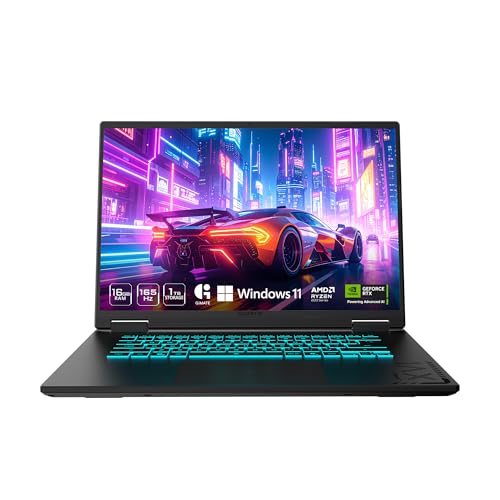
The MSI Katana 15 HX is a gaming laptop built for players who want high performance without breaking the bank. Powered by an Intel Core i9-14900HX and NVIDIA GeForce RTX 5070, this 15.6-inch machine targets competitive gamers, streamers, content creators, and anyone who needs a portable system that can handle modern AAA titles and creative workloads. With 32GB of DDR5 RAM and a 1TB NVMe SSD, it's ready to run demanding software right out of the box.
In real-world gaming, the i9-14900HX and RTX 5070 push high frame rates even at QHD resolution. The RTX 5070 supports NVIDIA DLSS 4, which uses AI to boost FPS and improve image quality in supported games. The display is a QHD 165Hz panel with 100% DCI-P3 color coverage, meaning you get sharp details, smooth motion, and rich colors whether you're battling in an FPS or exploring an open world. The 165Hz refresh rate reduces motion blur for a competitive edge.
MSI's Cooler Boost 5 cooling system uses two fans and shared heat pipes to keep the CPU and GPU temperatures in check during long gaming sessions. Based on user feedback, the design does a good job maintaining stable frame rates without throttling, though the fans do become audible under load. The 4-zone RGB keyboard includes highlighted WASD keys, and the keycaps have a nice tactile feel for gaming. Port selection is generous with USB-C Gen 2, HDMI 2.1 supporting up to 8K output, multiple USB-A ports, and Wi-Fi 6E for fast wireless connectivity.
Build quality is practical rather than premium. The chassis is primarily plastic, which keeps weight down to just under 5 pounds, but it doesn't have the all-metal feel of more expensive laptops. The hinge feels sturdy, and the keyboard deck has minimal flex. Setup is straightforward: the laptop comes with Windows 11 Home and MSI Center software for performance tuning, RGB control, and system monitoring. Battery life is limited to around two hours under gaming loads, so you'll want to stay plugged in for serious play.
One realistic limitation is fan noise; under heavy gaming, the cooling fans ramp up noticeably. If you game in a quiet room or stream with an open mic, this is something to consider. Additionally, the 1080p webcam is average, so streamers may want a dedicated webcam for better quality.
The MSI Katana 15 HX offers strong value for gamers and creators who need a portable, high-performance laptop. It's ideal for college gamers, work-from-home players, and anyone building a gaming setup on a budget. If you can live with plastic build and short battery life, this laptop delivers where it counts: gaming performance, display quality, and system responsiveness.
The combination of Intel Core i9-14900HX and GeForce RTX 5070 makes the Katana 15 HX a beast for modern games. The i9's 24 cores (8 Performance + 16 Efficient) handle both gaming and background tasks seamlessly, while the RTX 5070, based on NVIDIA Blackwell architecture, brings full ray tracing and DLSS 4. In titles like Cyberpunk 2077 or Call of Duty, you can expect high to ultra settings at QHD resolution with smooth frame rates. The 32GB DDR5 RAM ensures zero stutter even when streaming or running Discord in the background. Esports players will appreciate the 165Hz display low latency for fast-paced shooters.
The 15.6-inch QHD display is a highlight, offering 2560x1440 resolution, a 165Hz refresh rate, and 100% DCI-P3 color gamut. This means you get sharp details, smooth motion, and vibrant colors suitable both for gaming and photo/video editing. The Cooler Boost 5 cooling system employs two fans and five heat pipes to keep temperatures in check. In sustained gaming, the CPU and GPU stay within safe limits, though the fans do become audible. The laptop maintains stable performance without significant thermal throttling, which is crucial for long sessions.


Frequently Asked Questions
Can an integrated graphics laptop handle both coursework and gaming?
Yes, integrated graphics easily handle standard school tasks and casual gaming, though they struggle with demanding 3D titles. Processors featuring built-in Radeon or UHD graphics run lightweight esports and indie games at modest settings. Students aiming for heavy modern gaming will benefit from systems equipped with entry-level dedicated graphics cards or faster hardware.
How much RAM is ideal for a student who also plays games?
A minimum of 16GB of RAM is recommended for balancing campus multitasking and gaming in 2026. This capacity allows you to keep multiple browser tabs, PDF readers, and office software open without system slowdowns. High-performance models like the MSI Katana 15 HX provide 32GB of DDR5 RAM for extra headroom during intensive workloads.
How long does the battery typically last during campus use?
Battery life depends heavily on hardware configuration, screen brightness, and running applications. Manufacturer specifications indicate standard productivity runtimes between four and eight hours on energy-efficient processors. Gaming laptops with high-wattage discrete GPUs draw more power, meaning you should keep a charger handy during full days of classes.
Is a 15.6-inch or 16-inch screen portable enough for school?
Yes, modern 15.6-inch and 16-inch laptops with slim bezel designs fit comfortably into standard backpacks. Many contemporary clamshells maintain slim profiles under one inch to ease daily transit. For students who review detailed spreadsheets or creative assets, selecting crisp QHD display options improves clarity without adding physical bulk.
Does a best gaming and school laptop need upgradeable storage?
Upgradeable storage is very helpful if you plan to install modern games alongside large academic files. Many recent game installations demand significant drive space, which can crowd a baseline 512GB solid-state drive. Selecting a model that supports M.2 NVMe SSD expansion allows you to increase capacity as your storage needs grow.





Write Your Review
No reviews yet. Be the first to share your experience!