


Mismatched components can quickly create frustrating performance bottlenecks when you load modern games. A powerful processor cannot make up for an entry-level graphics card, and skimpy memory will cause stutter during multitasking. Investing in the best gaming desktop means balancing processing power, graphics capability, and thermal headroom so your system runs smoothly under load. Whether you target high-frame-rate competitive shooters or immersive story-driven adventures, selecting the right prebuilt system saves time and eliminates assembly headaches. Exploring a reliable pre-built gaming PC gives you tested component compatibility, dedicated customer support, and ready-to-play convenience straight out of the shipping carton.
Modern gaming towers offer varied configurations spanning mainstream mid-towers to liquid-cooled flagships. Systems equipped with NVIDIA GeForce RTX 50-series or AMD Radeon RX 9000-series graphics deliver advanced ray tracing and frame generation features for demanding visual settings. You will also want to assess case airflow, power supply wattage, and available motherboard expansion slots for future component additions. Reviewing listed hardware specifications helps ensure your new rig fits your workspace while handling your favorite titles without thermal throttling.

Pros
- Strong gaming performance for 1080p and 1440p gaming with ray tracing capabilities
- High-speed DDR5 RAM and PCIe 4.0 SSD reduce load times and improve system responsiveness
- Built-in WiFi 6 and Bluetooth 5.3 for reliable wireless connections
- Customizable RGB lighting and tempered glass panel enhance any gaming desk setup
- Free lifetime technical support and 1-year parts/labor warranty add peace of mind
Cons
- Only 16GB of RAM may require an upgrade for heavy multitasking or future AAA titles
- RTX 5060 Ti 8GB is a solid mid-range card, but may not max out 4K gaming at high settings
- Case size and cable management could be tricky for users wanting extensive customization
The CyberPowerPC Gamer Master GMA2900A3 is a pre-built gaming desktop designed to deliver reliable 1080p and 1440p performance right out of the box. Powered by an AMD Ryzen 7 8700F processor featuring 8 cores and a 4.1GHz base clock, this PC handles demanding games, streaming, and content creation without breaking a sweat. Paired with an NVIDIA GeForce RTX 5060 Ti 8GB GPU, you can enjoy smooth frame rates in popular esports titles like Valorant and Apex Legends, as well as visually rich single-player experiences with ray tracing enabled.
This PC is best suited for a wide range of users, including competitive gamers looking for low-latency performance, casual gamers who want a hassle-free setup, and streamers or content creators who need reliable multitasking. With 16GB of DDR5 RAM and a 1TB PCIe 4.0 NVMe SSD, game load times are snappy, and you'll have plenty of room for your library. The inclusion of WiFi 6 and Bluetooth 5.3 ensures you can game wirelessly with minimal lag and easily connect peripherals like headsets and controllers.
Build quality is a strong point here. The tempered glass side panel gives a clear view of the interior, and the pre-installed custom RGB lighting adds a personal touch to any gaming desk setup. The AMD B850 chipset motherboard provides modern connectivity, including multiple USB-C and USB-A ports, making it easy to plug in your gaming mouse, keyboard, and external drives. The case design is practical and looks clean, though some users may find the interior a bit tight for future upgrades.
In terms of real-world performance, the RTX 5060 Ti handles high-refresh-rate 1080p gaming with ease and can push respectable frame rates at 1440p on medium to high settings. The CPU's eight cores are excellent for streaming gameplay without impacting in-game performance. The 16GB of DDR5 memory is a solid start, but heavy multitaskers or those running memory-intensive applications might consider an upgrade down the line. The 1TB SSD offers fast load times, and the PCIe 4.0 interface ensures data transfers are quick.
Setting up this system is straightforward - it comes with Windows 11 Home pre-installed, and all drivers are ready to go. You'll just need to connect a monitor, keyboard, and mouse (both are included as basic peripherals). The included keyboard and mouse are functional for immediate use, but many gamers will want to upgrade to their preferred peripherals for comfort and performance. Cable management inside the case is decent, though the rear could be tidier. The included 1-year parts and labor warranty and free lifetime technical support provide reassurance for first-time buyers.
A realistic limitation is the 8GB VRAM on the RTX 5060 Ti; while adequate for most current games, it may become a bottleneck in future titles with heavy texture demands. Additionally, the 16GB RAM, while fast, is the minimum recommended for modern gaming, and users who also edit video or stream may want 32GB. Overall, the CyberPowerPC Gamer Master GMA2900A3 is a well-balanced pre-built gaming PC that offers strong performance for its price point and is a great option for U.S. gamers seeking a turnkey system for gaming, streaming, and everyday use without the hassle of building their own.

Pros
- High-end specs at a competitive price point for a pre-built desktop.
- Excellent thermal management with four fans and an ARGB air cooler.
- Generous 32GB DDR5 RAM and 2TB NVMe SSD provide ample speed and storage.
- User-friendly RGB customization through MSI Center software.
- Compact tower design (16 x 8.38 x 19 inches) fits well on most desks.
Cons
- Limited upgradeability due to potential proprietary components common in pre-built systems.
- No mention of integrated Wi-Fi or Bluetooth in the specifications - may require a USB adapter.
- RGB lighting may not appeal to users who prefer a minimalist or stealth look.
The MSI Codex Z2 (model A8NVP-436US) is a pre-built gaming desktop that brings together a potent combination of components for PC gamers, competitive players, streamers, and content creators. At its core, it features an AMD Ryzen 7-8700F processor and an NVIDIA GeForce RTX 5070 graphics card, paired with 32GB of DDR5 RAM and a 2TB NVMe SSD. This setup is designed to tackle modern games at high settings, handle streaming workloads, and support virtual reality experiences right out of the box.
When it comes to real-world gaming performance, the RTX 5070 and Ryzen 7-8700F deliver strong results for 1440p and even 4K gaming in many titles. The 32GB of DDR5 memory ensures smooth multitasking whether you are gaming, streaming, or running creative applications. The 2TB NVMe SSD provides lightning-fast load times for games and applications, reducing downtime and keeping you in the action. As a VR-ready system, it is also well-suited for immersive experiences like Half-Life: Alyx or Beat Saber.
Cooling is handled by an ARGB air cooler paired with four system fans: three in the front pulling in cool air and one in the rear exhausting heat. This configuration helps maintain stable temperatures during long gaming sessions, which is critical for both performance and component longevity. The built-in RGB lighting can be cycled using the MSI LED button on the chassis or customized further through MSI Center software, allowing you to match the look of your gaming desk setup.
Build quality is solid for a pre-built system. The case dimensions (16 x 8.38 x 19 inches) are relatively compact for a desktop with these components, and the 21.3-pound weight makes it manageable to move if needed. Setup is straightforward: connect your monitor, keyboard, mouse, and power, and Windows 11 Home is ready to go. The inclusion of a USB-C port provides modern connectivity for peripherals and external drives. Cable management inside the case appears tidy based on the product description, but as with many pre-built PCs, some users may find internal access limited for future upgrades.
One realistic limitation is that pre-built desktops often use proprietary motherboards, power supplies, or cooling mounts, which can make it harder to upgrade individual parts down the line. The product data does not specify wireless networking, so users who need Wi-Fi or Bluetooth may need to add a USB adapter or PCIe card. Additionally, the RGB lighting is present but is not as extensive as fully customizable RGB setups in enthusiast-level cases.
Overall, the MSI Codex Z2 is a strong recommendation for gamers who want high performance without the hassle of building a PC. It works well for competitive gaming (thanks to the fast CPU and GPU), casual gaming, streaming, and even light content creation. If you value convenience, strong out-of-box performance, and a cohesive aesthetic, this desktop is worth considering for your gaming setup.
The combination of the AMD Ryzen 7-8700F and NVIDIA RTX 5070 provides excellent gaming performance for both competitive and single-player titles. In games like Call of Duty: Warzone, Fortnite, and Apex Legends, you can expect high frame rates at 1440p with medium to high settings. The 32GB of DDR5 memory helps prevent stutters during intense scenes or when running background apps like Discord or streaming software. The 2TB NVMe SSD ensures maps and levels load quickly, giving you an edge in fast-paced games. For ray tracing and DLSS supported titles, the RTX 5070 delivers crisp visuals while maintaining smooth gameplay.
The MSI Codex Z2 uses a four-fan cooling setup with an ARGB air cooler on the CPU. Three front intake fans draw cool air across the components, while one rear exhaust fan pushes hot air out. This design helps keep temperatures manageable even during extended gaming sessions. The ARGB cooler adds a touch of style while ensuring the processor stays within safe operating limits. Users who plan to push the system hard may still want to monitor CPU and GPU temperatures, but the overall airflow configuration is effective for a pre-built system in this class.


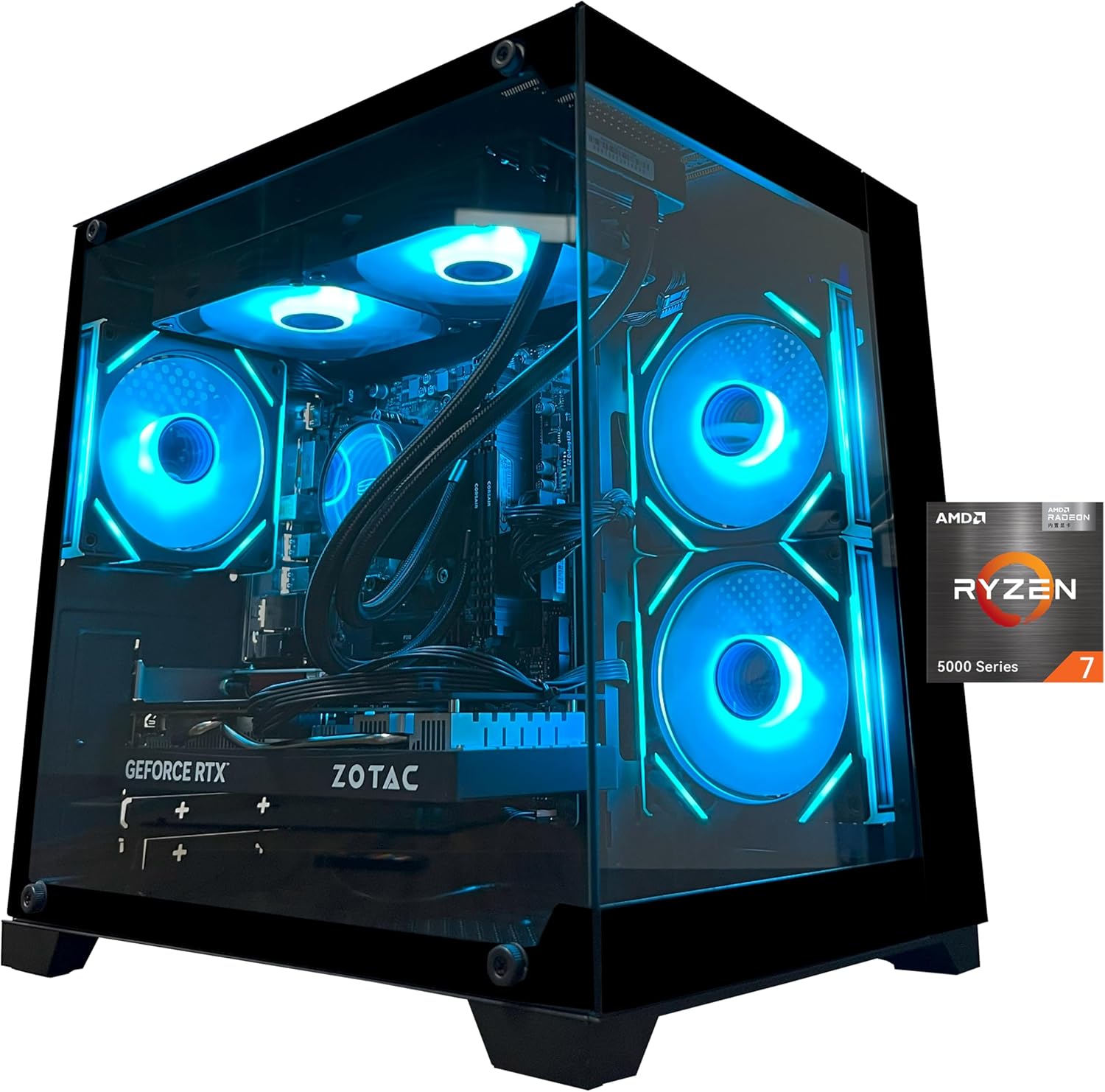
Pros
- Powerful CPU and GPU combo handles modern games at high settings.
- Plentiful 32GB RAM supports heavy multitasking for gaming and streaming.
- Effective liquid cooling with customizable ARGB lighting adds visual appeal.
- Large 1TB NVMe SSD provides fast load speeds and ample storage.
- Easy plug-and-play setup with Windows 11 pre-installed.
Cons
- Reviews mention potential reliability issues after extended use.
- Some users may find the stock graphics card brand varies, which can affect performance consistency.
- Limited upgrade room for high-end GPUs due to the 650W power supply.
The YAWYORE gaming PC desktop is a pre-built tower designed for gamers, streamers, and content creators who want strong performance without the hassle of building their own rig. It packs an AMD Ryzen 7 5700X CPU, an NVIDIA GeForce RTX 5060 GPU, 32GB of DDR4 RAM, and a 1TB NVMe SSD into a stylish case with liquid cooling and ARGB fans. This setup targets a wide audience, from competitive esports players to casual gamers and even those who need a versatile machine for work-from-home or college tasks.
In real-world gaming, the RTX 5060 with 8GB of GDDR7 memory and DLSS 4 support delivers smooth frame rates in modern titles at 1080p and even 1440p with some settings adjustments. The Ryzen 7 5700X’s eight cores handle multitasking well, allowing you to stream or run Discord alongside gameplay without noticeable stutter. User feedback highlights quiet operation during sessions, which is a plus for immersive gaming or content creation. The included 240mm liquid cooler and three ARGB fans keep temperatures in check, even during extended use, and the lighting can be controlled with a remote for easy desktop customization.
Build quality appears solid, with an MSI B550M-A PRO motherboard that offers good stability and upgrade paths. The case has a tempered glass side panel, though not explicitly stated in specs, typical for this price range. The 650W 80 Plus Bronze power supply is sufficient for the current components but may limit future GPU upgrades to mid-range options. Setup is straightforward: Windows 11 is pre-installed, and the system boots quickly thanks to the NVMe SSD. However, the product description advises removing internal foam padding upon arrival, which adds a small initial step.
One limitation noted in user reviews is mixed reliability. While many users praise the performance and appearance, some report issues after a few months, with one reviewer experiencing a system failure after two months. This suggests that while the PC offers great value on paper, quality control may vary. Also, the graphics card brand may differ from what’s listed, which could affect performance consistency. The 650W PSU might struggle with future high-end upgrades, so buyers should plan accordingly.
For desk setup, the tower is relatively compact for a liquid-cooled system, and the RGB fans add flair to any gaming station. Cable management inside appears tidy based on user images. The included WiFi and Bluetooth eliminate the need for dongles, simplifying connectivity. Overall, this PC is well-suited for gamers who want a ready-to-run machine with strong out-of-box performance and visual appeal, especially those building their first gaming setup or upgrading from a laptop. However, those seeking long-term reliability might want to consider extended warranty options or build their own system for more control.

Pros
- Excellent 4K and 1440p gaming performance from RTX 5070 and Ryzen 7 9700X
- Large 11.3-inch smart display adds premium aesthetics and useful system monitoring
- 360mm liquid cooling keeps CPU temperatures low under heavy loads
- Fast DDR5 RAM and PCIe 4.0 SSD for snappy system responsiveness
- Comes fully assembled in the US with Windows 11, no GPU installation needed
Cons
- Limited upgrade path due to proprietary case and motherboard form factor
- Smart display software may require occasional updates for full functionality
- Price point is high for a prebuilt, though component selection justifies cost for high-end gaming
The KOTIN G60B is a prebuilt gaming PC designed for gamers who want high-end performance without the hassle of building their own system. It pairs an NVIDIA GeForce RTX 5070 12GB GDDR7 graphics card with an AMD Ryzen 7 9700X processor, making it well-suited for 4K gaming, competitive esports titles, and content creation workflows. This tower is especially appealing to PC gamers, streamers, and gaming setup builders who value both performance and aesthetics.
In real-world gaming, the RTX 5070 with DLSS 4 Multi Frame Generation and ray tracing delivers smooth frame rates at 4K resolution and high refresh rates at 1440p. The Ryzen 7 9700X, with boost speeds up to 5.5GHz, handles multitasking and streaming without noticeable lag. The 32GB of DDR5 6000MHz RAM ensures quick load times and smooth transitions between games, recording software, and Discord. For competitive gamers, the low-latency Reflex 2 support in supported titles can reduce input delay, giving a slight edge in fast-paced FPS and MOBA games.
Build quality is solid with a tempered glass side panel and ARGB lighting that syncs with the motherboard. The 360mm liquid cooler with a digital temperature display helps manage heat during long sessions, and the 850W 80 PLUS Gold power supply provides stable power for demanding components. The 11.3-inch smart display is a standout feature, showing real-time system stats like CPU temperature, weather, and time, which adds a premium feel to any gaming desk setup. Cable management inside the case is tidy, and the PC comes with Windows 11 Home pre-installed, so setup is literally plug-and-play after removing internal protective foam.
Ease of use is a major advantage for this prebuilt. There is no GPU installation required, and the system is fully assembled in California. Simply connect peripherals, plug in power, and start gaming. The included software allows customization of RGB lighting and the smart display themes. Maintenance is straightforward thanks to easy-access dust filters on the top and front panels. However, the case design may limit future upgrades, as the motherboard and power supply are likely proprietary to the chassis.
A realistic limitation is the price: at around $1900, this PC sits in the premium prebuilt segment. While the components are high-end, some users might prefer to build a similar system for less, but they would lose the convenience of a prebuilt and the smart display. Additionally, the smart display software may require occasional updates, though this is a minor inconvenience. The system is relatively heavy at 30 pounds, so moving it between rooms or LAN parties requires some effort.
Overall, the KOTIN G60B is a strong recommendation for PC gamers who want a powerful, ready-to-use system with impressive cooling and a unique smart display. It works well for streamers who need reliable performance for encoding and gaming simultaneously, and for gaming setup builders who want a visually striking centerpiece. For casual gamers or those on a tighter budget, there are more affordable prebuilts, but for high-end 4K gaming and content creation, this PC delivers excellent value in a plug-and-play package.
The RTX 5070 with 12GB GDDR7 memory and DLSS 4 Multi Frame Generation provides excellent 4K gaming performance in AAA titles like Cyberpunk 2077 and Call of Duty. At 1440p, the system easily pushes high refresh rates for competitive shooters. The Ryzen 7 9700X ensures minimal CPU bottlenecks, and with Reflex 2 low-latency support, input response feels snappy. For esports players, this PC can handle 1440p 165Hz monitors without issue.
The case features a tempered glass side panel and ARGB fans that sync with the motherboard. The 360mm liquid cooler includes a digital temperature display, and the 850W 80 PLUS Gold PSU provides reliable power. Cable management is clean, and the smart display adds a premium touch. The system is well-ventilated with mesh panels, and dust filters are easy to remove for cleaning.

Pros
- Top-tier 4K gaming performance with RTX 5080 and Ryzen 7 9850X3D for ultra settings
- Ample 32GB DDR5 RAM and 2TB NVMe SSD for seamless multitasking and fast load times
- Effective 360mm AIO liquid cooling for sustained performance during long sessions
- Clean, bloatware-free Windows 11 installation and free gaming keyboard and mouse included
Cons
- Wi-Fi 5 instead of Wi-Fi 6 or 6E may be a limitation for some users seeking latest wireless standards
- Limited USB port configuration; additional ports may vary which could require extra adapters
- Premium pricing at nearly $3700 may be out of reach for budget-conscious gamers
The Skytech Gaming King 95 is a prebuilt gaming desktop that packs serious hardware for anyone who demands top-tier performance. It’s powered by an AMD Ryzen 7 9850X3D processor and an NVIDIA RTX 5080 with 16GB of GDDR7 VRAM, making it a beast for 4K gaming, streaming, and content creation. This PC is geared toward PC gamers who want to run the latest titles at ultra settings, esports players looking for smooth frame rates, and streamers who need reliable performance while broadcasting.
In real-world gaming, the King 95 handles demanding games like Cyberpunk 2077, Elden Ring, and Black Myth: Wukong at 4K ultra settings with 60+ FPS, offering buttery-smooth responsiveness. The 32GB of DDR5 6000 RAM and 2TB NVMe SSD ensure quick load times and seamless multitasking, whether you’re switching between games, Discord, and streaming software. The 360mm ARGB AIO cooler keeps the CPU cool under pressure, preventing thermal throttling during long gaming sessions or heavy rendering tasks.
Build quality is solid, with the King 95 case featuring tempered glass panels and ARGB fans that look great on any gaming desk. The included free gaming keyboard and mouse are basic but functional for getting started. Setup is straightforward: plug in, connect to Wi-Fi 5, and you’re ready to go. The system comes with no bloatware, so you won’t waste time uninstalling useless software.
One realistic limitation is the Wi-Fi 5 support, which isn’t the latest standard, but it’s still fine for most home networks. The USB port configuration may also vary, so you might need a hub for multiple peripherals. At around $3700, it’s a premium investment, but for the performance offered, it delivers strong value for high-end gamers and creators who don’t want to build their own PC.
Overall, the Skytech Gaming King 95 is a powerful prebuilt that excels at 4K gaming and multitasking. If you’re a U.S. gamer, streamer, or content creator looking for a ready-to-go system with top-tier components and effective cooling, this is a solid choice. Just be mindful of the Wi-Fi and port limitations, and consider if the price fits your budget.

Pros
- Exceptional gaming performance with RTX 5080 and Intel Ultra 9, handling AAA titles at high settings with ease.
- Quiet operation even under load, thanks to liquid cooling and improved airflow design.
- Compact tower fits well on most desks, and clear side panel shows off internal components and RGB lighting.
- Alienware Command Center offers intuitive control over lighting, performance modes, and game profiles.
- Solid build quality with cable management and a robust power supply (1000W Platinum) ensures stability.
Cons
- Premium price compared to building a similar PC yourself, though GPU and RAM costs offset that for some buyers.
- Some users have reported startup issues that require a full discharge to resolve, which can be frustrating.
- Limited upgrade path due to proprietary motherboard and power supply connectors, though standard PCIe and RAM slots remain usable.
The Alienware Aurora ACT1250 is a top-tier gaming desktop built for PC gamers, streamers, and content creators who want a powerful system without the hassle of building their own. It combines an Intel Core Ultra 9 processor with an NVIDIA GeForce RTX 5080, delivering exceptional performance for 4K gaming, high-refresh-rate esports, and demanding creative workloads. The liquid-cooled CPU and carefully designed chassis keep things quiet and cool, even during marathon gaming sessions.
Based on product specifications and user feedback, this desktop excels in responsiveness and low-latency gaming. The RTX 5080 supports DLSS 4 and NVIDIA Reflex 2, which can dramatically boost frame rates in supported titles while reducing input lag. Many users report smooth gameplay in games like Cyberpunk 2077 and Escape from Tarkov at maximum settings. The Intel Core Ultra 9 with its 20 cores handles multitasking effortlessly, whether you're streaming, running Discord, or editing videos.
The build quality is solid: a matte black case with a clear side panel that shows off the internal components and customizable AlienFX lighting. The hexagonal side vents and top exhaust improve airflow without adding noise. Cable management is well-executed internally, keeping the system tidy and thermals efficient. The front I/O includes USB-C with Power Share, so you can charge devices even when the PC is off.
Set up is straightforward: plug in, power on, and Windows 11 Home takes care of the rest. The Alienware Command Center lets you tweak lighting, fan speeds, and performance presets - quiet, balanced, or performance mode. Some users noted that the included mouse and keyboard are basic, but most gamers will already have their own peripherals. The 1TB SSD is fast but may fill quickly with modern game libraries; you can add more drives via the two M.2 slots or a 3.5-inch bay.
Realistic limitations include the premium price - this is a significant investment. A few customers have experienced occasional startup glitches that require a full power discharge to fix, though this isn't widespread. Also, while the tower is compact, it's still a substantial piece of hardware that needs adequate desk space. The single HDMI port on the GPU might be an issue for those running multiple monitors, but the RTX 5080 typically has multiple DisplayPort outputs as well.
Overall, the Alienware Aurora ACT1250 is a strong choice for gamers who want a reliable, high-performance prebuilt with excellent cooling and quiet operation. It's especially well-suited for streamers, esports players, and anyone who values plug-and-play convenience over building their own rig. If you have the budget and prefer a polished experience, this desktop delivers.
The Alienware Aurora ACT1250 is powered by the NVIDIA GeForce RTX 5080, which brings the latest Blackwell architecture and features like DLSS 4 Multi Frame Generation. This allows for buttery-smooth frame rates in demanding titles, even at 4K resolution. Combined with the Intel Core Ultra 9, the system handles competitive games like Valorant and Call of Duty at high refresh rates with negligible input lag thanks to NVIDIA Reflex 2. According to user reviews, it easily pushes over 70 FPS in graphics-heavy games like Streets of Tarkov on ultra settings. The 32GB of DDR5 RAM ensures seamless multitasking while gaming and streaming.
The Alienware Aurora uses a 240mm liquid cooler for the CPU, supported by a smart thermal design that includes hexagonal side vents and a top exhaust. According to the product description, this results in 20% quieter operation and 7% lower temperatures compared to previous generations. The clear side panel lets you see the liquid cooling tubes and RGB lighting. The 1000W Platinum power supply ensures stable power delivery even under heavy loads. Users report that the system remains whisper-quiet during gaming and stays cool over extended sessions, making it suitable for both gaming rooms and open-plan setups.

Pros
- Strong gaming performance with RTX 5060Ti and Core Ultra 7 for modern games
- Clean, customizable RGB lighting through Alienware Command Center
- Clear side panel and compact chassis look great on a desk
- Easy setup right out of the box for PC gamers who don't want to build
- 1 Year Onsite Service provides peace of mind
Cons
- Only 16GB of RAM may need upgrading for heavy content creation or future games
- Air cooling may struggle under sustained heavy loads compared to liquid cooling options
- Premium price point compared to building a similar spec system yourself
The Alienware Aurora ACT1250 is a pre-built gaming desktop designed for U.S. PC gamers who want strong performance without the time and effort of building a custom PC. This machine is powered by an Intel Core Ultra 7 265F processor and an NVIDIA GeForce RTX 5060Ti graphics card, making it capable of running today's most demanding games at high settings. Whether you're diving into competitive FPS titles, exploring open-world RPGs, or streaming your gameplay on Twitch, this desktop delivers a smooth, responsive experience.
Build quality is a highlight here. The chassis features a matte basalt black finish and a clear side panel that lets you show off the internal components. AlienFX RGB lighting with customizable zones, including the stadium lighting effect, adds a striking visual element that RGB setup enthusiasts and gaming desk builders will appreciate. The 500W Platinum-rated PSU provides stable power, which is critical during long gaming sessions or when multitasking with streaming software.
In terms of real-world performance, the RTX 5060Ti offers solid frame rates at 1440p in most games, and the 16GB of DDR5 RAM keeps things snappy for multitasking. The 1TB SSD provides fast load times, though heavy content creators may want to add more storage down the line. The Intel Core Ultra 7 handles both gaming and productivity tasks like video editing or live streaming with ease, making this a versatile option for streamers and content creators.
The Alienware Command Center software is a useful tool for managing lighting profiles, performance modes, and game libraries. You can create custom lighting themes for different setups and monitor system performance in real-time. This is especially handy for gamers who like to fine-tune their RGB aesthetics or optimize power states for various games.
One realistic limitation is the air cooling solution. While it's adequate for most gaming scenarios, users pushing the system hard for extended periods may notice higher fan noise or thermal throttling. Similarly, 16GB of RAM is sufficient for gaming but may feel tight for heavy multitasking or memory-intensive creative work. The price is also on the premium side, but you're paying for a ready-to-go system with a warranty and support.
Overall, the Alienware Aurora ACT1250 is a great choice for PC gamers, streamers, and gaming setup builders who want a reliable, good-looking desktop without the DIY hassle. It's also a solid pick for college gamers or anyone working from home who needs a machine that can handle both play and productivity. Just be aware of the cooling and RAM limitations if you plan to push it hard.
Frequently Asked Questions
How much RAM is ideal in a modern gaming desktop?
A minimum of 16GB of RAM is standard, but 32GB provides optimal headroom for modern gaming and streaming. Systems like the msi Codex Z2 and Skytech King 95 include 32GB of DDR5 memory, which prevents background applications from slowing down your games. If you choose a configuration with 16GB, verify that the motherboard offers empty DIMM slots for easy future upgrades.
Which processor and graphics card combination should you choose?
Your choice should match your target monitor resolution and performance expectations. For 1440p and 4K gaming, pairings like the AMD Ryzen 7 9850X3D with an RTX 5080 or RX 9070 XT deliver exceptional graphical bandwidth and high frame rates. Budget-conscious players targeting 1080p can achieve fluid performance with an Intel Core i5 or Ryzen 7 8700F paired with an RTX 5060 or 5060 Ti. For value-driven setups, checking out prebuilt gaming PCs under $1500 provides great entry-level and mid-range options.
Does liquid cooling make a noticeable difference in a prebuilt PC?
Liquid cooling helps manage temperatures effectively on high-wattage processors under sustained gaming sessions. Configurations utilizing 240mm or 360mm all-in-one liquid coolers disperse heat efficiently away from the CPU socket. While multi-heatpipe air coolers work fine for mainstream processors, choosing gaming desktop liquid cooling keeps flagship hardware running within optimal thermal parameters.
Can you upgrade components in a prebuilt desktop later?
Most standard mid-tower prebuilts allow you to replace or upgrade storage, memory, and graphics cards down the road. Desktops using standard ATX motherboards and cases make adding another M.2 NVMe SSD or swapping RAM sticks straightforward. Always confirm the power supply wattage and physical case clearances before planning future component upgrades.
What video ports should you look for on the graphics card?
Dedicated graphics cards typically feature a combination of HDMI and DisplayPort outputs for monitor connectivity. You should connect your monitor cables directly to the horizontal GPU ports rather than the vertical motherboard ports to use the discrete card. Having multiple DisplayPort outputs is particularly beneficial if you plan to run multi-monitor displays or high-refresh-rate gaming panels.






Write Your Review
No reviews yet. Be the first to share your experience!