


Eliminating Wireless Lag and Desk Guesswork with Smart Displays
Unexpected battery dropouts during intense multiplayer matches can ruin hours of competitive progress. Sudden power loss leaves players guessing charge levels while scrambling for a charging cable across a cluttered desk. Modern peripheral engineering solves this annoyance by embedding dynamic visual screens directly onto the keyboard top plate. Investing in the best gaming keyboard with screen provides immediate status monitoring for battery life, active connection profiles, and volume levels without forcing you to tab out of full-screen software. Pairing this visual utility with a responsive pc gaming keyboard setup keeps your focus squarely on split-second gameplay decisions.
Gasket-mounted plates and multi-layer acoustic dampening now define top-tier mechanical boards, replacing hollow case ping with deep, satisfying acoustics. Multi-device setups also demand seamless connectivity, allowing users to shift from desktop gaming rigs to work laptops with the turn of a knob. Adding a supportive wrist rest for keyboard setups reduces repetitive joint strain during extended gaming or typing marathons. Detailed technical analysis reveals that pre-lubed linear switches, flex-cut printed circuit boards, and south-facing RGB backlighting deliver an ultra-smooth typing experience right out of the box.

Pros
- Exceptional pre-lubed switches and foam layers deliver a satisfying creamy thock sound with minimal noise.
- Tri-mode wireless with 1000Hz polling ensures responsive gaming without cable clutter.
- Hot-swappable PCB and switch compatibility allow easy customization of typing feel and sound.
- Large 4000mAh battery provides long wireless life, and the TFT screen clearly shows battery status.
- Solid build quality with gasket mount and flex-cut plate gives a premium typing experience at a competitive price.
Cons
- Screen can be dim and scratches easily, and the volume knob is very sensitive, requiring precise adjustments.
- No dedicated Home key, and the knob requires a press to switch between volume and screen mode, which may feel clunky.
- Software is only available for Windows, so Mac/Linux users cannot customize settings without first saving on a Windows PC.
The EPOMAKER X Aula F75 MAX is a 75% wireless mechanical keyboard that packs a surprising amount of premium features into a compact, desk-friendly footprint. It's designed for PC gamers, streamers, esports players, and anyone who appreciates a satisfying typing experience without sacrificing functionality. The keyboard comes with a TFT screen, a multifunction knob, and tri-mode connectivity, making it a versatile choice for both gaming and productivity.
When it comes to gaming performance, the F75 MAX delivers. The 1000Hz polling rate in wired and 2.4GHz wireless modes ensures low latency and responsive inputs, ideal for competitive FPS, MOBA, or rhythm games. The anti-ghosting and N-key rollover let you execute complex combos without missed keystrokes. Bluetooth 5.0 works well for casual gaming or typing, though some users report occasional interference in crowded wireless environments, so sticking to 2.4GHz or wired is recommended for serious play. The pre-lubed Reaper linear switches are buttery smooth with a creamy, thocky sound that many users describe as satisfying and not overly loud, making it suitable for both gaming and office work.
Build quality is impressive for the price. The gasket mount and flex-cut PC plate provide a soft, bouncy feel that reduces finger fatigue during long sessions. Five layers of foam and silicone dampen hollow echo and pinging, resulting in a clean, rich sound profile. The Cherry profile PBT keycaps feel durable and have a pleasant texture. The black gradient finish adds a stylish look that fits most setups. The TFT screen is a nice touch for displaying battery, connection status, and GIFs, but it can be dim and scratches easily, and the knob is very sensitive, which may require a learning curve. The hot-swappable PCB lets you experiment with different switches without soldering, and the plate-mount stabilizers are well-lubed for minimal rattle.
Setup is straightforward. The keyboard works out of the box with Windows, Mac, Linux, and Android. The dedicated software (Windows only) allows full key remapping, macro recording, and RGB customization. Settings save to onboard memory, so you can use them on other operating systems. The 4000mAh battery lasts several days with RGB on, and the screen shows battery level. The keyboard automatically sleeps after 5 minutes of inactivity to save power. The dual-function knob is useful for volume control or navigating the screen menus, but switching between modes requires pressing FN+knob, which some users find less intuitive than a dedicated button.
One limitation is the lack of a dedicated Home key, which may frustrate users who rely on it for navigation. The knob's sensitivity can make fine adjustments tricky, especially when scrolling through screen pages. The screen's brightness could be better, and it's prone to scratches if not handled carefully. Also, the software is Windows-only, so Mac or Linux users need access to a Windows PC for initial customization. These are minor issues considering the overall value.
Overall, the EPOMAKER X Aula F75 MAX is a fantastic choice for gamers and setup builders who want a premium typing experience, versatile connectivity, and customizable RGB at a reasonable price. It's especially well-suited for those who enjoy a thocky sound profile, want to experiment with switches, or need a compact keyboard that can handle both gaming and daily work. If you're looking for a reliable, feature-rich mechanical keyboard that doesn't break the bank, this is a strong contender.

Pros
- Outstanding thocky sound straight out of the box thanks to pre-lubed switches and effective dampening
- Sharp, responsive LCD screen with GIF upload and real-time system info
- Compact 75% layout with a comfortable typing angle and two-stage kickstand
- Wireless versatility with Bluetooth, 2.4GHz, and USB-C for any setup
Cons
- Software for full customization and screen calibration only works on Windows and in wired mode
- Battery life is around 30 hours with backlight on, which may require more frequent charging for heavy RGB users
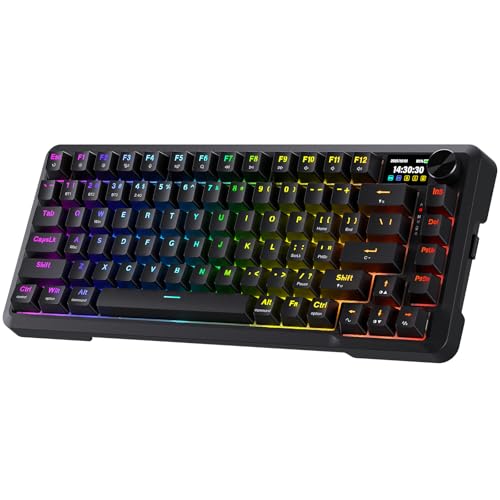
The AULA S75 PRO is a wireless mechanical keyboard that brings a premium feature set to an approachable price point. It's a 75% compact layout board with 80 keys, designed for PC gamers, streamers, content creators, and anyone who wants a clean, space-saving desk setup. The star of the show is the integrated LCD screen and multifunction knob, which allow you to check battery life, time, date, and even upload custom GIFs. This keyboard is built for those who value both aesthetics and performance, whether you're grinding ranked matches, editing videos, or just chatting on Discord.
In real-world gaming use, the S75 PRO delivers satisfying responsiveness. The pre-lubed linear switches provide a buttery smooth keystroke with a distinct thocky sound that many enthusiasts love. The hot-swappable PCB means you can try different switch types without soldering, a huge plus for tweaking your feel. According to user feedback, the keyboard is accurate and responsive, with no noticeable input lag in wireless mode. The low-latency 2.4GHz connection is ideal for competitive gaming, while Bluetooth 5.0 is handy for switching between your gaming PC, tablet, or phone.
Build quality is impressive for the price. The keyboard has a solid weight of over 3 pounds, giving it a sturdy feel on the desk. The side-printed PBT keycaps are durable and resistant to shine, with legends that won't fade over time. The south-facing RGB LEDs shine through the keycaps, creating a vibrant underglow and a clean side light effect. The two-stage kickstand lets you choose a comfortable typing angle, and the included foam layers dampen unwanted pinging nicely. Cable management is straightforward with the USB-C port located at the top edge.
Setting up the S75 PRO is simple. It works out of the box with Windows, Mac, iOS, and Android. The tri-mode connectivity toggle is conveniently placed on the side, so you don't need to lift a keycap to switch connections. For full customization of the screen, GIF upload, and macro programming, you'll need to download AULA's software on a Windows PC and connect via USB-C. The software is functional but not the most polished, and it's only available in wired mode. That's a minor limitation for Mac or Linux users, but the core typing experience is excellent without any software.
One realistic limitation is battery life. With the RGB backlight on, the 4000mAh battery lasts about 30 hours, which is enough for a few days of moderate use. You can extend it significantly by turning off the backlight, where it can last up to 80 hours. The keyboard charges via USB-C, and it's recommended to use a computer USB port rather than a fast charger. The included USB-C cable is decent, but you might want a longer one for a clean desk setup if you use it wired often.
Overall, the AULA S75 PRO is an excellent value for gamers and setup builders who want a thocky, feature-rich wireless keyboard without spending over $100. It competes well with other budget mechanical keyboards, especially with its screen and knob. If you're a Windows user looking for a compact keyboard with great sound, responsive performance, and plenty of RGB flair, this is a solid choice. Just be aware that Mac users will have limited software access, and heavy RGB users should plan for more frequent charging. For most gamers and streamers, it's a winner.

Pros
- Gasket mount construction provides a comfortable, bouncy typing feel with reduced resonance.
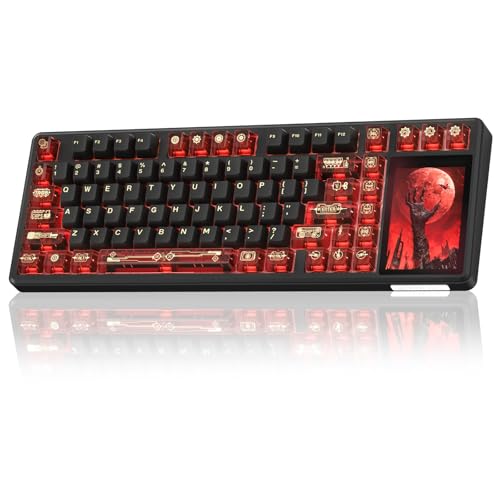
- Color multimedia display adds unique customization for system info and GIFs, enhancing setup aesthetics.
- Hot-swappable PCB offers easy switch replacement, ideal for enthusiasts who like to experiment.
- Pre-lubed linear switches deliver a pleasantly creamy sound right out of the box.
- Compact 75% layout helps keep your gaming desk organized without sacrificing functionality.
Cons
- Wired USB-C connection only, no Bluetooth or wireless option for a cleaner desk setup.
- Keycaps are ABS material, which may develop shine over time compared to PBT.
- Software customization may require a short learning curve for users new to keyboard programming.
The Womier SK80 is a 75% wired mechanical keyboard that blends a compact layout with a custom multimedia display, aiming to appeal to PC gamers, streamers, and RGB setup enthusiasts. Its gasket mount design and pre-lubed switches aim to deliver a creamy typing sound and responsive feel right out of the box. Priced competitively, it targets users looking for a customizable, hot-swappable board without breaking the bank.
In real-world use, the SK80's gasket mount construction provides a soft, cushioned bottom-out that reduces fatigue during long gaming or typing sessions. The linear switches are smooth and reasonably quiet, making this keyboard suitable for both competitive gaming (where quick keystrokes matter) and casual use at home or in a dorm. The multimedia display adds a layer of personalization, allowing you to upload GIFs or see volume and RGB status at a glance.
Build quality feels solid for the price point, with a plastic case and metal plate that keeps the board stable during intense gaming. The hot-swappable PCB is a standout feature, letting you swap in your preferred switches without any soldering. The included keycaps use ABS plastic with a dye-sublimated print; while they feel fine initially, some users might prefer PBT for longer-lasting texture. The South-facing RGB LEDs provide good per-key lighting that shows through the legends clearly.
Setup is straightforward: plug in the detachable USB-C cable, install the software for deeper customization, and you're ready to go. The software offers control over lighting effects, macros, and display content, though it may take a few minutes to explore. The keyboard is compatible with both Windows and Mac, with a sliding switch for the OS. Cable management is adequate, thanks to the detachable cable and a standard mini-USB port on the back.
One limitation is the lack of wireless connectivity – this is a wired-only board, which may be a dealbreaker for users seeking a clutter-free desk or Bluetooth pairing with tablets. Additionally, the keycap material and the somewhat coarse print may not appeal to everyone. However, for the price, the SK80 offers a feature set typically found in higher-end boards: gasket mount, hot-swap, a customizable display, and pre-lubed switches.
Overall, the Womier SK80 is a strong recommendation for PC gamers who value a compact layout, creamy sound, and the ability to customize switches without soldering. It also suits streamers and content creators who want a unique visual element on their desk. If you prioritize wireless ease, look elsewhere, but for a wired, feature-packed 75% keyboard under $50, this is a compelling option.

Frequently Asked Questions
What practical benefits does a built-in display screen offer on a gaming keyboard?
A built-in display provides instant visibility for critical operational data, including real-time battery percentage, active wireless mode, connection profiles, and system volume. This hardware readout prevents you from interrupting gameplay to inspect third-party desktop utilities. Many models also support custom animated GIFs, giving your desk setup a personalized visual touch alongside functional device status monitoring.
Does running an integrated screen drain the keyboard battery quickly?
Yes, keeping an active screen and full RGB backlighting running will noticeably reduce wireless runtime. Most models feature high-capacity batteries ranging from 5000mAh to 8000mAh to offset this draw, providing dozens of hours before requiring a recharge. You can extend operational battery life significantly by lowering screen brightness or using wired USB-C mode during marathon gaming sessions.
Can you customize the images and system settings on the screen without proprietary software?
Basic settings like volume, backlighting presets, and connection modes can be managed directly using on-board knobs and menus, but uploading custom GIFs requires companion desktop software. Manufacturers typically require a wired USB connection under Windows to transfer custom animations into the on-board flash memory. Once saved, your selected animations and settings persist across different operating systems.
How does a Best Gaming Keyboard With Screen perform for everyday typing and programming?
High responsiveness and ergonomic gasket-mounted construction make these boards exceptional daily drivers. The cushioned internal silicone pads and pre-lubed switches provide a creamy acoustic profile that reduces finger fatigue during long writing sessions. Typists who value keystroke accuracy often pair these versatile boards with a dedicated gaming keyboard for typing workflow that balances gaming speed with office comfort.
Are switches hot-swappable on keyboards featuring built-in displays?
Yes, modern options support universal 3-pin and 5-pin mechanical hot-swappable sockets on their printed circuit boards. This allows you to swap stock linear switches for tactile or silent variants without any soldering tools. Just remember to power off the keyboard before pulling and inserting replacement switches to prevent accidental electrical shorts.
Does using 2.4GHz wireless introduce noticeable input latency during competitive games?
No, 2.4GHz wireless connections with a 1000Hz polling rate deliver near-instantaneous response times comparable to wired cables. This high polling frequency ensures rapid actuation registration during fast-paced shooters and rhythm titles. Bluetooth mode remains available for multi-device tablet or office pairing where ultra-low latency is less critical.





Write Your Review
No reviews yet. Be the first to share your experience!