


Stuttering frame rates and thermal throttling during intense multiplayer matches can test anyone’s patience, especially on a tight hardware budget. Squeezing genuine performance out of entry-level mobile silicon requires looking past inflated marketing claims to see what actually works. These Best Gaming Laptops Under $500 2026 Value Picks show that you do not need to spend a small fortune to jump into popular esports titles, indie favorites, or older blockbuster adventures. While you won’t be maxing out ray tracing presets at high resolutions, a properly balanced rig with responsive memory and swift storage gets the job done without breaking a sweat.
Careful analysis of multi-core processor architectures, integrated Radeon Vega graphics, and cooling designs indicates that memory configuration often makes or breaks the experience. Systems equipped with 16GB of DDR4 memory and fast NVMe SSD storage maintain smooth background task handling while reducing stutter in fast-paced matches. Anyone transitioning from a basic school notebook will appreciate how modern APUs handle titles like Valorant or Rocket League with respectable frame pacing. If your gaming demands heavier graphical rendering, checking out a portable gaming laptop with GTX 1650 hardware offers a direct comparison with dedicated mobile GPUs. For general use, schoolwork, and casual gaming, these sub-500 options deliver dependable bang for your buck.
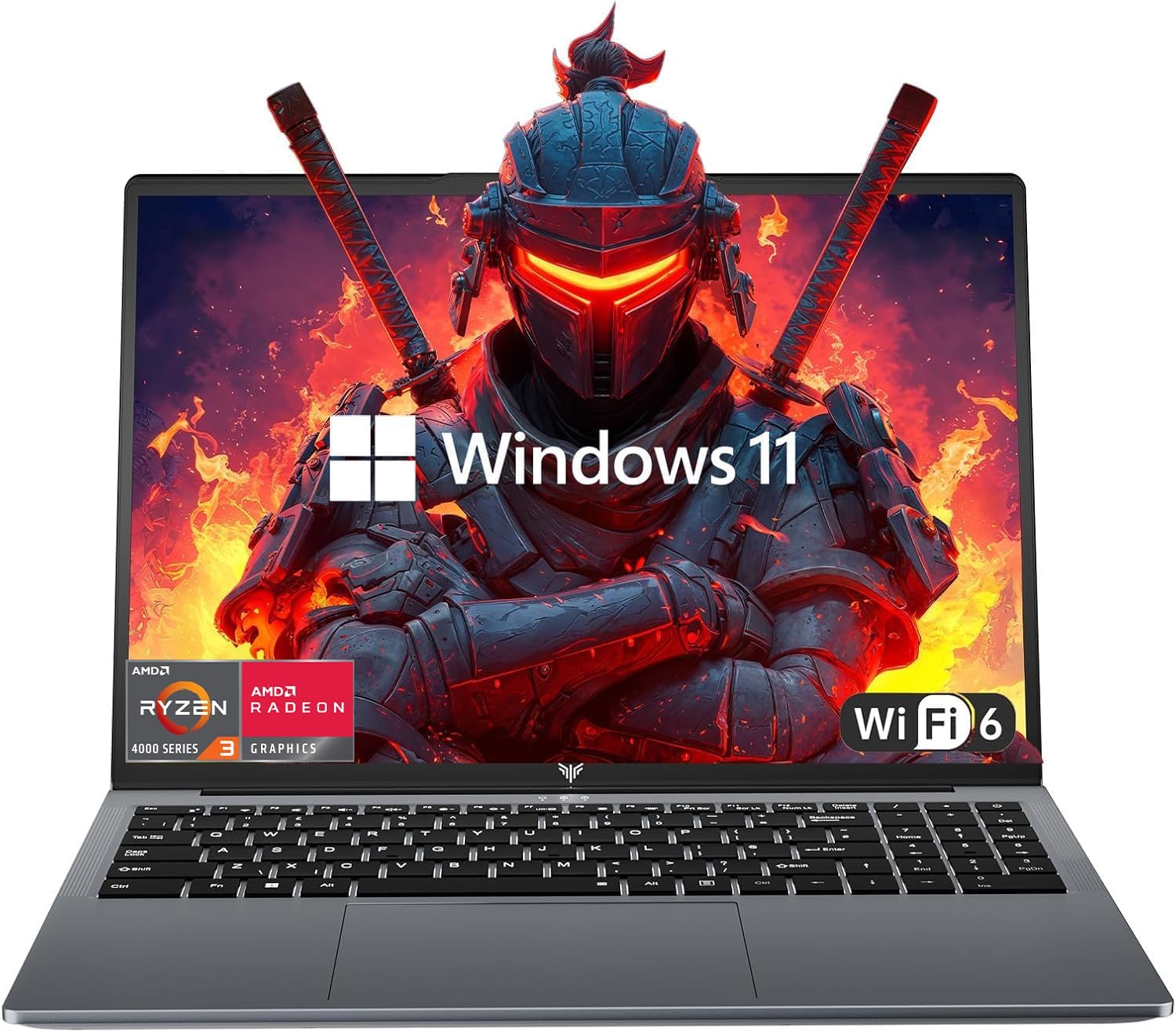
Pros
- Strong performance for the price with AMD Ryzen 3 and 16GB RAM
- Large, vibrant 16-inch FHD display with slim bezels
- Fast boot and app loading thanks to the 512GB SSD
- Decent battery life for all-day use
- Lightweight and portable for easy travel
Cons
- Integrated graphics limit gaming to less demanding titles at lower settings
- Only 802.11ac WiFi, not WiFi 6 as advertised in some descriptions
- No dedicated GPU, so not suitable for AAA gaming
The KAIGERR LX16PRO is a traditional laptop that aims to deliver solid performance for everyday computing and light gaming. At its core, it features an AMD Ryzen 3 4300U processor, a quad-core chip that can boost up to 3.7GHz. This CPU is a noticeable step up from older budget processors like the Celeron N5095, offering enough power for web browsing, office work, streaming, and even some casual gaming. Paired with 16GB of DDR4 RAM, multitasking feels smooth, and you can keep multiple tabs and applications open without slowdowns.
This laptop is best suited for college gamers, work-from-home users, or anyone who needs a reliable machine for both productivity and entertainment. It's not designed for hardcore esports or AAA gaming, but it handles older or less demanding titles like League of Legends, Minecraft, or indie games at lower settings. The integrated UHD graphics are fine for light gaming, but don't expect to run modern shooters at high frame rates. For streaming, video calls, and content consumption, the 16-inch FHD display with its thin bezels provides a crisp and immersive experience.
Build quality is what you would expect at this price point: a lightweight plastic chassis that feels sturdy enough for daily use. The laptop weighs just over 6 pounds, making it easy to toss in a backpack. The keyboard includes a numeric keypad, which is a nice bonus for data entry or gaming binds. The touchpad is smooth and responsive, according to user feedback. Port selection is generous, with two USB 3.0 ports, one USB 2.0, and a USB Type-C, so you can connect peripherals like a gaming mouse or external drive without needing a hub.
Storage is handled by a 512GB M.2 SSD, which ensures fast boot times and snappy application loading. If you need more space, the SSD can be swapped out for a 2TB drive, and there is also support for a 128GB TF card. The laptop runs Windows 11 out of the box, making setup straightforward. Battery life is rated at up to 8 hours, which should get you through a day of classes or work, though real-world usage will vary depending on screen brightness and workload.
One limitation to keep in mind is the WiFi: while the product title mentions WiFi 6, the specifications list 802.11ac (WiFi 5). This is still fast enough for most online gaming and streaming, but it is a discrepancy worth noting. The integrated graphics also mean you will not be playing the latest triple-A titles at high settings. However, for the price, this laptop offers excellent value for its intended audience.
Overall, the KAIGERR LX16PRO is a practical choice for budget-conscious gamers and students who need a versatile laptop for work and play. It excels at everyday tasks, handles light gaming, and offers a large, sharp display. If you are looking for a portable machine that won't break the bank and can handle moderate gaming, this is a solid option to consider.

Pros
- Exceptional value for the price; Ryzen 7 performance at a budget compared to similar Intel or AMD alternatives.
- Upgradeable RAM and SSD allow users to expand storage and memory as needed, extending lifespan.
- Fast Wi-Fi 6 and full-function USB-C support modern networking and accessory needs.
- Solid build quality with a sleek Cosmic Gray finish and decent port selection for a budget laptop.
- High user rating (4.9/5) indicates strong customer satisfaction with reliability and support.
Cons
- Integrated Radeon RX Vega 8 graphics limit AAA gaming to low settings; not suitable for hardcore gamers seeking high frame rates.
- Display likely 60Hz with no high refresh rate option, so competitive FPS players may prefer a dedicated gaming laptop with 120Hz+ panel.
- RAM is DDR4 (not DDR5), which may affect performance in memory-intensive tasks compared to newer laptops.
The KAIGERR LX15PRO is a 15.6-inch Windows 11 laptop designed for users who need a powerful yet affordable machine for light gaming, streaming, and daily productivity. Powered by the AMD Ryzen 7 7730U processor (8 cores, 16 threads, up to 4.5GHz) and integrated Radeon RX Vega 8 graphics, it sits in a sweet spot for casual gamers, college students, and remote workers who want solid performance without a high price tag.
This laptop shines in esports titles like League of Legends, Fortnite, and CS:GO, where the Vega 8 graphics can push medium settings with playable frame rates. For AAA games like Cyberpunk 2077 or Red Dead Redemption 2, expect low settings and lower resolutions. The 16GB DDR4 RAM and 512GB NVMe SSD keep boot times and app loading snappy, and the ability to upgrade to 64GB of RAM and 2TB of storage means you can grow the system over time. That kind of flexibility is rare at this price point.
Build quality is decent for the budget tier. The 15.6-inch IPS display offers good color reproduction and viewing angles, making it suitable for streaming video or editing photos. The chassis is thin (0.74 inches) and relatively light (4.07 pounds), so it travels well between classes or offices. Connectivity covers most essentials: two USB 3.2 Type-A ports, one full-function USB-C (supports power delivery and display output), HDMI, a 3.5mm audio jack, and a TF card slot. Wi-Fi 6 support ensures fast wireless speeds for online gaming and large file transfers.
Thermal management is handled by a rapid cooling system (described in the product title), which should keep the Ryzen 7 from throttling during extended gaming sessions. Fan noise under load is typical for a thin laptop, but not obtrusive. The keyboard offers a standard layout with good key travel for typing and gaming, though it lacks RGB backlighting. Battery life is not specified, but based on the efficient Ryzen 7, casual use should last through a few hours of work or light gaming.
The biggest limitation is the integrated graphics. This is not a machine for high-refresh-rate competitive gaming or demanding creative tasks like 3D rendering. Also, the RAM is DDR4-3200, not the newer DDR5, which may be a factor for those looking to max out performance. But for its intended audience — budget-conscious gamers, streamers on a tight setup, and students — the trade-offs are well worth the savings.
Overall, the KAIGERR LX15PRO is an excellent choice if you need a laptop that can handle everyday tasks and occasional gaming without breaking the bank. With its upgradeability, solid connectivity, and strong CPU performance, it offers long-term value for casual PC gamers and productivity users alike. Just keep expectations realistic for the GPU side, and this machine will serve you well for years.

Pros
- Excellent value with 16GB RAM and 512GB SSD at this price point.
- USB-C fast charging included, making it travel-friendly and versatile.
- Backlit keyboard with adjustable brightness and no auto-off timeout.
- Fingerprint reader provides quick and secure login.
- Solid build quality with no flex and a quiet fan.
Cons
- Integrated AMD graphics limit gaming to older or less demanding titles.
- No dedicated PgUp/PgDn/Home/End keys, which may frustrate power users.
- Wi-Fi 5 instead of Wi-Fi 6 can be slower in congested network environments.
The NIMO 15.6" laptop is a budget-friendly choice aimed at students and casual gamers who need a reliable daily driver for school, work, and light gaming. It packs a Ryzen 5 processor, 16GB of RAM, and a 512GB PCIe SSD into a slim, blue chassis with a metal A-shell. While not built for hardcore AAA gaming, it handles everyday multitasking, streaming, and older or esports titles with ease.
Performance is where this laptop shines for its price bracket. The AMD Ryzen 5 3500U with four cores up to 3.7GHz, paired with 16GB of DDR4 RAM, ensures smooth operation across multiple browser tabs, office applications, and even some light photo editing. The 512GB SSD boot up quickly, and file transfers feel snappy. For gaming, it can run titles like Starcraft 2, Warhammer: Rogue Trader, and indie games without major issues, though you'll need to keep settings low for modern 3D games. The integrated Radeon graphics are not designed for high-end gaming, so stick to less demanding experiences.
Build quality is impressively solid for the price. The metal lid gives it a premium feel, and the chassis shows no flex. The backlit keyboard is a standout feature - it offers adjustable brightness and, as noted by users, does not time out after 30 seconds of inactivity. This is a real plus for late-night study sessions or gaming in dimly lit rooms. The fingerprint reader on the touchpad is responsive and makes logging in quick and secure. The 65W USB-C charger is compact and can also charge tablets and phones, reducing cable clutter.
Port selection covers the basics: three USB 3.0 ports, a USB 2.0 port, an audio jack, and an HDMI output for connecting an external monitor. The 15.6" Full HD IPS display is bright and sharp, with good color accuracy for media consumption. Battery life is rated at 9 hours, which should get you through a day of classes or casual use. Additionally, both the RAM and SSD are upgradeable via accessible slots, allowing you to extend the laptop's lifespan as your needs grow.
Realistic limitations include the integrated graphics, which mean you won't be playing Cyberpunk 2077 or the latest AAA releases. The keyboard layout omits dedicated PgUp, PgDn, Home, and End keys - you'll find them embedded in the numeric keypad, which might take some getting used to. Also, Wi-Fi 5 is sufficient for most, but if your network is crowded, Wi-Fi 6 would offer better speeds. The fan can get audible under load, but it's not overly loud.
Overall, the NIMO 15.6" laptop is an excellent choice for college gamers, students, and home office users who need an affordable, capable machine for daily tasks and light gaming. It offers great value with its generous RAM and SSD, USB-C charging, and thoughtful extras like a backlit keyboard and fingerprint reader. If you're looking for a budget-friendly laptop that can handle schoolwork and some casual gaming, this is a solid pick.

Pros
- Excellent value with massive storage and memory at this price point.
- Pre-installed Lifetime Office 2024 saves money for students and professionals.
- Lightweight and portable with a thoughtful design like the lay-flat hinge.
- Bundled accessories add convenience right out of the box.
- Quiet and cool operation for light gaming and everyday tasks.
Cons
- Integrated Intel UHD Graphics limits modern gaming to low settings.
- 60Hz display and 250 nits brightness may not satisfy competitive gamers.
- External SSD performance is noticeably slower than the internal drive.
The ASUS Vivobook 14 (2025) is a versatile ultraportable laptop that blurs the line between work and play. Designed for students, professionals, and casual gamers, this machine packs a solid 13th Gen Intel i3 processor, 16GB of RAM, and a fast 512GB NVMe SSD into a lightweight 3.09-pound frame. While it is not a dedicated gaming laptop, its specs can handle light gaming sessions, streaming video content, and everyday productivity without breaking a sweat.
For gaming, the integrated Intel UHD Graphics is best suited for less demanding titles like Roblox, indie games, or older AAA games at low settings. User feedback suggests that games like Roblox run smoothly, but more demanding titles like Cyberpunk 2077 will struggle even at low settings. The external 500GB drive included in the bundle is convenient for extra storage, but some users reported slower transfer speeds compared to the internal SSD, so it is best used for files rather than game installations.
The 14-inch FHD display delivers clear visuals with an anti-glare coating, making it comfortable for long study or work sessions. The 60Hz refresh rate and 250 nits brightness are sufficient for indoor use but may appear dim in bright environments. Audio quality is adequate for video calls and casual media consumption, but external speakers or a headset are recommended for an immersive gaming or streaming experience.
Build quality is solid for its price range. The 180-degree lay-flat hinge allows easy sharing of the screen, and the physical webcam shield adds a layer of privacy. The keyboard offers 1.4mm key travel with a responsive feel, though it lacks backlighting. The included accessories - a wireless mouse, USB-C hub, HDMI cable, and mouse pad - add significant value, making this a true plug-and-play package for a home office or dorm room setup.
Realistically, this laptop is not meant for competitive esports or heavy content creation. Battery life is moderate, with around 4-5 hours under high performance and up to 9-10 hours with battery saver, which works well for classes or coffee shop work. The lack of a dedicated GPU and a 60Hz display are the biggest trade-offs for gamers. However, for college gamers who need a portable study machine that can also run casual games, or for work-from-home professionals who want a secondary device for light productivity and streaming, this is a compelling budget option.
Overall, the ASUS Vivobook 14 offers excellent value with its memory, storage, and software bundle. It is a practical choice for anyone seeking a reliable, lightweight laptop for everyday use with the bonus of light gaming capabilities. If you can live with the integrated graphics and external drive limitations, this setup may work well for your gaming and productivity needs.
Frequently Asked Questions About Best Gaming Laptops Under 500
Can you play competitive esports titles on Best Gaming Laptops Under 500 in 2026?
Yes, these systems comfortably run competitive esports titles like League of Legends, CS:GO, and Valorant at 1080p resolution with low to medium graphics settings. The AMD Ryzen processors with integrated Vega and UHD graphics provide sufficient graphics horsepower to sustain playable frame rates. Lowering shadow fidelity and turning off ambient occlusion helps maintain steady frame pacing during hectic firefights.
How important is having 16GB of RAM for budget gaming laptops?
Having 16GB of DDR4 memory is essential for budget gaming because integrated graphics share system RAM for video memory buffer tasks. When an APU reserves memory for graphics, an 8GB system can run out of headroom quickly, leading to stuttering and application crashes. Models like the KAIGERR Ryzen 7 laptop and NIMO 15.6 support dual-channel bandwidth that directly enhances graphics rendering and general multitasking.
Can you upgrade the storage and RAM on these budget gaming laptops later?
Yes, several models offer practical upgrade pathways for both memory and solid-state drives. For example, the KAIGERR LX15PRO supports expanding storage up to a 2TB NVMe SSD and upgrading memory up to 64GB DDR4. Planning simple upgrades for gaming PC components down the line allows your laptop to keep up with larger game install sizes without needing a full system replacement.
Do these budget laptops need an external display for smooth visual clarity?
An external display is not mandatory, but pairing your laptop with a dedicated screen can significantly improve motion smoothness and color depth. Most units include HDMI output or full-function Type-C ports capable of driving a 1080p gaming monitor under 500 for higher refresh rates and better viewing angles. The built-in IPS anti-glare panels provide crisp visual clarity for mobile play, while external ports offer an easy desk setup transition.
How does thermal cooling perform during extended gaming sessions on these machines?
Built-in rapid cooling designs with quiet copper heatpipes and exhaust vents keep temperatures stable under standard gaming loads. Because these energy-efficient U-series processors draw lower wattage than high-powered gaming chips, fan acoustics remain relatively quiet. Closing background apps before loading your games ensures minimal heat buildup and prevents thermal throttling during marathon sessions.


Write Your Review
No reviews yet. Be the first to share your experience!