


Loud mechanical switches and short wireless cables turn a relaxed evening streaming movies into a frustrating chore. Navigating living room streaming menus demands a reliable best htpc keyboard that blends whisper-quiet keystrokes with smooth sofa ergonomics. Selecting the best htpc keyboard means looking for responsive wireless range, dedicated playback shortcuts, and solid battery life that will not quit mid-film. Paired alongside low-latency wireless audio gear, the right living room typing board keeps your media center responsive and completely clutter-free.
Careful analysis of manufacturer specifications and everyday user feedback highlights the necessity of dependable 2.4 GHz wireless signals over spotty connections. Low-profile membrane switches prevent loud clatter from interrupting dialogue, while built-in shortcut keys let you adjust volume or skip tracks without digging through menus. Whether you are searching for media titles or managing home server files from the couch, an ergonomic wireless combo offers the exact balance of comfort and utility for your entertainment space.
Pros
- Quiet membrane keys keep Discord voice chats and late-night gaming free of loud clatter
- Impressive battery endurance requires fewer swaps across both peripherals
- Instant plug-and-play 2.4 GHz wireless connection with zero complex setup
- Useful multimedia and hotkey row allows quick volume and playback adjustments
Cons
- Lacks mechanical switches and anti-ghosting features needed for fast competitive esports
- Mouse sensor lacks adjustable high DPI settings for precise FPS twitch aiming
- No customizable RGB backlighting for dark room visibility
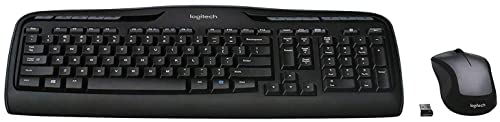
The Logitech MK335 is a full-size wireless keyboard and mouse combo built for casual PC gamers, work-from-home pros, and college students who want a clutter-free desk setup. Pairing a low-profile keyboard with an ambidextrous wireless mouse, this set focuses on quiet everyday usability, long-lasting battery life, and clean cable management. While dedicated esports players often reach for expensive mechanical decks, this bundle targets budget-conscious PC users who need dependable gear that seamlessly transitions between casual gaming, school assignments, and daily productivity.
In real-world casual gaming scenarios, the 2.4 GHz wireless connection provides stable transmission with virtually no dropouts or noticeable input lag for slower-paced titles. Strategy games, management sims, casual open-world exploration, and point-and-click adventures feel responsive and fluid. The whisper-quiet key switches produce minimal clatter, which is a major advantage for late-night gaming in dorms or jumping on Discord calls without microphone feedback picking up every keystroke. However, fast-paced competitive FPS or MOBA titles will highlight the limitations of standard membrane switches and basic key rollover compared to dedicated gaming hardware.
The keyboard is built around a practical full-size frame featuring a dedicated number pad, directional arrow keys, and an extensive row of 11 multimedia hotkeys alongside 4 programmable F-keys. These quick-access buttons make adjusting stream volume, muting sound, or skipping music tracks effortless while running games in full-screen mode. The bundled mouse features an ambidextrous contour suited for both claw and palm grips during relaxed desktop sessions. Underneath its battery compartment, Logitech includes dedicated storage for the USB nano-receiver, protecting the dongle during travel between a home desk and a gaming laptop.
Setting up the MK335 is as effortless as plugging the compact 2.4 GHz nano-receiver into an open USB port on your gaming desktop or laptop. The plug-and-play design requires no bloatware or heavy background utilities, keeping your PC resources free for gaming. Desk organization improves immediately by removing two extra wires from your setup, simplifying mouse pad surface space and leaving your battle station looking tidy. Power management stands out as another strong point, offering up to 24 months of keyboard battery life and up to 12 months for the mouse under typical conditions, eliminating the constant stress of mid-session recharge cycles.
For gamers prioritizing high-speed competitive esports, adjustable optical sensors, or multi-zone RGB lighting, this combo will not replace a dedicated mechanical gaming keyboard and high-DPI esports mouse. The mouse features a standard fixed sensor suited more for navigation than micro-flick shooting, and the keys do not offer mechanical tactile actuation. Nonetheless, for dorm room setups, secondary streaming control rigs, family PCs, or casual gaming desks where quiet operation, wireless reliability, and budget value matter most, the Logitech MK335 delivers a practical and dependable solution.
Streamlining a gaming desk starts with clearing away unnecessary cables, and the Logitech MK335 helps achieve a neat desktop aesthetic effortlessly. The full-size keyboard profile remains slim enough to preserve valuable mouse pad room, while the wireless design gives you the freedom to reposition the keyboard for relaxed typing or angled casual gameplay.
Because both the keyboard and mouse share a single tiny USB nano-receiver, you only sacrifice one USB port on your motherboard or front I/O panel. This leaves your remaining ports open for gaming headsets, external microphones, capture cards, or USB storage drives.
Equipped with advanced 2.4 GHz wireless connectivity, this combo ensures an encrypted and steady link to your PC without the annoying signal drops common to budget wireless peripherals. The compact plug-and-forget receiver stays securely seated in your computer without obstructing adjacent ports.
For gamers who travel with a gaming laptop or switch between desktop stations, the mouse includes internal storage for the USB receiver right beneath the battery cover. This prevents loss during transit and ensures quick plug-and-play functionality wherever your PC setup moves.
Frequently Asked Questions
Does a dedicated 2.4 GHz USB receiver work better than Bluetooth for an HTPC setup?
Yes, a 2.4 GHz USB nano-receiver generally delivers a more stable connection with lower input latency than standard Bluetooth when transmitting through living room obstacles. The dedicated wireless frequency reduces dropped keystrokes while you relax on the couch away from your PC chassis. This plug-and-play setup also bypasses complex operating system pairing menus during cold boot sequences.
Why are low-profile membrane keys preferred over mechanical switches for media center keyboards?
Low-profile whisper-quiet keys produce virtually silent actuation that prevents distracting typing noise during late-night movie streaming or group viewing. They also provide a slimmer profile that rests comfortably on your lap without requiring an elevated wrist rest. While custom mechanical switches offer distinct tactile bumps, silent membrane designs keep audio playback completely unobstructed.
How long can you expect the batteries to last on a wireless home theater keyboard combo?
Battery life on an energy-efficient wireless setup often reaches up to 24 months for the keyboard and 12 months for the mouse using standard alkaline cells. Manufacturer power management features put the peripheral into an automatic sleep state when not actively sending signals. This longevity prevents frequent recharging interruptions during your entertainment sessions.
Can you control streaming playback directly from the keyboard without using a mouse?
Yes, integrated multimedia hot keys provide instant hardware shortcuts to pause, play, mute, and adjust system volume on the fly. Models like the Logitech MK335 Full Size Quiet Wireless Keyboard feature dedicated media buttons and programmable function keys for fast navigation. These dedicated buttons save time when watching videos without needing extra mouse cursor adjustments.
Is a full-size wireless combo suitable for sofa navigation compared to an integrated trackpad?
A full-size combo with a separate ambidextrous mouse gives you complete numeric keypad utility and superior cursor accuracy over compact trackpads. Typists who regularly input search queries, manage files, or require precise desktop control benefit from having a dedicated mouse surface. When fine-tuning your cursor control for desktop apps on a 4K TV, understanding proper mouse tracking precision ensures smooth tracking across expansive screen resolutions.
What is the best way to position the USB receiver for maximum wireless range in 2026?
Plugging the 2.4 GHz USB receiver into a front-facing port or using a short USB extension cable yields the cleanest line of sight to your couch. Rear computer ports often suffer from signal interference caused by metallic chassis panels and nearby HDMI cabling. Placing the dongle in clear view guarantees zero stutter and seamless inputs across your living room.





Write Your Review
No reviews yet. Be the first to share your experience!