


Cramming modern hardware into compact desktop towers often turns into a wrestling match with stiff power supply cables and tight corners. Nobody enjoys watching a graphics card cook itself because a solid front panel chokes intake fans. Evaluating the best mini pc cases requires looking past exterior footprint measurements to inspect internal clearance limits, ventilation perforation patterns, and fan mount flexibility. A well-designed compact enclosure keeps temperatures low while freeing up desk space, proving that smaller builds don’t have to sacrifice cooling. You can balance small footprints with generous ventilation without overspending, similar to what you find across budget-friendly high airflow chassis options.
Careful assessment of manufacturer specifications and builder feedback reveals that layout details make or break a build experience. Flexible power supply clearances, dedicated cable tie-down paths, and modular front I/O panels save hours of frustration during hardware assembly. Whether you want a compact cube or a dual-chamber panoramic glass showcase, picking the right frame ensures your GPU length clearance and CPU cooler height clearance won’t clash with internal hardware. Modern enclosures direct fresh intake air right into expansion slots, keeping your system cool during intense gaming sessions.

Pros
- Excellent airflow thanks to the perforated design on all sides, ideal for gaming sessions.
- Modular I/O panel offers multiple placement options for desk and setup flexibility.
- Magnetic dust filters are easy to remove and clean, keeping the interior dust-free.
- Compact size fits well on desks or in tight spaces while still supporting large GPUs and coolers.
- Transparent side panel lets you show off your gaming components and RGB lighting.
Cons
- The case includes only one pre-installed fan, so additional fans are recommended for optimal cooling.
- Cable management space is limited due to the compact size, requiring careful routing.
- The side panel is acrylic (not tempered glass), which may be less scratch-resistant over time.
The Cooler Master MasterBox Q300L is a Micro-ATX PC case designed for PC gamers, setup builders, and anyone looking to create a compact but capable gaming rig. It supports Micro-ATX and Mini-ITX motherboards, making it a versatile choice for both budget and mid-range builds. Whether you are a competitive gamer, casual player, or streamer, this case offers a solid foundation for a performance-focused gaming PC.
For gaming performance, the Q300L emphasizes airflow and cooling. Its perforated design on all sides promotes excellent heat dissipation, which is crucial for maintaining low temperatures during intense gaming sessions. The case can accommodate a 240mm liquid cooler and up to five fans, allowing you to build a system that stays cool even under heavy loads. The open thermal design helps reduce heat buildup, which can improve the longevity and stability of your components.
Build quality is practical and functional. The case features a sturdy steel frame with a transparent acrylic side panel, letting you show off your gaming hardware and RGB lighting. The magnetic dust filters are a nice touch, adding a distinctive look while keeping dust out, which reduces cleaning frequency. The modular I/O panel is a standout feature, allowing you to reposition it to the front, top, or bottom on either side. This flexibility is great for desk setups where cable routing or access needs vary.
Setup and maintenance are straightforward. The compact size (15.4 x 9.1 x 15 inches) means it fits well on desks or in tight spaces, though cable management can be a bit challenging due to limited space behind the motherboard tray. The case includes one pre-installed 120mm fan, but you will likely want to add more fans or a liquid cooler for optimal airflow. The magnetic dust filters are easy to remove and clean, making regular maintenance simple.
One realistic limitation is the single pre-installed fan, which may not be sufficient for high-heat gaming builds without additional cooling. Also, the acrylic side panel is more prone to scratches than tempered glass, so careful handling is recommended. The compact design also means less room for cable management, so plan your build accordingly.
Overall, the Cooler Master MasterBox Q300L is a practical choice for PC gamers, setup builders, and anyone building a compact gaming PC on a budget. It offers good airflow, modular I/O, and a clean look that fits well in most gaming setups. If you prioritize cooling flexibility and a compact footprint, this case is worth considering for your next gaming build.
The Cooler Master MasterBox Q300L is designed with an open thermal approach, featuring perforated panels on all sides to maximize airflow. This design helps dissipate heat effectively, keeping your gaming components cool during long sessions. The case supports a 240mm liquid cooler at the front and up to five 120mm fans, giving you plenty of options to customize your cooling setup. While it comes with one pre-installed 120mm fan, adding more fans or a liquid cooler is recommended for high-performance builds. The magnetic dust filters on the top and front panels add a distinctive look while preventing dust buildup, reducing maintenance frequency.
The MasterBox Q300L features a steel frame with a transparent acrylic side panel, offering a balance of durability and visibility. The acrylic panel is lighter than tempered glass but may be more susceptible to scratches, so handle with care. The case has a compact footprint (15.4 x 9.1 x 15 inches) and weighs just over a pound, making it easy to move or place on a desk. The magnetic dust filters are well-designed and easy to remove for cleaning. The modular I/O panel is a practical addition, allowing you to reposition the power button, USB ports, and audio jacks to suit your setup. Overall, the build quality is solid for its price point, with a focus on functionality and airflow.
Frequently Asked Questions
Will a standard ATX power supply fit inside the Best Mini Pc Cases options for 2026?
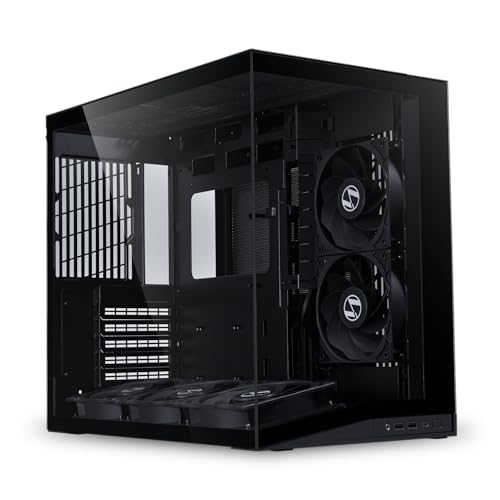
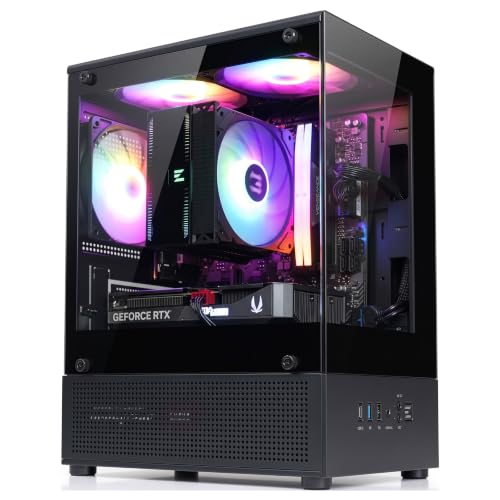
Yes, many compact cases support standard ATX power supplies, though depth limits vary by model. The Cooler Master MasterBox Q300L accommodates power supplies up to 160mm in length, while the Zalman CUBIX-G limits depth to 140mm. The Lian Li O11D Mini V2 Flow features a protruded mesh side panel specifically engineered to house full-sized ATX units in a compact footprint. Always check power supply cable clearance so modular cables don’t crush against internal bays.
Can you install a 240mm liquid cooling radiator in a compact chassis?
Yes, select compact enclosures provide dedicated mounting brackets for 240mm liquid coolers. The Cooler Master MasterBox Q300L supports a 240mm liquid cooler alongside up to five cooling fans for solid thermal dissipation. Compact cases often require careful radiator placement to prevent cooling tubes from pressing against tall memory heatsinks. Checking your radiator thickness and motherboard clearance beforehand prevents assembly headaches.
What is the maximum GPU length supported in these compact enclosures?
Maximum graphics card clearance depends on chassis design, ranging from 280mm up to 360mm across these models. The Cooler Master MasterBox Q300L accommodates GPUs up to 360mm, whereas the Zalman CUBIX-G supports graphics cards up to 280mm. The Lian Li O11D Mini V2 Flow also includes anti-sag brackets to stabilize heavy triple-fan cards. Checking GPU length before choosing a best mini pc cases prevents fitment surprises.
Do compact cases provide enough airflow to prevent thermal throttling?
Yes, compact cases maintain safe thermal levels when built with perforated panels or angled intake fans. The Lian Li O11D Mini V2 Flow features five pre-installed reverse fans and a 10-degree slanted bottom floor that feeds fresh intake air directly to the GPU. Perforated mesh panels allow natural heat exhaust while magnetic filters block dust. If you pair your chassis with high-performance processors, choosing an open-airflow layout keeps clock speeds steady.
What motherboard form factors work inside these compact computer chassis?
All three chassis support Micro-ATX and Mini-ITX motherboard layouts, while select models accommodate standard ATX boards. The Lian Li O11D Mini V2 Flow supports ATX, Micro-ATX, and Mini-ITX form factors, including back-connect motherboards with rear-mounted cable connectors. The Zalman CUBIX-G and Cooler Master MasterBox Q300L focus strictly on Micro-ATX and Mini-ITX motherboards to keep desktop footprints minimal. Aligning your board form factor with chassis standoffs ensures easy cable routing.


Write Your Review
No reviews yet. Be the first to share your experience!