


Evaluating Modern Desk Seating for Long Gaming Sessions
Desk clearance and armrest interference often ruin what should be a comfortable workstation setup. Many chairs come with rigid parts that collide with desk edges, forcing you to sit awkwardly far from your monitors or keyboard tray. Selecting the best pc chair requires examining how physical dimensions, adjustability, and materials match your daily routine. Modern hybrid designs blend office ergonomics with gaming features, offering multidirectional arms and deep recline modes. You can compare standard seating with high back gaming chair options designed for extended upright sitting.
Breathability also matters during intense gaming sessions or remote work shifts, especially in rooms that heat up quickly. While traditional leatherette surfaces can trap warmth, tensioned mesh distributes weight evenly and encourages airflow across your back and seat. Checking the stated weight capacity, gas lift rating, and base stability ensures dependable everyday performance. If you want adjustability without overspending, examining budget ergonomic options can help clarify which features fit your setup best. Reviewing these mechanical details beforehand helps you find seating that integrates smoothly with your desk height and layout.
Frequently Asked Questions
How do 5D flip-up armrests help with desk clearance?
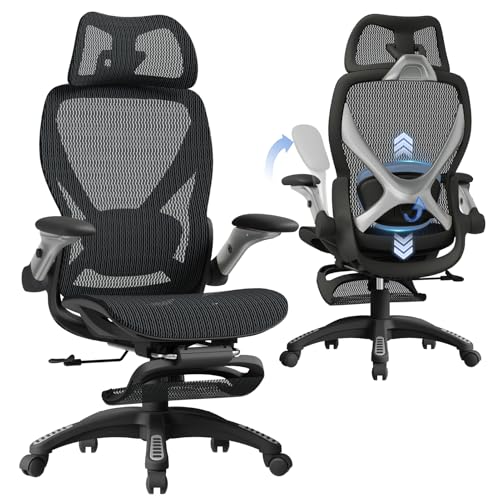
Flip-up armrests allow you to roll your chair completely under a desk when not in use. The 5D mechanism on models like the ELABEST X100 lets you adjust height, width, depth, and rotation angle before folding the arms away. This space-saving design is especially useful in compact rooms with limited clearance. It also prevents the armrests from bumping against the desk lip during typing.
What weight capacity should you look for in a heavy-duty PC chair?
Buyers should look for a stated weight capacity of 300 pounds or higher paired with a heavy-duty gas cylinder. The ELABEST X100 features a BIFMA-certified structure rated for up to 300 pounds alongside a Grade-4 lift column. This rating provides stable support across diverse seated postures. Shoppers seeking specialized frames can also review heavy-duty gaming chairs for larger setups.
How does dynamic lumbar support differ from a fixed lumbar cushion?
Dynamic lumbar support shifts angle and depth automatically as your posture changes throughout the day. Instead of remaining static like an external strap-on pillow, spring-loaded tracking follows your lower back through lockable adjustments. While some users prefer an external lumbar support pillow, integrated dynamic systems stay aligned without slipping out of position.
Why is breathable mesh advantageous for PC gaming setups?
Ventilated mesh promotes airflow that prevents heat and moisture buildup during long computer sessions. The Dual-Stripe AirMesh on the ELABEST X100 provides elasticity while resisting sagging over time. This material works especially well in warmer rooms where hardware raises ambient temperatures. Basic vacuuming and light damp wiping keep the mesh clean.
Does an extendable footrest improve relaxation during desk breaks?
An extendable footrest supports leg elevation when using a reclined backrest angle. The 18-inch extendable footrest on this chair offers two angle positions for relaxing between gaming sessions. It folds neatly beneath the seat pan when returning to an upright posture. This mechanical feature provides a simple resting option without requiring extra furniture.







Write Your Review
No reviews yet. Be the first to share your experience!