


Stuttering frame rates and thermal throttling can ruin a gaming session fast. A well-ventilated case keeps your GPU and CPU cool under load, preventing those annoying performance dips. But finding a white case that balances airflow, aesthetics, and component compatibility isn’t always easy. The best white gaming pc cases of 2026 combine high-airflow mesh or dual-chamber designs with pre-installed ARGB fans and panoramic tempered glass. They support the latest RTX 40-series GPUs and 360mm radiators, so you can build a high-performance rig without sacrificing style. Whether you’re upgrading an existing system or building from scratch, the right case makes cable management simpler and keeps your hardware running at peak efficiency. For those on a tighter budget, check out our best gaming PC under 800 guide for complete system recommendations.
We’ve analyzed product specifications, user feedback, and compatibility details across 8 models from brands like MUSETEX, GAMDIAS, SAMA and more to bring you options that fit different budgets and build goals. From the feature-packed MUSETEX Y6 with its 270-degree view to the budget-friendly GAMDIAS AURA GC2, each case offers something unique. Many include USB Type-C ports for fast data transfers and magnetic dust filters for easier maintenance. If you’re planning a streaming setup, our best gaming PC build for streaming article pairs well with these case recommendations.

Pros
- Excellent pre-installed ARGB fan setup saves time and money.
- Impressive hardware compatibility for high-end GPUs and liquid cooling.
- Beautiful all-white design with dual glass panels for maximum visibility.
- Good airflow with reverse-blade fans and dust filters.
- Included Type-C port for modern peripherals.
Cons
- Some users may prefer a more traditional mesh front for even better airflow.
- The case is heavy at nearly 18 pounds, so moving it around can be a bit cumbersome.
- Limited front I/O placement might be less convenient for desktop users who prefer top ports.
The MUSETEX Y6 is a white mid-tower ATX PC case that targets gamers, PC building enthusiasts, and RGB lovers who want a clean, high-visibility build without the hassle of sourcing extra fans. It comes with six pre-installed PWM ARGB fans right out of the box, including two reverse-blade fans on the side panel for optimized intake. That alone makes it an attractive option for anyone looking to save time and money on fan setups.
When it comes to cooling performance, the Y6 doesn't hold back. The side fans pull fresh air directly onto the GPU and motherboard, while three top fans and one rear fan exhaust heat efficiently. The top supports up to a 360mm radiator, so you can easily integrate liquid cooling for high-end CPUs. Magnetic dust filters on the top and bottom help keep dust out without restricting airflow too much, which is a nice touch for long-term maintenance.
Build quality is solid for its price range. The dual tempered glass panels offer a 270-degree view of your components, letting you show off every RGB fan and GPU backplate. The white paint job is clean and consistent, giving the case a premium look that stands out from the usual black cases. Internally, there's plenty of room for large GPUs up to 400mm, tall CPU coolers up to 176mm, and long power supplies up to 200mm. The layout is smartly divided to keep cable management tidy, with rubber grommets and ample routing space.
Setting up the Y6 is straightforward thanks to its tool-free side panels and spacious interior. The front I/O includes a USB 3.2 Type-C port, two USB 3.0 ports, and an HD audio jack, so you can fast-charge or transfer data quickly. For gamers who stream or do content creation, having those high-speed ports on the front is very convenient. The included fans can be controlled via your motherboard's software for synchronized ARGB effects, which means no extra remotes or hubs to deal with.
That said, there are a couple of realistic limitations. Because the front panel is mostly solid glass, airflow is primarily through the side and rear vents. While the reverse-blade fans do a good job, this design may not be ideal for extremely hot components or overclocked systems that need maximum fresh air. The case is also fairly heavy at about 18 pounds, so it's not the best choice if you attend LAN parties or need to move your rig often. Additionally, the glass panels can show fingerprints easily, so you'll want to wipe them down regularly to keep that showroom look.
Overall, the MUSETEX Y6 is a fantastic choice for PC gamers, RGB setup builders, and streamers who value aesthetics and pre-built convenience. It offers great hardware compatibility, impressive cooling out of the box, and a beautiful white finish that makes any build pop. Whether you're building your first gaming PC, upgrading your current setup, or crafting a themed streaming station, this case delivers solid performance and style at a very competitive price point.

Pros
- Pre-installed ARGB PWM fans with good airflow and lighting right out of the box.
- Panoramic tempered glass design shows off your build clearly from front and side.
- Magnetic dust filters make cleaning easy and maintain airflow.
- Built-in GPU support bracket reduces sag and adds a clean look.
- USB Type-C and USB 3.0 ports on the front panel for modern device connectivity.
Cons
- No included fan hub or controller - fan lighting and speed must be controlled via motherboard RGB and PWM headers.
- White finish may show dust and fingerprints more than darker cases.
- Brand is relatively new with limited user reviews, so long-term build quality is unverified.
The RUIX OV303 is an ATX mid-tower PC case that targets gamers, streamers, and PC builders who want a clean white aesthetic without sacrificing performance. It comes with four pre-installed 120mm Prism ARGB PWM fans, a panoramic tempered glass panel, and front-panel USB Type-C and USB 3.0 ports. At its price point, it aims to deliver strong airflow and out-of-the-box convenience for a wide range of gaming setups.
This case is best suited for PC gamers building a white-themed rig, competitive players who need good airflow for high-power components, and streamers or content creators who want their hardware to look the part on camera. The spacious interior fits full-size ATX motherboards, graphics cards up to 420mm, and 360mm AIO liquid coolers, so it can easily accommodate enthusiast-level parts. The built-in GPU support bracket is a thoughtful addition for modern heavy cards, reducing stress on the PCIe slot and keeping everything looking tidy.
From a performance standpoint, the pre-installed fans are a major advantage. Four 120mm Prism ARGB PWM fans provide decent static pressure and airflow right out of the box. The large mesh top and front panel (behind the glass) allow for good intake and exhaust, while magnetic dust filters on the top and bottom keep the inside cleaner longer. The case supports up to 10 fans total or 7 fans with a 360mm AIO, so there's plenty of room for custom cooling setups. The USB Type-C port on the front is a welcome feature for fast charging and data transfer, especially for gamers who frequently connect external drives or VR headsets.
Build quality is solid for the price. The three tempered glass panels are thick and well-edged, and the steel chassis feels sturdy. Cable management could be improved - while there are grommets and tie-down points, the main chamber is a bit snug when routing thick PSU cables. Still, the spacious design gives you room to work, and the magnetic PSU shroud cover hides extra cables. The case uses standard thumbscrews for side panels and expansion slots, making assembly straightforward.
A realistic limitation is the lack of a built-in fan hub or controller. You'll need to connect the ARGB and PWM headers directly to your motherboard, which may be an issue if you're short on headers. Also, the white exterior shows dust and smudges quickly, so regular wiping is needed to keep it looking fresh. Since the brand is relatively new, long-term durability remains to be seen, but the included case features suggest RUIX put thought into the design.
Overall, the RUIX OV303 is a good option for budget-conscious gamers and PC builders who want a white, well-ventilated case with pre-installed ARGB fans and modern connectivity. It pairs nicely with a white-themed RGB setup and offers the clearance needed for high-end GPUs and liquid cooling. If you're building a new gaming PC or upgrading an older one and want a clean, functional case that doesn't break the bank, the OV303 is worth considering.
Pros
- Seven pre-installed ARGB fans save time and money on additional cooling.
- Stunning 270-degree tempered glass view shows off your build beautifully.
- Excellent compatibility with large GPUs, tall CPU coolers, and 360mm radiators.
- USB Type-C port on the front I/O is a modern convenience for fast data and charging.
- White color scheme looks clean and pairs well with other white gaming peripherals.
Cons
- Side and bottom fans are reverse-blade, which may confuse some builders during setup.
- Limited to 160mm CPU cooler height, which may not fit the largest air coolers.
- Cable management space behind the motherboard tray could be tighter than some full-tower cases.
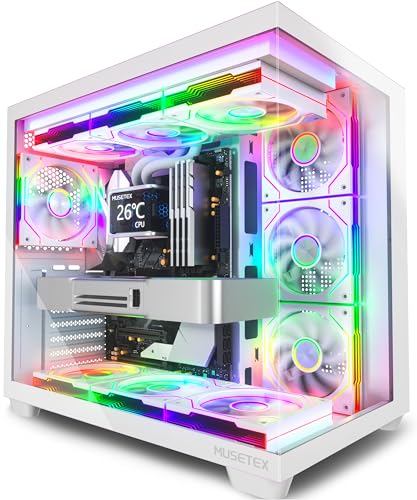
The MUSETEX Y6 is an ATX mid tower PC case designed for gamers and PC enthusiasts who want a visually striking build without sacrificing performance. It comes with seven pre-installed 120mm Infinity Mirror PWM ARGB fans, including three reverse-blade fans on the side, three reverse-blade fans on the bottom, and one forward fan on the rear. This setup creates a continuous gradient rainbow lighting effect that looks far more dynamic than standard ARGB fans, making it a top choice for RGB setup enthusiasts and streamers who want their rig to stand out on camera.
This case is best suited for PC gamers, competitive gamers, casual gamers, esports players, streamers, content creators, gaming setup builders, and even college gamers looking for a reliable and attractive foundation for their first or next build. The 270-degree full view tempered glass panels let you showcase your GPU, CPU cooler, and any collectible figures you place inside, which is a huge plus for those who take pride in their desktop aesthetics.
In terms of real-world performance, the Y6 delivers strong cooling potential thanks to its seven pre-installed fans and support for top-mounted 360mm liquid coolers. The anti-vortex fan blades help maintain steady airflow, and the PWM control allows you to adjust fan speeds via your motherboard software for a balance between noise and cooling. This makes it suitable for long gaming sessions, streaming marathons, or content creation workloads where thermal management is critical.
Build quality is solid, with a steel frame and tempered glass panels that feel sturdy. The internal layout is well-organized, with separate compartments for the power supply and drives, which helps with cable management. The front I/O includes a USB Type-C port, USB 3.0, and USB 2.0, plus audio jacks, making it easy to connect modern peripherals. The white finish is clean and matches well with other white gaming gear, though it may require occasional dusting to keep it looking pristine.
Setup is straightforward for anyone familiar with PC building, though the reverse-blade fans on the side and bottom might confuse first-time builders. The included manual and screw kit help, but you'll need to pay attention to fan orientation for optimal airflow. Cable management is decent, with rubber grommets and tie-down points, but the space behind the motherboard tray is a bit tight if you have a lot of cables. Overall, the Y6 is a practical choice for gamers who want a feature-rich case with impressive RGB lighting and good cooling out of the box.
One realistic limitation is the CPU cooler height limit of 160mm, which may not accommodate the largest air coolers on the market. Additionally, the side and bottom fans are reverse-blade, meaning they pull air in from the back, which is fine for intake but requires careful planning. Despite these minor quirks, the MUSETEX Y6 offers excellent value for its price, especially for those who want a pre-fanned case with stunning RGB and a panoramic view. It's a strong recommendation for anyone building a mid-range to high-end gaming PC, streaming setup, or RGB-focused desktop.
Pros
- Excellent value with seven ARGB fans pre-installed, saving cost and setup time.
- Panoramic tempered glass provides a stunning view of internal components and RGB lighting.
- Dual-channel airflow design keeps CPU and GPU temperatures low during intense gaming sessions.
- Back-connect motherboard support and generous cable management space keep the build clean and improve airflow.
- Front USB 3.2 Gen 2 Type-C port offers fast connectivity for modern devices.
Cons
- The case is relatively new with no user reviews yet, making long-term reliability unverified.
- White color may show dust and fingerprints more easily than darker finishes, requiring more frequent cleaning.
- Cable management space, while generous, might still be tight for users with many non-modular cables or extensive RGB wiring.
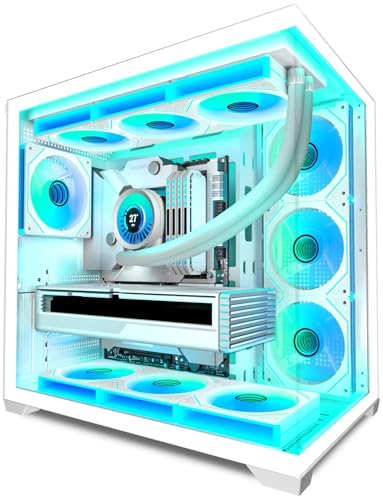
The KEDIERS K4 is a mid-tower ATX PC case that comes with seven pre-installed ARGB fans and a panoramic tempered glass design, aimed at PC gamers, setup builders, and RGB enthusiasts who want a balance of performance and aesthetics without breaking the bank. Priced competitively, this case offers a feature set typically found in more expensive models, making it a strong candidate for budget-conscious gaming PC builds.
Targeting a wide audience from competitive gamers to casual streamers and college gamers, the K4 focuses on cooling efficiency and visual appeal. Its dual-channel airflow design channels horizontal airflow for the CPU area and vertical airflow for the GPU, which helps maintain lower temperatures during long gaming sessions or demanding tasks like streaming and content creation. The seven included fans (three reverse-blade side intake, three top exhaust, one rear exhaust) provide ample airflow right out of the box, and the daisy-chain wiring keeps cable management neat.
Build quality is solid for the price point, with tempered glass panels that offer a 270-degree panoramic view of your components. The glass is thick and should provide good sound insulation, though it may require careful handling during installation. The case supports a wide range of hardware, including 360mm radiators, tall CPU coolers up to 175mm, and long GPUs up to 400mm, making it compatible with most high-end gaming parts. The back-connect motherboard support is a forward-thinking feature that helps keep the front of the case clean, improving both aesthetics and airflow.
Setup is straightforward, especially with the pre-installed fans and the included 1-to-3 splitter for fan power. The magnetic dust filters on top and bottom make cleaning easy, reducing maintenance time. The front I/O panel includes a USB 3.2 Gen 2 Type-C port, which is a welcome addition for fast data transfers and modern peripherals. However, the case is new to the market, so long-term durability and customer support are yet to be proven through widespread user feedback.
One realistic limitation is that the white color may show dust and smudges more prominently, so regular cleaning is recommended. Additionally, while cable management is generally good, users with non-modular power supplies or extensive RGB wiring might find the space a bit tight. Overall, the KEDIERS K4 is a compelling choice for gamers building a mid-tower gaming PC who want strong cooling, great RGB aesthetics, and modern connectivity without overspending. It's especially suited for first-time builders and those looking to create a visually striking setup for gaming, streaming, or daily use.

Pros
- Excellent value at under $70 for a dual-chamber, panoramic glass case.
- Good compatibility: fits GPUs up to 400mm, PSUs up to 200mm, and 360mm radiators.
- Clean white aesthetic with two tempered glass panels for a premium look.
- USB Type-C and USB 3.0 ports are convenient for modern peripherals.
Cons
- Pre-installed fans are non-ARGB, so RGB fans must be purchased separately for lighting effects.
- No included fan hub or controller, so you'll need a motherboard with enough headers or a separate hub.
- Glass panels can show fingerprints and require regular cleaning to stay pristine.
The MUSETEX Y6 is an ATX mid tower PC case that prioritizes visual flair and cooling flexibility without stretching your budget. Aimed squarely at gaming PC builders, esports enthusiasts, and casual gamers who want to show off their hardware, this white chassis features a 270-degree panoramic tempered glass design. That means nearly unobstructed views of your GPU, CPU cooler, and any RGB components from the front and side, making it a strong choice for anyone building a showcase rig.
When it comes to real-world performance, the Y6 focuses on airflow and cooling support. The dual-chamber layout separates the power supply and cables from the main compartment, reducing clutter and improving direct airflow to the GPU and CPU. It supports top-mounted radiators up to 360mm and tall air coolers up to 176mm, so you can run a high-end cooling setup without issues. The pre-installed three 120mm non-ARGB fans provide decent airflow out of the box, though you may want to swap them for RGB fans if you're after a flashy look. For competitive gamers and streamers running demanding titles, this case can handle the thermal load of a mid-range to high-end build.
Build quality is solid for the price point. The dual tempered glass panels feel substantial, though they do attract fingerprints and need occasional wiping. The tool-less snap-on side panels make accessing the interior quick and easy, which is great for cleaning or swapping parts. The steel frame feels sturdy, and the magnetic dust filters on top and bottom help keep dust out without restricting airflow. Cable management is decent with tie-down points and enough space behind the motherboard tray for basic routing, though thicker cables may require some patience.
Setup is straightforward due to the generous interior room. You can install a large GPU up to 400mm and a PSU up to 200mm, which covers most modern components. The inclusion of a USB 3.2 Type-C port is a nice touch at this price, letting you connect fast external drives or VR headsets. The case also supports back-connect motherboards, offering some future-proofing for upcoming designs. However, there is no included fan hub or RGB controller, so you'll need to rely on your motherboard's headers or buy a separate hub if you plan to run additional fans or RGB strips.
What holds the MUSETEX Y6 back slightly is its fan configuration. The three fans are non-ARGB, meaning you'll need to purchase your own RGB fans if you want the full lighting showcase that the panoramic glass invites. Also, while the glass panels look great, they are a magnet for smudges and require regular cleaning to stay clear. For gamers and builders who prefer a low-maintenance experience, this might be a minor annoyance. Additionally, the front panel is mostly glass with limited mesh, so airflow may be slightly restrictive compared to full mesh cases, but the dual-chamber design helps compensate.
Overall, the MUSETEX Y6 is a compelling option for budget-conscious gaming PC buyers who want a visually striking case without spending a fortune. It works well for casual gamers, streamers, and content creators who value aesthetics and aren't afraid to add their own RGB fans. If you're building a white-themed setup or want to display your components prominently, this case delivers excellent value. Just be prepared to clean the glass and invest in some aftermarket fans if you crave more lighting. For its price, the Y6 offers a great balance of performance, compatibility, and style.

Pros
- Excellent out-of-the-box cooling with 7 PWM ARGB fans – no need to buy extra fans.
- Stunning 270-degree glass panels for maximum RGB showcase.
- Dual-chamber design simplifies cable management and improves airflow.
- Supports up to 3x360mm radiators for extreme water cooling.
- Spacious interior fits large GPUs and PSUs without clearance issues.
Cons
- No dedicated fan controller included – fans connect directly to motherboard; may require a suitable motherboard with enough headers.
- White color may show smudges and dust more easily than black variants.
- Case weight is moderate (11 lbs) but could be heavier with glass panels; handling requires care.
The HYXN H1 is a dual-chamber mid-tower PC case designed for gamers, streamers, and PC builders who want a clean, high-performance chassis with plenty of RGB flair. It comes with seven pre-installed PWM ARGB fans (six reverse-blade intakes and one standard exhaust) that deliver strong airflow and customizable lighting right from the start. The 270-degree panoramic tempered glass panels give you an unobstructed view of your components, making it a great choice for anyone who loves showing off their build.
This case is best suited for PC gamers who prioritize cooling and aesthetics, especially those building a mid-range to high-end system. The dual-chamber layout separates the PSU and cables from the main compartment, which not only looks cleaner but also improves airflow. With support for up to three 360mm radiators at the same time, the H1 can handle even the most demanding liquid cooling setups. The vertical airflow design pulls cool air from the bottom and side, exhausting heat out the top and rear, keeping your CPU and GPU temperatures in check during long gaming sessions.
Build quality is solid for the price point. The tempered glass panels are thick and well-framed, and the steel body feels sturdy. The case is spacious enough for large graphics cards up to 400mm and PSUs up to 200mm, so compatibility with high-end hardware is not an issue. Cable management is straightforward thanks to the generous space behind the motherboard tray and the dual-chamber design, which hides the power supply and excess cables. However, because the fans use a daisy-chain connection without a dedicated controller, you'll need a motherboard with enough ARGB and PWM headers to control them individually – or plan to use the included splitter cables.
Setup is relatively easy for a mid-tower. The removable top and front panels make installing radiators and fans simple, and the included dust filters on the top and bottom help keep the interior clean. The front I/O includes a USB Type-C port, USB 3.0, and USB 2.0, which covers most modern peripherals. One realistic limitation is the white finish – it looks great but can show fingerprints and dust more quickly than a darker color. Also, while the case is not excessively heavy at 11 pounds, handling the glass panels requires caution during assembly.
Overall, the HYXN H1 offers excellent value for gamers and RGB enthusiasts who want a pre-fanned case with strong cooling potential and a premium aesthetic. If you're building a new PC and want a case that looks sharp, runs cool, and supports high-end water cooling without breaking the bank, this is a strong contender. The lack of a built-in fan controller is a minor inconvenience, but for most builders, connecting to the motherboard is standard practice. I'd recommend it for mid-tower ATX builds where airflow and visual impact are top priorities.
The HYXN H1 uses a vertical airflow design with dual intake channels. Cool air enters through the bottom (3x120mm reverse-blade fans) and side (3x120mm reverse-blade fans), while hot air is exhausted via the top and rear (1x120mm forward fan). This layout creates a natural thermal chimney effect, efficiently removing heat from high-power components. The top and bottom are equipped with dust filters to reduce buildup, and the case supports up to three 360mm radiators simultaneously (top, side, and bottom), giving liquid cooling enthusiasts plenty of room for custom loops. The pre-installed PWM fans can be controlled via motherboard software, allowing you to balance noise and performance.
The H1 comes with seven ARGB PWM fans that are daisy-chained for simpler cable management. They connect directly to your motherboard's ARGB header (3-pin 5V) and PWM fan header, allowing you to control lighting and speed through software like ASUS Aura Sync, MSI Mystic Light, Gigabyte RGB Fusion, or ASRock Polychrome. The 270-degree panoramic glass panels maximize the visual impact of the RGB lighting, creating a stunning showcase for your components. There is no dedicated controller included, so you need a motherboard with at least one ARGB header to control the lighting effects. The white interior of the case further reflects and diffuses the light, making colors pop.

Pros
- Excellent airflow with mesh front and four included ARGB fans for efficient cooling.
- Wide GPU clearance supports even the largest RTX 4090 cards without issue.
- USB-C and dual USB 3.0 ports on the front panel for modern connectivity.
- Tool-less or easy installation of drives and components simplifies the build process.
Cons
- The case is relatively large for a mid-tower, which may be a tight fit on smaller desks.
- Cable management could be more spacious behind the motherboard tray, requiring careful routing.
- The included fans are ARGB but lack a dedicated controller, so you may need to use the motherboard's software.
The SAMA S40 is a mid-tower ATX PC case that combines modern aesthetics with practical performance. It features a large mesh front panel for unrestricted airflow and a tempered glass side panel that shows off your components. With four 120mm ARGB PWM fans pre-installed, this case is ready to keep your gaming rig cool and colorful from the moment you power it on.
This case is designed for a wide range of users, including PC gamers, esports players, streamers, content creators, and gaming setup builders. Its high-airflow design and support for large GPUs like the RTX 4090 make it ideal for high-performance gaming and streaming builds. The included ARGB fans add a vibrant touch to any RGB-focused setup, while the mesh front panel ensures that even during intense gaming sessions, your components stay cool under load.
In terms of real-world performance, the SAMA S40 delivers strong cooling out of the box. The four 120mm fans are PWM-controlled, allowing you to adjust fan speeds for the perfect balance between noise and cooling. The case supports up to 12 fans total and a 360mm radiator on top, so you can expand cooling for even the most demanding CPUs. This setup is great for competitive gamers who need consistent performance without thermal throttling, as well as casual gamers looking for a quiet, cool system.
Build quality is solid for the price point. The steel frame feels sturdy, and the tempered glass side panel is securely mounted with thumbscrews. The front I/O includes two USB 3.0 ports, a USB-C port, and HD audio jacks conveniently placed on the top edge for easy access. Cable management is decent, with a few Velcro straps and rubber grommets to help route cables neatly, though some builders may find the space behind the motherboard tray a bit tight for extensive cable bundles.
Setup is straightforward, especially for a mid-tower case. The drive mounts are tool-less for 2.5-inch drives, and there is ample room for installing a full-size ATX power supply and large graphics cards. The case also offers multiple expansion slots (7+2) to accommodate multi-GPU setups or additional cards for streaming and content creation. Storage options are flexible: you can install up to three 3.5-inch HDDs or three 2.5-inch SSDs, or a mix of both, which is great for gamers with large game libraries and creators who need fast storage.
While the SAMA S40 is a strong contender for many builds, there are a few limitations. The case lacks a built-in ARGB controller, so you will need to connect the fans to your motherboard's ARGB header or use a separate hub. Also, the overall dimensions are on the larger side for a mid-tower, so make sure your desk or gaming area can accommodate its footprint. For PC gamers, streamers, and setup builders who want great airflow, a modern aesthetic, and room for top-tier components without breaking the bank, the SAMA S40 is a practical and reliable choice.

Pros
- Excellent value with four ARGB fans included at this price point.
- Good airflow thanks to mesh front panel and multiple fan mounting options.
- Tempered glass side panel with easy tool-free removal for quick access.
- Spacious enough for most modern GPUs and AIO liquid coolers.
- White color scheme stands out in a market dominated by black cases.
Cons
- Front panel lacks a USB-C port, which may be a drawback for newer motherboards.
- Cable management space behind the motherboard tray is somewhat limited, requiring careful routing.
- Only two USB 2.0 ports on the front panel; some users may prefer more USB 3.0 connectivity.
The GAMDIAS AURA GC2 Elite White is a mid-tower ATX PC case designed for budget-conscious gamers and first-time builders who want a clean white aesthetic with built-in RGB lighting. It comes with four 120mm ARGB fans pre-installed, a perforated mesh front panel, and a full-sized tempered glass side window. This case is best suited for PC gamers, RGB setup enthusiasts, and anyone building a white-themed gaming PC without breaking the bank.
In terms of performance, the mesh front panel allows for excellent airflow, keeping components cool during long gaming sessions or streaming on Twitch. The four included fans provide decent air movement and vibrant lighting that can be controlled via the case's LED button or synced with your motherboard's ARGB header. The interior supports radiators up to 360mm, GPUs up to 340mm, and CPU coolers up to 160mm, so it can handle most mid-range to high-end gaming hardware comfortably.
Build quality is solid for the price. The steel frame feels sturdy, and the tempered glass panel is thick and securely mounted with thumbscrews. The tool-free side panel removal makes it easy to access your components for upgrades or cleaning. The white paint job is even and gives the case a premium look that matches well with white-themed peripherals and desks. However, cable management is a bit tight behind the motherboard tray; you'll need to plan your routing carefully to keep things tidy.
Setting up this case is straightforward. The pre-installed fans and front I/O cables are already routed, so you just need to install your motherboard, PSU, and drives. The drive cages are removable and support both 3.5-inch and 2.5-inch drives, offering flexibility for storage. The front panel includes one USB 3.0 port, two USB 2.0 ports, and HD audio jacks, which is adequate for most setups but lacks a USB-C port that some newer motherboards offer.
One realistic limitation is the lack of a USB-C front panel connector, which may be a dealbreaker if you frequently use USB-C devices. Also, the included fans are not PWM, so they run at a fixed speed unless controlled via voltage regulation. Despite these drawbacks, the GAMDIAS AURA GC2 Elite White offers tremendous value for its price, especially for gamers building a white gaming PC on a budget.
Overall, this case is a great choice for casual and competitive gamers who want a good-looking, airflow-focused chassis without spending a lot. It works well for dorm room setups, home office gaming, or as a foundation for a colorful RGB build. If you're looking for an affordable white case with plenty of fans included, the GAMDIAS AURA GC2 Elite White is worth considering.
Frequently Asked Questions About White Gaming PC Cases
What size motherboard do most white gaming PC cases support?
Most white mid-tower ATX cases support ATX, Micro-ATX, and Mini-ITX motherboards. This gives you flexibility for different build sizes and upgrade paths. Some models also support back-connect motherboard designs for cleaner cable management.
Can I fit a 360mm AIO liquid cooler in a white gaming case?
Yes, many white cases like the MUSETEX Y6 and HYXN H1 support top-mounted 360mm radiators. Some even accommodate two 360mm radiators simultaneously for advanced water cooling setups. Always check the max radiator length in the product specs before buying.
Do white gaming PC cases come with pre-installed fans?
Yes, many models include pre-installed ARGB or PWM fans. The KEDIERS K4 comes with 7 fans, while the GAMDIAS AURA GC2 includes 4. Pre-installed fans save time and money, but check if they use reverse blade designs for optimal airflow with panoramic glass panels.
How important is GPU clearance in a white case?
Very important for high-end builds. Cases like the SAMA S40 support GPUs up to 415mm, accommodating RTX 40-series cards. The RUIX OV303 handles up to 420mm. Measure your GPU length and compare with the case’s max clearance to avoid fitment issues.
Are white cases harder to keep clean than black ones?
White cases show dust more easily, but many models include magnetic dust filters on top and bottom intakes. Regular cleaning with a microfiber cloth keeps them looking fresh. The tempered glass panels may need occasional wiping to maintain that panoramic view.
Do white cases affect component temperatures?
No, case color doesn’t directly impact thermals. What matters is airflow design, fan configuration, and radiator support. White cases with mesh front panels or dual-chamber layouts can perform just as well as black equivalents.
Can I use a white case for a professional or office build?
Absolutely. White cases with clean lines and minimal RGB can blend into professional environments. The MUSETEX Y6 and HYXN H1 offer a sleek aesthetic that works well in home offices or creative studios. For more ideas, see our best PC for gaming and studying guide.


Write Your Review
No reviews yet. Be the first to share your experience!