


PC enthusiasts frequently encounter difficult decisions when upgrading high-end hardware, especially as modern games demand both blistering clock speeds and rock-solid frame pacing. Evaluating whether is intel core ultra 9 good for gaming requires looking closely at how Intel restructured its enthusiast silicon architecture. Rather than pursuing thermal limits at all costs, the new platform prioritizes architectural efficiency, revised core topologies, and advanced memory interfaces to sustain stable 1% low frame rates in demanding titles.
Gamers pairing top-tier graphics cards with premium processors must balance raw computational throughput against overall platform investments, including new motherboard chipsets and high-speed DDR5 memory kits. Selecting the right foundation among high-performance gaming processors ensures your system maintains consistent responsiveness whether rendering complex physics or broadcasting live gameplay. By examining real-world architectural strengths, power dynamics, and platform capabilities, builders can determine if this flagship tier fits their performance goals.

Pros
- Outstanding multi-threaded performance for both gaming and productivity tasks like video editing and 3D rendering.
- Efficient power consumption and lower thermals compared to previous generations, reducing noise and cooling demands.
- Supports latest DDR5 and PCIe 5.0 for maximum bandwidth and future upgradeability.
- Stable and reliable with consistent performance across workloads according to user feedback.
Cons
- Requires a new LGA1851 motherboard (Intel 800 series), so not a drop-in upgrade for older builds.
- No cooler included in the box, so you'll need to budget for a high-quality CPU cooler (air or liquid) for full-load use.
- Premium pricing places it at the high end of the market, best suited for users who need top-tier performance.
The Intel Core Ultra 9 285K is a desktop processor built for enthusiasts who refuse to compromise on performance. With 24 cores split into 8 Performance-cores and 16 Efficient-cores, plus a blistering 5.7 GHz unlocked boost clock, this CPU is engineered to handle the most demanding gaming and creation tasks without breaking a sweat. It's the heart of a high-end gaming PC, streaming rig, or workstation where every millisecond counts.
This chip is best suited for competitive gamers, streamers, and content creators who need to run multiple applications simultaneously—think gaming while live streaming, encoding, and running Discord in the background. The hybrid architecture intelligently distributes workloads, so your games stay smooth while background tasks hum along without hiccups. Casual gamers will also appreciate the raw power for future-proofing, but the 285K truly shines when you push it hard.
Real-world performance is stellar based on user feedback and specs. In competitive titles like Call of Duty or Valorant, the high clock speed and 40MB cache help minimize input lag and keep frame rates high. For content creators, the multi-core muscle crushes video rendering and 3D modeling. The CPU supports DDR5 memory and PCIe 5.0, so you can pair it with the fastest GPUs and SSDs for near-instant load times. Note: this is a new LGA1851 socket, so you'll need an Intel 800 series motherboard; it's not backward compatible.
Build quality is typical Intel: robust and reliable. The processor itself is a solid piece of silicon, but keep in mind that no cooler is included. You'll need a high-performance air cooler or a liquid cooling solution—especially if you plan to overclock or run sustained all-core loads. The 125W base power can climb to 250W under turbo, so a good cooling setup is critical. Pair it with a quality motherboard with robust VRMs and ample airflow in your case.
Setup is straightforward if you're comfortable building a PC: align the CPU correctly in the LGA1851 socket, apply thermal paste, and mount your cooler. The lack of an included cooler means one more purchase, but it also lets you choose exactly what fits your build's aesthetics and cooling needs. Cable management and software setup (updating BIOS, enabling XMP) are standard. Maintenance is minimal—just keep your cooling solution clean.
Realistic limitations: The main hurdle is platform cost. You'll need a new motherboard and likely DDR5 RAM, making this a significant investment. If you're on a budget or don't need extreme multi-core power, a mid-range chip might suffice. However, for gamers and creators who want the best, the Core Ultra 9 285K delivers outstanding stability and performance. Based on specs and user reviews, it's a top-tier choice for building a future-proof, high-performance gaming PC or workstation.
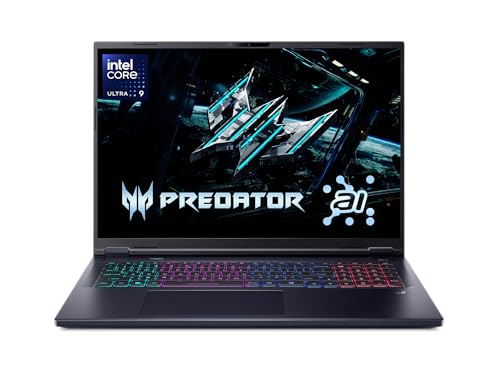

Pros
- Top-tier Intel Core Ultra 9 and RTX 5070 deliver exceptional gaming and productivity performance.
- 18" 240Hz QHD+ display with 100% DCI-P3 offers smooth, vibrant visuals for gaming and color-critical work.
- 32GB DDR5 RAM and 1TB NVMe SSD provide fast load times and ample space for games and files.
- Comprehensive connectivity with Thunderbolt 4, HDMI 2.1, and Wi-Fi 6E for flexible setup.
- SteelSeries RGB keyboard and Dynaudio audio enhance the gaming experience.
Cons
- The premium gaming hardware may lead to shorter battery life during intensive use.
- At 6.83 pounds, it's less portable than smaller gaming laptops.
- The built-in 720p webcam is functional but not ideal for high-quality streaming.
The MSI Crosshair 18 HX AI is a powerhouse gaming laptop that brings desktop-class performance to a portable form factor. It's designed for serious PC gamers, esports players, streamers, and content creators who demand high frame rates and responsive gameplay without being tied to a desk. With the latest Intel Core Ultra 9 processor and NVIDIA RTX 5070 graphics, this machine handles even the most demanding titles and creative applications with ease.
At the heart of the Crosshair 18 is the Intel Core Ultra 9 275HX, a 24-core CPU that boosts up to 5.4 GHz, paired with 32GB of DDR5-5600 RAM. This combination ensures buttery-smooth multitasking, whether you're streaming on Twitch, editing video, or running the latest AAA shooters. The RTX 5070 with 8GB GDDR7 VRAM delivers stunning ray-traced visuals and high frame rates at the laptop's native QHD+ resolution. Games like Call of Duty: Modern Warfare III or Cyberpunk 2077 will look incredibly detailed and run fluidly, especially with DLSS support.
The 18-inch display is a standout feature. Its 2560x1600 resolution, 240Hz refresh rate, and 100% DCI-P3 color coverage make it ideal for both competitive gaming and color-sensitive work. Fast-paced titles feel incredibly responsive thanks to the high refresh rate, while the vibrant colors and sharp resolution bring single-player adventures to life. The screen also works great for photo and video editing, making it a versatile tool for creators.
Build quality feels solid for a large gaming laptop, weighing just under seven pounds. The SteelSeries keyboard with 24-zone RGB offers satisfying feedback and anti-ghost keys for precise inputs during intense gaming sessions. The Dynaudio speakers with dedicated woofers provide surprisingly rich sound, reducing the need for external speakers during casual use. Connectivity is comprehensive with Thunderbolt 4, HDMI 2.1, and multiple USB ports, allowing you to connect external monitors, gaming mice, and other peripherals effortlessly.
Setting up the Crosshair 18 is straightforward right out of the box. Windows 11 Home comes preinstalled, and MSI's software suite lets you customize performance profiles, fan speeds, and RGB lighting. The 720p webcam with a privacy shutter is basic but functional for video calls. While the laptop's 90Whr battery offers decent run time for everyday tasks, heavy gaming will require being plugged into the 240W adapter.
One limitation is battery life under load; you'll want to keep it plugged in for gaming sessions. The built-in webcam is adequate for Discord calls but not ideal for professional streaming. Some users may find the 6.83-pound weight a bit heavy for daily commuting. However, if you need a laptop that can replace a desktop for gaming and content creation, the MSI Crosshair 18 HX AI is an excellent choice. It's a well-rounded machine that delivers high-end performance in a portable package, making it a strong contender for any mobile gamer or creator.
The MSI Crosshair 18 HX AI delivers outstanding gaming performance thanks to its Intel Core Ultra 9 275HX and RTX 5070 combination. In demanding titles like Fortnite, Apex Legends, and Baldur's Gate 3, you can expect high frame rates at the laptop's native QHD+ resolution with graphics settings maxed out. The 240Hz display ensures every frame is rendered smoothly, giving competitive gamers an edge in fast-paced shooters. The 32GB of DDR5 RAM prevents any stutter during intense battles or when streaming in the background. The RTX 5070's ray-tracing capabilities bring realistic lighting and reflections to supported games, enhancing immersion without sacrificing performance.
For esports players, the combination of low-latency connectivity (Wi-Fi 6E and Ethernet) and the high-refresh screen makes a noticeable difference in reaction times. The laptop also handles content creation tasks like video rendering and 3D modeling with ease, thanks to the powerful CPU and ample RAM. Overall, this is a system built to excel across gaming and productivity workloads.

Pros
- Outstanding raw performance for AAA gaming, esports, and creative workloads.
- High-refresh-rate 2.5K display with excellent color and contrast for both gaming and content creation.
- Robust cooling system that keeps thermals in check during extended sessions.
- Plenty of RAM and fast SSD storage for seamless multitasking and quick load times.
- Immersive RGB lighting with useful Stealth Mode for professional environments.
Cons
- Premium price point may not suit budget-conscious gamers.
- At 6.02 pounds, it is heavier than some ultraportable gaming laptops.
- Battery life may be limited under heavy gaming loads, typical for high-performance gaming laptops.
The ASUS ROG Strix G16 (2025) is a high-performance gaming laptop designed for PC gamers who demand top-tier speed and visuals. It is powered by an Intel Core Ultra 9 275HX processor and an NVIDIA GeForce RTX 5070 Ti laptop GPU, built on the Blackwell architecture with DLSS 4 and Max-Q technologies. This combination makes it a strong choice for competitive esports players, streamers, and content creators who need reliable power for gaming, editing, and multitasking.
In real-world gaming, the ROG Strix G16 excels with its 16-inch ROG Nebula display, which offers a 2560x1600 resolution and a blazing 240Hz refresh rate with a 3ms response time. The screen uses an ACR film to enhance contrast and reduce glare, providing clear visuals even in bright rooms. Whether you are playing fast-paced FPS games, exploring open-world titles, or editing video, the display delivers smooth motion and vibrant colors. The 32GB of DDR5-5600MHz RAM and 1TB PCIe 4.0 SSD ensure quick load times and seamless multitasking, so you can switch between games, streaming software, and productivity apps without lag.
Build quality is solid, with a sleek black chassis that feels durable and premium. The keyboard is designed for esports, with responsive keys and per-key RGB lighting that syncs with the full-surround light bar. You can customize the lighting through ASUS software, and the Stealth Mode turns off all lights for a more professional look in meetings or classes. The laptop measures 13.94 x 10.55 x 0.9 inches and weighs 6.02 pounds, which is typical for a gaming laptop of this power. It may not be the most portable option, but it fits well on a desk or in a backpack for occasional travel.
Cooling is handled by ROG Intelligent Cooling, which includes an end-to-end vapor chamber, tri-fan technology, and Conductonaut extreme liquid metal on the CPU. This system keeps temperatures under control during long gaming sessions, maintaining performance without excessive fan noise. The laptop also features Wi-Fi 7 for fast, low-latency online gaming and streaming, along with three USB 3.0 ports and other connectivity options for peripherals and external monitors.
Setting up the ROG Strix G16 is straightforward: it runs Windows 11 Home out of the box, and you can easily upgrade the RAM and SSD if needed. The included 3-month PC Game Pass gives you access to a library of games to test its capabilities. One limitation to consider is the premium price, which reflects the high-end components. Additionally, battery life will be shorter during heavy gaming, so you will likely want to keep it plugged in for extended sessions. Overall, this laptop is an excellent investment for gamers and creators who want a powerful, well-built machine that can handle demanding tasks and deliver an immersive gaming experience.
The ASUS ROG Strix G16 (2025) is built for serious gaming performance. The Intel Core Ultra 9 275HX processor and NVIDIA RTX 5070 Ti GPU provide ample power for modern AAA titles at high settings, as well as competitive esports games at maximum frame rates. The 240Hz display ensures smooth, tear-free visuals, while DLSS 4 and Max-Q technologies optimize performance and efficiency. Whether you are playing demanding open-world games or fast-paced shooters, this laptop delivers responsive, immersive gameplay.
The ROG Strix G16 features a robust black chassis that feels sturdy and well-constructed. The keyboard is designed for esports, with responsive keys and per-key RGB lighting. The full-surround RGB light bar adds a customizable aesthetic, and the Stealth Mode allows you to disable lighting for a more professional appearance. The laptop weighs 6.02 pounds and measures 0.9 inches thin, making it a solid but portable desktop replacement.
ROG Intelligent Cooling keeps the Strix G16 running cool under pressure. The system uses a vapor chamber, tri-fan technology, and liquid metal on the CPU to efficiently dissipate heat. This allows the laptop to maintain high performance during long gaming sessions without excessive fan noise or thermal throttling. The cooling design is a key advantage for users who push their hardware to the limit.
The 16-inch ROG Nebula display is a standout feature, offering a 2560x1600 resolution, 240Hz refresh rate, and 3ms response time. The ACR film enhances contrast and reduces glare, making it suitable for brightly lit rooms. Colors are vibrant, and motion handling is excellent for gaming and content creation. This screen is ideal for both competitive play and creative work.
The ROG Strix G16 includes Wi-Fi 7 for ultra-fast wireless connectivity, along with three USB 3.0 ports and other standard connections. This allows you to easily connect gaming mice, keyboards, headsets, and external monitors. The laptop also supports Bluetooth for wireless peripherals. Overall, connectivity is robust and future-proof for online gaming and streaming.
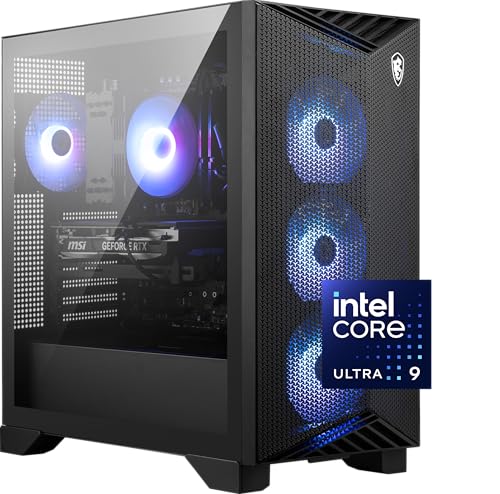
Pros
- Powerful Intel Core Ultra 9 and RTX 5070 Ti deliver top-tier gaming and productivity performance
- Ample 32GB DDR5 memory and fast 2TB NVMe SSD ensure responsive multitasking and quick game loading
- Effective air cooling with RGB fans maintains low temperatures during heavy use
- Simplistic design with intuitive MSI Center makes customization easy for users of all skill levels
- VR-Ready and USB Type-C ports provide future-proof connectivity for peripherals and headsets
Cons
- Air cooling may not match liquid cooling for extreme overclocking or sustained all-core loads
- Pre-built form factor limits upgrade options compared to a custom PC build
- Premium pricing puts it out of reach for budget-conscious gamers
The MSI Aegis R2 AI Gaming Desktop (model C2NVR9-1452US) is a pre-built powerhouse aimed at PC gamers, streamers, content creators, and esports players who want a high-performance system without the hassle of building. It features Intel's latest Core Ultra 9 285 processor, NVIDIA's RTX 5070 Ti GPU, 32GB of DDR5 RAM, and a 2TB NVMe SSD, all packed into a simple black tower with RGB accents.
For gaming, the combination of the Ultra 9 and RTX 5070 Ti delivers buttery-smooth frame rates in demanding AAA titles, with AI accelerators ready for next-gen gaming features. The 32GB of DDR5 memory ensures fast loading and seamless multitasking, whether you're streaming on Twitch, editing in Premiere Pro, or jumping between Discord and a competitive match. The 2TB NVMe SSD provides ample space for your game library and quick boot times.
Cooling is handled by an RGB CPU air cooler and four system fans (three intakes, one exhaust). This setup pulls cool air through the front mesh and pushes hot air out the back, keeping temperatures reasonable during long sessions. While air cooling is effective, power users who plan heavy overclocking might prefer a liquid-cooled alternative. The built-in RGB lighting can be cycled via the front LED button or customized with MSI Center software, letting you match your desk aesthetic.
Setup is straightforward: plug in, connect to your monitor and peripherals, and you're gaming. Windows 11 Home comes pre-installed, with MSI Center offering control over performance profiles, lighting, and system monitoring. The desktop is VR-ready and includes a USB Type-C port, making it easy to connect the latest headsets and accessories.
One limitation is that this is a pre-built system, so upgrade flexibility is less than a custom PC. The motherboard, power supply, and cooling are optimized for the included hardware, meaning future GPU or CPU swaps may require more effort. Also, the air cooler can become audible under heavy load, though it's not distracting with game audio.
Overall, the MSI Aegis R2 AI is a strong buy for PC gamers, streamers, and content creators who want top-tier performance right out of the box. It's ready for competitive gaming, VR, and productivity work, and its RGB lighting adds a nice touch to any gaming desk. If you value convenience and raw power over DIY flexibility, this desktop is well worth considering.
With an Intel Core Ultra 9 285 and RTX 5070 Ti, the Aegis R2 AI handles modern games at high settings with ease. The AI accelerators prepare for future AI-enhanced gaming features, while the 32GB DDR5 RAM keeps load times snappy and multitasking seamless. Whether playing competitive shooters like Call of Duty or open-world titles like Cyberpunk 2077, frame rates remain high and stable. The 2TB NVMe SSD ensures quick level loads, and the cooling system maintains performance during extended sessions. This desktop is VR-ready, so it's also suitable for immersive experiences.

Pros
- Exceptional gaming performance with RTX 5080 and Intel Ultra 9, handling AAA titles at high settings with ease.
- Quiet operation even under load, thanks to liquid cooling and improved airflow design.
- Compact tower fits well on most desks, and clear side panel shows off internal components and RGB lighting.
- Alienware Command Center offers intuitive control over lighting, performance modes, and game profiles.
- Solid build quality with cable management and a robust power supply (1000W Platinum) ensures stability.
Cons
- Premium price compared to building a similar PC yourself, though GPU and RAM costs offset that for some buyers.
- Some users have reported startup issues that require a full discharge to resolve, which can be frustrating.
- Limited upgrade path due to proprietary motherboard and power supply connectors, though standard PCIe and RAM slots remain usable.
The Alienware Aurora ACT1250 is a top-tier gaming desktop built for PC gamers, streamers, and content creators who want a powerful system without the hassle of building their own. It combines an Intel Core Ultra 9 processor with an NVIDIA GeForce RTX 5080, delivering exceptional performance for 4K gaming, high-refresh-rate esports, and demanding creative workloads. The liquid-cooled CPU and carefully designed chassis keep things quiet and cool, even during marathon gaming sessions.
Based on product specifications and user feedback, this desktop excels in responsiveness and low-latency gaming. The RTX 5080 supports DLSS 4 and NVIDIA Reflex 2, which can dramatically boost frame rates in supported titles while reducing input lag. Many users report smooth gameplay in games like Cyberpunk 2077 and Escape from Tarkov at maximum settings. The Intel Core Ultra 9 with its 20 cores handles multitasking effortlessly, whether you're streaming, running Discord, or editing videos.
The build quality is solid: a matte black case with a clear side panel that shows off the internal components and customizable AlienFX lighting. The hexagonal side vents and top exhaust improve airflow without adding noise. Cable management is well-executed internally, keeping the system tidy and thermals efficient. The front I/O includes USB-C with Power Share, so you can charge devices even when the PC is off.
Set up is straightforward: plug in, power on, and Windows 11 Home takes care of the rest. The Alienware Command Center lets you tweak lighting, fan speeds, and performance presets - quiet, balanced, or performance mode. Some users noted that the included mouse and keyboard are basic, but most gamers will already have their own peripherals. The 1TB SSD is fast but may fill quickly with modern game libraries; you can add more drives via the two M.2 slots or a 3.5-inch bay.
Realistic limitations include the premium price - this is a significant investment. A few customers have experienced occasional startup glitches that require a full power discharge to fix, though this isn't widespread. Also, while the tower is compact, it's still a substantial piece of hardware that needs adequate desk space. The single HDMI port on the GPU might be an issue for those running multiple monitors, but the RTX 5080 typically has multiple DisplayPort outputs as well.
Overall, the Alienware Aurora ACT1250 is a strong choice for gamers who want a reliable, high-performance prebuilt with excellent cooling and quiet operation. It's especially well-suited for streamers, esports players, and anyone who values plug-and-play convenience over building their own rig. If you have the budget and prefer a polished experience, this desktop delivers.
The Alienware Aurora ACT1250 is powered by the NVIDIA GeForce RTX 5080, which brings the latest Blackwell architecture and features like DLSS 4 Multi Frame Generation. This allows for buttery-smooth frame rates in demanding titles, even at 4K resolution. Combined with the Intel Core Ultra 9, the system handles competitive games like Valorant and Call of Duty at high refresh rates with negligible input lag thanks to NVIDIA Reflex 2. According to user reviews, it easily pushes over 70 FPS in graphics-heavy games like Streets of Tarkov on ultra settings. The 32GB of DDR5 RAM ensures seamless multitasking while gaming and streaming.
The Alienware Aurora uses a 240mm liquid cooler for the CPU, supported by a smart thermal design that includes hexagonal side vents and a top exhaust. According to the product description, this results in 20% quieter operation and 7% lower temperatures compared to previous generations. The clear side panel lets you see the liquid cooling tubes and RGB lighting. The 1000W Platinum power supply ensures stable power delivery even under heavy loads. Users report that the system remains whisper-quiet during gaming and stays cool over extended sessions, making it suitable for both gaming rooms and open-plan setups.


Pros
- Incredible performance from RTX 5090 and Intel Core Ultra 9, handles any game or creative workload with ease.
- Stunning 18-inch Mini LED display with high brightness, deep blacks, and smooth 240Hz refresh rate ideal for competitive gaming.
- Advanced cooling system keeps temperatures manageable even under sustained load, with quiet fan operation on balanced profiles.
- Tool-less upgrade design simplifies adding more RAM or storage, a rare convenience in gaming laptops.
Cons
- RTX 5090 stability issues reported by some users, requiring driver tweaks or third-party tools to prevent crashes in demanding games.
- Premium pricing at over $3,800 may be hard to justify for those who don't need the absolute highest performance.
- Liquid metal thermal paste application can be inconsistent out of the box, potentially requiring a repaste for optimal cooling.
The ASUS ROG Strix SCAR 18 (2025) is a flagship gaming laptop designed for the most demanding PC gamers, esports players, streamers, and content creators who refuse to compromise on performance. It packs the latest Intel Core Ultra 9 275HX processor and an NVIDIA GeForce RTX 5090 Laptop GPU running at 175W TGP, making it one of the most powerful portable gaming machines available. The 18-inch ROG Nebula HDR Mini LED display with a 2560x1600 resolution, 240Hz refresh rate, and over 2,000 dimming zones delivers incredibly vibrant and smooth visuals, perfect for competitive FPS games, open-world adventures, or color-accurate video editing.
Real-world gaming performance is outstanding, with user reports of consistent 100+ FPS in the most demanding titles at ultra settings. The MUX Switch with Advanced Optimus provides a noticeable 5-10% boost in raw frame rates by routing frames directly from the dGPU, while automatically switching to integrated graphics for better battery life during office tasks. The combination of a powerful CPU and GPU makes this laptop equally capable for 3D modeling, coding, and streaming. However, some users have encountered stability issues with the RTX 5090, including black screen crashes in demanding games that require workarounds like capping core clock speeds or using third-party software to manage power profiles.
Build quality is typical of ASUS ROG: a solid aluminum chassis with a premium feel, weighing 6.28 pounds and measuring just 0.93 inches thick. The 18-inch form factor is large but still portable enough for a laptop bag. The cooling system is a highlight, featuring a vapor chamber, tri-fan design, and Conductonaut Extreme liquid metal on the CPU and GPU. Under sustained gaming loads, temperatures reportedly stay around 70°C, and fan noise is manageable on the performance profile. That said, some users have noted poor application of liquid metal from the factory, which can lead to higher temps or thermal throttling. A quick repaste with quality thermal compounds may solve this, but it is an extra step most buyers wouldn't expect at this price point.
Setting up the SCAR 18 is straightforward, with Windows 11 Pro pre-installed and a straightforward OOBE. The tool-less access to the bottom panel makes upgrading RAM or SSDs a breeze no screwdrivers needed. The included Armoury Crate software provides extensive control over performance profiles, RGB lighting (including the customizable AniMe Vision on the lid), and system monitoring. That said, some users have reported that Armoury Crate can be resource-heavy, and many opt for the lighter G-Helper alternative. The keyboard has good travel and per-key RGB, and the trackpad is responsive, but serious gamers will likely use an external gaming mouse.
Connectivity is top-notch with Wi-Fi 7, Bluetooth 5.4, three USB 3.0 ports, HDMI 2.1, and a Thunderbolt 4 port, ensuring compatibility with fast peripherals and external displays. The 90Wh battery gives around 4-5 hours of light use, though gaming will drain it much faster. The speakers are surprisingly good for a laptop, with clear sound for casual listening or Discord calls. One realistic limitation is the price over $3,800 is a huge investment, and the RTX 5090 stability issues (though not universal) are a potential dealbreaker for those who want a plug-and-play experience.
Overall, the ASUS ROG Strix SCAR 18 (2025) is an exceptional gaming laptop for users who need the best performance and are willing to invest time in optimizing stability. It shines for competitive gamers who want the highest frame rates on a large display, content creators who need a color-accurate screen, and streamers who need a portable workstation. However, casual users or those who prefer a hassle-free experience may be better served by a laptop with a more mature RTX 5080 or 5070 Ti configuration. If you are ready to potentially tweak drivers and apply thermal paste, the SCAR 18 can be a beast. If not, wait for ASUS to address the reported issues or consider other options.
Evaluating Intel Core Ultra 9 Performance for Modern Gaming
Determining whether a flagship tier processor fits your gaming setup requires understanding the balance between raw single-core frequencies and overall multi-threaded architectural efficiency. The Intel Core Ultra 9 processor family represents a deliberate design evolution prioritizing manageable thermal envelopes alongside dense computational throughput. For high-end gaming enthusiasts, this generation delivers exceptionally consistent frame delivery and abundant multitasking headroom, provided the surrounding platform components meet high bandwidth standards. Builders exploring whether is intel core ultra 9 good for gaming should examine how this architecture handles modern graphics pipelines and background application loads.
The Direct Verdict: Where Core Ultra 9 Fits in Gaming Rigs
The straightforward answer to whether the Core Ultra 9 family excels in gaming is a definitive yes, particularly for enthusiasts targeting modern visual fidelity and multi-application workflows. These processors combine high single-core turbo frequencies with extensive multi-core clusters that keep frame pacing steady across demanding titles. Rather than chasing unsustainable boost limits, the architecture focuses on sustained performance that mitigates abrupt thermal throttling. This design philosophy translates into reliable 1% low frame rates, which are crucial for eliminating jarring micro-stutters during intense in-game action.
Pure gaming performance, however, depends heavily on how closely a system is bound by the graphics processor. When paired with high-performance discrete graphics cards, a Core Ultra 9 processor ensures that the graphics engine receives uninterrupted draw calls without compute bottlenecks. In heavily simulated environments or large-scale multiplayer matches, the extra computational resources process physics, artificial intelligence, and network packets effortlessly. Gamers who simply want a smooth, stutter-free visual experience across premium modern releases will find this hardware tier more than capable.
Value considerations remain an important part of the broader purchasing decision. For players who exclusively run esports titles at modest resolutions, an enthusiast-grade flagship may provide more compute capacity than their games can realistically saturate. Enthusiast buyers who combine gaming with streaming, content creation, or heavy background multitasking, on the other hand, benefit directly from the balanced throughput. The platform justifies its position when the user actively leverages both its primary performance cores and its secondary efficiency clusters.
Silicon Architecture: Physical Cores, Threading, and Cache Hierarchy
Understanding the gaming capabilities of the Core Ultra 9 lineup requires looking closely at its underlying compute topology. Flagship desktop offerings like the Intel Core Ultra 9 Desktop Processor 285K feature 24 physical cores divided into 8 high-performance cores and 16 efficient cores. Notably, this generation eliminates simultaneous multi-threading on the performance cores, resulting in a direct 24-core and 24-thread configuration. This design choice reduces scheduling contention and improves per-watt computational efficiency across complex gaming workloads.
Cache hierarchy plays a fundamental role in maintaining smooth frame rates by keeping essential game data close to the execution units. The desktop 285K model integrates 40 MB of combined cache, allowing instructions and geometry assets to remain rapidly accessible without frequent trips to system memory. Faster internal cache access directly mitigates memory latency penalties that often cause frame pacing drops in open-world titles. Operating at boost clocks up to 5.7 GHz on unlocked models, the architecture maintains the high instruction throughput necessary for swift frame preparation.
Thread scheduling is managed dynamically by intelligent onboard hardware coordination, routing active game instructions to performance cores while shunting secondary tasks elsewhere. This core division ensures that game rendering loops receive uninterrupted access to dedicated hardware resources. Meanwhile, lower-priority threads like voice communication software or background game launchers occupy the efficient cores without stealing execution cycles from active gameplay. This separation helps preserve frame pacing consistency even when running multiple applications simultaneously.
Resolution Dynamics: 1080p Esports Versus 1440p and 4K Workloads
Resolution scaling fundamentally alters how much a gaming system relies on its central processor versus its graphics card. At 1080p resolutions, the graphics processor quickly completes rasterization tasks, causing the primary bottleneck to shift toward the CPU’s single-core speed and memory latency. Competitive esports players who demand frame rates exceeding 240 frames per second depend on fast CPU cycle times to deliver frames rapidly. In these CPU-bound scenarios, the Core Ultra 9 maintains competitive high-refresh delivery, although specialized gaming processors with stacked cache designs may achieve narrower latency advantages in specific legacy titles.
Shifting the visual target to 1440p or 4K resolutions dramatically changes the performance dynamics inside your gaming PC. At higher pixel densities and maximum graphical settings, the graphics processor becomes the primary performance bottleneck across virtually all modern titles. Here, the Core Ultra 9 operates as an ideal foundation, feeding the graphics pipeline smoothly so the GPU maintains 100 percent utilization without stuttering. The processor’s primary job in 1440p and 4K scenarios is to eliminate frametime variance rather than chasing synthetic peak frame records.
Frametime consistency matters far more than arbitrary average frame rate numbers when judging real-world gameplay feel. Inconsistent frame delivery produces visible micro-stutters and input lag that degrade immersion, even when average frames per second appear high on a counter. The extensive cache pool and responsive performance cores of the Core Ultra 9 ensure that minimum frame rates stay tightly grouped around the average. This tight grouping creates a fluid, responsive feel in visually intense action games and fast-paced competitive shooters alike.
Desktop Flagships Versus High-Performance Mobile HX Silicon
The Core Ultra 9 architecture extends across both custom desktop rigs and elite portable gaming systems. In the mobile space, chips like the Intel Core Ultra 9 275HX power massive desktop-replacement machines, including the Acer Predator Helios Neo 18 AI Gaming Laptop and the ASUS ROG Strix SCAR 18 (2025) Gaming Laptop. These mobile processors share the 24-core layout of their desktop counterparts, achieving turbo boosts up to 5.4 GHz while managing aggressive mobile power limits. Paired with high-end mobile graphics cards, these laptops bring genuine workstation-grade gaming performance into portable form factors.
Thermal dissipation and power delivery represent the primary dividing line between desktop and laptop implementations. Desktop systems like the msi Aegis R2 AI Gaming Desktop feature expansive chassis airflow and dedicated cooling fans that allow processors to sustain elevated clock speeds over indefinite gaming sessions. In contrast, gaming notebooks must rely on advanced vapor chambers, liquid metal thermal compounds, and multi-fan exhausts to manage heat within restricted chassis volumes. While modern cooling solutions in high-end laptops keep sustained throttling at bay, desktops naturally provide superior acoustic profiles and longer thermal headroom during marathon sessions.
Form factor selection ultimately comes down to mobility requirements versus platform flexibility. Mobile systems often integrate ultra-fast displays, such as 240Hz WQXGA panels, providing an all-in-one gaming package straight out of the box. Desktop platforms, however, give builders complete control over component upgrades, cooling maintenance, and long-term expansion options. Both environments harness the Core Ultra 9 architecture effectively, offering tailored solutions depending on whether you value portable power or desktop longevity.
Motherboard Ecosystems and Total Platform Investment
Adopting a new desktop processor architecture involves calculating the overall investment required for supporting hardware. Unlocked desktop models like the Core Ultra 9 285K require an Intel 800-series chipset motherboard, representing a platform transition to modern socket interfaces. When researching options for choosing a gaming motherboard, builders should inspect power delivery phases and thermal heatsinks to ensure clean voltage regulation under sustained gaming loads. Motherboards equipped with robust voltage regulator modules prevent power throttling during prolonged multi-threaded operations.
Memory configuration is another critical component of the platform equation, as the Core Ultra 9 platform operates exclusively on high-speed DDR5 memory. The memory controller on these chips benefits from elevated DDR5 transfer rates, which supply the bandwidth necessary to feed 24 physical cores without data starvation. Dual-channel memory kits with optimized timing profiles help reduce latency, further stabilizing in-game 1% low frame rates. Investing in high-speed, low-latency DDR5 modules ensures that you unlock the full throughput potential engineered into the silicon.
Next-generation input and output capabilities round out the advantages of modern platform motherboards. Native support for PCIe 5.0 lanes allows direct communication with the fastest solid-state drives and future high-bandwidth graphics expansion cards. High-speed USB connectivity, Thunderbolt 4 integration, and advanced networking interfaces provide versatile peripheral support for complex simulation or streaming setups. While the transition to new socket and memory standards requires careful budgeting, it establishes a high-bandwidth foundation capable of supporting demanding hardware for years.
Thermal Profiles, Package Power, and Cooler Requirements
Power efficiency represents one of the most prominent improvements in the Core Ultra desktop and mobile lineup. Previous enthusiast architectures frequently drew massive package power under full load, creating substantial heat dissipation challenges that required aggressive liquid cooling loops. The Core Ultra 9 series achieves noticeable efficiency gains, running cooler and quieter under typical gaming workloads than earlier flagship generations. However, because unlocked enthusiast processors can boost aggressively when thermal headroom permits, pairing the chip with an adequate thermal solution remains essential.
Prebuilt gaming systems demonstrate the range of cooling configurations suitable for these processors. Desktop options like the Alienware Aurora Gaming Desktop ACT1250 incorporate 240mm liquid heat exchangers to maintain consistently low core temperatures during prolonged multiplayer marathons. Meanwhile, efficient desktop configurations such as the msi Aegis R2 AI Gaming Desktop demonstrate that robust multi-fan air cooling setups can effectively manage thermal output under standard power limits. Enthusiasts building their own rigs should opt for a premium dual-tower air cooler or a 240mm to 360mm all-in-one liquid cooler to maintain optimal boost frequencies.
Maintaining proper thermal operating margins prevents thermal throttling, which occurs when a processor automatically downclocks to protect itself from excessive heat. When a CPU throttles during gameplay, frame pacing stutters and sudden frametime spikes can interrupt the smoothness of your experience. Ensuring adequate case airflow, using high-quality thermal interface material, and verifying balanced mounting pressure during cooler installation all contribute to stable thermal operation. With sensible cooling installed, Core Ultra 9 processors sustain their rated clock speeds smoothly without noisy fan cycling.
Simultaneous Streaming, Content Creation, and AI Acceleration
Modern gamers rarely run games in complete isolation; background utilities, voice chat applications, and broadcasting tools constantly vie for execution cycles. With 24 physical cores and 24 threads, the Core Ultra 9 delivers exceptional multitasking headroom that prevents background tasks from degrading active gameplay. Single-PC streamers can comfortably run complex broadcast software while gaming at high settings, confident that secondary applications are handled gracefully by dedicated efficiency cores. This multi-threaded flexibility makes the platform particularly attractive to hybrid users who treat their gaming rig as a creative workstation.
Integrated media engines and hardware acceleration modules further enhance the processor’s appeal for content creators and streamers. Intel Quick Sync Video provides dedicated hardware encoding for streaming and video rendering, allowing software like Open Broadcaster Software to offload video compression tasks completely from the central execution cores. When comparing options for evaluating desktop PC processors, having dedicated hardware encoders alongside an integrated neural processing unit gives users versatile tools for modern workflow optimization. Mobile variants also feature dedicated NPU capabilities that accelerate AI tasks like automated camera framing and background noise removal without impacting frame rendering.
Content creation tasks such as video rendering, 3D asset compiling, and audio production take full advantage of all 24 physical cores simultaneously. While pure gaming might only saturate a fraction of the available compute cores, creative production software scales almost linearly across every available thread. A user can finish an intense gaming session, switch immediately to rendering high-resolution gameplay footage, and experience rapid export times without needing a separate production machine. This versatile dual-purpose capability represents one of the strongest arguments for investing in flagship-tier hardware.
Strategic Takeaways for System Builders and Gamers
Assessing the overall value of the Intel Core Ultra 9 processor comes down to matching its distinct architectural strengths with your personal gaming habits. If your gaming routine focuses exclusively on casual titles or GPU-bound 4K gaming on a strict budget, a mid-range processor tier may fulfill your needs while freeing capital for graphics hardware. However, if your goal is building a premium, uncompromising system designed for ultra-smooth frame pacing, high-refresh gameplay, and concurrent broadcasting, this flagship family delivers outstanding performance.
Prospective buyers should carefully factor platform requirements into their total build budget before finalizing their hardware selections. Securing an Intel 800-series motherboard, a high-bandwidth DDR5 memory kit, and a dependable thermal cooling solution ensures that the processor operates within its intended performance envelope. Mobile buyers should evaluate laptop chassis thermal designs and display specifications to find a portable balance that fits their travel and gaming lifestyles. When supported by appropriate hardware, Core Ultra 9 platforms offer consistent responsiveness across every modern gaming scenario.
In summary, the Intel Core Ultra 9 lineup successfully blends high-frequency gaming responsiveness with dense multi-core productivity and refined energy efficiency. It handles modern graphics pipelines smoothly, provides the bandwidth needed for elite graphics cards, and eliminates the micro-stutters that distract from competitive play. For enthusiasts and hybrid creators seeking a forward-looking foundation for work and play, choosing a Core Ultra 9 system represents a solid and capable investment.





Write Your Review
No reviews yet. Be the first to share your experience!