


Essential Hardware for Mobile Audio Production
Audio software and virtual instruments can strain system resources far faster than standard office utilities. Home producers often struggle with latency hiccups or sudden system throttling right in the middle of tracking a vocal session. Selecting a capable laptop for recording music requires balancing adequate system memory, responsive solid-state storage, and reliable processor performance. Modern setups also demand stable connectivity for external audio interfaces, MIDI controllers, and backup drives without relying on messy hub setups. While power users frequently look toward budget powerhouse systems for heavy multi-track processing, portable notebook options can still handle basic song sketches quite well.
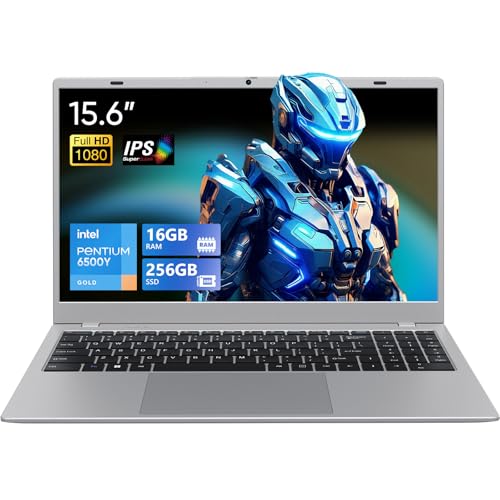
Hardware specifications reveal crucial differences between everyday student laptops and machines suited for lightweight digital audio workstations. For instance, the UOWAMOU 15.6 FHD Laptop features a fanless silent build that eliminates unwanted fan noise near sensitive studio microphones, though its dual-core Intel Pentium Gold 6500Y processor is tailored primarily for light audio playback. In contrast, the Dell 15 Laptop DC15250 provides a modern Intel Core 3 100U processor alongside a 120Hz display, though it ships with only 8GB of RAM. Meanwhile, the KAIGERR 15.6 laptop supplies 16GB of DDR4 RAM and 512GB of expandable NVMe SSD storage, giving mobile creators extra headroom for sample libraries. Evaluating these specific component differences helps you target an affordable portable setup that meets your studio tracking demands.

Pros
- 120Hz display is rare at this price point, offering smoother animations and reduced eye strain
- Solid build quality with a clean Carbon Black finish and ergonomic hinge design
- Fast SSD storage and adequate 8GB RAM for light gaming and productivity tasks
- Included 1 Year Onsite Service adds convenience for hardware issues
Cons
- Integrated Intel UHD Graphics limit gaming to less demanding titles and lower settings
- 8GB RAM may feel restrictive for heavy multitasking or running multiple applications side by side
- Battery life is average compared to some competitors in the same price range
The Dell 15 Laptop (DC15250) is a traditional laptop designed for everyday computing, but it offers a few features that casual gamers and college gamers will appreciate. With a 15.6-inch FHD display refreshing at 120Hz, this laptop prioritizes visual smoothness at an affordable price point. While it's not a dedicated gaming machine, the high refresh rate screen makes browsing, streaming, and less graphically intensive games feel more fluid than your typical 60Hz workhorse.
This laptop is best suited for casual gamers who enjoy lighter titles like indie games, older RPGs, or esports games at lower settings. College students and work-from-home gamers will also benefit from the comfortable keyboard with a numeric keypad and the lifted hinge design that promotes ergonomic wrist positioning for long typing or study sessions. Streamers or content creators on a tight budget may find it adequate for video playback and basic editing, but the integrated Intel UHD Graphics won't handle heavy rendering or high-bitrate streaming smoothly.
In terms of real-world performance, the 120Hz display stands out for reducing motion blur and making everyday tasks feel snappier. The Intel Core 3 processor paired with 8GB DDR4 RAM is enough for web browsing, office apps, and light multitasking. The 512GB SSD ensures quick boot times and fast loading for your primary applications and a few games. However, the lack of a dedicated graphics card means you'll need to lower resolutions and details to play modern titles, and even then, frame rates will be modest.
Build quality is decent for a budget laptop. The Carbon Black chassis feels solid, and the hinges are sturdy enough to lift the bottom of the laptop for better airflow and a comfortable typing angle. At 4.19 pounds, it's portable enough for a backpack. The keyboard includes a separate numeric keypad and a calculator hotkey, which is a nice productivity touch. Setup is straightforward with Windows 11 Home pre-installed; you just need to sign in and update. The Dell ComfortView software is a welcome addition for reducing blue light, which helps during late-night gaming or study sessions.
One realistic limitation is the integrated graphics, which will struggle with demanding games. Also, the 8GB RAM is soldered? Actually, many Dell 15 models allow upgrading RAM, but check specifications. If you plan to run multiple tabs and applications simultaneously, you may hit memory limits. Battery life is typical for this class, lasting around 6-8 hours under light use but less with the 120Hz screen active during gaming. The 1 Year Onsite Service is a nice bonus, providing direct support if hardware issues arise.
Overall, the Dell 15 is a practical buy for casual gamers, college students, or anyone needing a responsive display for everyday computing on a tight budget. If you're a competitive gamer or streamer requiring higher frame rates and graphics power, you'll need a dedicated GPU laptop. But for light gaming, schoolwork, or home office tasks within a strict budget, this laptop offers good value with its smooth 120Hz screen and solid build.

Frequently Asked Questions
How much RAM is necessary in a laptop for recording music?
A minimum of 16GB of RAM is generally recommended for smooth digital audio workstation performance. While an 8GB machine can run lightweight multi-track sessions, recording software and sample libraries quickly consume memory. Configurations such as the KAIGERR notebook and UOWAMOU laptop supply 16GB of memory out of the box, reducing background caching slowdowns.
Does processor speed affect audio recording latency?
Yes, processor clock speeds and core efficiency directly influence real-time buffer management during live audio tracking. Stronger multi-core processors, such as the Intel Core 3 100U in the Dell 15, handle real-time audio plugin rendering more effectively than entry-level chips. When tracking live vocals or instruments, lower latency buffers depend heavily on steady CPU burst capability.
Why is fan noise a major consideration for studio recording?
Excessive cooling fan noise can bleed directly into sensitive studio condenser microphones during vocal or acoustic takes. Passive, fanless computers like the UOWAMOU 15.6 FHD Laptop operate silently, making them useful for quiet room recordings. However, active cooling laptops handle sustained processing heat much better during dense mixing sessions.
What ports are essential on a Laptop For Recording Music in 2026?
Standard USB-A and USB-C ports are essential for connecting external audio interfaces, MIDI keyboards, and hardware dongles. A built-in headphone jack and HDMI port provide direct monitoring and external monitor connections without adapters. For creators who also produce visual media or use sharp laptop visual displays, multi-port versatility remains vital.
Can an SSD improve project load times in audio software?
Yes, solid-state drives drastically cut load times for large sample libraries and multi-track audio project files. Fast NVMe storage, as listed on the KAIGERR 15.6-inch laptop, streams recorded audio stems without disk-read bottleneck errors. Dedicated SSD capacity also ensures stable project saving when managing dense session folders.
Is a dedicated graphics card required for recording audio?
No, audio production relies almost entirely on CPU capability and system memory rather than dedicated graphics hardware. Integrated solutions like Intel UHD Graphics manage standard DAW user interfaces easily without inflating notebook cost or power consumption. A dedicated GPU is only necessary if your studio workflow also includes video editing or 3D rendering.





Write Your Review
No reviews yet. Be the first to share your experience!