


Most LG monitors use standard VESA patterns, so a universal replacement stand is often the correct solution. The specific lg replacement monitor stand you need depends on your screen size, weight, and desk type. You do not need an LG-branded accessory if you verify the VESA hole spacing and weight capacity of your display. This guide helps you identify the right mount to replace a broken or missing stand safely.
Choosing the wrong stand can lead to instability or damage to the monitor panel. Many users assume that because LG makes monitors, they must use LG-specific stands. In reality, the industry standard for mounting holes allows for cross-brand compatibility. By checking the back of your monitor for the 75x75mm or 100x100mm pattern, you can select from a wide range of freestanding or clamp-based options. This ensures you get the ergonomic adjustments you need without paying a premium for a brand-specific part.


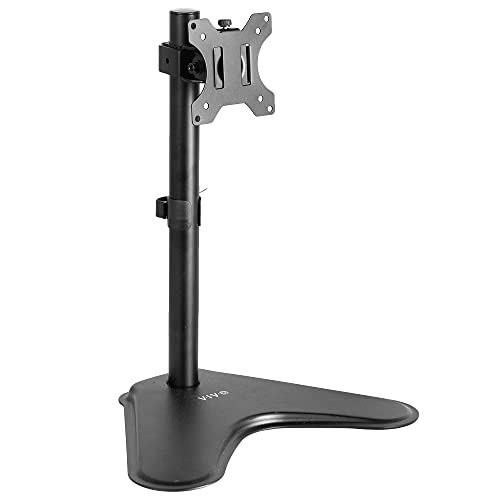


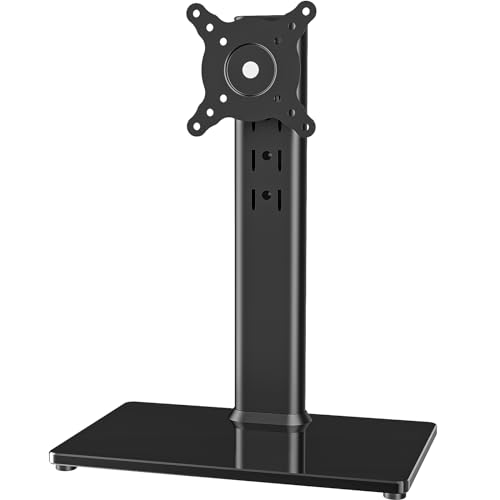
How to Identify the Correct Replacement Stand
The first step in finding a compatible replacement is confirming that your LG monitor supports VESA mounting. Most modern LG monitors include this feature, but some ultra-thin models or all-in-one computers may not have the mounting holes. You must physically inspect the back of the screen to see the screw holes. If the holes are present, you need to measure the distance between them to determine the correct pattern. This measurement dictates which stand heads will fit securely onto your display.
| VESA Pattern | Typical Screen Size | Common Monitor Weight |
|---|---|---|
| 75x75mm | 13″ to 24″ | Under 15 lbs |
| 100x100mm | 24″ to 32″ | 15 lbs to 30+ lbs |
| 200x100mm | 34″ Ultrawide | 20 lbs to 40+ lbs |
Weight capacity is the second critical factor that determines stability. A stand that is too light for the monitor may wobble or tip over, especially if the screen is large or heavy. You should check the maximum weight limit listed in the product specifications for any stand you consider.
For LG monitors, which vary significantly in weight depending on the panel technology and size, it is safer to choose a stand with a weight capacity that exceeds your monitor’s actual weight by at least 20%. This buffer ensures long-term stability and prevents stress on the mounting hardware.
Desk compatibility is another major consideration that many buyers overlook. Freestanding stands are ideal for desks that cannot be drilled or clamped, while clamp-based arms save space but require a solid desk edge. If you have a glass desk or a desk with a grommet hole, your options change significantly.
Freestanding models use a weighted base to stay in place, which is perfect for shared offices or rentals where modifications are not allowed. Clamp-based mounts, on the other hand, attach directly to the desk edge, providing a more secure hold but requiring specific desk thickness and material strength.
Before purchasing, you should verify the physical dimensions of the stand to ensure it fits your workspace. Some stands have a large footprint that may conflict with keyboard trays or other desk accessories. Others have tall poles that may hit low ceilings or overhead shelves. Measuring your available desk space and ceiling height helps you avoid buying a stand that is physically too large for your environment. This practical check saves time and prevents the need to return a product that does not fit your specific setup.
Here is a quick checklist to use before you buy a new stand:
- Confirm VESA holes are present on the back of your LG monitor.
- Measure the distance between holes to identify 75×75 or 100×100 pattern.
- Check the exact weight of your monitor in the LG manual.
- Decide if you need a freestanding base or a desk clamp.
- Ensure the stand height range allows for eye-level viewing.
- Verify the stand includes the necessary VESA screws and hardware.
Freestanding vs Clamp-Based Mounts
Freestanding stands are the most common replacement for broken LG monitor stands because they do not require any modification to your desk. They sit on the surface and use a heavy base to keep the monitor upright. This makes them ideal for users who cannot drill holes or use clamps. However, they take up more desk space and may be less stable than clamp-based options if the base is not weighted enough. For lighter monitors, a freestanding stand is usually sufficient and easy to move around.
Clamp-based arms attach to the edge of your desk and offer a more secure connection. They are often preferred for larger or heavier monitors because the clamp provides a fixed point that does not rely on friction or weight.
These arms can also retract closer to the desk, saving space in tight workstations. However, they require a desk that is thick enough and sturdy enough to support the clamp without bending. If your desk is too thin or made of soft material, a clamp-based arm may not be a safe option.
Grommet-based stands are another alternative that uses an existing hole in your desk to secure the stand. This is a good option if you already have a grommet hole for cable management. It provides stability similar to a clamp but without the risk of damaging the desk edge. However, it is only useful if you have a suitable hole in the right position. If not, you would need to drill one, which is not always practical for all users.
Understanding VESA Patterns and Compatibility
The VESA standard defines the distance between the four screw holes on the back of a monitor. The two most common patterns for LG monitors are 75x75mm and 100x100mm. Most 24-inch and smaller LG monitors use the 75x75mm pattern, while 27-inch and larger models often use 100x100mm. However, there are exceptions, so you must always verify the specific pattern for your model. Some ultrawide monitors use a 200x100mm pattern, which requires a specialized stand head.
Many stands are designed to be compatible with both 75x75mm and 100x100mm patterns. They include adjustable plates or multiple sets of screws to accommodate either spacing. This makes them a versatile choice for users who may upgrade their monitor in the future. If you are unsure of your monitor’s pattern, buying a dual-compatible stand is the safest bet. It ensures that the stand will fit your current monitor and any future replacement that uses a standard pattern.
Some LG monitors have a proprietary mounting system that does not follow the standard VESA pattern. This is rare but possible in certain older or specialized models. If your monitor does not have standard VESA holes, you may need an adapter plate to connect a standard stand. These adapters are inexpensive and widely available. They attach to the back of the monitor and provide the necessary VESA holes for a standard stand. Check the model number of your monitor to confirm if an adapter is needed.
Ergonomic Adjustments and Viewing Comfort
One of the main reasons to replace a monitor stand is to improve ergonomic positioning. A fixed stand often forces you to look down at the screen, which can cause neck and back pain over time. An adjustable stand allows you to raise the monitor to eye level, reducing strain on your cervical spine. This is particularly important for users who spend long hours in front of the computer. The ability to adjust height is the most valuable feature for ergonomic comfort.
Tilt and swivel adjustments are also important for reducing glare and improving viewing angles. A stand that allows you to tilt the screen forward or backward helps you find the optimal angle for your lighting conditions.
Swivel capability lets you turn the screen left or right, which is useful for collaborative work or sharing content with someone next to you. Rotation, or the ability to switch between landscape and portrait mode, is beneficial for tasks like coding or reading long documents. Not all stands offer these features, so choose based on your specific needs.
Cable management is a practical feature that keeps your workspace tidy. Many replacement stands include clips or channels to route cables along the pole or arm. This prevents cables from dangling loosely, which can look messy and potentially snag on other items. A clean setup is not just aesthetic; it can also reduce distractions and make it easier to clean your desk. If you have multiple cables, look for a stand with ample cable management options to keep everything organized.
Here are key ergonomic features to look for in a replacement stand:
- Height adjustment range that allows the screen to be at eye level.
- Tilt mechanism that lets you angle the screen up or down.
- Swivel capability for left and right rotation of the monitor.
- Portrait mode support for vertical orientation of the display.
- Cable management clips to keep wires organized and hidden.
- Smooth and stable movement without excessive wobble.
Installation and Safety Considerations
Installing a replacement stand is usually a straightforward process, but it requires care to avoid damaging your monitor. Most stands come with a VESA plate that screws onto the back of the monitor. You should use the screws provided in the package, as they are the correct length for the stand and monitor. Using screws that are too long can damage the internal components of the monitor. Always follow the manufacturer’s instructions for assembly and installation.
For clamp-based stands, ensure that the desk is sturdy enough to support the weight of the monitor. A weak desk edge may bend or break under the pressure of the clamp. If your desk is made of particle board or a similar soft material, a freestanding stand may be a safer choice. For grommet-based stands, ensure that the hole is large enough for the stand’s base to fit through securely. A loose fit can lead to instability and potential tipping of the monitor.
Always check the weight of your monitor before installing a new stand. Exceeding the weight limit of the stand can lead to failure, which may result in the monitor falling and breaking. This is a serious safety hazard that can cause injury and expensive damage. If your monitor is near the maximum weight limit of the stand, consider choosing a stand with a higher capacity. It is better to be safe and have extra capacity than to risk a failure.
When handling the monitor during installation, support the weight of the screen with both hands. Avoid lifting by the screen itself, as this can put stress on the panel. Use the back of the monitor or the VESA plate to lift and position the screen. If you are installing a heavy monitor, it may be helpful to have someone assist you. This ensures that the monitor is positioned correctly and securely attached to the stand without any accidental drops or bumps.
If you are unsure about the compatibility of a stand with your specific LG monitor, check the product description for a list of compatible models. Some manufacturers provide detailed compatibility charts that list the exact models and sizes that work with their stands.
If your model is not listed, you can contact the manufacturer’s support team for clarification. They can help you determine if the stand is suitable for your monitor based on the VESA pattern and weight. This step ensures that you make an informed purchase and avoid potential compatibility issues.
For more on how to optimize your display setup, check out our guide on best monitor for office work to see how stand choice impacts productivity.
Choosing the right replacement stand involves verifying VESA patterns, checking weight limits, and selecting the appropriate mounting style for your desk. By following these steps, you can ensure a safe and ergonomic setup for your LG monitor. Take the time to measure and verify compatibility before purchasing to avoid returns and ensure a smooth installation process.







Write Your Review
No reviews yet. Be the first to share your experience!