


Esports enthusiasts know the sting of missing an easy flick shot because enemy models smear into blurry streaks during high-speed turns. Screen blur cuts right through fast reaction times and ruins tactical awareness when you can’t spot a crisp enemy outline. Pixels must transition fast enough to keep moving silhouettes razor sharp, which makes understanding what is a good monitor response time for gaming a critical step before upgrading your desk setup. Many competitive players pair high refresh rates with a dedicated monitor for FPS gaming to maintain crystal-clear visibility without visual distraction. Fast pixel transitions keep targets readable, helping your crosshair stay locked where it belongs.
Display manufacturers often slap a flashy one-millisecond label on product boxes, but real-world pixel behavior depends heavily on panel architecture and overdrive tuning. Analyzing manufacturer specifications shows that a 1ms to 4ms response time delivers the sweet spot for modern Fast IPS and VA panels, ensuring swift transitions without severe overshoot artifacts. Some budget curved panels offer great immersion, though checking whether curved monitors for gaming introduce dark smearing is vital for fast-paced shooters. Matching solid pixel speed with adaptive sync keeps screen tearing away, providing a fluid presentation across marathon gaming sessions.

Pros
- 200Hz refresh rate provides excellent fluidity for competitive gaming.
- Fast IPS panel offers good color accuracy and viewing angles for its price.
- Adaptive Sync eliminates screen tearing with compatible GPUs.
- Affordable price point for a high refresh rate IPS monitor.
- Beige color option adds a refreshing alternative to standard black/grey monitors.
Cons
- 1080p resolution may not satisfy users wanting higher pixel density for productivity or detailed visuals.
- Built-in speakers are basic; dedicated headphones or external speakers recommended for immersive audio.
- 24-inch size might feel small for users accustomed to larger displays or who prefer a more expansive view.
The Pixio PX248 Wave Beige is a 24-inch Fast IPS gaming monitor that brings a 200Hz refresh rate and 1ms response time to the table at a very accessible price point. It is designed for PC gamers, esports enthusiasts, and streamers who prioritize smooth, responsive gameplay without breaking the bank. The monitor's unique beige finish also appeals to those who want their setup to stand out from the sea of black and grey peripherals.
Performance-wise, the 200Hz refresh rate is a standout feature, especially for competitive titles like first-person shooters and fast-paced MOBAs. Combined with the 1ms GTG response time, motion blur and ghosting are virtually eliminated, allowing you to track targets and react quickly. Adaptive Sync further enhances the experience by synchronizing the monitor's refresh rate with your GPU, which reduces screen tearing and stuttering during variable frame rates. This makes the PX248 Wave a solid choice for gamers who own compatible graphics cards.
The Fast IPS panel is another highlight, delivering vibrant colors and consistent brightness from wide viewing angles. While it is not a high-end HDR display, it offers good color reproduction for gaming and media consumption. The built-in speakers are a convenient addition for casual use or quick audio needs, but they lack depth and volume, so a dedicated headset or external speakers will provide a much better experience for long sessions or competitive gaming.
Setting up the monitor is straightforward: it includes HDMI 2.0 and DisplayPort 1.4 ports, both supporting 1080p at 200Hz. The stand is basic but functional, and the monitor is VESA mountable (100x100mm), making it easy to attach to an arm or wall mount for a cleaner desk setup. The beige color scheme might not match everyone's decor, but for those building a themed or minimalist setup, it's a refreshing change.
One realistic limitation is the 1080p resolution on a 24-inch screen. While it ensures high frame rates in games, users accustomed to 1440p or 4K displays may notice less sharpness in text and fine details. Additionally, the 24-inch size is compact, which is great for smaller desks or dual-monitor setups but may feel restrictive for gamers who prefer larger, more immersive displays.
Overall, the Pixio PX248 Wave Beige is a practical choice for competitive gamers on a budget who value high refresh rates and smooth performance. It is also well-suited for esports players, casual gamers, and streamers who want a reliable secondary monitor or a primary display that doesn't compromise on speed. If you can live with 1080p and a 24-inch panel, this monitor offers excellent value for its price.
The Pixio PX248 Wave Beige excels in gaming scenarios where every millisecond counts. The 200Hz refresh rate is a significant upgrade over standard 60Hz or 144Hz monitors, providing buttery-smooth motion that makes fast-paced games like shooters and racing simulators feel incredibly responsive. The 1ms GTG response time ensures that fast-moving objects remain sharp, without the ghosting or blur that can hinder your aim in competitive play.
Adaptive Sync support is another key advantage for gamers. By matching the monitor's refresh rate to the frame output of your GPU, it virtually eliminates screen tearing, even when frame rates fluctuate. This feature works with both AMD FreeSync and NVIDIA G-Sync compatible cards, making it a flexible option for a wide range of systems. In real-world use, this means you can enjoy a tear-free experience in games like Call of Duty, Apex Legends, or Valorant without needing to cap your framerate.
While the monitor is limited to 1080p resolution, that is often a benefit for competitive gamers who prioritize high frame rates over pixel density. The combination of 200Hz and 1080p means even mid-range GPUs can push enough frames to take full advantage of the refresh rate. For casual single-player games, the vibrant IPS panel still delivers an enjoyable visual experience, though you may notice the lower resolution on text or detailed environments if you sit close. Overall, the PX248 Wave is a performance-focused monitor that delivers where it matters most for gaming.
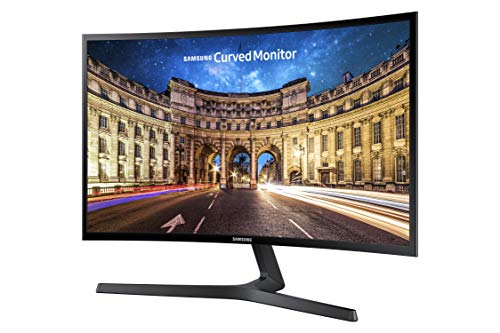
Pros
- Immersive curved display at an affordable price
- FreeSync support ensures smooth gameplay with compatible GPUs
- Fast 4ms response time reduces blur for competitive gaming
- Eye Saver Mode and flicker-free technology protect your eyes
- Ultra-slim, lightweight design is easy to mount or place on a desk
- Excellent 3000:1 contrast ratio for deep blacks and rich colors
Cons
- Limited to 60Hz refresh rate, not ideal for high-FPS competitive gaming
- Connectivity options are limited to HDMI and VGA (no DisplayPort)
- Stand lacks height adjustment, tilt only
The Samsung CF396 is a 23.5-inch curved monitor designed to bring immersion to PC gamers without demanding a premium price. Its 1800R curvature wraps the visuals around you, making it a solid choice for casual gamers, esports players, and anyone building a budget gaming setup. The monitor also works well for streamers and content creators who want a secondary display or a compact primary monitor for their desk.
In real-world gaming, the AMD FreeSync support is a standout feature. If you pair this monitor with a compatible AMD graphics card, you'll notice smoother visuals and fewer screen tears during fast scenes. The 4ms response time is respectable for the price, keeping motion blur in check during shooters like Fortnite or racing games like Forza Horizon. However, the 60Hz refresh rate means it won't deliver the buttery-smooth motion that competitive players crave at higher frame rates, but for most casual and mid-tier gaming, it's perfectly adequate.
Build quality is impressive given the price point. The ultra-slim profile (under half an inch thick) makes it one of the slimmest curved monitors available, and the simple circular stand keeps the footprint small. The monitor is lightweight at under 7 pounds, so wall-mounting is easy if you want a cleaner desk. The bezels are fairly thin on the sides, adding to the modern look. On the downside, the stand only offers tilt adjustment and no height or swivel, so you may need to add a VESA mount (100x100mm) for optimal ergonomics.
Setting up the CF396 is straightforward: plug in the power, connect via HDMI or VGA, and you're good to go. The on-screen menu is simple, with presets for gaming, eye saver, and eco-saving. Speaking of eye care, the Eye Saver Mode and flicker-free backlight are great for reducing fatigue during long marathon sessions or late-night grinding. The eco-saving feature also helps reduce power consumption when you're just browsing or watching videos.
A realistic limitation is the connectivity: only one HDMI and one VGA port, with no DisplayPort or USB hub. This might be a dealbreaker if you need multiple inputs or want to use adaptive sync over DisplayPort. Also, the 1080p resolution is standard for a 24-inch panel, but text can appear slightly less sharp compared to higher-resolution displays. The colors and contrast are good out of the box, with the 3000:1 ratio delivering deep blacks that are rare at this price, making it suitable for media consumption as well.
Overall, the Samsung CF396 is a practical choice for PC gamers on a budget who want curved immersion and basic gaming features. It's best for casual gamers, work-from-home setups, dorm rooms, or as a secondary monitor for streamers. If you're a competitive player needing 144Hz or higher, look elsewhere, but for the price, this monitor offers solid value and a sleek design that fits nicely into most gaming desk setups.
The Samsung CF396 brings AMD FreeSync to the table, which is a big plus for smooth, tear-free gameplay when used with a compatible GPU. The 4ms response time keeps motion blur low, so fast transitions in FPS and racing games look cleaner than standard office monitors. However, the 60Hz refresh rate limits its appeal for competitive esports players who prefer 144Hz or higher. For casual and story-driven games, the curved screen and good contrast ratio make scenes feel more immersive.
The monitor's ultra-slim profile (less than 0.5 inches thick) is a standout design feature, giving it a premium look despite the budget price. The 1800R curve is gentle enough to be pleasant without distorting straight lines. The stand is simple but stable, though it only offers tilt. The VESA 100x100 mount compatibility is a plus for those who want to arm-mount or wall-mount the display. Overall, the build feels solid and the matte black finish resists fingerprints.
Eye Saver Mode reduces blue light emissions significantly, making it easier on your eyes during long gaming sessions or late-night work. The flicker-free technology eliminates PWM flicker, which can cause headaches and eye strain for sensitive users. Combined with the curved screen that reduces eye movement across the display, the CF396 is a comfortable monitor for extended use. The brightness range is good, and the Eco-Saving Plus feature helps reduce glare in dark environments.
Setup is quick: connect power and signal via HDMI or VGA. The monitor auto-detects the input and you can adjust settings through the simple OSD menu. The lack of DisplayPort means you can't take full advantage of FreeSync over that interface (though it works over HDMI on compatible AMD GPUs). There are no built-in speakers or USB ports, so plan for external audio and a separate hub if needed. The small footprint makes it ideal for tight desks or multi-monitor setups.

Pros
- High 180Hz refresh rate ensures smooth motion and responsive gameplay for competitive gaming
- Curved VA panel with 4000:1 contrast ratio delivers deep blacks and vivid colors for an immersive experience
- Eye care features like Flicker-Free and blue light reduction help reduce fatigue during extended use
- Affordable price point makes it an excellent entry-level option for budget-conscious gamers
Cons
- 1080p resolution on a 27-inch screen may result in slightly lower pixel density compared to higher-resolution monitors
- Limited to 180Hz via DP; HDMI may not support full refresh rate depending on source device
- Minimal adjustability (likely tilt only) and no built-in speakers may require additional accessories for optimal ergonomics and audio
The DJiEX 27-inch curved gaming monitor is a solid entry-level display built for PC gamers who want smooth performance without breaking the bank. With a 180Hz refresh rate and AMD FreeSync support, this monitor is designed to minimize screen tearing and stuttering, giving you a fluid experience in fast-paced games like first-person shooters and MOBAs. The 1800R curvature wraps around your field of view, adding a layer of immersion that flat panels just can't match, while the VA panel delivers deep blacks and vibrant colors thanks to a 4000:1 contrast ratio and 99% sRGB coverage.
This monitor is best suited for competitive gamers, casual players, esports enthusiasts, and even streamers who need a reliable secondary display for chat or monitoring. College gamers and work-from-home users will also appreciate the balance of performance and eye comfort features, including Flicker-Free technology and blue light reduction, which help reduce strain during marathon sessions or long workdays. The 3ms response time keeps motion blur in check, so you can track fast-moving targets with clarity.
Build quality is decent for the price, with a slim bezel design that looks clean on any desk. The stand offers basic tilt adjustment, but you'll likely want to use the VESA mount compatibility to free up desk space and improve ergonomics. Connectivity is straightforward with one HDMI and one DisplayPort, supporting up to 180Hz over DP, though the exact refresh rate depends on your GPU and apps. Cable management is minimal, but mounting the monitor helps keep things tidy.
Setup is plug-and-play simple: just connect your PC or laptop, adjust the refresh rate in your display settings, and enable FreeSync if your GPU supports it. The on-screen display (OSD) is easy to navigate with physical buttons, letting you tweak brightness, contrast, and gaming presets quickly. For software customization, you're limited to the OSD, but that's typical for monitors in this price range.
One realistic limitation is the 1080p resolution on a 27-inch screen, which means pixel density isn't as sharp as a 1440p or 4K panel. Text and fine details may look slightly softer, but for gaming, the high refresh rate and smoothness more than compensate. Also, there are no built-in speakers, so you'll need a headset or external speakers for audio. The stand is functional but lacks height and swivel adjustments, so a VESA arm is a worthwhile upgrade.
Overall, the DJiEX 27-inch curved gaming monitor is a practical choice for gamers building a budget-friendly setup or looking for a smooth secondary display. It delivers the responsiveness needed for competitive play, with enough color accuracy and eye comfort for everyday use. If you're a PC gamer, esports player, or casual user who values high refresh rates and immersive curvature without overspending, this monitor is worth considering.

Pros
- 240Hz refresh rate provides exceptional smoothness for competitive gaming.
- Fast IPS panel offers good color accuracy and wide viewing angles.
- 1ms GTG response time reduces ghosting effectively.
- Fully adjustable stand adds ergonomic flexibility without extra cost.
- Adaptive Sync helps eliminate screen tearing during gameplay.
Cons
- 1080p resolution on a 27-inch screen may appear less sharp than higher-resolution alternatives for some users.
- No built-in speakers, so you'll need external audio for sound.
- Limited to FHD resolution, which may not suit gamers who prefer higher pixel density.
The Pixio PX279 Prime Neo is a 27-inch gaming monitor built for players who prioritize speed and responsiveness above all else. With a 240Hz refresh rate and 1ms GTG response time, this Fast IPS panel is designed to keep up with the fastest movements in competitive shooters, MOBAs, and racing games. It's a solid choice for PC gamers, esports competitors, and anyone building a high-performance gaming setup on a budget.
For competitive gamers, the combination of 240Hz and 1ms response time means you'll see less motion blur and ghosting during intense firefights. The Fast IPS technology also gives you vibrant colors and good viewing angles, so you don't have to sacrifice image quality for speed. Adaptive Sync support further smooths out gameplay by reducing screen tearing, as long as you have a compatible graphics card. This monitor is particularly well-suited for esports titles like Valorant, Overwatch, and CS2 where every millisecond counts.
The build quality is practical and functional. The fully adjustable stand offers tilt, swivel, and height adjustments, letting you dial in a comfortable viewing position for long gaming sessions. The monitor's black, minimalist design fits well into most gaming desk setups. Connectivity includes two HDMI 2.1 ports and one DisplayPort 1.4, all supporting 1080p at 240Hz, so you can easily hook up a PC, laptop, or console without compatibility issues.
Setting up the PX279 Prime Neo is straightforward - just attach the stand, plug in your preferred cable, and you're ready to go. There's no complex software needed for basic use, though you may want to tweak the on-screen display settings for brightness or color presets. The lack of built-in speakers means you'll need to use a headset or external speakers, but that's common among gaming monitors. Cable management is simple thanks to the stand's design, keeping your desk tidy.
One realistic limitation is the 1080p resolution on a 27-inch screen. While it keeps frame rates high and is ideal for competitive gaming, some users may notice less sharpness compared to 1440p or 4K displays, especially for desktop use or single-player games. If you prioritize pixel density over raw speed, this might not be the best fit. However, for its price point, the trade-off is reasonable for those focused on performance.
Overall, the Pixio PX279 Prime Neo is a strong recommendation for competitive PC gamers and esports players who want a high refresh rate monitor without spending a fortune. It's also a great option for college gamers or anyone building a budget-friendly gaming setup that still delivers smooth, responsive gameplay. If you're after a fast, reliable monitor for fast-paced titles, this one deserves a spot on your desk.

Pros
- Blazing 200Hz refresh and 1ms response give a clear competitive edge in fast games
- IPS panel offers excellent color accuracy and consistent viewing angles
- Adaptive Sync works seamlessly with compatible AMD and NVIDIA GPUs
- Very affordable price for a high-refresh-rate gaming monitor with modern features
Cons
- Only 1080p resolution, which may not satisfy gamers wanting higher pixel density for immersive titles
- Built-in speakers are basic and lack bass, so dedicated headphones or external speakers are recommended for serious gaming
- Yellow color scheme may not match all desk setups or personal aesthetics
The Pixio PX248 Wave Yellow is a 24-inch 200Hz FHD IPS gaming monitor that brings speedy performance to budget-conscious PC gamers, esports players, and setup builders. With its sharp 1080p resolution, fast 1ms GTG response time, and Adaptive Sync support, this display is built for competitive gaming where every millisecond counts. It also includes built-in speakers and a bold yellow design that stands out from the typical black monitor crowd.
When it comes to real-world performance, the 200Hz refresh rate makes a huge difference in fast-paced titles like Valorant, Apex Legends, or Call of Duty. Motion stays fluid and blur-free, and the 1ms response ensures that ghosting is virtually eliminated. Adaptive Sync further smooths out the experience by matching the monitor's refresh rate to your GPU's frame output, so screen tearing becomes a thing of the past. This combination is a boon for competitive gamers who demand responsiveness and visual clarity without stutter.
The IPS panel delivers rich, lifelike colors and wide viewing angles, which is a nice bonus for both gaming and media consumption. Whether you're playing an open-world RPG or watching a stream, the image quality remains consistent even if you move off-center. Build quality is typical of Pixio's value-oriented monitors: a sturdy plastic frame with a simple stand that offers tilt adjustment but lacks height or swivel. The yellow bezels and stand add a playful aesthetic, though it may not suit every setup.
Connectivity is straightforward with one HDMI 2.0 and one DisplayPort 1.4, both capable of running 1080p at 200Hz. This ensures broad compatibility with PCs, laptops, and even some consoles (though most consoles top out at 120Hz). The built-in speakers are adequate for casual use or background audio, but serious gamers and streamers will want dedicated headphones or external speakers for better sound quality. Setup is plug-and-play, and the monitor's on-screen display is easy to navigate.
One realistic limitation is the 1080p resolution; while it's fine for 24 inches and high refresh rates, users accustomed to 1440p or 4K may find the pixel density lacking for immersive single-player games. Also, the yellow color may clash with more neutral or RGB-heavy setups. The stand offers only tilt, so if you need height, swivel, or pivot adjustments, you'll need to factor in a VESA mount (100x100mm compatible). The built-in speakers are a convenience but not a replacement for a good headset or speakers.
Overall, the Pixio PX248 Wave Yellow is a solid choice for PC gamers, esports competitors, and streamers who prioritize speed over resolution. It's especially suited for college gamers or anyone building a budget gaming setup who wants a reliable, high-refresh-rate monitor without breaking the bank. If you can live with 1080p and the unique yellow design, this monitor delivers excellent performance for its price point.

Pros
- High 180Hz refresh rate and 1ms response time provide a competitive edge in fast games.
- IPS panel delivers accurate colors and consistent brightness from any angle.
- FreeSync support ensures smooth gameplay with compatible AMD graphics cards.
- Multiple input options (DP 1.4, HDMI 2.0) for PCs, consoles, and laptops.
- Attractive price point for a 1440p 180Hz IPS monitor.
Cons
- Built-in speakers are basic and lack bass - external speakers or headphones are recommended for immersive audio.
- Stand offers tilt adjustment but no height or swivel adjustments, which may require a third-party monitor arm for optimal ergonomics.
- FreeSync is limited to AMD GPUs; Nvidia users won't get variable refresh rate support without a compatible G-Sync monitor.
The Pixio PX278 Wave is a 27-inch gaming monitor that targets PC gamers who want high performance without breaking the bank. With a 1440p resolution, 180Hz refresh rate, and 1ms GTG response time, it's built for fast-paced gaming where every millisecond counts. The Fast IPS panel ensures vibrant colors and wide viewing angles, making it suitable for both competitive shooters and immersive open-world titles.
This monitor is best suited for competitive gamers, esports players, and PC enthusiasts who demand fluid motion and quick response. Streamers and content creators will appreciate the color accuracy and 1440p clarity for editing and multitasking. Casual gamers and college gamers will enjoy the smooth gameplay and generous screen real estate for work or study.
In real-world use, the 180Hz refresh rate dramatically reduces motion blur, giving you a clear view of fast-moving enemies in games like Valorant or Apex Legends. The 1ms GTG response time ensures there's no ghosting or smearing, so you can track targets precisely. AMD FreeSync matches the monitor's refresh rate to your GPU's frame rate, eliminating screen tearing and stuttering for a seamless experience. The IPS panel also provides excellent color reproduction, making games look more vivid and lifelike.
Build quality is solid with a black plastic chassis and a slim profile. The stand is basic, offering only tilt adjustment, but the VESA mount compatibility allows you to use a monitor arm for better ergonomics and desk setup. Connectivity is straightforward with a DisplayPort 1.4 port that supports 1440p at 180Hz and two HDMI 2.0 ports that cap at 1440p at 144Hz. This gives you flexibility for connecting PCs, consoles, and laptops. The built-in speakers are a nice addition for quick audio, but they lack depth and volume, so dedicated speakers or a headset are better for serious gaming.
Setting up the Pixio PX278 Wave is simple - just attach the stand (or mount), plug in the cables, and you're ready. The on-screen display menus are intuitive, allowing you to adjust brightness, contrast, and gaming modes easily. One realistic limitation is the lack of height and swivel adjustment on the stand, which might force you to search for a better viewing angle. Additionally, FreeSync only works with AMD GPUs, so Nvidia users won't benefit from variable refresh rate unless they opt for a G-Sync compatible monitor.
Overall, the Pixio PX278 Wave is a strong choice for gamers who prioritize speed and clarity at a competitive price. It delivers the high refresh rate and response time needed for esports, while the 1440p IPS panel provides excellent visuals for any genre. If you can work around the stand limitations and don't mind the basic speakers, this monitor offers great value for building a high-performance gaming setup.
The Pixio PX278 Wave excels in gaming with its 180Hz refresh rate and 1ms GTG response time. In fast-paced shooters like Call of Duty or Overwatch, motion is incredibly smooth with minimal blur, giving you a clear view of opponents. The 1440p resolution offers a sharp image with better detail than 1080p, so you can spot enemies at a distance. AMD FreeSync synchronizes the display with your GPU, eliminating screen tearing without the input lag often associated with V-Sync. For competitive gamers, this monitor provides the speed and clarity needed to stay ahead.
The 27-inch Fast IPS panel covers 90% DCI-P3 color gamut (typical), delivering vibrant and accurate colors straight out of the box. Brightness peaks at 300 cd/m², which is adequate for indoor gaming but may feel dim in bright rooms. The 1000:1 contrast ratio is typical for IPS, with deep blacks and good shadow detail. Viewing angles are excellent, with no color shift when viewed from the side. The 1440p resolution at 27 inches yields a pixel density of around 109 PPI, giving you a crisp image for gaming, browsing, and editing.
The Pixio PX278 Wave offers one DisplayPort 1.4 port that supports 1440p at 180Hz with 10-bit color, and two HDMI 2.0 ports that support 1440p at 144Hz. This makes it compatible with PCs, laptops, and current-gen consoles like PlayStation 5 and Xbox Series X (though consoles are limited to 1440p at 120Hz via HDMI). There is no USB hub, but the included cables are of decent length. The input selection is straightforward, and the monitor supports HDCP 2.2 for streaming services.
The monitor has a clean, minimal design with a matte black finish and thin bezels on three sides. The build feels sturdy, though the stand is basic with only tilt adjustment (-5° to 20°). The plastic construction is standard for this price range. VESA 100x100mm mounting holes are available for monitor arms or wall mounts. The power and OSD buttons are located on the back right side, which can be a bit awkward to reach but are functional. Overall, the build is solid for daily gaming use.

Pros
- High 200Hz refresh rate and 1ms response time provide excellent competitive gaming performance.
- IPS panel offers better color accuracy and viewing angles compared to typical TN monitors at this price.
- Adaptive Sync works smoothly with both NVIDIA and AMD GPUs (via DisplayPort) to reduce screen tearing.
- Affordable price point makes high-refresh gaming accessible to budget-conscious builders and college gamers.
- Simple plug-and-play setup with no complex software required; includes HDMI and DisplayPort cables.
Cons
- Built-in speakers are basic and lack volume and bass, so most gamers will want external speakers or a headset.
- Stand offers tilt adjustment but lacks height, swivel, or pivot options, requiring aftermarket arms for full ergonomics.
- 24-inch size may feel small for users accustomed to larger displays or those who prioritize immersion over speed.
The Pixio PX248 Wave Blue is a 24-inch gaming monitor that punches well above its price tag. Designed for PC gamers who prioritize speed and clarity, this monitor combines a 200Hz refresh rate, 1ms response time, and a Fast IPS panel to deliver smooth, vibrant visuals. It is best suited for competitive esports players, FPS enthusiasts, casual gamers, and streamers who need a reliable secondary display for chat or game capture. College gamers and setup builders will also appreciate its compact footprint and clean blue-accented design.
In real-world gaming, the 200Hz refresh rate makes a noticeable difference in fast-paced titles like Valorant, Apex Legends, and Call of Duty. Motion feels fluid and responsive, and the 1ms response time keeps ghosting to a minimum. Combined with Adaptive Sync, screen tearing is virtually eliminated when paired with a compatible GPU, resulting in a smooth, stutter-free experience. The IPS panel provides rich colors and consistent brightness from any angle, which is a step up from many budget TN monitors.
Build quality is solid for the price, with a sturdy plastic frame and a stand that offers tilt adjustment. The monitor supports VESA mounting, so users can easily attach it to an arm for better ergonomics or desk organization. Connectivity includes one HDMI 2.0 and one DisplayPort 1.4, both capable of driving 1080p at 200Hz. Setup is straightforward: just plug in the included cables and enable Adaptive Sync in your GPU software. No additional drivers or calibration is needed for basic use.
One realistic limitation is the built-in speakers, which are adequate for system sounds but lack depth for immersive gaming. Most dedicated gamers will use a headset or external speakers anyway. The stand also lacks height adjustment, so taller users may need to prop the monitor up or use a VESA arm. Additionally, the 24-inch size may feel cramped for some who prefer larger screens for open-world games or productivity.
Overall, the Pixio PX248 Wave Blue is a strong value for gamers seeking high-performance specs without breaking the bank. It is an excellent primary monitor for competitive play or a secondary display for streaming and multitasking. If you are a PC gamer focused on response time and refresh rate over screen size and premium ergonomics, this monitor is a smart buy.
Frequently Asked Questions
Is a 1ms response time necessary for gaming?
No, a 1ms response time is not strictly mandatory for every gamer, but it offers a distinct advantage in competitive esports. Displays operating between 1ms and 4ms keep rapid motion crisp enough for titles like Counter-Strike 2 or Apex Legends. Casual gamers playing slower single-player adventures will find a 4ms or 5ms display perfectly smooth and immersive.
What is the difference between response time and input lag?
Response time measures how fast individual pixels transition between colors, while input lag measures the delay between pressing a button and seeing the action on screen. A monitor needs both low input lag and fast pixel transitions to feel responsive under pressure. High input latency makes controls feel sluggish, whereas slow response time produces blurry trails behind moving objects.
Does a 144Hz or 240Hz monitor need a faster response time?
Yes, higher refresh rate monitors require faster pixel transitions to avoid motion smearing. At 240Hz, a new frame appears every 4.16 milliseconds, meaning pixel response must stay well below that window to prevent overlapping frames. Fast IPS panels like those found on high-refresh Pixio screens easily keep pace with 180Hz and 240Hz refresh demands.
Can monitor overdrive settings eliminate ghosting completely?
Overdrive settings can significantly reduce ghosting, but setting the level too high causes inverse ghosting or bright coronas around moving characters. The middle overdrive preset on most monitors usually balances pixel velocity with clean image stability. Checking manufacturer documentation helps identify which overdrive preset delivers blur-free motion without distracting pixel overshoot.
Why do some VA panels suffer from dark-level smearing?
VA panels rely on liquid crystals that transition notably slower when shifting between deep blacks and dark grays. This inherent trait causes dark objects to leave shadowy trails across brighter backgrounds in dimly lit game maps. Fast IPS monitors typically handle dark color transitions much faster, making them a preferred choice for players seeking sharp clarity in shadow-heavy environments.
Is 1080p or 1440p better for maintaining clean pixel motion?
Screen resolution itself does not dictate pixel transition speeds, but it influences your graphics card output and overall frame stability. Budget-friendly options like a 27 inch gaming monitor under 200 running at 1080p reduce GPU workload, making it easier to hold the sustained high frame rates needed for clean visual motion. A 1440p panel provides sharper image detail, provided your system maintains enough FPS to match the panel speed.




Write Your Review
No reviews yet. Be the first to share your experience!