


Stuttering mid-match, thermal throttling during boss fights, and audio that sounds like it’s coming through a tin can – these frustrations push gamers to rethink their entire setup. It’s not always about grabbing the priciest machine on the shelf. Sometimes the right combination of a solid laptop, a capable mouse, decent speakers, and proper cooling makes all the difference between a frustrating session and one that actually feels smooth. That’s the real heart of which gaming laptop is the best for real performance, and it goes way beyond just the laptop itself. A full gaming ecosystem, from the peripherals on your desk to the cooling pad underneath your machine, shapes how everything performs together. If you’re eyeing upgrades that actually move the needle, check out the best upgrades for gaming PC to see where your money hits hardest.
Based on a careful look at product specifications, user feedback, and how each piece fits into a gaming workflow, this roundup covers laptops at different budgets, peripherals that solve real problems, and accessories that keep your hardware running cooler and longer. Whether you’re after a powerhouse like the Acer Predator Triton 500 SE with its RTX 3080 Ti and 240Hz display, or a budget-friendly entry point like the DERE 14 inch laptop for lighter tasks, every pick here serves a purpose. Pair any of these with the right mouse, headset, or speaker setup, and you’ve got a rig that punches above what the spec sheet alone would suggest. If your GPU situation needs attention too, the best graphics cards for gaming breakdown is worth a look.

Pros
- Clear, balanced sound for the price with decent stereo separation.
- Space-saving 2-in-1 design adapts to different desk layouts.
- Easy plug-and-play setup with wide OS compatibility.
- Touch RGB lighting adds ambiance without a separate controller.
- Long cables provide flexibility for larger desks or dual-monitor rigs.
Cons
- No Bluetooth connectivity only USB and 3.5mm wired.
- Lacks deep bass ideal for casual listening but not bass-heavy genres.
- Speaker-to-speaker cable can be slightly awkward to manage without cable ties.
The OFFSIR Computer Speakers are a 2-in-1 stereo system designed for PC gamers and desktop enthusiasts who want a clean audio setup without sacrificing desk space. These compact speakers can be used separately for a wider stereo field or snapped together to form a single soundbar-like unit. This flexibility makes them a strong contender for anyone building a tidy gaming station or a minimalist home office.
Aimed at casual to moderate gamers, streamers, and RGB lovers, these speakers provide a noticeable step up from built-in laptop or monitor audio. The dual 5W drivers deliver clear mids and highs with enough volume for a small to medium room. While they won't reproduce thumping bass, the Hi-Fi stereo core offers good clarity for spoken dialogue in games, music, and video calls. For competitive esports titles where audio cues matter, they perform adequately, though a dedicated headset is still recommended for pinpoint accuracy.
Setup is truly plug-and-play. Connect the USB cable for power and the 3.5mm audio cable to your PC, laptop, or console, and you're ready. No drivers or software are required, which is great for quick installations or sharing between devices. The extended 58-inch cables give you plenty of reach even on larger desks, and the speaker-to-speaker cable is long enough to place the speakers far apart or keep them close together.
Build quality feels solid for the price point. The black plastic housing is lightweight but sturdy, and the touch-sensitive RGB lighting on top is a neat touch. You can cycle through four lighting modes (including static, breathing, and off) with a simple tap. The volume knob on the right speaker works smoothly and doubles as the power switch. It's a clean interface that avoids extra buttons or on-screen controls.
One realistic limitation is the lack of Bluetooth, which means all audio must come through the 3.5mm jack. Also, the speaker-to-speaker cable can get a bit messy if you don't have a cable management plan. But for the price and simplicity, these are minor trade-offs. They work well for Twitch streams, Discord chats, casual gaming, and everyday productivity tasks like music or YouTube.
Overall, the OFFSIR 2-in-1 speakers are an excellent budget choice for PC gamers, college students, and setup builders who want decent sound with a dash of RGB flair. They offer great value for under $25, especially if you're looking to clear desk clutter while improving audio quality. Pair them with a subwoofer later if you crave more bass, but as a standalone desktop solution, they deliver exactly what most casual users need.
Pros
- Tri-mode connectivity (2.4G, Bluetooth, wired) provides flexibility for different gaming and work scenarios.
- High 8000 DPI sensor with adjustable settings suits both casual and competitive gamers.
- Comfortable ergonomic shape with textured grip reduces hand fatigue during long sessions.
- Long 75-hour battery life with fast charging and RGB off option.
- Affordable price point for a feature-rich wireless gaming mouse.
Cons
- No dedicated software for button remapping or DPI profile customization (default settings only).
- RGB lighting may drain battery faster, requiring users to turn it off for extended use.
- Some users may prefer a heavier mouse for more precise control in FPS games.
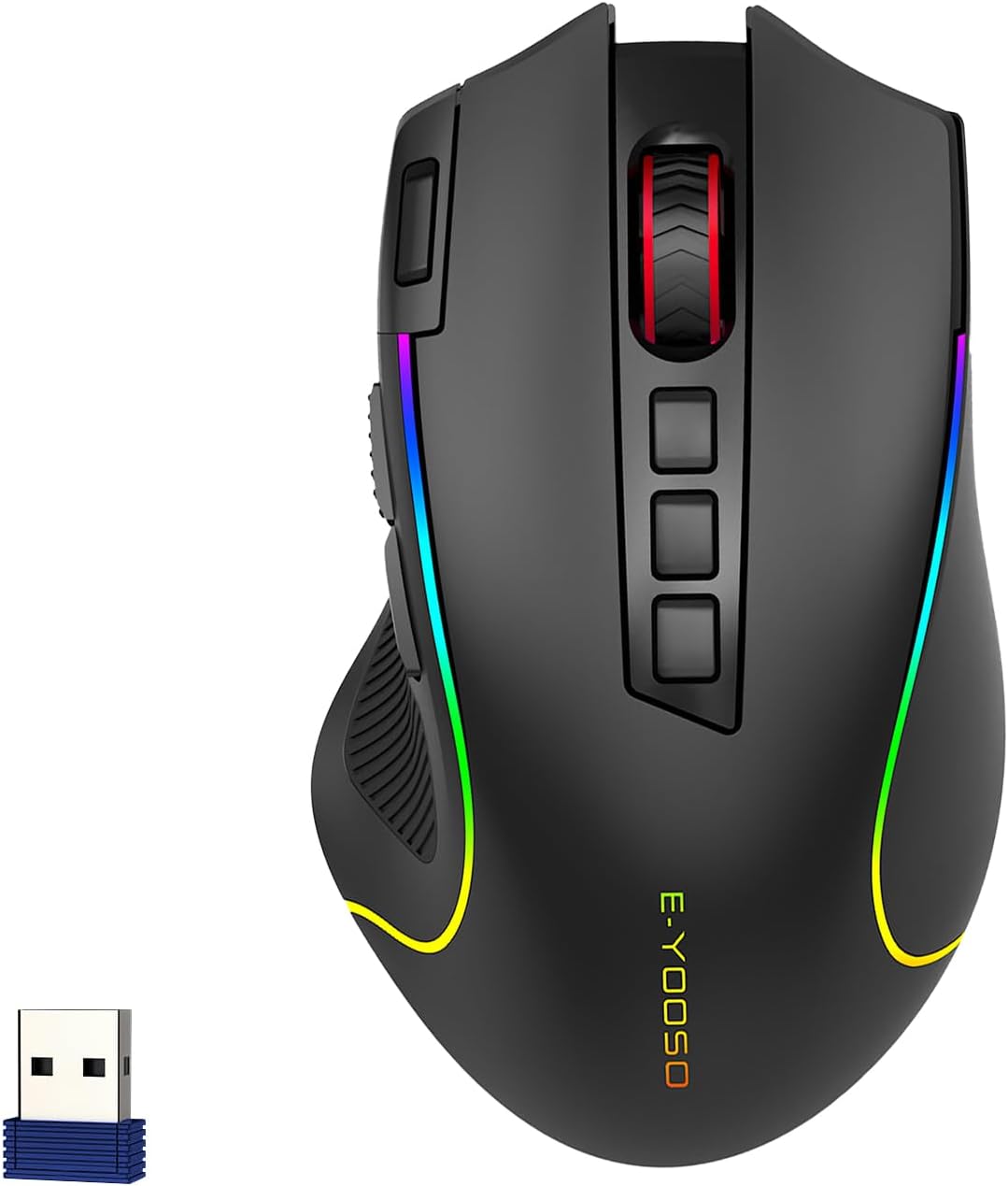
The E-YOOSO Premium Wireless Bluetooth Mouse is a versatile gaming and productivity accessory designed for PC gamers, streamers, esports players, and anyone needing a reliable multi-device mouse. With its tri-mode connectivity (2.4G, Bluetooth, and USB-C wired), it easily switches between a gaming PC, laptop, tablet, or console, making it a practical choice for both desktop setups and on-the-go use.
Performance-wise, this mouse delivers solid responsiveness thanks to its 8000 DPI optical sensor and 1000Hz polling rate. The five adjustable DPI settings (500 to 8000) let you fine-tune sensitivity for different game genres, from precise sniping in FPS titles to quick movements in MOBAs. The rapid fire key adds an extra edge in competitive scenarios, though its placement may take some getting used to. During real-world use, the mouse tracks smoothly with no noticeable lag, whether in wired or wireless mode.
Build quality is decent for the price point. The matte finish resists fingerprints, and the textured rubber grip on the left side improves handling during intense gaming sessions. The streamlined claw-grip shape helps reduce wrist strain, and the 20-million-click switch rating suggests long-term durability. However, the lack of customization software means you’re stuck with the default button assignments, which might be a limitation for power users who want to remap controls.
Setup is truly plug-and-play: no driver installation required. Simply connect via the included USB receiver, Bluetooth, or the Type-C cable, and it’s ready to go. The mouse works seamlessly with Windows, Mac, Android, and even consoles like PS4/PS5 and Xbox, making it a great companion for cross-platform gamers or streamers who use multiple devices. The 33-foot wireless range ensures stable connection even from across the room.
One realistic limitation is the RGB lighting. While the six preset modes are visually appealing and can match your gaming setup, they significantly reduce battery life. With RGB on, you’ll get around 40 hours; with lights off, the 1000mAh battery lasts up to 75 hours. The intelligent sleep mode helps conserve power, but if you prefer constant lighting, be prepared to charge every couple of days. Charging is fast at 1.5 hours, and you can still use the mouse wired during charging.
Overall, the E-YOOSO Premium Wireless Bluetooth Mouse is a strong value for budget-conscious gamers, streamers, and office workers who want a reliable, comfortable, and versatile mouse without breaking the bank. It’s especially suitable for college gamers with limited desk space, work-from-home users needing multi-device support, or casual gamers looking for an upgrade from basic mice. If you require extensive software customization or a heavier build, consider other options, but for most users, this mouse delivers where it counts: performance, comfort, and connectivity.
The E-YOOSO mouse performs well in gaming scenarios thanks to its 8000 DPI optical sensor and 1000Hz polling rate. In fast-paced games like Call of Duty or Valorant, the adjustable DPI settings allow quick sensitivity changes, and the rapid fire key can help with burst shots. The tri-mode connectivity ensures low latency, especially in wired mode. While not a top-tier esports mouse, it offers reliable tracking and zero-lag response suitable for most competitive and casual gamers.
The mouse features a streamlined claw-grip shape with a textured rubber grip on the left side for improved control. The matte coating resists fingerprints and provides a comfortable touch. During long gaming or work sessions, the ergonomic design helps reduce wrist fatigue. However, the mouse is relatively lightweight at 3.52 ounces, which may not suit users who prefer a heavier feel for more stability.
Six preset RGB lighting modes (single color, rainbow fixed, rainbow moving, rainbow flicker, neon, colorful fixed) offer 16.8 million color options. The lighting can be cycled through easily, but there is no software for custom effects. Turning off the RGB extends battery life to 75 hours, while keeping it on reduces it to around 40 hours. The lighting adds a nice aesthetic to any gaming setup, especially for RGB enthusiasts.
Tri-mode connectivity includes 2.4G wireless via USB receiver, Bluetooth, and USB-C wired. Switching between modes is done via a bottom button. The 2.4G connection offers low latency for gaming, while Bluetooth is convenient for laptops and tablets. The wired mode also charges the mouse. Range is up to 33 feet, and connection stability is solid in typical home or office environments.

Pros
- Very affordable price point for a Windows 11 laptop with a modern display.
- Lightweight and portable design perfect for students and travelers.
- Expandable storage via microSD up to 2TB adds flexibility.
- Full-size USB ports and HDMI make connecting external devices easy.
Cons
- Celeron N5805 is not suitable for demanding games or intensive multitasking.
- 8GB RAM is sufficient for basic use but may limit heavy workloads.
- Battery life may be average for prolonged gaming sessions.
The DERE 14-inch laptop targets budget-conscious users who want a portable Windows 11 machine for everyday computing. It's not a gaming powerhouse, but its lightweight design and solid display make it a versatile companion for casual gamers, college students, and work-from-home professionals. The Celeron N5805 processor and integrated UHD Graphics can handle lightweight titles like Minecraft, Stardew Valley, or older games at low settings, as well as streaming video and web browsing.
This laptop is best suited for those who need a secondary device for light gaming on the go, or for students who want a low-cost option for note-taking, research, and media consumption. The 14-inch FHD+ IPS panel delivers sharp visuals with good color reproduction, making it pleasant for watching movies or working on documents. The 16:10 aspect ratio gives extra vertical space for productivity.
Build quality feels adequate for the price, with a slim plastic chassis that weighs just under 3 pounds. The keyboard is comfortable for typing, though not designed for gaming. Port selection is generous for a budget laptop, with three USB-A ports and HDMI 2.0 for connecting an external monitor or projector. The 256GB SSD ensures quick boot times, and the microSD slot allows storage expansion up to 2TB, which can hold a small game library.
Setup is straightforward: unbox, plug in, and go through Windows 11 out-of-box experience. There's no bloatware to speak of, and the laptop runs quietly under light loads. Battery life from the 38Wh cell should last through a day of classes or a few hours of streaming, though gaming will drain it faster.
Realistic limitations include the processor's inability to run modern AAA titles or handle heavy multitasking. The 8GB RAM is fine for basic tasks but may cause slowdowns with many browser tabs open. Additionally, the laptop lacks a dedicated graphics card, so esports titles like Fortnite or Valorant will only run at lower settings and resolutions.
Overall, the DERE 14-inch laptop is a practical choice for users on a tight budget who need a lightweight, portable Windows 11 device for light gaming, school, or office work. If you're a competitive gamer or need high-performance gaming, look elsewhere. But for casual gaming and everyday productivity, this laptop delivers solid value at its price point.

Pros
- Quiet operation even at max speed – ideal for competitive gamers and streamers who need minimal background noise.
- Effective cooling that lowers laptop temperature noticeably, as confirmed by many user reviews, helping maintain performance in games and streaming.
- Adjustable height with five positions improves posture and typing comfort, beneficial for long gaming or work sessions.
- USB pass-through ports add convenience without needing a separate hub, freeing up laptop ports for essential peripherals.
- Lightweight and sturdy build for a budget cooling pad – easy to move between desk setups or pack for LAN events.
Cons
- The metal mesh top can be slick, causing laptops to slide if the pad is used on uneven surfaces like a couch or bed – best suited for a stationary desk setup.
- Some users report that the plastic hinge joints may feel less durable over time, especially if frequently adjusted, though the pad remains functional for most.
- Extra USB ports are USB 2.0 (as per typical cooling pad hubs) and may not support high-power devices; best for mice, keyboards, or low-power accessories.
The AISUNKUTECH F3 Ultra is a laptop cooling pad that bridges the gap between affordability and functionality, making it a strong contender for gamers, streamers, and anyone who pushes their laptop hard. It's designed to fit laptops from 12 to 17 inches, including thicker gaming models, and provides active cooling via three large fans. The cooling effect is immediate and noticeable, as many users have reported – perfect for keeping frame rates stable during long Rocket League or Warzone sessions, or when streaming on Twitch for hours.
This pad is especially suitable for competitive gamers and esports players who can't afford performance dips from overheating. The fans are whisper-quiet even at full speed, so you won't hear them over your headset or on stream audio. The 5-level height adjustment is a standout feature for ergonomics: you can tilt the laptop to a comfortable viewing angle, reducing neck strain whether you're grinding ranked matches or editing content. It's also handy for casual gamers who play in different spots around the house – though the pad works best on a desk, not on your lap.
Build quality is decent for the price. The main body uses ABS plastic with a stainless steel mesh top that allows heat to escape efficiently. The mesh surface, however, is quite smooth, which can cause lightweight laptops to slide a bit on an incline. Many users solve this by placing the pad on a non-slip surface or using adhesive strips. The hinges for the support bar feel serviceable but may not inspire extreme confidence if you change angles often – they're best left at one setting once you find your sweet spot.
Setup is truly plug and play: connect the included USB cable, turn the dial, and you're cooling. The extra USB ports are a nice bonus, allowing you to plug in your mouse, keyboard, or stream deck directly into the pad. Note that these are USB 2.0, so they're fine for peripherals but not for high-speed storage. The built-in phone holder is a thoughtful touch for checking Discord, stream alerts, or following a build guide – no need for a separate stand.
Some realistic limitations: the pad is not ideal for laptop-on-lap use because the plastic bottom edges can be uncomfortable and the mesh is slick. Also, a few users with very large 17.3-inch gaming laptops noted that the pad's dimensions (13.4 x 10.1 inches) make those laptops overhang, which may affect stability or fan coverage. For most 15-16 inch gaming laptops, it's a perfect fit.
If you're a gamer or streamer who uses a desk, this cooling pad delivers excellent value. It keeps temperatures down, offers ergonomic adjustability, and includes practical extras like USB ports and a phone holder. For anyone building a gaming PC setup on a budget or looking for an affordable accessory for their college dorm or home office, the AISUNKUTECH F3 Ultra is a solid recommendation.
For gamers, the primary benefit is thermal management. The three fans cover a large area of the laptop base, pulling heat away quickly. User feedback confirms a noticeable drop in CPU and GPU temperatures during extended play, which helps sustain higher boost clocks in games like Cyberpunk 2077 or Helldivers 2. The silence of the fans is a huge plus – you won't hear them over game audio or during plot-critical cutscenes. The adjustable height also helps with posture, letting you maintain a more upright, comfortable position for long gaming sessions without wrist or neck strain.
The cooling pad's construction is a mix of sturdy ABS plastic and a stainless steel mesh top. The plastic feels solid enough for desktop use, but the mesh can be slippery – a minor trade-off for better airflow. The hinge mechanism for the height adjustment is plastic and might feel a bit loose after repeated adjustments, but it holds your laptop securely at the chosen angle. The USB ports are standard, and the included cable is braided; overall, it's built to last for daily use. Some users have had no issues after months of heavy gaming.
Comfort is where this pad shines. The 5-level height adjustment lets you tilt your laptop screen to eye level, reducing the need to crane your neck down. This is a lifesaver for streamers who look at second monitors or for anyone prone to back pain during long sessions. The front anti-slip pads keep the laptop in place, and the phone holder lets you keep your phone propped up for notifications or stream controls. However, if you plan to use this pad on your lap or in bed, the hard plastic edges and lack of cushion make it uncomfortable – this is strictly a desk companion.
The pad fits laptops from 12 to 17 inches, but heavy 17-inch models may overhang slightly. Most 15.6-inch gaming laptops sit perfectly on the mesh. Setup couldn't be easier – plug the USB cable into your laptop, adjust the height, and turn the dial to your desired fan speed. The extra USB ports work immediately for mice, keyboards, or low-power devices. No drivers or software needed. The only thing to keep in mind is that the USB ports on the pad share bandwidth with your laptop's port, so they're best for peripherals rather than external drives.
Pros
- Incredible performance for gaming and creative tasks thanks to i9-12900H and RTX 3080 Ti
- High-refresh-rate 240Hz G-SYNC display with excellent color accuracy (100% DCI-P3) and 16:10 aspect ratio for more vertical workspace
- Advanced cooling system with liquid metal and AeroBlade fans maintains performance without excessive noise
- Killer Wi-Fi 6E and Ethernet provide reliable, low-latency connectivity for competitive gaming and streaming
- Thin and relatively lightweight design (0.78" thin, 5.29 lbs) makes it portable for LAN parties or working on the go
Cons
- Premium price point may be prohibitive for budget-conscious gamers or students
- Memory is soldered and limited to 32GB, so no future upgrades possible
- Battery life under heavy gaming load is limited, as expected from a high-performance laptop
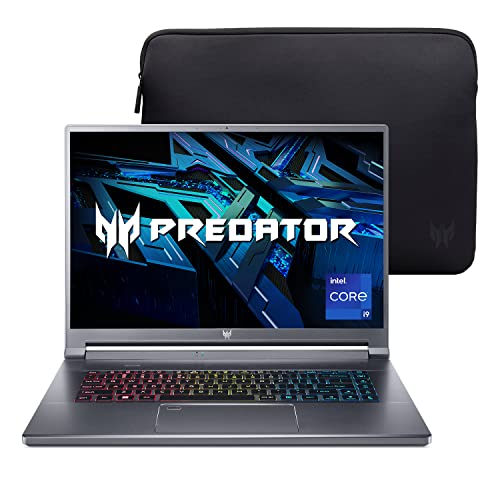
The Acer Predator Triton 500 SE (model PT516-52s-99EL) is a high-performance gaming and creator laptop that bridges the gap between desktop-replacement power and portable convenience. At its core, it features a 12th Gen Intel Core i9-12900H processor with 14 cores and 20 threads, paired with an NVIDIA GeForce RTX 3080 Ti with 16GB of dedicated GDDR6 VRAM. This combination ensures it can handle demanding AAA games at high settings, as well as intensive creative tasks like video editing, 3D rendering, and live streaming without breaking a sweat.
This laptop is best suited for competitive gamers, streamers, content creators, and gaming setup builders who need top-tier performance in a portable package. The 16-inch WQXGA (2560x1600) IPS display with a 240Hz refresh rate and NVIDIA G-SYNC support delivers buttery-smooth visuals with minimal tearing, making it ideal for fast-paced esports titles like Valorant or Apex Legends. The 16:10 aspect ratio also provides extra vertical screen space, which is a boon for productivity tasks such as coding, photo editing, or managing streaming overlays.
Real-world gaming responsiveness is outstanding, thanks to the high-refresh-rate panel and the powerful GPU. The RTX 3080 Ti easily pushes high frame rates at native resolution, and the 240Hz refresh rate ensures every frame is rendered smoothly. The laptop's cooling system, featuring 5th Gen AeroBlade 3D fans, Vortex Flow airflow, and liquid metal thermal compound on the CPU, keeps thermals in check even during extended gaming sessions. The system stays relatively quiet under load, though the fans do become audible during intense gaming.
Build quality is solid, with a sleek gray aluminum chassis that feels premium and durable. The 3-zone RGB keyboard offers per-key customization via the PredatorSense software, allowing users to match their setup's aesthetic. The keyboard itself provides decent travel and tactile feedback, suitable for both gaming and typing. Connectivity is comprehensive, with two Thunderbolt 4 USB-C ports, HDMI 2.1, USB 3.2 Gen 2, an Ethernet port (RJ-45), and a headphone jack, making it easy to connect multiple peripherals or external displays.
Setup is straightforward: unbox, plug in, and start gaming or creating. The PredatorSense utility gives you control over performance profiles, fan speeds, and RGB lighting, all through an intuitive interface. One limitation to consider is that the 32GB of LPDDR5 RAM is soldered and not upgradeable, so you'll need to be comfortable with that capacity from the start. Additionally, while the laptop is relatively thin and light at 5.29 pounds, the battery life under gaming loads is limited, as is typical for high-performance machines.
Overall, the Acer Predator Triton 500 SE is a powerful choice for gamers and creators who demand desktop-level performance in a portable form. Its combination of a fast i9 processor, RTX 3080 Ti, high-refresh-rate display, and robust cooling makes it a strong contender for those building a premium gaming or streaming setup. If you have the budget and need a laptop that can handle both gaming and creative work without compromise, this model is well worth considering.
The Acer Predator Triton 500 SE is engineered for high-end gaming, leveraging the 12th Gen Intel i9-12900H and RTX 3080 Ti to deliver exceptional frame rates in modern titles. The 240Hz G-SYNC display ensures tear-free, fluid motion, which is crucial for competitive gaming. The NVIDIA Advanced Optimus technology automatically switches between integrated and dedicated graphics to balance performance and battery life. With DirectX 12 Ultimate support, the laptop is ready for ray-traced games and advanced visual effects. The Killer Wi-Fi 6E and Ethernet prioritize gaming traffic, reducing latency for online multiplayer. This laptop is a beast for esports, AAA gaming, and VR experiences.
Acer's 5th Gen AeroBlade 3D Fan Technology uses custom-engineered blades to increase airflow while reducing noise. The Vortex Flow airflow design guides air through strategically placed thermal foam, and liquid metal thermal compound on the CPU ensures efficient heat transfer. This cooling system allows the Triton 500 SE to maintain high performance during extended gaming sessions without thermal throttling. The fans do ramp up under load, but the noise level is reasonable for a laptop of this caliber. The bottom intake and rear exhaust design helps keep the keyboard deck cool during use.
The 16-inch WQXGA (2560x1600) IPS display is a standout feature, offering a 240Hz refresh rate, 100% DCI-P3 color gamut, and 500 nits brightness. The 16:10 aspect ratio provides more vertical screen real estate compared to traditional 16:9 panels, which is beneficial for productivity and creative work. NVIDIA G-SYNC technology eliminates screen tearing and stuttering, ensuring smooth gameplay. The high color accuracy makes it suitable for photo and video editing, while the fast refresh rate caters to competitive gaming. This display is versatile enough for both gaming and content creation.

Pros
- Comfortable memory foam padding and adjustable metal headband reduce fatigue over long gaming sessions
- Detachable noise-canceling mic provides clear voice pickup and is easy to remove when not needed
- Lightweight build makes it suitable for travel and portable use
- Inline controls for volume and mute are convenient and easy to access
- Affordable price point with solid build quality and 24-month warranty
Cons
- Wired connection may limit mobility compared to wireless headsets
- No USB adapter included for PCs without a 3.5mm jack; requires separate adapter
- Purple color may not appeal to all users who prefer more neutral tones
The EKSA E900 is a wired gaming headset designed to offer clear audio and reliable voice communication at an accessible price. It features a detachable noise-canceling microphone and 50mm drivers that aim to deliver immersive 3D surround sound. This headset is primarily targeted at PC gamers, console players (PS4, PS5, Xbox), and anyone who needs a comfortable headset for long gaming sessions, streaming, or daily use.
For performance, the E900 uses large 50mm drivers with an OFC copper voice coil to produce wide dynamic range and decent spatial positioning. This helps in games where hearing footsteps or environmental cues matters, like FPS or open-world titles. The microphone uses omnidirectional noise reduction to filter out background chatter, which is especially useful during Discord calls or Twitch streams. While it doesn't offer simulated surround sound software, the hardware-based audio is solid for basic 3D positioning.
Build quality includes a flexible metal headband that resists warping and thick memory foam ear cushions covered in soft leatherette. The earcups are large enough to fit over ears without excessive pressure. The detachable microphone is a practical feature, allowing the headset to double as regular headphones for music or videos. The inline remote with volume wheel and mute switch is placed conveniently on the cable, so you can adjust without fumbling.
Setup is straightforward: just plug the 3.5mm jack into your device. It works with PCs, consoles, laptops, and mobile devices that have a standard headphone jack. One limitation is that newer gaming laptops or PCs with only USB-C or combo jacks may need an adapter, which is not included. The cable is a standard rubberized type, which is fine but not braided for extra durability.
Comfort is a strong point due to the memory foam and adjustable headband. Even during multi-hour sessions, the headset remains lightweight and doesn't cause hot spots. The purple color adds a unique look, though some may prefer more subdued options. The 24-month warranty adds reassurance for long-term use.
Overall, the EKSA E900 is a practical pick for budget-conscious gamers, esports players, or streamers who need reliable audio and microphone performance without breaking the bank. It's also a good option for college gamers or work-from-home users who want a comfortable headset for calls and gaming. Just ensure your device has a 3.5mm port or plan to get an adapter.

Pros
- Strong CPU performance for its price range with the Ryzen 5 4600H
- Dedicated GTX 1650 graphics allow for 1080p gaming at medium settings
- Fast 512GB NVMe SSD for quick game and application loading
- Effective dual-fan cooling system for sustained gaming sessions
- B&O-tuned speakers produce clear and full sound
Cons
- 8GB RAM is single-channel (1x8GB) which may limit performance in some titles; upgrade to dual-channel recommended
- 60Hz display refresh rate is standard; higher refresh would be better for competitive gaming
- Battery life under gaming is limited, as expected with most gaming laptops
The HP Pavilion Gaming 15 laptop (model 15-ec1010nr) is a well-rounded entry-level gaming machine that aims to balance performance and affordability. Powered by an AMD Ryzen 5 4600H processor and NVIDIA GeForce GTX 1650 graphics, it handles everyday gaming, schoolwork, and content creation without breaking a sweat. This setup is ideal for PC gamers on a budget, college gamers, and casual streamers looking for a reliable portable system.
In real-world use, the Ryzen 5 4600H with its six cores provides snappy responsiveness for multitasking and gaming. The GTX 1650 can run popular esports titles like Fortnite, Valorant, and Rocket League at high settings with smooth frame rates, and handle many AAA games at medium settings. The 512GB NVMe SSD ensures quick boot times and fast level loads, though storage can fill up quickly with modern game installs. The 8GB of DDR4 RAM operates in single-channel mode, which can bottleneck CPU performance in some CPU-bound scenarios; users may want to add another 8GB stick for dual-channel benefits.
Build quality is solid for a budget gaming laptop, with a clean Shadow Black chassis that looks professional enough for work or class. The 15.6-inch Full HD IPS display features a micro-edge bezel for a modern look, but its 60Hz refresh rate is standard rather than high-refresh, so competitive gamers may want an external monitor for a smoother experience. The backlit keyboard is comfortable for both gaming and typing, with decent key travel.
Thermals are well-managed thanks to HP’s dual-fan cooling system with a wide rear vent and larger air inlets. During gaming, the laptop stays reasonably cool, though the fans can become audible under load. Elevating the laptop on a cooling pad or stand helps maintain peak performance. Audio from the B&O-tuned front-firing speakers is clear and gets loud enough for gaming without external speakers.
Connectivity includes USB 2.0 and 3.0 ports, HDMI, and a headphone jack, covering basic peripherals. The laptop is thin and light enough (4.37 lbs) to carry in a backpack for dorm or office use. Battery life averages around 6-7 hours for light tasks, but drops to about 3 hours during gaming, which is typical for this class. Fast charge support (0-50% in roughly 45 minutes) is a plus.
Overall, the HP Pavilion Gaming 15 is a solid value pick for budget-conscious gamers, students, and anyone needing a versatile laptop for both work and play. Adding a second RAM stick and an external hard drive for extra storage are smart first upgrades. While it’s not designed for max-settings AAA gaming or high-refresh esports, it delivers dependable 1080p performance and a strong feature set at an accessible price point.
With the AMD Ryzen 5 4600H and GTX 1650 combo, this HP Pavilion Gaming 15 handles most modern games at 1080p medium settings comfortably. Esports titles like Overwatch, CS, and League of Legends can push well above 60fps on high. Heavier AAA games like Cyberpunk 2077 or Red Dead Redemption 2 require lowered settings for stable play. The 512GB SSD keeps load times short, and the 8GB single-channel RAM is adequate for most games but upgrading to dual-channel can boost CPU-dependent performance.
The dual-fan cooling system does a commendable job keeping temperatures in check during long sessions. The wide rear exhaust vent and enlarged intakes help maintain airflow. Users report that the laptop stays cool to the touch during gaming, though the fans are audible. For best thermal performance, keep the laptop on a hard surface and consider a cooling pad. The construction feels sturdy, and the hinge is durable. Some users note that the screen can interfere with hot air if angled too far back, so good positioning is advised.

Pros
- Clear, punchy audio with noticeable bass improvement over built-in laptop speakers.
- Easy plug-and-play setup with USB power and 3.5mm aux - no software or drivers required.
- Compact size fits well on smaller desks or next to a monitor without taking much space.
- RGB lighting adds a nice gaming vibe to any PC setup, with multiple modes to choose from.
- Affordable price makes it an easy upgrade for budget-conscious gamers or those building their first gaming PC.
Cons
- Audio quality is good for the price but won't match high-end speakers - lacks deep sub-bass and may distort at max volume.
- Limited physical controls - only a small knob for volume and on/off, no separate bass or treble adjustment.
- Cable management could be better - the USB and aux cables are non-detachable and may clutter a clean desk setup.
If you're a PC gamer or streamer looking to upgrade from those tiny, tinny laptop speakers, the BUSP-HYY Computer Speakers bring a welcome boost in audio quality and aesthetics to any gaming setup. These compact desktop speakers pack dual 3W drivers that deliver a fuller sound with enhanced bass and clearer highs, making them a solid choice for casual gaming, watching movies, or listening to music at your desk.
Designed for versatility, these speakers connect via a single USB cable for power and a 3.5mm aux input for audio. The plug-and-play simplicity means you can have them running in seconds on any Windows, Mac, or Chrome OS device, even newer laptops with USB-C thanks to the included adapter. The straightforward volume knob and front-facing headphone jack add everyday convenience, letting you switch between speakers and headphones for late-night gaming sessions or Discord calls without fumbling behind your PC.
One of the standout features for any RGB enthusiast or gaming setup builder is the six colorful lighting modes. From a flowing rainbow effect to a subtle breathing pulse or solid colors, the light bar across the front adds a personalized touch that syncs easily with your existing desktop vibes. While the lighting isn't addressable per-LED or software controlled, the on-board button cycles through modes quickly, keeping things simple and effective.
Build quality is decent for the price point, with a lightweight plastic housing that won't weigh down your desk. The 31.5-inch gap between the left and right speakers provides a decent stereo separation for a compact setup, though the non-detachable cables might complicate a clean cable management approach. Still, for the casual gamer, college student, or anyone building their first gaming PC on a budget, these speakers offer a noticeable step up from integrated monitor audio, especially in immersive open-world games or during Twitch streams where clear sound matters.
That said, audio purists or competitive esports players requiring pinpoint positional audio may find the bass a bit boomy at higher volumes and the lack of a dedicated subwoofer limits deep lows. The plastic build also feels less premium than pricier alternatives, but that's expected at this price tier. For everyday gaming, video calls, and content consumption, the BUSP-HYY speakers perform admirably, making them a practical, low-risk addition to any gaming desk or dorm room setup where space and budget are tight.

Pros
- High DPI range up to 12,800 allows flexible sensitivity for different game genres and screen resolutions.
- 8 programmable buttons with software support enhance efficiency in both gaming and productivity tasks.
- 12 RGB lighting modes offer personalization without overwhelming brightness, according to user feedback.
- Comfortable ergonomic shape fits medium hands well, reducing strain during extended use.
- Affordable price point makes it a great entry-level or backup gaming mouse for budget-conscious gamers.
Cons
- Some users reported durability issues, including left-click failure within the first few days of use.
- The software requires manual download from the user manual, and the driver may be blocked by browsers, requiring whitelisting.
- RGB lighting is described as simple; while customizable via software, it may lack the advanced effects found on pricier gaming mice.
The Acer Wired Gaming Mouse is a solid entry-level option for PC gamers, esports players, streamers, and content creators who need a reliable, responsive peripheral without overspending. With a maximum DPI of 12,800, an optical sensor, and eight programmable buttons, this mouse aims to bridge the gap between casual use and competitive play. Based on product specifications and user feedback, it offers a practical blend of performance and customization for various gaming genres, including FPS, MOBA, and open-world titles, as well as everyday productivity tasks.
Performance-wise, the 1000Hz polling rate and 20G acceleration deliver low-latency tracking that feels snappy in fast-paced games. The adjustable DPI settings (default presets at 1200, 2400, 3200, and 6400) let you switch between sniper precision and rapid flicks on the fly, while the top-end 12,800 DPI caters to high-resolution monitors. The eight programmable buttons, configured via the included software, allow for macro assignments or key binds that can streamline your in-game actions or work shortcuts. However, users have noted that the driver download process requires following the printed manual's link, and some browsers may block it, so be prepared to whitelist the site.
Build quality is a mixed bag. The ABS plastic shell feels decent for the price, and the braided cable adds a touch of durability and reduces drag during movement. The ergonomic shape, sized for medium hands (4.7 inches long), receives praise from users who find it comfortable for palm or claw grips during extended sessions. That said, some owners have reported issues such as left-click failure within the first day or the inability to left-click while holding the right button, which could be dealbreakers for competitive gamers. It's wise to check your unit early and contact support if problems arise.
The 12 RGB lighting modes add personalization to your desk setup, with effects like breathing, ripple, and neon stream that sync with your rig. Users appreciate that the lighting isn't too bright, but some wish for an option to disable the LED button fully without manually cycling through modes. The software does allow customization of colors and effects, though it's straightforward rather than premium. Cleaning is easy with a dry cloth, and the cable management is simple thanks to the 3-foot braided cord.
On the practical side, this mouse works out of the box as a plug-and-play device on Windows, Linux, and macOS, making it convenient for gaming PCs, laptops, or even work setups. Its weight (6.7 ounces) strikes a balance that feels substantial without being a drag, according to reviews. For college gamers or work-from-home users, this versatility means you can use it for both gaming and office tasks without skipping a beat.
Realistically, the Acer Gaming Mouse is best suited for budget-conscious PC gamers, casual players, and streamers who want a functional RGB mouse with programmable buttons. If you're a hardcore esports competitor demanding flawless durability and zero-latency performance, you might want to invest in a higher-tier mouse from brands known for long-term reliability. However, for its price, it offers a commendable set of features, good ergonomics, and decent performance for gamers seeking a reliable wired mouse for their setup. Keep an eye on the return policy and test it thoroughly upon arrival.
Frequently Asked Questions
Can a budget laptop like the DERE 14 inch handle any gaming at all?
It can handle very light titles and older games, but it’s not built for demanding gaming. The Celeron N5805 processor and integrated UHD Graphics are designed for everyday tasks like browsing, streaming, and office work. Its 1920×1200 FHD+ IPS display looks sharp for media consumption, and the 256GB SSD keeps boot times quick. But if you’re trying to run modern AAA games at playable frame rates, you’ll hit a wall fast. It’s a solid pick for students or casual users who game on the side with less demanding titles.
Does the Acer Predator Triton 500 SE actually stay cool under heavy load?
Acer designed this laptop with 5th Gen AeroBlade 3D Fan Technology, Vortex Flow airflow guidance, thermal foam placement, and liquid metal thermal compound on the CPU. That’s a serious cooling stack for a laptop. The 14-core i9-12900H and RTX 3080 Ti with 16GB GDDR6 VRAM generate significant heat, so all of that cooling hardware earns its place. Many users note that the thermal design helps maintain stable performance during extended sessions, which matters a lot more than peak benchmark numbers that only last a few seconds.
Is the EKSA E900 headset comfortable enough for marathon gaming sessions?
Yes, many users find it comfortable for long periods. The E900 uses thick memory foam cushion pads with large earmuffs and an adjustable metal headband. It’s lightweight enough that you won’t feel neck strain building up over hours. The 50mm drivers with OFC copper voice coils deliver a wide sound range, and the detachable noise-cancelling microphone keeps voice chat clear. The 3.5mm jack means it works across PC, PS4, PS5, and Xbox without any driver hassle.
How does the E-YOOSO wireless mouse perform for competitive FPS games?
It offers 5 adjustable DPI settings up to 8000, a 1000Hz polling rate, and 15G acceleration, which covers most competitive needs. The tri-mode connection (2.4GHz, Bluetooth, USB-C wired) gives flexibility, and switching to wired mode during intense matches removes any wireless latency concern. The ergonomic claw-grip design with matte coating and rubber side textures helps with control during fast flick shots. Its 75-hour battery life with RGB off means you won’t run dry mid-session, and the rapid fire key adds utility for certain game types.
Will a laptop cooling pad actually improve gaming performance?
A cooling pad like the AISUNKUTECH model can help reduce surface temperatures, which may prevent or delay thermal throttling on gaming laptops. Its three fans stay under 40dB, so noise isn’t a major issue. The 5-level height adjustment also improves ergonomics, reducing neck and shoulder strain during long sessions. It fits laptops up to 17 inches, includes two extra USB ports, and uses stainless steel mesh for heat dissipation. It won’t turn a weak laptop into a powerhouse, but it can help a capable machine maintain its performance ceiling longer. If you’re also considering gaming laptops with a GTX 1650, proper cooling support becomes even more important at that tier.
Are USB-powered PC speakers good enough for gaming audio?
They work well for casual gaming and general desktop use. The OFFSIR 2-in-1 speakers use dual 5W drivers with 2.0-channel stereo, which provides decent spatial audio for the price. The touch-sensitive RGB lighting adds atmosphere without extra software. The BUSP-HYY speakers take a similar approach with dual 3W drivers and 6 RGB lighting modes, plus they include a headphone jack for private listening. Neither set replaces a quality headset for competitive play where directional audio cues matter, but for story-driven games, music, and movies, they’re a solid plug-and-play upgrade over built-in laptop speakers.
Does the Acer wired gaming mouse need software to work?
No, it works out of the box via USB-A with driver-free plug-and-play across Windows, Linux, and macOS. The default DPI presets (1200, 2400, 3200, 6400) cover most scenarios without software. But if you want to unlock the full 12,800 DPI, remap the 8 programmable buttons, assign macros, or customize the 12 RGB lighting modes, you’ll need to download the driver from the installation manual. The onboard memory saves your custom settings, so once configured, you can use it on any system without reinstalling software. Its 1000Hz polling rate and 20G acceleration keep tracking responsive for both gaming and productivity.



Write Your Review
No reviews yet. Be the first to share your experience!