


Most modern gaming monitors in the mid-range and premium segments support HDMI 2.1, enabling 4K resolution at 120Hz or 1440p at 240Hz. This connectivity standard is now standard on displays from brands like LG, ASUS, and KTC, ensuring compatibility with next-generation consoles like the PS5 and Xbox Series X. Understanding which models offer this feature helps you avoid buying a display that limits your frame rate or resolution.
While older monitors may only offer HDMI 2.0, limiting 4K output to 60Hz, newer options include full-bandwidth ports. This distinction matters for competitive players who need high refresh rates and for single-player enthusiasts who want 4K clarity. The monitors listed below feature HDMI 2.1, allowing for variable refresh rate (VRR) support and faster signal transmission. For a broader overview of display options, you can check our gaming monitor guide to see how these specs fit into a larger setup.


Pros
- Dual-mode refresh rate adapts to any game genre or task
- Color-accurate IPS panel with HDR400 enhances visual immersion
- Ergonomic stand with VESA compatibility fits any desk setup
- 90W USB-C simplifies laptop connectivity and charging
- KVM support lets you control multiple devices with one keyboard and mouse
Cons
- White color scheme may not suit all gaming setups
- Only 0 reviews at launch, so long-term reliability is unproven
- Built-in speakers are often basic on monitors; external speakers or headset recommended for best audio
The KTC H27P6 is a 27-inch 4K gaming monitor that aims to cover all bases for PC gamers, content creators, and streamers. Its standout feature is the dual-mode refresh rate: you can enjoy crisp UHD at 160Hz for single-player adventures and creative work, or switch to FHD at 320Hz for ultra-fast competitive gaming. This flexibility makes it a great fit for anyone who plays a mix of genres or uses their monitor for both gaming and productivity.
Under the hood, the Fast IPS panel delivers a 1ms MPRT response time and supports Adaptive-Sync, which helps eliminate screen tearing and stuttering for a smoother experience. The factory-calibrated colors with Delta E<2 and 97% DCI-P3 coverage mean you get accurate, vibrant visuals without needing to tweak settings. HDR400 adds extra depth to shadows and highlights, making games and movies look more immersive.
Build quality is solid, with a fully adjustable stand that offers height, pivot, swivel, and tilt adjustments. You can easily find a comfortable angle for long gaming sessions or work hours. The monitor also supports VESA mounting if you prefer an arm or wall mount. The white finish is a nice departure from the usual black, but it may not match every setup theme.
Connectivity is a highlight. You get two HDMI 2.1 ports, a DisplayPort 1.4, and a USB 3.0 hub with one upstream and two downstream ports. The 90W USB-C port is especially useful for laptop users, as it can charge your device and transmit video through a single cable. KVM support lets you control multiple PCs or laptops with one keyboard and mouse, which is handy for streamers or anyone juggling work and gaming systems.
Setup is straightforward: the stand attaches without tools, and the on-screen display menu is easy to navigate. The monitor includes a low blue light mode to reduce eye strain during late-night sessions. One realistic limitation is the lack of built-in speakers, so you'll need external speakers or a headset for audio. Also, as a new model with zero reviews, long-term reliability is something to keep an eye on.
Overall, the KTC H27P6 is a versatile monitor that balances high-resolution gaming with competitive performance. It's well-suited for PC gamers who want one monitor for both immersive titles and fast-paced esports, as well as streamers and content creators who need color accuracy and flexible connectivity. If you're building a dual-purpose gaming and productivity setup, this monitor offers strong value at its price point.

Pros
- 4K at 160Hz with 1ms response time is rare and well-executed
- ELMB Sync works with variable refresh rates to reduce motion blur
- Wide 95% DCI-P3 color coverage out of the box for HDR and editing
- Solid build quality and 3-year warranty from ASUS TUF series
- Works with both G-Sync and FreeSync for flexible GPU pairing
Cons
- Stand has limited ergonomic adjustment (no height or swivel out of the box)
- Connectivity may lack HDMI 2.1, which could limit console performance at 4K 120Hz
- No USB-C or built-in speakers, requiring separate audio and video cables
The ASUS TUF Gaming VG27UQ1A is a 27-inch 4K gaming monitor that targets PC gamers, esports players, and content creators who want high resolution without sacrificing speed. With a 160Hz refresh rate and 1ms response time, this monitor bridges the gap between sharp visuals and competitive responsiveness. It's also well-suited for streamers who need accurate colors for video editing or live overlays.
In real-world use, the combination of 4K and 160Hz provides a smooth experience in fast-paced shooters and immersive single-player titles. The Extreme Low Motion Blur Sync (ELMB Sync) technology allows motion blur reduction to work alongside variable refresh rates, reducing ghosting without introducing tearing. G-Sync Compatible and FreeSync Premium support ensure compatibility with most modern GPUs, making it a flexible choice for gaming PCs.
Color performance is a strong point, with 95% DCI-P3 coverage delivering rich, accurate hues for HDR gaming and creative tasks. The monitor handles HDR content well for its price point, though peak brightness may not match premium HDR displays. Gamers who play colorful games like Cyberpunk 2077 or work with photo and video content will appreciate the enhanced vibrancy.
Build quality reflects the TUF lineup's reputation for durability. The stand offers tilt but no height or swivel adjustment, so you may need a separate monitor arm for optimal desk setup. The included L-shaped screwdriver and DisplayPort cable add convenience for immediate use. Cable management is straightforward with ports located at the rear, though you'll need to supply your own HDMI cable if required.
One limitation is the lack of HDMI 2.1, which means console gamers aiming for 4K at 120Hz may need to rely on DisplayPort or accept lower refresh rates. The monitor also omits built-in speakers and USB-C, which could be drawbacks for all-in-one setups. However, for a dedicated PC gaming monitor, these omissions are common at this price point.
Overall, the ASUS TUF Gaming VG27UQ1A is a strong recommendation for PC gamers and creators who want a 4K high-refresh experience without breaking the bank. It performs well in competitive and casual scenarios alike, and the inclusion of ELMB Sync and wide color gamut makes it versatile for both gaming and productivity.
The ASUS TUF Gaming VG27UQ1A delivers excellent gaming performance thanks to its 160Hz refresh rate and 1ms response time. In fast-paced esports titles like Valorant and Apex Legends, motion stays clear and responsive. The ELMB Sync feature reduces motion blur without dimming the screen, and it works alongside variable refresh rates to keep gameplay smooth. G-Sync Compatible and FreeSync Premium ensure tear-free visuals across a wide range of graphics cards, making it a solid choice for any gaming PC.
With 4K (3840 x 2160) resolution and 95% DCI-P3 color coverage, the VG27UQ1A provides sharp, vivid imagery suitable for HDR gaming and content creation. The panel delivers good brightness and contrast for its class, though HDR peak brightness is not as high as premium models. Colors appear saturated and accurate out of the box, reducing the need for calibration. For gamers and creators who prioritize color fidelity, this monitor offers strong value.
The monitor includes DisplayPort and HDMI inputs, plus a headphone jack. The box contains a DisplayPort cable and an L-shaped screwdriver for VESA mount installation. Setting up the monitor is straightforward: attach the stand, plug in power and video, and adjust basic settings via the on-screen display or optional DisplayWidget software. The stand only offers tilt adjustment, so a VESA arm may improve ergonomics and desk space.


Pros
- Sharp 4K UHD resolution and 160Hz refresh rate provide a competitive edge in fast-paced games.
- VA panel with 3000:1 contrast ratio offers deep blacks and vivid colors for immersive visuals.
- 1500R curved design enhances peripheral vision and reduces eye strain during long gaming sessions.
- Multiple connectivity options (HDMI 2.1, DP 1.4) make it easy to connect to modern gaming PCs and consoles.
- VESA mount compatibility allows clean, space-saving desk setups with monitor arms or wall mounts.
Cons
- VA panel may have slightly slower pixel response compared to IPS, which could lead to minor ghosting in extreme fast-paced scenarios.
- Built-in speakers are adequate for casual use but may lack bass and volume for immersive gaming or streaming without external speakers.
- With only zero reviews at launch, early adopters may want to monitor real-world user feedback for long-term reliability.
The CRUA 32-inch curved gaming monitor is a robust addition to any PC gaming, streaming, or content creation setup. With its 4K UHD resolution (3840x2160) and 1500R curvature, it aims to deliver both visual clarity and immersion that competitive gamers, esports players, and casual gamers will appreciate. The VA panel is known for high contrast ratios, and here it offers a 3000:1 static contrast, which helps in dark scenes in open-world games and movies, making details pop without washing out.
For performance, the 160Hz refresh rate and AMD FreeSync support are standouts. In fast-paced FPS or MOBA titles, this combination reduces screen tearing and stuttering, keeping gameplay fluid. While VA panels typically have slightly slower response times than IPS, many users may find the trade-off in deeper blacks and better contrast acceptable for immersive single-player experiences. The 4K resolution also provides plenty of screen real estate for multitasking, benefiting streamers who need to manage overlays, chat, and game capture simultaneously.
Color accuracy is another strong point with 120% sRGB coverage. This makes the monitor suitable for photo editing, video streaming, and content creation work beyond gaming. The built-in speakers are a convenient addition for those who want to minimize desk clutter, though serious gamers and streamers will likely prefer dedicated external speakers or a quality gaming headset for better audio fidelity.
Connectivity is future-proof with HDMI 2.1 and DP 1.4, ensuring compatibility with next-gen consoles and modern gaming PCs. The VESA 75x75mm mount support allows for flexible desk arrangements, which is a big plus for gaming setup builders who prioritize cable management and ergonomic positioning. The monitor's relatively large 32-inch size may require a deeper desk or wall mount to maintain comfortable viewing distance, but the curvature helps reduce eye movement during long sessions.
One realistic limitation is the lack of user reviews currently, so early adopters should check for firmware updates and community feedback over time. The VA panel might exhibit slight ghosting in extremely fast-paced competitive gaming, but for the vast majority of gamers, the combination of 4K and 160Hz at this price point is compelling. Overall, the CRUA 32-inch curved monitor is a versatile choice for college gamers, work-from-home gamers, and RGB enthusiasts building a balanced high-performance setup without overspending.
The CRUA 32-inch curved monitor is designed for smooth, responsive gameplay thanks to its 160Hz refresh rate and AMD FreeSync compatibility. In competitive shooters like Call of Duty or Valorant, the high refresh rate reduces input lag and makes motion appear crisp. The 4K resolution adds detail but requires a powerful graphics card to maintain high frame rates. For more casual players or those playing less demanding titles, the combination works well, offering a visual upgrade over standard 1080p monitors. The 1ms MPRT response time (typical for VA panels) helps minimize motion blur, though some users might notice slight ghosting in extreme scenarios.
The CRUA monitor features a sleek black design with a sturdy stand that provides stable support for the 32-inch panel. The bezels are reasonably thin, making it suitable for multi-monitor setups. The VESA mount compatibility (75x75mm) allows for aftermarket arms or wall mounting, which is great for cable management and desk space optimization. The overall construction feels solid, though the stand lacks extensive ergonomic adjustments (height, swivel, pivot) found on more premium models. Users may need to rely on the monitor's tilt adjustment or a third-party arm for optimal viewing angles.
Equipped with HDMI 2.1 and DP 1.4, this monitor is ready for modern gaming PCs and consoles like the PlayStation 5 or Xbox Series X. HDMI 2.1 supports 4K at up to 120Hz, while DP 1.4 can handle 4K at 160Hz, ensuring you get the full refresh rate with a compatible GPU. The inclusion of these ports means easy connection to multiple devices, making it a flexible hub for a gaming and productivity station. There is also a headphone jack for private listening, though the built-in speakers are best considered a convenience feature rather than a primary audio solution.


Pros
- High 165Hz refresh rate and fast 1ms MPRT for responsive gaming.
- Ultrawide 21:9 ratio enhances immersion in open-world and racing games.
- PIP/PBP feature adds versatility for multitasking or streaming.
- Strong color accuracy with DCI-P3 95% coverage.
- Affordable price point for a 34-inch UWQHD gaming monitor.
Cons
- No built-in speakers; external audio is required.
- Maximum 100Hz over HDMI; full 165Hz requires DisplayPort connection.
- Limited ergonomic adjustments (tilt only) and no height or swivel.
The SANSUI 34-inch curved gaming monitor is a wide-screen ultrawide display designed for PC gamers, esports players, and streamers who want an immersive field of view without breaking the bank. With a 1500R curvature, UWQHD 3440x1440 resolution, and a 165Hz refresh rate, this monitor aims to deliver smooth, detailed visuals for everything from fast-paced shooters to expansive open-world titles.
This monitor is best suited for competitive and casual gamers who prioritize responsiveness and visual clarity. The 1ms MPRT response time and FreeSync support help reduce motion blur and screen tearing, making it a reliable choice for FPS games like Valorant or Call of Duty, as well as racing sims and MOBAs. Streamers and content creators will also appreciate the PIP/PBP mode, which lets you display two inputs at once, handy for monitoring chat or using a second PC.
In terms of performance, the 165Hz refresh rate over DisplayPort ensures smooth, low-latency gameplay, while the VA panel offers good contrast and wide viewing angles. The sRGB 125% and DCI-P3 95% color coverage provides punchy, accurate colors out of the box, beneficial for both gaming and light creative work. The 300 nits brightness is adequate for indoor use, but may struggle in very bright rooms.
Build quality is solid for the price, with a sturdy stand that offers tilt adjustment but lacks height or swivel. The monitor is VESA 75x75mm compatible, so you can easily mount it on an arm or wall. Cable management is basic, but the included DP cable and multiple ports (2x DP 1.4, 2x HDMI) give you flexibility. Note that the HDMI ports are limited to 100Hz, so you'll need DP for the full 165Hz.
Setting up the monitor is straightforward, and the on-screen display is easy to navigate. There are no built-in speakers, so you'll need a headset, external speakers, or a soundbar for audio, which is common for gaming monitors. The lack of speakers may be a consideration for those who prefer a clean all-in-one setup. Maintenance involves occasional screen cleaning with a microfiber cloth.
A realistic limitation is the absence of height adjustment and swivel, which might require a separate monitor arm for optimal ergonomics. Additionally, the 100Hz cap on HDMI means you'll need a compatible DP cable (included) to hit 165Hz. Overall, this monitor is an excellent value for PC gamers and gaming setup builders looking for an ultrawide high-refresh experience without spending a fortune. It works well for dorm room gaming, home office productivity, and streaming rigs where desk space is at a premium.
The SANSUI 34-inch curved monitor delivers a compelling gaming experience thanks to its 165Hz refresh rate and 1ms MPRT response time. In fast-paced FPS games, motion blur is minimal, and the UWQHD resolution provides a wider peripheral view, giving you a competitive edge in shooters. FreeSync compatibility helps eliminate screen tearing when paired with an AMD GPU, ensuring fluid gameplay. The VA panel's deep blacks and good contrast ratio further enhance immersion in darker game environments.
The monitor's construction is sturdy for its price segment, with a matte black plastic bezel and a solid stand that supports tilt adjustment. The VESA 75x75mm mounting pattern allows for easy attachment to monitor arms or wall mounts, freeing up desk space. While the stand lacks height and swivel adjustments, it feels stable on a desk. The port placement at the rear is convenient, and the included DP cable is a nice touch. Overall, build quality is reliable for everyday gaming and work use.
The 34-inch UWQHD (3440x1440) VA panel offers sharp image quality with a 21:9 aspect ratio that's great for immersive gaming and multitasking. Color accuracy is above average with 95% DCI-P3 and 125% sRGB coverage, so games and movies look vibrant. The 300 nits brightness is fine for indoor use, and the 1500R curvature wraps around your field of view without being too aggressive. Viewing angles are good for a VA panel, with minimal color shift when viewed from the sides.

Pros
- 240Hz refresh rate and 1ms response deliver top-tier competitive performance.
- Wide color gamut (95% DCI-P3) ensures rich, accurate colors out of the box.
- Dual adaptive sync support (G-Sync + FreeSync) works flawlessly with both NVIDIA and AMD GPUs.
- Fully adjustable stand offers excellent ergonomics for comfort during long gaming sessions.
- HDMI 2.1 enables 240Hz at QHD on compatible consoles and PCs.
Cons
- DisplayHDR 400 is entry-level HDR; highlights may not pop as much as higher HDR tiers.
- No built-in speakers; you'll need a headset or external speakers for audio.
- Stand base is relatively wide and may take up considerable desk space.
The LG 27GR83Q-B is a 27-inch QHD (2560x1440) IPS gaming monitor designed to deliver a competitive edge. With a 240Hz refresh rate and 1ms GTG response time, it's built for esports players, competitive gamers, and anyone who values ultra-smooth motion in fast-paced titles. Its IPS panel offers wide viewing angles and vibrant colors, while support for both NVIDIA G-Sync and AMD FreeSync Premium ensures tear-free gameplay regardless of your GPU.
This monitor is best suited for PC gamers who play shooters like Valorant, Apex Legends, or Call of Duty, where every millisecond counts. It also works well for streamers and content creators who need accurate colors for editing or broadcasting, thanks to its 95% DCI-P3 color gamut. Casual gamers will appreciate the smoothness and responsiveness, but the high refresh rate really shines in competitive scenarios.
In real-world use, the 240Hz refresh rate provides exceptionally fluid motion, reducing eye strain during long sessions. The 1ms response time minimizes ghosting, so fast-moving objects stay sharp. The IPS panel maintains consistent colors from any angle, which is great for co-op gaming or when sharing the screen. Adaptive sync works silently in the background, eliminating screen tearing without added input lag. The DisplayHDR 400 certification adds a modest boost to contrast and peak brightness, but it's not as impactful as higher HDR standards like 600 or 1000.
Build quality is solid with a sturdy plastic chassis and a metal-reinforced stand that supports tilt, height, and pivot adjustments. The cable management channel on the stand helps keep your desk tidy. Connectivity is generous with two HDMI 2.1 ports (supporting up to 240Hz at QHD) and one DisplayPort 1.4, plus a 4-pole headphone jack with DTS Headphone:X for 3D audio. The on-screen display is easy to navigate with a joystick, and features like Black Stabilizer, Dynamic Action Sync, and a crosshair overlay are useful for gaming tweaks.
One limitation is the lack of built-in speakers, so you'll need a headset or external speakers. The stand base is fairly large, which might be an issue on small desks. Also, the HDR performance is basic; it's fine for HDR content but not comparable to premium HDR monitors. Setup is straightforward: plug in the cables, adjust the stand, and you're ready to go. The monitor supports VESA mounting if you prefer an arm.
Overall, the LG 27GR83Q-B is an excellent choice for competitive gamers who want a high-refresh-rate QHD display with adaptive sync and solid color accuracy. It's also a good fit for console gamers thanks to HDMI 2.1, and for esports enthusiasts who prioritize responsiveness. If you're building a gaming setup around a mid-to-high-end PC and need a monitor that balances speed and image quality, this is a strong contender worth considering.
The LG 27GR83Q-B delivers outstanding gaming performance thanks to its 240Hz refresh rate and 1ms GTG response time. In fast-paced games like Overwatch 2, Counter-Strike 2, or Fortnite, motion clarity is exceptional, and you'll notice far less blur than on a standard 60Hz or 144Hz monitor. The IPS panel maintains consistent colors and contrast even when viewed at an angle, so you get a consistent experience whether you're leaning in or sitting back.
Adaptive sync is fully supported: NVIDIA G-Sync Compatible and AMD FreeSync Premium both work without issue. This eliminates screen tearing and stutter across a wide frame rate range. Input lag is negligible, with Dynamic Action Sync further reducing delay. The monitor also includes a Black Stabilizer to brighten dark areas without overexposing highlights, which is helpful for spotting enemies in shadowy corners.
The LG 27GR83Q-B offers excellent connectivity for a modern gaming setup. It includes two HDMI 2.1 ports that support 2560x1440 at 240Hz with HDR, making it perfect for both PC and next-gen consoles like the PS5 and Xbox Series X. There's also one DisplayPort 1.4 for high refresh rates on PCs. Additionally, a 4-pole headphone jack with DTS Headphone:X provides immersive 3D audio through any compatible headset.
The HDMI 2.1 ports are a standout feature, as many monitors in this price range still use HDMI 2.0. This ensures you can take full advantage of the monitor's speed with modern consoles. The DisplayPort also supports the full 240Hz at QHD without compression. Cable management is handled by a channel on the stand, keeping your desk neat.
Pros
- Excellent value for 8K/4K high-refresh-rate gaming and streaming
- Durable braided cable with long bend lifespan
- Supports VRR, ALLM, and other HDMI 2.1 features for smoother gameplay
Cons
- 6.6 feet may be too short for some large room setups
- Some users may prefer a more flexible cable for tight cable routing
The Capshi HDMI 2.1 cable is a straightforward accessory that brings high-bandwidth connectivity to your gaming PC, console, or monitor. With support for 8K@60Hz and 4K@120Hz, it's designed for gamers who want to take full advantage of modern displays and graphics cards. Whether you're a competitive esports player needing low latency or a casual gamer enjoying open-world titles, this cable aims to deliver stable signal transmission.
For PC gamers and streaming enthusiasts, the 48Gbps bandwidth means you can run 4K at 120Hz with HDR, which is great for fast-paced shooters or vibrant RPGs. The cable also supports VRR, ALLM, and eARC, so your audio and video stay in sync during intense gaming sessions or while watching movies. It's backward compatible with older HDMI versions, so it can work with a variety of devices in your setup.
Build quality feels solid thanks to the nylon-braided jacket and 24K gold-plated connectors. The cable is rated for over 25,000 bends, which adds peace of mind if you frequently move your gear or manage cables behind a desk. The tinplate metal shielding helps reduce electromagnetic interference, which is useful if your gaming setup has multiple cables running close together.
Setting up the Capshi cable is plug-and-play with no software required. The 6.6-foot length is convenient for most desktop setups, but if your PC and monitor are far apart, you might need a longer option. Cable management is straightforward with the braided exterior, though some users may find it slightly stiff for very tight bends.
One realistic limitation is the cable's length. For a large living room or a sprawling gaming desk, 6.6 feet might not be enough. Also, while the price is very competitive, some premium cables offer even higher flexibility or certified Ultra High Speed HDMI rating. However, for the vast majority of PC gamers, console players, and streamers, this cable provides the performance needed for 4K@120Hz gaming without breaking the bank.
Overall, the Capshi HDMI 2.1 cable is a smart buy for anyone building a high-refresh-rate gaming setup or upgrading their home theater. It's especially suited for competitive gamers who demand low latency, content creators who need reliable video output, and RGB enthusiasts who want a clean, braided cable in their desk setup. If your devices support HDMI 2.1 features, this cable offers a cost-effective way to unlock their full potential.
Pros
- Dual-mode display adapts to any game type from open-world to fast-paced shooters
- Fast IPS panel with 1ms response and high refresh rates ensures smooth motion
- Full ergonomic adjustments reduce neck strain during long gaming sessions
- Premium connectivity with two HDMI 2.1 and two DP 1.4 ports
Cons
- Built-in speakers are functional but not ideal for immersive audio; external speakers or headphones recommended
- HDR400 is entry-level HDR; doesn't match premium HDR1000+ displays
- Zero customer reviews yet, so long-term reliability is unverified
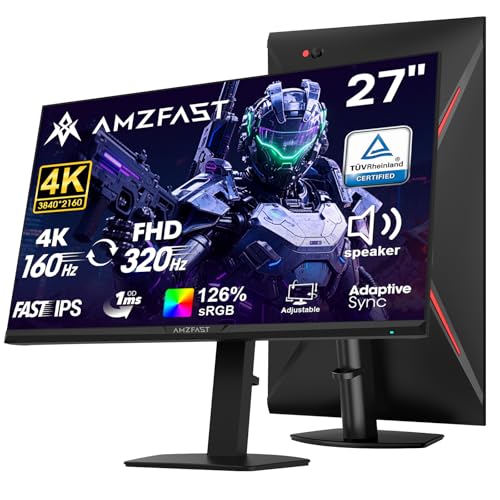
The Amzfast 27" 4K gaming monitor is a versatile display designed for PC gamers who want the flexibility of both high-resolution and ultra-high refresh rates. It features a dual-mode system that lets you switch between 4K UHD at up to 160Hz for visually rich single-player games and FHD 1080p at up to 320Hz for ultra-smooth competitive play. This makes it a strong candidate for gamers who play a mix of AAA titles and fast-paced esports like Valorant or Counter-Strike.
Performance-wise, the Fast IPS panel delivers a 1ms response time and supports Adaptive Sync to eliminate screen tearing and stuttering. Colors are punchy with HDR400 support, 126% sRGB, and 93% DCI-P3 coverage, which also benefits content creators working on color-accurate projects. The dual-mode refresh rates are a standout feature, offering a clear advantage for those who want one monitor to handle both immersive visuals and lightning-fast reactions.
Build quality is solid with a metal base and an ergonomic stand that provides height adjustment, pivot, swivel, and tilt. The monitor supports VESA 100x100mm mounting for those who prefer a clean desk setup. Connectivity is generous with two HDMI 2.1 ports (supporting 4K 144Hz or FHD 320Hz) and two DisplayPort 1.4 ports (up to 4K 160Hz), plus built-in speakers for casual use.
Setting up the monitor is straightforward - the stand attaches without tools, and the on-screen display menu is intuitive. The low blue light and anti-flicker modes reduce eye strain during long gaming sessions, and the anti-glare coating helps in brightly lit rooms. Cable management isn't built-in, but the VESA option makes it easy to route cables through a mount arm.
The main limitations are the built-in speakers, which lack bass and volume for immersive gaming, and the HDR400 certification, which offers basic high dynamic range compared to premium displays. Additionally, with no customer reviews available, long-term durability is yet to be confirmed by the community.
Overall, the Amzfast 27" dual-mode monitor offers excellent value for PC gamers who want a single display that excels at both 4K single-player and high-FPS competitive gaming. It's also suitable for streamers and content creators who need accurate colors. If you're building a gaming setup that demands versatility without breaking the bank, this monitor is worth serious consideration.
In gaming scenarios, the dual-mode feature is the highlight. You can run Cyberpunk 2077 in 4K 60-80Hz with HDR for eye candy, then switch to FHD 320Hz for a blisteringly smooth Overwatch session. The 1ms response time and Adaptive Sync keep motion crisp and tear-free. The Fast IPS panel also offers wide viewing angles, which is great for co-op gaming or streaming setups. Competitive gamers will appreciate the FHD 320Hz mode for minimal input lag, while casual players can enjoy 4K visuals without compromise.
The monitor covers 126% sRGB and 93% DCI-P3, providing rich, accurate colors out of the box. HDR400 adds a noticeable boost in brightness and contrast compared to standard SDR, though it lacks the deep blacks of HDR600 or higher. The 10-bit color depth (8-bit + FRC) reduces banding in gradients for smoother transitions. For content creators, this monitor offers a reliable secondary display with good color accuracy, though professional grading may require calibration.
The stand offers full ergonomic adjustability: 130mm height range, 90-degree pivot, 30-degree swivel, and a tilt range from -5 to 20 degrees. This makes it easy to find a comfortable viewing angle for long sessions, whether you're sitting upright or reclining. The metal base is sturdy and space-saving. For multi-monitor setups, the VESA 100x100mm pattern and slim bezels make alignment simple. Setting up is quick - just attach the stand base and plug in cables. The built-in speakers are fine for YouTube or notifications but not for critical gaming audio.
Understanding HDMI 2.1 Support in Gaming Monitors
HDMI 2.1 is a connectivity standard that significantly increases bandwidth compared to its predecessor, HDMI 2.0. This upgrade allows monitors to accept higher refresh rates at 4K resolution and supports features like Variable Refresh Rate (VRR) and Auto Low Latency Mode (ALLM). For PC gamers, this means the ability to run 1440p at 240Hz or 4K at 120Hz without dropping frames due to bandwidth limitations. For console owners, it ensures the PS5 and Xbox Series X can output their maximum potential to the screen.
| Specification | HDMI 2.0 Capability | HDMI 2.1 Capability |
|---|---|---|
| Max Bandwidth | 18 Gbps | 48 Gbps |
| 4K Max Refresh Rate | 60Hz | 120Hz (or higher with compression) |
| 1440p Max Refresh Rate | 144Hz (limited) | 240Hz+ |
| VRR Support | Limited/None | Full Support (G-SYNC/FreeSync) |
| HDR Format | Basic | Advanced (HDR10+, Dolby Vision) |
Not every monitor with an HDMI port is created equal. Some displays list HDMI 2.1 on the box but only support 4K at 60Hz through that specific port, reserving higher refresh rates for DisplayPort. This is a common point of confusion for buyers.
You must verify the specific bandwidth and refresh rate capabilities of the HDMI port in the product specifications, not just the version number. A monitor might have two HDMI 2.1 ports, but only one might support the full 120Hz at 4K, while the other is limited. Checking the manufacturer’s detailed spec sheet is the only way to confirm this.
Here are the key features to look for when verifying true HDMI 2.1 support on a gaming monitor:
- Full 48 Gbps bandwidth support for uncompressed 4K120 signal
- Variable Refresh Rate (VRR) compatibility for tear-free gaming
- Auto Low Latency Mode (ALLM) for instant console game mode
- Quick Frame Transport (QFT) to reduce input lag
- Support for 48-bit deep color and 10-bit color depth
Resolution and Refresh Rate Combinations
The relationship between resolution and refresh rate determines the bandwidth required. At 1080p, even HDMI 2.0 can handle 240Hz in many cases, but HDMI 2.1 provides headroom for future-proofing. At 1440p, HDMI 2.1 is often required to sustain 240Hz without dithering or compression artifacts. For 4K, HDMI 2.1 is essential for anything above 60Hz. If you are a competitive FPS player using 1440p, a 240Hz monitor with HDMI 2.1 ensures your GPU can push frames to the screen without bottlenecking at the connection level.
Many modern monitors, such as the LG 27GR83Q-B, explicitly state that both HDMI 2.1 and DisplayPort 1.4 support the maximum refresh rate. This dual-path approach gives you flexibility. You can use HDMI for your console and DisplayPort for your PC, or swap cables as needed.
However, some budget-friendly options might only push 120Hz over HDMI while reserving 144Hz or higher for DisplayPort. This distinction is crucial if you plan to use the monitor primarily for console gaming. A 4K 120Hz setup is the sweet spot for many PS5 and Xbox Series X users, offering crisp visuals with smooth motion.
Console Compatibility and VRR
Console gamers benefit most from HDMI 2.1 because of VRR support. Without VRR, if your console outputs 50 fps but the monitor refreshes at 60Hz, you will experience screen tearing or stuttering. HDMI 2.1 allows the monitor to match the console’s frame output dynamically.
This feature is supported by the PS5 and Xbox Series X, but the monitor must also have the capability enabled. Some monitors require you to enable “Game Mode” or “VRR” in the on-screen display menu for it to work correctly. Failing to do so may result in a black screen or no signal when the console tries to use variable refresh rates.
It is also important to note that not all HDMI 2.1 cables are created equal. You need a cable certified for 48 Gbps bandwidth to utilize the full potential of the connection. Standard HDMI cables may only support 18 Gbps, which would limit your 4K output to 60Hz even if the monitor and console support 120Hz.
Using a high-speed HDMI 2.1 cable is a necessary step to ensure the signal integrity required for high refresh rates. The Capshi 10ft 8K 4K@120Hz HDMI Cable 2.1 listed in the products above is an example of a cable designed for this bandwidth, ensuring stable signal transmission for your setup.
PC Gaming and DisplayPort vs. HDMI
For PC gamers, the choice between HDMI and DisplayPort often depends on the GPU and the specific monitor model. NVIDIA GPUs have historically supported G-SYNC over HDMI, but AMD GPUs have traditionally used DisplayPort for FreeSync. However, with HDMI 2.1, both ecosystems are converging. Many modern GPUs, including NVIDIA’s RTX 40-series and AMD’s RX 7000-series, support VRR over HDMI 2.1. This means you can use HDMI for your PC as well, simplifying cable management if you have a console and PC sharing the same display.
DisplayPort 1.4 remains a strong contender for high refresh rates, especially at 1440p and 4K. It supports DSC (Display Stream Compression), which allows for higher bandwidth in a smaller space. Some monitors offer higher refresh rates over DisplayPort than over HDMI.
For example, a monitor might support 240Hz at 1440p over DisplayPort but only 120Hz over HDMI. If you are a competitive player who prioritizes the absolute highest refresh rate, check the specific port limitations. If you are a casual player or console user, HDMI 2.1 is usually sufficient and offers the convenience of a single cable type for all devices.
When selecting a monitor for a mixed PC and console setup, consider the following checklist to ensure compatibility:
- Verify the monitor supports VRR over HDMI for console use
- Check if the GPU supports VRR over HDMI 2.1 for PC use
- Confirm the cable is rated for 48 Gbps to enable 4K120
- Ensure the monitor has enough HDMI ports for all devices
- Look for ALLM support to auto-switch to game mode
Common Misconceptions About HDMI 2.1
One common misconception is that any monitor labeled “HDMI 2.1” can handle 4K at 120Hz. As mentioned, some manufacturers limit the refresh rate on HDMI ports to save on cost or prioritize DisplayPort. Another misconception is that HDMI 2.1 is required for 1440p gaming.
While HDMI 2.0 can handle 1440p at 144Hz, HDMI 2.1 is necessary for 240Hz at that resolution. If you are buying a 240Hz monitor for 1440p, you need to ensure the HDMI port supports that specific bandwidth if you plan to use it for PC gaming or if you want to swap consoles and PCs easily.
Additionally, some users believe that upgrading to HDMI 2.1 will automatically improve image quality. While it enables higher resolutions and refresh rates, it does not inherently change the panel technology, color accuracy, or brightness. The visual quality is still determined by the panel type (IPS, VA, OLED) and the monitor’s calibration.
HDMI 2.1 is about capability and bandwidth, not aesthetic enhancement. It allows the display to show more information faster, but the underlying hardware determines how that information looks. Understanding this distinction helps you focus on the specs that actually affect your visual experience.
Choosing the Right Monitor for Your Setup
If you are a console gamer, prioritize monitors that explicitly list 4K 120Hz over HDMI and VRR support. The CRUA 32″ Curved Gaming Monitor and the ZZA 32 Inch Curved Gaming Monitor both feature HDMI 2.1 and are designed to support next-gen consoles.
These 4K displays offer a balance of detail and smoothness, ideal for single-player experiences. For competitive PC players, a 1440p 240Hz monitor like the CUNPU 24 Inch 240Hz Gaming Monitor may be the better choice. It offers a higher refresh rate at a lower resolution, which is often easier for the eye to track in fast-paced shooters.
For users who want a single display for both gaming and office work, the KTC 27 Inch 4K Gaming Monitor offers dual-mode switching. This allows you to switch between 4K 160Hz for gaming and 1080p 320Hz for competitive play.
The HDMI 2.1 port ensures you can connect a console for 4K 120Hz gaming, while the DisplayPort handles the higher refresh rates for PC. This versatility makes it a strong candidate for users who do not want to maintain separate setups for different tasks. The built-in USB hub and Type-C port add convenience for connecting peripherals and charging laptops.
Ultimately, the decision comes down to your primary use case. If you play mostly on console, 4K 120Hz is the target. If you play competitive PC games, 1440p 240Hz or 1080p 360Hz is the goal. If you want a balance, 1440p 144Hz is a safe middle ground. Always verify the specific HDMI 2.1 capabilities in the product description before purchasing.
The presence of the port is not enough; you need the bandwidth and feature support to unlock the full potential of your hardware. By understanding these technical details, you can make an informed decision that aligns with your gaming style and budget.
If you are considering a different display configuration, our guide on one large monitor vs multiple monitors can help you decide if a single high-end display is the right fit for your desk space and workflow.







Write Your Review
No reviews yet. Be the first to share your experience!