


Choosing between a single large display and a multi-monitor setup depends heavily on whether you prioritize immersive gaming or multitasking efficiency. While one large monitor vs multiple monitors often comes down to preference, the physical layout and bezel width play a critical role in your daily workflow and visual comfort.
A single ultrawide or large panel offers a seamless canvas without visual interruptions, which is ideal for competitive gaming and creative work. Conversely, a dual-monitor arrangement provides distinct workspace separation, allowing you to keep communication tools open while gaming or working. Understanding these trade-offs helps you select the configuration that best fits your desk space and hardware capabilities. For more insights on display optimization, check out our dual monitor setup guide.

Pros
- 75Hz (overclockable to 100Hz) and 1ms BR ensure responsive gameplay for competitive and casual gamers alike
- 99% sRGB coverage provides excellent color reproduction for immersive visuals and content creation
- Built-in speakers offer convenient audio without extra cables, perfect for tidy desk setups
- VESA mount and edgeless design make it simple to create a multi-monitor or wall-mounted arrangement
- Eyecare features help reduce eye fatigue during extended gaming or work sessions
Cons
- Built-in speakers lack bass and volume for immersive gaming, so many users may prefer dedicated external speakers or a headset
- Limited connectivity options (HDMI x2, VGA, no DisplayPort) may restrict high-bandwidth usage at 100Hz
- No USB ports or headphone jack on the monitor itself, which could be inconvenient for cable management
The Sceptre 27-inch Prime Monitor (E275W-19203R Series) is a budget-friendly 27-inch display that punches above its weight for U.S. PC gamers, streamers, and casual users alike. With a 100Hz refresh rate and 1ms blur reduction, it delivers noticeably smoother motion than standard 60Hz monitors, giving you a competitive edge in fast-paced games like Overwatch 2, Apex Legends, or Call of Duty. The 99% sRGB color coverage also means rich, lifelike visuals out of the box, making it a strong choice for gaming setup builders who want vibrant colors without calibration headaches.
This monitor is best suited for competitive gamers, esports players, and casual gamers who want a high-refresh experience without spending a lot. It's also a great pick for college gamers or work-from-home users who need a reliable, space-saving display that can handle both gaming and productivity. The built-in speakers offer convenience for quick gaming sessions or YouTube videos, though you'll likely want a dedicated gaming headset for immersive audio in games like Valorant or Fortnite.
In terms of real-world performance, the 100Hz refresh rate and 1ms BR provide excellent responsiveness for fast-paced titles, reducing motion blur and making tracking targets feel more natural. The 27-inch screen size offers plenty of screen real estate for multitasking, and the near-bezel-less design makes it easy to set up dual monitors for streaming or content creation. The eyecare feature helps reduce strain during long sessions, which is a nice bonus for anyone spending hours in front of the screen.
Build quality is solid for the price point, with a sturdy frame that feels reliable on a desk or mount. The VESA wall-mount compatibility (100x100mm) lets you reclaim desk space, which is especially useful for cramped dorm rooms or home offices. The monitor's lightweight design (around 11.5 pounds) makes mounting and adjusting straightforward, and the included stand offers basic tilt adjustments. However, the stand lacks height or swivel adjustments, so you may want an aftermarket arm for better ergonomics.
Setup is incredibly easy: just plug in the included HDMI cable, connect to your PC or console, and you're ready to go. The on-screen display (OSD) is intuitive for adjusting brightness, contrast, and refresh rate settings. One limitation is the lack of USB ports or a headphone jack on the monitor, which means you'll need to manage cables separately. Also, the speakers are adequate but not powerful, so external speakers or a gaming headset are recommended for immersive audio.
Overall, the Sceptre Prime Monitor is a fantastic value for U.S. PC gamers on a budget, offering smooth 100Hz visuals, vibrant colors, and practical features like built-in speakers and VESA mount support. It's a smart choice for competitive and casual gamers alike, as well as for content creators and work-from-home users who want a responsive, color-accurate display. If you're building a gaming setup and need a reliable main monitor or a secondary screen for streaming, this is a solid option that won't disappoint.

Pros
- Smooth 100Hz refresh rate and 1ms response for responsive gameplay.
- Rich color reproduction with 100% sRGB for vibrant visuals.
- Multiple connectivity options including DisplayPort and two HDMI ports.
- Frameless bezel design fits well in multi-monitor arrays or tight desk setups.
- Included VESA mount support allows flexible placement options.
Cons
- Built-in speakers are adequate for basic use but lack bass and volume for immersive gaming.
- Stand offers tilt only, no height adjustment or swivel, so an aftermarket arm may be needed for ergonomic setups.
- 100Hz refresh rate is a step up from 60Hz but not as high as 144Hz monitors preferred by competitive esports players.
The Sceptre E275W-FW100T is a 27-inch gaming monitor that hits a sweet spot for PC gamers who want a smooth, vivid display without breaking the bank. With a 100Hz refresh rate and 1ms response time, this monitor handles fast-paced action in FPS games like Call of Duty or Valorant with minimal blur. The 100% sRGB color gamut ensures that every game world pops with accurate, rich colors, making it a strong option for both casual gamers and content creators who need decent color accuracy for light editing work.
This monitor is best suited for budget-conscious PC gamers, casual gamers, college students building their first rig, or streamers looking for an affordable secondary display. The inclusion of AMD FreeSync helps reduce screen tearing when paired with compatible AMD graphics cards, delivering a smoother experience during intense gameplay. The built-in speakers are a nice convenience for quick sessions, though you will likely want a dedicated headset or external speakers for immersive audio during long streams or multiplayer sessions.
In terms of build quality, the frameless design gives it a modern look and works well in multi-monitor setups where thin bezels minimize distractions. The stand is functional but basic, offering only tilt adjustment, so you may need to invest in a VESA mount or monitor arm for better ergonomics and desk organization. The monitor itself is lightweight at just over 7 pounds, making wall mounting straightforward. Cable management is a bit limited with the stock stand, but the VESA mount option helps keep things tidy.
Setup is plug-and-play: connect via DisplayPort for the full 100Hz, and the monitor automatically detects the signal. The on-screen display menus include FPS and RTS game modes that tweak contrast and brightness for specific genres, plus a Blue Light Shift feature to reduce eye fatigue during late-night gaming. While the monitor lacks a USB hub or advanced software customization, the hardware controls are easy to navigate. Maintenance is minimal, just occasional dusting of the matte screen.
A realistic limitation is the 100Hz refresh rate, which is a noticeable upgrade from standard 60Hz monitors but not as high as 144Hz or 240Hz panels favored by competitive esports professionals. However, for the price, this is a fantastic value. The built-in speakers are also basic they work fine for system sounds or casual YouTube watching, but don't expect rich audio for gaming. If you prioritize sound quality, plan to use a separate audio solution.
Overall, the Sceptre E275W-FW100T is a practical choice for gamers who want a larger 27-inch screen with smooth motion and great colors without spending a fortune. It works well as a primary monitor for casual to mid-level competitive gaming, as a secondary display for streamers, or as a budget-friendly option for a home office setup that also handles light gaming. If your budget allows only one monitor upgrade and you value high refresh rates, this monitor delivers where it counts.
The 100Hz refresh rate and 1ms response time on the Sceptre E275W-FW100T provide a noticeable lift in responsiveness over standard 60Hz monitors. In fast-paced games like Apex Legends or Rocket League, motion looks smoother and ghosting is minimal. AMD FreeSync further refines the experience by synchronizing the monitor's refresh rate with your GPU, reducing stutter and tearing without adding input lag. The dedicated FPS and RTS modes adjust brightness and contrast to highlight details in dark corners or keep the UI crisp in strategy games, giving you a small competitive edge in your favorite titles.


Pros
- Cost-effective dual monitor solution under $220 for a pair of 120Hz IPS panels.
- Frameless bezels make the dual-display transition nearly seamless for immersive gaming or streaming.
- VESA mountable head-only design encourages a tidy, ergonomic desk setup with monitor arms.
- 120Hz refresh rate is a noticeable upgrade over standard 60Hz for smoother gameplay and scrolling.
Cons
- No monitor stands included; you must purchase VESA arms or wall mounts separately, adding to total cost.
- 1080p resolution may feel dated for users wanting higher pixel density for AAA titles or graphic design.
- 120Hz refresh rate is good but not as high as 144Hz or 165Hz options found in dedicated gaming monitors.
The ViewSonic VA2456A-MHD_H2 Dual Monitor Pack is a head-only bundle of two 24-inch Full HD (1920x1080) IPS monitors with a 120Hz refresh rate, designed for users who want a dual-screen setup without the bulk of traditional stands. This pack is targeted at PC gamers, streamers, content creators, and productivity-focused users who already have VESA-compatible monitor arms or wall mounts. The absence of stands may seem like a drawback, but it actually opens up more flexible desk configurations for gaming setups, esports rigs, or home offices.
For gaming, the 120Hz refresh rate makes a noticeable difference in fast-paced titles like shooters, battle royales, and racing games. The SuperClear IPS technology ensures accurate colors and consistent brightness from wide viewing angles, which helps when you are streaming or using a multi-monitor layout for chat, monitors, and gameplay. The thin bezels minimize the gap between screens, creating a more immersive borderless experience. The built-in Flicker-Free technology and Blue Light Filter help reduce eye strain during long sessions, whether you are grinding ranks, editing videos, or attending online classes.
Build quality is solid with a sleek black frameless design, but remember that these monitors are head-only - you will need to supply your own VESA-compliant mounts (100x100mm pattern). This is actually a benefit for desk setup enthusiasts and cable management fans, because you can position each monitor at the perfect height and angle while hiding cables behind arms. Connectivity includes HDMI, DisplayPort, and VGA inputs, making them compatible with modern PCs, laptops, Macs, and even older devices.
Setting up the pair is straightforward: mount each monitor on an arm, connect your video cables, and power them up. The monitors include preset viewing modes (Game, Movie, Web, Text, Mono) that adjust brightness, contrast, and color temperature for different tasks. While there is no built-in USB hub or advanced ergonomic adjustments on the panel itself (e.g., tilt, swivel, height), those features are handled by your monitor arms. The on-screen display menu is simple and intuitive.
One realistic limitation is the 1080p resolution, which may not satisfy gamers seeking 1440p or 4K for ultra-detailed graphics. Also, while 120Hz is smooth, competitive esports players might prefer a higher 144Hz or 240Hz panel. However, for the price of a dual pack (under $220), the combination of IPS quality, 120Hz, and VESA flexibility is exceptional value. These monitors work well for casual to mid-level competitive gaming, streaming overlays, coding, spreadsheet work, and media consumption.
Overall, the ViewSonic VA2456A-MHD_H2 Dual Monitor Pack is a practical choice for PC gamers and gaming setup builders who want an affordable dual-screen foundation with a head-only design. It suits streamers who need a secondary streaming PC monitor, college gamers building a dorm desk, or work-from-home gamers who want a clean, adjustable multi-monitor layout. If you already have or plan to buy monitor arms, this pack delivers excellent screen real estate and smooth motion without breaking the bank.

Pros
- Affordable price point for a 100Hz curved monitor with solid features
- 1ms blur reduction effectively reduces motion blur in fast-paced games
- 100% sRGB coverage provides accurate colors right out of the box
- VESA mountable for flexible desk or wall mounting options
- Built-in speakers eliminate the need for external speakers in a pinch
Cons
- VA panel may have slightly slower pixel transition than IPS, though 1ms BR helps
- Narrower viewing angles compared to IPS, which may affect side viewing
- Stand offers limited ergonomics (tilt only); no height or swivel adjustment
The Sceptre C275W-FW100T is a 27-inch curved gaming monitor that aims to deliver solid performance without breaking the bank. With a 1500R curvature, 100Hz refresh rate, and 1ms blur reduction, it’s designed for gamers who want a more immersive experience and smoother motion handling. The VA panel provides deep contrast and decent color reproduction, covering 100% of the sRGB spectrum — a plus for both gaming and light creative work.
This monitor is best suited for budget-conscious PC gamers, including those into esports titles like Counter-Strike or Valorant, as well as casual gamers who enjoy open-world or racing games. The 100Hz refresh rate is a noticeable upgrade from standard 60Hz, making movement feel fluid. The 1ms blur reduction (backlight strobing) helps reduce perceived motion blur, though it may introduce slight flicker for some users — a common trade-off in this price range.
In terms of build quality, the monitor feels solid for its price, with a slim bezel design that looks modern. The included stand offers only tilt adjustment, but the VESA 100x100mm pattern allows you to mount it on an arm or wall for better ergonomics. The on-screen display (OSD) is intuitive, giving quick access to custom gaming modes — presets for FPS and RTS that tweak brightness and contrast for competitive advantage.
Connectivity is straightforward: two HDMI ports and one DisplayPort support up to 100Hz, so you can hook up a gaming PC and a console simultaneously. Built-in speakers are a nice convenience for casual use, but they sound fairly average — fine for YouTube or system sounds, but most gamers will prefer a headset or external speakers. The Blue-Light Shift feature reduces eye strain during extended sessions, which is a thoughtful addition for late-night gaming.
One realistic limitation is that the VA panel has narrower viewing angles than IPS, so colors wash out if viewed from an angle — but for a single user sitting directly in front, it’s not an issue. Also, the stand lacks height or swivel adjustment, so you may need a VESA mount for ideal positioning. Setup is quick: plug in power, connect via HDMI or DisplayPort, and you’re ready to play.
Overall, the Sceptre C275W-FW100T offers excellent value for gamers on a tight budget who want a curved screen, higher refresh rate, and decent color accuracy. It works well for competitive gaming where responsiveness matters, and its 100% sRGB makes it a capable second monitor for content creators. If you’re building a gaming setup that won’t break the bank, this monitor is a strong candidate.

The decision between a single large screen and a multi-monitor array hinges on how you use your desktop. A single display eliminates the visual break of bezels, creating a continuous field of view. This is particularly beneficial for gaming, where a seamless image reduces distraction and improves immersion. However, it requires a monitor with a high enough resolution to maintain sharp text and details.
| Feature | Single Large Monitor | Multiple Monitors |
|---|---|---|
| Visual Continuity | Seamless, no bezel interruption | Bezel gap between screens |
| Task Switching | Manual window management | Dedicated screen per task |
| Desk Space | Single footprint | Requires wider desk |
| Connectivity | One video cable | Multiple video cables |
| Immersion | Higher for gaming | Split focus |
Before committing to either setup, evaluate your current desk dimensions and the specific needs of your primary activities. The following checklist highlights the key factors to consider when comparing these two approaches.
- Measure your desk width to ensure it accommodates the total screen real estate.
- Check your graphics card output ports for sufficient HDMI or DisplayPort connections.
- Determine if you need a seamless view for gaming or distinct windows for productivity.
- Consider the bezel width of the monitors to minimize the visual gap in dual setups.
Visual Continuity and Bezel Impact
Bezel width is a defining characteristic when comparing single versus multiple displays. In a dual-monitor setup, the gap between screens can disrupt the visual flow, especially during full-screen gaming or video editing. Monitors with ultra-thin bezels, often marketed as frameless, help mitigate this issue. Some models, like the Sceptre New 27-inch Prime Monitor, feature a minimal bezel design intended for dual arrangements.
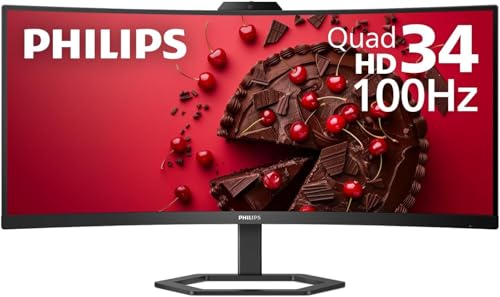
A single large monitor, particularly an ultrawide model, removes the bezel problem entirely. The Philips 34E1C5600HE, for example, offers a 34-inch curved panel that wraps around your field of view. This curvature can reduce eye strain by keeping the screen at a consistent distance from your eyes. For competitive gamers, a single large screen ensures that no part of the image is obscured by a physical barrier.
Productivity and Window Management
Multi-monitor setups are often favored by professionals who need to keep multiple applications open simultaneously. Having a dedicated screen for chat, email, or reference materials allows for faster task switching without the need to minimize or maximize windows. This separation of duties can significantly boost workflow efficiency in office environments. The ViewSonic VA2456A-MHD_H2 dual pack is designed for this exact purpose, providing two 24-inch screens for flexible workspace organization.
On the other hand, a single large monitor requires more manual window management. You must rely on operating system features or third-party tools to arrange windows effectively. While this can be efficient for some, it may feel cluttered for others. Ultrawide monitors offer a middle ground, providing enough horizontal space to place windows side-by-side without the physical separation of two distinct monitors.
Gaming Performance and Refresh Rates
For gamers, the choice often leans toward a single large monitor to maximize immersion and maintain high refresh rates. Driving two high-resolution monitors at high refresh rates places a significant load on the graphics card. A single monitor allows the GPU to focus its power on one display, potentially resulting in higher frame rates. The Viewedge 27 inch Gaming Monitor offers a 240Hz refresh rate, which is ideal for fast-paced competitive titles when used as a single display.
However, some gamers prefer a secondary monitor for chat, streaming, or background tasks. In this case, the primary gaming monitor should have the highest refresh rate and lowest response time. The Sceptre 27-inch Gaming Monitor with 100Hz and 1ms response time is a solid choice for this primary role. Ensure that your graphics card has enough output ports and bandwidth to support the desired configuration without bottlenecking performance.
Desk Space and Ergonomics
Physical space is a practical constraint that often dictates the choice between one large monitor and multiple monitors. A dual-monitor setup requires a wider desk to accommodate both screens comfortably. If your desk is narrow, a single ultrawide monitor may be the only viable option. The Philips 34-inch model, while wide, fits within the footprint of a standard large monitor, saving space compared to two separate units.
Ergonomics also play a crucial role. With multiple monitors, you must ensure that both screens are aligned at the same height and angle to prevent neck strain. VESA mount compatibility, found on many models like the Sceptre and ViewSonic monitors, allows for flexible positioning using arms or wall mounts. This flexibility can help optimize your viewing position and reduce fatigue during long sessions.
Connectivity and Cable Management
Connectivity requirements differ significantly between single and multi-monitor setups, affecting cable management and port availability.
- A single monitor typically requires only one video cable, which simplifies the overall cable management process for users.
- In contrast, a dual-monitor setup requires two video cables, which can lead to a cluttered desk if not managed properly.
- Check the available ports on your graphics card to ensure you have enough HDMI or DisplayPort connections for your needs.
- Some monitors, like the Viewedge model, include a DisplayPort cable, which can save you from buying one separately.
USB-C docking is another factor to consider, especially for laptop users. The Philips 34E1C5600HE features USB-C docking with power delivery, allowing you to connect your laptop with a single cable for video, data, and charging. This feature is less common in dual-monitor packs, which usually rely on traditional HDMI or DisplayPort connections. If you use a laptop regularly, a single monitor with USB-C support may offer a cleaner and more convenient setup.
Cost and Value Considerations
Price is a significant factor when choosing between one large monitor and multiple monitors. A single high-end ultrawide monitor can be more expensive than two mid-range monitors. However, the total cost of a dual-monitor setup includes the cost of stands, arms, and additional cables. The ViewSonic dual pack offers a cost-effective solution by including both monitors in a single purchase, often at a lower price than buying them individually.
Consider the long-term value of your investment. A single large monitor with a high refresh rate and good color accuracy may serve you well for both gaming and productivity. A dual-monitor setup offers more flexibility in terms of workspace organization. Evaluate your budget and priorities to determine which option provides the best value for your specific needs. For more options, see our gaming monitor guide.
Choosing the Right Configuration for You
Ultimately, the choice between one large monitor and multiple monitors depends on your primary use case. If you are a competitive gamer who values immersion and high frame rates, a single large monitor with a high refresh rate is likely the better choice. If you are a professional who needs to multitask across different applications, a dual-monitor setup may offer greater efficiency. Consider your desk space, connectivity options, and budget before making a decision.
Both configurations have their advantages and disadvantages. A single large monitor offers a seamless visual experience and simpler cable management. A multi-monitor setup provides distinct workspace separation and flexibility. By understanding these trade-offs, you can select the configuration that best fits your workflow and preferences. Take the time to measure your desk and check your hardware compatibility to ensure a smooth setup process.







Write Your Review
No reviews yet. Be the first to share your experience!