


Limited desk space and awkward screen angles can quickly turn an ambitious multi-display workstation into an uncomfortable bottleneck. When you try to position two panels side by side, mismatched heights and thick stands often create unwanted clutter and physical fatigue. Identifying the best monitor for dual monitor setups means evaluating not only display panels like portable Full HD screens, but also the mounting arms and multi-display docks that keep everything aligned. We examine stated manufacturer specifications, connectivity requirements, weight ratings, and user feedback to help you build a clean, productive workspace.
Modern productivity demands seamless video transmission alongside reliable ergonomic flexibility. If you are integrating a secondary panel alongside top developer displays, having the right VESA mounting bracket or USB-C hub ensures consistent viewing angles while reducing eye strain throughout long sessions. Hardware options like dual-arm mechanical stands and multi-port video docks let you rotate screens into portrait orientation, share high-resolution feeds, and reclaim valuable desktop real estate without hassle.

Pros
- Sturdy dual C-clamp base eliminates monitor wobble for stable dual-screen gaming.
- Full range of motion (tilt, swivel, rotation) allows customizable ergonomic positioning.
- Frees up desk space and includes cable management for a clean, organized setup.
- Wide compatibility with 13-32 inch monitors and VESA mounts (75x75, 100x100mm).
- Easy to install with two mounting options (C-clamp or grommet) on wooden desks.
Cons
- Only recommended for wooden desks; not compatible with glass or plastic surfaces.
- Each arm supports up to 19.8 lbs, which may not be sufficient for heavier or larger monitors.
- Requires desk clearance underneath (no cross beams or panels) for proper installation.
The HUANUO FlowLift Dual Monitor Stand is a practical desktop accessory designed for PC gamers, streamers, content creators, and anyone running a dual-screen gaming setup. It is a fully adjustable monitor arm that lifts both screens off the desk, freeing up valuable real estate for your keyboard, mouse, and other gear. Based on product specifications, this mount targets users who want a clean, ergonomic workstation without sacrificing stability during intense gameplay or long work sessions.
This monitor arm is best suited for competitive gamers, casual gamers, esports players, and streamers who need quick, one-handed adjustments to their monitor positioning. Whether you are deep in a FPS match, switching between Discord and Twitch, or coding in portrait mode, the full-motion adjustments (tilt, swivel, rotation) let you find the perfect angle to reduce neck and eye strain. The dual C-clamp base is a standout feature, locking the mount firmly to your desk to prevent any wobble or slipping during fast-paced mouse movements or keyboard clicks.
In terms of gaming performance, the HUANUO FlowLift excels at providing a stable and responsive dual-screen experience. The product description highlights that each arm holds 4.4 to 19.8 lbs, which covers most standard gaming monitors in the 13-32 inch range. The built-in cable management keeps wires organized along the arms, which is a huge plus for RGB setup enthusiasts and anyone aiming for a minimalist desk aesthetic. You can raise your monitors up to 16.2 inches, which promotes a healthy posture and helps you stay focused during marathon gaming sessions.
Build quality appears solid, with a reinforced metal construction and a large platform base that distributes weight evenly. The mount offers two installation options: a C-clamp or grommet mount, both designed for wooden desks between 0.59 and 3.54 inches thick. According to user feedback (though limited), the mount feels premium and does not introduce any noticeable sag or wobble when properly installed. The VESA compatibility (75x75mm and 100x100mm) ensures it works with the vast majority of monitors on the market.
Setting up the HUANUO FlowLift is straightforward, but there are some realistic limitations to consider. The product notes that it is only recommended for wooden desks, so glass or plastic surfaces are out. You also need clearance underneath the desk without cross beams, which could be an issue for some gaming desks with built-in cable trays. Each arm supports up to 19.8 lbs, meaning heavier 32-inch monitors or super-ultrawides may not be compatible. Additionally, the mount does not include any RGB lighting, which may disappoint users looking for flashy aesthetics.
Overall, the HUANUO FlowLift Dual Monitor Stand is a practical and ergonomic solution for PC gamers, streamers, and work-from-home users who want a stable, space-saving dual-monitor setup. It is especially well-suited for college gamers or anyone with a compact desk who needs to maximize surface area. While it has specific desk and monitor weight requirements, it delivers on its core promise of reducing clutter and improving viewing comfort. For gamers invested in a clean, performance-focused gaming station, this mount is a solid choice at its price point.

Pros
- Integrated 1 Gbps Ethernet port provides a reliable hardwired connection for gaming laptops.
- Dual USB-A 3.0 ports easily accommodate standard desktop peripherals like keyboards and mice.
- Up to 85W power pass-through reduces the need for multiple power bricks when using a compatible 100W adapter.
- Compact, lightweight build fits easily into desk cable trays or laptop travel bags.
Cons
- Dual display output drops to 4K at 30Hz, which is restrictive for fast-paced gaming monitors.
- Does not include the required 100W PD wall charger or USB-C to USB-C charging cable.
- macOS does not support Multi-Stream Transport (MST), forcing dual external monitors to mirror identical images.
The Anker PowerExpand 8-in-1 USB-C PD Media Hub (Model A8380) is a compact connectivity accessory built for laptop users seeking to expand a single USB-C, USB4, or Thunderbolt port into a multi-port workstation. For PC gamers using a modern laptop as their primary battle station, this hub provides a centralized way to hook up external displays, high-speed networking, and essential peripherals without juggling multiple cables on the laptop chassis itself. It is particularly well-suited for hybrid setups where users regularly alternate between mobile use and docked desktop gaming.
When evaluating this hub for gaming setup connectivity, display output and peripheral management are the critical factors. The hub provides two USB-A 3.0 data ports rated up to 5 Gbps, making them practical for connecting wired gaming mice, mechanical keyboards, or 2.4 GHz wireless peripheral receivers. It also integrates a dedicated 1 Gbps Gigabit Ethernet port, ensuring a stable wired network connection that avoids the potential interference of household Wi-Fi. Video output is handled through two HDMI ports. A single monitor setup supports up to 4K resolution at 60Hz on DisplayPort 1.4 systems. However, hooking up dual external displays caps each output at 4K at 30Hz on Windows. For fast-paced competitive gaming, a 30Hz refresh rate will feel noticeably choppy, making this dual-display configuration far better suited for secondary chat or stream-monitoring screens rather than active gameplay displays.
In terms of physical design, the hub measures 4.65 by 2.01 by 0.69 inches and weighs approximately 3.2 ounces, giving it a lightweight profile that easily rests on a desk mat or behind a monitor stand. The gray exterior houses ports along both long edges, while an integrated USB-C cable extends from one end to connect to the computer. Compatibility covers Windows 10 and 11, ChromeOS, and macOS laptops that support DisplayPort Alt Mode and USB Power Delivery. The hub is explicitly incompatible with Linux, Nintendo Switch, and external optical drives like the Apple USB SuperDrive.
Setting up the hub requires consideration of desk ergonomics and power distribution. The unit supports up to 85W pass-through charging to the connected laptop, but it requires a separate 100W USB-C Power Delivery wall charger and a compatible cable to reach that output, as no power supply is included in the box. User feedback highlights that the short integrated host cable can cause the lightweight hub to hang suspended if your laptop is elevated on a tall cooling pad or vertical stand. Several user reviews also note that the enclosure tends to become warm during prolonged sessions running dual displays and continuous peripheral data transfer.
Operating system constraints represent another realistic limitation. While Windows systems use Multi-Stream Transport (MST) to extend independent desktop spaces across both HDMI monitors, macOS does not support MST over this hub. On a Mac, dual connected HDMI monitors will simply mirror each other, displaying the exact same image. In addition, user feedback indicates that the two USB-A ports sit close to one another, which can cause physical interference if you use a wide flash drive alongside a standard peripheral cable.
The Anker PowerExpand 8-in-1 hub offers a dependable, space-saving docking option for laptop gamers who need a hardwired Gigabit Ethernet port, SD card slots, and USB peripheral consolidation in one unit. Before purchasing, verify that your laptop supports DisplayPort Alt Mode over USB-C, assess whether the 30Hz refresh rate ceiling on dual monitors fits your gaming needs, and make sure you have an external 100W PD charger on hand if you plan to power your machine through the hub.
The Anker PowerExpand 8-in-1 hub connects to host laptops via a short integrated USB-C cable compatible with standard USB-C, USB4, and Thunderbolt ports. Full video and charging functionality requires host hardware support for DisplayPort Alt Mode and USB Power Delivery. The hub is officially supported on Windows 10 and 11, ChromeOS, and macOS, while Linux distributions and the Nintendo Switch are not supported.
Display capabilities depend on the DisplayPort version supported by your host machine CPU or dedicated GPU. Systems with DisplayPort 1.4 support single display outputs up to 4K at 60Hz and dual displays up to 4K at 30Hz. Dual extended monitors are supported on Windows via Multi-Stream Transport, but macOS devices will mirror the same external image across both HDMI screens.
This hub operates via plug-and-play functionality across supported operating systems without requiring third-party software drivers for basic peripheral or display detection. Because the integrated host cable is roughly six inches long, positioning the laptop on an elevated vertical stand or monitor riser may leave the hub suspended unless you place the laptop close to the desk surface.
To take advantage of the 85W pass-through laptop charging, users must connect a standalone 100W USB-C Power Delivery charger and USB-C to USB-C cable directly into the hub PD-IN port. According to user reviews, the hub generates noticeable warmth when simultaneously running dual HDMI monitors and active network transfers, so maintaining clear airflow around the unit on your desk is recommended.
Model Number: A8380 (PowerExpand 8-in-1 USB-C PD Media Hub). Dimensions: 4.65 x 2.01 x 0.69 inches. Product Weight: 3.2 ounces. Exterior Color: Gray.
Ports include: two HDMI ports supporting 4K at 60Hz single or 4K at 30Hz dual display; one 1 Gbps Gigabit Ethernet port; two 5 Gbps USB-A 3.0 data ports; one SD card reader; one microSD card reader; and one USB-C Power Delivery input port supporting up to 85W host charging. Package includes the hub, welcome guide, and an 18-month warranty.


Pros
- Sharp 1080P IPS display with good color accuracy and wide viewing angles
- Plug-and-play USB-C connectivity works with many devices without extra drivers
- Lightweight and thin for easy portability to LAN parties or dorm rooms
- Included smart cover is practical for protection and stand use
- Multiple connectivity options (USB-C, HDMI) support various gaming platforms
Cons
- Requires USB-C DP Alt Mode or Thunderbolt 3 for single-cable operation, limiting compatibility with older devices
- Built-in speakers may lack depth for immersive gaming audio
- Matte screen can reduce contrast in bright environments compared to glossy panels
The MNN Portable Monitor is a 15.6-inch Full HD 1080P IPS display designed for PC gamers, streamers, content creators, and anyone who needs a second screen for their gaming setup. This ultra-slim external monitor connects via USB-C or HDMI, making it versatile for use with laptops, PCs, phones, and consoles like the PS5, Xbox, and Nintendo Switch. Its lightweight build and included smart cover make it a practical choice for gamers who want to extend their desktop or take their gaming on the go.
In terms of performance, the 1080P resolution and IPS panel deliver clear visuals with decent color accuracy and 178-degree viewing angles. The matte screen helps reduce glare and blue light, which is a nice touch for long gaming sessions or late-night streaming. While the 60Hz refresh rate is standard for portable monitors, it works well for strategy games, casual gaming, or as a secondary screen for Discord, chat, or productivity tasks during competitive play. The HDR mode adds a bit more pop to colors and contrast, though it's not a replacement for a high-end gaming monitor.
Build quality feels solid for its price range, with a slim profile that measures just 0.3 inches thick and weighs 1.53 pounds. The smart cover is made of durable PU leather and doubles as a stand, offering protection during travel and flexible orientation options (landscape or portrait). This is especially useful for streamers who want to manage chat or OBS on a vertical screen. The dual USB-C ports support plug-and-play connectivity, but note that your device must support USB-C DP Alt Mode or Thunderbolt 3 for single-cable operation. If not, you'll need to use the included USB-C cable for power and HDMI for video.
Setting up the MNN monitor is straightforward: just connect it to your laptop, PC, or phone, and it works as an extended or mirrored display. The multiple display modes (copy, extend, second screen, portrait) give you flexibility for different tasks, whether you're gaming, working, or creating content. The built-in speakers are adequate for basic audio, but most gamers will prefer using a gaming headset or external speakers for better sound quality. Cable management is simple thanks to the compact design, and the monitor requires minimal maintenance beyond occasional screen cleaning.
One realistic limitation is that the 60Hz refresh rate and 5ms response time (typical for portable monitors) won't satisfy competitive esports players who need high refresh rates for fast-paced FPS games. Additionally, the single-cable USB-C convenience depends on your device's compatibility, so check your laptop or phone specs before buying. The speakers are also basic, so don't expect rich audio for movies or games.
Overall, the MNN Portable Monitor is a solid choice for PC gamers, streamers, and gaming setup builders who want an affordable, portable second screen for multitasking, travel, or casual gaming. It works well as a companion for laptops in dorm rooms, home offices, or on the go. If you need a high-refresh-rate gaming monitor for competitive play, look elsewhere, but for general productivity and light gaming, this is a practical and budget-friendly option.

Pros
- Sturdy steel construction supports dual monitors reliably for a stable gaming view
- Extensive adjustability for tilt, swivel, rotation, and height to reduce neck strain during marathon play
- Cable management clips help keep RGB cables and display cords organized
- Easy installation with detachable VESA plates and clear instructions
Cons
- Maximum monitor weight limit of 22 lbs per arm may not support larger or heavier gaming monitors
- Some users may find the C-clamp mount limits desk edge space or accessibility
- No integrated USB ports or additional routing channels, so extra cable ties might be needed for ultra-clean setups
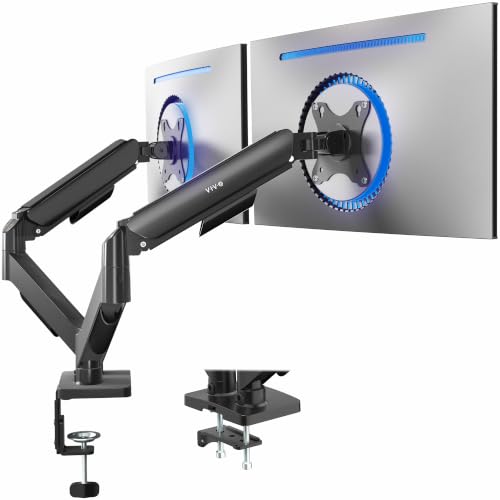
The VIVO Dual Monitor Desk Mount (STAND-V002) is a practical and affordable solution for PC gamers, streamers, and gaming setup builders who want to elevate their multi-monitor arrangement. This heavy-duty steel stand accommodates two screens from 13 to 30 inches, each up to 22 lbs, making it compatible with most standard gaming monitors. With full articulation including tilt, swivel, rotation, and height adjustment along the center pole, it's designed to help you achieve that perfect viewing angle for competitive gaming or streaming on Twitch.
For performance and responsiveness, this mount excels at holding monitors steady, reducing wobble during intense FPS or MOBA gameplay. The adjustable arm allows you to position screens in portrait or landscape orientation, which can be a boon for Discord chats, content creation, or monitoring chat while gaming. The cable management clips along the arms and center pole help keep your desk tidy, which is especially valuable for RGB enthusiasts or anyone aiming for a clean streaming setup.
Build quality is surprisingly robust for the price point. The steel construction feels solid, and the heavy-duty C-clamp (or optional grommet mount) secures firmly to desks up to 3.25 inches thick. This means your dual monitors remain stable even during heated gaming sessions. Installation is straightforward thanks to detachable VESA bracket plates and included hardware, so you can get your dual-screen gaming rig up and running quickly.
Comfort and ergonomics are key for long gaming marathons. The ability to tilt, swivel, and rotate each monitor independently lets you reduce glare and neck strain. Whether you're a casual gamer or an esports competitor, having both screens at eye level can make a real difference in comfort over hours of play. It's also a great fit for work-from-home gamers who need a productive dual-monitor setup for both gaming and office tasks.
One realistic limitation is the 22 lb per arm weight capacity. Larger gaming monitors with heavy stands or ultrawide screens may exceed this limit, so check your monitor's weight before buying. Also, the C-clamp mount uses desk edge space, which could be an issue if your desk has a narrow lip or you prefer a completely clutter-free surface. Some users may want additional cable routing options beyond the included clips.
Overall, the VIVO STAND-V002 is a solid choice for PC gamers, streamers, and gaming setup enthusiasts who want a reliable dual monitor mount without spending a fortune. It delivers the adjustability and stability needed for immersive gaming, streaming, and everyday use. If your monitors fall within the size and weight limits, this mount will help you achieve a cleaner, more ergonomic desktop, letting you focus on your game or content without unnecessary distractions.
The VIVO Dual Monitor Mount is a fantastic addition to any gaming desk, especially for those who value a clean and organized workspace. By lifting both monitors off the desk, it frees up valuable surface area for your keyboard, mouse, and other peripherals. The included cable management clips help route display cables and power cords neatly along the arms and center pole, reducing the visual clutter that can distract during intense gaming sessions. For streamers and content creators, this mount makes it easier to achieve a professional-looking setup. The compact footprint of the C-clamp or grommet base means you don't lose desk space underneath the monitors, perfect for smaller desks in dorm rooms or home offices.


Frequently Asked Questions
Can dual monitor mounts hold curved gaming displays?
Yes, models like the VIVO mechanical stand and WALI arms explicitly support both flat and curved screens up to their specified weight and size limits. If you are pairing curved panels or high-speed hardware like competitive gaming displays, always ensure each monitor stays under the arm load limit, which typically ranges from 17.6 to 22 pounds per arm.
Does macOS support extended desktop across dual HDMI docking stations?
No, macOS does not support Multi-Stream Transport (MST) over standard USB-C connections, meaning dual HDMI adapters like the Anker hub will mirror the same external display on Mac laptops. Windows and ChromeOS devices with DP Alt Mode can extend separate desktop feeds across both connected HDMI screens.
What VESA patterns do dual monitor stands require?
Most standard desk mounts in this category require either 75x75mm or 100x100mm VESA mounting hole patterns on the back of each screen. If you mount a wider display, such as a curved 1440p monitor, verify that your panel features compatible mounting points before installing.
Can a portable USB-C monitor work effectively as a second display?
Yes, a compact screen like the MNN 15.6-inch Full HD display connects with a single full-featured USB-C cable for both signal and power. It offers multiple viewing orientations, including portrait mode, making it an excellent lightweight addition for mobile or compact workstation setups.
What desk types and thicknesses work with dual monitor desk clamps?
Dual monitor mounts usually require solid wooden desks with thicknesses between 0.39 inches and 3.54 inches, depending on the specific bracket. Glass or plastic desktops are not recommended, and you should ensure the underside of your desk lacks obstructive crossbeams that could block the clamp base.







Write Your Review
No reviews yet. Be the first to share your experience!