


Spending eight hours a day staring at a fixed screen can really mess with your posture and eye comfort. Many users find that a rigid stand forces them into awkward neck positions, leading to fatigue before the workday even ends. Finding a display that moves with you is key to a sustainable home office setup. We analyzed the specifications of nine popular units to see which ones offer genuine height adjustable capabilities without breaking the bank. This list focuses on practical ergonomics and value. You can browse our guide to reducing eye strain for more tips on setting up your workspace comfortably.
The selection includes options from major brands like ASUS, Samsung, and HP, each with different stand features. Some models offer full vertical adjustment, while others rely on VESA mounts for flexibility. It is important to check if the stand is included or if you need a separate arm. We looked at panel types, refresh rates, and connectivity options to help you decide. Whether you need a 120Hz display for smooth scrolling or a VA panel for contrast, there is a pick here for you. Understanding these specs helps you avoid buyer’s remorse and ensures you get a monitor that fits your specific desk space and usage habits perfectly.


Pros
- Affordable price point for a 100Hz VA monitor with good contrast
- Frameless design looks modern and works great in multi-monitor arrays
- Eye care features are genuinely helpful for long sessions
- VESA compatibility adds flexibility for desk organization
- 4-year advance replacement warranty provides peace of mind
Cons
- Only 100Hz, not ideal for competitive esports gamers seeking higher refresh rates
- Limited connectivity (1x HDMI, 1x VGA) – no DisplayPort or USB-C
- VA panel may have slight ghosting in fast-paced scenes compared to IPS
The Philips 241V8LB is a 23.8-inch Full HD monitor that bridges the gap between budget-friendly pricing and practical performance for PC gamers and everyday users. It features a VA panel with a 100Hz refresh rate, making it a solid entry-level choice for casual gamers, college students, and work-from-home gamers who want smoother visuals without breaking the bank.
This monitor is best suited for casual PC gamers who play titles like Minecraft, Fortnite, or indie games, as well as for productivity users who need a reliable second screen. The 100Hz refresh rate offers a noticeable upgrade over standard 60Hz displays, reducing motion blur and providing a more fluid experience in games and desktop navigation. However, competitive esports players may want to look for higher refresh rates like 144Hz or 240Hz for peak responsiveness.
In terms of performance, the VA panel delivers excellent contrast – deeper blacks and brighter whites compared to typical IPS panels – which enhances visual clarity in darker game scenes and movies. The 178/178 degree viewing angles ensure consistent colors from most positions, though VA panels can exhibit slight color shift at extreme angles. The monitor also includes Philips' Eye Care technology (flicker-free and low blue light mode) to reduce eye strain during long gaming or work sessions, and an EasyRead mode that mimics paper for reading documents.
Build quality is practical: the monitor has a slim, frameless design on three sides, which not only looks modern but also makes multi-monitor setups seamless. It weighs just over 6 pounds and has a compact footprint, so it won't dominate your desk. The stand is basic but functional, with tilt adjustment. VESA 100x100mm compatibility means you can easily mount it on an arm for better ergonomics and cable management.
Setup is straightforward – plug in the HDMI or VGA cable, and you're good to go. There's no USB hub or built-in speakers, but for the price, that's expected. The on-screen menu is simple to navigate for adjusting brightness, contrast, and eye care settings. Maintenance is minimal; just occasional dusting of the screen.
Realistically, the main limitation is the lack of DisplayPort or USB-C connectivity, which might be a dealbreaker for some modern laptops. Also, while 100Hz is smooth, it's not optimized for high-speed competitive gaming. However, for its price point, the Philips 241V8LB offers excellent value for casual gamers, college gamers, and anyone building a budget-friendly gaming or productivity setup. If you're looking for an affordable monitor that does the job without fuss, this is a strong recommendation.

Pros
- Affordable 120Hz monitor with solid motion clarity and low input lag
- IPS panel offers wide viewing angles and good color reproduction for the price
- Borderless design looks clean and works well for dual-monitor setups
- Tilt-adjustable stand allows comfortable viewing angles out of the box
Cons
- Stand offers tilt only, no height or swivel adjustment, so you may need a separate monitor arm
- Limited to one HDMI input (likely HDMI 1.4), no DisplayPort, which could restrict high-refresh-rate sources
- Built-in speakers (if any) are basic, external speakers or headset recommended for gaming audio
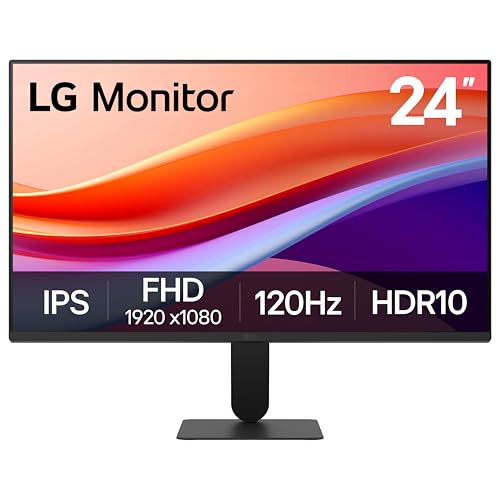
The LG 24U411A-B is a 24-inch Full HD IPS monitor that brings a 120Hz refresh rate and gamer-friendly features to a budget-friendly price point. It's not a high-end esports monitor, but for casual gamers, competitive players on a tight budget, and those building a clean dual-monitor setup, it offers a lot of value. Streamers and content creators who need a secondary display for chat or editing will appreciate the slim bezels and solid color performance.
In terms of real-world gaming responsiveness, the 120Hz refresh rate is a noticeable step up from standard 60Hz displays, making motion smoother and reducing screen tearing in fast-paced games like Overwatch or Call of Duty. The 1ms Motion Blur Reduction helps keep fast-moving objects sharp, though it may introduce some flicker at lower brightness settings. Dynamic Action Sync keeps input lag low, which is crucial for competitive play, and the Black Stabilizer brightens dark areas so you can spot enemies hiding in shadows more easily.
Build quality is decent for a monitor in this price range. The plastic casing feels sturdy enough, and the ultra-slim bezels give it a modern, borderless look that blends well into any desk setup. The included stand allows tilt adjustment from -5° to 20°, which is helpful but limited—there's no height or swivel adjustment, so you might want to invest in a third-party monitor arm for better ergonomics, especially for long gaming sessions.
Setting up the LG 24U411A-B is straightforward. It comes with an HDMI cable and a power adapter, and the stand snaps on without tools. The on-screen menu is easy to navigate, with presets for gaming, reader mode, and custom settings. The Switch app allows you to split the screen into up to six sections, which is useful for multitasking between gaming, Discord, and streaming tools. Cable management is minimal—just a single HDMI and power cable, so keeping your desk tidy is easy.
A realistic limitation is the connectivity: there's likely only one HDMI port and no DisplayPort, which means you may need to use an adapter or switch cables if you want to connect multiple devices. Also, the 24-inch 1080p panel is fine for gaming but not ideal for spreadsheet-heavy productivity or high-end photo editing due to the lower resolution. The lack of built-in speakers (or very basic ones) means you'll need a headset or external speakers for decent audio.
Overall, the LG 24U411A-B is a smart purchase for budget-conscious PC gamers, college gamers, or anyone building a dual-monitor gaming setup without breaking the bank. It delivers smooth 120Hz performance, decent color accuracy with HDR10 support, and a clean design that won't clutter your desk. If you're not a competitive esports pro needing 144Hz+ or adjustable ergonomics, this monitor offers excellent value for everyday gaming, streaming, and productivity.
The 120Hz refresh rate and 1ms Motion Blur Reduction make a noticeable difference in fast-paced games like first-person shooters and racing titles. You'll experience smoother frame transitions and less motion blur compared to standard 60Hz monitors. Dynamic Action Sync further reduces input lag, helping you react quicker in competitive matches. Black Stabilizer brightens dark scenes, giving you an advantage in games like PUBG or Escape from Tarkov where spotting enemies early is key. For casual and intermediate gamers, this monitor provides a solid responsive experience at a budget price.
The 24-inch IPS panel delivers Full HD (1920x1080) resolution with vivid colors and wide viewing angles. With up to 99% sRGB coverage and HDR10 support, images look punchy and colors are more lifelike than typical TN panels. While it doesn't rival high-end HDR monitors, it's great for watching videos, browsing, and gaming. The 3-side virtually borderless design gives a clean, modern look that works well in multi-monitor setups. Brightness is adequate for indoor use, but the matte coating helps reduce glare.


Pros
- High 240Hz refresh rate and 0.3ms response time give a competitive edge in esports.
- Adaptive sync support works seamlessly with FreeSync and G-SYNC for no screen tearing.
- Ergonomic stand with full height adjustment reduces neck strain during marathon gaming.
- Compact 23.8-inch size fits well on smaller desks and multi-monitor setups.
- DisplayWidget software makes adjustments convenient without reaching behind the monitor.
Cons
- 1080P resolution limits pixel density; higher resolution monitors may offer sharper text.
- On-screen display navigation uses buttons rather than a joystick, which can be less intuitive.
- Built-in speakers are basic; external speakers or a headset are recommended for better audio.
The ASUS TUF Gaming VG249QML5A is a 23.8-inch Full HD monitor built for PC gamers who prioritize speed and responsiveness. It features a Fast IPS panel with a 240Hz refresh rate and an incredibly low 0.3ms response time, making it a strong contender for competitive esports titles where every frame matters. This monitor is best suited for competitive gamers, casual players who want smooth visuals, and streamers looking for a reliable secondary or primary display that handles fast motion without tearing or ghosting.
In real-world gaming scenarios, the 240Hz refresh rate and 0.3ms response time provide fluid motion clarity that reduces eye strain and helps you track targets in fast-paced shooters like Overwatch 2 or Call of Duty. The combination of FreeSync Premium and G-SYNC Compatibility ensures tear-free gameplay whether you're using an AMD or NVIDIA graphics card, which is a huge plus for PC builders who often mix and match components. ASUS's Extreme Low Motion Blur Sync (ELMB SYNC) technology further sharpens moving objects by reducing ghosting while keeping variable refresh rate active, giving you clear visibility during chaotic scenes.
Build quality is typical of ASUS TUF Gaming products - sturdy, matte-black plastic with a reinforced stand that offers height adjustment, tilt, swivel, and pivot. The 10.8-pound weight feels solid on a desk, and the included DisplayPort cable and L-shaped screwdriver make setup straightforward. A nice touch is the DisplayWidget Center software, which lets you control monitor settings with a mouse instead of fumbling with buttons. The monitor also includes a 3-month Adobe Creative Cloud subscription, which adds value for content creators who might use it for editing alongside gaming.
Setting up the VG249QML5A is simple: attach the stand, connect via DisplayPort or HDMI, and adjust the height to eye level. Cable management is basic - there's a small cutout in the stand to route cables, but it's not the most elaborate system. Cleaning the matte screen is easy with a microfiber cloth, and the anti-glare coating helps reduce reflections in brightly lit rooms.
A realistic limitation is the 1080P resolution at 23.8 inches; while it's perfectly fine for competitive gaming, users who prefer higher pixel density for reading text or detailed design work might want a 1440P or 4K panel. The OSD buttons, though functional, are less intuitive than a joystick, but the software compensates for that. Also, like most monitors in this price range, the built-in speakers are basic - plan on using a gaming headset or external speakers for an immersive experience.
Overall, the ASUS TUF Gaming VG249QML5A is an excellent choice for competitive PC gamers and esports enthusiasts who want a fast, responsive 1080P monitor without breaking the bank. It also suits college gamers with limited desk space and streamers needing a smooth secondary display. If you prioritize high refresh rates, low latency, and ergonomic adjustability, this monitor delivers where it counts.
The 240Hz refresh rate and 0.3ms response time make this monitor a beast for fast-paced gaming. In games like Valorant, Apex Legends, and Fortnite, motion stays fluid with minimal blur, giving you a clear advantage when tracking enemies. The ELMB SYNC feature reduces ghosting while keeping VRR active, so you get sharp motion without screen tearing. FreeSync Premium and G-SYNC Compatibility ensure smooth gameplay regardless of your GPU brand, making it a versatile pick for any gaming PC.
The monitor sports a durable matte-black chassis with a full ergonomic stand that supports height, tilt, swivel, and pivot adjustments. The 10.8-pound weight gives it a solid feel on a desk, and the included L-shaped screwdriver makes stand attachment quick. The port layout includes DisplayPort, HDMI, and a headphone jack, providing enough connectivity for most setups. Overall, the build quality matches the TUF Gaming reputation for reliability.
Frequently Asked Questions
Do all 24-inch monitors have height adjustment?
No, many budget models only offer tilt. Check the stand specifications carefully. Some monitors are VESA mountable, allowing you to attach a separate arm for height adjustment if the built-in stand is fixed.
Is IPS better than VA for office work?
IPS panels generally offer better color accuracy and wider viewing angles. This makes them ideal for text clarity and collaborative work. VA panels provide deeper contrast but may have slower response times for fast-moving content.
What is the benefit of a 120Hz refresh rate?
A higher refresh rate makes scrolling and window dragging feel smoother. This reduces perceived motion blur and can help with eye comfort during long sessions. It is a nice upgrade for productivity-focused users who value fluid motion.
Can I use a VESA arm with these monitors?
Most monitors in this list support VESA mounting. This allows you to detach the stand and use a wall or desk arm. Check the specific VESA pattern size on the product page to ensure compatibility with your chosen arm.
Are 100Hz and 120Hz worth the extra cost?
For most office tasks, 60Hz is sufficient, but higher rates feel smoother. If you are sensitive to motion blur, the upgrade is noticeable. Many users find the fluidity helpful for reading and navigating complex spreadsheets or code editors.




Write Your Review
No reviews yet. Be the first to share your experience!