


Hardware Showcase Aesthetics and Thermal Efficiency
Choked intake panels often plague showpiece chassis builds when solid front glass replaces traditional high-flow mesh. Routing thick power cables around tight corners also turns an otherwise exciting desktop project into an exercise in frustration. Choosing the best fishtank pc cases requires balancing seamless corner glass panels with dedicated side and bottom fan mounts to keep internal temperatures under control. Based on our detailed comparison of component clearances, fan configurations, and user feedback, modern dual-chamber enclosures solve these airflow headaches while giving your graphics card the spotlight it deserves. If you want a stylish setup, finding a clean white chassis with adequate clearance makes all the difference.
Massive modern graphics cards demand substantial horizontal room, especially when thick power adapters press against side panels. Adequate clearance between your motherboard tray and the glass ensures heat dissipates freely instead of baking critical voltage regulator modules. Analyzing chassis dimensions shows that top radiator cutouts and side reverse-blade fan brackets keep intake streams direct and unobstructed. You also avoid messy tangles behind the backplate by utilizing deep chambers that tuck power supplies away from view. Taking a close look at affordable gaming cases reveals that visual flair no longer demands high price tags.

Pros
- Out-of-the-box cooling is outstanding with seven pre-installed fans, saving time and money on extra purchases
- Panoramic glass design looks premium and shows off RGB components beautifully from all sides
- Dual-chamber layout keeps cables hidden and airflow efficient, ideal for tidy builds
- Excellent radiator support (up to 3x 360mm) for custom or AIO liquid cooling setups
- Competitive price for a case with so many fans and features included
Cons
- Glass panels may require frequent cleaning to maintain that clear look in a dusty environment
- Case dimensions (16.5 x 11.2 x 17.3 inches) could be tight for very tall CPU coolers or extra-large radiators
- Brand is relatively new, so long-term build quality feedback from the community is still emerging
The FOIFKIN F600 is a mid-tower ATX gaming PC case that aims to deliver premium features without breaking the bank. It comes packed with seven pre-installed PWM ARGB fans, a 270-degree panoramic tempered glass side panel, and a dual-chamber interior layout. This combination makes it a strong contender for gamers, streamers, and PC enthusiasts who want a visually impressive and well-cooled system right from the start.
This case is best suited for PC gamers who value both performance and aesthetics. Whether you are a competitive gamer building a high-performance rig, a casual gamer looking for a colorful showpiece, or a streamer who wants a clean and cool-running setup for long broadcasts, the F600 has a lot to offer. The pre-installed fans include six reverse-blade and one standard forward-blade 120mm PWM ARGB units, which push a substantial amount of air while adding customizable RGB lighting. The dual-chamber design not only hides the power supply and drives but also creates a separate airflow path that helps keep temperatures low under load.
In terms of real-world performance, this case is built for strong airflow and effective cooling. The ability to mount up to three 360mm radiators simultaneously means you can scale up with AIO or custom liquid cooling if needed. The generous GPU clearance of up to 400mm fits almost any modern graphics card, and the PSU support up to 200mm gives flexibility for high-wattage units. The front-panel USB Type-C port is a welcome addition for modern peripherals and fast file transfers. For gamers who play demanding titles or run CPU/GPU-intensive tasks, the F600’s ventilation and fan configuration should keep components running at safe temperatures even during extended sessions.
Build quality is emphasized through the use of high-hardness tempered glass on the side and front panels, creating a panoramic view that lets your hardware and RGB shine from almost every angle. The steel chassis feels sturdy, and the dual-chamber layout makes cable management simpler than in traditional cases. The included space for one 3.5-inch HDD and two 2.5-inch SSDs covers most storage needs. Setting up the case is straightforward for anyone with basic PC-building experience; the fan wiring is already managed, and the ARGB can be controlled via a motherboard header or included hub.
Like any case, there are a few realistic limitations. The large glass panels may show dust and fingerprints easily, requiring occasional cleaning to keep the look pristine. While the case supports large radiators, very tall air coolers (above 165mm or so) might be a tight fit due to the top-mounted radiator clearance. Additionally, FOIFKIN is a newer brand in the PC case market, so long-term reliability and customer support are still being established. However, early product descriptions and user feedback suggest solid construction for the price point.
Overall, if you’re building a new gaming PC and want a case that already includes plentiful ARGB fans, great cooling potential, and a modern panoramic glass design, the FOIFKIN F600 is a smart buy. It fits well in a gaming desk setup or a dorm room, and its clean cable management makes it easy to maintain. With a price that undercuts many competitors with similar features, it offers excellent value for PC gamers, RGB enthusiasts, and anyone looking to create an impressive build without extra fan purchases.
The FOIFKIN F600 comes with seven pre-installed 120mm PWM ARGB fans (six reverse-blade, one standard) that ensure strong intake and exhaust right out of the box. The dual-chamber design separates the power supply and drives from the main motherboard area, reducing heat buildup. The case supports up to three 360mm radiators, making it suitable for high-end liquid cooling configurations. With ample mesh vents on the top, bottom, and rear, airflow is well-balanced for gaming PCs with powerful components.
This case uses high-hardness tempered glass for the side and front panels, giving a 270-degree panoramic view that showcases your components and RGB lighting. The steel chassis feels solid and the dual-chamber layout enhances structural rigidity. Cable management is simplified with pre-routed tie-down points and a covered PSU area. The entire frame is designed to support large GPUs (up to 400mm) and PSUs (up to 200mm), offering flexibility for various high-end builds.
All seven fans feature addressable RGB lighting that can be synchronized with your motherboard's ARGB header for cohesive lighting effects. The panoramic glass design maximizes the visibility of the fans and internal components. The included fan hub (or motherboard control) allows for easy software customization. This makes the F600 ideal for RGB enthusiasts who want a vibrant, unified look without adding extra lighting strips.

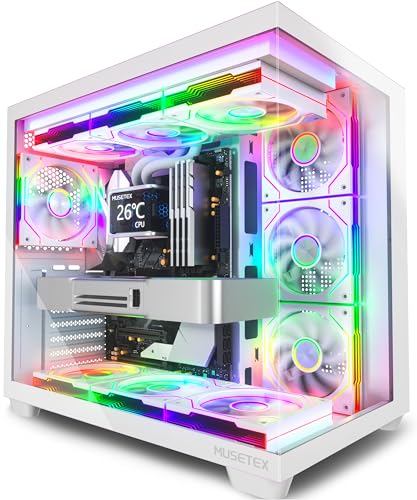
Pros
- Seven pre-installed ARGB fans save time and money on additional cooling.
- Stunning 270-degree tempered glass view shows off your build beautifully.
- Excellent compatibility with large GPUs, tall CPU coolers, and 360mm radiators.
- USB Type-C port on the front I/O is a modern convenience for fast data and charging.
- White color scheme looks clean and pairs well with other white gaming peripherals.
Cons
- Side and bottom fans are reverse-blade, which may confuse some builders during setup.
- Limited to 160mm CPU cooler height, which may not fit the largest air coolers.
- Cable management space behind the motherboard tray could be tighter than some full-tower cases.
The MUSETEX Y6 is an ATX mid tower PC case designed for gamers and PC enthusiasts who want a visually striking build without sacrificing performance. It comes with seven pre-installed 120mm Infinity Mirror PWM ARGB fans, including three reverse-blade fans on the side, three reverse-blade fans on the bottom, and one forward fan on the rear. This setup creates a continuous gradient rainbow lighting effect that looks far more dynamic than standard ARGB fans, making it a top choice for RGB setup enthusiasts and streamers who want their rig to stand out on camera.
This case is best suited for PC gamers, competitive gamers, casual gamers, esports players, streamers, content creators, gaming setup builders, and even college gamers looking for a reliable and attractive foundation for their first or next build. The 270-degree full view tempered glass panels let you showcase your GPU, CPU cooler, and any collectible figures you place inside, which is a huge plus for those who take pride in their desktop aesthetics.
In terms of real-world performance, the Y6 delivers strong cooling potential thanks to its seven pre-installed fans and support for top-mounted 360mm liquid coolers. The anti-vortex fan blades help maintain steady airflow, and the PWM control allows you to adjust fan speeds via your motherboard software for a balance between noise and cooling. This makes it suitable for long gaming sessions, streaming marathons, or content creation workloads where thermal management is critical.
Build quality is solid, with a steel frame and tempered glass panels that feel sturdy. The internal layout is well-organized, with separate compartments for the power supply and drives, which helps with cable management. The front I/O includes a USB Type-C port, USB 3.0, and USB 2.0, plus audio jacks, making it easy to connect modern peripherals. The white finish is clean and matches well with other white gaming gear, though it may require occasional dusting to keep it looking pristine.
Setup is straightforward for anyone familiar with PC building, though the reverse-blade fans on the side and bottom might confuse first-time builders. The included manual and screw kit help, but you'll need to pay attention to fan orientation for optimal airflow. Cable management is decent, with rubber grommets and tie-down points, but the space behind the motherboard tray is a bit tight if you have a lot of cables. Overall, the Y6 is a practical choice for gamers who want a feature-rich case with impressive RGB lighting and good cooling out of the box.
One realistic limitation is the CPU cooler height limit of 160mm, which may not accommodate the largest air coolers on the market. Additionally, the side and bottom fans are reverse-blade, meaning they pull air in from the back, which is fine for intake but requires careful planning. Despite these minor quirks, the MUSETEX Y6 offers excellent value for its price, especially for those who want a pre-fanned case with stunning RGB and a panoramic view. It's a strong recommendation for anyone building a mid-range to high-end gaming PC, streaming setup, or RGB-focused desktop.
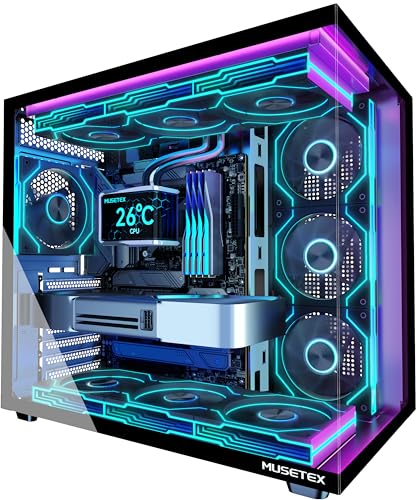
Pros
- Seven high-quality Infinity Mirror ARGB fans included - no need to buy extras for a fully lit build.
- Excellent component visibility thanks to the 270-degree tempered glass panels.
- Good compatibility with large GPUs, tall CPU coolers, and 360mm radiators for high-end builds.
- Type-C port adds modern connectivity convenience for fast charging and data.
- Fan speeds and lighting can be synced with motherboard software for personalized control.
Cons
- Cable management behind the motherboard tray may require careful routing due to limited space with seven pre-installed fans.
- The case's tempered glass panels are prone to fingerprints and smudges, requiring regular cleaning to maintain clarity.
- Included fan controllers or hubs are not mentioned - users may need to manage fan headers directly on the motherboard.
The MUSETEX Y6 is a mid-tower ATX PC case that sets itself apart by including seven pre-installed Infinity Mirror PWM ARGB fans straight from the factory. These are the 9th generation prism fans from MUSETEX, featuring seamless gradient rainbow lighting that transitions smoothly across the blades. For gamers and PC builders who want a vibrant, cohesive look without spending extra time and money on additional fans, this case delivers an impressive visual experience right out of the box.
This case is best suited for PC gamers, RGB setup enthusiasts, competitive gamers, and streamers who value both aesthetics and airflow. The 270-degree full-view tempered glass panels offer an almost unobstructed view of your internal components - perfect for showing off a custom water loop, high-end GPU, or even collectible figures inside the case. The black finish and clean lines fit well in most gaming desk setups, from dorm rooms to dedicated streaming stations.
From a cooling and performance standpoint, the seven 120mm fans include three reverse-flow fans on the side, three reverse-flow on the bottom, and one forward-flow on the rear. This configuration promotes strong intake from the side and bottom while exhausting hot air out the back. The anti-vortex blade design helps maintain steady airflow and reduces turbulence. Based on user feedback and the product description, this layout can effectively cool high-wattage components during long gaming sessions or heavy rendering tasks. The included PWM fans allow speed control via motherboard software, giving you the ability to balance noise and airflow.
Build quality is solid for the price point. The tempered glass panels are sturdy and attach with thumbscrews, though they do attract fingerprints easily. The internal layout is well-organized, with ample clearance for large graphics cards (up to 410mm) and tall CPU coolers (up to 160mm). A top-mounted 360mm radiator is supported, which is great for liquid cooling enthusiasts. The power supply shroud hides cables and drives, contributing to a cleaner build. Cable management is adequate, but with seven pre-installed fans, careful routing behind the motherboard tray is necessary to keep everything tidy.
Setup is straightforward for an intermediate builder. The case comes with a manual and all necessary screws. Motherboard installation follows standard ATX layout, and the I/O panel includes a Type-C port, USB 3.0, USB 2.0, and audio jacks - convenient for modern peripherals. One limitation is that the case does not include a fan hub, so you'll need enough fan headers on your motherboard or purchase a separate hub to control all seven fans independently. Additionally, the glass panels may require occasional cleaning to keep them smudge-free.
Overall, the MUSETEX Y6 offers excellent value for anyone building a gaming PC who wants a head start on RGB lighting and airflow. It's a practical choice for competitive and casual gamers alike, especially those who prioritize visual flair without sacrificing cooling capability. If you're looking to build a showpiece gaming rig on a budget, this case provides a strong foundation. Just be prepared to manage the extra fan cables and keep a microfiber cloth handy for the glass.

Pros
- Exceptional value with 7 pre-installed PWM ARGB fans
- Stunning 270-degree dual tempered glass panel
- Includes Type-C port for modern connectivity
- Excellent cooling potential with expandable fan support up to 10
Cons
- Case width of 8.35 inches may be too wide for smaller desks
- No included radiator support specifications; liquid cooling clearance may require careful planning
- Cable management depth behind motherboard tray could be tighter for extensive builds
The MUSETEX K2 is a mid tower ATX PC case that comes ready to impress straight out of the box. With seven pre-installed PWM ARGB fans and a striking 270-degree dual tempered glass panel, this case is built for gamers and PC builders who want both performance and visual flair. Whether you're assembling a high-end gaming rig, a streaming powerhouse, or a RGB-lit showpiece, the K2 aims to deliver a balanced experience without breaking the bank.
Cooling is a clear priority here. The three side-mounted fans draw in fresh air directly onto the GPU and CPU area, while three top fans and one rear fan exhaust heat efficiently. All seven fans are PWM controlled and ARGB enabled, so you can sync lighting effects and adjust fan speeds through your motherboard software. The case also supports up to 10 fans total, giving you room to expand if needed. Magnetic dust filters on the top and bottom keep dust out while maintaining airflow, which is a thoughtful touch for long-term maintenance.
The dual tempered glass panels are the visual centerpiece. The front and left side are seamless glass, offering a clear view of your components from nearly any angle. The interior layout is clean and spacious, with plenty of room for large graphics cards and CPU coolers. Build quality is solid, with a sturdy steel frame and glass panels that feel secure. The included Type-C port on the I/O panel is a welcome addition for modern peripherals, alongside two USB 3.0 ports and audio jacks.
Setting up a build in the K2 is straightforward. The case fits ATX, Micro-ATX, and Mini-ITX motherboards, and the power supply shroud helps with cable management. There are grommets and tie-down points to route cables neatly, though the space behind the motherboard tray is a bit tight if you have many cables. The pre-installed fans already have their cables daisy-chained, which simplifies connection to the motherboard. Overall, installation should be smooth for builders with some experience.
One realistic limitation is the case width. At 8.35 inches wide, it's wider than many standard mid towers, so make sure your desk or shelf can accommodate it. Additionally, the manual doesn't specify exact radiator support dimensions, so if you plan to use a liquid cooling system, double-check the clearance before buying. The cable management area could also be deeper for very complex builds with lots of RGB controllers.
Overall, the MUSETEX K2 is a strong contender for budget-conscious PC gamers and RGB enthusiasts who want a ready-to-go cooling solution with great looks. It's especially suited for first-time builders looking to avoid the hassle of buying and installing fans separately, and for anyone who wants a clear view of their components. If you can work within its size constraints and plan your cooling setup accordingly, this case offers excellent value for a modern gaming PC build.
The MUSETEX K2 comes with seven pre-installed PWM ARGB fans that are strategically placed for balanced airflow. Three side fans act as intakes, pulling fresh air directly over the GPU and motherboard area, while three top fans and one rear fan exhaust hot air out. This positive pressure setup helps reduce dust accumulation when used with the included magnetic dust filters. All fans are PWM controllable, allowing you to fine-tune speeds for noise or performance. The case also supports up to three additional fans (two top and one rear) if you need extra cooling for high-end components.
Airflow is further enhanced by the side panel ventilation apertures, which allow the side fans to draw air efficiently. The top and bottom magnetic dust filters are easy to remove and clean, keeping maintenance simple. The case does not include a dedicated PSU shroud fan mount, but the power supply area has its own intake from the bottom filter. For most gaming builds, the stock fan configuration should provide adequate cooling. If you're pushing overclocked hardware or a high-TDP GPU, you may want to consider adding a rear exhaust fan (the included one is already there) or upgrading to a liquid cooler, though clearance for radiators should be measured carefully.
The MUSETEX K2 features a steel chassis with two tempered glass panels on the front and left side, creating a panoramic view of your components. The glass is tinted slightly dark, which complements RGB lighting nicely. The frame feels sturdy and supports standard ATX, Micro-ATX, and Mini-ITX motherboards. The I/O panel includes a Type-C port, two USB 3.0 ports, and audio jacks, all mounted on the top front for easy access. The power and reset buttons are tactile and responsive.
Inside, the layout is clean with a PSU shroud that hides cables and drives. There are two 2.5-inch SSD mounts on the shroud and one 3.5-inch HDD cage in the bottom. Cable management openings are well-placed, with Velcro straps to secure bundles. The pre-installed fans use daisy-chained connectors, simplifying cable routing. The only drawback is that the space behind the motherboard tray is limited, so thick cable bundles may bulge a bit against the side panel. Overall, the design focuses on aesthetics and ease of installation for a mid-range price point.
Frequently Asked Questions
Do best fishtank pc cases suffer from poor airflow compared to traditional mesh cases?
No, modern dual-chamber fishtank cases do not compromise airflow when configured with dedicated side and bottom intakes. While solid front glass eliminates standard front fans, chassis like the FOIFKIN F600 pull cool air directly from bottom and side vents. Pre-installed reverse-blade fans direct fresh air straight to the graphics card, while top and rear fans exhaust heat efficiently.
How much GPU length clearance do the best fishtank pc cases of 2026 provide?
Most mid-tower fishtank enclosures support graphics cards measuring between 400mm and 410mm in length. According to manufacturer specifications, models like the MUSETEX Y6 provide up to 410mm of clearance, easily accommodating massive triple-fan graphics cards. You also retain ample room to plug in power cables without pressing them sharply against the glass panel.
Can you mount a 360mm liquid cooler radiator in a panoramic fishtank case?
Yes, the best fishtank pc cases of 2026 support 360mm liquid cooling radiators along the top panel, and some models support multiple radiators. Enclosures like the FOIFKIN F600 can mount up to three 360mm radiators simultaneously. The CORSAIR 3500X and MUSETEX Y6 support roof radiators without blocking RAM, helping keep your high-end processor cool.
Why do best fishtank pc cases use reverse-blade fans on the bottom and side?
Reverse-blade fans draw fresh air into the chassis while keeping the decorative fan face pointed toward the glass. Standard fans display rear motor brackets when configured as intakes, disrupting panoramic aesthetics. If you prefer light-colored components, exploring panoramic white PC cases with reverse fans delivers great airflow alongside a clean interior view.
Do modern best fishtank pc cases come equipped with front panel USB Type-C ports?
Yes, the latest best fishtank pc cases feature dedicated USB Type-C ports directly on their front or top I/O panels. Models such as the MUSETEX K2, MUSETEX Y6, and FOIFKIN F600 provide fast Type-C connectivity alongside USB 3.0 ports. This feature lets you connect modern external storage drives and accessories without reaching behind the chassis.


Write Your Review
No reviews yet. Be the first to share your experience!