


Heavy gaming loads push desktop processors to their limits, frequently causing thermal throttling right when frame rates matter most. Watching your boost clocks drop during intense multiplayer matches ruins the experience, especially if an underpowered cooler cannot move heat away from dense CPU dies fast enough. Picking the best gaming cooling aio gives your processor the liquid thermal headroom needed to maintain high clock speeds without excessive noise. Based on our analysis of radiator surface areas, pump designs, and user feedback, liquid setups absorb sudden heat spikes far better than air towers. Pairing efficient cooling with the best gaming computer CPU keeps temperatures low and stops hardware bottlenecks early.
Thermal control also protects platform longevity and motherboard power delivery across long sessions. Modern liquid coolers feature high-static pressure fans, contact frames for balanced socket pressure, and dedicated VRM cooling to keep voltage regulators stable. You can also match your thermal setup with the best CPU for desktop PC configurations to avoid tricky socket clearance headaches down the road. Our review of current mounting hardware shows that daisy-chain cabling and offset brackets take the hassle out of PC assembly.




Pros
- Excellent cooling performance for high-end gaming CPUs, with a thick 38mm radiator and high-static-pressure P12 Pro fans.
- Integrated VRM fan helps keep motherboard voltage regulators cool during sustained loads, boosting system reliability.
- Offset mounting improves heat transfer on both Intel and AMD platforms, reducing CPU temperatures in real-world gaming scenarios.
- Cable management is a standout feature - only one visible cable for all fans, making builds cleaner and easier to manage.
- Contact frame design ensures even pressure distribution, potentially extending CPU lifespan and reducing risk of bending.
Cons
- Thicker 38mm radiator may not fit in all cases, especially those with limited clearance for top or front mounting.
- PWM cables integrated into tubing could complicate replacement or custom loop upgrades if needed in the future.
- A-RGB lighting is limited to pump and fans; some users may prefer more extensive RGB coverage on the radiator itself.
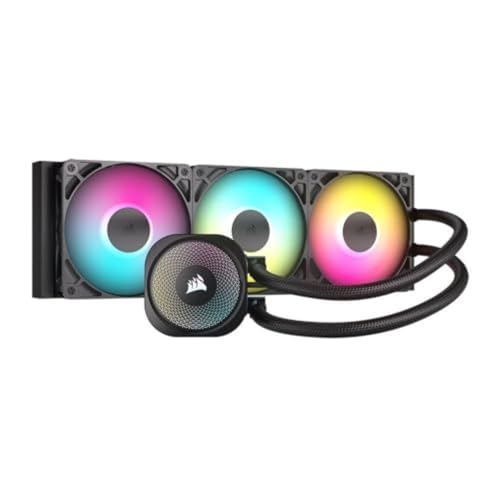
The ARCTIC Liquid Freezer III Pro 360 A-RGB is a purpose-built all-in-one CPU cooler that targets serious PC gamers, streamers, and custom PC builders. This 360mm AIO combines a thick 38mm radiator, ARCTIC's P12 Pro fans, and a unique integrated VRM fan to deliver reliable thermal performance even under the sustained loads of competitive gaming or live streaming. The included contact frame for Intel LGA1851 and LGA1700 ensures even pressure distribution, which not only improves heat transfer but also helps protect your CPU from long-term stress.
For gaming PCs, this cooler excels at taming high-TDP processors during extended sessions. The native offset mounting for both Intel and AMD platforms positions the cold plate directly over the CPU's hotspot, making it an effective choice for overclocked gaming rigs. The P12 Pro fans offer a strong balance of airflow and silence; they move plenty of air at higher speeds when needed but stay remarkably quiet at lower RPMs, so you won't hear them during casual gameplay or desktop work. The integrated VRM fan is a thoughtful addition for streamers and content creators who push their systems hard, as it actively cools the voltage regulators around the CPU socket.
Build quality is solid across the board. The radiator feels sturdy with its reinforced frame, and the sleeved tubing is both flexible and durable. One of the cooler's biggest practical advantages is the integrated cable management: the PWM cables for all three fans are routed inside the tubing sleeve, so you only have to manage a single, clean cable to the motherboard. This simplicity makes installation and cable routing much easier compared to traditional AIOs with multiple fan cables, especially in compact gaming cases where airflow organization is critical. The pump is PWM-controlled as well, allowing system software to fine-tune performance versus noise.
Setting up the Liquid Freezer III Pro 360 A-RGB is straightforward, thanks to included mounting hardware for Intel LGA1851/1700 and AMD AM5/AM4. The contact frame design removes guesswork from mounting pressure. However, the 38mm radiator thickness means you should double-check case compatibility: many mid-towers can accommodate a 360mm radiator, but clearance for the added thickness depends on your case layout and whether you top-mount or front-mount it. Also, because the fan cables are permanently embedded in the tubing, replacing a fan requires more effort than usual.
A realistic limitation is that this AIO is best suited for users who value a clean, functional build over extensive RGB customization. While the pump and fans feature A-RGB lighting that can sync with most motherboards, the radiator itself doesn't have integrated LEDs. Some gamers who prefer a fully illuminated setup might look for more flashy options. Additionally, the fan cable integration means you cannot easily swap fans for other brands without cutting into the tubing sleeve, which is a minor inconvenience for modders.
Overall, the ARCTIC Liquid Freezer III Pro 360 A-RGB is a smart choice for PC gamers, streamers, and content creators who prioritize cooling performance, reliability, and build simplicity. Its integrated cable management and VRM fan set it apart from many competitors in the same price range. If your case has the clearance for a 38mm radiator, this cooler delivers robust thermal performance and a clean aesthetic that will complement any gaming setup, from competitive esports rigs to quiet home-office gaming machines.

Frequently Asked Questions
Does a 360mm AIO cooler prevent CPU thermal throttling better than an air cooler?
Yes, a 360mm radiator provides significantly more liquid volume and surface area to absorb sudden thermal spikes from multi-core processors. Modern gaming processors boost aggressively until hitting thermal thresholds, making rapid heat dissipation essential. Large radiator fin arrays and static pressure fans keep coolant temperatures stable under sustained loads, preventing clock speed drops during demanding gameplay.
Are these liquid coolers compatible with both Intel LGA 1851 and AMD AM5 sockets?
Yes, modern options include mounting hardware for Intel LGA 1851, LGA 1700, and AMD AM5 sockets in the box. Leading coolers feature contact frames or native offset mounting brackets to align the cold plate directly over CPU hotspots. Builders pairing liquid cooling with the best gaming AMD CPU will appreciate how offset mounts reduce core temperatures under heavy gaming loads.
How does radiator thickness impact case clearance for the Best Gaming Cooling Aio of 2026?
Radiator thickness determines whether your cooling setup clears tall motherboard VRM heatsinks and tall RAM modules. Standard radiators measure around 27mm thick, while high-capacity designs reach 38mm and require extra chassis depth. Adding 25mm fans brings total stack thickness to over 60mm, so checking case clearance beforehand is essential.
What are the benefits of daisy-chained fans on liquid CPU coolers?
Daisy-chained fan connections combine multiple fan cables into a single 4-pin PWM and ARGB connector to streamline installation. Coolers link power and lighting directly along the radiator frame, eliminating bulky fan hubs. This setup reduces cable clutter behind the motherboard tray and keeps all radiator fans running at synchronized speeds.
Does an integrated VRM fan actually improve motherboard temperatures?
Yes, dedicated VRM fans provide active airflow across the power delivery heatsinks surrounding the CPU socket. Liquid cooling blocks normally remove the downward airflow generated by standard air coolers. Adding a small PWM fan on the pump block actively cools power stages, preventing thermal buildup during long gaming marathons.





Write Your Review
No reviews yet. Be the first to share your experience!