


Inaccurate color rendition and inconsistent gradations can compromise an editing session before your images reach print or publication. When editing raw files, subtle differences in gamma, backlight uniformity, and panel balance dictate whether colors appear natural or distorted across different screens. Selecting the best monitor for photography requires evaluating verified gamuts like sRGB, Adobe RGB, and DCI-P3 alongside panel contrast. Creative professionals spending long hours retouching fine details often seek a comfortable display setup for daily screen use to reduce visual fatigue while maintaining color fidelity. Our review examines manufacturer specifications, factory calibration data, and connectivity options to help you select a dependable creative display.
Display resolution and physical workspace also impact how efficiently you manage editing palettes and side panels. While sharp 4K panels provide excellent pixel density for checking lens sharpness, a balanced workspace shares many traits with productivity screens for multi-window workflows. Convenient connectivity also matters if you rely on single-cable USB-C power delivery to charge laptops and transfer media files. We evaluate verified factory calibration standards, panel specifications, and user experiences to provide an objective comparison for your desk.


Pros
- High 4K resolution and 120Hz refresh rate for smooth, detailed visuals in games and media.
- AMD FreeSync Premium reduces screen tearing and stutter for responsive gameplay.
- ComfortView Plus minimizes eye strain during extended use, ideal for long gaming or work sessions.
- Built-in speakers with improved sound quality eliminate the need for external speakers in casual setups.
- Sleek ash white design with ultra-thin bezels enhances desk aesthetics and fits well in modern gaming rooms.
Cons
- Limited to 120Hz refresh rate, which may not satisfy competitive gamers seeking higher refresh rates like 144Hz or 240Hz.
- Integrated speakers, while improved, may lack bass and volume compared to dedicated external speakers or gaming headsets.
- Ash white finish may show dirt or smudges more easily than darker colors, requiring occasional cleaning.
The Dell 27 Plus 4K Monitor (S2725QS) is a 27-inch IPS display that blends high-resolution visuals with smooth performance, making it a versatile option for PC gamers, streamers, content creators, and everyday users. With a 4K (3840x2160) resolution and a 120Hz refresh rate, this monitor delivers sharp details and fluid motion, whether you're exploring open-world games, editing 4K video, or watching movies. The inclusion of AMD FreeSync Premium further enhances the experience by reducing screen tearing and stutter, ensuring a responsive and immersive gameplay session.
This monitor is best suited for a wide range of users. Casual and competitive gamers will appreciate the 120Hz refresh rate and FreeSync support, which provide smooth visuals in fast-paced titles like FPS and MOBA games. Streamers and content creators can benefit from the 4K resolution and 99% sRGB color coverage, ensuring accurate colors for video editing, graphic design, or live streaming on platforms like Twitch or YouTube. Additionally, work-from-home professionals and college gamers will find the ComfortView Plus feature valuable, as it reduces blue light emissions by up to 35% without sacrificing color accuracy, making long study or work sessions more comfortable.
In terms of real-world performance, the Dell S2725QS excels in visual clarity and responsiveness. The IPS panel offers wide viewing angles and vibrant colors, while the 1500:1 contrast ratio provides decent depth for dark scenes. The 0.03ms response time (though likely a typo for MPRT) ensures minimal ghosting, keeping fast-moving objects sharp. The integrated speakers have been re-engineered to deliver more detailed audio with greater output power and frequency response, which is a noticeable upgrade over previous Dell monitors. While not a substitute for a dedicated gaming headset or external speakers, they are sufficient for casual gaming, video calls, or background music.
Build quality is solid, with a sleek ash white finish and ultra-thin bezels that give the monitor a modern, minimalist look. The stand is sturdy and offers tilt adjustment, though height and swivel adjustments are not mentioned, which might be a limitation for some users. The monitor's dimensions (7.89 x 24.08 x 15.3 inches) and weight (14.26 pounds) make it relatively compact for a 27-inch 4K display, fitting well on most desks. Connectivity options are not fully detailed in the specs, but typical Dell monitors include HDMI and DisplayPort inputs, along with USB ports, which should cover most gaming and productivity setups.
Setting up the Dell S2725QS is straightforward, with plug-and-play functionality and easy on-screen display controls. The ComfortView Plus feature can be toggled on for reduced eye strain, and the FreeSync Premium works seamlessly with compatible AMD graphics cards. One realistic limitation is the 120Hz refresh rate, which may not satisfy competitive esports players who prefer higher refresh rates like 144Hz or 240Hz for maximum responsiveness. Additionally, the integrated speakers, while improved, lack the bass and immersion of dedicated audio solutions, so serious gamers and streamers will likely want to use a gaming headset or external speakers.
Overall, the Dell 27 Plus 4K Monitor is a strong choice for PC gamers, streamers, and content creators who want a balance of 4K clarity and smooth 120Hz performance. Its eye-care features and improved audio make it practical for long sessions, while the sleek design enhances any gaming setup. If you prioritize high refresh rates for competitive gaming, you might look elsewhere, but for most users seeking a versatile 4K monitor for gaming, work, and entertainment, this Dell model offers excellent value.


Frequently Asked Questions
What color gamut coverage is most important for the best monitor for photography?
It depends on your output format. For web publishing, 99% to 100% sRGB coverage is standard, as provided by the ASUS ProArt PA278QV and Dell S2725QS. If you prepare fine-art prints, wide gamut coverage reaching 99% Adobe RGB or 95% DCI-P3 on the ASUS ProArt PA279CRV and BenQ PD2706U provides the broader color spectrum needed.
Is 4K resolution required for photo editing?
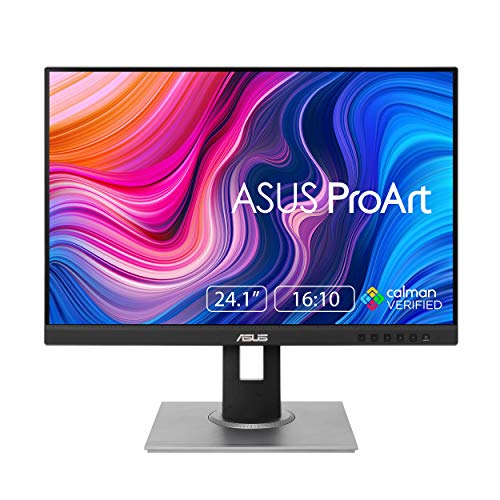
No, 4K is not mandatory, though it provides superior pixel density on 27-inch screens. A 4K UHD display lets you inspect fine details and focus without zooming. However, 1440p QHD and 1200p WUXGA panels, like the ASUS ProArt PA248QV, still deliver ample workspace and precise colors for budget-conscious photographers.
What does factory calibration with Delta E below 2 provide?
A Delta E score below 2 means color deviations are essentially invisible to the human eye. Calman Verified certification ensures your display shows true tones out of the box without requiring manual hardware calibration. This consistency helps you edit images with confidence that color values remain uniform across viewing environments.
Can a photo editing monitor also serve for everyday entertainment?
Yes, color-accurate photo displays double effectively as general media screens. A monitor with accurate sRGB reproduction and steady contrast works well as a screen for watching movies with clear detail. For example, the Dell S2725QS combines 4K clarity with a 1500:1 contrast ratio and built-in speakers for versatile daily use.
How does USB-C power delivery assist photo editing setups?
USB-C power delivery transmits video, carries data, and charges compatible laptops through a single connection. The ASUS ProArt PA279CRV provides 96W delivery while the BenQ PD2706U offers 90W delivery, eliminating extra power bricks from your desk. This single-cable setup streamlines connecting your editing laptop to your primary workspace.







Write Your Review
No reviews yet. Be the first to share your experience!