


Modern desktop graphics cards continue to swell in size, turning hardware installation into a high-stakes puzzle where clearance issues can break a build. Cramming high-wattage components into cramped chassis creates thermal bottlenecks that choke intake fans and leave thick power cables mashed against glass side panels. Selecting the largest pc case for your custom setup eliminates those clearance headaches by offering abundant headroom for triple-slot graphics cards and thick liquid cooling radiators. Whether you need an expansive full-tower chassis or want to explore budget airflow computer cases, interior space directly impacts component longevity. Careful evaluation of chassis frame layouts, front panel ventilation, and manufacturer clearance specifications helps you avoid thermal throttling.
Generous chassis dimensions also turn cable management from a frustrating chore into a breeze. Wide rear clearance behind the motherboard tray lets you route bulky 24-pin ATX power cables without bulging the side door or straining delicate motherboard connectors. Builders assembling systems with extended motherboards often look at the largest pc case models to guarantee ample fan mounts and uninterrupted airflow channels. Pair these roomy chassis with high-end hardware, or check out clean showcase aesthetic builds to see how panoramic glass panels handle hardware heat.

Pros
- Exceptional modularity with FRAME system allows future upgrades to motherboard tray, I/O panel, and more.
- Excellent pre-installed RS ARGB fans with daisy-chainable PWM and Zero RPM mode for quiet operation.
- InfiniRail mounting system offers great flexibility in fan placement for optimized airflow.
- Clean cable management options with removable side panel that doubles as a cable cover or fan mount.
- High airflow design with 3D Y-pattern front panel and support for large radiators and fans.
Cons
- Modular panels and additional accessories may require extra purchases to fully utilize the FRAME system.
- Side panel fan mounting may reduce cable management space if used.
- ATX mid-tower size may be larger than some compact builds, requiring ample desk space.
The CORSAIR 4000D RS ARGB is a modular mid-tower ATX PC case that blends high airflow with a groundbreaking FRAME modular system. Designed for PC gamers, streamers, and gaming setup builders, this case allows you to swap out components like the motherboard tray or front I/O panel, so your build can evolve over time without needing a whole new case.
Performance-wise, the 4000D RS comes with three pre-installed CORSAIR RS ARGB PWM fans, each with eight LEDs and daisy-chainable 4-pin PWM connectors. These fans support Zero RPM mode for near-silent operation during light loads, making them perfect for long gaming sessions or late-night streaming. The InfiniRail fan mounting system lets you slide fans anywhere along the rail in the front and roof, accommodating up to 200mm fans in front and 140mm on top for targeted cooling where you need it most.
Build quality is solid with a steel frame and a 3D Y-pattern airflow front panel that minimizes resistance while keeping dust out. The internal side panel near the motherboard tray is a versatile touch: use it as a clean cable cover for a tidy look, or remove it to mount additional fans or radiators for extra cooling potential. This flexibility is a boon for RGB enthusiasts and competitive gamers who want to balance aesthetics with thermal performance.
Setup is straightforward thanks to the modular design. The InfiniRail system makes fan installation tool-free in many cases, and the spacious interior leaves plenty of room for cable management behind the motherboard tray. Support for ASUS BTF, MSI Zero, and Gigabyte Stealth motherboards means you can build a nearly cable-free front side if you choose those models, which is a dream for clean desk setups.
One realistic limitation: to fully leverage the FRAME system's upgrade paths (like a billet aluminum motherboard tray or extra USB ports), you'll need to purchase those modules separately, which adds cost over time. Also, while the case is mid-tower, it's on the larger side, so ensure your desk or gaming space can accommodate its 19.2-inch height and 9.4-inch width.
Overall, the CORSAIR 4000D RS ARGB is a forward-thinking choice for anyone who loves to tweak their PC build. It's especially recommended for streamers, content creators, and PC gamers who value airflow, customization, and a case that can adapt to future hardware trends. If you're building a new rig or upgrading an existing one, this case delivers both performance and longevity.
The CORSAIR 4000D RS ARGB is built for high airflow straight out of the box. The steel front panel uses a 3D Y-pattern that creates a low-restriction path for cool air to reach your components, while the three pre-installed RS ARGB PWM fans handle intake with authority. Each fan spins up to 200mm in the front (or 140mm in the roof) thanks to the InfiniRail system, giving you precise control over your cooling setup.
The fans themselves feature eight individually addressable RGB LEDs and support Zero RPM mode, so they stop spinning under low loads for near-silent operation - ideal for quiet gaming or recording. With daisy-chainable 4-pin PWM, you can sync fan speeds across multiple units easily. For liquid cooling, the case accommodates radiators up to 360mm in the front and 280mm in the roof, making it compatible with most AIO coolers. The removable side panel also lets you mount additional fans for even more directed airflow, perfect for high-end GPUs or CPUs during extended gaming sessions.
Cable management is a strong point of the CORSAIR 4000D RS ARGB. The motherboard tray features a removable side panel that serves dual duty: it can cover cables for a clean, professional look, or be removed entirely to mount fans or radiators for improved cooling. The spacious chamber behind the tray provides ample room for routing cables, with plenty of Velcro straps and rubber grommets to keep everything organized.
For users opting for ASUS BTF, MSI Zero, or Gigabyte Stealth motherboards, the case supports hidden connectors that route cables through the back, leaving the front nearly cable-free. This is a huge plus for streamers and RGB enthusiasts who want a pristine desk setup. The InfiniRail system also keeps fan wires tidy by allowing you to clip them along the rail. Overall, this case makes building a clean, airflow-optimized PC easier than most mid-tower options.


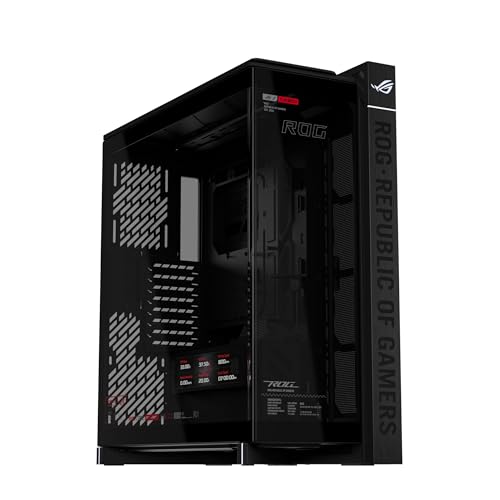
Hardware Clearance and Setup Questions
Does a Largest Pc Case improve thermal performance compared to a standard mid-tower?
Yes, full-tower cases deliver lower internal temperatures due to larger air volumes and expanded fan capacities. Massive enclosures support up to fourteen 120mm fans alongside dual 360mm radiators, preventing hot air pockets around the GPU. Increased distance between heat-generating components allows intake fans to push ambient air across the motherboard without immediate obstruction. This extra breathing room keeps thermal throttling at bay during intense gaming sessions.
Will a full-tower Largest Pc Case fit all modern extended ATX motherboards?
Most full-tower chassis support standard E-ATX motherboards, but specific tray dimensions determine cable pass-through accessibility. Full-size enclosures provide dedicated tray cutouts that accommodate wide motherboards without covering hidden-connector grommets. Mid-tower alternatives often cap motherboard support at standard ATX. Checking the chassis motherboard tray clearance before purchasing prevents overlapping cable grommets or blocked storage ports.
How much GPU clearance is required for modern high-end graphics cards in 2026?
Modern flagship graphics cards usually require at least 340mm of horizontal clearance, though large cases offer up to 420mm. Spacious options support GPUs up to 420mm in length, leaving room even when front intake fans are mounted. Builders installing a front-mounted liquid cooling radiator should allow an additional 30mm to 55mm for radiator and fan thickness. Generous clearance also accommodates an integrated GPU support bracket to prevent PCIe slot strain.
Can you mount a 360mm liquid cooling radiator at the top of a Largest Pc Case without hitting the RAM?
Yes, true full-tower cases provide sufficient vertical offset above the motherboard tray to prevent radiator and RAM interference. Cases designed with modular rail systems allow builders to shift radiator mounts away from tall memory heat spreaders. If you are comparing chassis styles, exploring a dedicated tempered glass white chassis helps evaluate top clearances across different aesthetic setups. Always check top offset measurements to confirm clearance for high-profile memory modules.
Why do some builders prefer dual 200mm front fans over triple 120mm fans in a large chassis?
Dual oversized front fans move higher volumes of air at significantly lower rotational speeds, reducing operational noise. Large intake designs push massive airflow through low-resistance front mesh without high-pitched hums. Lower RPM operation maintains quiet acoustics while supplying ample fresh air to internal components. Pairing quiet, high-airflow intake designs with high-performance processors for gaming ensures your entire system remains thermally stable under load.


Write Your Review
No reviews yet. Be the first to share your experience!