


Long desk sessions often leave people wondering whether their seating provides genuine ergonomic help or merely flashy aesthetics. When evaluating modern seating, asking what does a gaming chair do helps clarify how specific mechanical adjustments, high backrests, and targeted cushions influence posture. While race-car styling grabs immediate attention, the core purpose centers on supporting your spine, neck, and arms through multi-hour gaming or working sessions. Combining a supportive chair with a supportive desk surface mat can help create a cohesive, balanced workspace.
Rather than offering a single universal sitting position, these chairs provide adaptable components like reclining backrests, height adjustments, and specialized cushions that shift pressure away from sensitive pressure points. Manufacturers engineer features such as bucket-style wings, pocket springs, and retractable footrests to cater to varied postures ranging from upright typing to leaned-back console play. Understanding these functional mechanisms allows you to weigh advertised claims against your personal body measurements, workspace clearances, and daily habits before making an investment.


Understanding the Mechanical and Ergonomic Role of Gaming Chairs
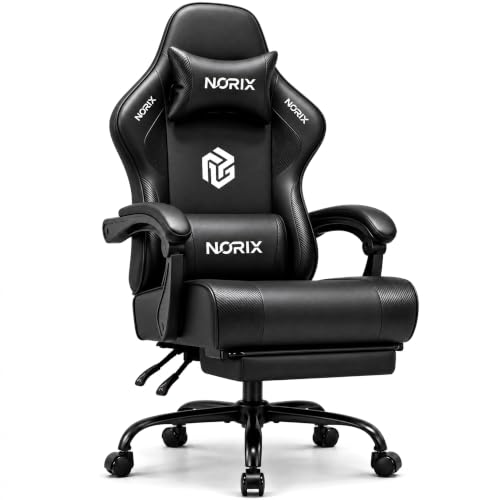
A gaming chair functions primarily as an adjustable seating system designed to support your body across varied postures during long computer sessions. Unlike static kitchen chairs or basic stools that restrict you to an upright 90-degree angle, these specialized seats distribute upper-body weight across multiple adjustable contact surfaces. They combine high backrests, specialized cushioning, and multi-angle reclining mechanisms to help manage physical strain in your neck, shoulders, and lower back. Understanding these physical mechanisms clarifies how a gaming chair interacts with your body and whether its features align with your daily desk activities.
The design philosophy borrows heavily from automotive racing seats, which were originally built to hold drivers securely during sharp turns. In a home office or gaming setup, that structure has been adapted to stabilize your posture during high-focus competitive play and prolonged desk work. Rather than enforcing one rigid posture all day, modern gaming chairs allow users to alternate between focused upright positions and leaned-back relaxation modes. This mechanical flexibility helps set them apart from standard office seating, giving users the freedom to adapt their chair to their immediate activity.
Full-Backrest Spinal Alignment and Cervical Support
The defining visual element of a gaming chair is its tall backrest that extends from the pelvis past the top of the shoulders. Traditional task chairs often feature low or mid-height backs that terminate below the shoulder blades, leaving the upper spine unsupported when leaning backward. A high backrest provides continuous physical contact along the thoracic region, preventing you from slumping your shoulders forward during long matches. This structural backboard encourages natural spinal alignment by supporting the head, neck, and upper torso simultaneously.
Most gaming chairs include an adjustable lumbar pillow to support the natural inward curve of the lower back. Prolonged sitting often causes the pelvis to tilt backward, flattening the lumbar curve and increasing strain on the lower spinal discs. Placing a firm cushion directly in the small of the back helps maintain the spine’s natural S-curve and reduces muscular fatigue across the lumbar region. Models with adjustable straps allow you to slide the pillow higher or lower along the backrest, ensuring it aligns precisely with your individual spine curvature.
Cervical support is reinforced by an upper neck pillow that mounts near the top of the backrest. When you lean back to read documents or watch a livestream, this cushion fills the gap between your neck and the chair, cradling the base of the skull. This support keeps your head balanced without demanding constant isometric contraction from your neck and upper trapezius muscles. Users who alternate between looking at a primary monitor and glancing at higher displays often appreciate having a dedicated resting point for the head.
Reclining Backrests and Dynamic Pelvic Angulation
Static seating positions place continuous vertical pressure on the lumbar spine throughout the entire workday. Gaming chairs address this challenge by incorporating mechanical reclining hinges that allow the backrest to tilt from an upright 90-degree angle back to 135 degrees or even 150 degrees. As the backrest angles backward, a substantial portion of your upper-body weight shifts onto the chair frame rather than pressing straight down into your lower back. This recline mechanism allows users to quickly change their spinal orientation without needing to leave their desk entirely.
Reclining also opens up the angle between your torso and your thighs, creating an open-angle sitting posture. Sitting with a hip angle between 100 and 110 degrees helps reduce lower disc compression compared to a strict 90-degree right angle. Gaming chairs make this relaxed posture practical by providing stable locking points at multiple recline increments. You can lock the chair upright for intensive typing tasks, angle it slightly back for casual web browsing, or recline deeply for controller gaming.
Beneath the seat pan, most gaming chairs incorporate a center-tilt mechanism paired with an adjustable spring tension knob. This system allows the entire seat unit to rock smoothly with your natural body movements rather than staying locked in place. Loosening the tension knob accommodates lighter individuals who want gentle rocking resistance, while tightening it ensures stability for heavier users. Engaging in subtle rocking movements throughout a work session encourages healthy blood circulation in the lower limbs and prevents muscle stiffness.
Arm and Shoulder Girdle Strain Reduction
Holding your arms outstretched to operate a keyboard and mouse can quickly strain the muscles across your shoulders and upper back. Gaming chairs combat this fatigue by providing dedicated armrests that bear the weight of your forearms and elbows. Supporting your arms reduces the continuous downward pull on your trapezius muscles, keeping your shoulders relaxed. When armrests are adjusted to match your desk height, your wrists can rest in a neutral position that avoids awkward upward or downward bending.
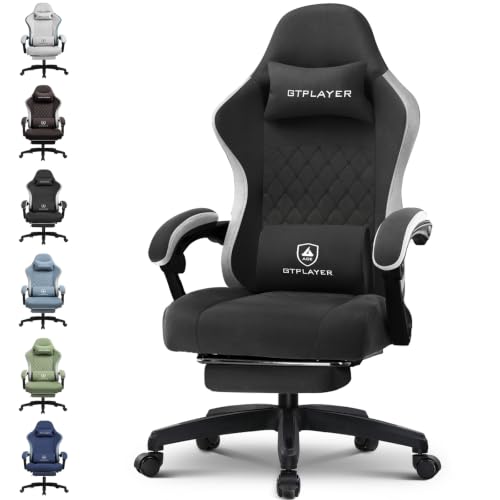
Different chairs offer varied armrest adjustment technologies to suit specific sitting preferences. Linkage armrests connect directly to both the seat pan and the backrest, pivoting backward automatically as you recline so your elbows remain supported at every angle. Other designs, such as the GTPLAYER models, feature multi-directional armrests that adjust vertically, slide forward and backward, and rotate inward or outward. These adjustments allow you to tuck your elbows close to your torso during gamepad play or angle them inward toward a compact keyboard.
Certain versatile chairs, like the Sweetcrispy model, incorporate flip-up armrests that rotate upward by 90 degrees. This capability allows you to push the chair fully underneath a low desk when not in use, which saves valuable floor space in small rooms. Flipping the armrests up also provides lateral freedom for users who enjoy sitting cross-legged or playing musical instruments at their desk. Having the option to clear the armrests away ensures that the chair adapts to diverse hobbies beyond standard mouse-and-keyboard setups.
Seat Cushion Architecture: Foam Density and Pocket Springs
The seat cushion forms the primary foundation for your body weight, making its internal construction crucial for sustained comfort. Entry-level office chairs frequently use thin, low-density foam cut from flat sheets, which can compress completely within months of daily use. When foam bottoms out, your sit bones press directly against the hard underlying plywood or metal base, causing sharp localized discomfort. In contrast, well-constructed gaming chairs employ high-density cold-cured or molded foam that rebounds quickly and preserves its shape over years of sitting.
Some advanced models borrow cushioning techniques from high-end mattresses by combining dense foam with independent pocket springs. Products like the JECQCUPG chair and the HOMRELEXA big and tall design incorporate internal spring coils that adapt dynamically to body movement. The individual pocket springs distribute downward pressure evenly across your hips and thighs, eliminating painful pressure hot spots. This hybrid design delivers a plush, responsive feel that cushions your lower body effectively during extended work or gaming blocks.
Seat cushion geometry also plays an important role in how comfortable a chair feels for different body types. Many classic gaming chairs feature pronounced side wings that rise along the edges of the seat pan to simulate racing bucket seats. While these side bolsters create a snug, secure feeling for slender users, they can press uncomfortably against the outer thighs of larger individuals. Newer gaming chair designs increasingly feature wide, wingless seat cushions that allow full freedom of movement and accommodate varied sitting positions without pinching your legs.
Lower Extremity Relief and Integrated Footrests
A signature feature that sets many gaming chairs apart from traditional office seating is the retractable, slide-out footrest. Stored neatly beneath the seat cushion, the footrest pulls out on dual metal rails and flips open to support your lower legs. When you pair an extended footrest with a reclined backrest, your calves are elevated above the floor, which promotes healthy venous return from your feet. This setup helps reduce lower leg swelling and heavy sensations that often accompany long periods of uninterrupted sitting.
An integrated footrest changes how you utilize your desk space, shifting your posture from active computer operation to relaxed media consumption. Controller gamers, tablet users, and podcast listeners can kick back completely without needing an extra ottoman or footstool cluttering the room. While an upright seated posture remains essential for precise competitive mouse tracking, an extended footrest provides an immediate lounge option for break periods. The ability to switch between these two modes within seconds makes the chair a versatile multi-purpose piece of furniture.
Using a footrest also alters your viewing distance and eye angle relative to your display setup. Reclining deeply shifts your natural line of sight upward, making it ideal for wall-mounted screens or tilted secondary monitors. If you regularly use your computing area for entertainment or transition between desktop play and living room gaming peripherals, an extendable footrest offers welcome physical flexibility. Once your break is over, the footrest glides smoothly back under the cushion, restoring full floor clearance for standard office tasks.
Gaming Chairs Compared to Ergonomic Task Chairs
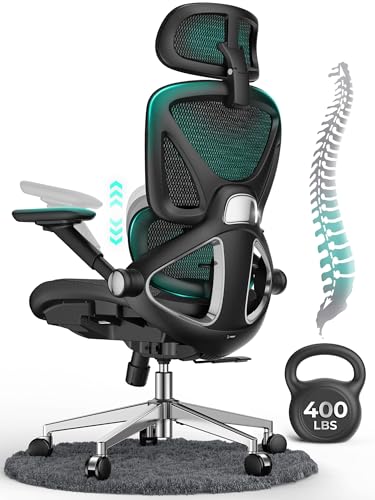
Shoppers frequently debate whether a gaming-branded chair or a traditional ergonomic office chair provides superior daily utility. Traditional office chairs generally focus on a minimalist, breathable aesthetic, utilizing mesh backrests and built-in lumbar dials tailored for strict 90-degree typing. Gaming chairs prioritize high-back coverage, rich padding, vibrant colors, and broad recline ranges that support both work and leisure. While an office chair optimizes your posture for structured corporate productivity, a gaming chair offers greater versatility for users who relax, watch shows, and play games at the same desk.
The approach to lumbar and neck support also highlights a major philosophical difference between the two styles. Ergonomic office chairs typically feature integrated, height-adjustable lumbar bars that cannot be removed from the frame. Gaming chairs rely primarily on modular pillows secured with elastic straps, allowing users to reposition or completely remove them based on personal preference. This modularity lets you experiment with different support configurations, finding the exact setup that matches your spinal contours without being locked into a rigid factory shape.
Breathability and temperature regulation represent another key distinction between mesh office task chairs and padded gaming chairs. Synthetic leather upholstery on gaming chairs provides a soft, luxurious feel and wipes clean effortlessly, but it naturally breathes less than open mesh fabric. In warm rooms without air conditioning, synthetic leather can retain body heat during prolonged sessions. Buyers who live in warmer climates or naturally run warm should look for models featuring perforated leather or breathable fabric upholstery to maintain air circulation.
Workspace Integration, Desk Compatibility, and Floor Movement
A gaming chair must integrate smoothly with your existing desk and available room space to deliver its full benefits. Checking the minimum and maximum seat height specifications ensures your legs fit comfortably beneath the desk without pressing your knees against the table apron. Ideally, your feet should rest flat on the floor with your knees bent at a comfortable 90-degree angle when the seat is adjusted properly. If your desk is particularly low, choosing a chair with flip-up armrests or a wide vertical adjustment range prevents clearance issues.
Aligning your armrest height with the top surface of your desk creates a continuous resting plane for your forearms during keyboard and mouse navigation. This alignment prevents your forearms from rubbing against sharp desk edges, which can compress soft tissue and cause wrist discomfort. Equipping your work surface with a wide desk mat for arm support adds an extra layer of soft cushioning under your forearms. Combining proper chair armrest elevation with a padded desk surface creates a seamless, low-friction workstation for extended computer sessions.
Mobility around your workstation depends on the quality of the five-star base and smooth-rolling casters. Most gaming chairs feature heavy-duty steel or reinforced nylon bases capable of supporting substantial weight without flexing or tipping during deep reclines. The casters roll smoothly across different floor types, though standard hard nylon wheels can sometimes scratch delicate hardwood or snag on thick carpeting. Upgrading to soft polyurethane rollerblade-style casters or laying down a protective floor mat ensures quiet movement and protects your flooring from long-term scuffs.
Assembly Protocols, Structural Durability, and Long-Term Care
Because gaming chairs ship disassembled in heavy cardboard packaging, proper initial assembly is essential for long-term safety and stability. Following the manufacturer’s step-by-step illustrated manual ensures that bolts are seated straight and tightened securely into the internal steel frame. Most models include the necessary hex keys and hardware, allowing assembly within twenty to thirty minutes when taking proper care. Taking time to ensure the gas lift cylinder seats firmly into the base prevents dangerous wobbles or mechanical instability once you begin daily use.
Maintaining your gaming chair requires straightforward, routine upkeep to preserve both structural integrity and cosmetic appearance. Over months of regular sitting and reclining, mechanical bolts connecting the armrests and backrest hinges can gradually loosen from vibration. Inspecting and tightening these fasteners every six months keeps the chair rigid and eliminates annoying squeaks. Cleaning synthetic leather upholstery with a damp microfiber cloth removes surface dust and body oils, preventing the material from cracking or hardening over time.
Evaluating Individual Fit, Stated Capacities, and Limitations
Manufacturer weight ratings, which often range from 275 pounds up to 400 pounds on heavy-duty models like the HOMRELEXA, indicate structural frame thresholds rather than a guarantee of comfort. A chair certified for 330 pounds may possess a steel frame capable of supporting that load, but its seat width might still feel constricting for someone with broad hips. Always compare your personal body measurements against the published seat width, seat depth, and backrest height before selecting a specific model. Paying attention to these dimensional details ensures that the chair accommodates your physical frame naturally.
Before finalizing your decision, examine warranty coverage, customer service support, and return freight policies. Reputable manufacturers, including GTPLAYER, Sweetcrispy, and ZABINS, provide one-year limited warranties covering factory defects, broken mechanisms, and damaged parts. Because repacking and shipping a large office chair can be difficult, clear return policies provide peace of mind in case a chair does not suit your comfort preferences. Verifying that replacement parts like casters, pillows, and gas cylinders are readily available further protects your investment over the long haul.
A gaming chair ultimately functions as an adaptable tool designed to support varied postures, reduce muscular strain, and enhance your overall desk experience. By combining high-back support, reclining capabilities, adjustable armrests, and plush cushioning, it bridges the gap between focused computer productivity and relaxed entertainment. Choosing a model that matches your physical dimensions and configuring its adjustments to your daily routine allows you to enjoy comfortable, supported seating for work and gaming alike.



Write Your Review
No reviews yet. Be the first to share your experience!