


Mushy key switches and skipped keystrokes quickly ruin high-stakes PC gaming sessions, leaving players stuck with sluggish responses right when accuracy matters most. Budget setups often suffer from hollow plastic cases and stiff rubber domes that cause rapid finger fatigue during long gaming runs. Upgrading your gear does not require a massive investment, as the best gaming keyboards under 40 deliver reliable membrane responsiveness, bright illumination, and sturdy construction. Gamers aiming for smooth, low-latency inputs can explore a responsive PC gaming keyboard layout to keep command reaction times sharp. Based on our detailed comparison of switch profiles, build materials, and user feedback, modern entry-level boards balance quiet acoustics with prompt keystrokes.
Long play sessions also demand stable ergonomic angles and proper wrist support to avoid uncomfortable tendon strain. Many affordable peripherals integrate sloped wrist rests and stepped keycaps to maintain a neutral hand position. Adding dedicated wrist support, such as a contoured gaming wrist rest for keyboard setups, prevents awkward forearm angles during intense action. Our research into listed specifications reveals that IP32 spill resistance, 25-key anti-ghosting, and customizable lighting now come standard on value-driven hardware. These practical features let you enjoy quiet midnight gaming while maintaining complete command over every keystroke.

Pros
- Solid metal base provides premium feel at a budget price
- Quiet keystrokes suitable for shared spaces or dorm rooms
- Bright, smooth RGB lighting with multiple effects and adjustable brightness
- Spill-resistant design adds peace of mind for desktop users
- Responsive and comfortable typing for both gaming and daily use
Cons
- Membrane switches lack the tactile feedback of mechanical keyboards
- No dedicated software for advanced lighting customization
- Cable is a bit stiff and non-braided
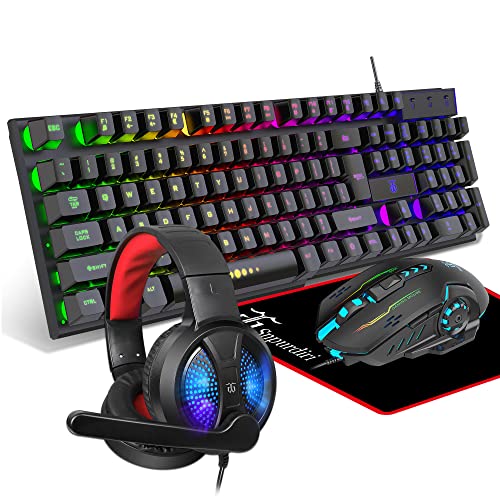
The TECKNET Gaming Keyboard is a wired USB membrane keyboard designed for PC gamers, casual players, and streamers who want a reliable, visually appealing accessory without spending a fortune. It features 15-zone RGB backlighting, 25 anti-ghosting keys, and an IP32 water-resistant rating, making it a practical choice for both intense gaming sessions and everyday typing.
This keyboard is best suited for budget-conscious gamers, college students, work-from-home users, and anyone building a gaming setup on a tighter budget. The whisper-quiet membrane switches are a standout for those who need a low-noise profile during late-night gaming or streaming on Twitch. According to user feedback, the keys feel comfortable and responsive, though they lack the distinct click of a mechanical board. The anti-ghosting support for up to 25 keys helps improve input accuracy during fast-paced FPS or MOBA games.
Build quality is surprisingly good for the price. The all-metal panel gives the keyboard a sturdy, weighty feel that resists sliding on the desk. The included wrist rest is integrated into the design, providing basic ergonomic support. The keycaps are made of durable ABS plastic and are removable for cleaning or replacement. The IP32 spill resistance, with drainage holes in the wrist rest, adds a layer of protection against accidental liquid spills, a common concern in active gaming environments.
RGB customization is handled through on-keyboard shortcuts, offering seven illumination modes and four brightness levels. The lighting is bright and smooth, with color transitions that look great in a dark room. However, there is no software for deeper customization, so users are limited to the preset effects. The keyboard automatically enters sleep mode after five minutes of inactivity to save power, which can be a minor inconvenience but is easily resolved by pressing any key.
Setup is truly plug-and-play. Just connect the USB-A cable to a PC or laptop, and the keyboard is recognized instantly without any driver installations. The cable is a bit stiff and not braided, but it's long enough for most desk layouts. Maintenance is straightforward thanks to removable keycaps and the spill-resistant design. One limitation noted in reviews is that the multimedia keys are not compatible with Mac, so Mac users may miss out on those shortcuts.
Overall, the TECKNET Gaming Keyboard delivers solid performance for its price point. It's a great choice for gamers who prioritize quiet operation, durable build, and vibrant RGB without the mechanical keyboard price tag. While it won't satisfy enthusiasts seeking tactile switches or deep software control, it's an excellent entry-level or backup keyboard that covers the essentials well.

Pros
- Excellent value for the price - includes both keyboard and mouse with RGB and macro functionality.
- Ergonomic wrist rest and low-profile keys provide comfort for long gaming or typing sessions.
- Mouse DPI adjustment from 800 to 7200 offers flexibility for different game genres and screen resolutions.
- Positive user feedback on durability and build quality, with many reporting years of reliable use.
- Easy setup with no driver hassles - just plug in and start gaming or working immediately.
Cons
- Membrane keys may feel mushy to gamers accustomed to mechanical switches, lacking the tactile click.
- Wired connection only - not ideal for those seeking a clutter-free wireless desk setup.
- Software download required for full macro and lighting customization, which some users found unavailable or complicated.
The Redragon S101-3 PRO is a wired gaming keyboard and mouse combo designed for PC gamers who want solid performance without breaking the bank. It includes a full-size RGB backlit keyboard with membrane switches and a high-precision mouse with adjustable DPI up to 7200, making it a practical choice for competitive gamers, casual players, esports newcomers, streamers building a budget streaming setup, and college gamers setting up their first gaming desk.
In real-world use, the keyboard offers quick responsiveness thanks to anti-ghosting technology, ensuring every key press registers during intense FPS or MOBA sessions. The mouse's adjustable DPI lets you switch between slow, precise aiming for sniping and fast tracking for fast-paced action. User reviews highlight that the combo maintains low latency and reliable input accuracy, making it suitable for both gaming and everyday productivity tasks like typing assignments or managing spreadsheets.
Build quality is surprisingly robust for the price point. The keyboard features a spill-resistant design and a comfortable wrist rest, while the mouse has an ergonomic shape that fits medium to large hands. The membrane keys provide a soft, quiet feel that works well in shared spaces or dorm rooms, though enthusiasts used to mechanical switches may find them less tactile. The included foldable stand lets you adjust the keyboard angle for better typing posture.
Setup is straightforward: plug the USB cables into your PC, and everything works out of the box. Customizing RGB effects and macro commands requires downloading Redragon software from their website, which is free but not always easy to find according to some reviewers. Once set, lighting and DPI profiles save directly to the hardware, so you don't need the software running constantly. Cable management is simple thanks to the braided USB cables, though the wired design means two cables on your desk.
One realistic limitation is that the keyboard uses membrane switches rather than mechanical ones, so it lacks the crisp feedback that competitive gamers often prefer. Additionally, the mouse's DPI settings are preset steps (800/1200/1600/2400/7200) rather than fully customizable increments. Some users also noted that the software can be inconsistent across different Windows versions.
Overall, the Redragon S101-3 PRO is a reliable and feature-rich combo that delivers excellent value for budget-conscious PC gamers, streamers starting out, or anyone needing a dependable upgrade for work and play. It won't match high-end mechanical gear, but for its price, it offers responsive performance, comfortable ergonomics, and enough RGB flair to light up your gaming setup without emptying your wallet.
Frequently Asked Questions
Are membrane switches responsive enough for fast gaming?
Yes, modern membrane switches with volcano or crater structures provide dependable actuation for fast-paced gaming. They offer quiet keystrokes and tactile resistance that dampens bottom-out noise without missing key presses. Players who switch between casual gaming and productivity also find these quiet keys ideal as a gaming keyboard for typing in quiet work environments.
How does anti-ghosting improve gaming on a budget keyboard?
Anti-ghosting prevents missed commands when pressing multiple buttons simultaneously during competitive play. Standard office boards often lock up under three simultaneous inputs, but gaming models support up to 25 anti-ghosting keys around primary action clusters like WASD. This ensures that diagonal sprint maneuvers, jumping, and reloading register cleanly every time.
Why are metal backplates beneficial on affordable keyboards?
Metal backplates eliminate chassis flex and add stabilizing weight to keep the board firmly anchored on your desk. The rigid plate creates a solid foundation for every key press, resulting in a more uniform typing feel. This reinforced construction protects internal components from accidental impacts and extends overall keyboard lifespan.
Do keyboard and mouse combos offer good value for beginners?
Yes, all-in-one peripheral combos provide complete desktop functionality at a fraction of the cost of buying separate devices. These bundles deliver matching RGB lighting profiles, dedicated macro commands, and coordinated ergonomics out of the box. Pairing an entry-level deck with a dedicated gaming mouse with adjustable DPI gives new players precise control without straining their budget.
How does spill resistance protect budget gaming keyboards?
Spill resistance protects delicate electrical traces by redirecting liquid away from sensitive membrane layers through integrated drainage ports. Keyboards featuring IP32 ratings withstand accidental splashes without short-circuiting during gameplay. Removable keycap designs further simplify cleanup and routine maintenance when drinks spill.






Write Your Review
No reviews yet. Be the first to share your experience!