


Mobile titles and cloud-streamed titles have expanded what players expect from portable screens, leading many to ask what are the best tablets for gaming when balancing portability and power. While traditional desktop enthusiasts often look at entry-level desktop gaming systems for home performance, an Android tablet offers on-the-go convenience for touch titles and remote play. Selecting the right hardware depends heavily on processing architecture, screen refresh rate, and memory management rather than marketing labels alone. A tablet must maintain consistent frame output without aggressive thermal throttling or rapid battery exhaustion during continuous play sessions.
Modern portable devices often pair multi-core processors with high-refresh panels to provide fluid visuals in competitive mobile games and media playback. Many current Android devices also utilize virtual memory expansion alongside physical system memory to assist with background task management. Understanding how physical hardware specifications compare to simulated performance numbers ensures realistic expectations for native titles and game-streaming platforms. Evaluating display resolution, battery capacity, and wireless connectivity helps gamers determine whether a compact slate can comfortably handle their preferred titles.




Evaluating Hardware Capabilities for Portable Gaming and Remote Play
Selecting an Android slate for gaming requires looking beyond raw promotional numbers to understand how mobile hardware behaves under load. Mobile tablets combine their computing cores, memory controllers, and display pipelines inside a slim passive chassis rather than modular desktop assemblies. Understanding the interplay between processors, display refresh rates, and memory configurations helps identify which device best suits your preferred gaming library. Whether you intend to run casual touchscreen titles, play retro emulators, or stream demanding PC games through cloud services, specific hardware criteria dictate the quality of your experience.
Mobile Processing Architectures and Computational Throughput
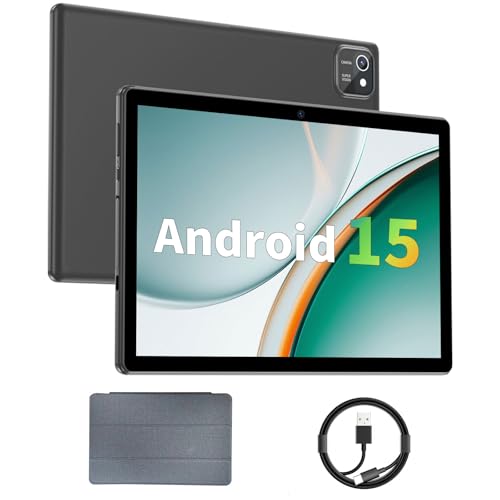
Mobile games place varying demands on central processing units depending on how graphics rendering and physics calculations are programmed. Devices such as the aiprotablet feature entry-level 2.0GHz quad-core processors designed primarily for lightweight casual titles, video playback, and basic media consumption. When players step up to more demanding 3D games or multi-layered simulations, octa-core processors provide superior thread scheduling and smoother execution across multiple application threads. Octa-core configurations, such as the Unisoc chip found in the COLORROOM tablet or the A75-based processor clocked up to 2.2GHz in the TECLAST model, distribute background operating system processes across multiple efficiency cores while keeping primary cores free for gameplay.
Higher-tier mobile processors, including the T615 octa-core chip in the KINGRID tablet and the T7250 octa-core processors in the Raemond and Frameflow units, offer improved efficiency for moderate 3D gaming. These architectures handle background operating system services without siphoning away vital compute cycles needed to render complex environments. If you are accustomed to reading a dedicated graphics card performance analysis for desktop systems, keep in mind that mobile tablet chips operate within low-wattage passive thermal envelopes. Sustained gaming performance on mobile silicon depends heavily on how efficiently the internal chassis disperses heat before throttling clock speeds.
Distinguishing Physical System Memory from Virtual Expansion
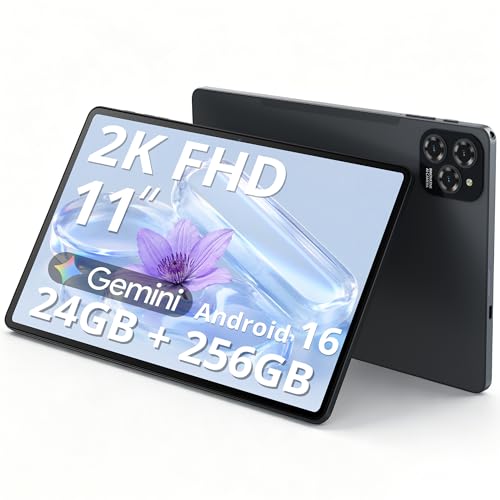
System memory is one of the most prominent specifications advertised on contemporary Android tablets, yet promotional figures often combine two distinct technologies. Manufacturers frequently highlight total figures by combining physical high-speed RAM with virtual memory allocated from internal storage. The Raemond tablet features 12GB of physical RAM paired with 24GB of software-based virtual expansion, whereas the COLORROOM tablet pairs 4GB of physical RAM with 28GB of virtual memory. Similarly, the KINGRID tablet provides 8GB of physical RAM alongside 16GB of extended memory, and the TECLAST model features 6GB of physical RAM backed by virtual allocation.
Physical RAM consists of dedicated high-speed volatile memory chips that provide instantaneous data transfer directly to the processor and graphics cores. Virtual memory expansion uses a portion of the tablet’s flash storage to park idle background applications when physical memory fills up. Because flash storage operates at significantly lower transfer rates than physical memory, virtual RAM cannot accelerate 3D frame rendering or reduce real-time graphical hitching. Players seeking smooth gameplay should always prioritize the physical memory rating when evaluating tablet specifications.
Display Refresh Rates and Touch Screen Fluidity
Display refresh rates directly influence visual smoothness, input latency, and perceived responsiveness during fast-paced action. Standard mobile displays refresh sixty times per second, which suffices for video streaming, reading, and turn-based strategy titles. Advanced models, including the Raemond and Frameflow tablets, feature 90Hz refresh panels that deliver noticeably smoother motion when scrolling through interfaces or dodging obstacles in fast-paced mobile titles. The TECLAST 13-inch tablet raises this benchmark further by implementing a 120Hz refresh rate, allowing games capable of high-frame output to look remarkably fluid.
Higher refresh rates also reduce the delay between physical finger touches and on-screen reactions, providing a tangible advantage in rhythm games and competitive action titles. Running a panel at 90Hz or 120Hz draws additional power from the battery and requires the graphics processor to generate more frames each second. If a game’s graphical demands exceed the capability of the processor, the system may drop frames, resulting in stuttering visuals. Many operating systems include adaptive refresh settings that scale the display frequency based on on-screen activity to balance visual fluidity with battery preservation.
Screen Resolution, Panel Size, and Visual Immersion
Visual fidelity on gaming tablets relies on a careful balance between resolution, screen size, and graphics processing capacity. Compact models, such as the 10-inch aiprotablet and 11-inch COLORROOM slates, utilize 1280×800 LCD screens that keep processing overhead light. Because the graphics processor has fewer pixels to render at 1280×800, games can often maintain steady performance even on modest hardware configurations. The lower pixel density means fine text and distant in-game details may appear softer compared to full high-definition alternatives.
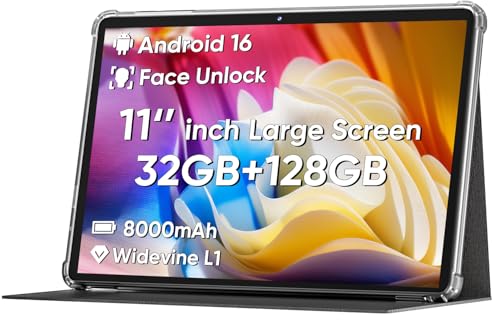
Larger panels with higher resolutions, such as the 1920×1200 FHD display on the TECLAST 13.4-inch tablet and the 2000×1200 2K screen on the Raemond 12-inch tablet, offer crisp textures and sharper clarity. The KINGRID tablet also incorporates an 11-inch 1920×1200 panel with 380 nits of brightness and eye-protection certification, making fine details stand out in bright rooms. Rendering graphics at 1080p or 2K resolution demands significantly more computational power, which can lead to warmer chassis temperatures and faster battery depletion during long gaming sessions. Widevine L1 certification on models like the TECLAST and Suicoey units further ensures that high-definition streaming content from media services renders at native resolution rather than being capped at standard definition.
Internal Storage Speeds and MicroSD Card Expansion
Storage capacity determines how many modern games, media files, and system updates can reside on a tablet simultaneously. Entry-level units typically provide 64GB of onboard storage, which can fill rapidly after downloading several large game installations and operating system updates. Models such as the TECLAST, COLORROOM, and Frameflow units step up to 128GB of internal storage, while the Raemond, Suicoey, and KINGRID tablets offer spacious 256GB configurations. The KINGRID tablet specifically notes the use of high-speed UFS storage, which provides faster read and write speeds for quicker game loading times and rapid file indexing.
Most Android gaming tablets include expandable storage through a MicroSD card slot, supporting additional cards ranging from 1TB up to 2TB on devices like the Suicoey slate. While expandable storage is convenient for storing offline movies, photos, and music libraries, Android limits how games utilize external cards. Most modern 3D games must be installed directly onto internal flash storage to maintain necessary asset-streaming speeds during active gameplay. Buyers should treat the built-in storage figure as the primary ceiling for game installations and consider external memory cards as supplemental media storage.
Battery Capacity, Thermal Management, and Fast Charging
Portable gaming drains tablet batteries far faster than passive tasks like reading documents or browsing social media feeds. Battery capacities among contemporary slates range from 6000mAh in compact models like the aiprotablet up to 8000mAh in the Suicoey, COLORROOM, and KINGRID units. The Frameflow tablet incorporates an expansive 8800mAh battery, while the Raemond provides an 8000mAh cell designed to support extended media sessions. Larger battery capacities provide the necessary reserve power to run bright displays and multi-core processors under sustained processing loads without requiring immediate recharging.
Thermal dissipation plays an equally critical role in sustaining performance throughout extended play sessions. Because budget and mid-tier tablets rely on passive heat dispersion rather than internal cooling fans, heat builds up along the rear casing during intense gaming. When internal temperatures cross thermal thresholds, the processor automatically reduces operating frequencies to prevent damage, which can lead to visible frame drops. Fast charging support, such as the 18W charging technology featured on the COLORROOM and KINGRID tablets, reduces downtime when replenishing the battery between gaming sessions.
Wireless Connectivity and Cloud Gaming Requirements
For players who plan to use their tablet for cloud gaming platforms, wireless networking performance is more important than local 3D rendering power. Cloud gaming streams the graphical output of high-end servers directly to the tablet while sending player controller inputs back over the internet. Stable dual-band Wi-Fi supporting both 2.4GHz and 5GHz frequencies, found across the TECLAST, aiprotablet, Raemond, and Frameflow devices, is essential for avoiding network packet loss and input latency. Connecting over a 5GHz Wi-Fi network significantly reduces interference and jitter compared to crowded 2.4GHz bands, creating a much smoother remote streaming experience.
Certain portable tablets, including the TECLAST 13-inch slate and the KINGRID 2K tablet, include built-in 4G LTE cellular connectivity with SIM card slots. Cellular capability allows gamers to maintain internet connectivity while commuting, traveling, or staying in areas without accessible Wi-Fi networks. While cellular latency can fluctuate depending on carrier signal strength and tower congestion, having an active mobile data connection enables cloud gaming and multiplayer access on the move. Bluetooth 5.0 and 5.2 support across these devices also enables seamless pairing with wireless gamepads, headphones, and external speakers without introducing distracting audio lag.
Operating System Versions and AI-Powered Optimization
Modern Android tablets ship with operating system environments ranging from Android 15 to newer Android 16 iterations. Certified Google Mobile Services integration ensures full compatibility with the Google Play Store, allowing players to download verified games and security patches without sideloading risks. Newer models, including the Raemond, Suicoey, and Frameflow tablets, feature integrated Gemini AI functionality designed to improve system management. These software layers work behind the scenes to optimize background applications, adjust battery allocation, and intelligently prioritize system resources for active apps.
Operating system stability also affects peripheral support, such as wireless game controllers, touch-mapping software, and external keyboards. Tablets that bundle physical accessories, such as the Raemond keyboard package or the Suicoey 2-in-1 bundle containing a keyboard, mouse, and stylus, can function as hybrid devices for light work and gaming. Navigating Android with a paired mouse or utilizing a keyboard for text-heavy role-playing titles provides a versatile interface for players who want more than just touch controls. Verifying that a tablet runs an official, certified Android distribution ensures continued access to critical gaming updates and application compatibility over the device’s lifespan.
Determining which portable slate represents the right choice comes down to matching your primary gaming habits with the physical hardware that supports them. Gamers who prioritize fast-paced action and competitive mobile titles will benefit most from high-refresh panels at 90Hz or 120Hz paired with generous physical RAM. Those primarily interested in cloud streaming and casual titles can focus on stable dual-band wireless networking, comfortable screen dimensions, and long-lasting battery capacity. By evaluating physical processor capabilities, real system memory, display metrics, and cooling realities, you can select a tablet that provides enjoyable and dependable gaming performance wherever you decide to play.





Write Your Review
No reviews yet. Be the first to share your experience!