


Finding the right balance between portable form factors and processing capability shapes how players enjoy classic titles away from traditional desktop spaces. Dedicated handheld systems pack specialized processors, vibrant displays, and integrated controls into lightweight enclosures designed for gaming on the move. Many players evaluating these mobile machines want to know which handheld gaming console is the best for their preferred generation of titles and travel routines. Comparing hardware specifications helps separate casual pocket players from capable retro emulation devices.
Handheld hardware differs fundamentally from a traditional desktop setup, where high-wattage power supplies and discrete graphics cards drive high-resolution displays. Players who primarily play at a workstation often consult a budget gaming desktop guide when stationary home performance is the top priority. Portable devices, on the other hand, prioritize thermal efficiency, integrated battery longevity, and compact controls. Evaluating these compact options requires looking closely at processor architectures, software platforms, and control inputs to see which configuration aligns with your personal playstyle.




Understanding Portable Gaming Performance and Handheld Hardware Architecture
Determining which handheld gaming console is the best depends heavily on the specific gaming era you want to play and how much control precision you require on the go. Portable consoles range from ultra-compact pocket systems with preloaded classic libraries to advanced Linux machines capable of emulating fifth-generation 3D titles. Hardware specifications such as processor architecture, screen resolution, active cooling, and battery capacity create distinct performance tiers among these devices. Identifying the right model requires matching your gameplay expectations with the physical and technical capabilities of each platform.
Processing Architectures and Emulation Capabilities in Portable Consoles
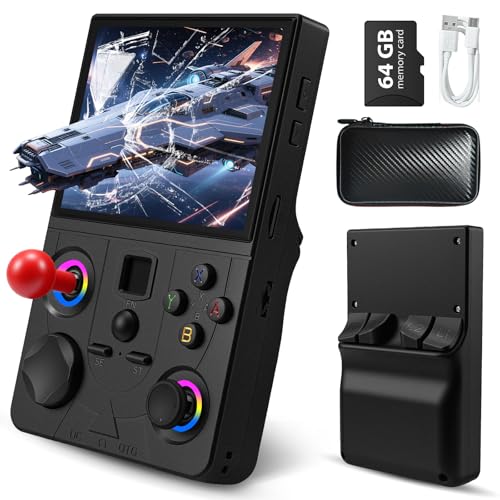
System-on-chip hardware serves as the primary engine inside every handheld console, dictating which console generations the system can emulate smoothly. Entry-level units often rely on basic microcontrollers suited solely for lightweight 8-bit or 16-bit arcade titles, offering fixed performance without firmware expansion. Mid-tier units utilize 64-bit processors such as the Rockchip RK3326 quad-core Cortex-A35 processor paired with Mali-G31 graphics, as seen in the EraVortx DC35V and Sunnymark R46H. These chips deliver reliable performance across classic platforms like the PS1, GBA, and retro arcade titles, balancing power consumption with computational stability.
Higher-end portable devices advance to quad-core silicon like the Rockchip RK3562 Cortex-A53 processor running at speeds up to 2.0GHz. Devices like the RG56PRO and RG52MINI leverage this extra CPU headroom alongside expanded RAM to handle fifth-generation 3D systems and complex emulation overhead without stuttering. Memory configuration also plays a major role, with models like the RG52MINI providing substantial memory pools to support multitasking across dual operating systems. Understanding these processor tiers prevents the frustration of buying a system that struggles with demanding 3D geometry or complex audio synchronization.
Graphics processing units integrated into these chips handle scaling shaders and texture filtering across varying display resolutions. The Mali-G31MP dual-core GPU found in RK3326 consoles manages standard-definition 2D sprites efficiently while rendering early polygon models with consistent frame pacing. Systems featuring higher-clocked ARM cores maintain tighter timing loops, reducing audio crackling in demanding arcade emulation cores. Matching processor architecture to your target gaming catalog ensures that hardware limits never hinder your retro gaming sessions.
Display Panels, Aspect Ratios, and Visual Fidelity
Screen technology directly impacts visual clarity, color rendition, and overall comfort during extended portable gaming sessions. Modern handhelds predominantly adopt IPS panels over older reflective LCDs, providing wider viewing angles and significantly richer color reproduction. The RG56PRO and RG52MINI feature 5.5-inch fully laminated IPS displays with 1280×720 or 720×1280 HD resolutions, making retro scaling sharp and legible. Anti-glare surface treatments and optical clear adhesive lamination help minimize ambient reflections when playing outdoors or under harsh indoor lighting.
Aspect ratio selection represents another crucial consideration for authentic retro visual reproduction. Traditional 4:3 and 1:1 aspect ratios, such as the 3.75-inch 720×720 display on the Boltz Retro device, suit older console and arcade graphics without awkward black bars or uneven pixel stretching. Conversely, wider 16:9 displays found on devices like the DREAMHAX X7 Plus accommodate widescreen portable systems and multimedia viewing. Choosing the right display format ensures that pixel art remains crisp, text remains readable, and visual artifacts do not distract from gameplay.
Control Precision, Hall-Effect Sensors, and Ergonomics
Input hardware determines how effectively you can execute complex maneuvers in fast-paced action and platforming games. Basic pocket consoles typically feature standard membrane directional pads and digital face buttons suited for simple retro titles. Advanced handhelds, such as the RG56PRO and RG52MINI, incorporate dual 3D analog joysticks and Hall-effect linear triggers that utilize magnetic sensors instead of mechanical contacts. Hall sensors eliminate the physical wear that causes stick drift over time, ensuring reliable analog precision throughout the life of the console.
Ergonomic chassis contours and button placements also affect hand comfort during longer play sessions. Compact devices like the WDYQJE Mini and BCWW Retro prioritize extreme pocketability with flat profiles that slip easily into bags or jackets. Larger form factors offer sculpted rear grips, tactile shoulder buttons, and integrated vibration motors that provide tactile feedback during intense gameplay moments. Customizable RGB light rings around analog sticks, featured on units like the RG56PRO, add visual customization without compromising the tactile grip of the console.
Operating Systems, Firmware Flexibility, and Storage Management
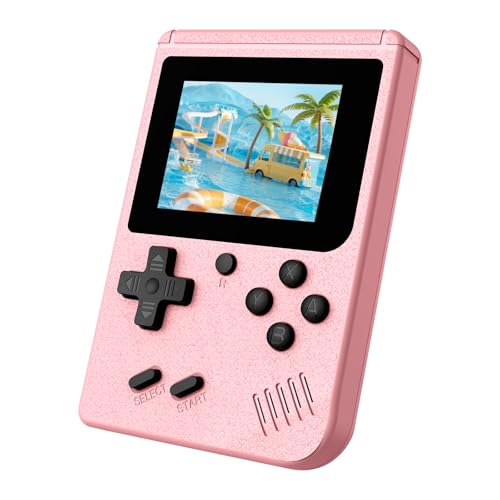
Software architecture shapes the entire day-to-day user experience on portable gaming consoles. Closed proprietary platforms, found on compact systems from BCWW and WDYQJE, offer plug-and-play simplicity with fixed game menus that require zero configuration. Open-source Linux systems, such as EmuELEC and RGBOX on the RG52MINI, grant users complete control over emulator cores, interface skins, and custom button mappings. This software flexibility allows enthusiast gamers to fine-tune frame pacing, apply visual filters, and optimize audio buffering for challenging titles.
Storage capacity and file organization determine how many classic libraries you can carry simultaneously. Preloaded TF memory cards ranging from 64GB on the EraVortx DC35V to 128GB on the RG56PRO and Sunnymark R46H provide immediate access to thousands of titles across diverse genres. Advanced systems support expandable micro SD card storage up to 1TB, letting players archive large CD-ROM images and disc-based files easily. Built-in Wi-Fi connectivity on select Linux consoles even enables wireless game transfers, system updates, and networked multiplayer matchmaking without swapping physical memory cards.
Managing memory card formats and directory structures represents an important skill for open-source console owners. Many Linux handhelds utilize separate micro SD slots for system firmware and game ROM storage, preventing data corruption during operating system updates. Formatting cards with compatible file systems such as FAT32 or exFAT ensures smooth read speeds and stable save-state retention across sessions. Keeping backup images of preloaded cards on a personal computer protects your game library against potential memory card degradation over time.
Battery Capacity, Power Management, and Thermal Throttling
Battery runtime dictates how reliably a handheld console performs when traveling away from electrical outlets. Ultra-compact units typically house modest 1020mAh rechargeable batteries, yielding several hours of light gameplay for low-power 8-bit titles. Larger devices, such as the FREEZE2TRIM Boltz Retro, step up to 3500mAh batteries to deliver sustained power for quad-core processing across five hours of continuous play. Premium units like the RG56PRO and RG52MINI incorporate massive 5000mAh lithium-polymer cells capable of providing up to eight hours of runtime depending on display brightness and processor load.
Thermal management directly influences sustained clock speeds and long-term hardware health during demanding emulation tasks. High-performance quad-core chips generate noticeable heat when rendering 3D environments or running heavy software filters over extended periods. The RG56PRO incorporates active cooling ventilation and an internal fan to actively exhaust thermal buildup, preventing thermal throttling from lowering in-game frame rates. Passive cooling designs rely instead on careful chassis airflow and metallic shielding, which remain silent but may require occasional breaks during heavy computational workloads.
Charging Protocol Safety and Power Input Guidelines
Power delivery and charging safety require careful attention to protect the sensitive internal circuitry of portable gaming devices. Many retro handheld consoles lack complex power negotiation chips commonly found in modern smartphones and premium tablets. For instance, the DREAMHAX X7 Plus explicitly requires users not to charge the console with power adapters exceeding 5V and 1A. Exceeding recommended charging voltage or using fast-charging smartphone bricks can overheat internal lithium cells and permanently damage power management controllers.
Higher-capacity consoles also maintain strict voltage thresholds to ensure battery longevity and safe operation. Manufacturer guidelines for devices like the RG56PRO specify charging with the included cable connected to a 5V and 2A power source, strictly avoiding supplies higher than 5V. Adhering to these manufacturer instructions prevents electrical overstress, reduces excess heat buildup during recharging, and preserves the usable lifespan of the lithium-polymer battery. Always verifying power brick ratings before plugging in your handheld protects your investment and ensures safe daily gaming.
External Display Connectivity and Multiplayer Capabilities
Modern portable consoles frequently double as micro home consoles through versatile video output options. Many budget units, including the BCWW retro player, feature composite AV outputs to connect directly to standard television screens for nostalgic split-couch gaming. Advanced models integrate digital HDMI ports or DisplayPort over USB-C, allowing users to output clean 720p or 1080p video signals to modern computer monitors and flat-screen televisions. This output flexibility transforms a personal travel device into a family multiplayer station for living room game nights.
Multiplayer support expands the entertainment value of these portable systems beyond solo gaming. The BCWW console includes a secondary wired gamepad, enabling instantaneous two-player cooperative play straight out of the box. Connected handhelds like the RG56PRO and Sunnymark R46H utilize integrated 2.4GHz Wi-Fi networking to establish direct local multiplayer sessions between compatible consoles without external routers. This wireless netplay capability allows friends to compete head-to-head in fighting games and arcade classics anywhere, from dorm rooms to airport departure lounges.
Handheld Consoles Versus Desktop and Laptop Gaming Systems
Understanding the distinction between portable emulation consoles and full-scale computer gaming hardware prevents misaligned performance expectations. Handheld consoles use low-power ARM architectures designed to run lightweight emulation operating systems on minimal electrical wattage. By contrast, a desktop workstation operates on an x86 platform that accommodates demanding modern AAA titles and intensive multitasking workloads. Builders evaluating stationary home gaming systems can reference a custom gaming desktop build guide to examine component compatibility, power delivery, and cooling dynamics.
Laptops occupy an intermediate space, blending computer-level rendering capabilities with portable battery operation. Players seeking to run modern graphic-heavy PC releases on the go frequently consult a portable gaming laptop guide for insight into dedicated mobile graphics chips and high-refresh panels. While gaming laptops deliver immense horsepower for modern computer games, handheld consoles excel in lightweight ergonomics, instant boot times, and specialized retro game controls. Choosing between them depends on whether your priority is portable retro nostalgia or demanding desktop-class graphics performance.
Matching Portable Hardware to Your Gaming Goals
Selecting the ideal console requires evaluating which gaming generations and convenience factors matter most to your routine. Casual players who want a quick nostalgic distraction during daily commutes often gravitate toward accessible models like the BCWW or WDYQJE Mini. These straightforward devices boot instantly, require zero software maintenance, and supply hundreds of beloved arcade favorites in pocket-sized packages. Their simple controls and durable shells also make them safe and accessible entertainment choices for younger family members.
Enthusiast gamers seeking authentic 3D emulation and expandable software libraries will find greater satisfaction with models like the RG56PRO, RG52MINI, or Sunnymark R46H. These systems feature the RK3562 or RK3326 chipsets, crisp IPS displays, Hall-effect controls, and open-source Linux operating systems needed for serious retro exploration. Features like HDMI video output, Wi-Fi networking, and active cooling ensure that performance remains smooth whether playing on the train or connected to a big screen. Aligning your hardware choice with your specific library preferences guarantees a rewarding portable gaming experience every time you power on the system.





Write Your Review
No reviews yet. Be the first to share your experience!