


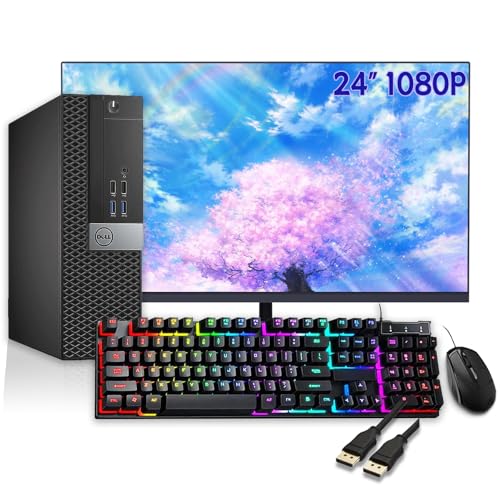
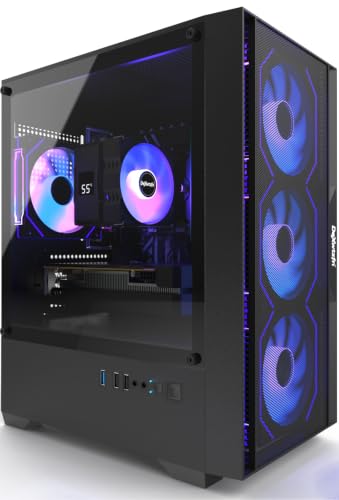
Most prebuilt gaming PC systems are sold as tower-only units, meaning the display is not included in the box. However, specific business-oriented bundles or entry-level kits may include a basic monitor, keyboard, and mouse. Understanding whether your specific model includes a display is crucial for budgeting, as purchasing a separate gaming monitor can significantly increase the total cost of your setup.
The distinction matters because a high-performance graphics card is useless without a screen to output the image. While the tower handles the processing power, the monitor determines your visual experience, from refresh rate to color accuracy. Many buyers assume that a “gaming computer” implies a complete workstation, but manufacturers often separate these components to allow for customization. If you are looking for a ready-to-use desk setup, you must verify the product listing for included peripherals or look for specific bundle offers.
For those considering a dual-screen arrangement to maximize workspace or immersion, understanding monitor compatibility is just as important as the PC itself. Our guide on comparing single large displays versus multiple monitors can help you decide which layout suits your gaming and productivity needs best.

Pros
- Sturdy dual C-clamp base eliminates monitor wobble for stable dual-screen gaming.
- Full range of motion (tilt, swivel, rotation) allows customizable ergonomic positioning.
- Frees up desk space and includes cable management for a clean, organized setup.
- Wide compatibility with 13-32 inch monitors and VESA mounts (75x75, 100x100mm).
- Easy to install with two mounting options (C-clamp or grommet) on wooden desks.
Cons
- Only recommended for wooden desks; not compatible with glass or plastic surfaces.
- Each arm supports up to 19.8 lbs, which may not be sufficient for heavier or larger monitors.
- Requires desk clearance underneath (no cross beams or panels) for proper installation.
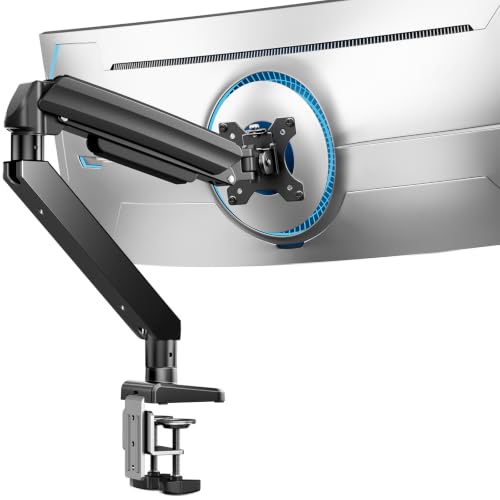
The HUANUO FlowLift Dual Monitor Stand is a practical desktop accessory designed for PC gamers, streamers, content creators, and anyone running a dual-screen gaming setup. It is a fully adjustable monitor arm that lifts both screens off the desk, freeing up valuable real estate for your keyboard, mouse, and other gear. Based on product specifications, this mount targets users who want a clean, ergonomic workstation without sacrificing stability during intense gameplay or long work sessions.
This monitor arm is best suited for competitive gamers, casual gamers, esports players, and streamers who need quick, one-handed adjustments to their monitor positioning. Whether you are deep in a FPS match, switching between Discord and Twitch, or coding in portrait mode, the full-motion adjustments (tilt, swivel, rotation) let you find the perfect angle to reduce neck and eye strain. The dual C-clamp base is a standout feature, locking the mount firmly to your desk to prevent any wobble or slipping during fast-paced mouse movements or keyboard clicks.
In terms of gaming performance, the HUANUO FlowLift excels at providing a stable and responsive dual-screen experience. The product description highlights that each arm holds 4.4 to 19.8 lbs, which covers most standard gaming monitors in the 13-32 inch range. The built-in cable management keeps wires organized along the arms, which is a huge plus for RGB setup enthusiasts and anyone aiming for a minimalist desk aesthetic. You can raise your monitors up to 16.2 inches, which promotes a healthy posture and helps you stay focused during marathon gaming sessions.
Build quality appears solid, with a reinforced metal construction and a large platform base that distributes weight evenly. The mount offers two installation options: a C-clamp or grommet mount, both designed for wooden desks between 0.59 and 3.54 inches thick. According to user feedback (though limited), the mount feels premium and does not introduce any noticeable sag or wobble when properly installed. The VESA compatibility (75x75mm and 100x100mm) ensures it works with the vast majority of monitors on the market.
Setting up the HUANUO FlowLift is straightforward, but there are some realistic limitations to consider. The product notes that it is only recommended for wooden desks, so glass or plastic surfaces are out. You also need clearance underneath the desk without cross beams, which could be an issue for some gaming desks with built-in cable trays. Each arm supports up to 19.8 lbs, meaning heavier 32-inch monitors or super-ultrawides may not be compatible. Additionally, the mount does not include any RGB lighting, which may disappoint users looking for flashy aesthetics.
Overall, the HUANUO FlowLift Dual Monitor Stand is a practical and ergonomic solution for PC gamers, streamers, and work-from-home users who want a stable, space-saving dual-monitor setup. It is especially well-suited for college gamers or anyone with a compact desk who needs to maximize surface area. While it has specific desk and monitor weight requirements, it delivers on its core promise of reducing clutter and improving viewing comfort. For gamers invested in a clean, performance-focused gaming station, this mount is a solid choice at its price point.

Pros
- Sharp QHD resolution paired with high 180Hz refresh rate for an excellent gaming experience.
- IPS panel ensures vibrant colors and wide viewing angles for both gaming and productivity.
- G-Sync and FreeSync compatibility cover both NVIDIA and AMD GPUs without screen tearing.
- Adjustable stand with ergonomic flexibility for comfortable long sessions.
- HDR10 adds extra depth and realism to compatible games and media.
Cons
- HDR performance is limited compared to higher-end monitors with better peak brightness.
- No built-in speakers, so external audio is required for sound.
- Stand base may take up desk space; VESA mount optional for more flexibility.
The Samsung 32” Odyssey G5 G50F is a mid-range gaming monitor that strikes a solid balance between performance and price. With a QHD resolution (2560x1440) and a fast IPS panel, it delivers crisp visuals and wide viewing angles that work well for both immersive open-world games and competitive titles. The 180Hz refresh rate and 1ms GtG response time ensure buttery-smooth motion and almost zero ghosting, making it a strong choice for fast-paced genres like FPS and racing games.
This monitor is best suited for PC gamers who want a step up from standard 1080p without jumping to 4K. It's also a good fit for esports players who value high refresh rates, and for streamers or content creators who need color-accurate IPS performance for editing. G-Sync and FreeSync compatibility mean tearing and stuttering are effectively eliminated, whether you're using an NVIDIA or AMD graphics card. The inclusion of HDR10 adds some extra punch in compatible titles, though peak brightness is moderate.
Build quality is solid, with a sturdy ergonomic stand that offers height, tilt, swivel, and pivot adjustments. This makes it easy to find a comfortable viewing angle for long gaming sessions or desk work. The Auto Source Switch+ feature is a nice convenience for users with multiple devices like a PC and console, automatically detecting the active input. The monitor also includes a Black Equalizer to brighten dark areas without washing out colors, and a Virtual Aim Point to help with crosshair placement.
Setup is straightforward: the stand attaches to the panel with included screws, and the monitor connects via DisplayPort or HDMI. The on-screen display (OSD) is intuitive, with a joystick for navigation. Cable management is minimal because the stand has a clip to route cables neatly. One limitation to consider is the lack of built-in speakers, so you'll need separate speakers or a headset for audio. Additionally, while HDR10 is supported, it's not at the same level as high-end HDR monitors with better local dimming.
For desk organization, the stand footprint is moderate, but if you're tight on space, the monitor supports VESA mounting (100x100mm) to free up the desk. The matte screen finish helps reduce glare in lit rooms. Overall, this is a versatile monitor that handles gaming, streaming, and everyday tasks well. It's a recommended buy for gamers looking to upgrade to a larger QHD display with a high refresh rate without breaking the bank. For casual players, competitive gamers, and setup builders alike, the Odyssey G5 G50F offers reliable performance and solid ergonomics.

Pros
- Affordable price point for a 100Hz VA monitor with good contrast
- Frameless design looks modern and works great in multi-monitor arrays
- Eye care features are genuinely helpful for long sessions
- VESA compatibility adds flexibility for desk organization
- 4-year advance replacement warranty provides peace of mind
Cons
- Only 100Hz, not ideal for competitive esports gamers seeking higher refresh rates
- Limited connectivity (1x HDMI, 1x VGA) – no DisplayPort or USB-C
- VA panel may have slight ghosting in fast-paced scenes compared to IPS
The Philips 241V8LB is a 23.8-inch Full HD monitor that bridges the gap between budget-friendly pricing and practical performance for PC gamers and everyday users. It features a VA panel with a 100Hz refresh rate, making it a solid entry-level choice for casual gamers, college students, and work-from-home gamers who want smoother visuals without breaking the bank.
This monitor is best suited for casual PC gamers who play titles like Minecraft, Fortnite, or indie games, as well as for productivity users who need a reliable second screen. The 100Hz refresh rate offers a noticeable upgrade over standard 60Hz displays, reducing motion blur and providing a more fluid experience in games and desktop navigation. However, competitive esports players may want to look for higher refresh rates like 144Hz or 240Hz for peak responsiveness.
In terms of performance, the VA panel delivers excellent contrast – deeper blacks and brighter whites compared to typical IPS panels – which enhances visual clarity in darker game scenes and movies. The 178/178 degree viewing angles ensure consistent colors from most positions, though VA panels can exhibit slight color shift at extreme angles. The monitor also includes Philips' Eye Care technology (flicker-free and low blue light mode) to reduce eye strain during long gaming or work sessions, and an EasyRead mode that mimics paper for reading documents.
Build quality is practical: the monitor has a slim, frameless design on three sides, which not only looks modern but also makes multi-monitor setups seamless. It weighs just over 6 pounds and has a compact footprint, so it won't dominate your desk. The stand is basic but functional, with tilt adjustment. VESA 100x100mm compatibility means you can easily mount it on an arm for better ergonomics and cable management.
Setup is straightforward – plug in the HDMI or VGA cable, and you're good to go. There's no USB hub or built-in speakers, but for the price, that's expected. The on-screen menu is simple to navigate for adjusting brightness, contrast, and eye care settings. Maintenance is minimal; just occasional dusting of the screen.
Realistically, the main limitation is the lack of DisplayPort or USB-C connectivity, which might be a dealbreaker for some modern laptops. Also, while 100Hz is smooth, it's not optimized for high-speed competitive gaming. However, for its price point, the Philips 241V8LB offers excellent value for casual gamers, college gamers, and anyone building a budget-friendly gaming or productivity setup. If you're looking for an affordable monitor that does the job without fuss, this is a strong recommendation.

Pros
- 280Hz refresh rate and 0.3ms response time deliver buttery-smooth motion with minimal input lag.
- 1500R curve enhances immersion without being too aggressive, suitable for both gaming and media.
- Fully adjustable stand (height, tilt, swivel) adds comfort and ergonomic flexibility.
- 3-year zero dead pixel guarantee shows confidence in quality and durability.
- Frameless design looks great in multi-monitor setups for a clean desk aesthetic.
Cons
- 1080p resolution on a 27-inch screen may appear less sharp for productivity tasks compared to higher-resolution monitors.
- HDR readiness is limited; it is not a true HDR display with high brightness and wide color gamut.
- Limited connectivity options (likely only HDMI and DisplayPort) with no USB hub or built-in speakers.
The AOC C27G4ZH is a 27-inch curved gaming monitor designed for PC gamers who prioritize speed and immersion. With a 1500R curvature, it wraps around your field of view, making it ideal for competitive esports titles, fast-paced FPS games, and immersive open-world adventures. Its ultra-fast 280Hz refresh rate and 0.3ms response time target serious competitive gamers and streamers who demand minimal latency and silky-smooth motion.
In terms of real-world performance, the 280Hz refresh rate ensures every frame renders with incredible fluidity, giving you a clear advantage in games like Valorant, Overwatch, or Apex Legends. The 0.3ms response time virtually eliminates ghosting and motion blur, so fast-moving objects stay sharp. Adaptive Sync (AMD FreeSync) further enhances the experience by preventing screen tearing during intense gameplay. While the monitor is HDR-ready, it's not a full HDR implementation, so expect modest contrast improvements rather than true HDR brightness.
Build quality is solid for its price range. The monitor features a frameless design that looks clean on any desk and works well in multi-monitor setups. The stand offers height, tilt, and swivel adjustments, letting you dial in perfect ergonomics for long gaming sessions. It also supports VESA mounting if you prefer a monitor arm. The 3-Year Zero Dead Pixel Guarantee adds peace of mind, though as a new model, long-term reliability is yet to be proven by user feedback.
Setting up the AOC C27G4ZH is straightforward. It comes with HDMI and DisplayPort cables (likely), and the on-screen display menu is easy to navigate. No special software is required for basic use, though you may want to adjust settings for optimal color accuracy. The curved screen may take a short adjustment period, but most gamers adapt quickly. Cable management is minimal since there are no USB ports, but the clean design helps keep your desk tidy.
One realistic limitation is the 1080p resolution on a 27-inch panel. While perfectly fine for gaming, it means lower pixel density compared to 1440p or 4K monitors, which could be noticeable for productivity tasks like reading text or editing images. Additionally, the HDR readiness is basic; don't expect the same level of HDR performance as more expensive monitors. Connectivity is limited to HDMI and DisplayPort, with no USB hub or built-in speakers.
Overall, the AOC C27G4ZH is an excellent value for competitive gamers and esports players who want a high-refresh, low-latency monitor without breaking the bank. Its ergonomic stand, curved design, and strong warranty make it a practical choice for dedicated gaming setups. If you primarily play fast-paced games and don't need high-resolution or advanced HDR, this monitor delivers where it counts: speed and smoothness.


Pros
- Blazing 240Hz refresh rate ensures silky-smooth gameplay, especially in competitive esports titles.
- 1ms response time virtually eliminates ghosting, providing sharp motion clarity.
- 1500R curvature creates an immersive wraparound effect for a more engaging gaming experience.
- Affordable price point delivers high-performance features without breaking the bank.
- Multiple video inputs (2x DisplayPort, 2x HDMI) allow easy switching between PC and console.
Cons
- 1080p resolution may feel limited for users accustomed to higher pixel densities on larger screens.
- Built-in speakers lack bass and volume, so external speakers or a headset may be needed for richer audio.
- Limited adjustability (tilt only) compared to higher-end monitors with height and swivel options.
The Sceptre C255B-FWT240 is a 24.5-inch curved gaming monitor that brings high-refresh-rate performance to a budget-friendly price point. With a 240Hz refresh rate and 1ms response time, it's specifically built for competitive gamers and esports players who demand smooth, responsive visuals. The 1500R curvature wraps the screen around your peripheral vision, making it a solid choice for immersive gaming sessions, whether you're into fast-paced shooters or open-world adventures.
When it comes to real-world performance, the 240Hz refresh rate delivers exceptionally fluid motion, reducing blur and tearing in high-speed games. Combined with a 1ms response time, quick movements remain sharp and clear, giving you a distinct advantage in titles like Valorant, Apex Legends, or Call of Duty. The AMD FreeSync Premium support further enhances the experience by synchronizing the monitor's refresh rate with your GPU's output, minimizing stutter and screen tearing without noticeable input lag. The 1080p resolution on a 24.5-inch screen keeps pixel density decent for clear text and details, though it's optimized for performance over pixel count.
Build quality is practical for its class. The monitor comes with dual DisplayPort and dual HDMI inputs, offering versatile connectivity for gaming PCs, consoles, and streaming setups. The built-in speakers are adequate for system sounds or casual video watching, but serious gamers will likely use a dedicated headset or external speakers for richer audio. The Blue Light Shift feature reduces eye strain during extended sessions, a thoughtful addition for streamers and work-from-home gamers. The stand provides tilt adjustment but lacks height or swivel, so you may need a VESA mount for optimal ergonomic positioning.
Setting up the monitor is straightforward: attach the base, plug in power and video cables, and you're ready. The on-screen menu is intuitive for adjusting brightness, contrast, and game modes. The curve helps reduce glare and keeps the screen uniform from different angles, though it's not a must for everyone. One limitation is the lack of USB ports or cable management features on the stand, which might require some desk organization for a tidy setup. Also, the 1080p resolution means it's best suited to the 24.5-inch screen size; larger monitors would benefit from higher resolution.
Overall, the Sceptre C255B-FWT240 is an excellent value for competitive gamers and casual players who want high refresh rates without paying a premium. It pairs well with mid-range to high-end GPUs that can push frame rates above 120fps, making it a practical choice for esports, streaming, and everyday PC use. If you need extensive ergonomic adjustments or higher resolution for content creation, you may look elsewhere, but for pure gaming performance at this price, it's a strong contender.
The 240Hz refresh rate is the standout feature of this Sceptre monitor, reducing motion blur and providing a competitive edge in fast-paced games. Combined with a 1ms response time, quick movements remain sharp and clear, making it a strong choice for esports titles like Valorant, CS:GO, and Apex Legends.
AMD FreeSync Premium further enhances the experience by synchronizing the monitor's refresh rate with your GPU's frame rate, minimizing screen tearing and stuttering without introducing noticeable input lag. The 1080p resolution on a 24.5-inch screen keeps pixel density high enough for crisp details while allowing mid-range GPUs to hit high frame rates easily. For competitive gamers seeking an affordable high-refresh-rate setup, this monitor delivers reliable performance.
Do Gaming PCs Include Monitors? What to Expect
The short answer is that the majority of dedicated gaming desktops sold as standalone towers do not come with a monitor. Manufacturers typically ship the computer case, power supply, motherboard, processor, graphics card, storage, and memory, but leave the display as a separate purchase. This allows gamers to choose a monitor that matches their specific refresh rate preferences, panel type, and budget, rather than being tied to a basic 60Hz office display that would limit the performance of a high-end GPU.
| PC Type | Monitor Included? | Typical Use Case |
|---|---|---|
| High-End Gaming Tower | No | Competitive gaming, streaming, content creation |
| Mid-Range Gaming Tower | Usually No | Console-alternative gaming, casual play |
| Business/Office Bundle | Yes | Productivity, light gaming, remote work |
| Entry-Level All-in-One | Yes | Basic computing, media consumption |
However, there is a significant exception in the form of business-oriented desktops or “renewed” office PC bundles. These systems are often marketed as complete workstations for home offices or students. They typically include a basic Full HD monitor, a wired keyboard, and a mouse.
While these monitors are sufficient for document editing, web browsing, and light gaming, they rarely feature the high refresh rates (144Hz or higher) or low response times required for competitive gaming. If you are buying a PC primarily for gaming, you should assume you need to buy a monitor separately unless the listing explicitly states otherwise.
Here is a quick checklist to verify if your PC purchase includes a display:
- Read the product title for words like “Bundle” or “With Monitor”.
- Check the “Included Components” section in the product details.
- Look for images showing the monitor next to the tower in the listing.
- Verify the resolution and refresh rate if a monitor is included.
- Contact the seller if the listing is ambiguous about peripherals.
Identifying Bundles vs. Tower-Only Kits
Product listings can be misleading if you do not read the fine print. A tower-only kit will list the internal specifications of the computer, such as the CPU model, RAM speed, and GPU type, but will not list monitor specifications. In contrast, a bundle listing will specify the monitor’s size, resolution, and port types. For example, a business PC bundle might include a 23.8-inch 1080p monitor with VGA and HDMI ports, which is adequate for office tasks but limiting for modern gaming titles that require DisplayPort for high refresh rates.
Some entry-level gaming PCs may include a basic 1080p 60Hz monitor to make the package more appealing to first-time buyers. These are often lower-cost options that do not support variable refresh rate technologies like G-Sync or FreeSync. If your goal is competitive gaming, a 60Hz monitor will cap your frame rate, making the investment in a powerful graphics card less effective. You must decide if the convenience of an included monitor is worth the performance compromise.
Why Most Gamers Buy Monitors Separately
Buying the monitor separately gives you control over your visual experience. A gaming monitor is not just a screen; it is a critical component of your gaming rig that affects input lag, motion clarity, and immersion. By choosing your own monitor, you can ensure it matches the capabilities of your graphics card. For instance, a high-end GPU capable of 144 frames per second will only display that smoothness if paired with a 144Hz or higher monitor. An included 60Hz monitor would waste that potential.
Additionally, separate purchases allow you to upgrade components independently. You can start with a mid-range monitor and upgrade to a 4K or ultrawide display later without replacing your entire PC. This flexibility is one of the main reasons why the PC market separates these two major components. It also allows you to choose a panel type, such as IPS for color accuracy or VA for contrast, that fits your specific gaming preferences.
When a Monitor Might Be Included
Monitors are most commonly included in business desktops, educational bundles, and refurbished office PCs. These systems are designed for productivity rather than gaming. They often feature integrated graphics or entry-level dedicated GPUs. The included monitors are typically standard 1080p displays with 60Hz refresh rates. They are suitable for video calls, document creation, and light media consumption, but they are not optimized for fast-paced gaming. If you are buying a PC for a student or remote worker who occasionally plays casual games, a bundle may be a cost-effective solution.
Some manufacturers also offer promotional bundles where a basic monitor is included to clear inventory or attract new customers. These bundles are usually clearly labeled as “Starter Kits” or “Complete Desk Sets.” You should always verify the specifications of the included monitor to ensure it meets your minimum requirements. If the bundle includes a 60Hz monitor and you plan to play competitive shooters, you will likely need to replace it shortly after purchase, which negates the initial savings.
Checking Ports and Compatibility
If you decide to buy a monitor separately, you must ensure it has the correct ports to connect to your PC. Most modern gaming PCs have DisplayPort and HDMI outputs on the graphics card. Older or business-oriented systems may rely on VGA or DisplayPort only. A mismatch in ports can require adapters, which may limit your maximum refresh rate or resolution. For example, using a VGA adapter for a modern gaming monitor will restrict you to 60Hz and lower color depths, significantly impacting the gaming experience.
Always check the rear panel of your PC or the product specifications for the available video outputs. If your PC only has HDMI 1.4, it may not support 4K at 60Hz or 1440p at 144Hz without a specific cable standard. DisplayPort 1.2 or 1.4 is generally recommended for high-refresh-rate gaming setups. Verifying this compatibility before purchase prevents frustrating troubleshooting issues later. If you are unsure which ports your specific model supports, contacting the manufacturer or checking the user manual is the safest approach.
Choosing the Right Monitor for Your Setup
Selecting the right monitor depends on your primary use case. For competitive gaming, prioritize high refresh rates (144Hz, 240Hz, or higher) and low response times (1ms or less). IPS panels offer good color accuracy and fast response times, making them a popular choice for many gamers. VA panels provide higher contrast ratios, which can be beneficial in dark scenes, but may have slower response times. OLED panels offer the best image quality with instant response times but are more expensive and may be susceptible to burn-in over time.
If you use your PC for both gaming and office work, consider a monitor with a balanced spec sheet. A 144Hz IPS panel with 1080p or 1440p resolution offers a good compromise. It provides smooth motion for games and crisp text for productivity tasks. Screen size is also a factor; 24 to 27 inches is the standard for 1080p and 1440p respectively. Larger screens may require higher resolutions to maintain pixel density and avoid visible pixels. Consider your desk space and viewing distance when choosing the size.
Here are key specifications to look for when buying a separate monitor:
- Refresh rate of at least 144Hz for smooth motion.
- Response time of 1ms or lower to reduce ghosting.
- Variable refresh rate support (G-Sync or FreeSync).
- Resolution matching your GPU capabilities (1080p, 1440p, 4K).
- Ports that match your PC’s video outputs.
Budgeting for the Complete Setup
When budgeting for a new gaming PC, always allocate a separate portion of your budget for the monitor. A high-performance PC without a suitable monitor is an incomplete setup. The cost of a good gaming monitor can range from a few hundred to over a thousand dollars, depending on the specifications. Factor this into your total cost of ownership. If you are on a tight budget, you might start with a basic 1080p 60Hz monitor and upgrade later, but be aware that this limits your initial gaming experience.
Alternatively, look for bundles that include a decent monitor if the savings are significant. Some business PC bundles offer a complete workstation for a lower price than buying a tower and a basic monitor separately. However, ensure that the PC’s internal components meet your gaming requirements. A cheap bundle with a powerful GPU and a weak monitor is still a viable option if you plan to upgrade the display later. Always prioritize the PC’s internal performance first, then choose the monitor that best fits your remaining budget.
For those interested in optimizing their desk setup, especially if you plan to use multiple displays, our guide on setting up dual monitors provides practical tips on arranging screens for maximum efficiency and comfort.
Ultimately, the decision to buy a PC with or without a monitor depends on your specific needs and budget. Most dedicated gaming PCs are tower-only, giving you the flexibility to choose a display that matches your performance goals. Business and office bundles often include a basic monitor, which is suitable for productivity but may limit gaming performance.
By understanding these distinctions, you can make an informed purchase that ensures you have the right components for your desired experience. Verify the product listing carefully, check port compatibility, and budget for a separate monitor if you are serious about gaming.



Write Your Review
No reviews yet. Be the first to share your experience!